






Still downloading templates?
There’s an easier way. Try a free AI Agent in ClickUp that actually does the work for you—set up in minutes, save hours every week.
Sorry, there were no results found for “”
Sorry, there were no results found for “”
Sorry, there were no results found for “”
At some point, you have probably found yourself sitting at an empty intersection waiting for the light to turn green.
Maybe worse, your destination was only two blocks away, but you still got stuck in traffic that seemed to appear out of nowhere.
Frustrating as it is, traditional traffic systems are often just doing what they were designed to do: follow timing plans created months earlier from historical traffic patterns.
The problem is that those plans do not adapt in real time, so the system keeps following the same outdated schedule even when current conditions have clearly changed.
This article explains how AI-powered traffic management systems replace those static timers with intelligent networks that respond to real conditions as they happen. It also shows how teams can keep AI traffic deployments structured and organized using ClickUp. ✨
AI for traffic management means using machine learning, computer vision, and IoT-connected sensors to monitor, predict, and improve the flow of vehicles and pedestrians. Instead of relying on fixed schedules, these intelligent transportation systems analyze live data and make decisions in real time.
On a more granular level, these systems work by using:
Simply put, it gives your city’s traffic network a brain that can see what’s happening, understand the flow, and make smart adjustments to keep things moving smoothly.
Understanding the technology is one thing. Seeing how it applies to everyday traffic problems makes the value much easier to understand.
Here are some of the most practical use cases.
AI models do not rely on historical traffic data alone. They also factor in weather, local events, and real-time sensor input to predict congestion before it happens.
By analysing these data streams together, the algorithms learn to recognise the early warning signs that lead to traffic jams, like the gradual buildup before a rush hour spike or the sudden slowdown caused by rain. It then predicts where and when bottlenecks are likely to form based on these signals.
Those predictions are fed directly into signal controllers and navigation systems, giving you enough time to reroute traffic or adjust signal timing before congestion spirals out of control.
📌 Outcome: Reduced unnecessary delays at signals leads to smoother flows that compound across your entire network, making commute times faster and more reliable for everyone.
Adaptive traffic signal control
This is one of the most widely used and impactful applications of AI in traffic management. Instead of fixed timers, signals with adaptive control adjust their green and red light phases based on the actual volume of traffic approaching the intersection from all directions.
There are two main ways this works:
📌 Outcome: A massive reduction in waiting time at intersections, which also directly cuts down on travel times, fuel consumption, and vehicle emissions.
When an accident or a stalled vehicle blocks a lane, the resulting congestion can ripple outward for miles. The faster you can detect and respond to incidents like this, the less impact it has on your entire network.
AI-enabled cameras and sensors automate this process by detecting accidents, debris on the road, or unusual slowdowns, and alerting the traffic management center (TMC).
Computer vision can even identify specific events like wrong-way drivers or pedestrians in the roadway without needing a human to watch a screen 24/7.
For emergency response, these systems even go as far as supporting emergency vehicle preemption (EVP), which automatically turns signals green to create a clear, fast corridor for ambulances, fire trucks, and police vehicles. In heavy congestion, studies show this can cut route times by up to 62.85%.
📌 Outcome: Computer vision keeps vulnerable road users, like older pedestrians, safer by extending walk signals when they need more time to cross. And if there’s an accident, emergency vehicle preemption gives ambulances and first responders a faster route, increasing the chances of saving lives.
Making public transit more reliable for users is one of the many ways used to reduce the number of cars on the road. AI helps support this strategy by making bus and light rail services faster and more predictable. For example:
📌 Outcome: Transit agencies run more buses where demand is high and reduce service where it’s low. This means reduced vehicle emissions due to fewer empty vehicles, shorter wait times, and more efficient use of resources.
Drivers searching for a parking spot are a major cause of traffic in busy urban areas. Smart parking systems use AI to solve this problem by tracking parking availability in real time through in-ground sensors, cameras, or payment data.
This information is then sent to drivers through apps and digital signs, guiding them directly to an open spot.
The technology also enables more advanced applications like dynamic pricing, where the cost of parking changes based on demand, and reservation systems.
More than just tracking parking lots, technologies like automatic license plate recognition (ALPR) can be used to automate access control and enforcement in garages and lots when drivers eventually arrive.
📌 Outcome: Drivers spend less time searching and more time actually getting where they need to be, which directly reduces the overall busyness of urban areas.
Understanding how AI improves traffic flow is only part of the picture. The harder challenge is usually deployment: coordinating teams, vendors, infrastructure work, technical validation, and stakeholder updates across a long rollout.
That is where project execution starts to matter just as much as the technology itself.
ClickUp helps centralize project plans, technical documentation, vendor communication, and stakeholder updates in one workspace, so teams can manage rollout work from planning through deployment and monitoring.
This gives your team a shared operating view of the rollout and reduces the constant back-and-forth of hunting through emails, spreadsheets, vendor portals, and internal tools for missing context.
A rollout like this usually breaks down first in documentation and communication, so that is the right place to start.
With ClickUp Docs, you can bring all of your documentation from signal timing plans and vendor integration guides to system architecture diagrams and intersection rollout schedules into one centralized, searchable workspace.
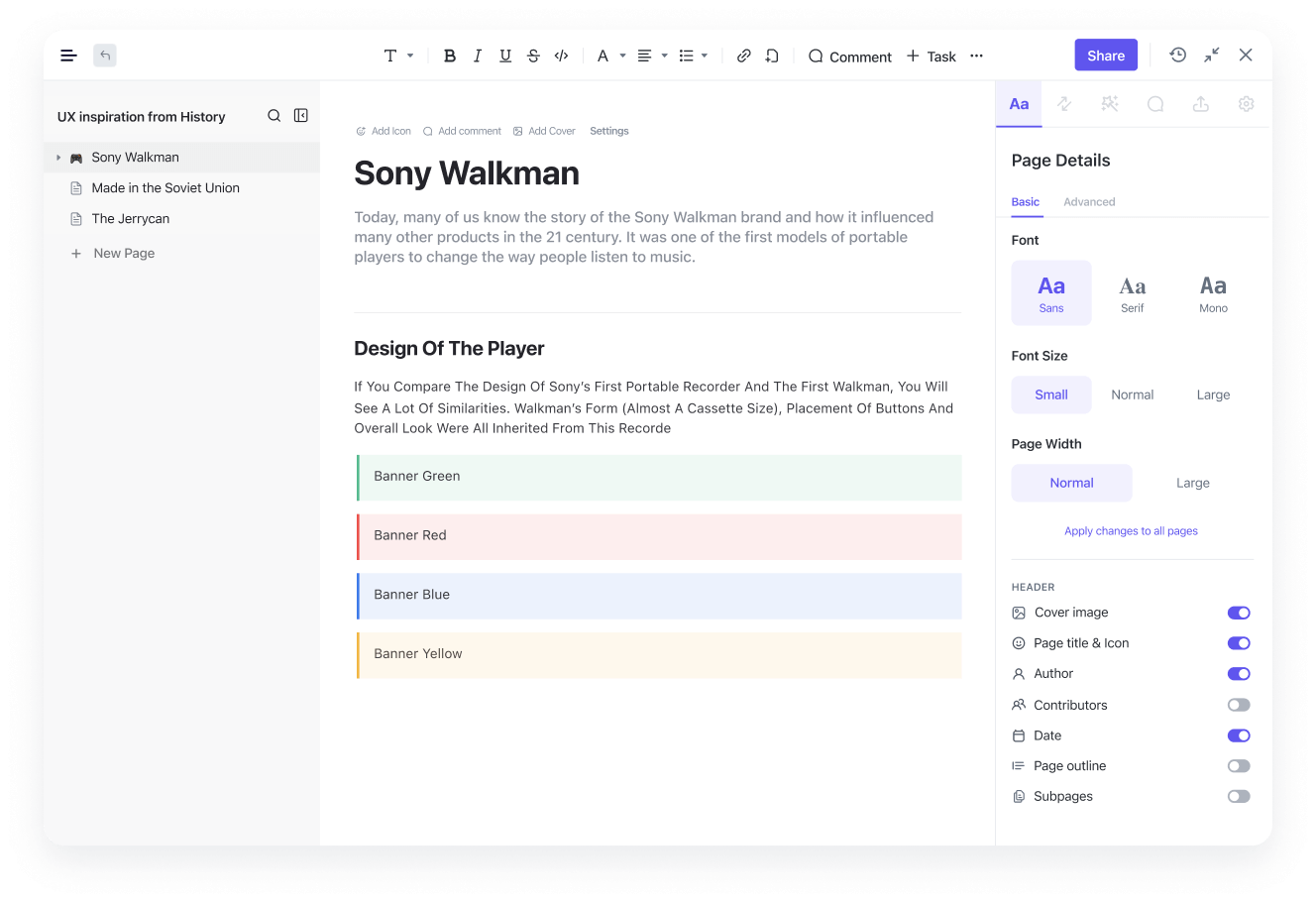
This way, your technical documentation stays attached to the work they support.
And with collaborative features built in, multiple team members can make edits, leave comments directly on technical details, or assign tasks from within the Doc itself.
Outside of Docs, collaboration still happens. ClickUp Chat gives you dedicated channels where engineers, vendors, and traffic operators can post updates as work progresses. Instead of scattered messages across different tools, every deployment conversation stays connected to the same workspace where the work is happening.
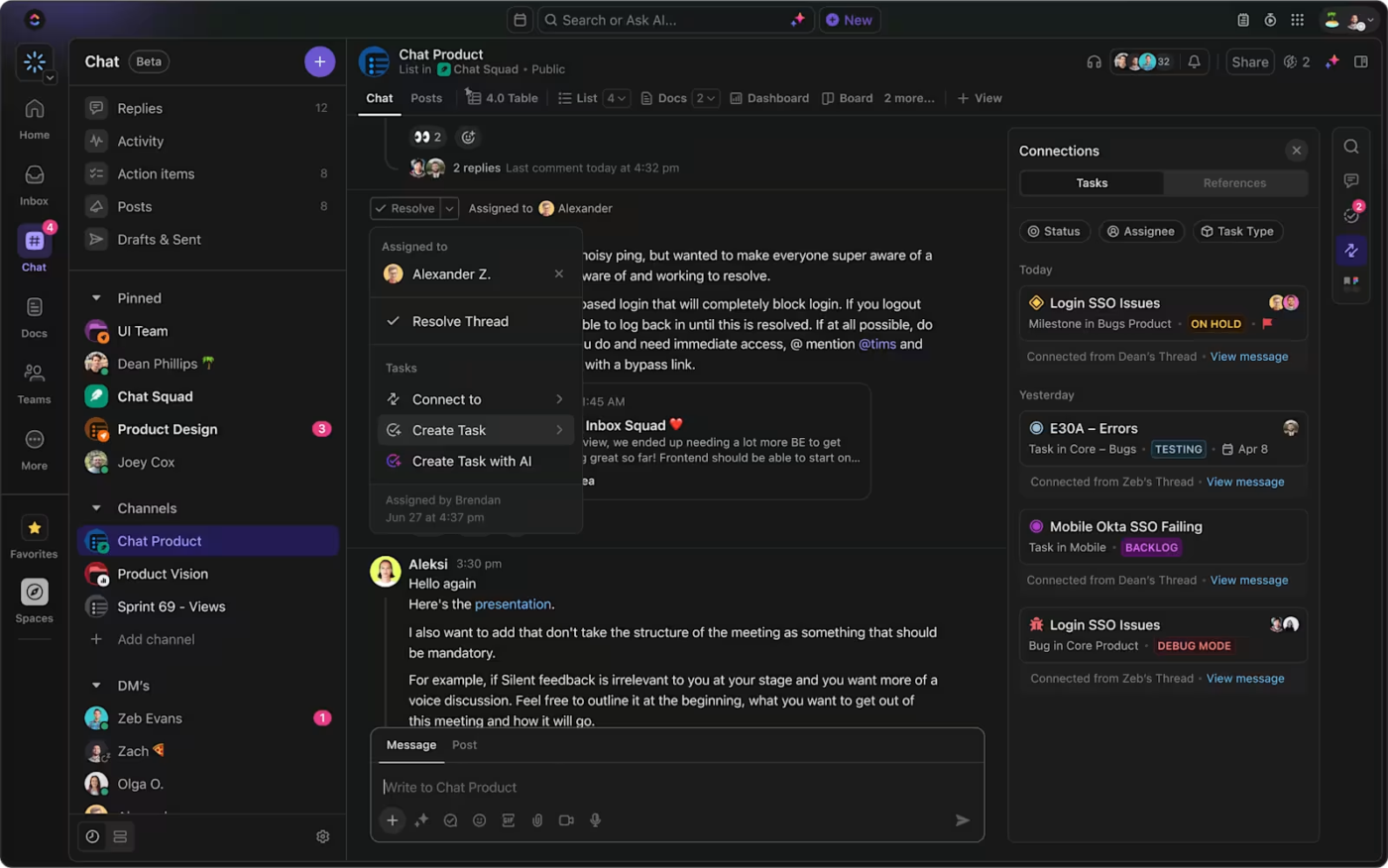
Your team can share when an intersection goes live, flag calibration delays, or confirm vendor deliverables.
More importantly, your conversations don’t stop at discussion. You can assign tasks to the right team members directly from Chat using assigned comments, turning deployment decisions or flagged issues into trackable work.
This ensures action items don’t get lost in conversation and are followed through to completion.
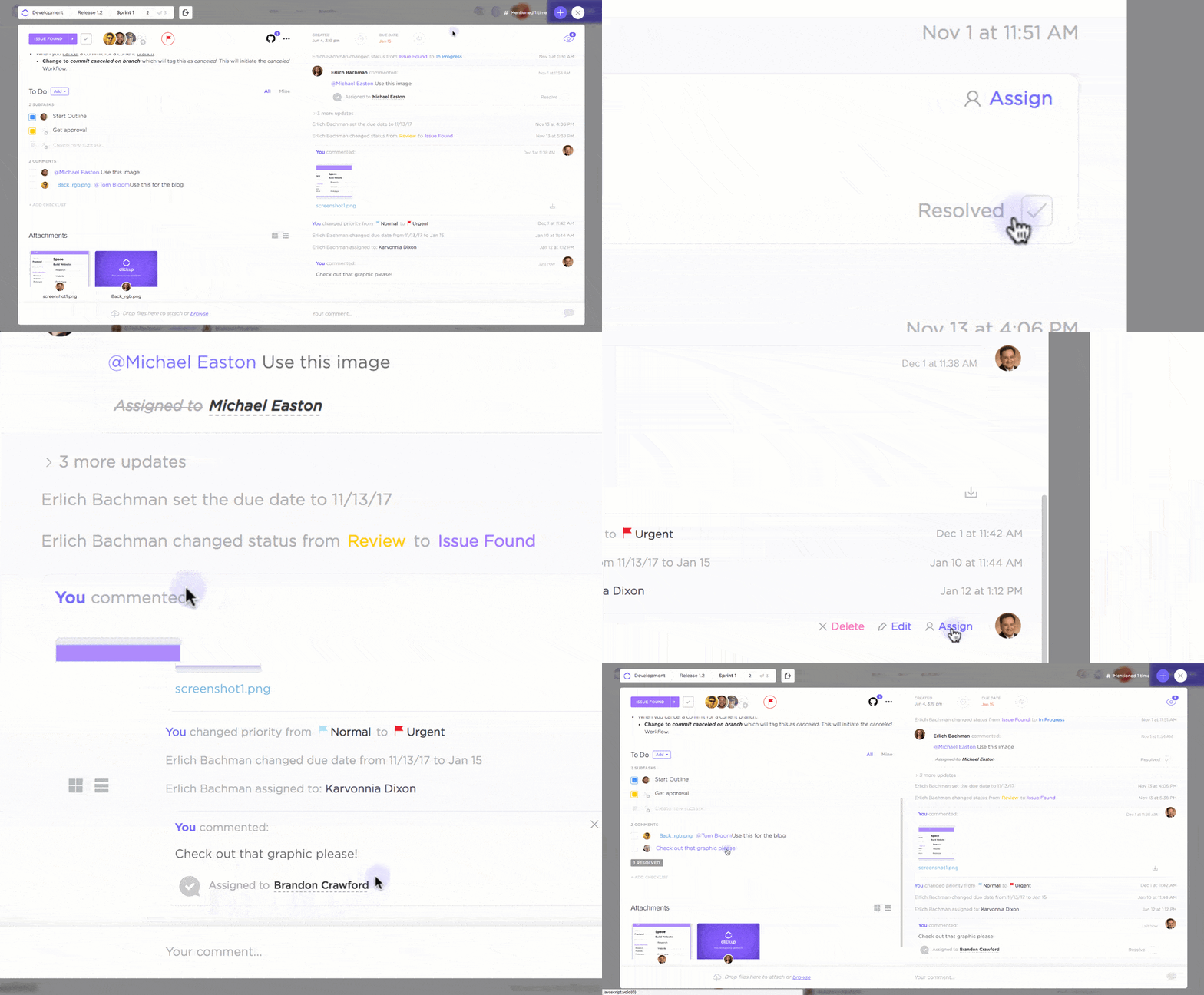
ClickUp gives you one place to not only manage your tasks, but also see exactly how they’re progressing across your entire rollout.
Here’s how:
As you roll out your AI traffic systems, it involves hundreds of individual actions, and ClickUp Tasks makes it easy to track each one.
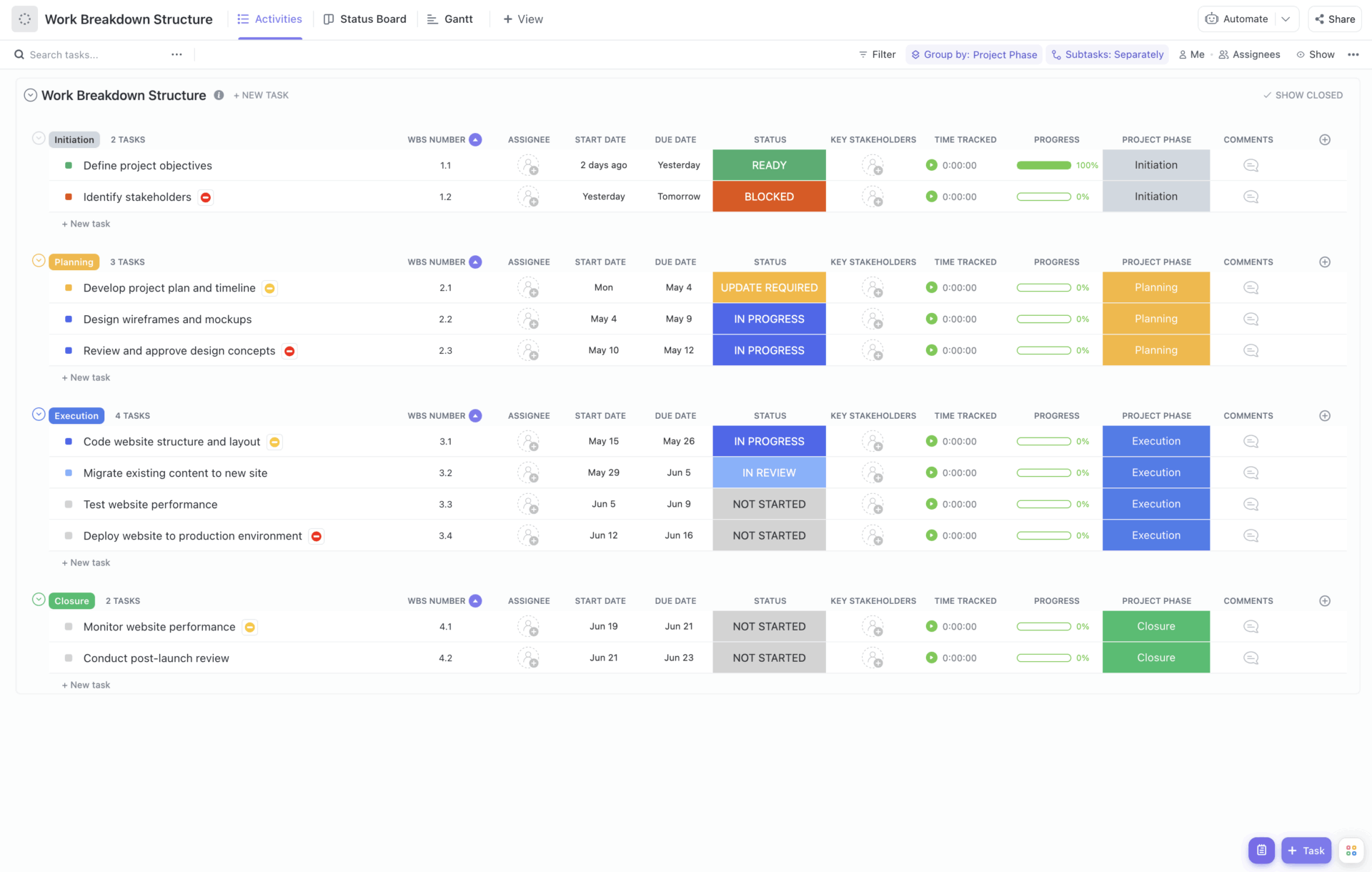
You can track each intersection deployment as its own unit of work, complete with assigned owners, deadlines, and linked technical documentation.
If your field team finishes installing sensors at a major intersection, they can update the task status immediately.
Your data science team is automatically notified that live data is now available for model calibration, allowing them to start model calibration without waiting for manual updates or check-ins
Because everything stays connected, your team can also link vendor updates, installation photos, and system validation reports directly to each task. This creates a clear operational record for every deployment across your city.
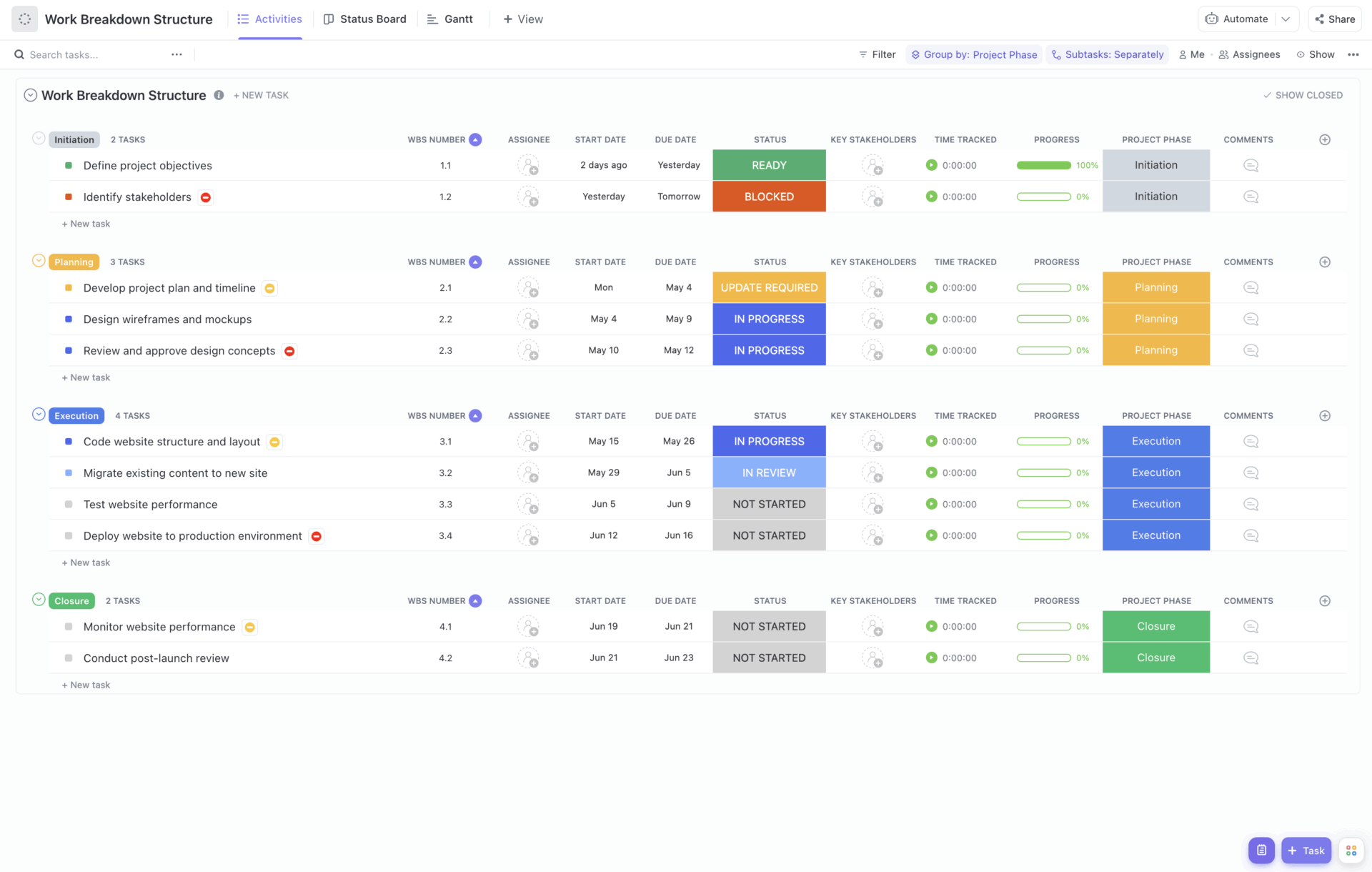
You also need a clear way to see how everything is moving across the entire project. ClickUp Views let you visualize the same tasks in different ways, so you always understand what’s complete, what’s in progress, and what needs attention.
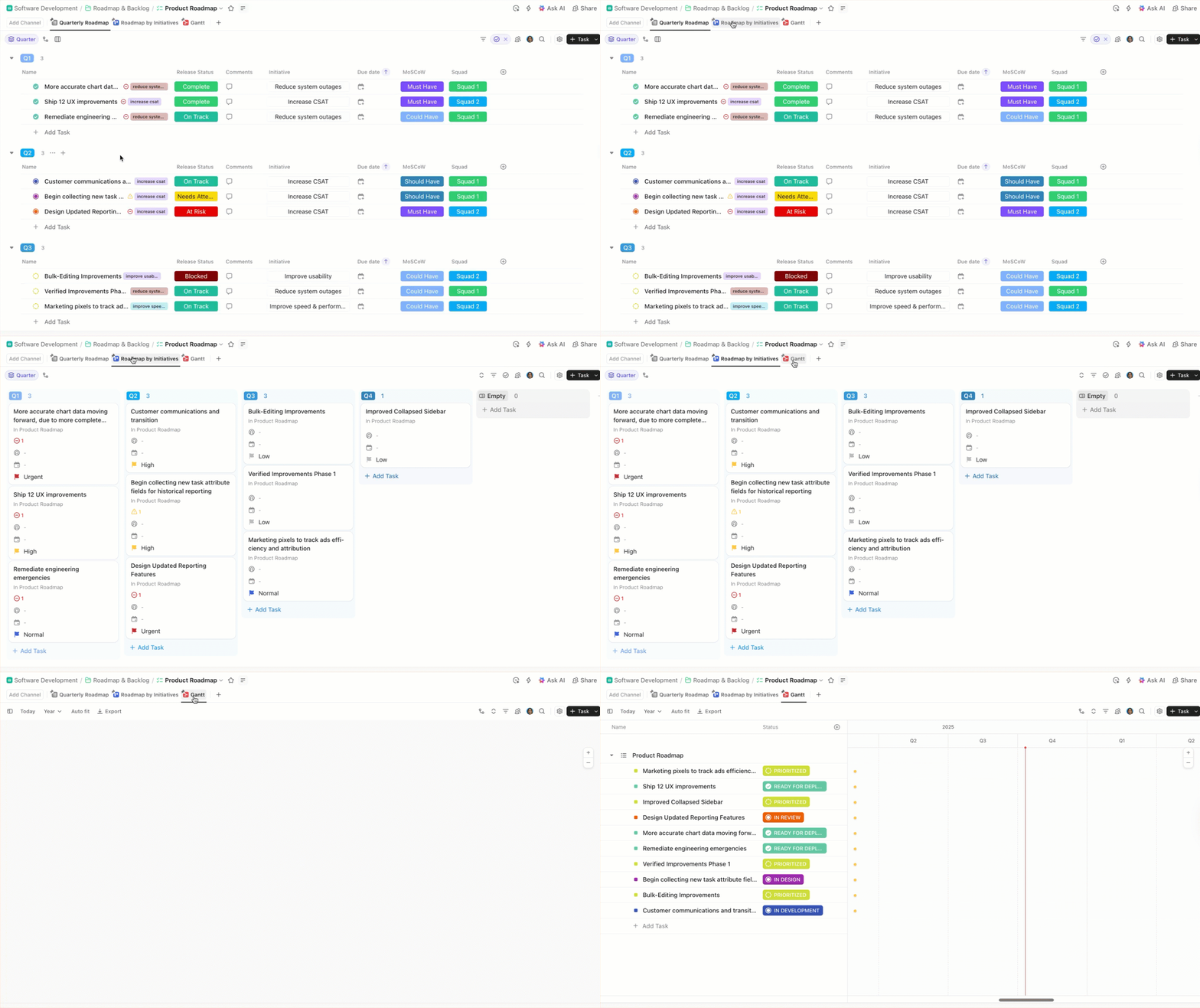
You can switch between Lists, Board, or Gantt View and instantly get a birds-eye view of your project, where bottlenecks are forming, and what your team needs to move forward.
Once documentation and task tracking are in place, the next challenge is finding the right answer quickly when something changes in the field.
Instead of digging through folders or messaging vendors for answers, you can simply ask ClickUp Brain, the context-aware intelligence layer built into your workspace, and get instant answers pulled directly from your workspace data.
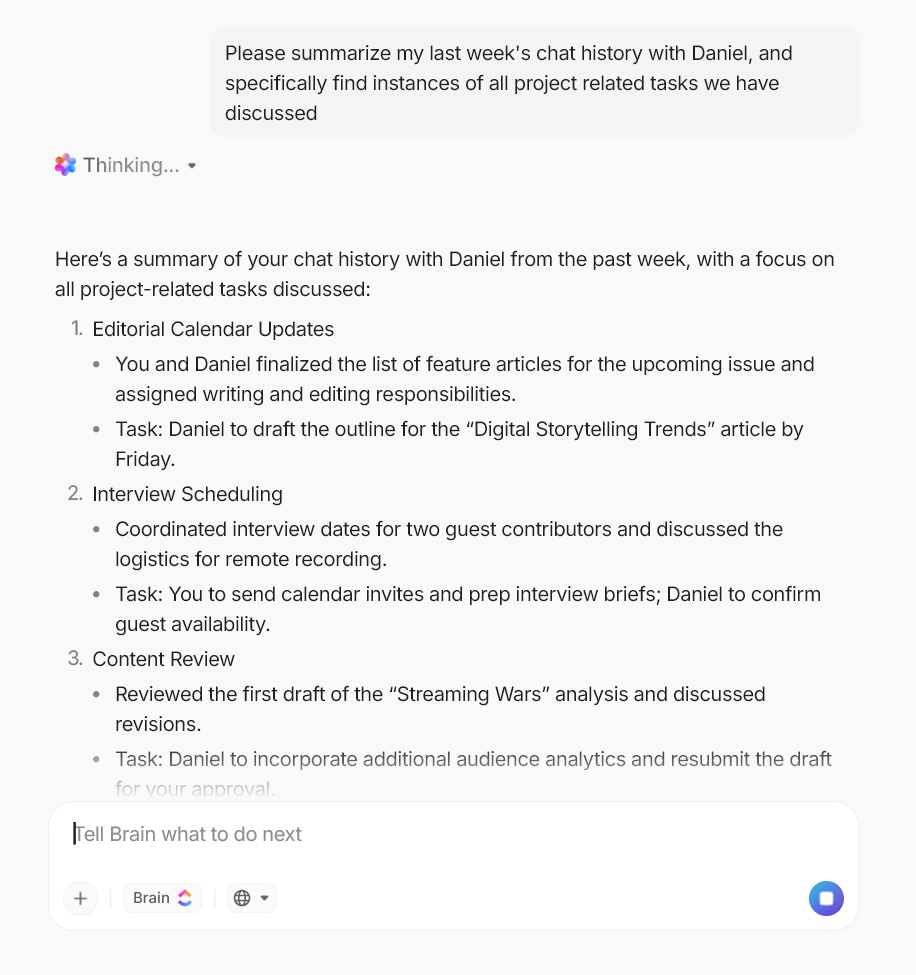
For example, if an engineering team needs to confirm whether a specific intersection is running the latest model version, ClickUp Brain can pull that answer from task history, documentation, or vendor updates in seconds.
This allows your team to resolve issues faster, reduce dependency on manual status checks, and make informed decisions without wasting hours searching for information.
AI traffic deployments involve constant handoffs between field teams, engineers, vendors, and operations staff. Managing those handoffs manually does not scale for long.
Instead, you can attach automation logic directly to the work using ClickUp Automations. For example, when you mark a task as Sensor Installed, ClickUp can automatically create a follow-up task for the Data Team to start calibration.
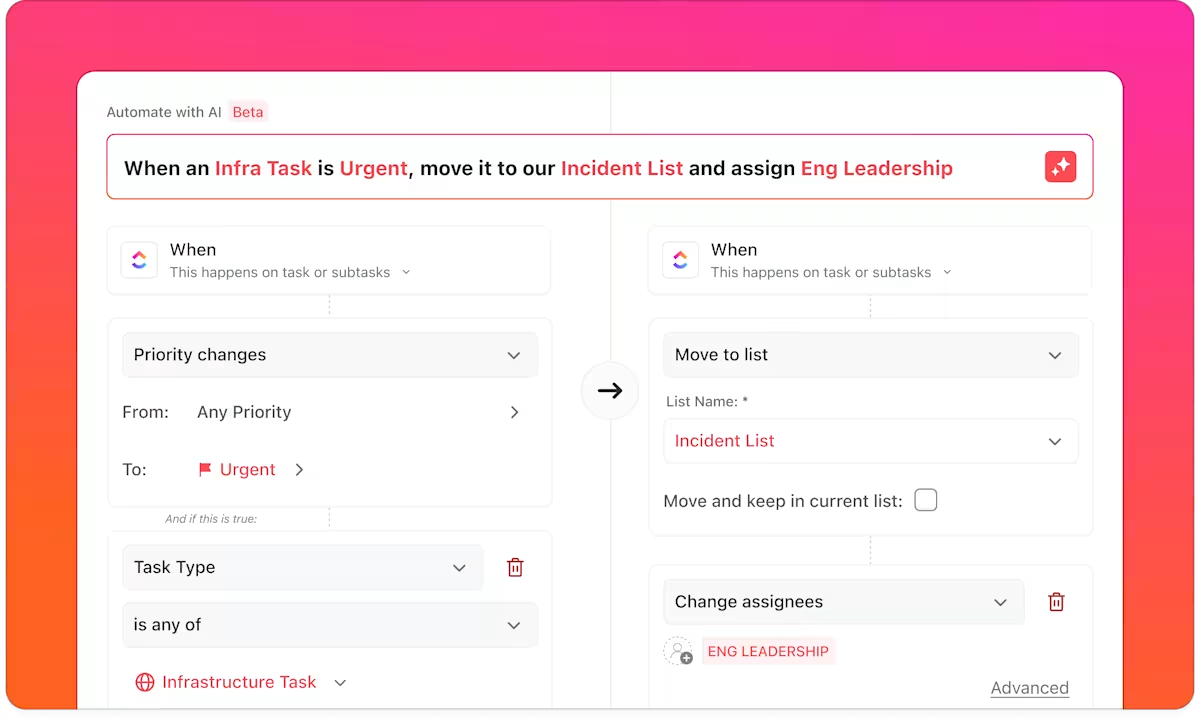
The same approach applies across other AI traffic workflows:
Because these automations are tied to task activity, they stay aligned with how your team already works. Tasks can be assigned to the right engineers or technicians, notifications can be sent based on task actions, and every update is logged automatically.
When your workflow changes, like adding a new validation step or a new vendor handoff, you update the automation rule once, and it applies across all relevant tasks.
In practice, this usually means setting up a small set of rules, like:
This ensures your AI traffic deployment moves smoothly from one phase to the next, without bottlenecks, missed handoffs, or hours spent chasing updates.
Monitoring a city-wide rollout means constantly tracking intersection status, sensor health, calibration progress, and congestion signals. Without a clear view, it becomes much harder to know where to focus next.
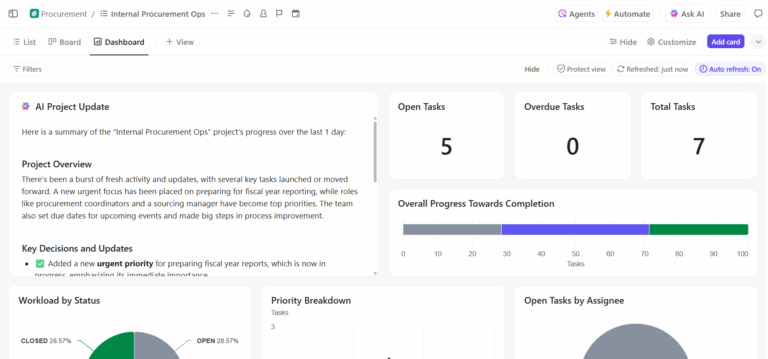
ClickUp Dashboards give you a live view of that data without requiring you to manually assemble reports.
You choose what to track, and Dashboards turns it into visual reports that update automatically as work changes. Stakeholders, from traffic engineers to city planners, can see the same dashboard in real time, eliminating the need for manual summaries or separate updates.
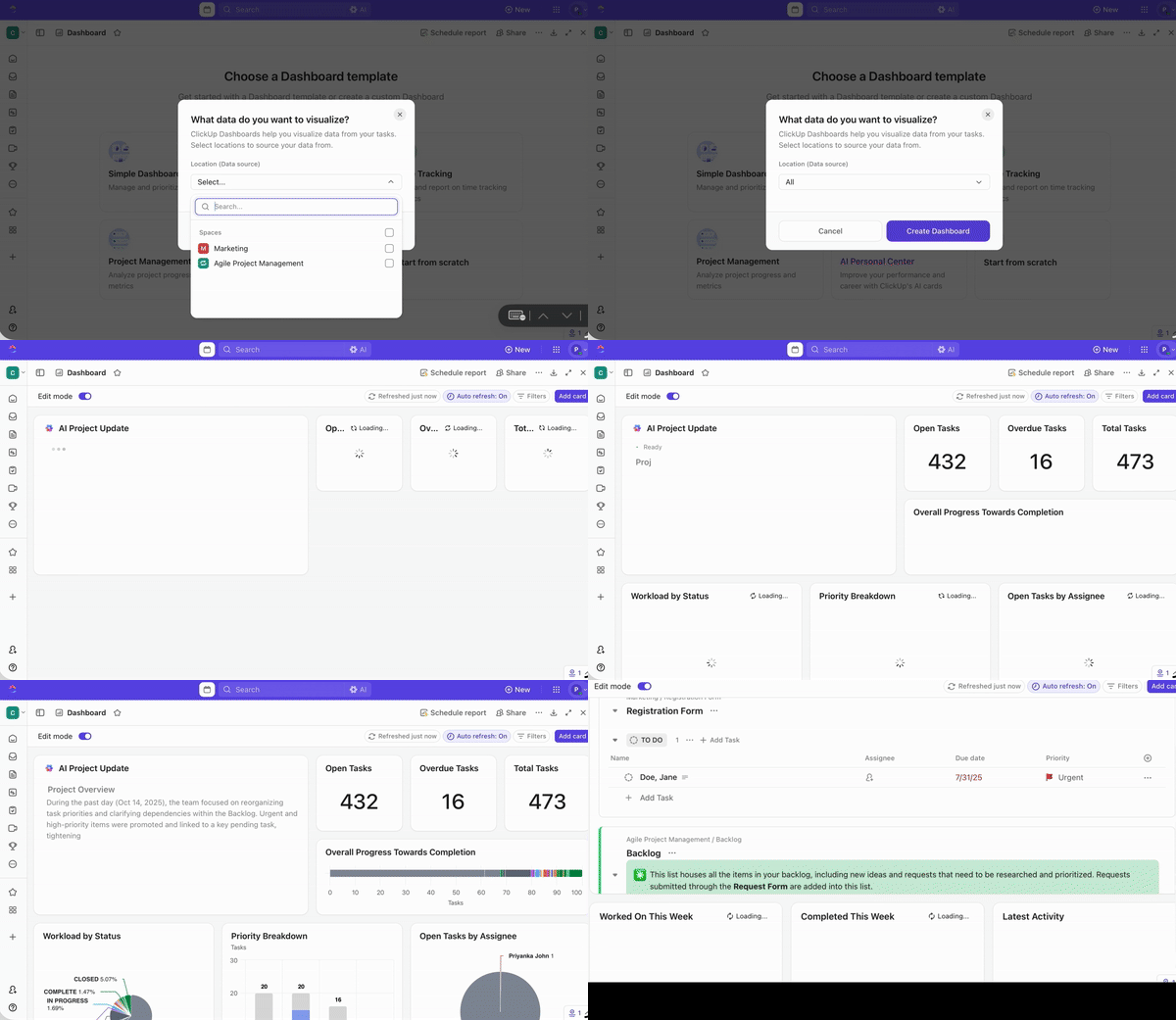
You can build a city-wide dashboard with widgets that highlight sensors reporting anomalies, intersections nearing congestion thresholds, or areas where maintenance is scheduled, surfacing risk and opportunity in one place.
ClickUp Brain adds another layer of visibility. When you’re looking at a dashboard, you can ask direct questions like:
Brain reads the underlying dashboard data and provides a clear answer, without requiring you to interpret charts manually. Your operations team can then assign engineers or field technicians to intervene proactively.
Rather than checking dashboards repeatedly, you get notified when something crosses a threshold that matters, keeping both your team and stakeholders informed in real time.
🎥 Want a broader example of how AI helps teams coordinate complex, multi-stakeholder rollouts? This video on AI for event management covers similar challenges around vendors, timelines, and execution.
💡Pro tip: Deploying AI traffic systems across dozens or hundreds of intersections requires clarity from structure. Using the ClickUp Traffic Management Template, you can structure every deployment task with Custom Fields that capture key data like intersection ID, signal type, vendor, calibration status, and last maintenance date without having to build a structure from the ground up.
Many cities around the world are already using AI to reduce congestion, shorten travel times, and make their roads more efficient✨. Some examples include:
In Pittsburgh, researchers and city engineers piloted an AI‑driven adaptive signal system called Surtrac, developed at Carnegie Mellon University. Instead of fixed timing, each intersection responds in real time to traffic demand and communicates with nearby signals to smooth flow.
Los Angeles operates one of the world’s oldest and largest automated traffic control networks, ATSAC, and in recent years, the city has layered AI‑powered analytics on top of it to make signals more responsive. By feeding real‑time data into adaptive timing algorithms and giving priority to buses on major routes, LA has improved network rhythm and cut delays for transit vehicles. The result isn’t theoretical; it’s shifts in peak‑hour congestion, smoother link progression, and quantifiable improvements in travel reliability across one of America’s busiest urban grids.
Alibaba’s City Brain initiative in Hangzhou uses data from thousands of cameras, sensors, and probes to build a real‑time model of city traffic and feed it into AI optimization engines. Signals adapt based on live conditions, congestion hotspots are pre‑emptively eased, and emergency vehicles are guided with priority routing. Early analyses showed average travel speeds rising by about 15 %, and emergency response times in some districts dropping by roughly half.
While the benefits of AI in traffic systems are clear, you still need to understand the potential bottlenecks you may encounter. Below are a few of them:
The cameras and sensors that feed these systems collect vast amounts of movement data, mostly from people moving through the city during their daily activities. You need to build public trust by establishing strong governance policies that protect road users’ privacy before deploying.
Operating and maintaining these sophisticated systems will require skills your team may not yet have. To make your deployment a success, you’ll need to invest in training and workforce development, ensuring your staff can confidently run and maintain the system for the long term.
Any infrastructure you connect to AI is a potential target for cyberattacks. If your traffic signal network is compromised, it could cause major disruptions—so building a robust security system isn’t optional, it’s essential.
Your AI traffic management system will only be as good as the data you feed it. If your data comes in inconsistent formats, has gaps in sensor coverage, or is locked away in siloed systems, it will limit how effectively your AI can perform.
📮 ClickUp Insight: 83% of knowledge workers rely primarily on email and chat for team communication. However, nearly 60% of their workday is lost switching between these tools and searching for information.
With an everything app for work like ClickUp, your project management, messaging, emails, and chats all converge in one place! It’s time to centralize and energize!
Planning for today’s traffic is already challenging, but if you want your city to be ready for the next five to ten years, you need to think ahead.
The future of AI in traffic management builds directly on what’s possible today, So planning, monitoring, and coordinating these initiatives carefully is essential for long-term success. As autonomous vehicles become more common:
To make all of this happen, your teams will need strong project management tools to plan, coordinate, and monitor initiatives both now and as the technology evolves. Tools like ClickUp can help your teams manage these complex projects, ensuring that your AI traffic solutions are implemented effectively and remain future-ready.
Without doubt, AI for traffic management moves systems from reactive schedules to proactive, adaptive systems that make cities safer, cleaner, and more efficient.
If you want to coordinate your teams, align stakeholders, and ensure everyone has visibility into every step of the deployment, bring AI-powered project management, documentation, and communication into a single, converged workspace.
Ready? Get started for free with ClickUp and see how it can bring order to your AI initiatives. 🙌
Traditional systems use fixed, pre-programmed timing schedules, while AI systems analyze live data from cameras and sensors to adjust signal timing and optimize traffic flow dynamically in response to real-world conditions.
These multi-year deployments involve traffic engineering, IT, procurement, and external vendors, who often use centralized project management platforms to manage documentation, track milestones, and maintain visibility across all stakeholders.
Traditional sensors just detect a vehicle’s presence at a fixed point, whereas AI-powered computer vision can analyze video feeds to track movement, classify vehicle types, and identify specific incidents, providing much richer data.
The most common challenges include the high cost of upgrading legacy infrastructure, navigating data privacy and cybersecurity concerns, and the need to develop a skilled workforce to operate and maintain these complex systems.

© 2026 ClickUp

There’s an easier way. Try a free AI Agent in ClickUp that actually does the work for you—set up in minutes, save hours every week.