






Still downloading templates?
There’s an easier way. Try a free AI Agent in ClickUp that actually does the work for you—set up in minutes, save hours every week.
Sorry, there were no results found for “”
Sorry, there were no results found for “”
Sorry, there were no results found for “”
We’ve all had workdays where our tasks feel like a Whack-a-Mole game. You finish one, and suddenly five more appear. Often, it’s not the complexity of the work that drags you down, but the endless, manual, and repetitive processes that eat up hours and energy.
According to McKinsey, up to 30% of hours currently worked across the U.S. economy could be automated.
One of the technologies driving this shift is agentic process automation.
Agentic process automation tools combine agentic AI, generative AI, and automation agents to handle repetitive tasks, so you and your team can focus on real problem-solving.
Let’s take a look at the top tools.
To help you find the right tool, we’ve compared the top tools side by side, highlighting their best use cases, key features, pricing models, and user ratings.
| Tool | Best for | Key features | Pricing* |
| ClickUp | End-to-end AI-powered workflow automation for teams of all sizes managing fast-moving projects | AI-powered project and task management, AI agents, no-code automation | Free Forever; Customization available for enterprises |
| UiPath | Enterprise-grade process automation for mid-sized to large organizations | Agent builder for intelligent bots, process and task mining, enterprise-grade security | Paid plans start at $25/month |
| Beam AI | Data-driven decision automation for data and operations teams in startups or enterprises | Pre-built and custom AI agents, API and Slack triggers, integrations with Snowflake and BigQuery | Custom pricing |
| n8n | Complex, custom automations for technical teams and IT departments at SMBs or enterprises | 500+ integrations and 600+ templates, modular node-based agent builder, open-source flexibility | Free plan available; Paid plans start at $28/month |
| Zapier | No-code workflow automation across apps for small to mid-sized teams | 8,000+ app integrations, AI workflow generator and chatbot tools, SOC 2 compliance, role-based access | Free plan available; Paid plans start at $29.99/month |
| Adept AI | Natural language–driven enterprise automation for mid to large enterprises | Multimodal AI, workflow reasoning and planning | Custom pricing |
| Uniphore | Enterprise-scale workflows and multi-step automation for large enterprises | BPMN-based visual design interface, multimodal reasoning and verification | Custom pricing |
| CrewAI | Multi-agent workflow orchestration for technical startups and enterprise R&D teams | Crews of multiple AI agents, drag-and-drop and code-based workflow design, 1,200+ app integrations | Custom pricing |
| Automation Anywhere | Enterprise-grade agentic process automation for mid to large enterprises | Process Reasoning Engine (PRE), document automation, integrations with ERPs and databases | Custom pricing |
| Vonage AI Studio | AI-powered customer engagement and support for SMBs and enterprise customer service teams | Omnichannel virtual agents, knowledge AI and NLU engine, Salesforce integration | Custom pricing |
Agentic Process Automation (APA) uses autonomous AI agents to reason, make decisions, and execute multi-step workflows across systems to complete business processes. It goes beyond traditional automation by using agents that can understand context and even adapt when things change.
These are the steps involved:
Sensing and input → AI agents collect signals in apps, documents, automated systems, or customer interactions to initiate data processing
Reasoning and decision-making → With the help of natural language processing, machine learning, and decision models, they determine the next best step
Action and task execution → Agents initiate multi-step automated workflows between different tools, APIs, or connected systems
Learning and adapting → These agents improve their performance over time, learning on the basis of the feedback, errors, and results
🫸🏻 Heads-up: Before choosing a tool, decide the types of AI agents you actually need. Some platforms excel at task-level agents that handle simple actions, while others support reasoning agents that plan multi-step workflows or autonomous agents that operate across entire applications.
Matching the agent type to your use case will dramatically improve success rates and reduce maintenance.
Let’s take a detailed look at each of the tools in our list.
Our editorial team follows a transparent, research-backed, and vendor-neutral process, so you can trust that our recommendations are based on real product value.
Here’s a detailed rundown of how we review software at ClickUp.
ClickUp has evolved far beyond traditional project management. It is the world’s first converged AI workspace and agentic process automation tool.
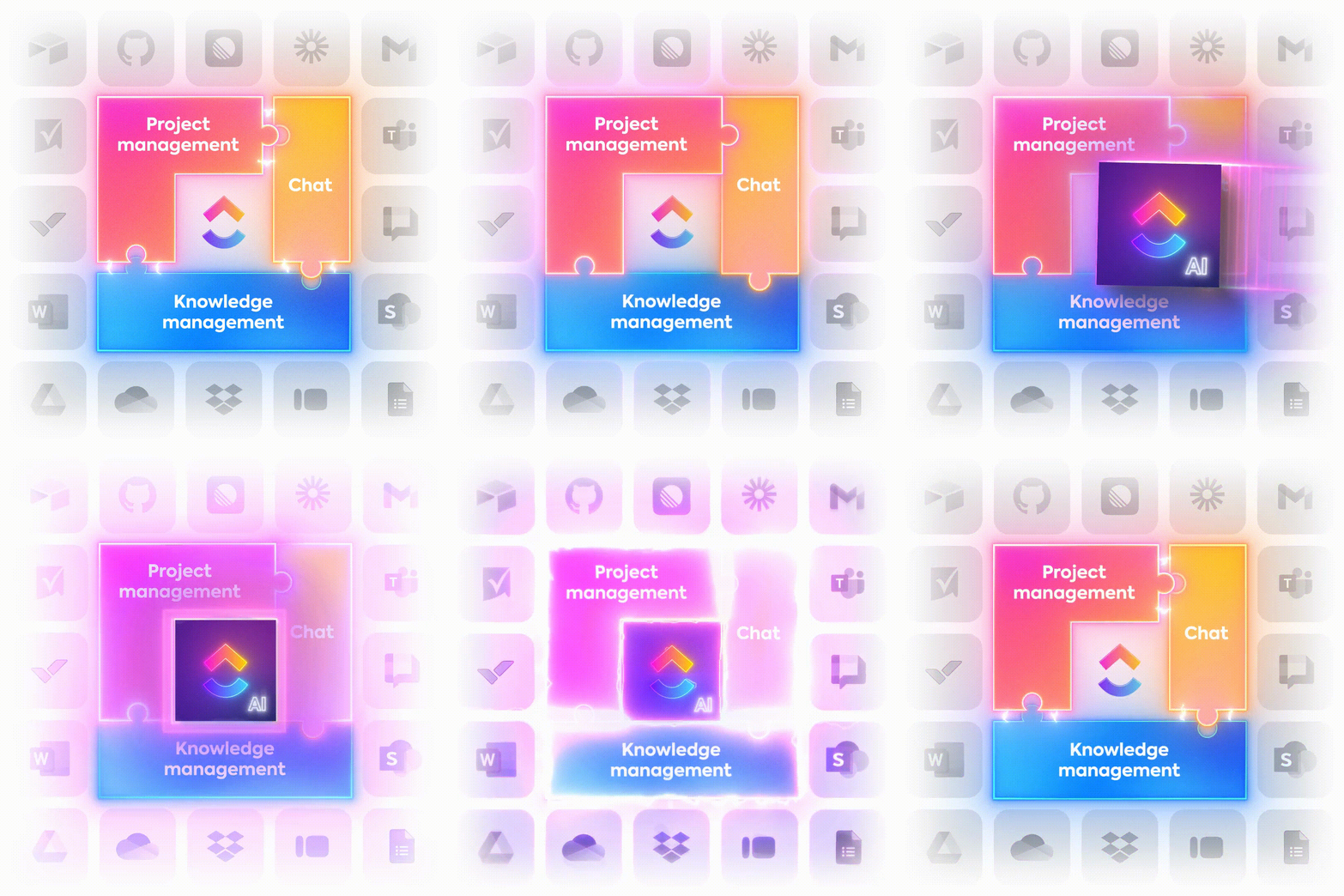
ClickUp Brain powers all of ClickUp’s AI capabilities. Embedded deep within your workspace, it understands your tasks, projects, dependencies, priorities, and documents. With full awareness of your workflows, it generates context-rich insights instead of isolated outputs.
Since it is natively built into your workspace, it can automatically generate detailed SOPs and briefs based on project context.
Additionally, it can provide task suggestions, summarize chat threads, transcribe meetings, generate marketing copy, suggest automations based on your workflows, and much more.

For existing processes, ClickUp Brain recognizes repetitive paths and approval loops. This helps identify areas where automation can bring the most value.
Once workflows are defined, ClickUp Automations helps set the right rules to ensure they run smoothly in the background. You can start with a prebuilt template or create a custom, no-code automation just as quickly.

Simple automations can be created with a Trigger and an Action, like sending an alert when a due date arrives or changing status when a task is assigned. Conditions are optional filters used for automations that need to run only when certain criteria are met.
You can also set multiple actions and reorder them as needed for multi-step workflows. For example, when a task’s status changes to ‘Ready for Review,’ reassigning to QA, adding followers, setting a due date, and sending a notification can all be part of a single automation.
ClickUp AI Agents, Automations, and ClickUp Brain work together to turn manual workflows into intelligent, decision-driven sequences.
These agents operate like automation partners who understand context and keep work moving. You simply activate an Agent, describe the outcome you want, and ClickUp Brain generates the correct logic flow behind the scenes.
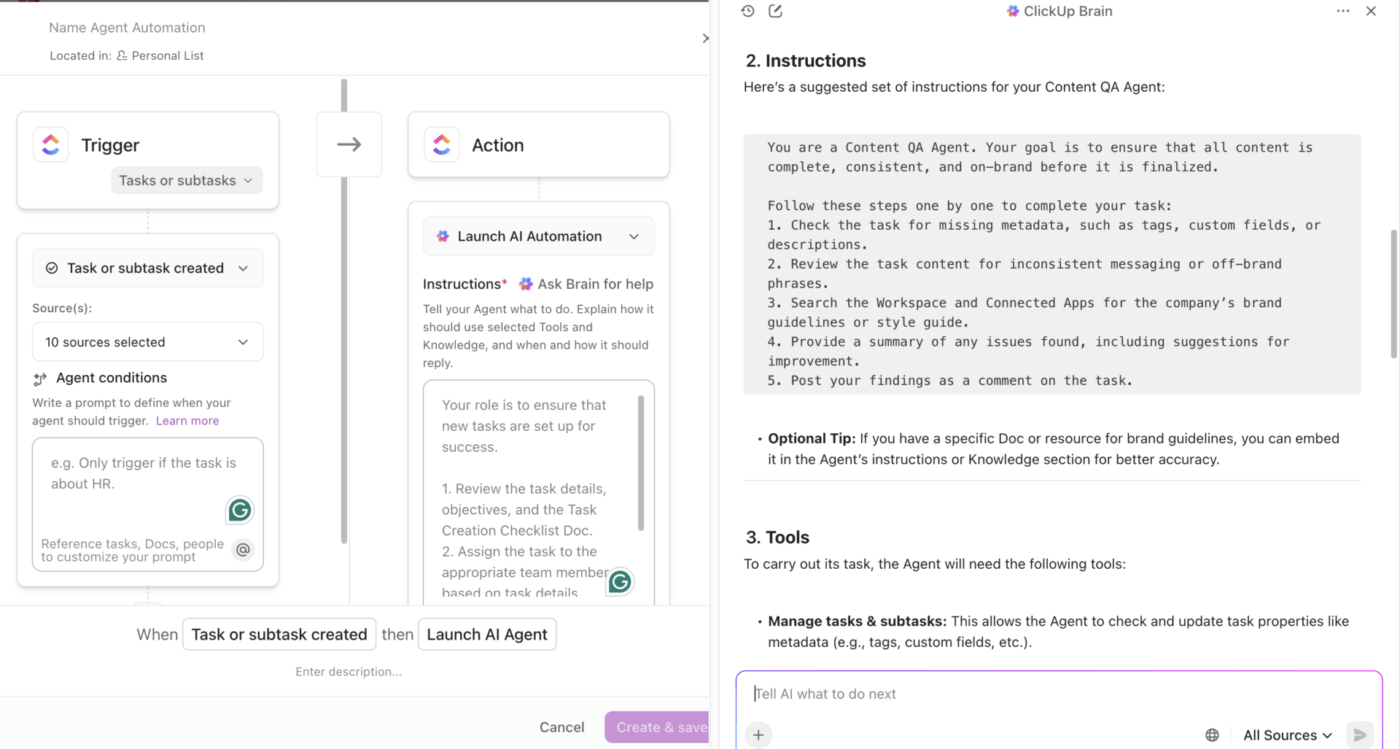
Agents in ClickUp understand context from tasks, fields, forms, statuses, and more to act autonomously. With access to your database, they can even answer customer queries and redirect to humans when a decision requires deeper expertise.
Here’s how you can build a customized agent in ClickUp in less than 20 minutes ⬇️
Jordan Patrick, CPO (Chief Product Officer) at Harness, says in a TrustRadius review:
This switch to using ClickUp for all teams has provided a centralized hub for all of our teams + users to exist and be able to organize their own work while also keeping track of other team’s projects. The set of features and tools provided by ClickUp are great for CS, Sales and our Development team to efficiently and effectively manage our projects company-wide!

UiPath started as a traditional robotic process automation (RPA) tool but has grown into a full-scale project management automation platform for large organizations.
Within the tool, you can use Agent Builder to design intelligent bots that can handle complex decisions instead of just following fixed rules. Human input can also be incorporated to create hybrid workflows that are more flexible and adaptive.
The tool’s process mining features let you determine the ROI potential of automating specific processes so you can focus on high-impact areas. Additionally, task mining helps pinpoint exact tasks that can benefit from AI-driven automation.
Here’s a G2 review:
Tools like AI Center, Document Understanding, and Autopilot allow bots to interpret context and take dynamic actions. It’s fascinating to watch a bot that can decide which process to run, instead of waiting for me to tell it exactly what to do.
📚 Read More: MCP vs. RAG vs. AI Agents: Who Leads AI?

With Beam AI, you can turn data into automated decisions. There is an option to choose from pre-built agents like email triage or KYC checks, or build an AI agent with custom rules.
AI agents can be activated with API calls, scheduled events, or even messages from tools like Slack and Gmail. The tool also connects directly to data warehouses such as Snowflake or BigQuery to flag data discrepancies or automatically approve workflow steps after data verification.
📮 ClickUp Insight: 15% of workers worry automation could threaten parts of their job, but 45% say it would free them to focus on higher-value work. The narrative is shifting—automation isn’t replacing roles, it’s reshaping them for greater impact.
For instance, in a product launch, ClickUp’s AI Agents can automate task assignments and deadline reminders and provide real-time status updates so teams can stop chasing updates and focus on strategy. That’s how project managers become project leaders!
💫 Real Results: Lulu Press saves 1 hour per day, per employee using ClickUp Automations—leading to a 12% increase in work efficiency.
📚 Read More: Powerful AI Agents Examples Transforming Industries

n8n uses a modular, node-based visual editor. Each node performs a task (trigger, logic, API call, AI action, etc.), and workflows are built step-by-step by connecting these nodes.
It lets you design custom logic, add your own code, and even self-host to stay in full control of your infrastructure and data privacy.
Moreover, advanced workflows can be created with conditions (if/else, switch), loops, splits, merges, and error handling instead of just simple trigger-action chains.
The AI-powered workflow automation also enables you to add a layer of intelligence to mechanical tasks, so your workflows can interpret data while moving it and decide what to do next based on AI outputs.
Here’s a G2 review:
n8n provides a powerful and flexible way to automate workflows without heavy coding. I like that it’s open-source, self-hostable, and has a wide range of integrations.
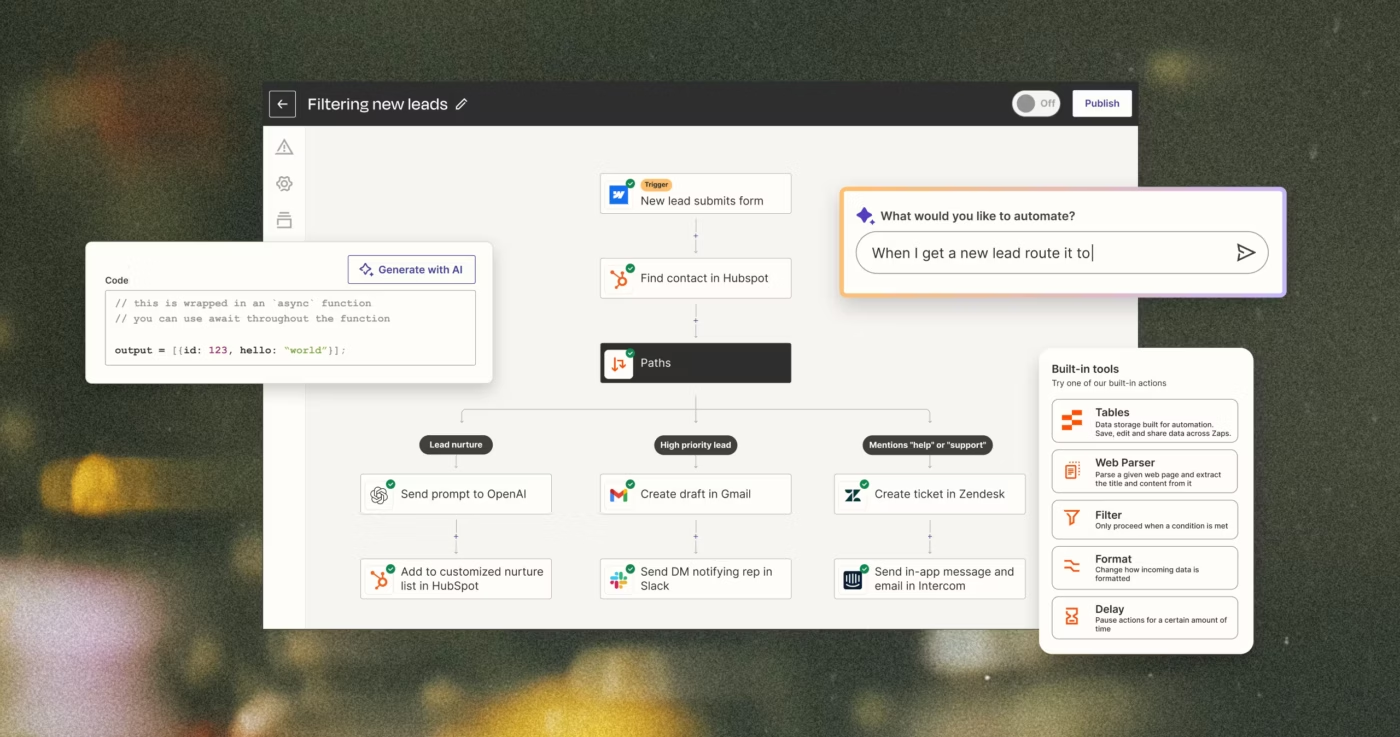
Zapier is a no-code automation platform for teams that want to scale automation fast. It helps you in auto-triaging IT tickets, qualifying leads, summarizing emails, or connecting to chatbot platforms for automated support.
With Zapier, you can start with pre-built templates or just describe your idea in plain English to generate a workflow. What makes it a reliable tool is its extensive integration coverage and easy-to-use tools like Canvas, Tables, and Interfaces.
For bigger teams, Zapier adds enterprise controls. You get role-based permissions, audit trails, SOC2 compliance, SSO, and full observability, so governance and security keep pace with automation.
Here’s a G2 review:
The platform saves time by reducing manual workloads and enhancing operational efficiency. Best of all, it is easy to implement and highly customizable, offering the flexibility needed to manage complex logic and multi-app workflows.
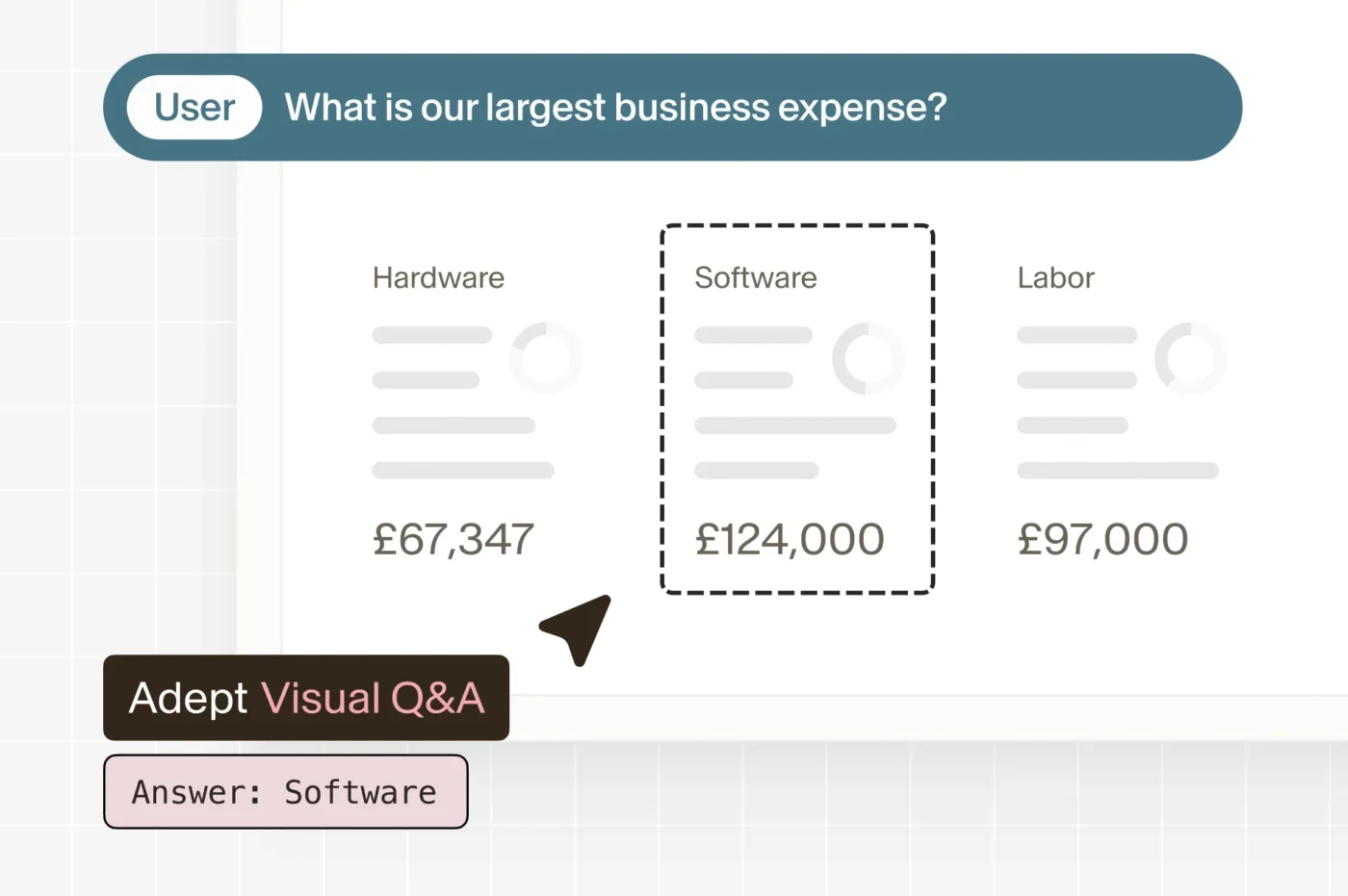
Adept AI’s core mission is to build agents that can use software the way humans do. The platform uses a full-stack approach and combines huge training datasets and multimodal AI models that understand both visuals and text.
Acting on both text and voice commands, agents can navigate a website, enter data into forms, search webpages, filter spreadsheets, and understand charts, tables, etc. Their computer-vision layer allows them to identify UI elements and understand spatial layouts, so they can easily interact with buttons, dropdowns, inputs, and complex widgets.
The tool is built to work alongside humans rather than replace them. It can pause to ask for clarification when something is unclear, request missing information, display the steps it’s taking, or confirm important actions before proceeding.
💡 Pro Tip: When evaluating APA tools, look beyond basic task automation and check how well they use LLM agents to interpret screens, understand unstructured inputs, and make real-time decisions.
The strongest platforms combine LLM reasoning with UI-level action capabilities, giving you agents that not only think but can also do, even when workflows span messy interfaces or multi-app environments.
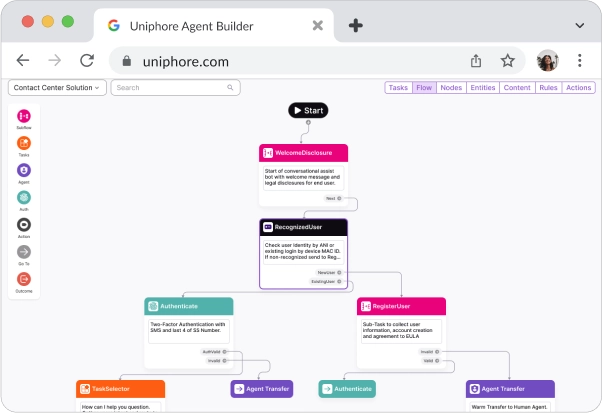
Uniphore is a cloud platform with a dedicated Agentic layer, deploying AI agents and applications tailored for customer service, sales, marketing, and HR transformation. It helps companies automate and improve customer conversations.
Instead of just turning calls into transcripts, it understands intent, detects emotions, and uses AI agents to guide service teams in real time. It can pull data, automate routine steps, create summaries, and suggest the next best action while the call is happening.
For teams burdened by manual follow-up work or inconsistent customer experiences, Uniphore offers a clearer, faster way to handle conversations. The result is quicker resolutions, smoother workflows, and interactions that feel more natural for both customers and agents.
⚡ Template Archive: Best Free Process Workflow Templates in Excel & ClickUp
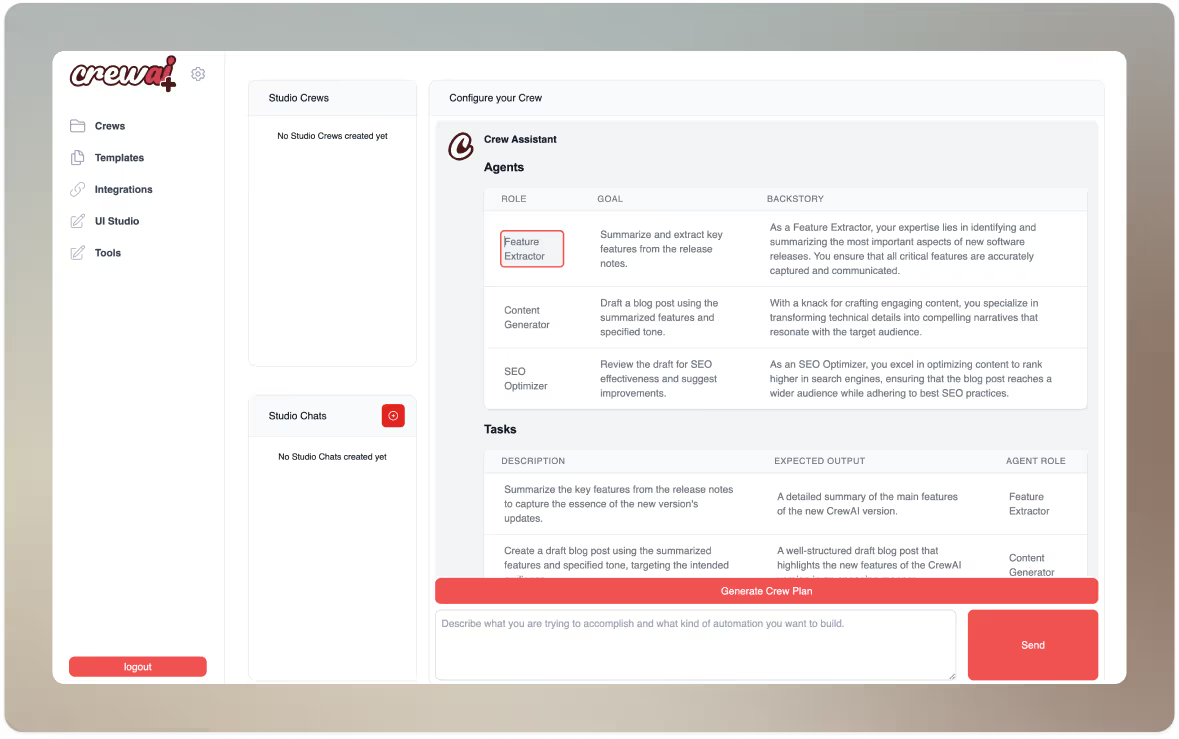
CrewAI lets you build crews of AI agents to automate tasks and complex, multi-step workflows. Each agent can be assigned a specific role, like researcher, writer, analyst, etc. Multiple agents then collaborate, delegate tasks, and work together to complete a larger goal, similar to how a real team works.
The platform has built-in tools for web automation, web-scraping, data processing, and API integrations that agents can use. Moreover, agents can maintain memory and context across tasks and interactions, making them useful for complex workflows where past context matters.
The platform is also flexible: you can run it in the cloud, self-host it, or deploy it locally, depending on your specific security and compliance needs. And with an easy-to-use UI Studio along with no-code templates, both technical and non-technical teams can easily build agentic automations.
Automation Anywhere uses a Process Reasoning Engine that enables agents to reason, plan, and make context-aware decisions rather than simply following rigid scripts. These agents operate with goals and work across multiple systems and data sources to achieve them.
The platform is built to orchestrate across legacy mainframes, cloud apps, ERPs, databases, SaaS, APIs, etc. This makes it a good option for enterprises with mixed infrastructure, where processes span across older and newer systems.
The platform also has a Document Automation engine. It extracts data using machine learning and OCR, validates it, and pushes it into downstream systems automatically.
Here’s a Capterra review:
The time and effort it has saved us have allowed us to focus on more important aspects of our work – like engaging with our students and crafting meaningful lesson plans. I’ve seen my fellow teachers and staff members breathe a sigh of relief as they watch tasks that used to eat up hours being completed automatically.

With Vonage AI, you get AI-powered virtual agents that can interact with users across multiple channels, like phone calls, SMS/text, chat, WhatsApp, and more.
Automatic speech recognition, natural language understanding, and text-to-speech capabilities help enable fully voice-driven, conversational workflows.
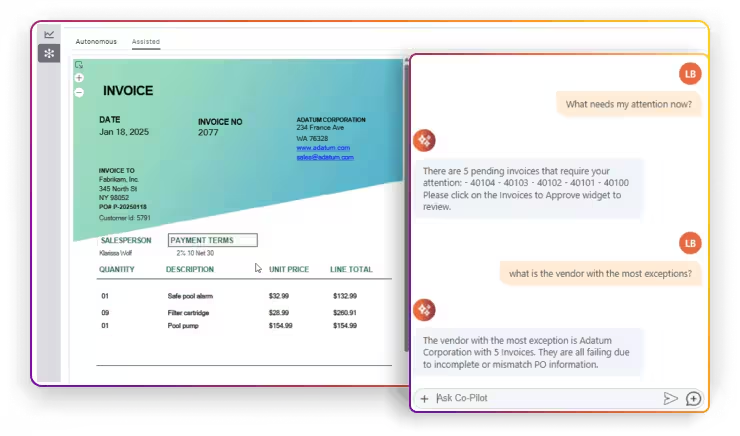
The platform integrates with major CRMs like Salesforce, Microsoft Dynamics 365, and Zoho CRM through a unified communications and contact center platform. When a call or chat arrives, the CRM integration can display the customer’s record, history, previous tickets, or deals, so agents instantly have full context before responding.
⚡ Template Archive: Process Map Templates for ClickUp, Excel, and Word
If you’re exploring agentic process automation platforms, here are some key features you should consider:
With AI agent tools that can learn, adapt, and coordinate, your workflows don’t just run faster; they actually get better.
Here are some of the biggest benefits of APA:
Agentic automation shows up where teams get stuck doing the same repetitive tasks. Here are some everyday areas where it makes life easier:
📞 Customer support: AI agents can instantly resolve routine questions, guide customers toward self-service options, capture needed information, and escalate only the genuinely complex cases to human agents. You can shorten response times while keeping human expertise focused where it matters.
💲 Finance teams: Approvals, reconciliations, data validation, report generation, and compliance checks become faster and more reliable as agents handle structured workflows with precision. This reduces operational risk and improves audit readiness.
👥 HR departments: Employee onboarding, policy queries, benefits enrollment, and document management stop piling up. AI agentic workflows coordinate multiple systems, send reminders, capture information, and ensure every new hire or employee request moves smoothly through the process.
❤️ Healthcare operations: Tasks like claims processing, patient intake, scheduling, and eligibility checks are streamlined. Agents reduce administrative overhead, minimize human errors, and help providers allocate more time to clinical care instead of paperwork.
📈 Sales and marketing: Agents pre-qualify leads, update CRMs, follow up on campaigns, monitor pipeline signals, and trigger timely outreach. This keeps revenue operations running continuously in the background while giving sellers more time for actual selling.
These terms can sound similar, but they’re not the same thing. Each approach solves a different layer of the automation puzzle.
Take a look ⬇️
| Dimension | RPA | AI-powered Automation | Agentic Automation |
| Core Function | Follows rules, mimics clicks/keystrokes | Adds AI for pattern recognition & NLP | Agents think, plan, adapt, and act autonomously |
| Data Handling | Structured data only | Handles structured + some unstructured data | Handles all data types with reasoning |
| Decision-making | None, rule-based only | Limited, guided by AI models | Advanced, multi-step, goal-driven reasoning |
| Workflow Scope | Task-level | Process-level | End-to-end, cross-system workflows |
| Human Role | High | Moderate | Low |
In short:
Agentic automation has huge potential, but it has its own hurdles. Before jumping in, it’s worth thinking about these challenges:
Agentic automation is on the rise, but the journey ahead won’t look the same for every business. Here’s what the research tells us about where things are headed:
According to McKinsey’s The State of AI report, approximately three-quarters of companies are already applying AI to at least one of their functions, and the adoption is gradually increasing.
The same will happen with the adoption of agentic automation; early adopters will proceed quickly, and others will require longer to incorporate it into their main processes.
Nancy Xu, the VP of Salesforce AI, predicts, ‘
We’re going to go from task-taking conversational assistant agents to outcome-owning agents that are deeply embedded into the fabric of work. Instead of giving agents instructions, we’ll give agents goals. Whether it’s improving customer satisfaction, growing pipeline, or reducing time to resolution, agents will dynamically learn to orchestrate people, processes, and data to drive results for you by operating proactively within your business with deep organizational awareness.
The future of work won’t be defined by how many tasks you can mark off in a day. It will be defined by how intelligently those tasks get done. Agentic process automation is the shift from humans manually handling tasks to AI-powered agents working alongside us, amplifying the capabilities of teams.
That’s why tools like ClickUp are so exciting. It keeps everything in one place, adds smart automation on top, and makes the messy parts of work way more manageable.
Sign up on ClickUp for free and see how smoothly your workflow can run.
Traditional automation methods like RPA follow fixed rules and scripts, while agentic automation uses agentic automation agents that can reason, adapt, and make decisions in real time.
Yes. APA can connect finance, HR, IT, operations, and customer service workflows, making cross-departmental automation possible.
Most APA platforms include error handling, escalation paths, and audit trails, ensuring exceptions are logged, flagged, and redirected with minimal human intervention and human oversight when needed.
Sectors like finance, healthcare, IT, and customer service see the biggest gains from intelligent automation due to their complex, repetitive, and compliance-heavy processes.
Absolutely. Many APA tools are designed with no-code or low-code builders, making them accessible to startups and SMBs looking to scale without extra headcount.
Leading platforms follow enterprise-grade security standards like SOC 2, GDPR, and HIPAA compliance, with role-based access, encryption, and detailed audit logs for data security.

© 2026 ClickUp

There’s an easier way. Try a free AI Agent in ClickUp that actually does the work for you—set up in minutes, save hours every week.