






Still downloading templates?
There’s an easier way. Try a free AI Agent in ClickUp that actually does the work for you—set up in minutes, save hours every week.
Sorry, there were no results found for “”
Sorry, there were no results found for “”
Sorry, there were no results found for “”
We all have the same 24 hours in a day, but how we spend them defines our productivity. Studies show that 83.13% of professionals spend up to one-third of their week in meetings.
With endless calls, meetings, emails, and documentation taking over your day, you can feel like you’re spending more time doing “work about work”. This is where Agentic AI tools step in.
By leveraging intelligent agents capable of automating complex workflows and analyzing vast amounts of data, professionals can reclaim wasted hours and focus on higher-value tasks. These AI tools are already transforming how enterprises seeking greater efficiency approach their daily work.
In this article, we’ll walk through some of the best agentic AI tools you can use to lighten the load and make your day flow more smoothly.
Here’s a quick comparison of the top Agentic AI software to help you choose the right fit based on key features, pricing, and user ratings.
| Tool | Best for | Key features | Pricing* |
| ClickUp | All-in-one work management with AI project planning for teams of all sizes | ClickUp Brain AI, task automations, prebuilt and custom AI Agents, scheduling templates, workload & timeline views, 1,000+ integrations | Free plan; Customizations for enterprises |
| LangChain Agents | Custom AI agents for developers and tech teams | Multi-agent orchestration, memory support, tool & API chaining, Python & JS libraries, observability tools | Free; Paid plans starting from $39/month per user |
| AutoGPT | Open-source, continuous AI agents for small teams | Event-triggered continuous agents, open-source framework, Docker/self-hosting, workflow library, monitoring & analytics | Custom pricing |
| AutoGen | Multi-agent collaboration for research and problem-solving for individuals and small teams | Planner/Doer/Reviewer agents, asynchronous messaging, external tool integration, debugging & observability, Python/.NET support | Custom pricing |
| Microsoft Copilot | Everyday productivity inside Microsoft 365 for enterprises | Teams meeting summaries, content creation in Word & PowerPoint, Excel insights, Copilot Studio for custom agents | Free; Paid plans starting from $30/month per user |
| CrewAI | Multi-agent workflows for large businesses | No-code studio, Python framework, agent roles (researcher/analyst/support), cloud & local deployment, ROI tracking | Open source |
| AgentGPT | Autonomous task-driven agents for small teams | Breaking down goals into tasks, automated research & reporting, integrated APIs, idea generation, beginner-friendly UI | Free; Paid plans starting from $40/month per user |
| Zapier AI | Wiring AI into existing tools for mid-sized to large teams | AI builder with 8,000+ apps, chatbots/interfaces/tables, Copilot for nudges, pre-built Zaps, file & CRM automations | Free; Paid plans starting from $29.99/month per user |
| Adept AI | Complex workflow automation for enterprises | Natural-language to action, multimodal models, Web VQA for documents/PDFs, proprietary actuation layer, planning & execution | Custom pricing |
| UiPath | Large-scale enterprise automation for | Unified orchestration for AI agents, humans & robots, Document Understanding, low-code Agent Builder, 40+ enterprise integrations | Free; Paid plans starting from $25/month per user |
| Orby | Audit-ready, high-stakes enterprise automation | Neuro-symbolic AI, Large Action Model (LAM), process discovery, document understanding, enterprise-grade compliance | Custom pricing |
| Beam | Industry-specific AI workforces for large teams in regulated industries | Pre-built agents for HR, finance, healthcare, retail & legal, AgentOS platform, modular design, continuous learning workflows | Custom pricing |
| AskUI | Cross-device automation with Vision AI for small to mid-sized teams | Workflow automation across Windows/Mac/Linux/iOS/Android, Vision Agents for UI testing, document processing, 3rd-party integrations | Free; Paid plans starting from $57/month per user |
The thing about most AI tools is that they respond to commands. This is where Agentic AI tools make a difference.
They are artificial intelligence systems built to work with more independence than traditional AI. This means they can set goals, plan steps, and follow through with minimal human input.
For example, instead of a manager spending hours coordinating tasks across different teams, an agentic AI system could assign responsibilities, send reminders, and update progress in real time.
In customer support, it might resolve common issues while flagging only the truly complex cases for a human to step in.
By combining reasoning, decision-making, and the ability to use external tools, here’s what these tools do for you:
Agentic AI tools are moving past simple copilots to AI agents that plan, act, and adapt across your stack. Choosing well means finding agentic AI platforms that fit your real work, not just a feature list.
Here’s a simple way to judge what will help you automate complex workflows and improve day-to-day task execution:
💡Pro Tip: Start small with one high-value workflow in support, ops, or marketing, then expand once results are clear. Connect natural language goals to tools like Slack, Jira, Salesforce, or your data warehouse, and try open frameworks like Microsoft Semantic Kernel to integrate cleanly without heavy custom code. Keep guardrails simple and visible so autonomous agents stay helpful and trusted.
Now that we’ve covered what agentic AI is and how to choose the right platform, let’s look at some of the best agentic AI tools that are making a real difference for teams.
Our editorial team follows a transparent, research-backed, and vendor-neutral process, so you can trust that our recommendations are based on real product value.
Here’s a detailed rundown of how we review software at ClickUp.
Most AI tools promise to save you time, but many end up feeling like add-ons. They can answer a question or draft a note, yet they rarely understand the bigger picture of your work.
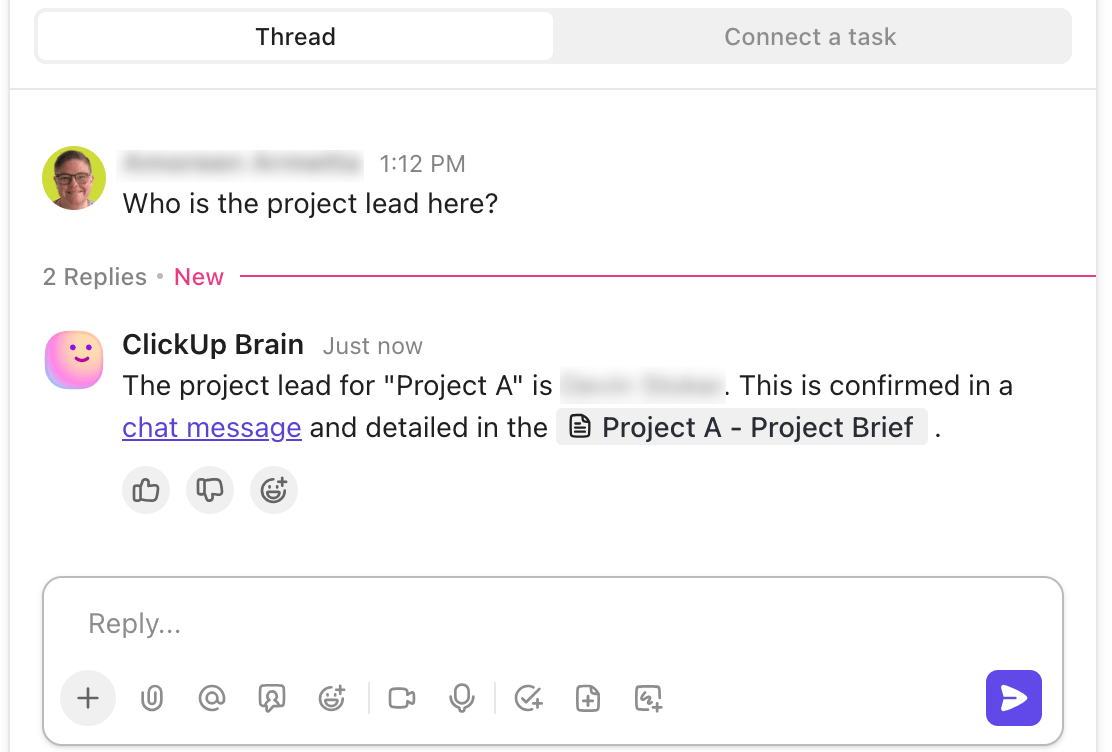
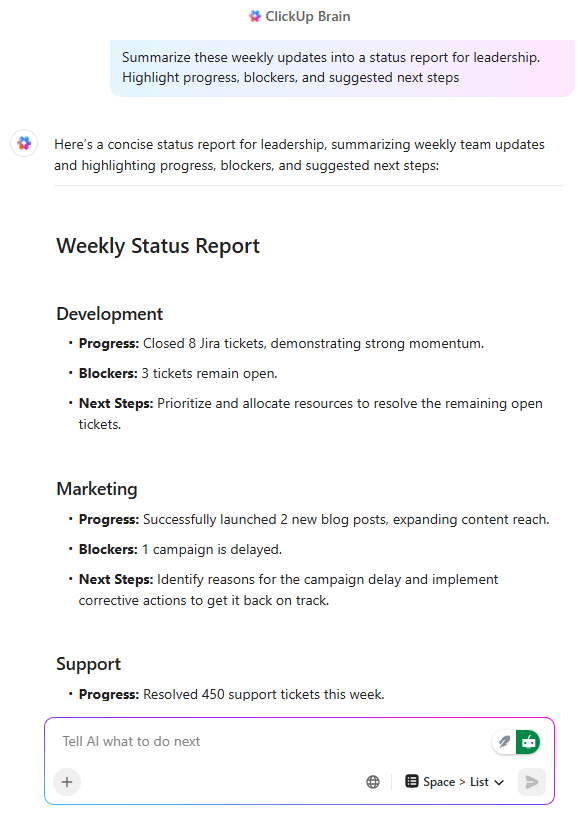
ClickUp takes a different approach. Its AI is not just another feature tucked inside a project management app. ClickUp Brain understands the context of your workspace, automates multi-step workflows, and makes suggestions to keep your team moving forward.
Automated project coordination with ClickUp Brain
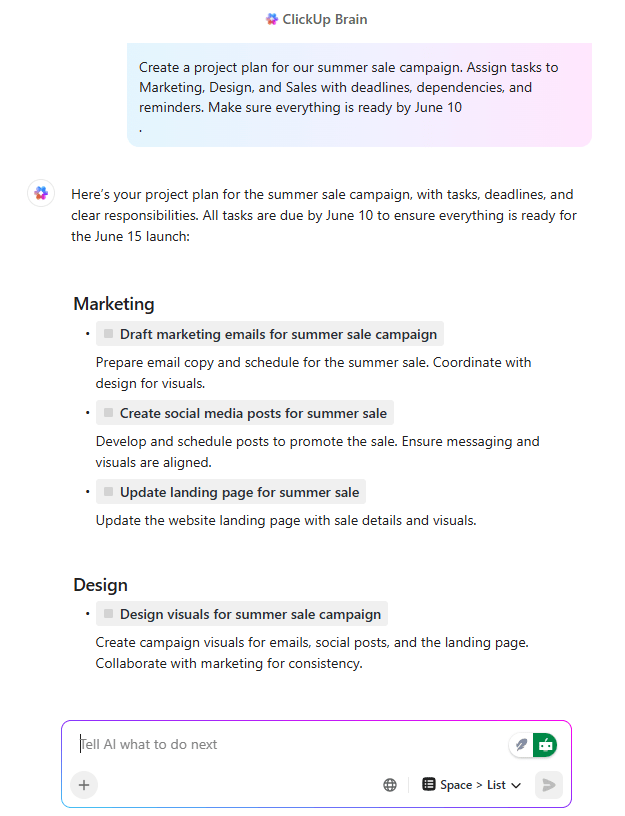
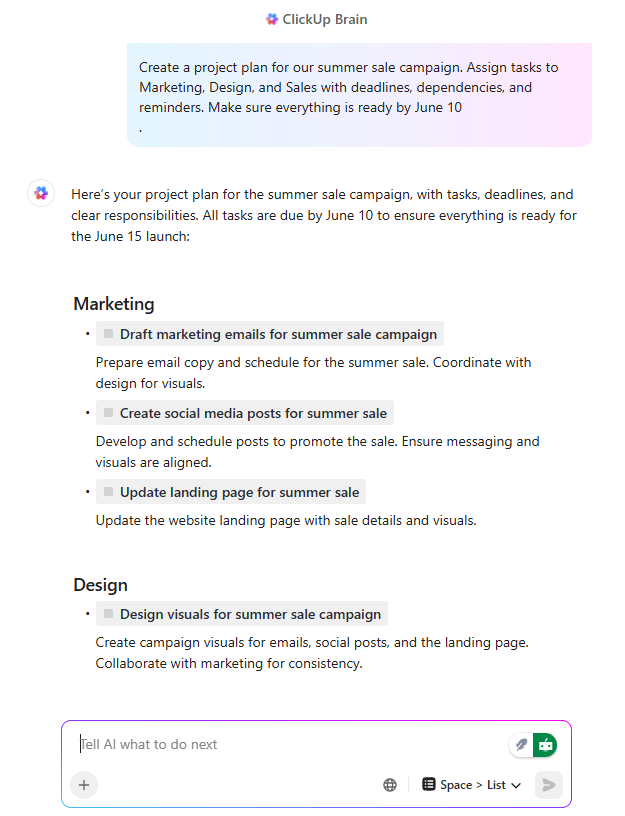
Picture a marketing team about to launch a new campaign. Normally, the project manager would spend half a day creating tasks, setting deadlines, and reminding people what needs to be done. With ClickUp Brain, the brief is uploaded once, and the AI lays out the plan, assigns responsibilities, and updates progress as things move forward.
It also keeps cross-functional projects from falling into silos. Brain monitors activity across systems and ensures real-time updates flow everywhere. When a Jira ticket closes, the linked ClickUp task updates instantly, and Slack notifications go out to stakeholders without anyone having to step in.
💡 Pro Tip: Use ClickUp Brain MAX’s Talk to Text to capture ideas on the go. Speaking is up to 4x faster than typing (220 words per minute vs. 45), which adds up to about 1.1 days saved every week. And because ClickUp Brain MAX connects to multiple premium AI models like GPT-5, Claude, and Gemini, instead of juggling different apps, you can replace several tools at once and cut costs by up to 88%.
End-to-end customer support with ClickUp AI agents
Where ClickUp Brain shines in project planning, ClickUp AI Agents bring the same intelligence to customer support.
These agents are built to do more than categorize or tag tickets—they can resolve routine cases from start to finish. Password resets, subscription updates, or order status checks are handled automatically, right down to replying to the customer and updating CRM records.
For the more sensitive or unusual issues, the AI knows when to step aside. Those tickets are escalated to a human agent, but with all the context neatly summarized. That means less time digging through notes and more time giving thoughtful support.
📌 Example: A SaaS company used ClickUp Brain to process hundreds of simple tickets every day. The AI agents automatically sent confirmations, closed cases, and kept records updated. This freed the human team to focus on the kinds of problems where empathy and creativity really matter.
The outcome is a faster, smoother experience for customers and a support team that feels less weighed down by repetition.
With features like workload balancing, intelligent task assignment, and proactive reminders built in, ClickUp AI Agents ensure teams can focus on higher-value work while the system takes care of the rest.
You can choose to use the Prebuilt Autopilot Agents in ClickUp or build your own for specific use cases.
This G2 review noted:
The ability to customize everything from task types to automations, combined with tools like dashboards, forms, and now ClickUp Brain, means I can build scalable, efficient systems for any workflow. Plus, I love how fast the platform continues to evolve.
📖 Also Read: How to Build an AI Agent for Better Automation
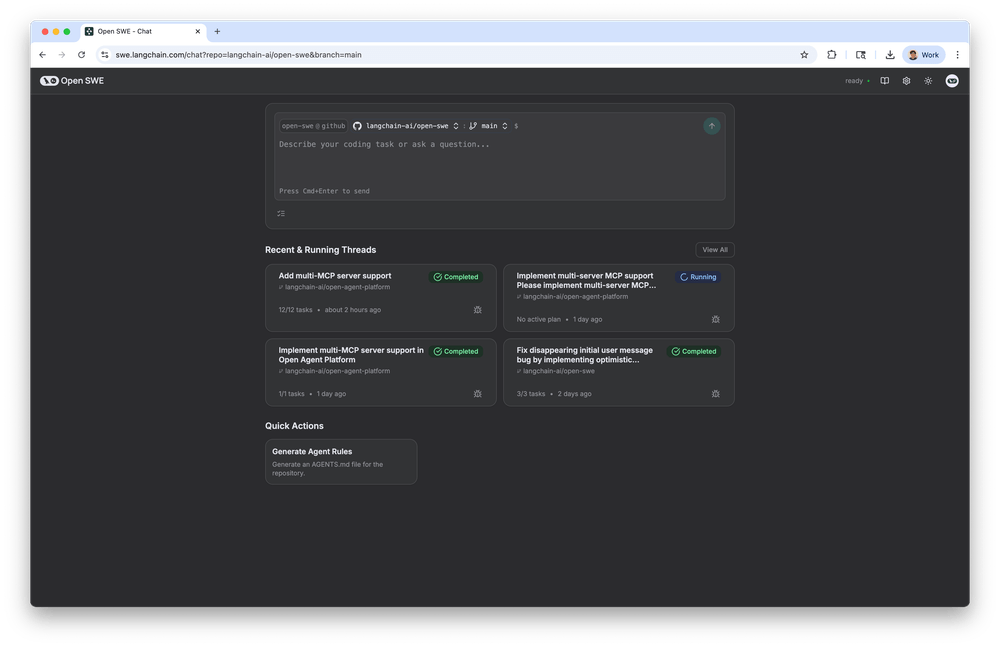
LangChain offers tools to build, orchestrate, and deploy autonomous AI agents that can handle complex, multi-step workflows. It lets you shape your own AI agents for real work, connect them to the apps you already use, and guide multiple agents to handle complex workflows without a lot of fuss.
With LangChain, you can start small, then grow. Add memory so your agent remembers context. Plug in search, data, or simple actions. Let the agent plan a few steps, try them, and report back.
Its visual agent IDE, LangGraph Studio, helps build agents faster.
This G2 review highlighted:
What I like most about LangChain is how seamlessly it helps connect large language models (like OpenAI or Cohere) with real-world tools, data, and APIs. It’s not just about prompting a model—it’s about chaining steps together.
In the near future, nearly 7 out of 10 customer interactions with vendors are expected to be managed by autonomous tools. That’s a big shift, and it shows how quickly businesses are leaning on AI agents to take care of everyday tasks.
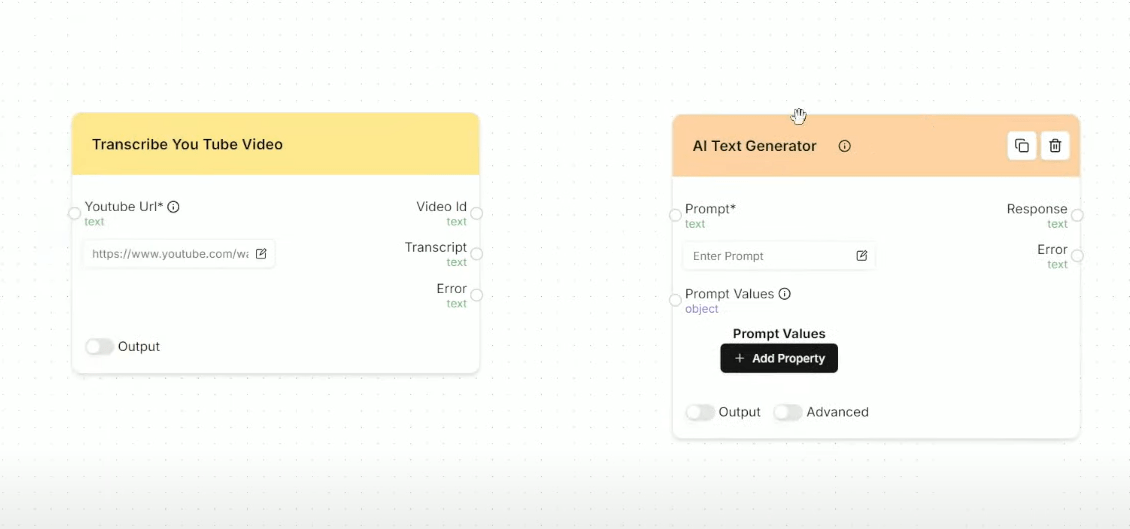
AutoGPT fits right into this future. Unlike many platforms that keep you locked into a black box, AutoGPT is open-source and built for flexibility. You can self-host it, build your own agents, or tap into ready-made ones.
Once set up, these agents can run continuously, trigger on events, and handle multi-step workflows from start to finish.
📮 ClickUp Insight: In our survey, only 10% of respondents said they use voice assistants (4%) or automated agents (6%) for AI tasks, while a much larger 62% prefer conversational tools like ChatGPT and Claude. The lower adoption of assistants and agents may be tied to their narrower focus on specific workflows or hands-free use cases.
ClickUp brings you the best of both worlds. ClickUp Brain serves as a conversational AI assistant that can help you with a wide range of use cases. On the other hand, AI-powered agents within ClickUp Chat channels can answer questions, triage issues, or even handle specific tasks! “
By now, we know that most Agentic AI tools behave like solo assistants. They can answer a query or automate a step, but they rarely thrive in situations where teamwork and iteration matter.
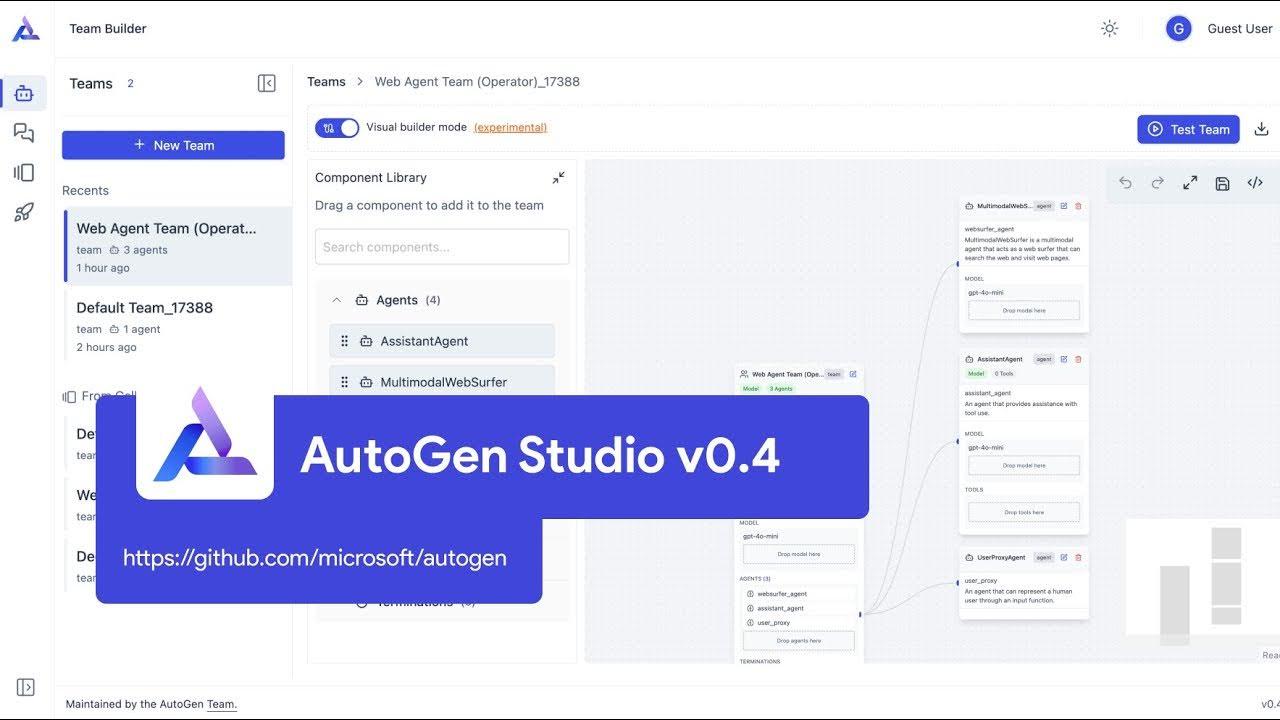
AutoGen, built by Microsoft Research, takes a different approach. It’s an open-source framework designed for multi-agent collaboration, where several intelligent agents can share information, divide roles, and solve problems together.
Instead of relying on one model to handle everything in a single prompt, AutoGen encourages you to think in conversations.
For example, you can have a Planner agent that breaks down goals, a Doer agent that executes steps, and even a Reviewer agent that checks quality.
This Reddit review shared:
AutoGen definitely makes sense for certain workflows, especially if you’re deep in the Microsoft ecosystem or building research-style multi-agent conversations out of the box.
🧠 Did You Know: The UK’s national mapping agency, Ordnance Survey, has found a clever way to keep its maps fresh. Instead of sending surveyors everywhere, they use computer vision and agentic AI that scan aerial and street images to spot things like new roads or buildings. This means their maps can be updated far more quickly, sometimes within days, so when you’re looking up a new bike path or housing development, the details are already there.
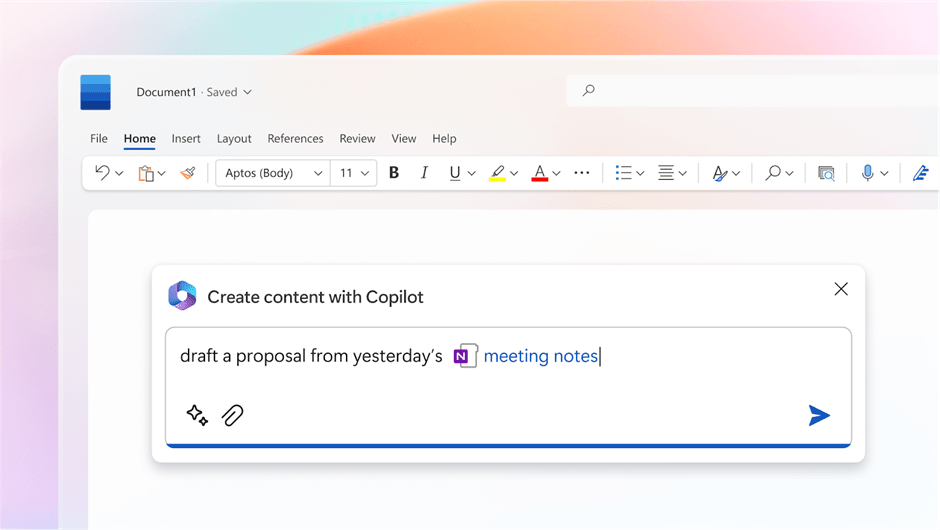
Most AI assistants live outside your daily tools, which means switching tabs. Microsoft Copilot feels different because it’s built right into the software millions of people already use—Word, Excel, Outlook, Teams, and more.
Instead of copying content between apps, you can ask Copilot to summarize an email thread, generate slides from a document, or analyze spreadsheet data, all without leaving your workspace.
For example, a manager preparing for a meeting in Teams can have Copilot pull highlights from the last 30 days of chat activity and draft and refine a report in Word.
This G2 review featured:
Copilot saves me hours of time and has allowed me to provide more for my clients than I was previously able to with helping me with sophisticated tasks and analysis.
Almost one-half of customers now believe AI agents can show empathy when handling their concerns.
That shift in trust changes what businesses expect from automation. It’s no longer enough for an agent to just complete a task.
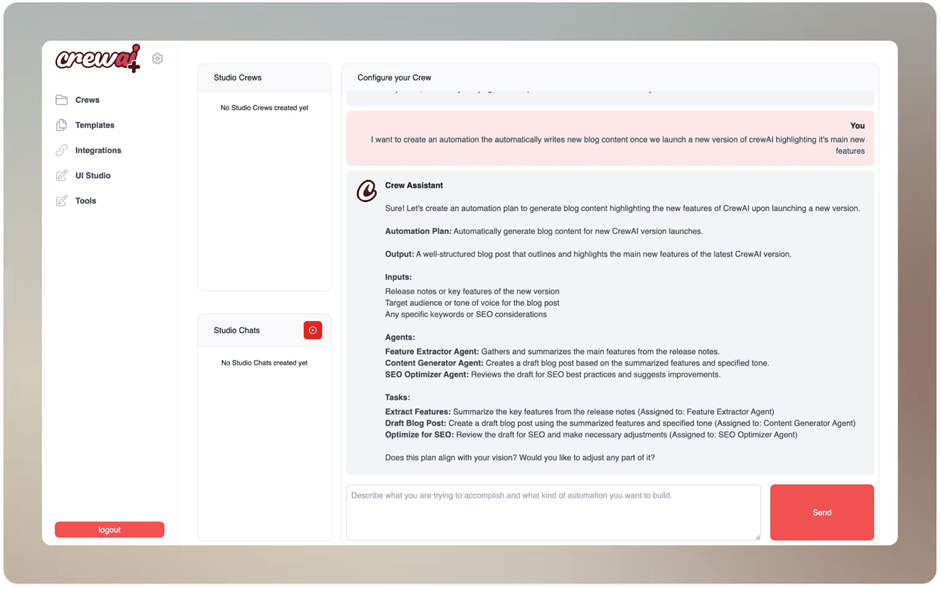
CrewAI takes the process further by helping you build teams of agents that collaborate, hand off responsibilities, and keep people in the loop when needed. Instead of a single assistant working in isolation, you get a coordinated crew that mirrors how real teams solve problems.
Built-in coordination mechanisms handle task delegation, progress tracking, and quality control.
This G2 review shares:
I love how easy it is to define specialized agents with unique roles and responsibilities, then have them collaborate in a structured workflow. The flexibility to plug in different LLMs, customize tools per agent, and define dynamic tasks through crew structure gives it a lot of power and adaptability. It’s great for building multi-agent systems without needing to start from scratch.
📖 Also Read: Powerful AI Agents Examples Transforming Industries
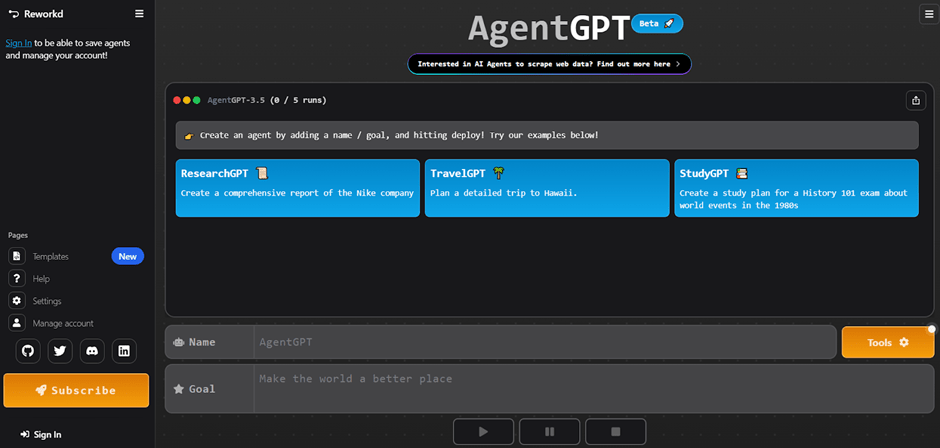
AgentGPT by Reworkd makes it easy to turn a single idea into an AI agent that runs with it.
Instead of manually breaking down every instruction, you set a goal, and the platform handles the rest by dividing it into smaller steps and completing them one by one.
Whether it’s planning a trip, drafting a report, or generating ideas for a campaign, AgentGPT gives you a taste of how autonomous agents can lighten the load on everyday work.
You can let the agent access your data or search Google, and use readymade templates for common use cases to get started quickly.
This G2 review noted:
AgentGPT is one of the best platforms where one can receive crucial and accurate results, which can be further used within a company in order to pitch some extraordinary and out-of-the-box ideas.
👀Fun Fact: Deloitte, EY, PwC, and KPMG are exploring AI systems that don’t just assist—they act. Deloitte’s Zora AI and EY’s EY.ai agentic platforms handle tasks like managing finances and compliance on their own, aiming to change consulting from hours sold to value delivered.
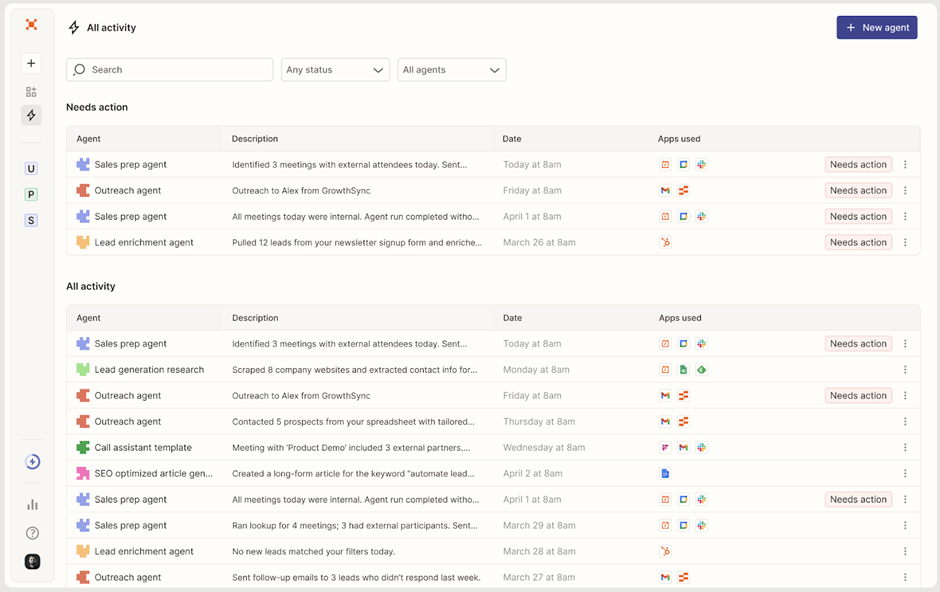
Zapier AI is where everyday work meets practical AI.
Instead of starting from a blank page, you describe what you want, and Zapier plugs smart help into the tools you already use. It connects to thousands of apps, listens for the moments that matter, and carries the task across the finish line.
If your world runs on forms, calendars, CRMs, sheets, and chats, Zapier AI slides right in. It can greet every new lead, clean the data, enrich it, and send it to the right pipeline.
The best part is how approachable it feels. You can sketch an idea in plain language and get a working flow in minutes.
Zapier’s orchestration features also let you create chatbots and custom AI Agents and connect them to company knowledge to carry out day-to-day tasks.
This Capterra review shared:
Overall, my experience with Zapier has been very positive. It has allowed me to automate repetitive tasks, freeing up time for more strategic activities. The “Zaps” are reliable, and Zapier provides clear documentation to troubleshoot errors or build more complex workflows.
📖 Also Read: Types of AI Agents to Boost Business Efficiency
I’ve always thought of AI as the most profound technology humanity is working on . . . more profound than fire or electricity or anything that we’ve done in the past.
That perspective captures both the promise and the challenge of AI. While many tools today are effective at automating simple tasks, very few can reliably handle the messy, cross-application workflows that real businesses depend on.
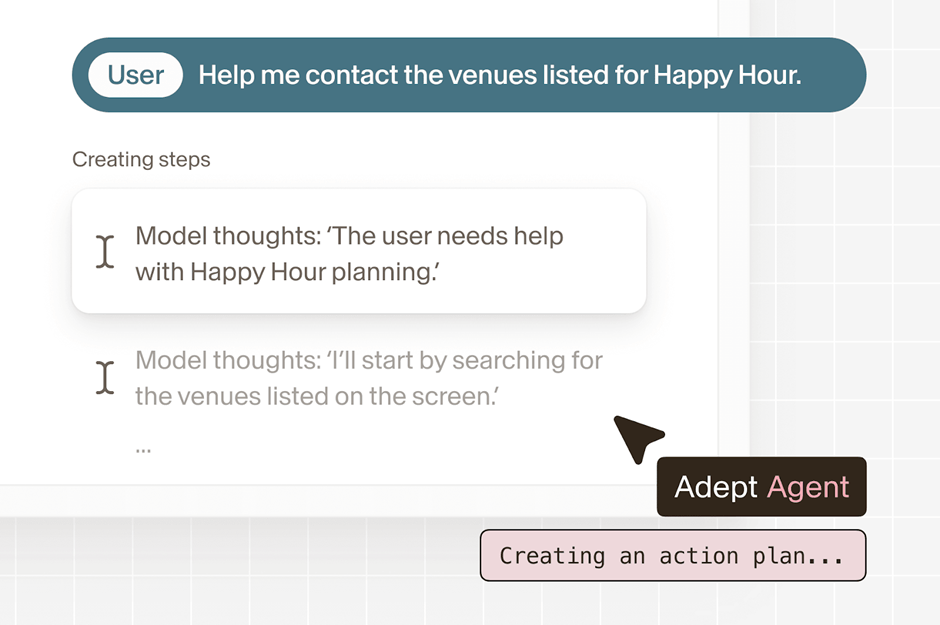
Adept AI is designed to close that gap. By combining proprietary training data, multimodal models, and a unique actuation layer, it can translate plain instructions into concrete actions across websites, PDFs, and enterprise software.
This SoftwareReviews user shared:
What makes Adept AI different is that it feels more like a real assistant than just a tool. It can understand complex instructions and carry them out across different apps, not just give answers. It also works well for both technical and non-technical users, making it more flexible than many other AI tools.
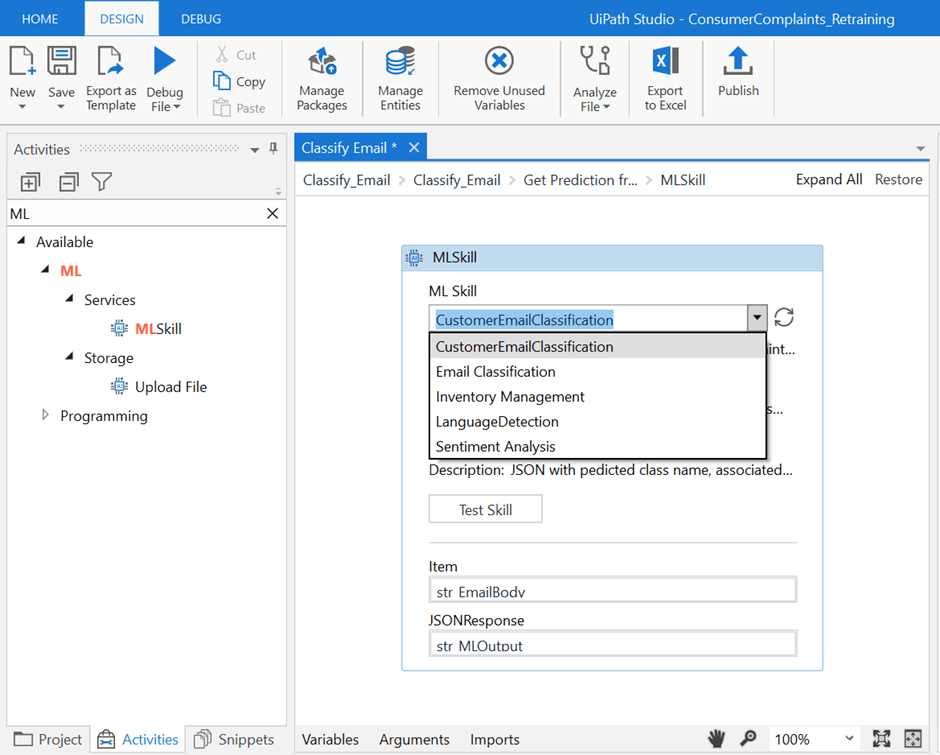
UiPath, long recognized as one of the leaders in robotic process automation, now also offers agentic AI solutions for enterprises.
Unlike traditional RPA, which follows rigid rules, UiPath blends AI agents, robots, and people into a single orchestration layer. You can build custom agents and allow them to make probabilistic decisions based on goals and context.
This means, for example, a claims processor at a healthcare company can rely on UiPath to read invoices, classify them with AI, route exceptions to humans, and close out the workflow.
UiPath provides a mature, secure, and highly scalable solution for enterprises striving to reduce costs and expedite processes.
This G2 review stated:
The new UiPath Platform for Agentic Automation is a major leap forward in enterprise automation. What stands out most is its ability to unify AI agents, robots, and human collaboration into a single, intelligent orchestration layer.
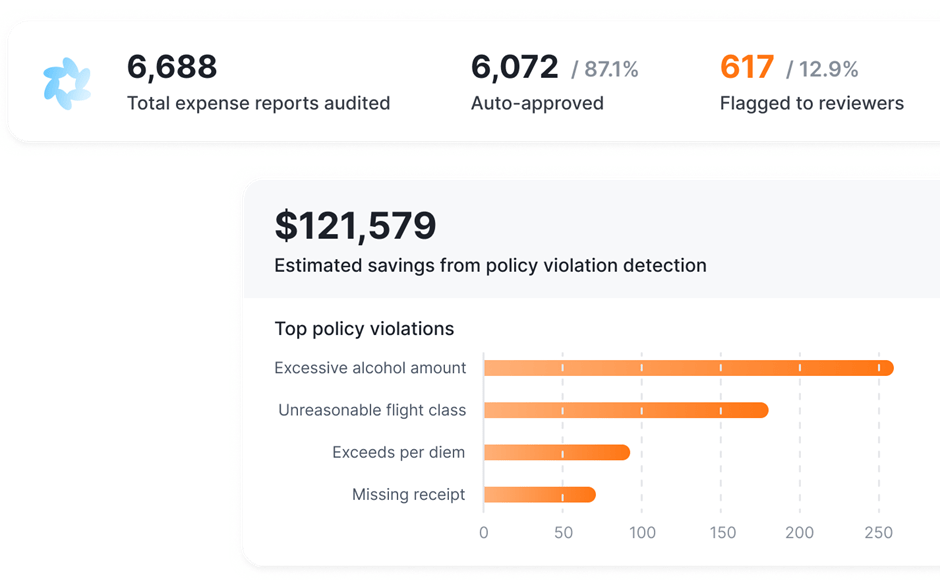
Orby takes a different path from “prompt-and-pray” LLM agents. It leans on neuro-symbolic AI and a Large Action Model (LAM) to plan step-by-step actions across apps and UIs, then shows its work with traceable reasoning.
In practice, that means you can automate multi-system processes (financial close, expense audits, vendor management) with transparent, verifiable execution rather than opaque heuristics.
Iterative feedback loops within the system help to improve its accuracy and performance over time.
Post-acquisition by Uniphore, Orby’s pitch is enterprise-grade reliability, security, and time-to-value measured in days—not quarters.
📖 Also Read: How to Use AI to Automate Tasks
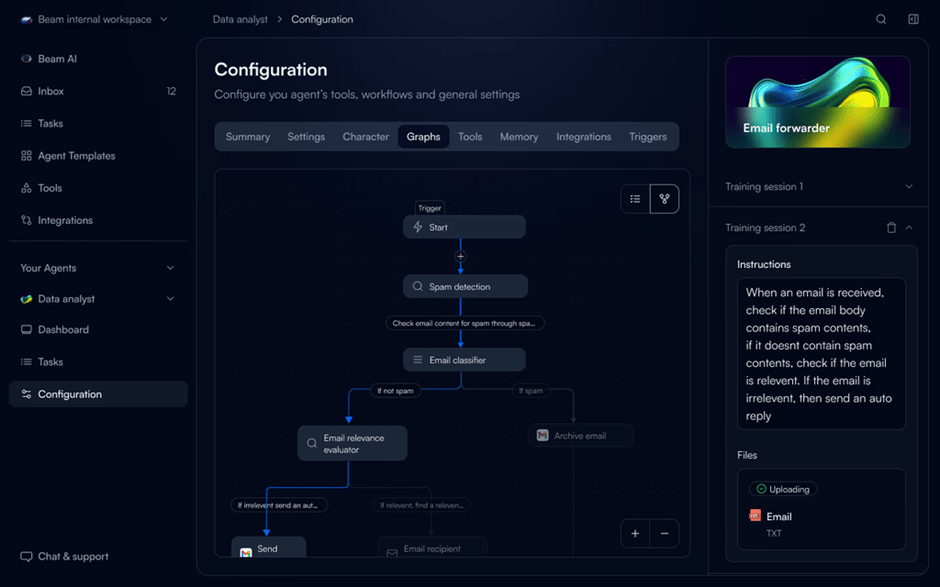
Beam takes a bold approach by positioning AI agents for project management, not just as helpers but as an enterprise-ready workforce.
Unlike many tools that focus on generic automations, Beam offers a vast catalog of pre-built agents tailored to industries like HR, finance, retail, healthcare, and legal.
Its AgentOS platform ties everything together, allowing businesses to run multi-agent systems reliably with accuracy, compliance, and speed.
Organizations can opt for cloud deployment or choose to go on-prem and keep their data in-house.
This Gartner review shared:
Using Beam AI has been a smooth and efficient experience, with simple navigation, reliable performance, and clear value in daily tasks.
👀Fun Fact: Walmart is rolling out four “super agents” powered by agentic AI to reshape how people shop and work with the company. One of them, called Sparky, can already suggest products for a workout or summarize reviews. Soon, it will even use computer vision to scan what’s in your fridge and suggest recipes on the spot.
Nearly 92 percent of companies say they’ll increase their AI investments over the next three years. But while many tools focus on web-based workflows, they often miss the reality that businesses run on a mix of desktops, mobile apps, and legacy systems.
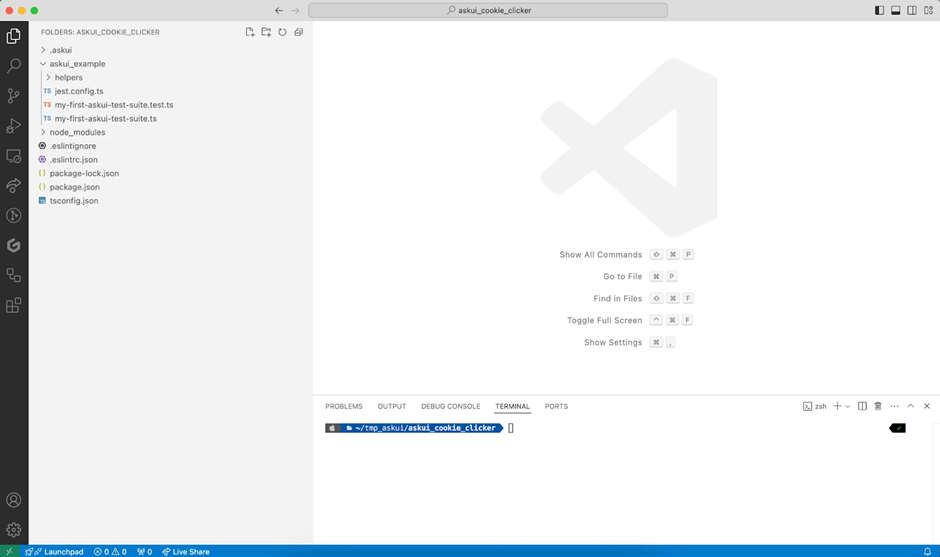
AskUI fills that gap with Vision Agents that can see and act across any device, making automation feel as natural as asking a colleague for help. You can design and build automations without knowing code or APIs.
This makes it especially useful for testing apps, processing documents, and automating tasks across mixed environments.
When KPMG Australia introduced TaxBot, an AI agent capable of drafting 25-page tax advisory reports in just a day, it revealed the transformative potential of agentic AI.
Instead of weeks of repetitive preparation, professionals could focus on higher-value judgment and strategy while AI handled the heavy lifting.
It’s proven that agentic AI is not merely theoretical. It’s changing the way industries function as we speak. Let’s look at some of its brightest applications:
For all the promise of agentic AI, the reality is that it still has growing pains. These tools are learning how to fit into the way people and organizations work, and that journey comes with hurdles worth noticing.
Just so you are not blindsided, here’s what to watch out for:
Agentic AI promises big shifts in the coming years. Not just changing the way businesses run, but also how people experience everyday services. Here are a few directions that feel especially close on the horizon:
Support will feel more natural and less like talking to a script. AI will find and fix problems before you even mention them.
Some companies are already piloting this with great success, and Gartner predicts that soon, AI will autonomously resolve 80% of common service issues, cutting operational costs significantly.
Instead of one tool doing everything, we’ll see multiple agents that communicate and share the load. One might watch shipping routes, another might adjust financial forecasts, and another might update customer messages in real time.
Think of it as a digital team quietly coordinating behind the scenes so the human team can focus on bigger decisions.
In areas like healthcare and finance, where accuracy and trust matter most, AI will play a more careful but still vital role.
These systems will provide an extra layer of support, from helping doctors flag urgent cases faster to spotting unusual financial activity before it causes harm.
We’ve covered a lot of ground in this guide, looking at how agentic AI tools are changing the way people work, solve problems, and support each other. Every tool brings something unique to the table, but what often gets lost is the bigger picture of how all these moving parts come together.
That’s where ClickUp stands out. With ClickUp Brain and AI Agents, tasks get handled before they pile up, projects stay on track without endless check-ins, and support feels faster and kinder.
But that’s not all. With everything from your project documents and tasks to team SOPs and chats in one connected workspace, ClickUp solves the problem of AI sprawl and missing context. AI can access your work and all your connected apps to manage tasks more effectively for you.
If you’ve been curious about where to start with Agentic AI, ClickUp is a safe first step. Sign up on ClickUp for free today!
Traditional automation usually follows a set of fixed rules. Agentic AI, on the other hand, can make decisions on the fly, adapt to changes, and carry tasks through from start to finish without constant instructions. It feels less like pressing buttons and more like working with a thoughtful teammate.
Yes, absolutely. You don’t need to be a giant corporation to benefit. Many tools are designed to scale, so even small teams can use them to cut down on repetitive work and free up time for the things that really matter, like serving customers or growing the business.
There isn’t one “best” option for everyone, since it depends on what you need. Some tools offer generous free versions that cover basics like task automation or simple customer support. If you’re just starting out, trying a free plan is a great way to see what works for you before investing further.
Most leading platforms take security very seriously, with protections like encryption, access controls, and detailed audit trails. That said, it’s important to choose tools that are transparent about how they handle data and meet compliance standards for your industry.
Finance, healthcare, and customer service are seeing some of the biggest gains right now. But the truth is, any field that has repetitive processes, large amounts of data, or customer interactions can benefit. From supply chains to HR, agentic AI is starting to make work smoother everywhere.

© 2026 ClickUp

There’s an easier way. Try a free AI Agent in ClickUp that actually does the work for you—set up in minutes, save hours every week.