

Do you get overwhelmed by your never-ending to-do lists? Millions of us share the struggle. We feel 24 hours just aren’t enough to get everything done!
But have you considered that the number of tasks may not be the real problem? It could just be your approach to time management.
If this sounds like you, time budgeting could be a great way for you to get on top of your to-do pile. It could be the key to taking back control of your schedule and maximizing productivity.
Whether you’re a busy professional, a student, or a parent managing a household, effective time budgeting can help you prioritize tasks and make time for what truly matters.
In this article, we’ll explore the benefits of time budgeting, practical strategies to implement it in your routine, and its benefits in everyday life.
How to Create a Time Budget to Get More Done

 Summarize this article for me please
What Is Time Budgeting?
Time budgeting is the practice of planning and allocating time to specific tasks, activities, or projects based on urgency, importance, and available hours.
Think of it like financial budgeting: just as you track income and expenses to avoid overspending, you plan where your time goes to avoid burnout, missed deadlines, or chaotic days.
By treating time as a limited resource, time budgeting helps you:
- Focus on what matters most
- Avoid overloading your schedule
- Reduce distractions and time sinks
- Set boundaries and protect your energy
It’s not just about working faster—it’s about working smarter, with intention.
Let’s say you’re a digital marketer with a packed day:
You need to write five social media captions, draft an email campaign, attend a team meeting, conduct market research, and outline an e-book.
Without a time budget, your options might look like this:
- ❌ Start with whatever feels easiest and scramble later
- ❌ Leave everything till the last minute and panic
- ❌ Multitask your way through and finish nothing well
- ✅ Or… plan ahead, prioritize, and block time for each task based on importance and energy levels
With time budgeting, you choose the productive path—designing your day instead of reacting to it.
It’s also highly flexible. Time budgeting works well alongside methods like:
- Time blocking (assigning fixed hours to specific tasks)
- The Pomodoro Technique (short bursts of focused work with breaks)
- The Eisenhower Matrix (prioritizing by urgency vs importance)
- The GTD method (capturing and organizing tasks into clear next actions)
Each method offers a different structure, but they all help you move from chaos to clarity.
📮ClickUp Insight: 92% of knowledge workers use personalized time management strategies. But, most workflow management tools don’t yet offer robust built-in time management or prioritization features, which can hinder effective prioritization.
ClickUp’s AI-powered scheduling and time-tracking features can help you transform this guesswork into data-driven decisions. It can even suggest optimal focus windows for tasks. Build a custom time management system that adapts to how you actually work!
💡 Pro tip: Mastering resource utilization and resource leveling are excellent ways to deliver projects within time and budget, especially if your team struggles with time management and budgeting.
The importance of time budgeting
Time budgeting forces you to make all critical and task-related decisions about your day before it begins. This ensures that you don’t have to make hasty decisions on the go.
Time budgeting allows you to track time spent on different tasks throughout the day. This way, you can ensure you’re using your most productive hours to tackle your most important work and leave the less important tasks for later.
For instance, you don’t like going to the dentist, but your teeth are aching. Start your day with a dentist appointment. Get your least favorite thing out of the way in the morning so that you can enjoy the rest of the day.
This way, time budgeting helps you get more done and feel accomplished throughout your day!
Why Most Time Budgets Fail (And How to Fix Them)
Even with a perfect schedule, many people struggle to stick to their time budgets. Here’s why—and how to fix it.
- Too rigid? → Add buffers between tasks so you’re not derailed by small delays.
- Too vague? → Be specific with task names. “Work on blog” becomes “Outline intro + draft first 2 sections.”
- No tracking system? → Use tools like ClickUp’s Time Tracking and Calendar View to visualize and measure your progress.
- No accountability? → Review your plan weekly and adjust based on what’s working and what’s not.
💡 Pro Tip: Use ClickUp Brain to automatically summarize long project briefs or generate estimated times for tasks. You can even ask it to build a time-blocked daily plan based on your workload!
🔄 Quick Breakdown: Pomodoro vs Time Blocking
Time Blocking: Schedule every hour of your day with specific activities. It gives your day structure and protects deep work time.
Pomodoro Technique: Work in 25-minute sprints with 5-minute breaks in between. Great for maintaining focus and avoiding burnout.
How to use both? Start with Pomodoro for high-focus tasks in your time blocks—this combo keeps your brain fresh and your tasks on track.
Summarize this article for me pleaseThe Process of Time Budgeting
👀 You Might Relate If…
- You open 10 tabs and forget why you started
- You constantly reschedule tasks without completing them
- Your days feel busy—but not productive
- You always think “I’ll get organized next week”
If that’s you, you’re not alone—and time budgeting can help.
Here are the steps to create balanced and accurate time budgets.
Step 0: Do a Time Audit Before You Budget
Before you jump into scheduling your time, pause to evaluate how you’re currently spending it.
A time audit helps you identify where your hours are going—especially the ones that seem to disappear. For 2–3 days, track everything you do. Use a journal, spreadsheet, or a digital tool like ClickUp’s time tracking to log:
- Tasks you’re doing
- Start and end times
- Energy levels
- Distractions
At the end of the audit, review the data. You’ll likely notice time leaks—meetings that run too long, unplanned social media scrolls, or long setup times for routine tasks. This insight gives you the clarity you need to budget your time realistically.
Step 1: Identify key priorities
Create a list of all the tasks you have for the day. Then, start by figuring out which task is the most time-sensitive.
Are there specific tasks or projects that need your attention today? Do you have tasks you can delegate to someone else so you can focus on other things? Can some tasks be done at a later date instead?
Identify these key priorities to focus on what’s most important for that day.
Step 2: Allocate exclusive time for each area
Once you know your priorities, allocate specific time blocks for each one.
For instance, if work, exercise, and family time are your priorities, allocate separate chunks for each priority during your day.
Divide them based on how well you can work on them at which time of the day. For example, if you’re a morning person, you can keep one hour in the morning for exercise, then keep the next 2–3 hours for focused work on critical tasks when you’ve got the most energy.
🎉 Fun Fact: You can automate your routines using ClickUp’s Recurring Tasks. Schedule daily focus sessions, morning prep, or review time to build consistent habits—without manual setup.
Step 3: Set priorities and add time buffer
Once you have listed all the tasks and blocked your time for each, assign priorities within each time block. You can mark the most crucial task as ‘P1,’ then mark a less critical task as ‘P2,’ and so on.
Set priority levels for each task so that you know which ones you must complete at that time.
It’s also a good practice to create time buffers between activities to account for unexpected delays or breaks and prevent your budget from being overshot.
Step 4: Review and adjust your time budget regularly
Finally, regularly review how you’re spending your time. Are you sticking to your planned schedule? Do you need to adjust your allocations based on what’s working and what’s not?
Stay flexible and change your schedule as tasks, commitments, and priorities evolve.
If you still struggle to prioritize your tasks or feel like you can make your day more efficient, fret not!
ClickUp’s Time Allocation Template is a ready-to-use template for beginners like you who want to plan and manage their projects confidently.
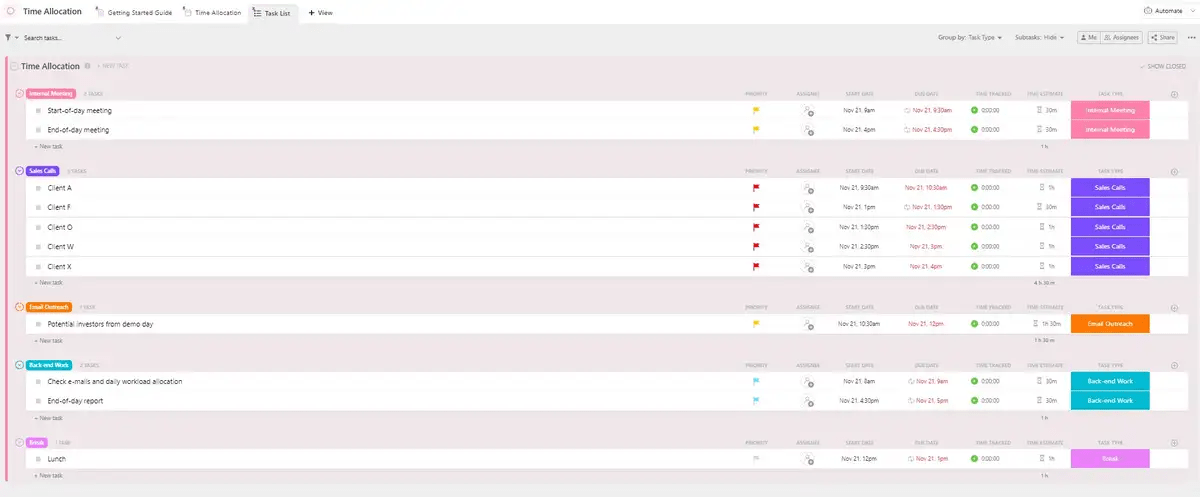
This balanced time budget template can provide structure and clarity to your day. It can help you stay focused and on track with its visual and highly customizable task views. You can view your schedule in a Task List, Time Allocation, and Getting Started Guide views.
To keep track of your and your team members’ progress, you can mark your tasks as Complete, In Progress, or To Do.
Additionally, use the template to:
- Create and assign yourself tasks in the Task List View
- Allocate specific minutes or hours to each task and ensure you don’t miss any important deadlines with the Time Allocation View
- Get helpful tips and tricks to make the most of time budgeting with the Getting Started Guide View
- Update task statuses as you make progress and move to the next one
If something doesn’t work, the template allows you to adjust your schedule as needed.
Summarize this article for me pleaseCommon Mistakes in Time Budgeting and How to Avoid Them
Although the four-step process makes budgeting time seem simple and easy, you might face some common challenges while creating your time budget.
Not using digital tools
Some people rely solely on mental notes, basic lists, or a time-tracking app to remind them of their tasks. But when we do that, we often forget critical tasks or deadlines.
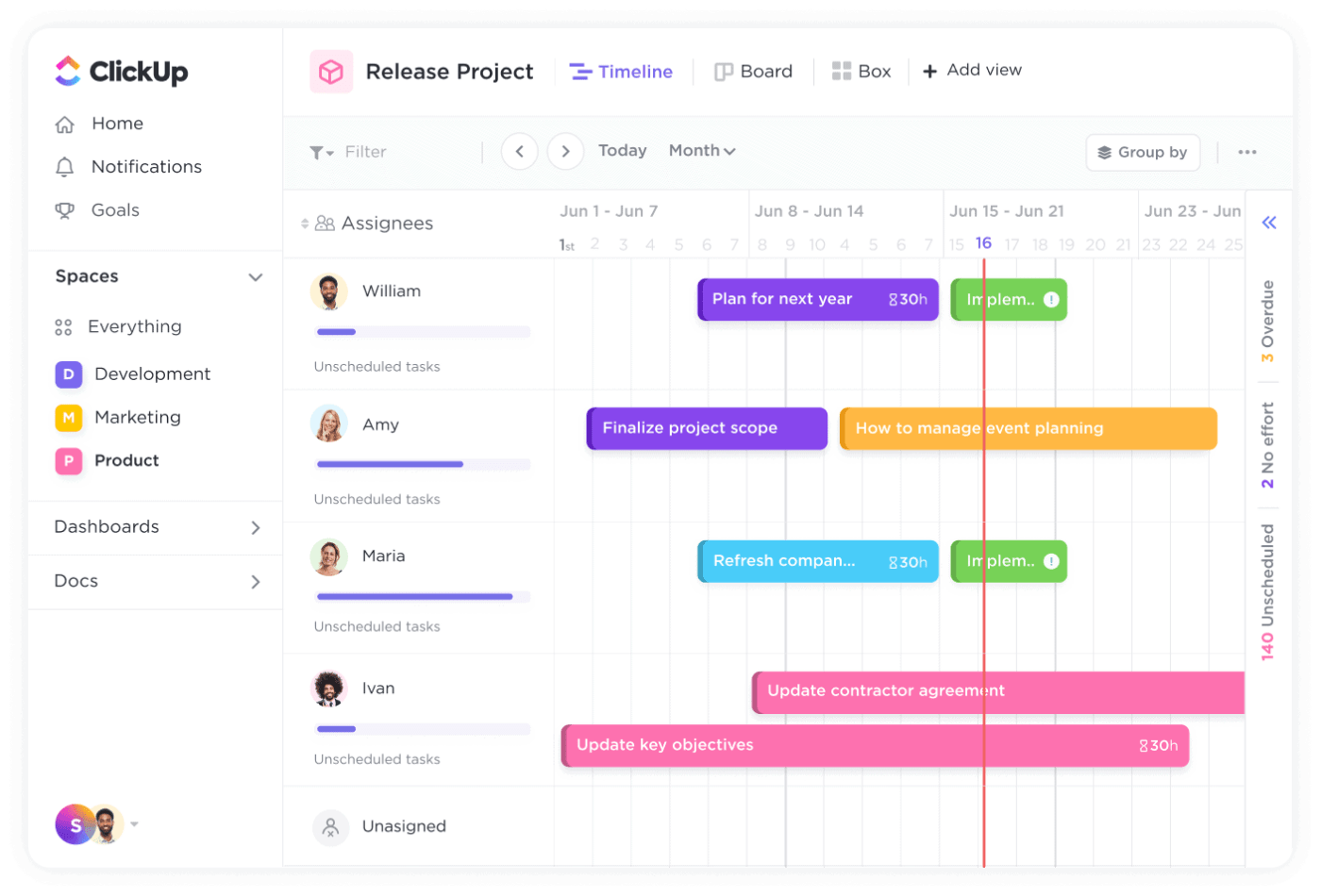
To avoid this, embrace digital tools such as calendars, task management apps, or productivity software. These can help you organize tasks, set reminders, manage your calendar and project timelines, and even analyze how you spend your time.
Apps like ClickUp, Asana, and Trello can organize your days and simplify task-related decision-making, enhancing project time management efforts.
Over-budgeting
Given a time frame, it’s common to overestimate what you can accomplish. Repeating it can lead to frustration and stress if you fall behind schedule.
To avoid over-budgeting, try to be realistic about the time needed for your tasks. Build buffer time for any unexpected interruptions or delays in your schedule.
💡Pro Tip: If you don’t know how much time to allocate to tasks, start by allocating less time. Then, make adjustments based on your actual performance later.
Neglecting budget review and adjustment
Once you create a time budget, you must regularly review how much time you set aside for every task. Schedule time weekly or monthly to assess how you’ve been using your time. Identify what’s working well and what needs improvement. If the time you allot is less or more than what you need, go ahead and adjust it accordingly.
Neglecting this step can result in a time budget that doesn’t align with reality and mess up your project completion and delivery schedules.
Summarize this article for me pleaseBenefits and Advantages of Time Budgeting
There are many benefits to managing your day through time budgeting. Let’s go through some of them together:
1. The value of time: Understanding your peak performance time
Time budgeting helps you recognize when you’re at your best during the day. We all have times when we’re super focused and energized and other times when our energy dips. You can align your most important tasks with your peak performance hours by budgeting your time.
For example, if you’re a night owl, you can schedule complex tasks or creative work at night (whenever possible) to maximize benefit and increase productivity.
2. Overcoming weak points and setting priority levels
With time budgeting, you can identify tasks or projects you struggle to complete. You may procrastinate on certain types of tasks because they’re boring or difficult to finish. Or maybe you get distracted easily.
You can overcome these weak points by setting priority levels and allocating specific time slots to tackle them. This approach ensures crucial tasks receive the attention they deserve, even if they’re not your favorite.
If you use ClickUp to manage your daily tasks, you may be familiar with a feature that makes it easy to prioritize tasks. ClickUp Task Priorities helps you to plan your future tasks with the help of four flags—urgent, high, normal, and low.
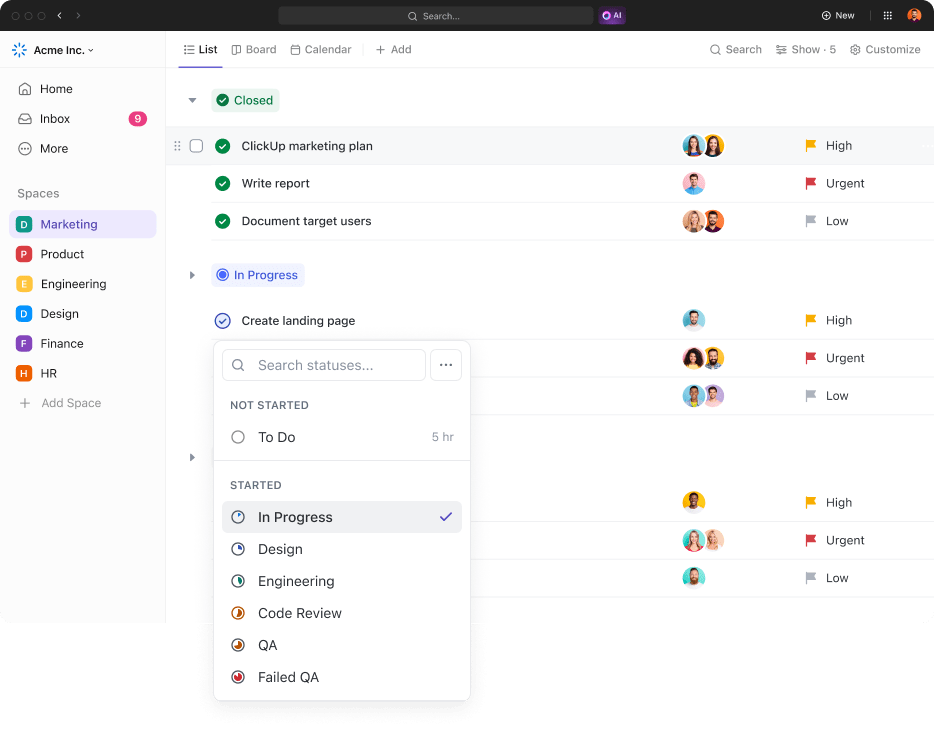
You can drop your high-priority items into your task tray so that you can work on them before other tasks. This feature is helpful if you work in a team and want to let your team members know your day’s priorities.
You can also set personal or workspace filters for due dates or priorities and then save, edit, delete, or share the filters.
3. Avoiding rush into activities and ensuring realistic goals
When you budget your time well, you avoid blindly rushing into activities, unexpected tasks, or commitments. You can only take on additional work if it is time-sensitive. This helps streamline your day and avoid burnout.
Also, you can assess how much time each task realistically requires and allocate your time accordingly.
Pacing yourself also helps you set achievable goals and prevents the stress of cramming too much into a limited timeframe. By pacing yourself, you increase the likelihood of completing tasks thoroughly and on schedule.
4. Greater self-awareness and progress tracking
Remember when, as school kids, we had homework to do over the summer? We would spend weeks oblivious to the deadlines and then finish it all toward the end, getting scolded for our carelessness.
Budgeting our time well would have saved us (and our parents) from last-minute panic. It would’ve given us bragging rights of being the first one to complete some projects. It also gave us insight into the activities we enjoyed—and ones we detested.
Time budgeting encourages self-awareness by making you conscious of how you spend your time. You gain insights into your habits, strengths, and areas for improvement.
Plus, tracking your progress against planned schedules provides a sense of accomplishment and keeps you accountable. It’s like having a roadmap that keeps you on track toward your goals.
5. Increased motivation and understanding when to set limits
Setting limits on your time for different activities builds discipline and motivation. Knowing you have dedicated time for work, relaxation, and personal pursuits encourages a healthy balance among all aspects of life.
It allows you to give your best to the task at hand and keeps you motivated to finish it.
It also helps you recognize when to say no or delegate tasks that don’t align with your priorities. This clarity prevents burnout and ensures you invest your energy where it matters most.
Summarize this article for me pleaseEnsuring Successful Time Budgeting
Successful time budgeting involves strategic planning, self-awareness, self-performance analysis, and flexibility. Here are some time management and budgeting tips for a better work-life balance:
- Delegate tasks that can be done by someone else on your team. This will lighten your workload and make time for other important work
- Establish clear boundaries between work and personal life. Define your work hours and stick to them unless necessary
- Avoid overcommitting yourself. Learn to politely decline requests that don’t align with your priorities or values
- Make time for self-care activities that recharge you physically, mentally, and emotionally, such as exercise and hobbies
You should see the positive effects of time budgeting almost as soon as you start practicing it. Here are some of the things you will notice when you use time budgeting correctly:
- You’ll become more productive as you start focusing on high-priority tasks and minimizing time wasted on less critical activities
- By having a clear plan and structure for your time, you’ll experience reduced stress and anxiety associated with uncertainty or overwhelming workloads
- You’ll have better work-life integration, ensuring that you have dedicated time for both work and personal pursuits
- You’ll be able to devote more energy and attention to each task, resulting in higher-quality work
ClickUp’s Time Management capabilities offer time tracking where you can start and stop time, jump between tasks, and add details on how time was spent. Know where you allocate time with global and manual tracking from your desktop or mobile devices.
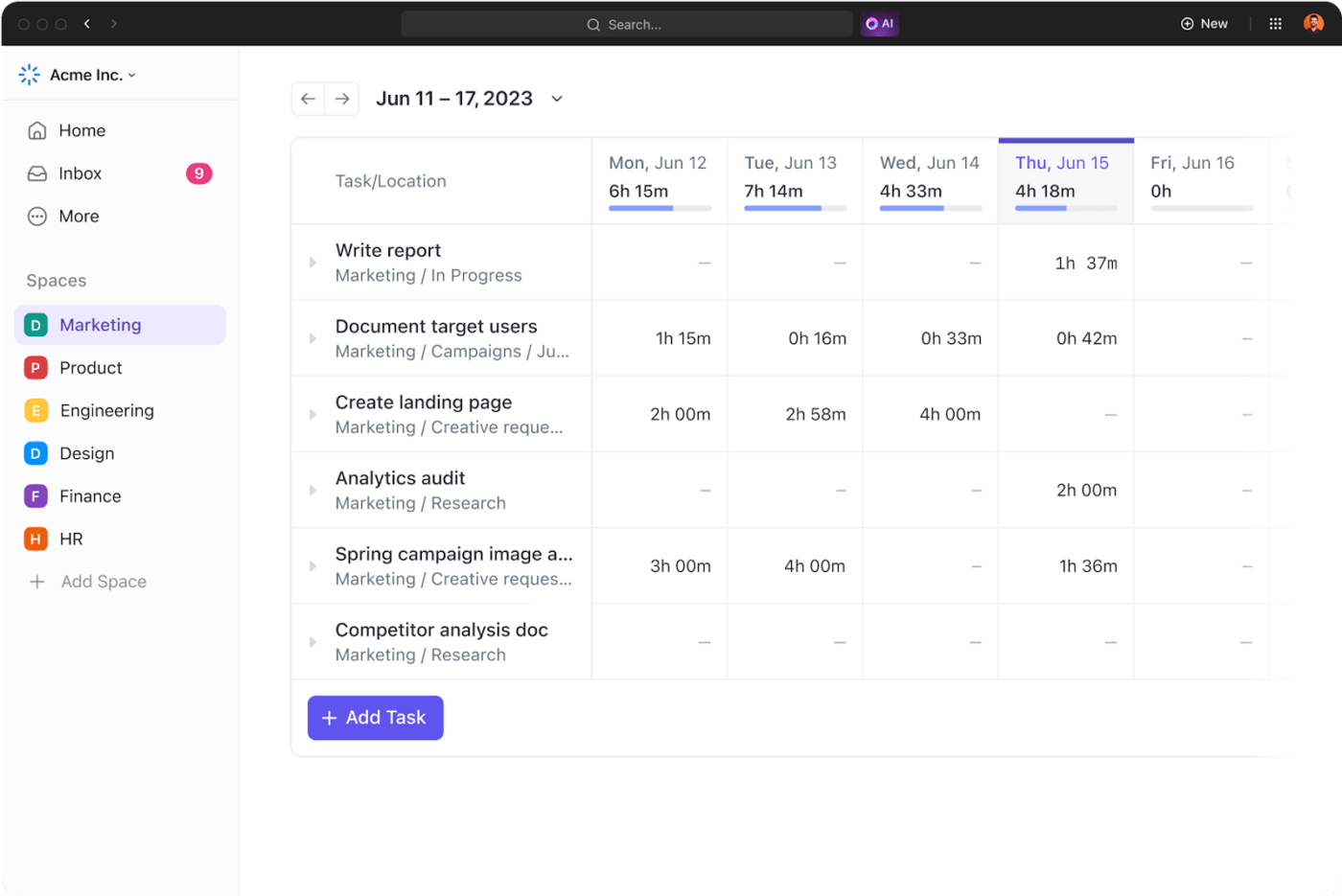
Start by defining your priorities. Create time blocks for key tasks, prioritize them, and check them off your list as you go.
With the Calendar, Gantt, Timeline, and Workload view of your schedule, view your tasks as you want to and stay accountable for your day.
Summarize this article for me pleaseStart Budgeting Time with ClickUp Today
Time budgeting is an excellent method to transform how you manage your days and achieve your goals. By setting clear priorities, allocating time strategically, and regularly reviewing your plan, you can experience numerous benefits, including increased productivity, reduced stress, and improved work-life balance.
Time budgeting helps you improve work efficiency, focus, and control over your time. It enables you to make informed decisions about where to invest your energy and resources, leading to more meaningful outcomes on both professional and personal fronts.
Remember, effective time budgeting requires constant assessment and adjustment. Stay responsive to changing priorities and circumstances. Regularly evaluate your time allocation, identify areas for improvement, set reasonable expectations, and make necessary adjustments to optimize your schedule for success.
Now is the time to take action and integrate time budgeting into your routine. Embrace tools like ClickUp to streamline your planning process and optimize your productivity. Sign up to ClickUp and take control of your time today!
Frequently Asked Questions
What’s the difference between time blocking and time budgeting?
Time blocking assigns specific hours for tasks, while time budgeting estimates how much time each task needs, then plans accordingly. You can use both together for best results.
How long should I spend on a time audit?
2–3 days is enough to reveal patterns. Just log your tasks and timestamps in ClickUp or a spreadsheet.
Can time budgeting reduce burnout?
Absolutely. It helps you set boundaries, avoid overcommitment, and align energy levels with tasks.
What tools help with time budgeting?
ClickUp offers time tracking, calendar view, recurring tasks, and AI suggestions—all in one place.
Is ClickUp only for work tasks?
Not at all! Many users use ClickUp to manage personal tasks, routines, travel plans, and even meal prep.


Everything you need to stay organized and get work done.

Recent Articles
What Is a Tiger Team? Definition, Origin, and When to Use One 
What Is a Tiger Team? Definition, Origin, and When to Use One
Marketing Agency Productivity: Where Your Margin Actually Goes
Marketing Agency Productivity: Where Your Margin Actually Goes
8 Communication Strategies That Actually Fix Team Chaos 
8 Communication Strategies That Actually Fix Team Chaos
