Sorry, there were no results found for “”
Sorry, there were no results found for “”
Sorry, there were no results found for “”
You don’t need another trade to go south before realizing you can’t improve what you don’t track. Ask any experienced trader, and they’ll tell you: a clear record of your wins, losses, and thought process separates impulsive guesses from intentional growth and trading discipline.
But staring at a blank spreadsheet isn’t inspiring when developing trading activities. That’s why having a solid trading journal template helps develop good trading habits.
To save you time and a few headaches, we’ve rounded up some of the most effective trading journal templates you can grab for free and stick with.
Let’s organize your trades and your mind a little clearer, too. 📈
🔎 Did You Know? Your favorite news source might influence the stock market, with research indicating a correlation between media coverage and trading behavior. For example, the news of after-hours earnings boosted stock prices in an astonishing 90% of all instances.
Trading journal templates are pre-designed formats that you can use to log your trades in an organized and systematic fashion. They usually come in spreadsheets or digital docs with preset columns for entry and exit prices, position size, date, direction, strategy used, and the result of the trade, among others.
Some go a step further with space to note your thoughts, emotions, or why you took the trade in the first place. The point is to make tracking consistent, so you’re not relying on memory or random screenshots.
When you track every trade similarly, patterns emerge from the market data, like which strategies work for you or how emotions affect your decisions. Ultimately, this helps you fine-tune your approach for future trading decisions.
🧠 Fun Fact: The first recorded stock trade wasn’t on Wall Street. It happened way back in 1602! The Dutch East India Company (VOC) made history by issuing shares on the Amsterdam Stock Exchange, making it the world’s first official stock market debut.
A good trading journal template should make tracking your trades easy, consistent, and insightful. Beyond being a simple trading companion, it should help you log essential details without overcomplicating the process. Here are the key components to look for:
✨Bonus Tip: Practicing trendspotting by reviewing your trading journal regularly is a great way to stay ahead in your trading journey. Look for recurring patterns, strategy outcomes, and market reactions!
Check out these free trading journal templates from ClickUp, the everything app for work, and other platforms to organize your trading plan and improve your decision-making process.
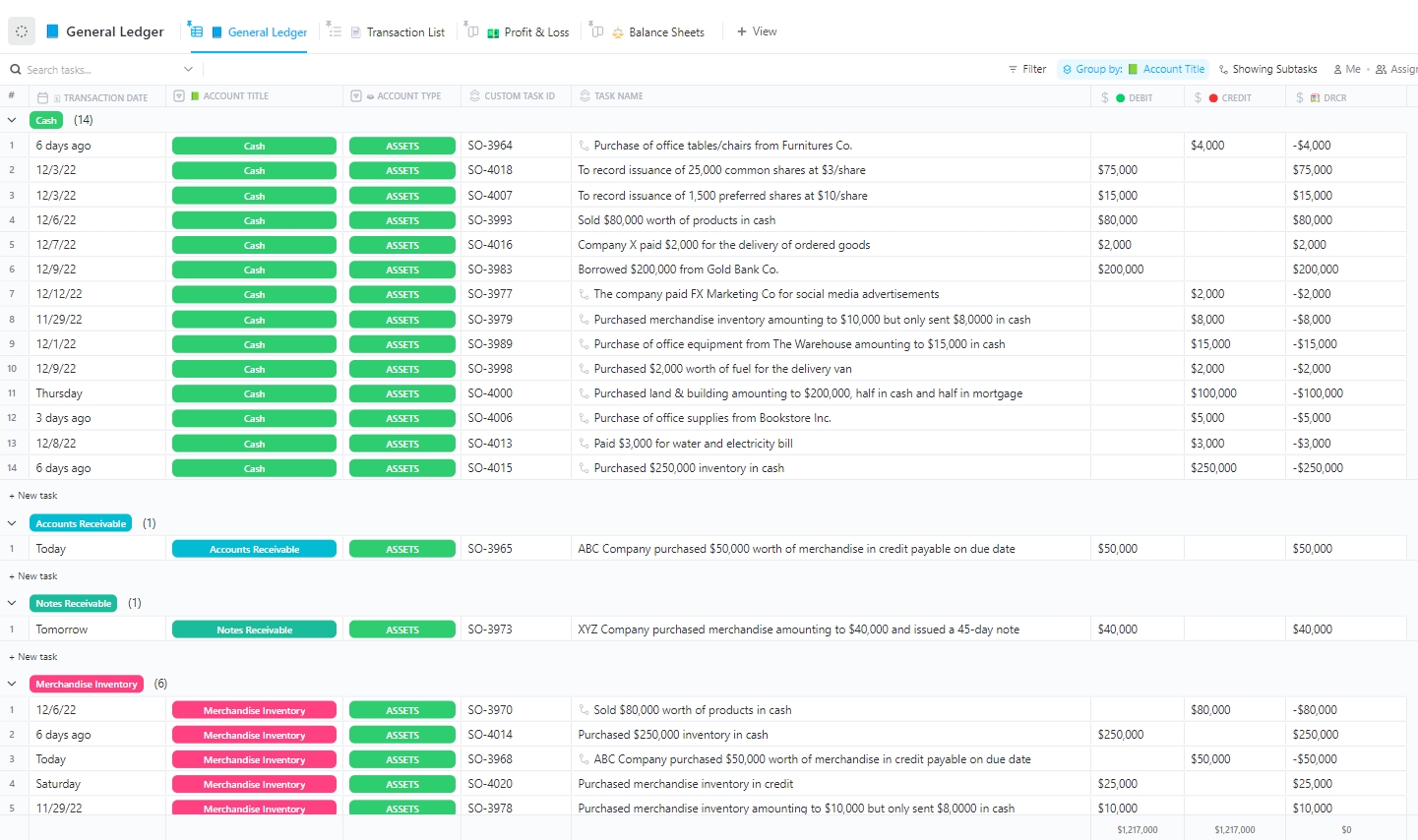
The ClickUp Journal and Ledger Template is journal-style tracking log in a unified dashboard that follows the general ledger structure. It combines trade entries, notes, P&L data, and account summaries in a digital workspace that adapts to daily or weekly trading workflows.
Each entry is easily tagged by asset class, trading strategy, or market condition, offering contextual insights that support future analysis. With Custom Fields for entry/exit price, size, fees, and trade rationale, traders get full visibility into behavior and results without relying on fragmented spreadsheets.
Ideal for: Retail traders, swing traders, and portfolio managers who need a hybrid ledger-journal format for ongoing review and money management.
📮 ClickUp Insight: The average professional spends 30+ minutes daily searching for work-related information—over 120 hours a year lost to digging through emails, Slack threads, and scattered files. An intelligent AI assistant embedded in your workspace can change that.
Enter ClickUp Brain. It delivers instant insights and answers by surfacing the right documents, conversations, and task details in seconds, so you can stop searching and start working.
💫 Real Results: By eliminating outdated knowledge management processes, teams like QubicaAMF reclaimed 5+ hours weekly using ClickUp—that’s over 250 hours annually per person. Imagine what your team could create with an extra week of productivity every quarter!
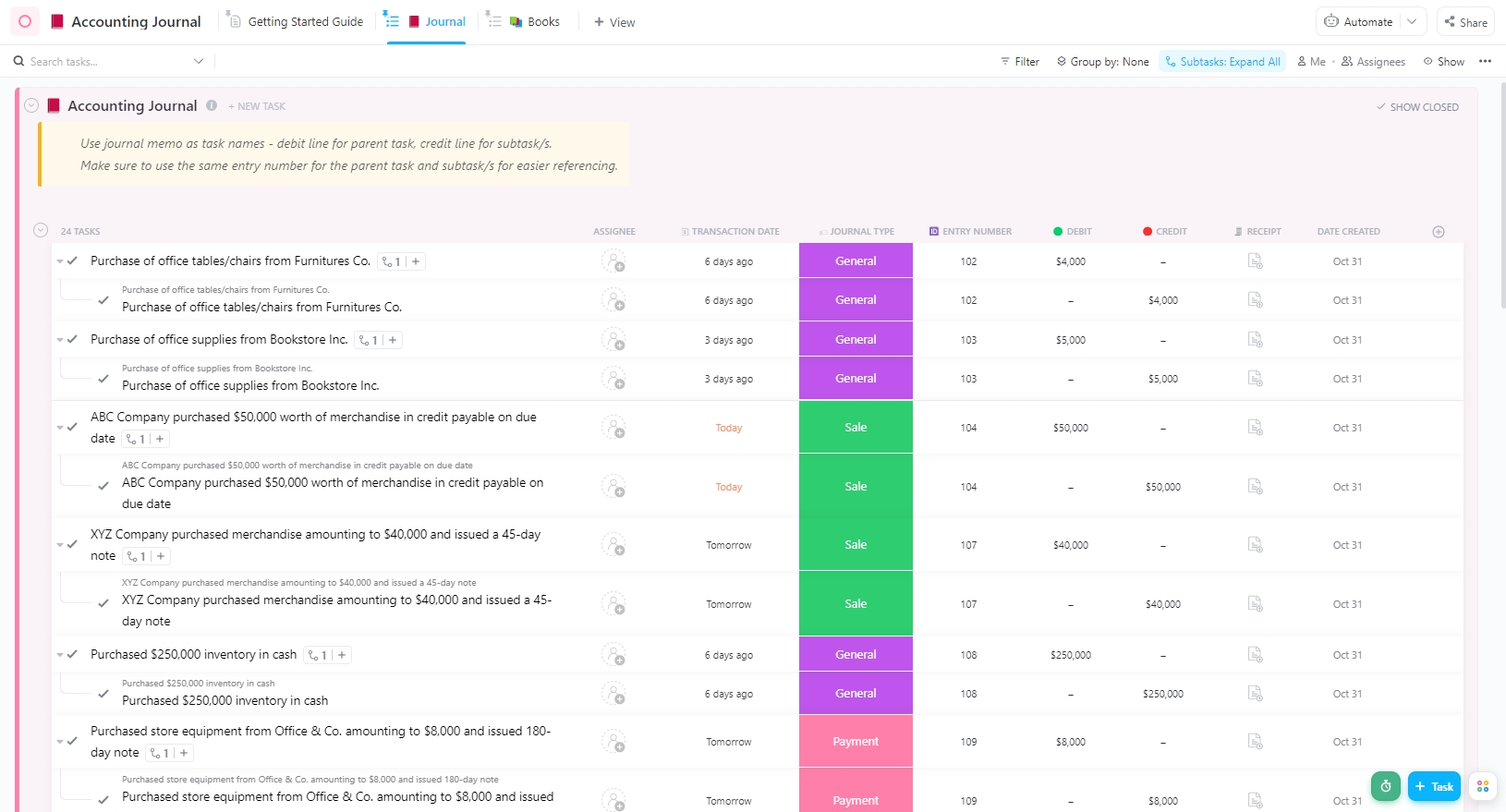
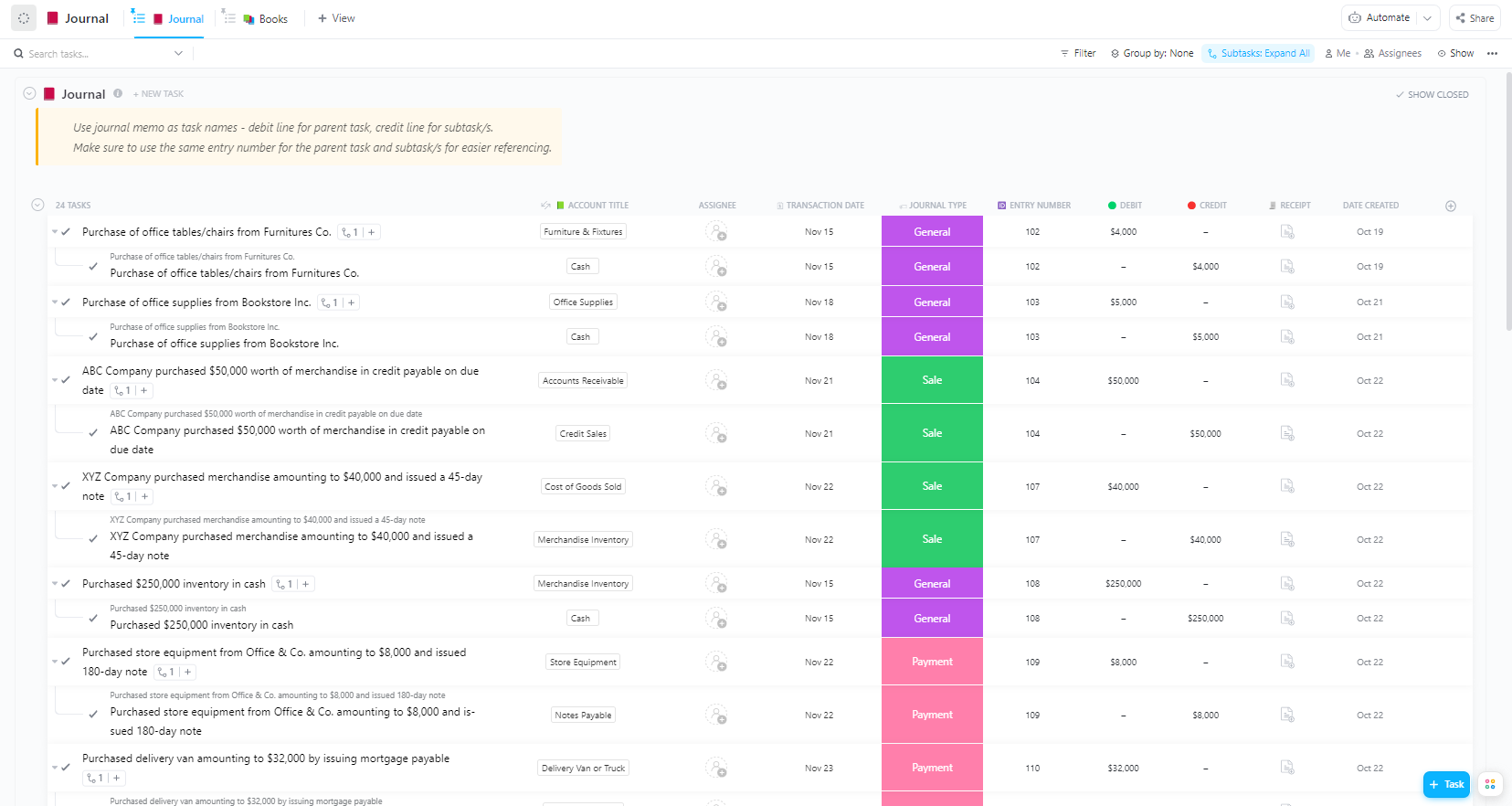
Accurate bookkeeping is non-negotiable for traders operating as sole proprietors or under LLCs. The ClickUp Accounting Journal Template helps you log transactions accurately using pre-set Custom Fields like Transaction Date, Journal Type, Entry Number, and Debit.
With everything laid out in one place, you can reduce manual entry and easily monitor your overall financial performance and key metrics. Entries are organized chronologically, with views created for specific accounts or months. Linked tasks, reminders, and document uploads help reduce end-of-year tax headaches.
Ideal for: Traders or business owners managing multiple accounts who need accurate, organized records for smarter financial tracking.
Here’s what Shireen Shalabi, Project Consultant at Raymond James Consultant, had to say about using ClickUp:
Rather than only keeping your projects on track, it is also helpful with keeping everyone who is working on the project to stay on track. For example, if I need to assign tasks to someone who is working on the same project, I can tag them in the task, and they are immediately notified via email of the task and when it is due.
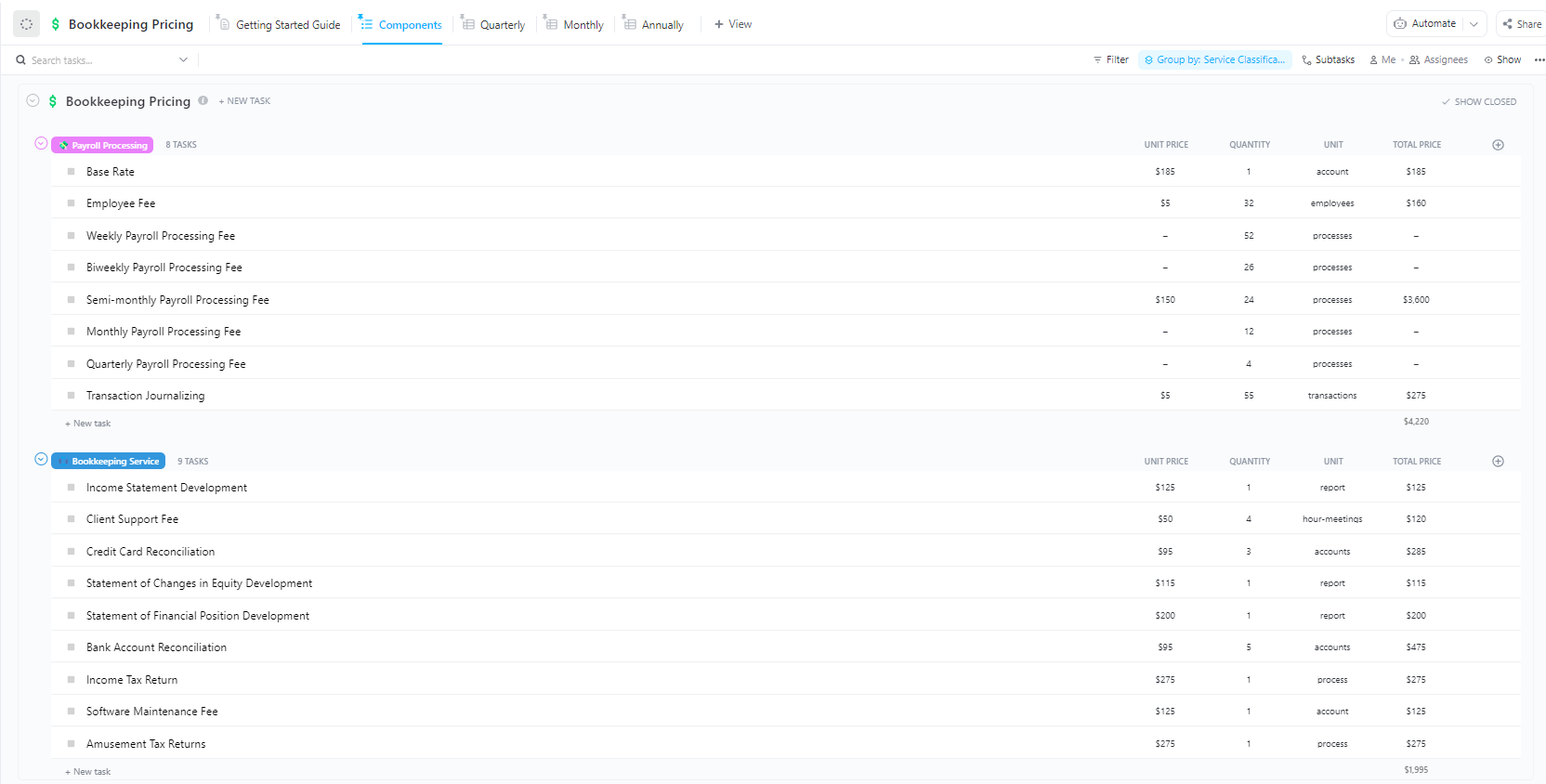
Many traders offering signal services, mentorship, or educational subscriptions struggle to formalize pricing and billing to increase profit levels. The ClickUp Bookkeeping Pricing Template solves this by laying out customizable tiers, billing cycles, service inclusions, and client-specific discounts.
The journal template lets you track services, set pricing tiers, and quickly generate quotes without digging through spreadsheets. It has five built-in views, including monthly, quarterly, and annual breakdowns, so you’ll always know where your numbers stand and how to adjust them.
Ideal for: Freelancers, beginner traders, virtual bookkeepers, or agencies that need to manage rates, quotes, and service structures.
➡️ Read More: Free Bookkeeping Templates in Excel and ClickUp
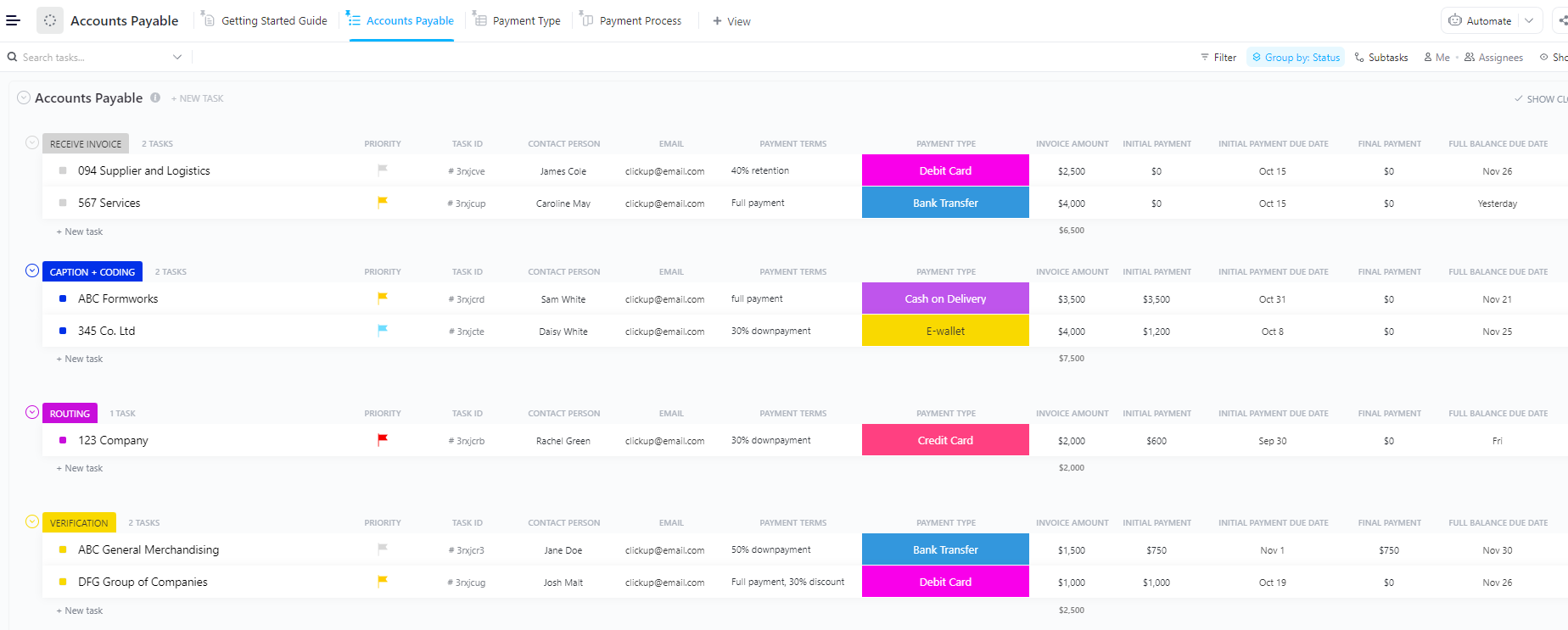
The ClickUp Accounts Payable Template clarifies your payment process, helping you keep vendor bills and payment cycles in check. The template offers a pre-built system for logging each invoice as a task and tracks all payment obligations in one clear interface.
It lets you assign statuses like ‘Receive Invoice,’ ‘Verification,’ and ‘Coding,’ and even attach receipts or notes directly to the entry. Plus, it organizes payments by vendor, due date, or account and creates automations to avoid missed deadlines through a disciplined approach.
Ideal for: Finance and procurement teams handling multiple vendors, where tracking invoice approvals and payment timelines needs to be organized.
🎥 Watch how to improve your team’s efficiency with AI Automations:
💡 Pro Tip: Avoid budget surprises by using an estimate template to break down project costs clearly and accurately before work begins.
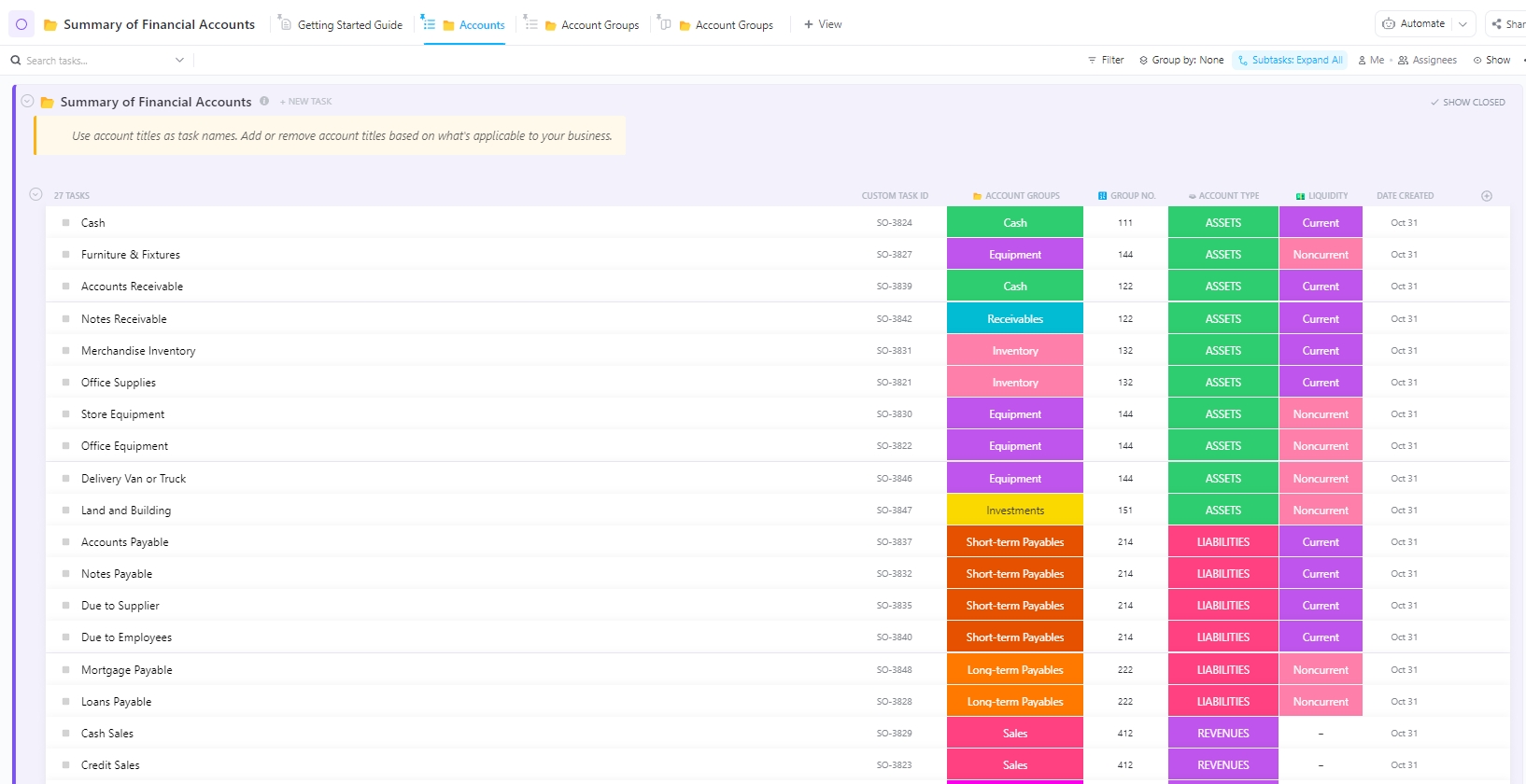
When managing multiple accounts, such as savings, credit lines, or investments, it’s easy to lose sight of the full picture. The ClickUp Summary of Financial Accounts Template combines account balances, margin levels, and account-specific performance in one workspace so you’re not constantly chasing numbers.
The template makes it relatively easier to spot trends or discrepancies with real-time insights into inflows and outflows. Track asset allocation, cash flow, and performance by account, with live filtering and timeline-based views. This makes it easier to compare brokerage performance and optimize capital allocation.
Ideal for: Traders juggling multiple accounts or strategies who want a clear, centralized overview and a consolidated, real-time summary of all financial accounts.
➡️ Read More: Free Sales Forecasting Templates in Excel and ClickUp
Behind every professional trader or asset manager is a back-office function, often scattered across multiple Microsoft Excel or Google Sheets files. The ClickUp Accounting Operations Template structures those back-end workflows: transaction logging, reconciliation, report generation, and compliance reviews.
It provides a methodical yet flexible space to track sales, expenses, payments, and everything. It also has recurring workflows, such as end-of-month balance sheets or quarterly performance summaries.
Ideal for: Accounting teams or small businesses that want to bring more structure into their day-to-day finance operations, especially those handling recurring, structured, and scalable accounting processes.
➡️ Read More: Free Balance Sheet Templates in Excel, Sheets, & ClickUp
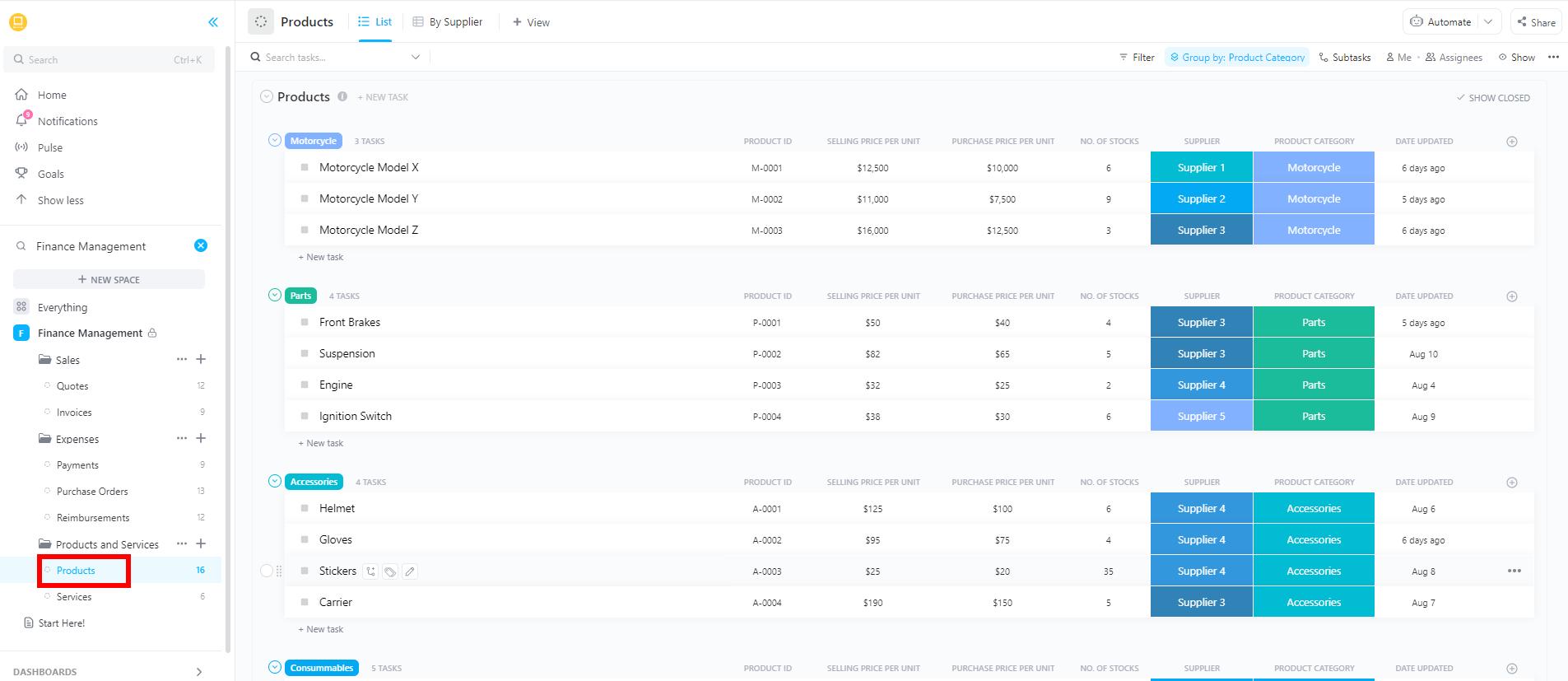
The ClickUp Finance Management Template provides a command center for managing income, expenses, recurring subscriptions, tax logs, and performance analysis. This all-in-one workspace is built to replace fragmented finance tracking systems.
Track what’s coming in, what’s going out, and what’s not adding up, and build budgets that get used. Spot spending leaks before they become problems and keep your team (and leadership) looped in without sending a dozen status updates.
Ideal for: Finance teams, founders, operations leads, traders, and consultants who need a clear, auditable history of financial activity across trading and business functions to keep a tight grip on budgeting and planning.
🎥 Want a top-level view of all your trades? Here’s a quick rundown on using ClickUp Dashboards
📚 Also Read: How to Organize Finances: A Step-by-Step Guide
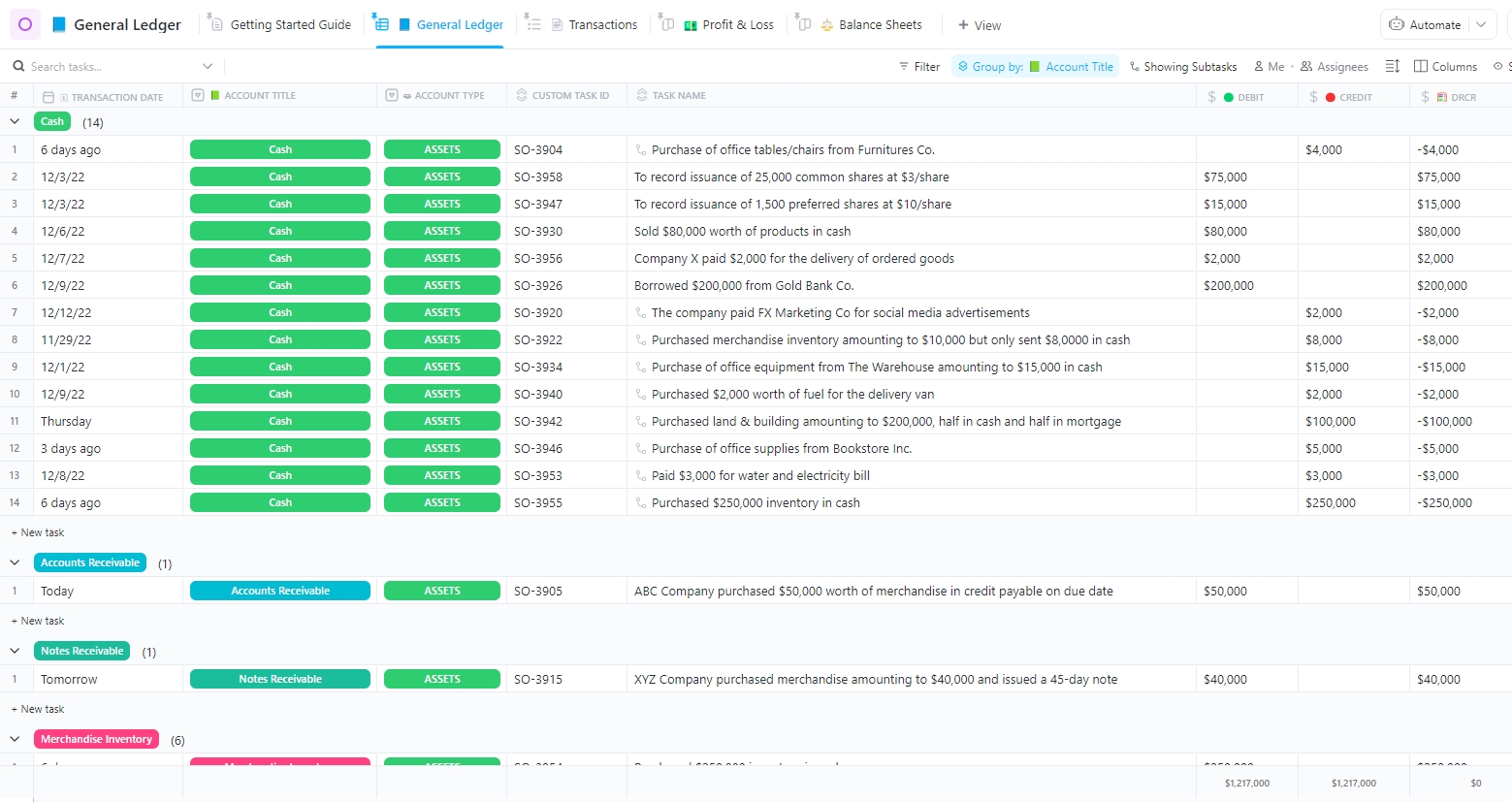
The ClickUp General Ledger Template is ideal for traders running as business entities. Though this template is built with accountants in mind, its flexible features make it just as useful for any business team. It provides a formalized double-entry bookkeeping system with organized accounts, journal categories, and real-time updates.
Each line item supports descriptions, account types, debit/credit status, and linked documentation. It lets you track transactions precisely and generate custom reports that make sense (even to non-finance folks).
Ideal for: In-house finance teams, solo bookkeepers, and anyone who’s ever had to untangle a spreadsheet from three quarters ago.
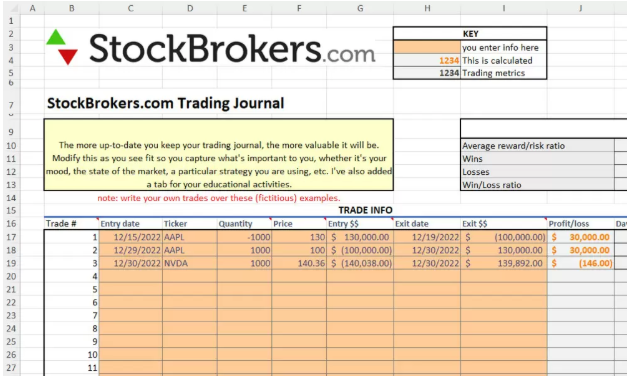
The Trading Journal Spreadsheet Template by StockBrokers.com nails what matters most: clarity, consistency, and insight.
Built in Excel but designed with serious traders in mind, this journal includes pre-built columns for symbol, entry/exit time, size, commissions, net P&L, and notes. The layout is straightforward: orange cells are yours to fill in, while gray cells automatically calculate profits, losses, and totals.
Ideal for: Day traders, long-term investors, or anyone trying to stay consistent and learn from past trades.
📚 Also Read: How to Leverage AI with Real-Time Data Insights
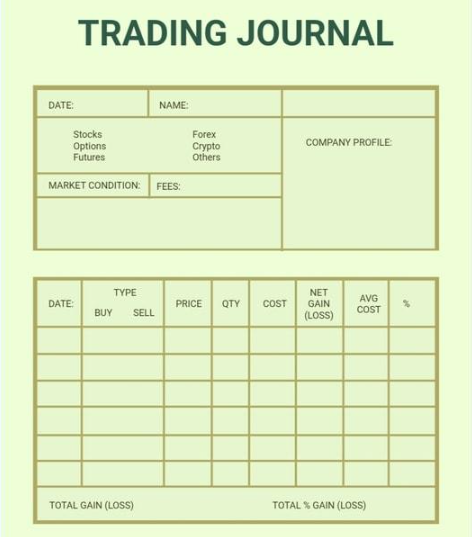
The Trading Journal Template by Template.Net is a great starting point for those who want to keep their current and future trades organized without all the bells and whistles. It’s designed for traders who wish to manually reflect on their performance with qualitative notes and summaries. This template supports trade logs, goal tracking, review sections, and space for trade screenshots or observations.
This no-fuss spreadsheet lets you record the basics: date, type (buy or sell), price, quantity, cost, net profit/loss, and your target condition. There’s also space to log company details and investment types, which is helpful if you want to monitor patterns across sectors.
Ideal for: Traders focused on learning through self-review and behavioral journaling rather than just stats.
💡 Pro Tip: AI thrives on live patterns constantly evolving with user behavior, market swings, trade details, risk charts, trade size, and operational shifts. Thus, feeding your AI real-time information is the key.
Everything around us is going digital, so why should accounting and financial management still be stuck in endless spreadsheets and email threads? It’s time to give your finances the upgrade they deserve.
Financial clarity doesn’t have to come at the cost of time or sanity.
ClickUp trading journal templates make it easier to track and analyze your financial goals with confidence. Thanks to its versatile and thoughtfully designed finance templates, you can finally replace confusion with control.
Take charge of your finances by signing up for ClickUp for free today!

© 2026 ClickUp