






Still downloading templates?
There’s an easier way. Try a free AI Agent in ClickUp that actually does the work for you—set up in minutes, save hours every week.
Sorry, there were no results found for “”
Sorry, there were no results found for “”
Sorry, there were no results found for “”

Method CRM works well if your business lives inside QuickBooks or Xero, but its tight focus on accounting can feel limiting.
You might find your team struggling when a process doesn’t fit neatly into that accounting-centric world. This is especially true when a deal closes and the real work begins, forcing you to switch to another tool and repeat the same updates across multiple platforms.
This guide breaks down 12 Method CRM alternatives that solve this handoff problem, comparing their CRM capabilities, automation power, project management features, and ability to keep customer context intact from first contact through final delivery.
When your sales data is in one place, and your project execution is elsewhere, you lose momentum. Your team wastes time manually transferring information, and the full customer story gets lost in the shuffle. If you’re feeling constrained by limited customization options or a lack of robust project management features, it’s time to consider an alternative.
Here are the key reasons you might be looking for a change:
Modern alternatives solve these issues by providing converged workspaces. They bring your CRM, projects, documents, and team communication into one place, eliminating the tool sprawl that slows you down.
📖 Read More: 10 Best CRM Software Examples and Their Use Cases
Here’s a quick summary:
| Tool Name | Key Features | Team Information | Pricing |
| ClickUp | AI Super Agents; Unified CRM & Projects; Automated deal-to-project conversion | All Sizes (Teams bridging the gap between sales and delivery) | Free Forever; Custom plans available |
| Salesforce Sales Cloud | Einstein AI; Massive AppExchange; Limitless customization | Enterprise (Large organizations with complex, global sales cycles) | Paid plans from $25/user/month |
| HubSpot CRM | Inbound marketing tools; Free core CRM; Email sequences | SMB to Mid-Market (Marketing-focused teams scaling lead gen) | Free; Paid plans from $15/seat/month |
| Zoho CRM | Zia AI; Canvas UI Studio; Part of 50+ app Zoho One suite | Small Business (Teams seeking deep features on a budget) | Paid plans from $14/user/month |
| Pipedrive | Visual Kanban pipeline; Activity-based prompts; Smart Docs | Small to Mid-Sized (Sales-driven teams focused on momentum) | Paid plans from $19/user/month |
| monday CRM | No-code visual boards; Cross-board dashboards; High flexibility | All Sizes (Teams wanting highly visual, custom workflows) | Paid plans from $12/seat/month |
| Dynamics 365 | Microsoft 365 native; Power BI analytics; LinkedIn sync | Enterprise (Organizations already deep in the Microsoft stack) | Paid plans from $65/user/month |
| Nutshell | Built-in email marketing; Simple pipelines; Pipeline automation | Small Teams (Sales teams handling their own marketing outreach) | Paid plans from $19/user/month |
| Bigin by Zoho | Pipeline-centric; Built-in telephony; Web forms | Micro-Teams/Solo (New users who find standard CRMs overwhelming) | Free; Paid plans from $9/month |
| ActiveCampaign | Advanced automation builder; Site tracking; Lead scoring | Marketing-Heavy (Teams focused on sophisticated email nurturing) | Paid plans from $15/month |
| Insightly | Relationship linking; Integrated project handoff; Custom objects | SMB Service Providers (Teams managing post-sale project delivery) | Paid plans from $29/user/month |
| Freshsales | Freddy AI; Built-in phone/email; Sales sequences | Mid-Market (Fast-growing teams using AI to score leads) | Free; Paid plans from $11/user/month |
Our editorial team follows a transparent, research-backed, and vendor-neutral process, so you can trust that our recommendations are based on real product value.
Here’s a detailed rundown of how we review software at ClickUp.
We looked at each tool through the lens of a Method CRM user’s biggest challenges. Our evaluation focused on CRM capabilities, ease of integration with other tools, project management features, and the ability to automate workflows. Eliminate tool sprawl by using the only true converged workspace—ClickUp—while other tools excel in specific areas. ✨
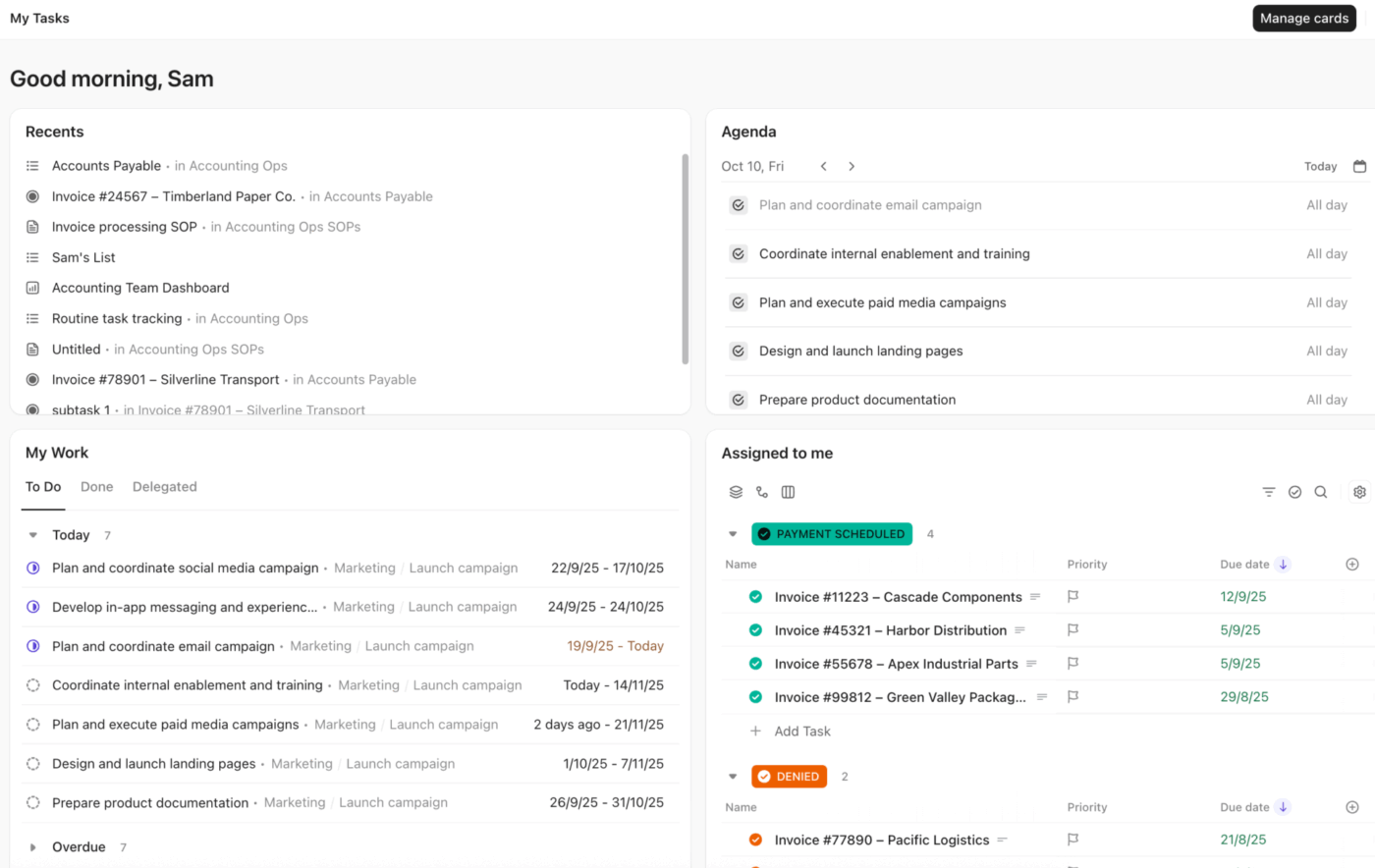
Method CRM works well when your focus is on tracking deals inside an accounting-led system. The friction starts the moment a deal closes. Customer details reside in the CRM, while the actual work takes place elsewhere. Projects begin without context, delivery teams have to reconstruct expectations, and sales promises live in emails instead of the system of record.
ClickUp is built for teams that want to manage the entire customer lifecycle in one place. Instead of treating CRM and project execution as separate phases, ClickUp connects them inside a single workflow. Leads, deals, delivery work, documentation, and communication all live in the same workspace, so context doesn’t disappear when ownership shifts.
During the sales phase, teams use ClickUp’s CRM structure to track leads, accounts, and opportunities in pipelines that reflect how they actually sell. Customer details, deal value, timelines, and notes stay attached to each record via Custom Fields, giving sales and delivery teams a shared view of the relationship as it evolves. This eliminates the need to recreate or reinterpret information later.
When a deal is marked as won, automation takes over. ClickUp Automations can instantly convert the deal into a delivery project, assign owners, set timelines, and notify the right teams without manual coordination. Instead of relying on handoffs or follow-up messages, the system ensures work starts immediately with clear ownership and expectations.
ClickUp Super Agents extend this hands-off approach even further. They can help triage incoming requests, generate task updates, handle routine follow-ups, and move work forward based on predefined rules or context. This reduces the need for constant check-ins and status updates, allowing teams to focus on execution rather than orchestration.
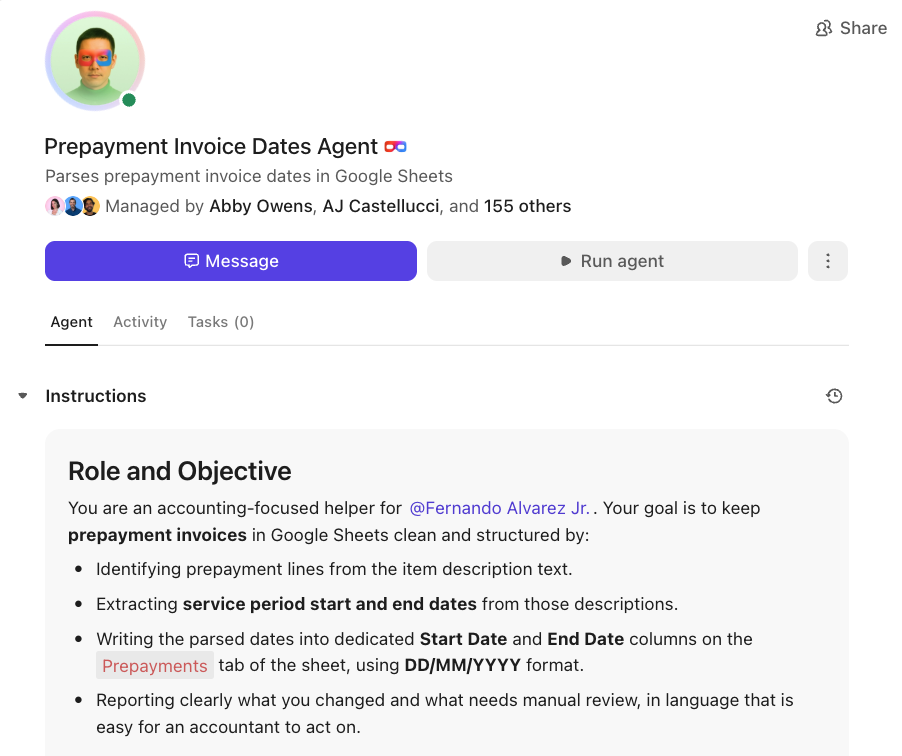
As work progresses, ClickUp remains the operational hub. Tasks, dependencies, and milestones live alongside customer information, while ClickUp Brain helps teams quickly understand what’s happening across deals and projects. It can summarize activity, surface risks, and provide instant context without digging through records or dashboards.
Collaboration and knowledge retention happen where the work already lives. Contracts, proposals, runbooks, and delivery notes are documented in ClickUp Docs and linked directly to tasks and customers. Conversations happen in ClickUp Chat, tied to the work they reference instead of scattered across tools. It’s your CRM plus an AI-powered execution layer, supported by deep context!
Pros:
Cons:
A user review says:
ClickUp is extremely versatile and allows me to create solutions for practically any business case or process. The automations and AI agents are also super powerful! I can setup automatic actions via logic or via AI prompts to run do just about any action in ClickUp I can imagine. Lastly, just the pace of product updates. There are truly significant feature updates every month and the company is heavily invested in its growth.
📖 Read More: CRM Components: How to Manage and Optimize Your CRM
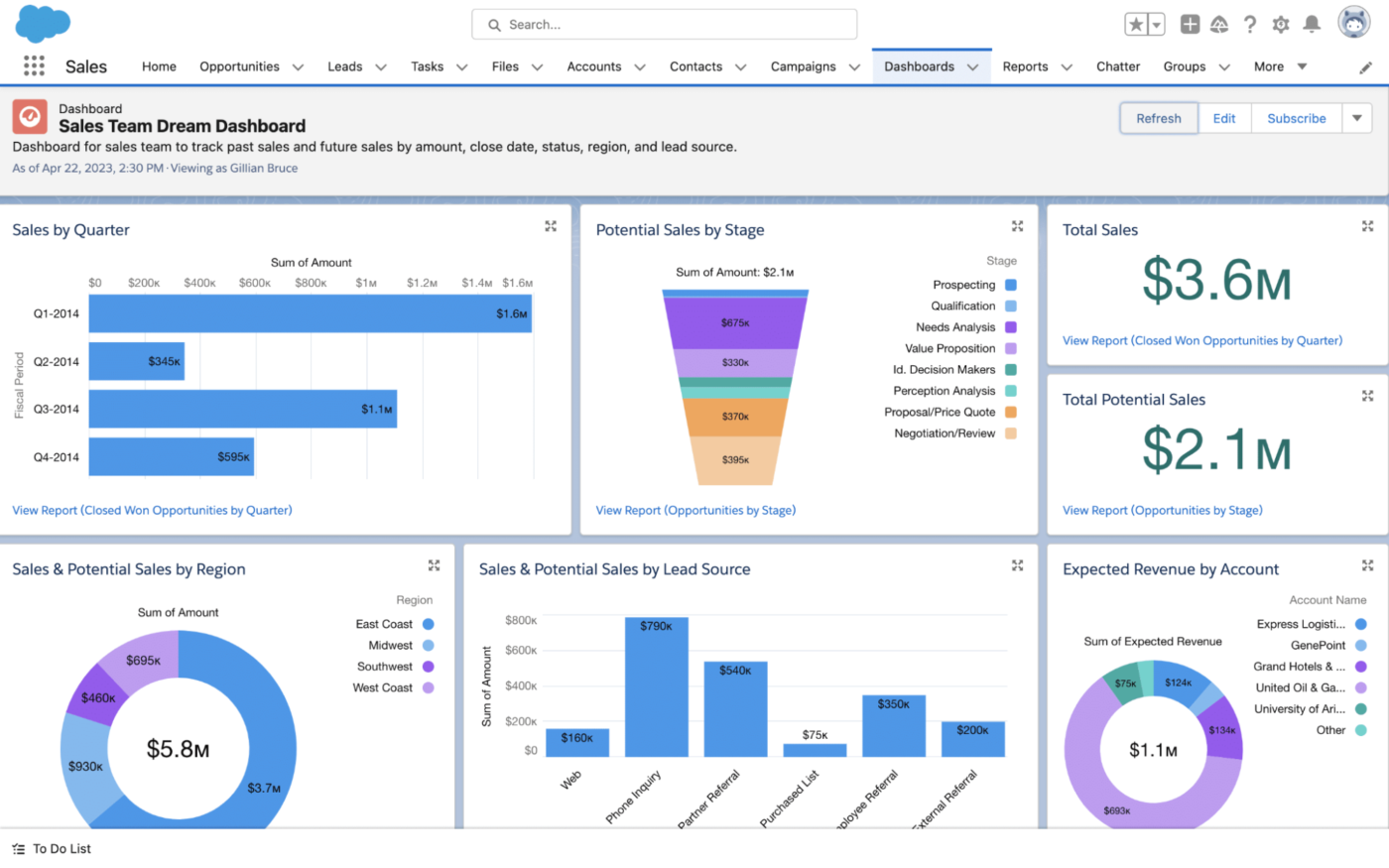
If you feel like your business has outgrown Method CRM’s simpler structure and you’re hitting a wall with its customization limits, Salesforce is the enterprise-grade alternative. Your complex sales process is being forced into a rigid system, and you can’t build the specific workflows your organization needs to scale effectively. This is a common growing pain for businesses that need more power.
Salesforce Sales Cloud is designed to solve this by offering nearly limitless customization. Unlike Method CRM, which is built around QuickBooks, Salesforce is a platform you can build on. With its Lightning Platform and AppExchange marketplace, you can create a CRM that perfectly mirrors your unique and complex sales operations, integrating with almost any other business system you use.
The AI, called Einstein, helps with predictive lead scoring and forecasting, while its reporting tools give you deep visibility into every aspect of your sales cycle. However, this power comes with significant complexity. Implementing Salesforce typically requires dedicated administrators or external consultants, making it a better fit for large organizations with the resources to invest in setup and ongoing maintenance.
Pros:
Cons:
A user review says:
My favorite aspect of Salesforce Sales Cloud is the seamless integration it provides for both the AI agent and the human SDR. Its ability to centralize data is key. This high frequency of use lets the AI pinpoint genuinely hot leads, which the human SDR can act on instantly.
The system’s ease of use and smooth ease of implementation mean we hit the ground running. Furthermore, reliable customer support ensures any issues are quickly resolved. This seamless collaboration is what truly drives efficiency and maximizes conversions.
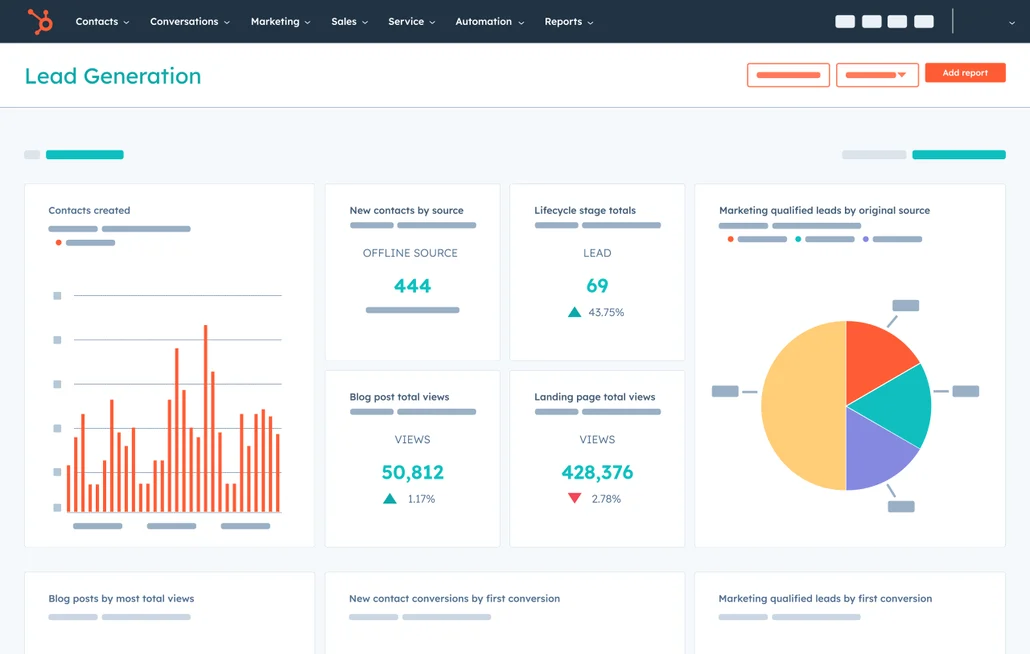
Is the cost of a full-featured CRM a barrier for your team? You might feel stuck, either paying for a tool with more features than you need or missing out on crucial marketing automation because it’s too expensive. This is a common frustration for small businesses and startups looking for a powerful yet accessible solution.
HubSpot CRM addresses this directly with its popular freemium model. The core CRM is completely free with no user limits, making it an attractive option for teams leaving Method CRM who want to try a platform before committing financially.
The tool comes with integrated marketing tools, including email sequences, landing pages, and lead nurturing workflows, that connect your campaigns directly to your CRM records. The interface is clean and intuitive, allowing for quick adoption. Keep in mind that while the free CRM is generous, accessing more advanced sales and marketing features requires upgrading to paid “Hubs,” which can become costly as your team scales.
Pros:
Cons:
A user review says:
It was easy to set up even though I had never used HubSpot before. It provides a lot of helpful features from managing our sales pipeline to workflow automations. It’s our customer database too. I like that it has a lot of easy integrations so we can communicate with other platforms we use. The customer support is pretty fast and helpful.
📖 Read More: How to Successfully Implement a CRM System
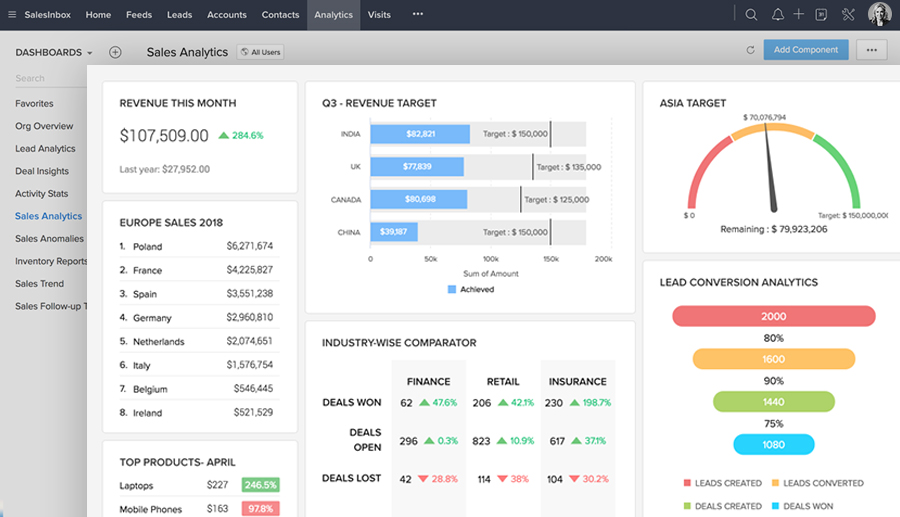
If you’re looking for more power than Method CRM offers but are wary of the high costs of enterprise solutions, you might feel caught in the middle. This is a frequent challenge for small to mid-sized businesses aiming to compete with larger players.
Zoho CRM is a value leader in this space, offering a comprehensive suite of CRM features at price points that are significantly more accessible. For teams leaving Method CRM due to cost or feature limitations, Zoho provides more functionality for every dollar spent. Its AI assistant, Zia, helps with lead scoring and deal predictions, while its Blueprint feature allows you to build visual workflows to standardize your sales process.
Furthermore, Zoho CRM is part of the broader Zoho One ecosystem, which bundles the CRM with dozens of other business applications. This creates a deeply integrated suite for teams looking to consolidate their software stack beyond just CRM, covering everything from finance to HR in a single subscription.
Pros:
Cons:
A user review says:
Zoho CRM stands out as a reliable and affordable option, especially for small to mid-sized businesses. Its intuitive interface makes navigation simple, though mastering some of the more advanced features may require a bit more time. The setup process is easy to follow, aided by clear instructions and ready-made templates that help streamline the experience. Zoho CRM is designed for daily use and excels at managing ongoing sales activities and customer relationships. The platform offers a robust suite of features, including automation, analytics, and AI-powered insights, all of which contribute substantial value. Customer support is generally responsive, but the quality of assistance can differ based on your subscription level. Integration with other Zoho products and third-party services is smooth and flexible, making Zoho CRM a versatile solution for diverse business requirements.
📖 Read More: Top 8 CRM Alternatives to Improve Your Business
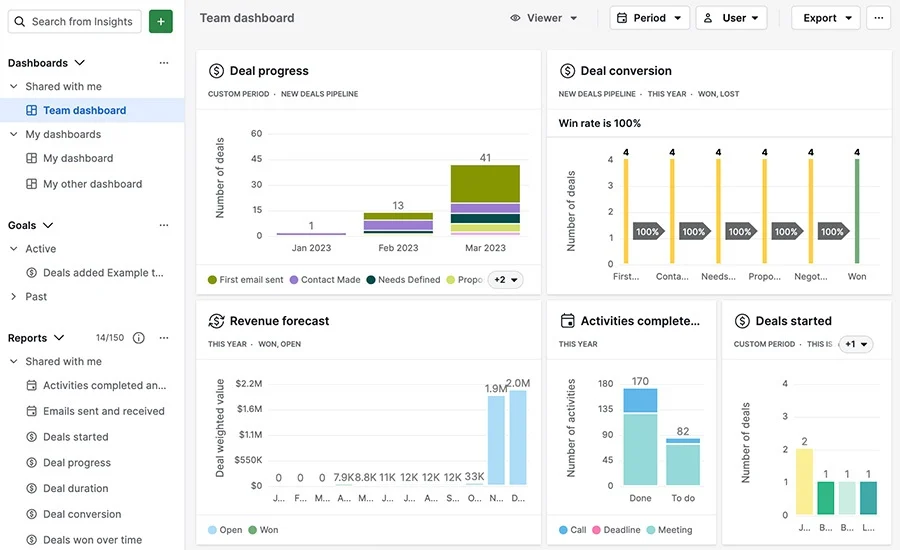
When your CRM doesn’t guide you on what to do next, reps can lose focus, and opportunities can stall. Pipedrive was built by salespeople to solve this exact problem.
Its philosophy is centered on activity-based selling, which means it prompts your team to focus on the tangible actions—calls, emails, and meetings—that move deals forward. The centerpiece of the platform is its visual Kanban pipeline, which makes deal progression intuitive and satisfying to manage.
The tool helps you see exactly what needs to be done for every deal, ensuring no follow-ups are missed. It’s intentionally designed to be a pure sales tool. This means that while it excels at pipeline management, you’ll need to integrate other tools for more robust project management or marketing automation.
Pros:
Cons:
A user review says:
Very focused on the right activities, and not on burdensome forms or tick-boxes. The integrations between computer and phone access are instantaneous and really helpful. I use it every day, whereever I am. Having used a few other CRMs over many years, I firmly believe Pipedrive is the best for my needs, which are sales-focused with a lot of service follow through.
📮 ClickUp Insight: The average professional spends 30+ minutes a day searching for work-related information—that’s over 120 hours a year lost to digging through emails, Slack threads, and scattered files.
An intelligent AI assistant embedded in your workspace can change that. Enter ClickUp Brain. It delivers instant insights and answers by surfacing the right documents, conversations, and task details in seconds—so you can stop searching and start working.
💫 Real Results: Teams like QubicaAMF reclaimed 5+ hours weekly using ClickUp—that’s over 250 hours annually per person—by eliminating outdated knowledge management processes. Imagine what your team could create with an extra week of productivity every quarter!
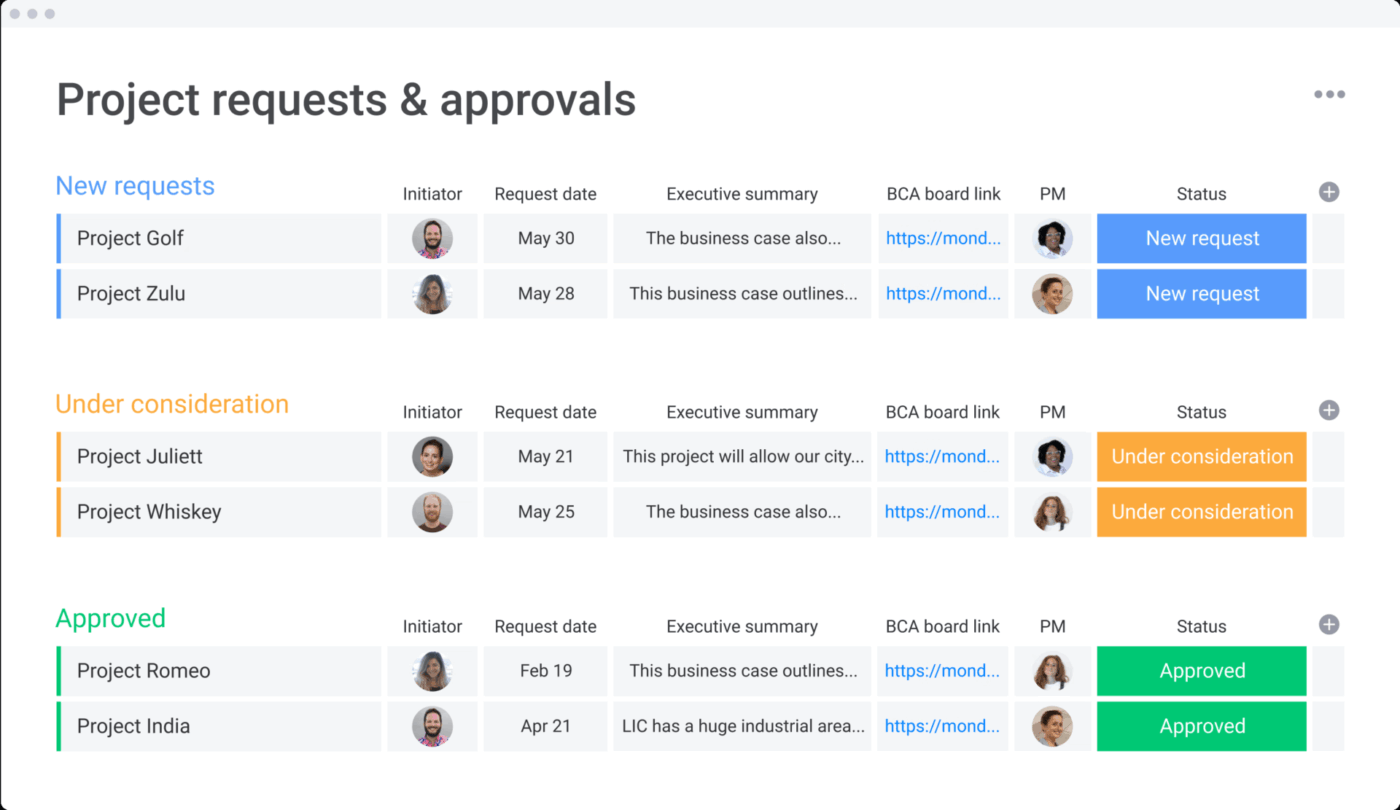
If you’re frustrated by the rigid structure of Method CRM and wish you could build a sales workflow that looks and feels exactly the way you want, you’re not alone. Many teams find that off-the-shelf CRMs force them into a box, rather than adapting to their unique processes.
monday CRM is built on the highly flexible monday.com Work OS, offering a solution for teams that crave visual and structural freedom. If you’re already using monday.com for project management, the CRM will feel like a natural extension. Its no-code, drag-and-drop interface allows you to build a custom CRM with boards, columns, and dashboards without needing any technical expertise.
This visual approach makes it easy to see your entire sales process at a glance and collaborate with your team in real-time. However, because it’s a newer product built on a general work platform, some of the deep, sales-specific features found in dedicated CRMs might be less mature or require creative configuration.
Pros:
Cons:
A user review says:
I absolutely love the emails and activities feature of monday CRM, which automatically tags emails to clients and leads, making tracking incredibly efficient. This automation, combined with the AI features, helps me extract crucial information like follow-up dates and important details effortlessly. The Workflow Center is another standout feature, offering enhanced automation akin to having if-this-then-that statements that propel my work forward and prevent stagnation, ultimately saving both time and money.
📖 Read More: 10 CRM Strategies to Manage Your Business

Is your organization already running on Microsoft? If so, you’ve likely felt the friction of using a tool like Method CRM that doesn’t natively connect with Outlook, Teams, or SharePoint.
Dynamics 365 Sales is a solid solution for this pain point. It’s the natural CRM choice for any organization deeply invested in the Microsoft ecosystem, offering seamless, native integration that other platforms can’t match. The tool integrates with the entire Microsoft business stack, providing a unified experience for your team.
However, the real value comes from its integration with the Power Platform. You can use Power BI for advanced analytics, Power Automate for complex workflow automation, and Power Apps to build custom business applications. This makes it an enterprise-focused solution with corresponding complexity, best suited for companies with the expertise to manage the Microsoft environment.
Pros:
Cons:
A user review says:
I primarily use Dynamics 365 CRM for managing our partner accreditations and reviewing their history with us as customers. It’s incredibly helpful to have all of that information in one place, making it easy to track interactions, keep records up to date, and ensure we’re supporting our partners effectively. The reporting tools and integration with Microsoft apps are a real plus, and they make collaboration much smoother.
📖 Read More: How CRM Project Management Drives Improved Pipeline

Nutshell combines a straightforward CRM with built-in email marketing capabilities. It’s built for small teams that want simplicity without sacrificing the essential tools needed for growth. You can create and send email campaigns, automated drip sequences, and newsletters directly from the CRM, with all your contacts automatically synced.
This all-in-one approach saves you both time and money.
Nutshell’s focus on simplicity means it may lack some of the advanced customization or reporting features that larger organizations require. However, for small teams, it provides a clean and effective solution to manage both sales and marketing outreach in one place.
Pros:
Cons:
A user review says:
Nutshell is easy for sales teams to adopt and actually use on a daily basis. The interface is clean, pipelines are flexible, and it supports a structured sales process without feeling heavy or overbuilt. It provides solid visibility into deals and activity, which makes managing and coaching the team more straightforward.
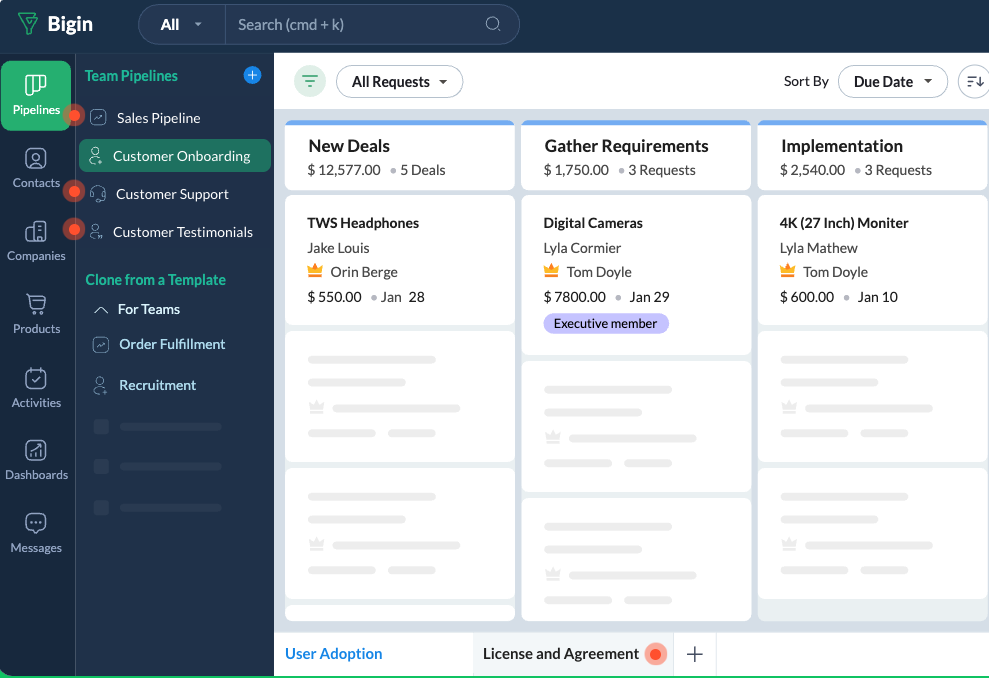
Are you a very small team or a solo entrepreneur who finds even “simple” CRMs like Method CRM to be overwhelming? The complexity, cost, and feature overload of most CRM platforms can be a major barrier for those who are just starting out.
Bigin by Zoho CRM can help. It’s an entry-level, pipeline-centric CRM designed specifically for small teams and individuals who are new to CRM. It strips away all the complex features and focuses on the absolute essentials: managing contacts and visualizing your sales process. This makes it an ideal first step for those leaving Method CRM in search of something far simpler.
With Bigin, you can set up multiple pipelines for different processes, use built-in telephony to make and log calls, and create web forms to capture leads. It’s designed for quick setup and immediate use.
Pros:
Cons:
A user review says:
What I like most about Bigin is its simplicity and clarity. It allows you to design custom pipelines and organize the business process without the complexity of larger CRMs, making it easier for the team to adopt. It is very useful for SMEs that need to organize their sales pipeline, centralize information, and improve opportunity tracking. The customization of stages and fields allows it to be adapted to real processes without overwhelming users.

Is your primary challenge nurturing leads through sophisticated, behavior-driven email campaigns? If you’re using Method CRM, you’re likely frustrated by its lack of marketing automation.
ActiveCampaign solves for this by flipping the traditional CRM model on its head. It’s a marketing automation powerhouse that includes a capable CRM, making it perfect for teams whose sales process is heavily reliant on email nurturing. Its visual automation builder is best-in-class, allowing you to create complex workflows that respond to email opens, link clicks, and website visits.
The tool automatically scores leads based on their engagement, segments your audience with precision, and triggers tasks for your sales team when a lead becomes hot. While its CRM features are solid, they are secondary to its marketing automation capabilities. Teams that need deep, complex sales pipeline management might find it limiting compared to a dedicated sales CRM.
Pros:
Cons:
A user review says:
ActiveCampaign is the lifeblood of my business. Without it, my marketing efforts would not be nearly as successful and I would not be able to message my program prospects with relevant information on a timely basis. And Active Intelligence is like having a market researcher, copywrite, graphic designer, and consultant on my marketing team.
📖 Read More: How to Automate Your CRM Workflow

Does your work begin only after a deal is won? For many service-based businesses, the sales process is just the prelude to a complex project. Using a tool like Method CRM creates a major disconnect—the moment a deal is marked “closed-won,” all the valuable customer context is left behind, and your project team has to start from scratch in a separate system.
Insightly bridges this exact gap. It’s a CRM that includes integrated project management, allowing you to convert a won opportunity directly into a project with a single click. All the contacts, emails, and notes from the sales process are carried over, eliminating the painful handoff and ensuring your delivery team has the full story.
Its relationship-linking feature allows you to connect contacts, organizations, opportunities, and projects, giving you a complete, 360-degree view of your customer relationships. While Insightly successfully bridges the gap between sales and projects, it’s worth noting that neither its CRM nor its project management features are as deep as what you’d find in specialized, best-in-class tools for each category.
Pros:
Cons:
A user review says:
What I like best about Insightly is how it combines CRM and project management in one platform, so you can track a customer from first lead all the way through delivery. It’s also very easy to use, with clean workflows and strong email and calendar integration.

Are your salespeople spending too much time chasing cold leads and not enough time with prospects who are ready to buy?
Freshsales, part of the Freshworks ecosystem, addresses this with its AI assistant, Freddy. It’s a modern CRM designed to help sales teams work smarter, not harder. Freddy AI provides predictive lead scoring, deal insights, and next-best-action recommendations, allowing your team to focus its energy on the opportunities that are most likely to close.
In addition to its AI capabilities, Freshsales includes built-in phone and email tools, allowing you to communicate with prospects and log all activities without leaving the CRM. It also integrates natively with other Freshworks products, such as Freshdesk, making it a strong choice for teams already using the Freshworks suite for customer support or marketing.
Pros:
Cons:
A user review says:
I like how cost-effective Freshsales is; for the cost, you’re getting an entire suite with many features like sequences and email bulk facility. It was really easy to set up everything as it provides step-by-step guidance. We created accounts fields and company, and Freshsales provides templates for other things. We tested email health without connecting the inboxes, then tested it with DKIM, SPF & DMARC setup on Freshsales. You can use Sequences for sending emails using certain logic, like sending follow-ups to clients who opened emails. It allows you to send automated email campaigns, and with bulk email, we can send a single email as a campaign and personalize every aspect of each email.
Method CRM works best when accounting is the center of your operations. But for teams where the real work begins after the deal is signed, that model quickly breaks down. Context gets fragmented, delivery slows, and teams end up stitching together tools just to keep customers moving forward.
The best Method CRM alternatives solve this by keeping sales, execution, and collaboration connected. Some excel at pipeline management. Others focus on marketing automation or enterprise customization. The right choice depends on where your business creates the most friction today.
If your biggest challenge is the handoff from sales to delivery, ClickUp stands out by design. It doesn’t just track customer relationships. It turns them into structured work, automates the transitions, and keeps context intact from the first conversation through final delivery.
Ultimately, the goal isn’t to replace Method CRM with another silo. It’s to choose a system that supports how work actually gets done. Give ClickUp a shot and see how it pulls things into focus!
Yes, most alternatives on this list function independently of accounting software. Platforms like ClickUp, HubSpot, and Pipedrive offer robust CRM capabilities without requiring QuickBooks or Xero, though many offer accounting integrations as optional add-ons.
Method CRM is built for small businesses that use QuickBooks, making it very niche. Salesforce is an enterprise platform with deep customization that is often too complex and expensive for small teams. For small businesses not tied to QuickBooks, alternatives like ClickUp or Zoho CRM often provide a better balance of power and affordability.
Focus on pipeline visualization, workflow automation, and integration flexibility, as these are common areas where Method CRM can be limiting. Most importantly, look for a platform that connects your CRM data to your project management workflows to eliminate the context gap between closing a deal and delivering the work.

© 2026 ClickUp

There’s an easier way. Try a free AI Agent in ClickUp that actually does the work for you—set up in minutes, save hours every week.