







Still downloading templates?
There’s an easier way. Try a free AI Agent in ClickUp that actually does the work for you—set up in minutes, save hours every week.
Sorry, there were no results found for “”
Sorry, there were no results found for “”
Sorry, there were no results found for “”

Your law firm’s knowledge is one of its most valuable assets.
But if your attorneys can’t find what they need when they need it, that expertise might as well not exist.🤦🏾♀️
With 62% of knowledge workers struggling to manage excessive time spent searching for information, the crisis of context/necessary information may be one of the biggest challenges facing the modern workforce today.
This hits the legal sector extra hard because your business depends on finding that golden nugget of information at the right time.
This guide walks you through what legal knowledge management is, why it matters for your firm’s efficiency and client service, and how to build a system that actually works—complete with practical strategies and tools that make knowledge sharing feel effortless and natural.
Legal knowledge management is the systematic process of capturing, organizing, and sharing your law firm’s collective expertise. This makes your firm’s past work, legal research, and institutional knowledge instantly accessible to everyone who needs it. It’s about turning scattered information into a powerful, searchable asset.
This process involves two types of knowledge. The first is tacit knowledge, which is the experience-based wisdom your senior partners and experienced attorneys have.
The second is explicit knowledge, which includes all the documented work product, like briefs, contracts, and research memos.
Unlike general knowledge management, the legal field has unique needs. Your system must handle precedents, manage matter-specific information, and help ensure compliance with complex regulations.
A knowledge management attorney/subject matter expert is often tasked with overseeing this entire process, ensuring the firm’s intellectual capital is protected and leveraged.
A strong legal knowledge management system is built on several key components:
Modern legal knowledge management software goes far beyond legacy shared drives or intranets. Today’s systems combine document management workflows, practice-area knowledge bases, advanced search capabilities, collaboration tools, and AI-powered automation that surfaces relevant past matters without requiring manual effort. The goal is to eliminate the context sprawl that forces attorneys to jump between disconnected email threads, document systems, and matter files.
A logical structure—or taxonomy—is what makes this work. Organizing your knowledge with consistent metadata such as matter type, industry, jurisdiction, or legal issue turns isolated files into institutional wisdom that teams can rely on.
You might notice that a Legal Project Management Template can be a game-changer for centralizing your work. It helps you organize all these moving parts—documents, knowledge bases, collaboration, and automation—into a repeatable, streamlined process that your whole team can use.
For many firms, effective knowledge management for law firms is no longer optional—it’s essential for maintaining competitive delivery standards.
Here’s the core challenge you’re likely facing: your attorneys spend a huge amount of their time searching for information instead of focusing on billable work.
This isn’t just about lost revenue. It leads to frustrated lawyers, delayed client responses, and a constant feeling of reinventing the wheel.
Every minute an attorney spends hunting for that perfect motion from a case last year or recreating a standard contract clause is time they can’t bill to a client. An effective legal knowledge management system dramatically cuts down this search time by making your firm’s work product instantly reusable. This is a cornerstone for effectively sharing information with your team members.
Imagine these common scenarios at your firm:
The impact on your firm’s workflow efficiency is huge. When junior associates have access to curated templates and high-quality precedents, they produce better work faster. This means senior attorneys spend less time reviewing and correcting basic errors, freeing them up for high-value strategic work.
If you want to make building and maintaining a knowledge base even easier, check out the The ClickUp Knowledge Base Template—it’s a super helpful way to get your team up to speed and keep your institutional knowledge organized.
This knowledge reuse also standardizes your firm’s approach to common matters. Everyone starts from a proven template that reflects your firm’s best practices, which reduces errors and helps you complete matters more quickly and consistently.
📖 Read More: Most Reliable Lawyer Time-Tracking Software
📮 ClickUp Insight: 1 in 4 employees uses four or more tools just to build context at work.
A key detail might be buried in an email, expanded in a Slack thread, and documented in a separate tool, forcing teams to waste time hunting for information instead of getting work done. ClickUp converges your entire workflow into one unified platform. With features like ClickUp Email Project Management, ClickUp Chat, ClickUp Docs, and ClickUp Brain, everything stays connected, synced, and instantly accessible. Say goodbye to “work about work” and reclaim your productive time. 💫
Real Results: Teams are able to reclaim 5+ hours every week using ClickUp—that’s over 250 hours annually per person—by eliminating outdated knowledge management processes. Imagine what your team could create with an extra week of productivity every quarter!
Having your firm’s knowledge organized directly translates to better client service delivery.
When your team can instantly access relevant precedents and past case strategies, they can respond to client questions faster and with more confidence. Speed and accuracy are critical when a client needs an answer now.
You can also show clients you remember their history and preferences by maintaining comprehensive matter records that are accessible to any attorney who might work on their case. This creates a single source of truth that ensures consistent advice across different practice groups. Tools like a Legal Case Tracking Template can help you set up those foundations faster.
Knowledge transfer or knowledge retention is another massive benefit, especially when a key attorney leaves your firm. Without a proper system, their expertise and insights walk out the door with them. But when you’ve captured their work product, matter strategies, and client notes in an organized system, that valuable knowledge remains to benefit future cases and new team members.
💡Pro Tip: If you want to keep your digital assets organized and accessible, the Digital Asset Management (DAM) Template is a fantastic resource to help you centralize and manage all your legal documents and knowledge assets.
A strong law firm knowledge management strategy depends on processes attorneys will actually follow, not just technology layered on top of existing habits.
It demands a cultural shift within your firm, supported by consistent processes and tools that integrate seamlessly into how your attorneys already work. Here’s how you can get started. 🛠️
Before you can organize your firm’s knowledge, you need to understand what you have and where it lives. Interview leaders from your different practice groups to identify their most valuable knowledge assets. You should also survey your associates to find out what information they struggle to find. This process will help you map out your existing knowledge and identify critical gaps.
If knowledge management is everyone’s job, it quickly becomes no one’s job.
To avoid this, assign “knowledge champions” within each practice group. These individuals are responsible for curating templates, updating precedents, and ensuring new work product is properly documented. They become the evangelists for your new system and drive its success.
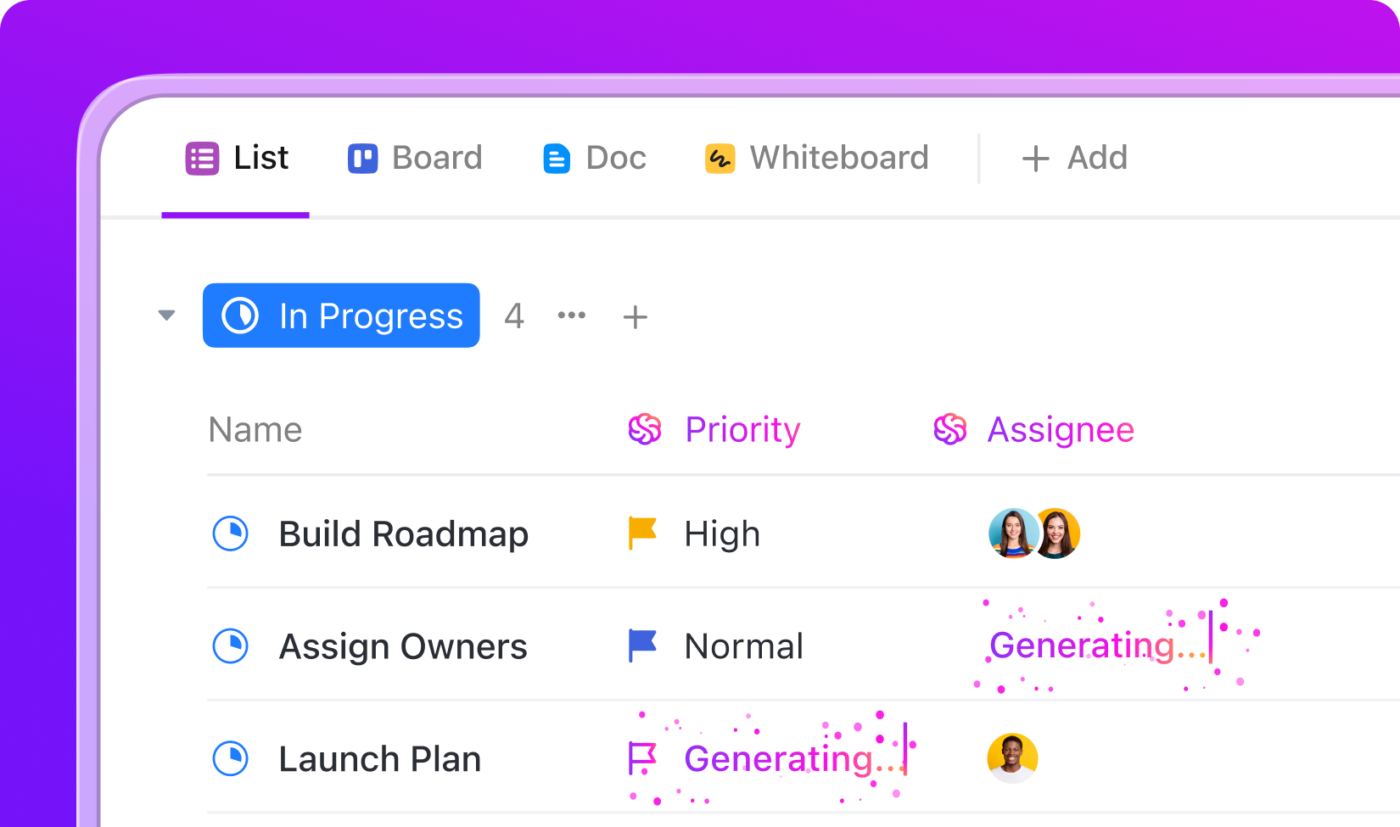
For instance, if you’re using a tool like ClickUp, you can break responsibilities down as ClickUp Tasks and assign it to specific team members so that responsibilities are clearly defined and allocated. This feature is also supported by the built-in AI within ClickUp, with features like AI Assign and AI Prioritize.
The best legal knowledge management software is the one your attorneys will actually use.
Instead of forcing them to adopt entirely new systems, look for a platform that integrates with their existing workflows. You want an all-in-one approach that combines document management, matter tracking, and team communication to minimize tool sprawl.
When evaluating platforms, you should typically look for the following:
| Feature | What it is | Why it matters for legal teams |
|---|---|---|
| Centralized document management with metadata | A unified repository for briefs, contracts, research, and matter files with structured fields (jurisdiction, issue, parties, stage). | Ensures attorneys work from the correct version and can retrieve documents based on legal and factual context—not just file names. |
| Advanced, context-aware search | Search that scans documents, comments, tasks, attachments, and integrated data with legal terminology recognition. | Helps attorneys find clauses, argument lines, and prior strategies in seconds, reducing research time and preventing duplication. |
| Template, precedent, and playbook management | A system for storing, updating, and distributing model documents, negotiation playbooks, and standard workflows. | Preserves institutional quality, shortens drafting time, and ensures consistent work product across practice groups. |
| Matter-centric collaboration | Tools that keep discussions, tasks, timelines, and documents tied directly to each matter. | Prevents knowledge from scattering across email and chat, creating a complete, reliable record of how decisions were made. |
| Workflow automation | Automated steps for review cycles, matter closure, document routing, or notifications. | Reduces administrative work, eliminates missed steps, and ensures knowledge is captured as a natural part of the workflow. |
| Information governance and compliance controls | Permissions, audit trails, retention rules, access logs, and data governance policies. | Upholds confidentiality, avoids ethical breaches, and supports regulatory and client-driven compliance requirements. |
| Flexible taxonomy and classification | Multi-level categorization for practice areas, issues, industry segments, risk levels, or matter types. | Allows the system to reflect how legal teams work and evolve as new specialties or client needs emerge. |
| Integration with research and productivity tools | Connections to email, calendars, legal research tools, DMS, eDiscovery, and timekeeping. | Reduces tool sprawl and ensures knowledge isn’t buried in siloed systems; everything feeds into one connected hub. |
| Intuitive user experience | A simple, approachable interface that requires minimal training and fits into daily workflows. | Drives adoption across seniority levels, preventing KM from becoming an “extra task” attorneys avoid. |
| Scalability and long-term adaptability | Infrastructure that supports growing practices, more users, more matters, and more complex taxonomies. | Ensures the KM system remains reliable and effective as the firm expands or reorganizes its practice groups. |
These capabilities ensure your knowledge hub becomes part of everyday legal work, not an extra system attorneys feel obligated to update.
Watch this step-by-step video guide to see how to set up and manage an AI-powered knowledge base that actually works for your team, featuring practical demonstrations of organizing documents, training your AI, and reducing information search time.
To keep your knowledge repository clean and useful, you need rules. Establish clear naming conventions for documents, set metadata requirements for all new matters, and define retention policies to decide what to keep and what to archive.
💡Pro Tip: This SOP Library Template governance ensures your system remains a trusted source of information.
Don’t try to roll out your new system to the entire firm at once. Start with a pilot group of attorneys who are eager to improve their workflows. Document their early wins—like how quickly they found a crucial precedent or reused a complex contract—and share these success stories to build momentum.
The key is to make knowledge sharing a natural part of the workflow, not an extra chore. When your team can capture insights and find information without leaving their primary workspace, knowledge management becomes automatic.
Turning a knowledge strategy into daily practice requires a system that captures work as it happens. It should help you preserve context, and make knowledge easy to retrieve.
The right structure will help you eliminate context sprawl—when teams waste hours searching for the information they need across disconnected apps, hunting down files, and repeating updates across multiple platforms—by bringing everything together in a unified platform where projects, documents, conversations, and analytics live together, like ClickUp.
Let’s look at how ClickUp can help you here:
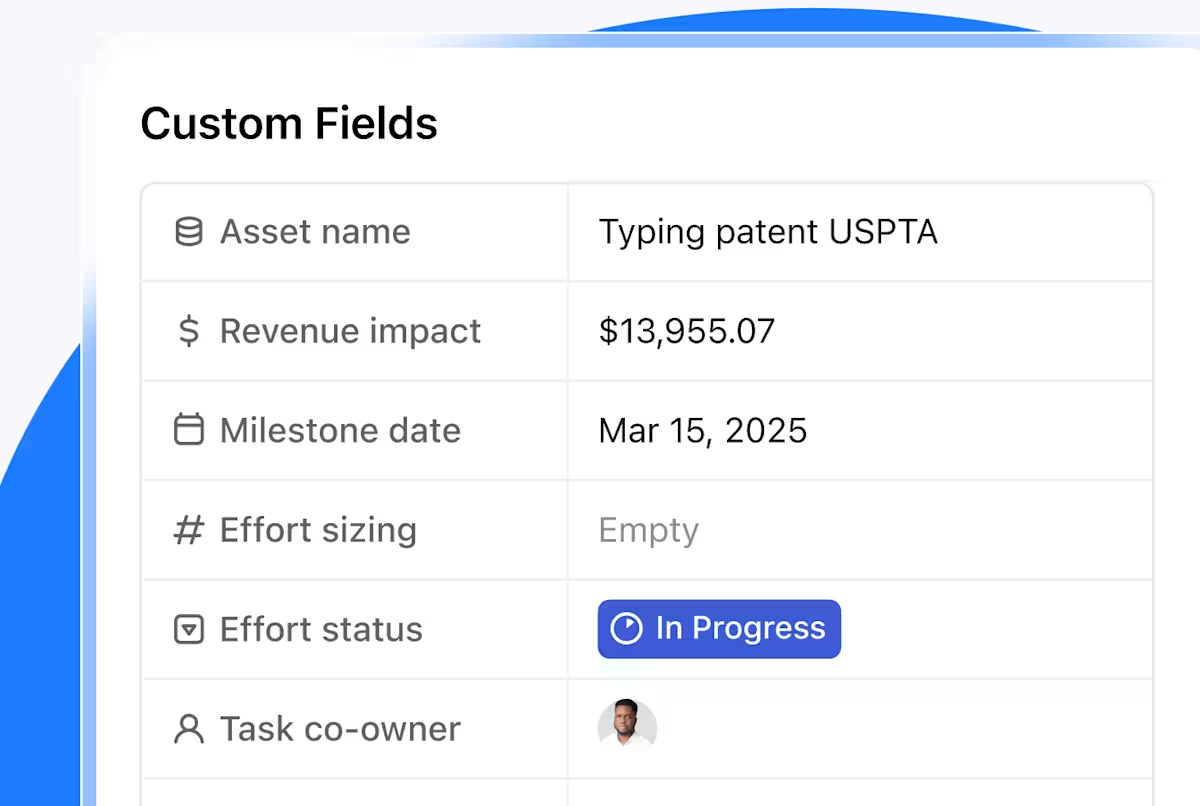
Legal teams work in patterns: practice areas, jurisdictions, deal sizes, issue types, regulatory themes. ClickUp’s Custom Fields let you translate those patterns directly into your workspace so every matter carries the metadata attorneys rely on. Instead of navigating static folders, your team can filter, group, and compare matters based on real legal criteria. This turns your workspace into a living index of your firm’s experience, not just a document store.
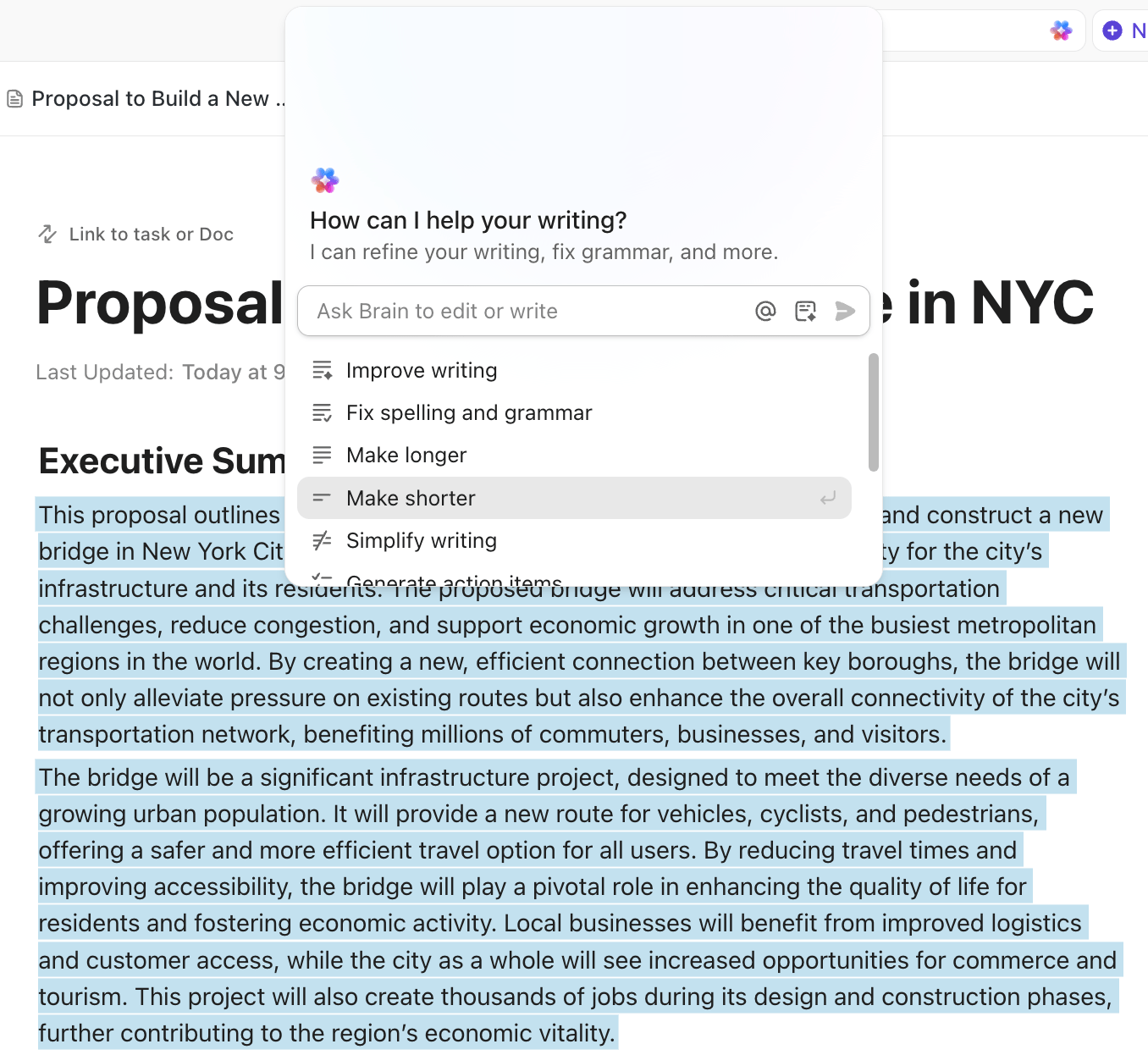
A firm’s intellectual capital is often locked inside individual matter files or the heads of senior attorneys. ClickUp Docs gives teams a structured place to turn that expertise into living, shareable resources—model clauses, practice-area playbooks, intake guides, litigation outlines, or client-facing templates.
Because Docs integrate directly with matters, attorneys can draft and refine content in the same workspace where the work is happening.
ClickUp’s AI assistance accelerates this process. Attorneys can convert rough notes into polished guidance, generate first-draft checklists from past matters, or summarize complex case histories into reusable precedent documents. Instead of starting from scratch, teams build on top of the firm’s prior thinking. Over time, this creates a cohesive library of standard language and best practices that reflects how the firm actually operates—and helps newer attorneys align with the firm’s established approach from day one.
Knowledge management falls apart when it depends on attorneys stopping to “file something later.” ClickUp’s Automations and AI Agents embed capture into the matter lifecycle itself.
When a matter closes, the system can assign a short summary, prompt the upload of final documents, or route key files to your precedent library. This ensures knowledge transfer happens at the exact moment when insights are still fresh—and without requiring anyone to remember an extra administrative task.
Here’s a workflow demonstrating this usecase:
One of the biggest drains on legal productivity is searching across disconnected systems. ClickUp’s Enterprise Search eliminates that fragmentation by searching tasks, documents, attachments, and integrated sources from one place.
Attorneys don’t need to check inboxes, old drives, or past Slack threads—the full record of a matter, and similar matters, appears in one consolidated view. The value is cumulative: less tool switching, faster recall of precedent, and fewer hours lost to chasing context.
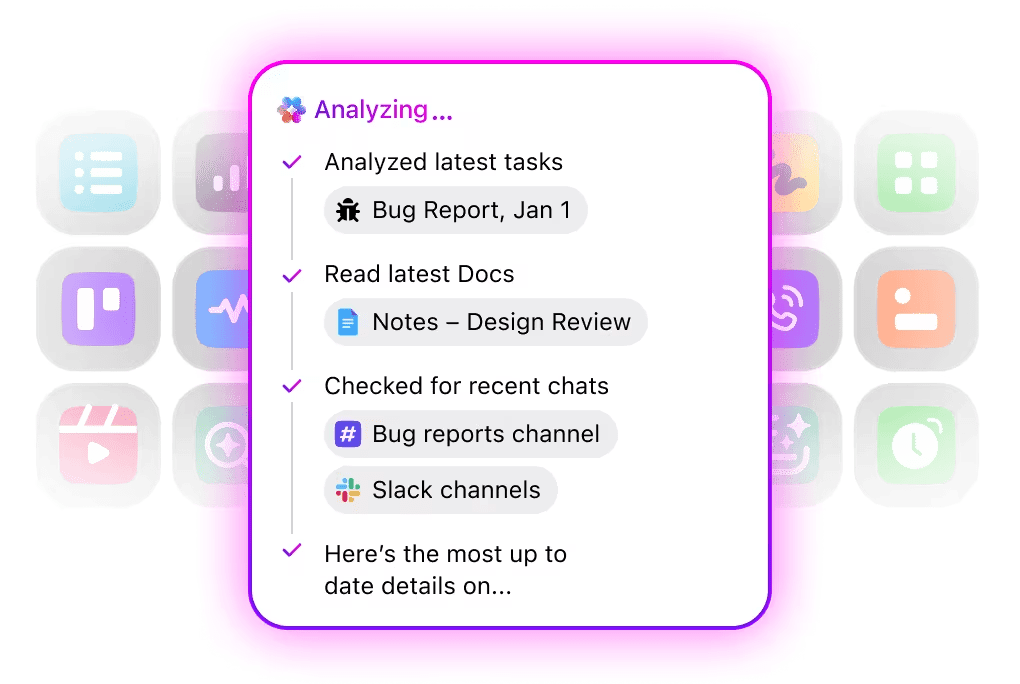
When teams change or matters shift hands, institutional memory often disappears with the people who held it.
ClickUp Brain bridges that gap by bringing matter context forward on demand. When an attorney asks Brain a question—inside a task, a comment, or a discussion—it responds using the actual work product and history in your workspace.
The AI tool can surface past matters, related clauses, or earlier discussions that would otherwise be buried. This reduces dependency on informal knowledge networks and keeps your firm’s collective experience accessible to everyone.
Once your taxonomy, templates, automations, and search layer are in place, your knowledge hub grows organically. Every matter closed, checklist refined, and discussion captured strengthens the system.
Attorneys begin to trust it because it reflects the real work of the firm—not an abstract library divorced from daily practice. Over time, this becomes one of your firm’s most valuable assets: a continuously updated record of how your team thinks, drafts, decides, and wins.
📖 Read More: AI Enterprise Search Use Cases
Even with clear benefits, many legal knowledge management initiatives stall once they move from planning to practice. The obstacles are rarely technical.
They stem from how legal work is structured, how attorneys manage information, and how firms historically store their institutional memory. Addressing these barriers early makes your knowledge program far more likely to succeed—and far more valuable over time.
| Challenge | Why it happens | How to solve it |
|---|---|---|
| Precedent-driven work lacks consistent curation | ❗️Firms rely heavily on prior work, but attorneys save their own versions without a shared process for identifying “gold-standard” documents. | ✅ Establish a simple, repeatable review loop at matter close. Designate reviewers to elevate only high-quality documents into your precedent library. |
| Knowledge captured at the document level, not the matter level | ❗️Documents alone don’t convey strategy, reasoning, negotiation dynamics, or turning points—where true expertise lives. | ✅ Add short, structured matter summaries at key milestones. A few sentences of context dramatically increase reuse value. |
| Practice groups use different structures and norms | ❗️Litigation, corporate, regulatory, and in-house teams categorize work differently, causing fragmentation. | ✅ Implement a flexible taxonomy: standardize core fields (e.g., jurisdiction, matter type) while allowing practice-specific layers. |
| Attorneys rely on personal systems that feel faster | ❗️Outlook folders, private drives, and personal precedent collections feel more familiar and efficient than a new KM tool. | ✅ Ensure the central system saves attorneys time from Day One. Make search fast, reduce steps, and embed capture into their everyday workflow. |
| Knowledge becomes outdated without clear ownership | ❗️Templates, checklists, and guidance quickly fall out of sync with changing legal requirements and firm practices. | ✅ Assign “knowledge champions” in each practice group. Set light-touch quarterly or biannual refresh cycles focused on assets attorneys actually use. |
| High document volume overwhelms manual processes | ❗️Firms generate thousands of documents monthly; manual tagging or filing becomes unmanageable. | ✅ Use automation for matter closure, tagging, routing for review, and initial classification to reduce manual burden and keep the system accurate over time. |
Legal knowledge management is a transformative practice for any modern law firm.
It shifts your team from reactive searching to proactive knowledge sharing, which drives efficiency, improves client management, and protects your firm’s most valuable asset—the collective expertise. The difference between a system that gathers dust and one that delivers real value often comes down to choosing a platform that your attorneys will actually use.
With ClickUp’s AI-powered enterprise search that understands legal context, customizable Templates for every matter type, and Automations that capture knowledge for you, you’re not just organizing information, you’re amplifying your firm’s expertise.
When legal knowledge management is implemented thoughtfully, it strengthens knowledge sharing across practice groups, improves matter oversight, and preserves the expertise that defines your firm’s reputation.
Ready to build a smarter, more efficient firm? Get started for free with ClickUp and see the difference for yourself. ✨
Legal knowledge management is the practice of capturing, organizing, and reusing a law firm’s collective expertise—past matters, documents, research, and practical insights—so attorneys can access the right information at the right time.
It reduces non-billable search time, prevents duplicated work, improves matter consistency, speeds up drafting, and ensures expertise stays within the firm even as teams change. It also directly enhances client service by making prior strategies and context immediately available.
A strong system includes centralized document management, precedent libraries, advanced search, standardized templates, collaboration tools, and governance for naming, metadata, and retention. Increasingly, firms also rely on AI to automate classification and surface relevant knowledge.
aligns with attorney workflows, and integrate knowledge capture into daily matter work. Begin with a pilot group to prove value and expand as adoption grows.
AI helps by summarizing documents, generating first-draft checklists and templates, identifying related matters, suggesting relevant clauses, and improving search accuracy. It reduces the manual effort typically required to maintain knowledge systems and makes institutional expertise easier to find.

© 2026 ClickUp

There’s an easier way. Try a free AI Agent in ClickUp that actually does the work for you—set up in minutes, save hours every week.