






Still downloading templates?
There’s an easier way. Try a free AI Agent in ClickUp that actually does the work for you—set up in minutes, save hours every week.
Sorry, there were no results found for “”
Sorry, there were no results found for “”
Sorry, there were no results found for “”

Real-time market sentiment tracking matters more than ever on X (formerly Twitter). Why?
Because over 53% of users rely on the platform for customer service, and they expect a response within 3 hours.
But here’s the catch: traditional surveys can’t keep pace.
A sudden spike due to a campaign or backlash on X can directly impact your brand perception and sales in ways that backward-looking data can’t capture.
Grok AI, the AI assistant built directly into X, offers unique access to the platform’s live data stream.
Below, we show you how to use Grok for audience analysis on X. We also share the limitations you’re likely to encounter and what you can do to counter them.
Grok AI is a large language model assistant built by xAI and integrated directly into X (formerly Twitter). Unlike standalone AI tools, it connects to X’s real-time public data stream, giving you access to conversations as they unfold.
What makes it different?
Grok AI doesn’t rely on pre-trained datasets or classifiers. Instead, it uses a modular, prompt-based approach where you guide its reasoning through specific instructions. This flexibility allows for nuanced market sentiment analysis tailored to your exact needs using natural language processing techniques.
Here’s how Grok AI analyzes audiences:
⚠️ Remember: Grok’s context windows depend on which model you use. Some models support 128,000 to 256,000 tokens, while newer Grok 4 variants support up to 2 million tokens.
Also, Grok AI only accesses public content; private accounts and direct messages remain off-limits.
📮 ClickUp Insight: 13% of our survey respondents want to use AI to make difficult decisions and solve complex problems. However, only 28% say they use AI regularly at work.
A possible reason: Security concerns! Users may not want to share sensitive decision-making data with an external AI. ClickUp solves this by bringing AI-powered problem-solving right to your secure Workspace. From SOC 2 to ISO standards, ClickUp is compliant with the highest data security standards and helps you securely use generative AI technology across your workspace.
Tracking public opinion and analyzing market sentiment helps brands gauge audience reactions and respond to shifting perceptions.
Here’s what Grok AI can dig up for you 👇
| Insight Type | What It Does | How It Helps |
| Distribution scores | Shows the share of positive sentiment, neutral sentiment, and negative responses, along with a score from -1 to +1 | For larger datasets, it includes sample sizes and representative post IDs so teams can review what contributes to the score |
| Topic clusters | Groups large volumes of content into common themes like product feedback, pricing questions, or service issues | Helps teams spot patterns without reading individual content |
| Trend and spike detection | Surfaces change after launches, outages, or announcements | Running the same process over time makes it easier to track how reactions shift |
| Early backlash signals | Surfaces early signs of content that expresses confusion or frustration | Helps teams understand how an issue is being framed before it gains traction |
| Qualitative context | Highlights tone and language, including sarcasm and repeated concerns | Provides context that goes beyond numerical scores |
🧠 Did You Know? The word “grok” comes from Stranger in a Strange Land, a 1961 science fiction novel by Robert A. Heinlein. It meant understanding something so completely that the observer becomes part of what’s being observed, merging into the experience itself.
Before you start using Grok AI to boost business productivity, let’s get the basics right.
Here’s a step-by-step guide on how to use Grok AI for monitoring conversations on X.
Write down your goal in one sentence.
Say: Track customer reactions to our new pricing tier launch. Or monitor opinions around our competitor’s product recall.
Identify what you’re actually trying to learn:
Map this into specific questions:
⚡ Template Archive: Free Voice of the Customer Templates to Understand Your Customers Better
Use Grok AI’s search capabilities to filter conversations. A classification prompt tells it to identify content matching your criteria and return only relevant post IDs that capture the general sentiment you’re tracking.
Compare these prompts:
❌ Weak: “Find tweets about our product.”
✅ Strong: “Search public tweets mentioning ‘BrandX launch’ in the last hour and return post IDs that specifically discuss product features, user experience, or pricing. Exclude generic mentions or unrelated conversations.”
The more specific your search criteria, the better your data will be.
📚 Read More: How to Leverage AI with Access to Real-Time Data
Create a separate prompt directing Grok AI to compute scores.
Include these elements in your prompts:
🤖 Example prompt: “Review the 200 most recent tweets about #BrandXChallenge. Compute the ratio (positive/neutral/negative), provide an overall score from -1 to +1, and list three representative quotes from each category. Weight content by follower count and engagement volume.”
⭐ Bonus: We’ve curated this mini video guide to prompt engineering to help you ask AI better questions.
Sure, Grok AI gives you the first draft. But you need to verify it.
Make sure to inspect the content for:
Read at least 10-15 examples from each category. You’ll catch misclassifications that could skew your entire interpretation. This kind of qualitative data analysis requires human judgment that AI models struggle to replicate.
💡 Pro Tip: Pay special attention to X content with emojis, memes, or social media content. These confuse language models more than straightforward text
Since Grok AI lacks built-in trend tracking, you need to run prompts consistently and document everything (yes, everything!) to maintain context.
Pick a monitoring rhythm matching your needs:
Document each run with timestamps, sample sizes, and scores. Without this external record, it becomes challenging to track changes over time or measure campaign impact.
💡 Pro Tip: Refine through iterations, not one massive prompt.
Don’t try processing everything at once. Tackle different issues in separate prompt runs:
Sentiment analysis only matters if it changes what your team does next. After reviewing and validating Grok’s output, the final step is deciding how to respond.
Start by mapping sentiment patterns to actions:
Create a decision framework that answers who owns the response, what action does this sentiment require, and what outcome are we trying to achieve.
Also, as Grok doesn’t store historical insights or track follow-through, you will have to manually log:
This step ensures sentiment insights don’t disappear after each prompt run.
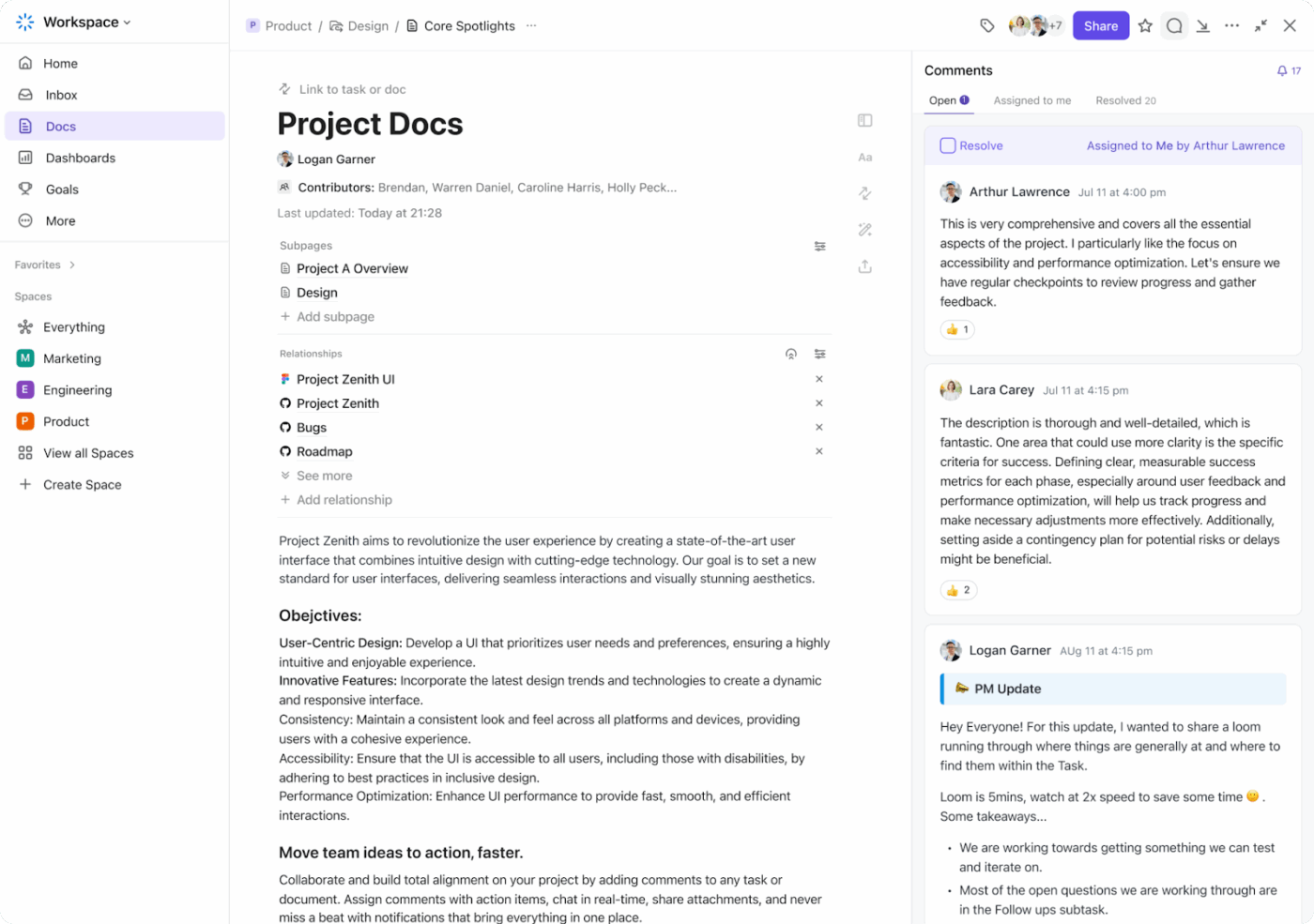
⭐ Bonus: You can centralize all of this in ClickUp Docs, creating a shared sentiment tracker your team can update after each analysis run.
ClickUp Brain, the built-in AI, allows you to summarize discussions, extract recurring sentiment themes, and turn raw observations into clear next steps.
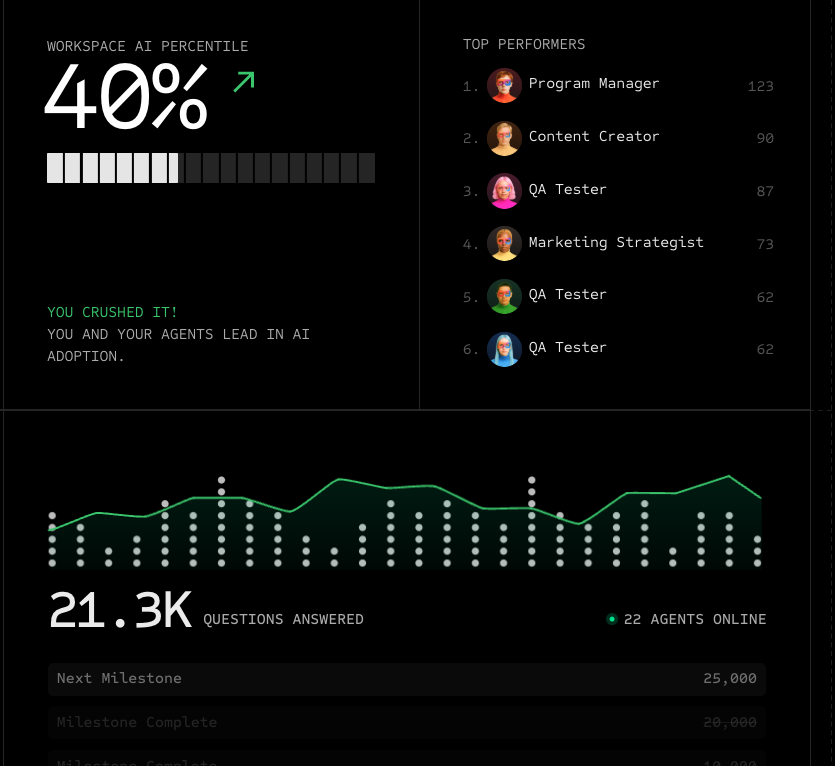
📮 ClickUp Insight: 47% of teams don’t measure AI’s impact, and only 10% track outcomes with real metrics. In many cases, leaders often don’t get to see where AI tools are delivering value, if at all.
ClickUp Brain changes that by bringing AI into one unified workspace where every action, update, and output is connected. And the impact is visible: more than 150,000 companies, including Booking.com, T-Mobile, Logitech, IBM, and Fortinet, use ClickUp Brain to drive measurable results.
Teams report up to 88% cost savings, 1.1 days saved per week, and 3× faster task completion because Brain replaces dozens of disconnected tools with a single AI that works across their entire workflow.
Grok AI can pull real-time data from X, but the output only becomes useful when you approach it strategically. Below are the best practices worth bookmarking: 👇
Vague questions get you vague results.
Instead of asking “What do people think?”, be precise: “Search tweets mentioning our new advertisement in the last 12 hours; provide positive/neutral/negative counts and list the top three complaints.”
🔔 Friendly Reminder: You can also request specific formats like JSON for programmatic work, bullet points for quick scanning, or tables for side-by-side comparisons.
Opinions shift fast on social media. Shorter windows (the last hour) reveal immediate reactions to breaking news or product launch announcements. Longer windows (24-48 hours) smooth out volatility and give you more stable metrics.
Keep your time windows consistent when comparing metrics across campaigns. Switching from hourly to daily sampling midway makes spotting market trends way harder than it should be.
When you use Grok, outputs vary slightly between runs because of model randomness and X’s constantly evolving data stream. Run prompts multiple times with different samples to catch outliers and make sure your findings accurately reflect the general sentiment.
If scores jump around significantly between runs, bump up your sample size or dig into the underlying content to understand what’s causing the discrepancy.
When you use Grok to surface themes and crunch preliminary scores, have team members verify the context. Sarcasm, cultural references, and evolving slang regularly confuse language models.
💡 Pro Tip: A comment like “This redesign is absolutely perfect” could be genuine praise or dripping with sarcasm. Context matters—was it posted after a bug report? Did it include an eye-roll emoji? You need human judgment to catch these nuances.
Don’t push the model toward predetermined conclusions.
A prompt like “Explain why customers hate the redesign” assumes negative reactions and skews the output. Instead, ask “What reactions do customers express about the redesign?” and let the data guide your interpretation.
🔔 Friendly Reminder: Confirmation bias will kill value. Neutral framing gets you more reliable findings worth acting on.
Keep detailed records of every session: the exact prompt you used, timestamp, sample size, scores, and representative quotes. This lets you replicate findings, track what’s working, and prove how you reached decisions.
For regulated industries or compliance-sensitive environments, this documentation addresses ethical considerations and shows you’ve done your due diligence.
💡 Pro Tip: Turn on Grok’s Fun Mode when you are analyzing reply threads to better surface sarcasm, in-jokes, irony, and meme-driven sentiment.
Remember to switch it off when you need precise analysis or decision-ready outputs, since this Grok feature optimizes for tone and wit over rigor.
Let’s look at the different prompt patterns you can use for sentiment analysis on X.
🤖 Prompt: “Analyze this X post for sentiment: [Insert post link]. You’re detecting sarcasm, emojis, and subtle tone. Output in JSON format: {‘one_sentence_summary’: ‘explanation’, ‘score’: -1.0 to +1.0, ‘reasoning’: ‘breakdown of tone, word choice, emojis, context’}. Consider implied meaning and be precise.”
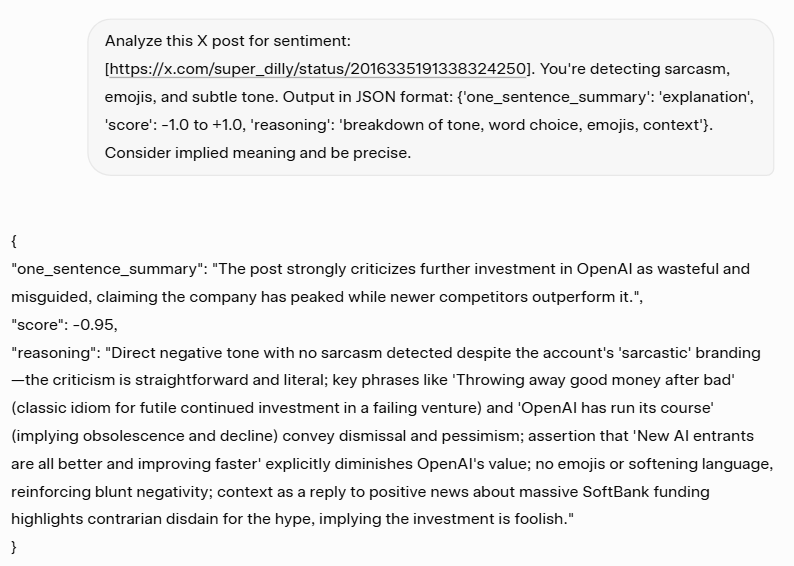
Prompt variations: Add “flag if sarcasm detected” or “compare to brand’s typical tone.”
✅ Why it works: Structured output makes sentiment data actionable and easy to track over time, while JSON format integrates smoothly with dashboards or analytics tools
🤖 Prompt: “Summarize this X thread [paste thread text]. First, give 3-4 bullet points covering main discussion points. Then analyze replies only: provide percentages for positive, neutral, and negative (totaling 100%). Finally, give an overall thread sentiment score from -1.0 to +1.0 with reasoning. Handle sarcasm and evolving discussion carefully.”
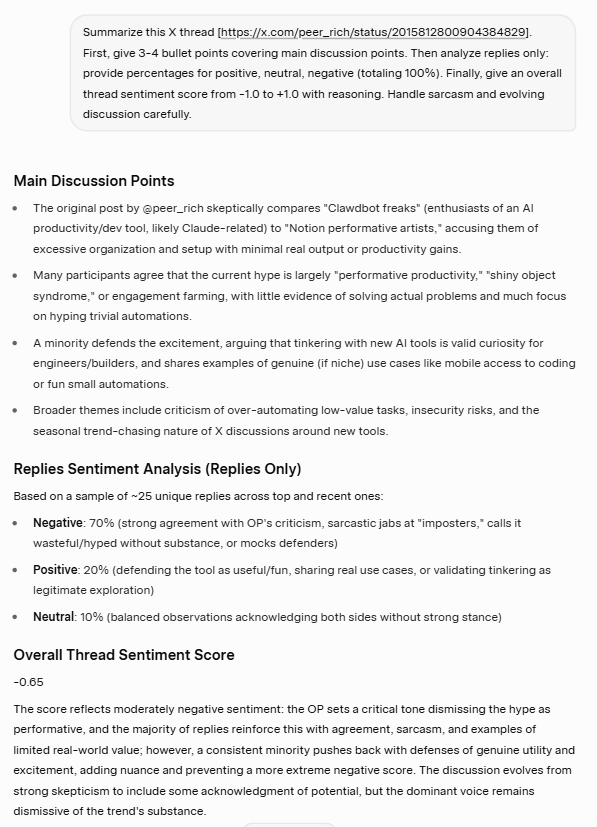
{rompt variations: “Focus only on verified accounts” or “weight by engagement (likes, retweets).”
✅ Why it works: Separates thread content from audience reaction, revealing whether your message lands as intended and where conversation shifts
🤖 Prompt: “Monitor X posts containing ‘#BrandX’ from the past 24 hours. Provide: sentiment distribution (positive %, neutral %, negative %), overall campaign score (-1.0 to +1.0), top 3-4 emerging themes, and 2-3 representative quotes (positive and negative) with context. Focus on authentic reactions and filter spam.”
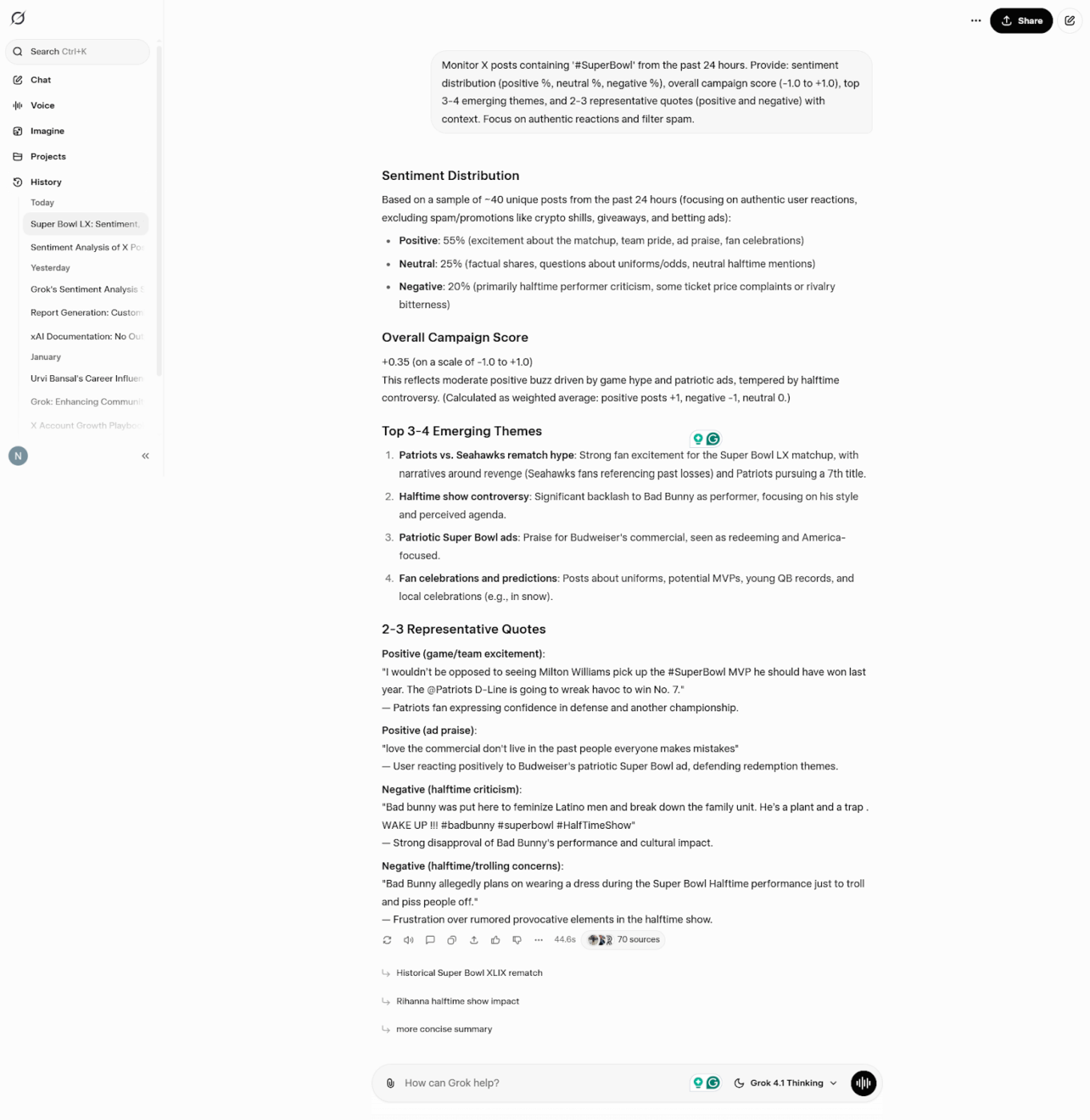
Prompt variations: Add “min_faves:10 for quality signals” or “track hourly for spike detection.”
✅ Why it works: Real-time campaign monitoring catches momentum shifts early, letting you amplify what works or address concerns before they escalate
🤖 Prompt: “Track mentions of ‘[product name] outage’, ‘down’, or ‘not working’ from the past [timeframe]. Flag if average sentiment drops below -0.5. Summarize top 3-5 complaints in bullets, quote 2-3 key negative examples, and provide: current average score, urgency level (low/medium/high based on volume/intensity), and reasoning.”
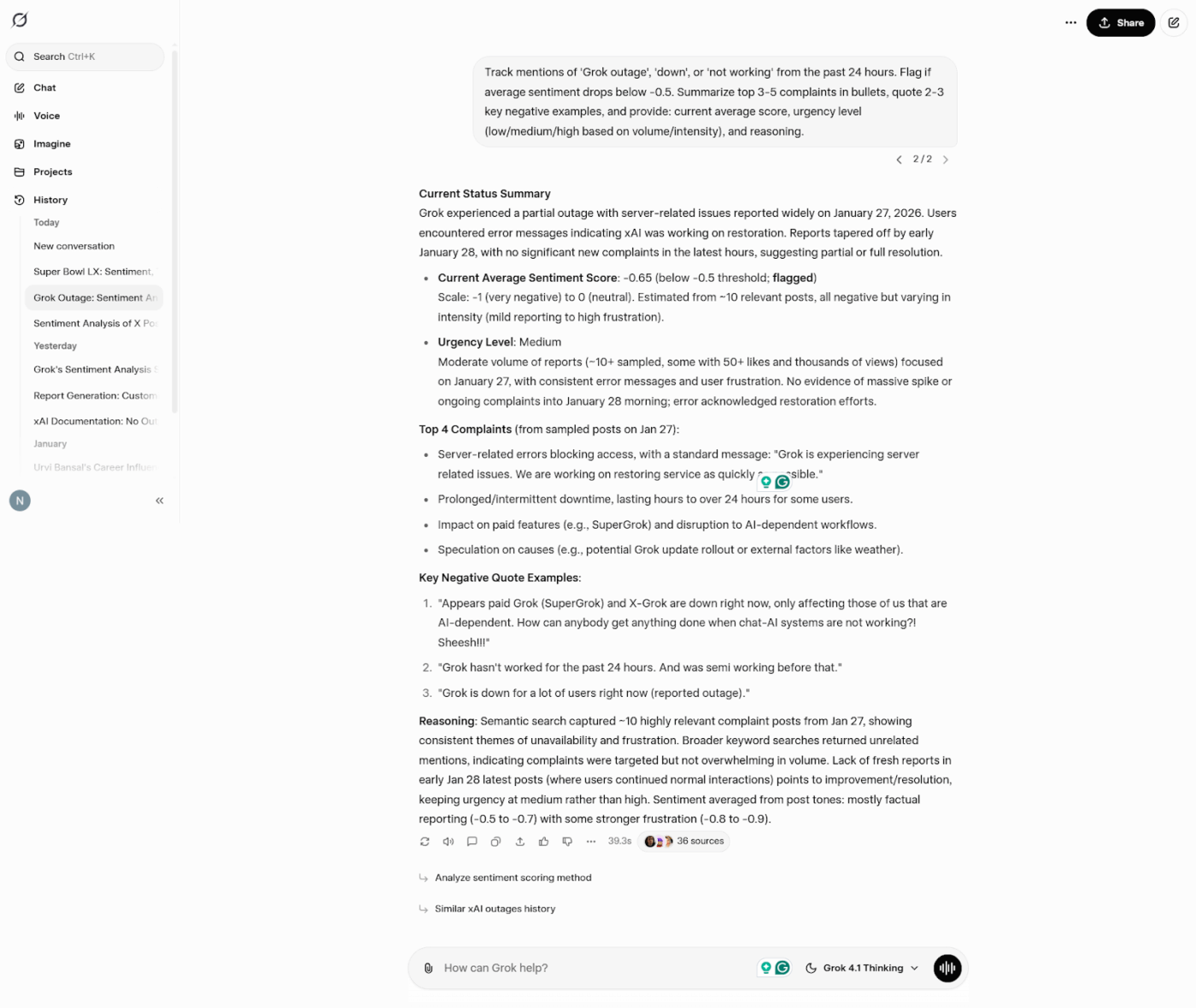
Prompt variation: “identify most influential complainers by follower count” or “group complaints by issue type (login, performance, features).”
✅ Why it works: Quantifies crisis severity with clear thresholds, helping teams prioritize response efforts and escalate appropriately
⭐ Bonus: Tips to make any prompt work better in an AI productivity too like Grok:
Here’s something to remember when using Grok for sentiment analysis on X 👇
🧠 Fun Fact: Americans spend an average of 34.1 minutes per day on X!
Let’s take a quick look at the common pitfalls of using Grok:
Grok AI forgets previous conversations once the context window fills. You can’t ask “How have reactions changed since our last session?” because there’s no historical record. Every session starts fresh, so you’re stuck manually tracking changes over time.
Without external tools to pull everything together, your data just sits scattered across individual chat sessions.
Grok cannot compile metrics into timelines or dashboards for you. You have to manually run prompts at regular intervals and transfer those results into spreadsheets or other visualization tools. For time-sensitive campaigns that need constant data monitoring, you’ll have to look for Grok alternatives.
Chat sessions aren’t easily exportable or traceable. When you need to justify decisions for stakeholder reports or regulatory compliance, the absence of structured audit trails becomes a serious issue.
Grok AI surfaces findings but gives you no way to act on them within the platform. It can provide insights about negative reactions around a product issue, but you can’t create tasks, set deadlines, or track progress. All the follow-through has to happen in completely separate systems.
If you’re on the free tier, you’re hitting strict query limits—usually 10-20 requests every few hours with frustratingly slow resets. When you’re monitoring campaign launches, tracking competitor mentions, or running daily sentiment scans, those limits become a real problem.
Unlimited access to Grok AI requires X Premium or Premium+ subscriptions ($8-40/month). API access comes with its own rate limits that can slow down high-volume monitoring workflows.
Processing hundreds of posts for trend analysis or crisis tracking? You’ll need the paid tier, and even then, large datasets take time that adds up quickly.
The model regularly mislabels sarcasm, struggles with slang and emoji interpretation, and defaults to labeling ambiguous content as neutral instead of making a call. You’ll catch both false positives and false negatives that need manual correction.
👀 Did You Know? X remains blocked in countries like China, Iran, North Korea, Russia, and Venezuela. This means Grok’s sentiment analysis skips huge populations and can’t capture regional perspectives from these markets.
Grok AI provides real-time insights into what’s happening on X right now. It reveals shifts in public opinion but stops at interpretation. You can’t track reactions over time, manage follow-ups, or connect findings to business outcomes.
Enter: ClickUp.
As the world’s first converged AI workspace, it unifies your tools and workflows.
Let’s see why ClickUp is the smarter choice for turning audience data into measurable outcomes 🏅
ClickUp Brain is a contextual AI layer that operates directly inside your workspace, with awareness of how your work is structured. It can reference:
Equipped with this information, the contextual AI can:
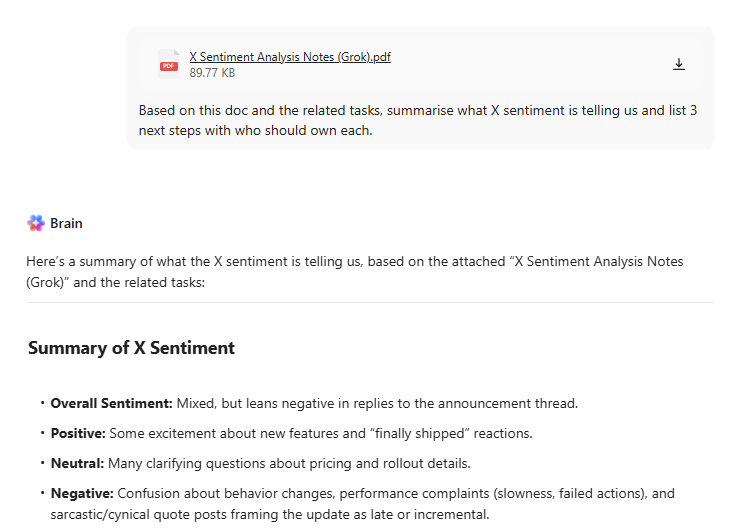
Because ClickUp Brain operates within the workspace’s permission model, it only surfaces information the user is authorized to access. No need to paste background, restate context, or manually explain how work is organized before asking a question.
Instead of generating output in isolation, ClickUp Brain reasons over live workspace data and returns responses that reflect the execution state of your work.
⭐ Bonus: ClickUp Brain MAX is a desktop AI super app that addresses some of the limits you’ll run into with standalone Grok usage. This includes:
While Brain MAX helps teams ask better questions and surface insights, ClickUp Super Agents are built to act on those insights.
Super Agents are ambient AI assistants that operate continuously inside your workspace.
They observe what’s happening across tasks, timelines, dependencies, and activity patterns, then respond automatically as conditions change. No prompts needed.
✨ If you want to see this in action, this video walks through how Super Agents power our content system.
Grok can tell you what sentiment looks like in a moment. It cannot show you whether your response worked.
ClickUp Dashboards turn sentiment insights into something teams can monitor, review, and act on over time.
The best part, they don’t stop at giving you data. AI Cards give you digestible interpretations of what the data means.
AI Cards help you with:
Here’s how to use this combination 👇
📌 Example of a self-updating sentiment dashboard
A marketing team reviews the sentiment dashboard every Monday.
Instead of rerunning Grok prompts, they see:
AI Cards surface patterns automatically, such as repeated objections, improving sentiment after clarifications, or new concerns emerging across multiple campaigns.
📚 Read More: How to Use AI in Marketing (with Examples)
✏️ Note: ClickUp also provides the knowledge management infrastructure to connect findings with documented best practices, historical precedents, and strategic frameworks.
ClickUp offers 1,000+ pre-built templates that help you turn insight into action without starting from scratch. These templates act as ready-made systems—giving your team structure, visibility, and ownership from day one.
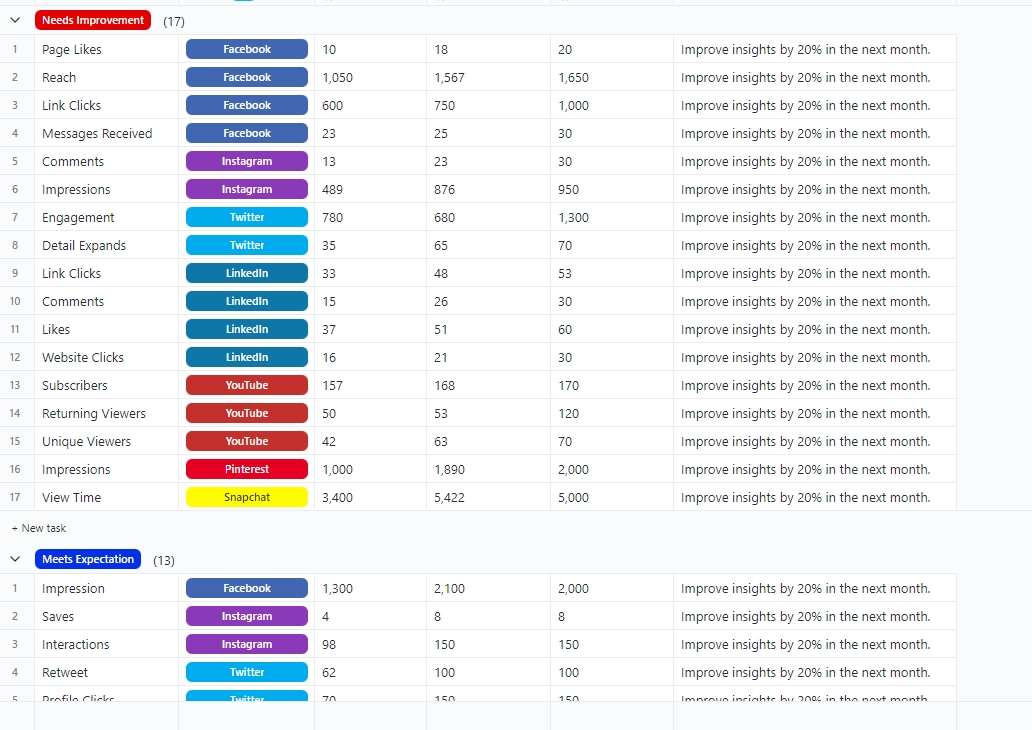
ClickUp’s Social Media Analytics Template helps you track performance, spot issues early, and connect insights to next steps without building dashboards or workflows from scratch.
You can monitor social metrics across platforms and flag what needs attention. No need to copy-paste data across spreadsheets, screenshots, or reports.
Here’s why you’ll love this template:
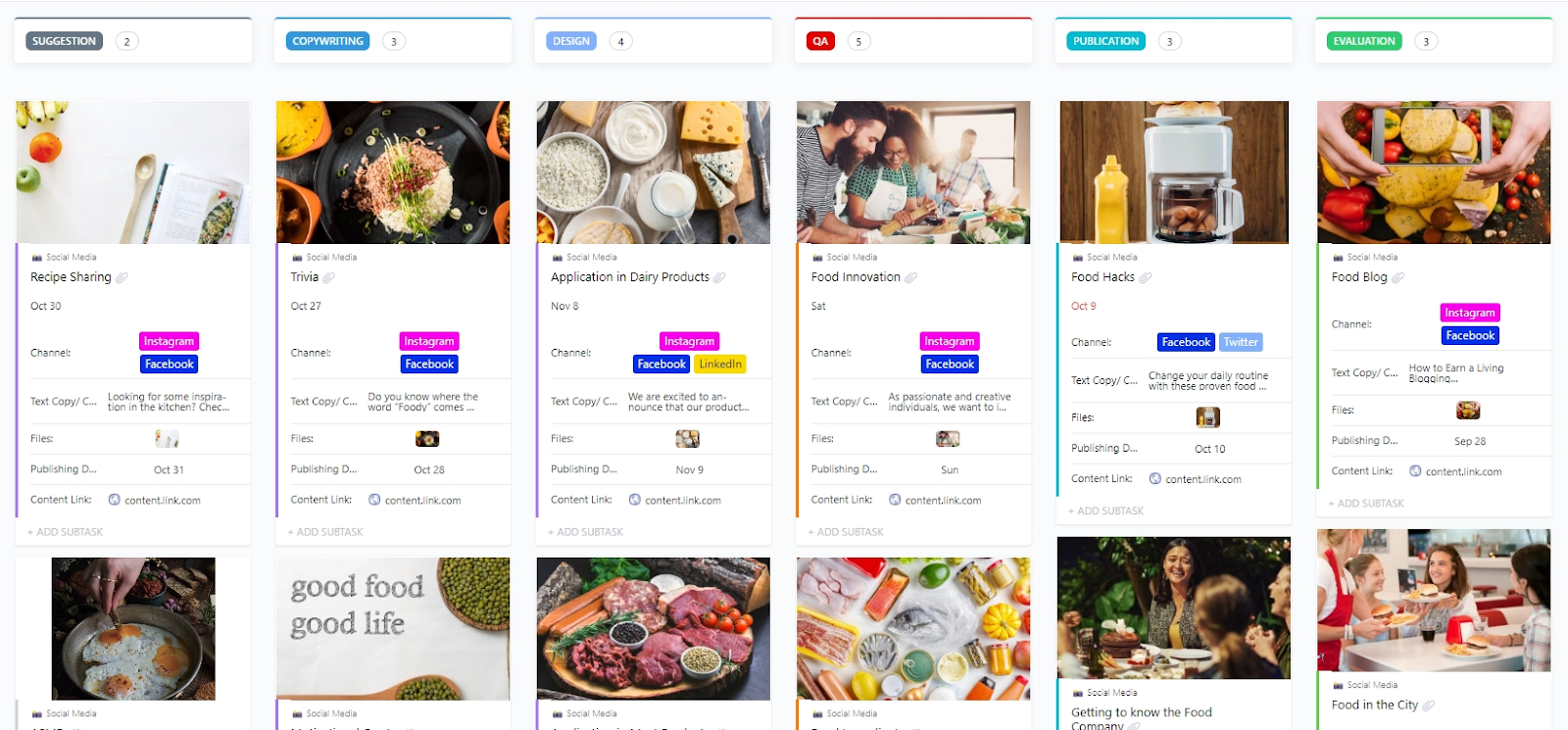
ClickUp’s Social Media Template lets you plan, create, review, and publish social media content across multiple platforms such as X, LinkedIn, Instagram, etc.
You can organize content with custom statuses and views tailored to multi-platform workflows.
Here’s why you will love this template:
📚 Also Read: How to Create a Social Media Workflow
Grok AI monitors sentiment analysis on X.
ClickUp excels at turning those insights into sustained, multi-channel operations that scale.
Use ClickUp Docs to document insights and decisions. Contextual AI summarizes patterns and highlights recurring themes.
Super Agents automatically act on those insights by triggering follow-ups, assigning owners, and keeping work moving without manual prompts.
Dashboards track actions and outcomes in one place, so teams can see what changed and what worked.
Sign up on ClickUp for free to get started.
Grok AI computes ratios that show the percentages of positive, neutral, and negative responses, along with scores ranging from -1 to +1. It can summarize discussion themes, identify opinion clusters, and highlight specific complaints or praise. You can prompt Grok to detect spikes and process reactions to campaigns, product launch events, or customer service interactions in real time. With all this, you get real-time insights into public opinion and perception.
Grok’s reliance on X data can create platform-specific biases that favor active, outspoken users over broader audience segments. Like all AI models, it can misinterpret context depending on how you frame your prompt or the complexity of the subject matter.
Effective prompts are specific and structured. Include the exact timeframe, relevant keywords or hashtags, the output format you need (ratios, scores, quotes), and follower counts. Use a two-step approach: first, classify relevant content, then compute scores. Request structured outputs in JSON or bullet-point format to simplify work. Avoid vague questions and specify exactly what metrics you need returned when working with Grok AI.
Yes, real-time access to public X content enables early detection of shifts. By sampling regularly and monitoring for rising negative scores, you will be able to spot backlash before it escalates. However, Grok AI doesn’t monitor automatically. Users must run prompts regularly and maintain external systems to store results and track trends over time.
Frequency depends on campaign risk, launch timing, and issue sensitivity. For high-stakes product launch situations or crises, hourly sampling captures rapid shifts.
For ongoing brand monitoring or routine competitor tracking, daily or weekly work typically suffices.
The key is maintaining consistent time windows to enable meaningful trend comparison. Adjust frequency based on the volatility and importance of conversations you’re tracking.

© 2026 ClickUp

There’s an easier way. Try a free AI Agent in ClickUp that actually does the work for you—set up in minutes, save hours every week.