






Still downloading templates?
There’s an easier way. Try a free AI Agent in ClickUp that actually does the work for you—set up in minutes, save hours every week.
Sorry, there were no results found for “”
Sorry, there were no results found for “”
Sorry, there were no results found for “”

More than 75% of knowledge workers report using AI for writing, research, or planning at work. Many also rely on AI for complex, multi-step thinking.
Getting an answer is no longer the problem. It’s losing that answer, that context, and all the work that led to it, in a scroll of endless chat history.
Claude Projects solves this problem for you.
They help you maintain long-running conversations, upload relevant documents, and return to the same body of work without having to start from scratch each time.
Below, we show you how to set up and use Claude Project. Also, where does it fall short, and what to do in that case?
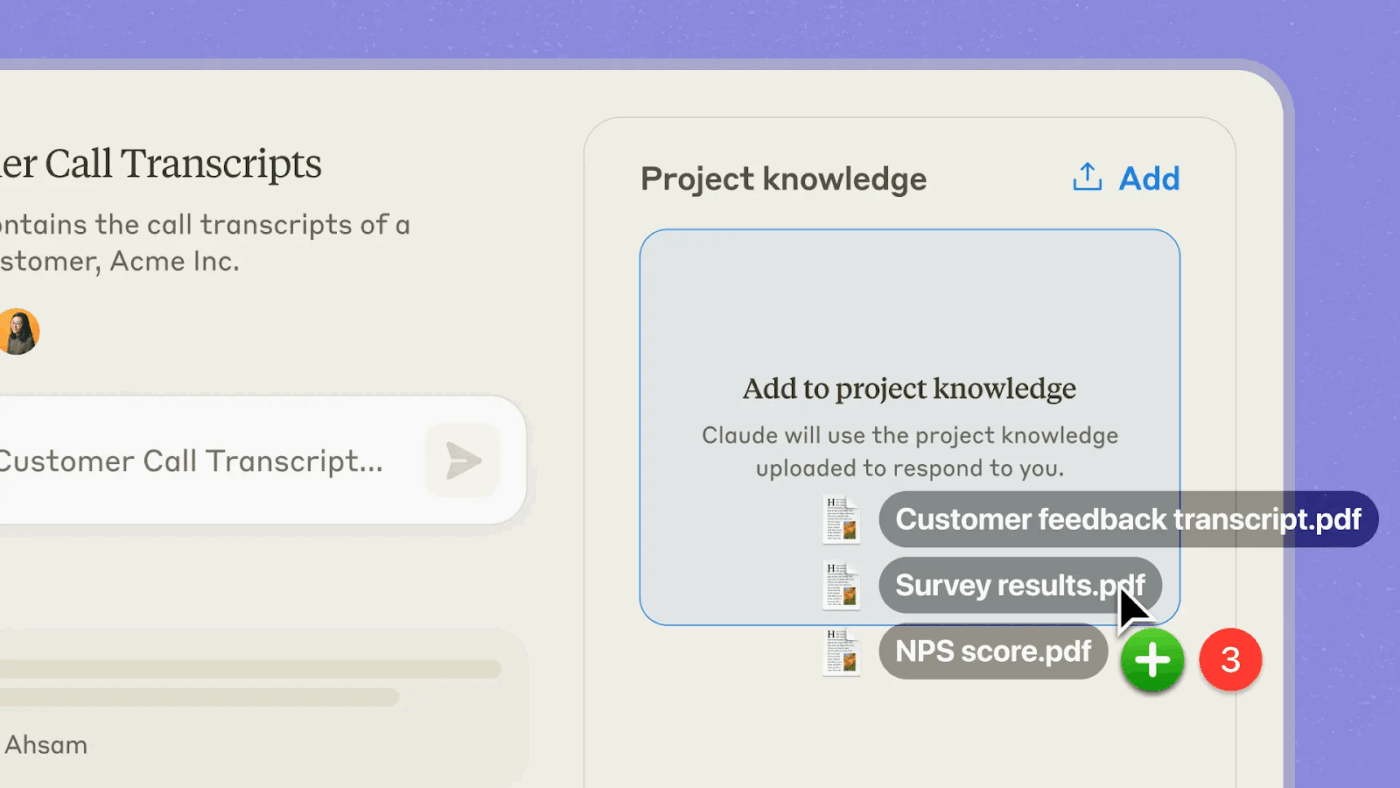
Claude Projects are self-contained workspaces with their own chat history and knowledge bases. Within each project, you can upload documents, add context, and have focused chats.
They are available to all Claude users, including those with a free Claude account. Rather than starting a new chat for every task, Claude Projects are designed to hold:
Let’s see what you get in Claude Projects on the free plan versus the paid plan 👇
| Feature/Capability | Free Plan | Paid Plans (Pro/Max/Team/ Enterprise) |
| Create Claude Projects | ✅ (up to 5 projects) | ✅ (no project count restrictions noted) |
| Projects with chat history | ✅ | ✅ |
| Upload documents and context | ✅ | ✅ |
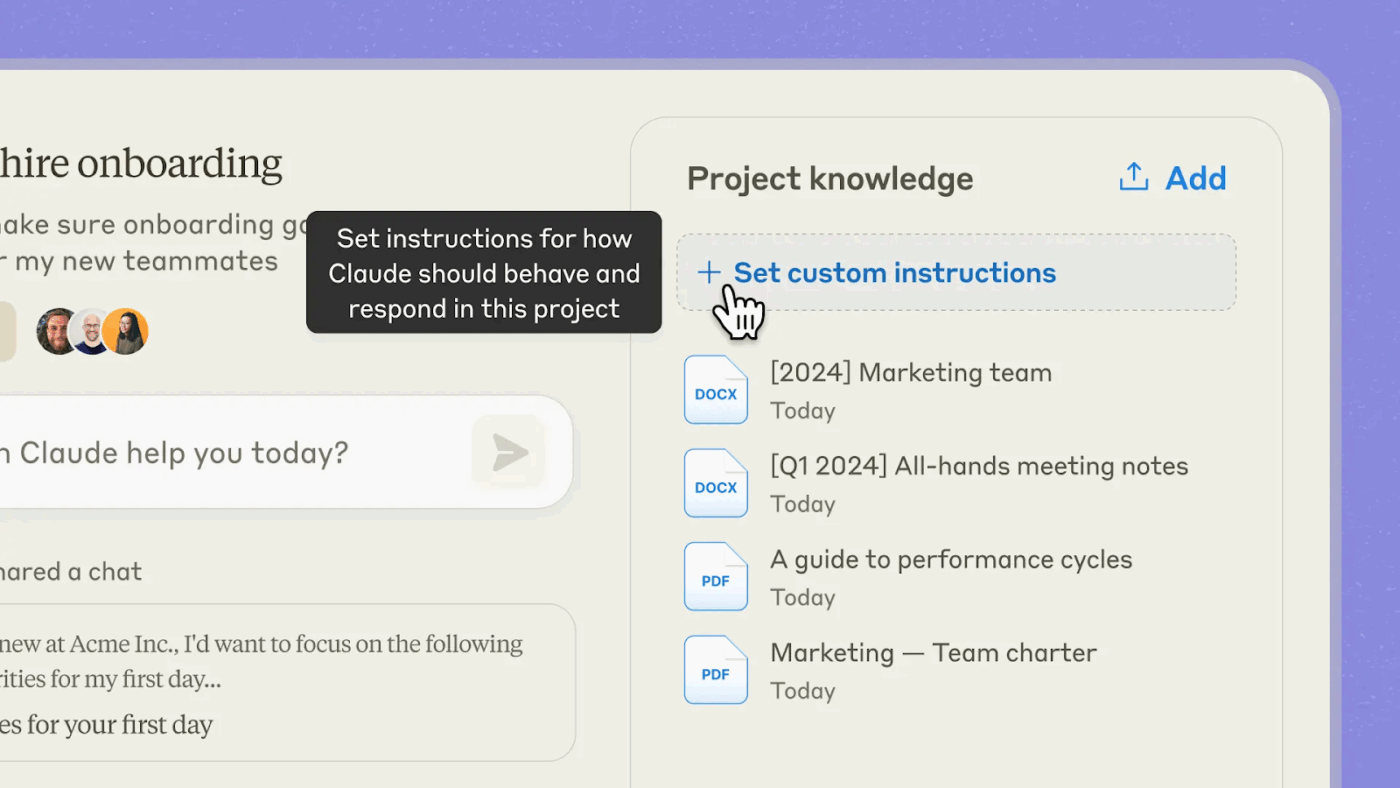
| Project-specific instructions | ❌ (not available) | ✅ |
| Enhanced project knowledge with RAG (bigger context) | ❌ | ✅ (up to ~10× expanded handling) |
| Project sharing/collaboration | ❌ | ✅ (Team & Enterprise only) |
| Shared access permissions | ❌ | ✅ with role controls |
✏️ Notes:
Claude Projects are built for work that is staggered, research-heavy, or context-dependent. Here’s exactly where these self-contained workspaces provide the most value:
Let’s say you have multiple sources to sift through for research analysis. Say academic papers, news articles, competitor reports, or survey data. Claude Projects will help you find common threads, extract insights, and create a coherent narrative.
Start by uploading all of your source materials, like PDFs, spreadsheets, and web clips, into one project. Ask Claude to compare arguments, summarize findings, or create documents, while referencing your entire uploaded research.
Strategic planning has several moving parts: initial hypotheses, evolving assumptions, changing data inputs, and shifting priorities.
In a Claude Project, collect all your strategic artifacts—roadmaps, briefings, decision criteria, and scenario analyses. This ensures that Claude doesn’t lose track of earlier decisions as you iterate.
Because the Project’s chat history and knowledge base are persistent, Claude can support your planning across multiple sessions, helping you refine your thinking. All this without repeating yourself in each conversation.
For long-form writing or documentation that spans multiple drafts and inputs, Claude Projects becomes your dedicated workspace.
Say you’re drafting a product spec, a research report, or a policy document. Store the style guides, reference documents, outlines, and earlier versions inside the Project.
Claude can then assist with rewriting, editing, or reformatting while always having all the context.
📚 Also Read: How to use Generative AI in Marketing
Claude Team users can share snapshots of their best conversations in a team’s shared Project activity feed. This allows teammates to see real examples of effective prompts, reasoning patterns, and work outputs, making it easier for the entire team to learn how to work better with Claude.
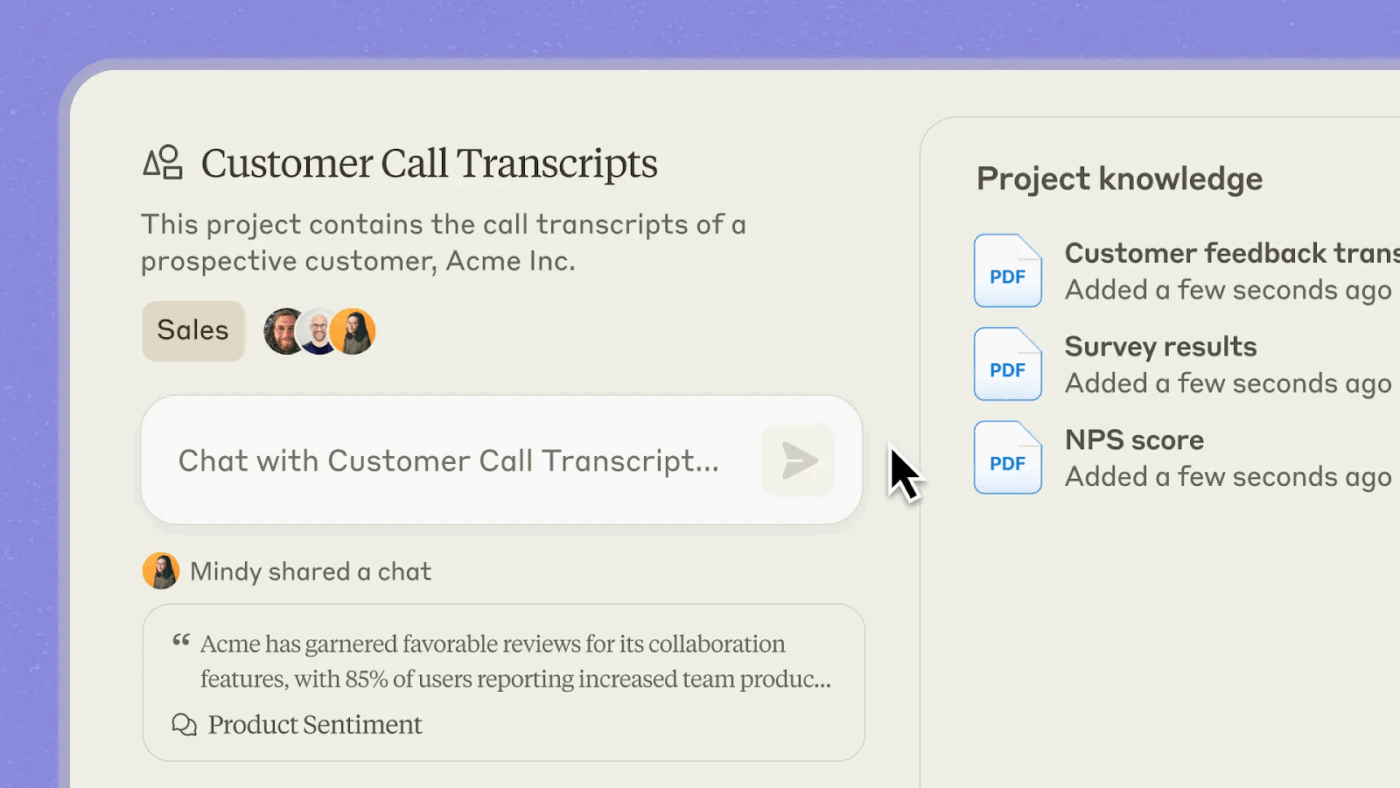
By sharing work products co-created with Claude, you can bring together organizational knowledge across functions.
Where is this most impactful? In areas such as product development and research, combining context from multiple contributors yields higher-quality outputs and stronger decisions.
📮 ClickUp Insight: 62% of our respondents rely on conversational AI tools like ChatGPT and Claude. Their familiar chatbot interface and versatile abilities—to generate content, analyze data, and more—could be why they’re so popular across diverse roles and industries.
However, if a user has to switch to another tab to ask the AI a question every time, the associated toggle tax and context-switching costs add up over time.
Not with ClickUp Brain, though. It lives right in your Workspace, knows what you’re working on, can understand plain text prompts, and gives you answers that are highly relevant to your tasks! Experience 2x improvement in productivity with ClickUp!
👀 Did You Know? Claude AI is named after Claude Shannon, the mathematician and engineer known as the father of information theory.
His work laid the foundation for how information is measured, transmitted, and preserved—fitting for an AI designed to reason across large volumes of context. Claude was first released in March 2023.
Step 1: Sign in to your Claude account
Step 2: Set up the first Claude Project
Click on the icon in the left panel.
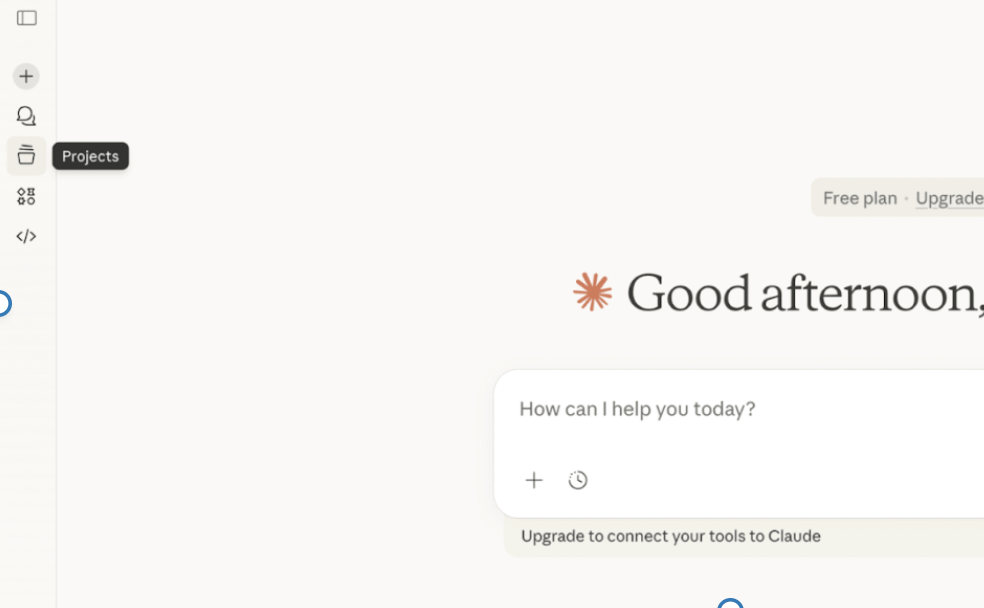
Then, create a new project.
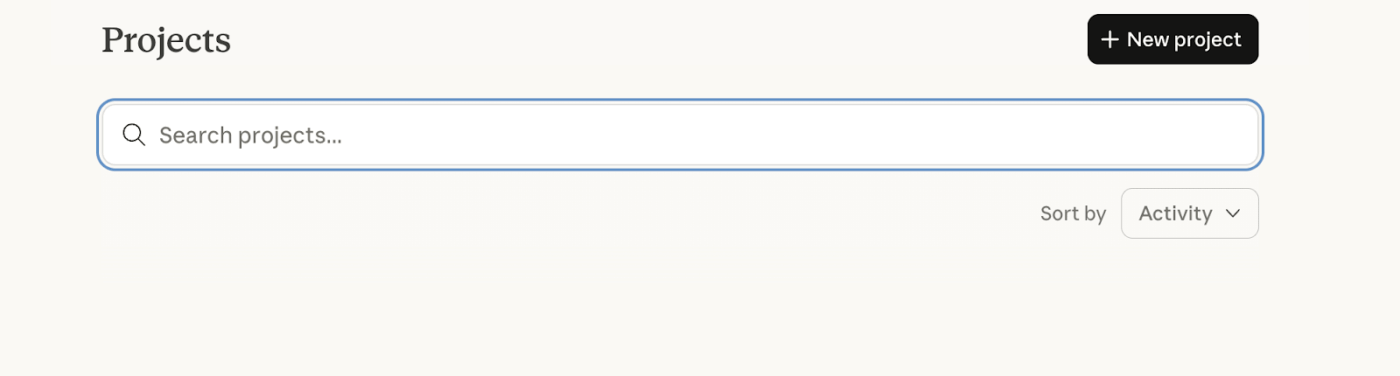
Step 3: Start adding project details
This is where you start entering details about the project.
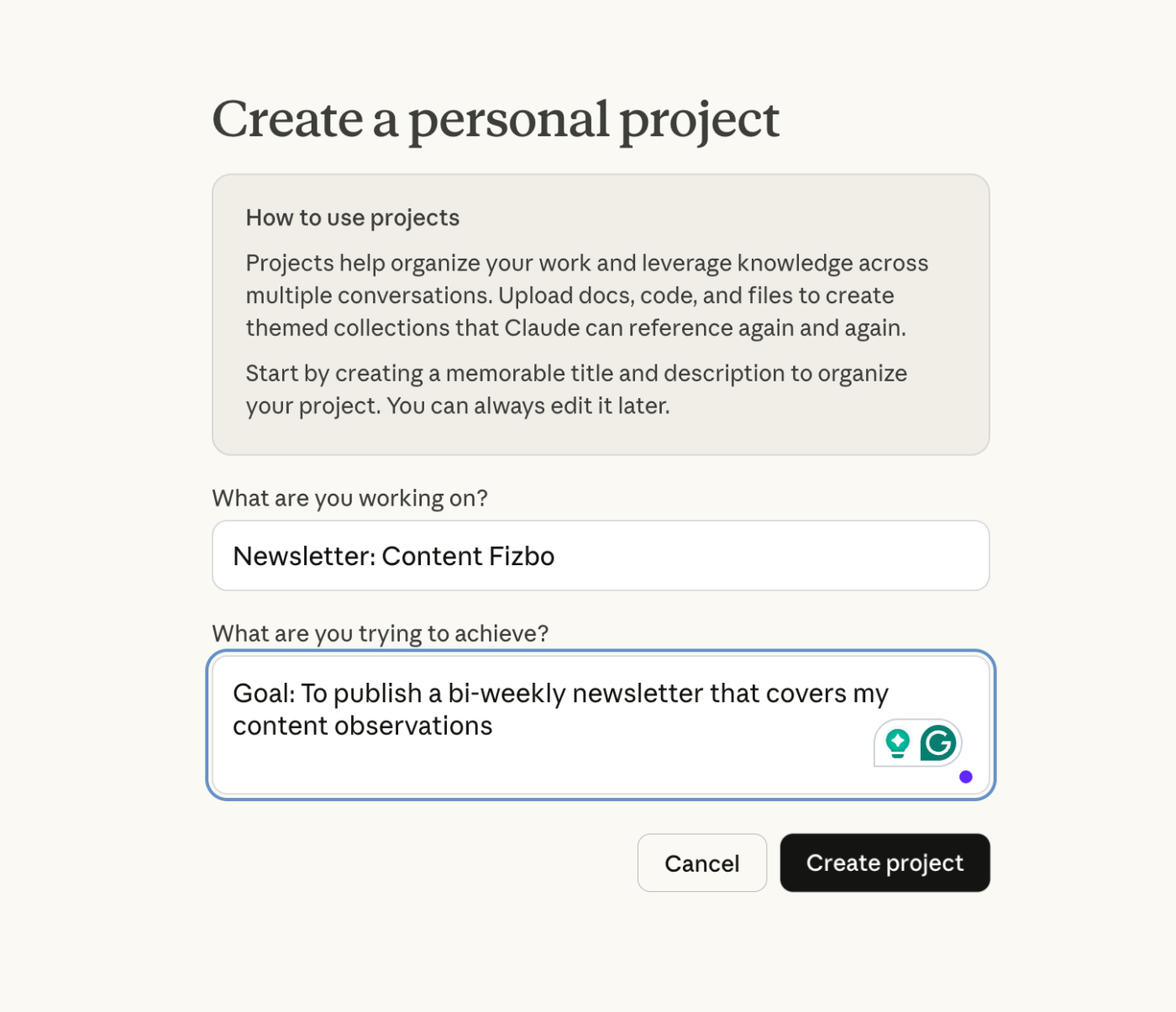
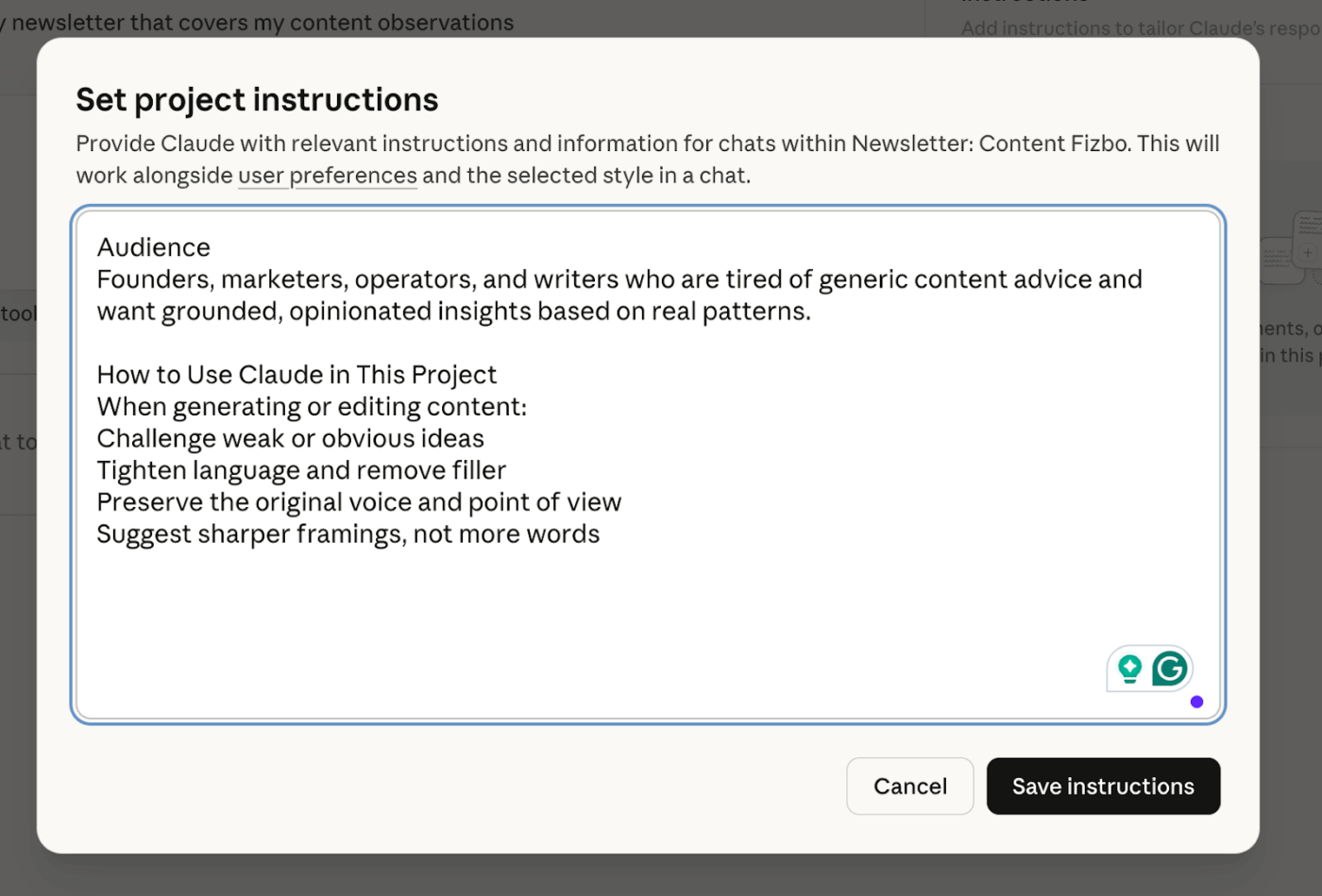
Next, add instructions for Claude to remember.
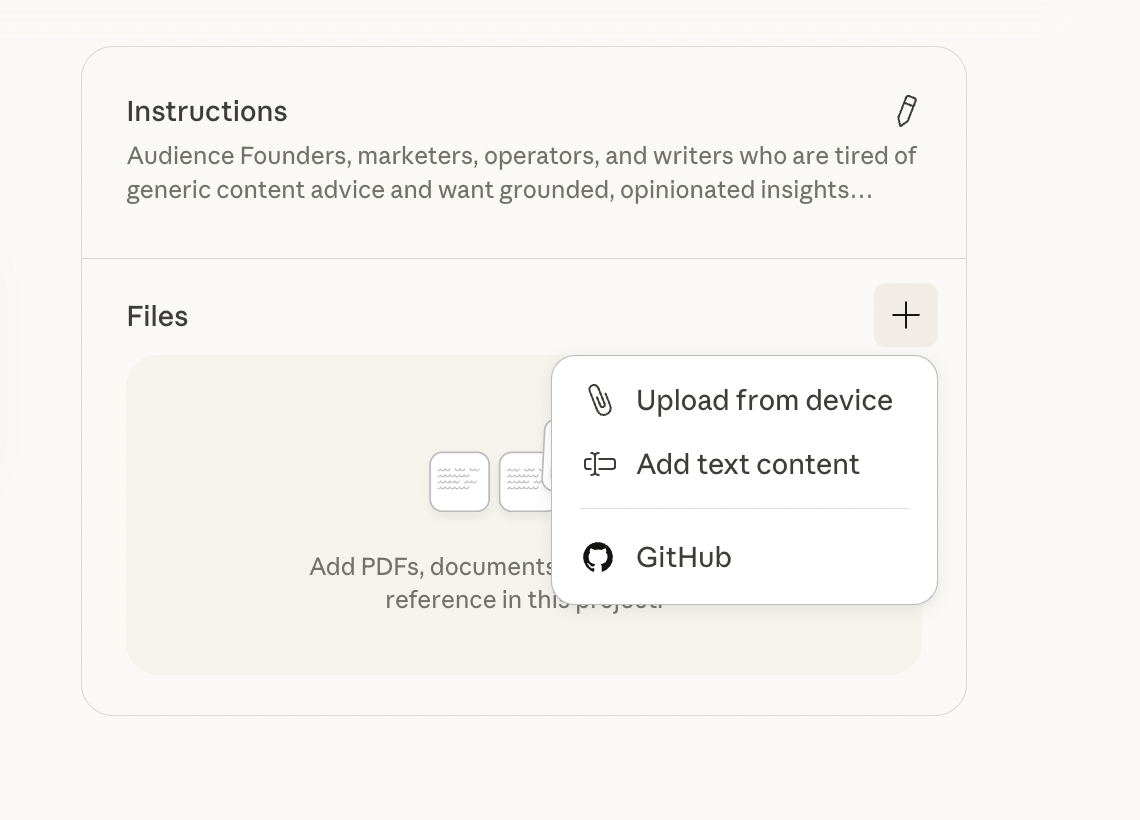
Upload files for reference. You can upload from a device, GitHub, or add text content.
Based on this project (Content Fizbo), here’s what I can include:
💡 Pro Tip: After uploading everything, run this once in the Project:
“Summarize Fizbo’s voice, beliefs, and writing rules based on the attached files. Call out anything that feels ambiguous.”
That forces Claude to internalize the material, and you can correct it early.
Here’s how to use Claude AI efficiently:
Claude Projects work best when the work unfolds over time and compounds with each iteration.
✅ Example: A recurring newsletter is a strong candidate for a Project. Each edition builds on earlier themes, audience insights, tone decisions, and formatting rules. You’ll likely return to drafts, reuse past sections, and refine ideas across multiple sessions.
❌ When it’s not a good idea: If you’re answering a one-off question, drafting a quick email, or brainstorming something you won’t revisit, a regular chat is enough. Creating a Project for short-lived tasks adds overhead without delivering much value.
Project instructions act like a standing brief. They apply to every conversation inside the project and help Claude reason in the right direction without constant correction.
You need to set project instructions to tell Claude exactly:
You can also specify timelines, output formats, or language requirements.
Claude Projects rely on two different types of memory. They include:
Asking a new chat, “What did we decide yesterday?” can result in hallucinated answers. You can work around this, though. Just turn important outputs into Project Knowledge or manually include essential context in your prompt.
Claude’s context window is around 200,000 tokens, roughly 500 pages of text. You should upload only material that truly matters to your work. Clean up files before adding them, remove irrelevant sections, and avoid bulk sharing entire folders “just in case.”
It’s also a good idea to learn the difference between files used in a single chat and files added to the knowledge base. Documents uploaded directly into a conversation are not available across the project. So, to make a file reusable, you have to add it to Project Knowledge.
Once uploaded, project knowledge becomes searchable. Instead of digging through folders, you can ask direct questions and get answers sourced from relevant files.
💡 Pro Tip: When Claude produces something you’ll need again (say a finalized brief, a campaign thesis, or a code snippet), save it to Project Knowledge. It also becomes a reference point for future conversations.
Treat each Claude Project as a single source of truth for one initiative.
Mixing unrelated work inside the same Project leads to diluted context and unpredictable outputs. Claude doesn’t know which assumptions apply to which task unless you keep boundaries clean.
🔔 Remember: One Project = one goal, one scope, one outcome.
Examples:
As the conversions grow, earlier conclusions can get buried under new threads. Claude may reference them inconsistently unless you explicitly surface what matters.
Every few sessions, summarize key discussions and finalized assumptions. Also, add what’s no longer valid.
To know more about how to use AI as your personal assistant, watch this video 👇
Claude Projects is great at organizing the inputs of deep work, like files, instructions, and context. But once projects move from planning to action, you’ll start to notice these limitations 👇
While a project can contain multiple chats, Claude cannot reference the content of one chat from another.
📌 Example: If you draft a blog post in chat A and want to revise it in chat B, Claude won’t know what you wrote unless you manually copy the text or add it to the project knowledge.
Claude Projects are great for storing reference materials (up to around 500 pages of text). But there are no tasks, no due dates, no assignees, no status columns, and no way to track progress toward a goal.
You can share a project with multiple team members and see each other’s chats. But you can’t actively contribute to a document in real time, comment on a specific line of an AI output, or brainstorm in a shared whiteboard.
When you upload a resource to Claude, it’s a snapshot. If it gets updated, your Project has no live connection. You have to manually delete and re-upload the new version after every update.
Claude Projects can give you a brilliant plan, but then you have to leave the interface to manage the next steps. The project’s output becomes another piece of data you need to manage elsewhere.
👀 Did You Know? You can run Anthropic’s Claude models directly through Amazon Bedrock, a fully managed AWS service that lets developers build generative AI applications at enterprise scale with a single, unified API.
Claude Projects work well at the thinking layer of work. They help you reason better, preserve context, and iterate on ideas without starting from zero.
However, when work moves beyond thinking into execution, a new set of questions arises.
For example, who owns this project? What happens next? When are the deliverables due? How do we know when it’s done?
Claude Projects aren’t designed to answer those questions.
What you need at this point is a shared system of action that needs to provide:
You need one platform where the plan (the strategy doc from Claude) lives alongside the project execution (the tasks derived from it), and both are updated in real time.
A platform that turns AI insights and outputs into assigned actions with clear owners, deadlines, and statuses. Without this, the best plans eventually devolve into who was supposed to do that?
Viewing each other’s chats is passive. You need to actively collaborate, comment on tasks, co-edit living documents, tag colleagues for input, and build on ideas within the context of your work to move your project forward.
Even when you use Claude for productivity, you will still need a separate system to execute on what Claude produces.
Enter: ClickUp.
The Converged AI Workspace offers a single platform where projects, documents, conversations, and AI intelligence work together.
Inside ClickUp, context-aware AI knows and understands your work. So, you spend less time copy-pasting and more time moving work forward.
Below are the key features of ClickUp that make it the best Claude alternative for busy teams:
ClickUp Brain is a contextual AI layer that operates directly inside your workspace, with awareness of how your work is structured. It can reference:
Because Brain operates within ClickUp’s permission model, it only surfaces information the user is allowed to see. There is no need to paste context, re-explain project structure, or summarize work manually before asking a question.
Instead of generating output in isolation, Brain reasons over live workspace data and returns answers that reflect the real execution state.
📌 Example: What is slowing down progress on the Q3 campaign workspace? This AI tool scans task comments, subtasks, statuses, and dependencies, then responds clearly:
The blocker report shows action owners and time impact, so the team fixes instead of dealing with the never-ending work sprawl.
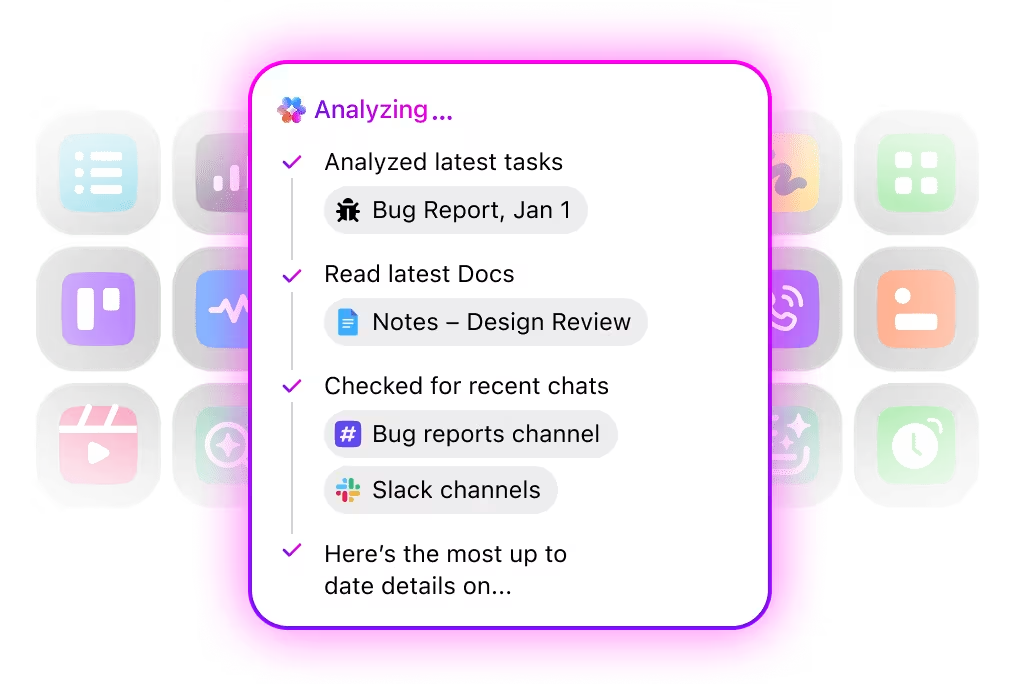
One of the strongest capabilities of Brain is Enterprise Search.
ClickUp Brain includes AI-powered enterprise search across the workspace and connected systems.
Users can search using natural language across:
Unlike traditional keyword search, Brain returns answers and related files based on how work is organized. This is especially valuable in large workspaces where information is fragmented across projects, teams, and tools.
Instead of hunting through folders or dashboards, teams can ask questions like:
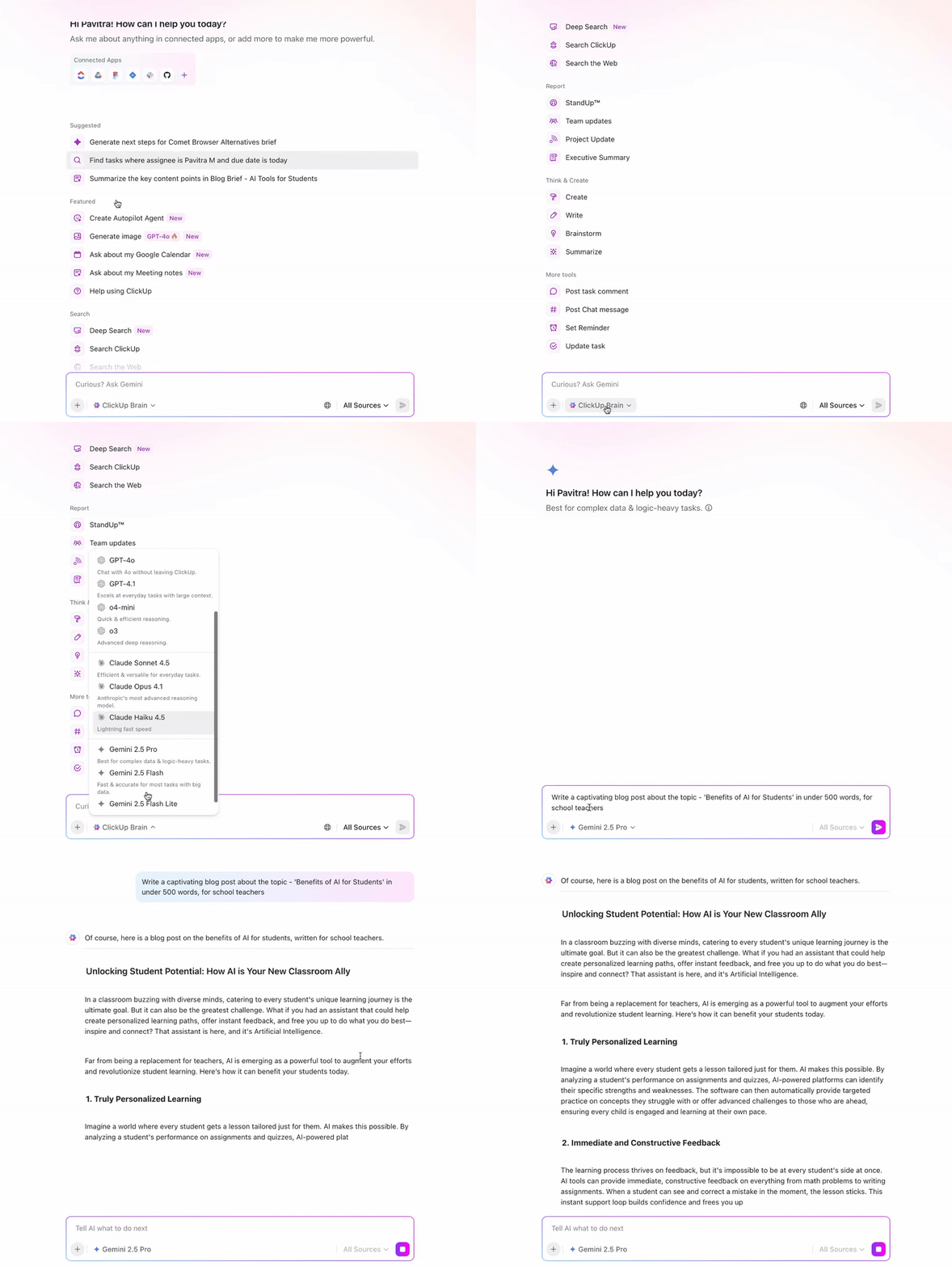
ClickUp Brain provides access to multiple external AI models within the same interface. Users don’t need to switch tools or manage separate subscriptions to experiment with different model strengths.
Common use cases here include:
All model access is abstracted through ClickUp Brain, meaning AI usage remains centralized, permissioned, and auditable within the workspace. This avoids the fragmentation that happens when teams rely on multiple standalone AI tools.
📌 Example use cases:
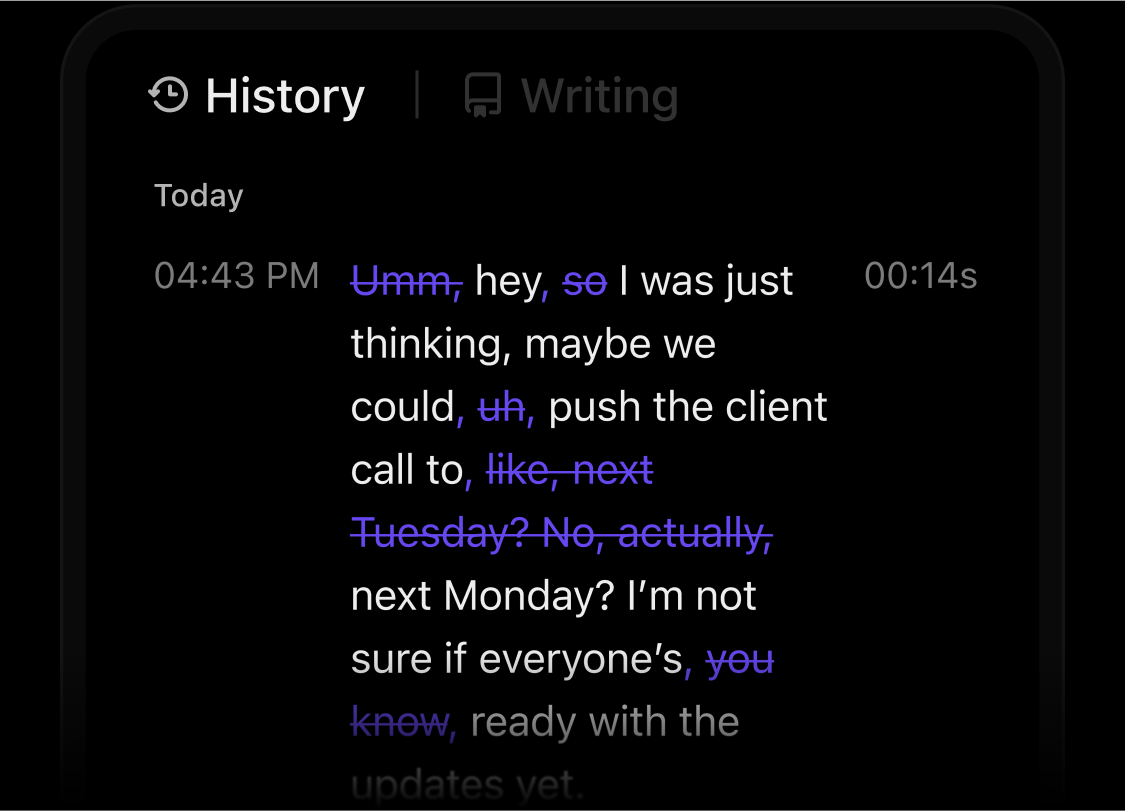
ClickUp’s Talk to Text feature extends BrainGPT beyond typed prompts.
Teams can dictate their ideas, meeting notes, or updates, and instantly convert them into structured text inside ClickUp. From there, Brain can:
Because this happens inside the workspace, voice input is not just transcribed. It becomes executable work with context, structure, and follow-through.
This is especially useful for capturing thinking in real time without breaking focus or losing momentum.
📚 Also Read: Your Guide to Using AI for Work
While BrainGPT helps teams ask better questions and surface insights, ClickUp’s Super Agents are designed to act on those insights.
They are your ambient AI assistants that continuously observe what’s happening across your workspace. They respond to changes in tasks, timelines, dependencies, and data patterns—without waiting for a manual prompt.
📌 Example: A Super Agent can:
Watch this video to know more about Super Agents for AI-powered project management.
Use this checklist if you’re deciding whether Claude Projects are enough—or if you need an execution layer.
ClickUp AI can:
✅ Understand live work state, not just text
Know what’s overdue, blocked, unassigned, or dependent—based on real task data, not conversation history.
✅ Turn AI outputs into structured work
Convert plans, decisions, and notes into tasks with owners, due dates, and statuses—without leaving the workspace.
✅ Update the system, not just respond
Change task statuses, assign owners, surface risks, and flag issues instead of returning static answers.
✅ Stay active after the conversation ends
Use Super Agents to monitor work continuously and act when conditions are met, without manual prompts.
✅ Connect strategy directly to execution
Keep documents, tasks, timelines, and AI insights in one place so plans don’t get lost in handoffs.
✅ Surface blockers automatically
Detect missing approvals, stalled dependencies, and unassigned work before they slow the team down.
✅ Operate across teams and projects
Summarize progress, risks, and workload across multiple initiatives—not just inside one Project.✅
✅ Support real collaboration, not passive viewing
Enable co-editing, inline comments, tagging, and shared workflows instead of isolated chats.
Here’s a direct comparison between the two:
| Aspect | Claude Projects | ClickUp |
| Purpose | Deep reasoning and long-running conversations | End-to-end AI-powered project execution |
| Core strength | Contextual thinking and synthesis | Turning decisions into action |
| Memory model | Project chat history + uploaded knowledge | Live system memory across tasks, docs, chats |
| Tasks & ownership | ❌ | ✅ Native tasks with owners, due dates, status |
| Progress tracking | ❌ | ✅ Real-time status, dependencies, workload |
| Collaboration depth | View shared chats | Co-editing, comments, tagging, shared workflows |
| AI role | Assistant that answers questions | Operator that updates and drives work |
| Automation | ❌ | ✅ Super Agents act autonomously |
| After the plan is written | You leave the tool | Work continues in the same system |
| Best for | Research, writing, strategy thinking | Running projects, teams, and operations |
📚 Also Read: A Detailed Review of Claude AI
🎯 The Bottom Line: If the goal is better thinking, Claude Projects work fine.
If the goal is getting work done, ClickUp becomes essential.
Most AI tools sit next to your work. ClickUp’s Converged AI Workspace sits inside it.
ClickUp combines AI with live projects, tasks, documents, conversations, and timelines in one system. That means AI understands not just what you’re asking—but what’s already happening, what’s blocked, and what needs to move next.
The edge comes from convergence:
Ready to explore the power of a converged AI workspace? Sign up on ClickUp for free.
Claude Projects are for deep, context-heavy thinking work. They help you organize research, maintain long-running conversations, and build ideas over time without needing you to start from scratch.
Projects work best for planning, analysis, long-form writing, learning, and any work where reasoning and continuity matter more than execution.
No. Claude Projects can suggest tasks, outline steps, or recommend next actions, but it cannot assign work, set deadlines, track progress, or manage ownership.
Once work moves beyond planning, you need a dedicated task management platform like ClickUp to turn ideas into accountable, trackable work.
Claude Projects is built for AI-assisted reasoning, which can help you plan, research, and generate any output. But ClickUp is built for team execution; it turns plans into trackable tasks, centralizes knowledge in living docs, and enables real-time collaboration.
You can think of it this way: Claude Projects helps you think through work, while ClickUp helps you get the work done. ClickUp gives you the accountability, dynamic project tracking, and integrated AI that works on your live data, capabilities that Claude Projects doesn’t have.
Yes, and that’s the most effective setup. Claude Projects work well for early-stage research, ideation, and drafting. You can even modify project instructions.
Once your output is ready, ClickUp helps you with project management. Within ClickUp, you can break the output into tasks, assign ownership, track progress, and collaborate with your team. ClickUp can also automate repetitive tasks for you. You can even store Claude-generated plans directly in ClickUp Docs.
While Claude Projects are great for individual brainstorming or exploratory work, ClickUp really stands out for its converged AI workspace. It gives everyone real-time visibility, clear ownership of complex tasks, and built-in ways to communicate and coordinate.
With ClickUp as a Claude alternative, you can turn your ideas into work that your whole team can see, act on, and finish together.

© 2026 ClickUp

There’s an easier way. Try a free AI Agent in ClickUp that actually does the work for you—set up in minutes, save hours every week.