






Still downloading templates?
There’s an easier way. Try a free AI Agent in ClickUp that actually does the work for you—set up in minutes, save hours every week.
Sorry, there were no results found for “”
Sorry, there were no results found for “”
Sorry, there were no results found for “”
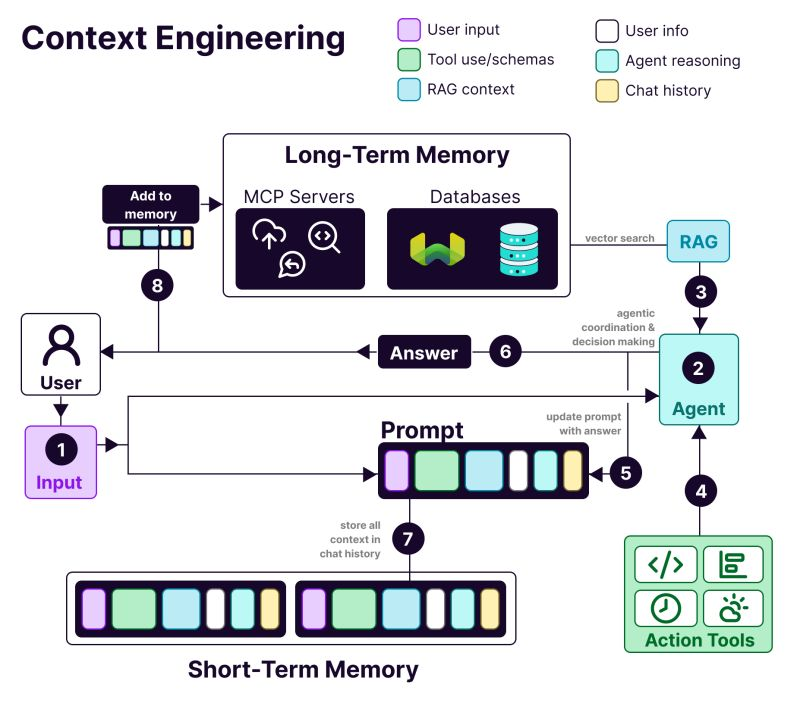
As LLMs get more powerful, prompting no longer remains the hard part. Context becomes the constraint.
Context engineering is bringing the right information in the right format to LLMs (large language models).
What makes context engineering hard?
You need to engineer every layer of the stack to capture context and make it available. If you send too little context, the LLMs won’t know what to do. Send too much context, and you run out of tokens. So, how do you find the balance?
Below, we share everything you need to know about context engineering.
AI context engineering is the process of designing and optimizing instructions and relevant context for LLMs and advanced AI and multimodal models to perform their tasks effectively.
It goes beyond prompt writing. Context engineering determines:
🌟 The purpose: To optimize the information you are providing in the context window of the LLM and filter out noisy information.
Without context, an LLM predicts the most statistically likely continuation of text. On the other hand, good context engineering improves outputs by:
Summing it up in the words of Tobi Lutke, Shopify’s CEO:
I really like the term context engineering over prompt engineering.
It describes the core skill better: the art of providing all the context for the task to be plausibly solvable by the LLM.
In AI-driven workflows, LLMs are not standalone tools. They operate inside systems that already have data, rules, and state.
Context engineering allows the model to understand where it is in the workflow and what it is allowed to do next.
When the model is aware of the current state, past actions, and missing inputs, it can recommend or execute the correct next step instead of generating generic advice.
This also means explicitly providing business logic such as approval rules, compliance constraints, and escalation paths. When these are part of the context, AI decisions stay aligned with operational reality.
Finally, context engineering enables multi-step and agentic workflows by ensuring clean handoffs of state and decisions at each step.
This prevents errors from compounding as workflows scale, thereby improving context effectiveness.
👀 Did You Know? 95% of enterprise GenAI implementations fall short, not because models are weak, but because organizations fail to integrate AI into real workflows.
Generic AI tools like ChatGPT work well for individuals, but break at scale because they don’t learn from system context, business rules, or evolving state. In other words, most AI failures are integration and context failures, not model failures.
📮ClickUp Insight: 62% of our respondents rely on conversational AI tools like ChatGPT and Claude. Their familiar chatbot interface and versatile abilities—to generate content, analyze data, and more—could be why they’re so popular across diverse roles and industries.
However, if a user has to switch to another tab to ask the AI a question every time, the associated toggle tax and context-switching costs add up over time.
Not with ClickUp Brain, though. It lives right in your Workspace, knows what you’re working on, can understand plain text prompts, and gives you answers that are highly relevant to your tasks! Experience 2x improvement in productivity with ClickUp!
Context engineering works by progressively shaping information before it ever reaches the model.
The anatomy of a context-engineered system includes:
Here’s why you need context engineering when building AI applications:
Providing decision-relevant context reduces ambiguity. The model reasons within known facts, constraints, and states instead of relying on probabilistic guesses.
Stable context structures produce repeatable outputs. Similar inputs lead to similar decisions—essential for production workflows.
Targeted, compressed context avoids token waste. Systems respond faster without repeatedly loading full histories or documents.
Context encodes business rules and permissions. This allows AI to act without violating policies or triggering risky actions.
Clean context handoffs preserve state across steps. Errors don’t compound as workflows grow more complex or agentic.
Structured context makes failures visible. You can trace errors to missing, stale, or mis-ranked inputs instead of blaming the model.
AI systems that respect workflow context feel reliable—a critical difference between pilots and tools for enterprise-wide adoption.
📚 Read More: How to Leverage AI with Access to Real-Time Data
👀 Did You Know? Context-aware AI directly impacts productivity. A Boston Consulting Group study found that communications teams alone can reclaim 26–36% of their time today with generative AI, and with redesigned workflows and agentic systems that understand context, productivity gains can climb toward 50%.
Prompt engineering: Ask ChatGPT to write a new feature announcement email. You’re writing instructions for a single task.
Context engineering: You’re building a customer service bot. It needs to remember previous tickets, access user account details, and maintain conversation history.
As explained by AI Researcher, Andrej Karpathy:
People associate prompts with short task descriptions you’d give an LLM in your day-to-day use. When in every industrial-strength LLM app, context engineering is the delicate art and science of filling the context window with just the right information for the next step.
+1 for "context engineering" over "prompt engineering".
People associate prompts with short task descriptions you'd give an LLM in your day-to-day use. When in every industrial-strength LLM app, context engineering is the delicate art and science of filling the context window… https://t.co/Ne65F6vFcf
— Andrej Karpathy (@karpathy) June 25, 2025
| Approach | What it focuses on | Best used for |
| Prompt engineering | Crafting instructions and output formats for the model | One-off tasks, content generation, format-specific outputs |
| Context engineering | Supplying relevant data, state, and constraints to the model | Conversational AI, document analysis tools, coding assistants |
| Both together | Combining clear instructions with system-level context | Production AI applications that need consistent, reliable performance |
Most applications use a combination of prompt engineering and context engineering. You still need well-written prompts in your context engineering system.
The difference is that those prompts work with carefully managed background information. You don’t need to start each time.
📮 ClickUp Insight: More than half of respondents type into three or more tools daily, battling “AI Sprawl” and scattered workflows.
While it may feel productive and busy, your context is simply getting lost across apps, not to mention the energy drain from typing. Brain MAX brings it all together: speak once, and your updates, tasks, and notes land exactly where they belong in ClickUp. No more toggling, no more chaos—just seamless, centralized productivity.
The key areas where AI context engineering is already being implemented are 👇
Most chatbots treat every message as new, forcing users to repeat themselves again and again.
With context engineering, AI can reference user history, previous interactions, purchase records, and product documentation. With this, it responds like a teammate who already knows the issue.
📌 Real-world example: Coda’s support team handles technical product questions that require understanding past messages and referencing product documentation. To scale support, they use Intercom Fin. Fin reads documentation and previous conversations before replying, helping resolve 50–70% of customer questions autonomously while maintaining high CSAT.
AI writing tools deliver value only when they understand what you’re working on, why it matters, and what already exists. Without that context, they save time on drafting but still require heavy rewrites and manual alignment.
This is where context engineering AI changes outcomes. By grounding AI in task state, documents, past decisions, and team conventions, writing assistants move from generic copy generation to workflow-aware support.
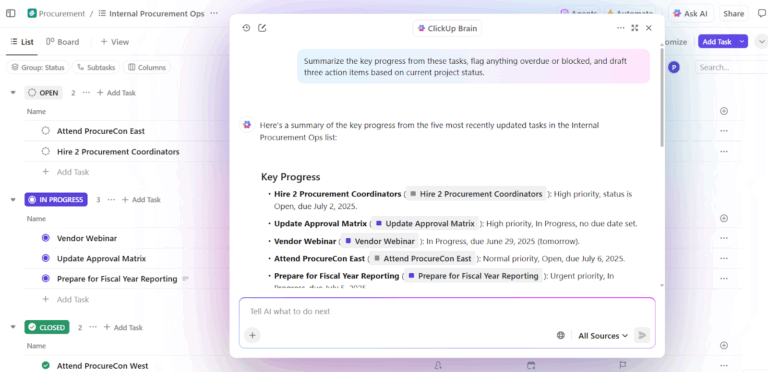
📌 Real-world example: ClickUp Brain, ClickUp’s native AI, applies context engineering at the workspace level. Instead of asking users to paste background into prompts, it pulls context directly from Tasks, Docs, comments, priorities, and timelines.
A key capability is contextual decision-making. It evaluates ongoing projects alongside team capacity and past performance to surface actionable insights.
So firstly, Brain can detect overload, delays, and bottlenecks. Along with summarizing the issue, it also recommends concrete adjustments—in the form of redistributing tasks, updating timelines, and re-distributing priorities.
Because these decisions are grounded in a live workspace context, the output is immediately usable. No need to restate background, explain priorities, or manually align recommendations with reality.
Teams using ClickUp Brain report 2.26X higher full integration rates and the lowest AI frustration scores (27.1%).
Sales workflows span emails, meetings, CRMs, and spreadsheets. Without context, AI can’t understand deal momentum or buyer intent.
Context engineering gives AI visibility into buyer conversations, timelines, communication tone, and past engagement. This helps surface insights, detect stalled deals, and suggest the right next action.
📌 Real-world example: Microsoft’s own sales team uses Copilot for Sales, which pulls context from Outlook, Teams calls, CRM updates, and notes to surface the right insights and draft follow-ups. Internal teams saw a 20% increase in won deals and a 9.4% lift in revenue per seller, showing how context-driven AI amplifies performance.
Medical decisions rely on patient history, lab reports, prescriptions, and doctor notes, but this information often sits in disconnected systems. This leads to doctors losing a lot of time re-entering data and risking overlooking critical details. They sometimes spend nearly 40% of their time on administrative work.
AI context engineering connects these data points. It supports clinicians with accurate summaries, draft documentation, highlights relevant history, and surfaces potential risks or next steps.
📌 Real-world example: Atrium Health uses Nuance DAX Copilot, developed in partnership with Microsoft, to auto-document clinical visits using prior records and real-time conversation. As a result, clinicians saved 30–40 minutes a day on documentation, while a study across 12 medical specialties reported higher provider efficiency and satisfaction without compromising patient safety.
Recruiting decisions depend on context, like skills, interview feedback, role fit, and past hiring data. AI context engineering allows you to analyze resumes, job descriptions, interview transcripts, and historical patterns to identify strong matches faster.
📌 Real-world example: Enterprise teams at Micron use Eightfold AI, a talent intelligence platform that analyzes resumes, role requirements, internal career paths, and past hiring outcomes to predict job fit. The platform evaluates candidates based on skills and potential. The result? Expanding their talent pipeline and hiring eight more candidates per month with a lean recruiting team.
Which tools help you implement context engineering at scale?
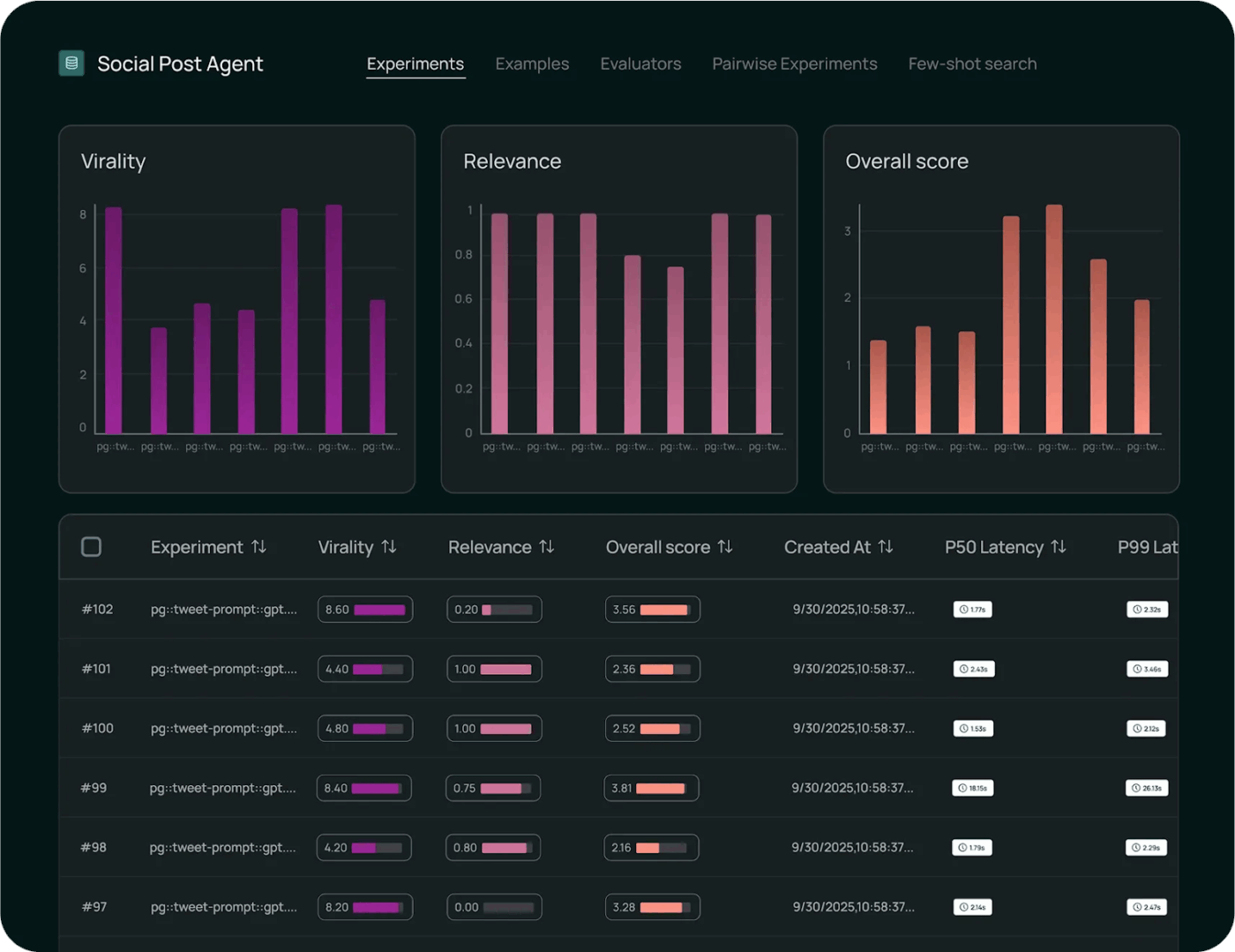
LangChain is an open-source orchestration framework for building AI systems where context must be assembled, updated, and routed programmatically.
The AI agent tool helps developers connect LLMs with tools, data sources, memory, and control logic rather than relying on static prompts.
Core LangChain handles chaining and retrieval, while LangGraph enables stateful, graph-based workflows for complex, multi-step reasoning.
DeepAgents builds on this foundation to support long-running, autonomous agents with planning, sub-agents, and persistent context.
Together, these components make LangChain a control layer for context engineering, deciding when context is fetched, how it evolves, and where it flows across agentic workflows.
As per a user on Reddit:
After testing a few different methods, what I’ve ended up liking is using standard tool calling with langgraph worfklows. So i wrap the deterministic workflows as agents which the main LLM calls as tools. This way the main LLM gives the genuine dynamic UX and just hands off to a workflow to do the heavy lifting which then gives its output nicely back to the main LLM.
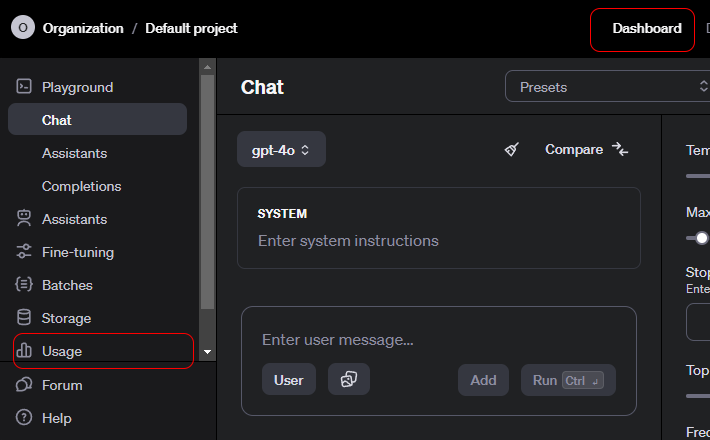
The OpenAI API is a general-purpose interface for accessing advanced generative AI models that power a wide range of applications.
Developers use it to integrate language understanding and generation into products. It also supports summarization, translation, code assistance, and reasoning.
The API supports chat, embeddings, function calling, moderation, and multimodal inputs, enabling structured interactions with models. OpenAI is well-suited for rapid prototyping, as it handles authentication, scaling, and versioning.
The ease of use is attributed to how the API abstracts complex model behavior into simple, reliable endpoints.
GPT-5.2
GPT-5.2 Pro
GPT-5 Mini
As per a user on Reddit:
OpenAI’s APIs are just like any other, so from a technical perspective, there should be zero learning curve.
All of the endpoints, parameters, and example responses are well documented.
If you have basic development experience, you shouldn’t need a course.
I agree with the point above to learn Python. The Python libraries have all the relevant information to make life easier. There are Node libraries if you want to stick with JS, too.
Biggest learning curve will be how to use them strategically. Spend some time trying out system messages, user prompts, and parameters in the Playground before you try to build it with code. (Pretty sure you can get sample code from Playground after you find something that works.)
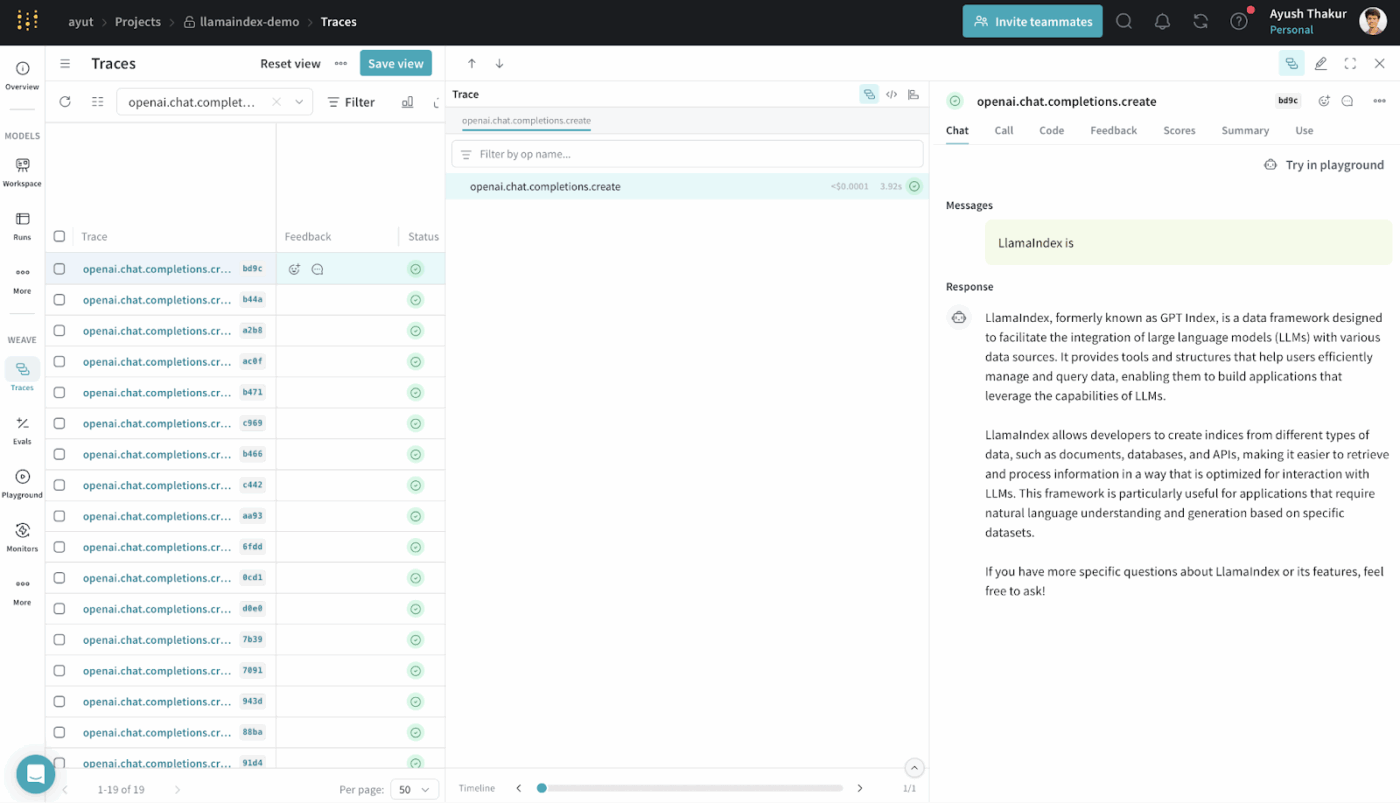
LlamaIndex is an open-source data framework designed to make external data accessible and usable for large language models.
It provides connectors, indexes, and query interfaces that transform structured and unstructured data into representations LLMs can reason over efficiently.
You can build RAG systems without deep custom infrastructure. It abstracts retrieval, vectorization, and relevance ranking.
It is commonly used for use cases such as semantic search, summarization, and question answering, grounded in real data.
Honestly I think most of this genAi framework like langchain,llamaindex are not that good and make the code more complicated. It’s better to use vanilla python
Most tools in this list help you with specific pieces of context engineering. They assemble prompts, retrieve data, or orchestrate workflows.
ClickUp Brain takes a different approach. As the world’s first Converged AI Workspace, ClickUp unifies your projects, tasks, docs, and comms into a single platform, with a context-aware AI embedded inside.
Here’s how 👇
ClickUp Brain understands the context of your work.
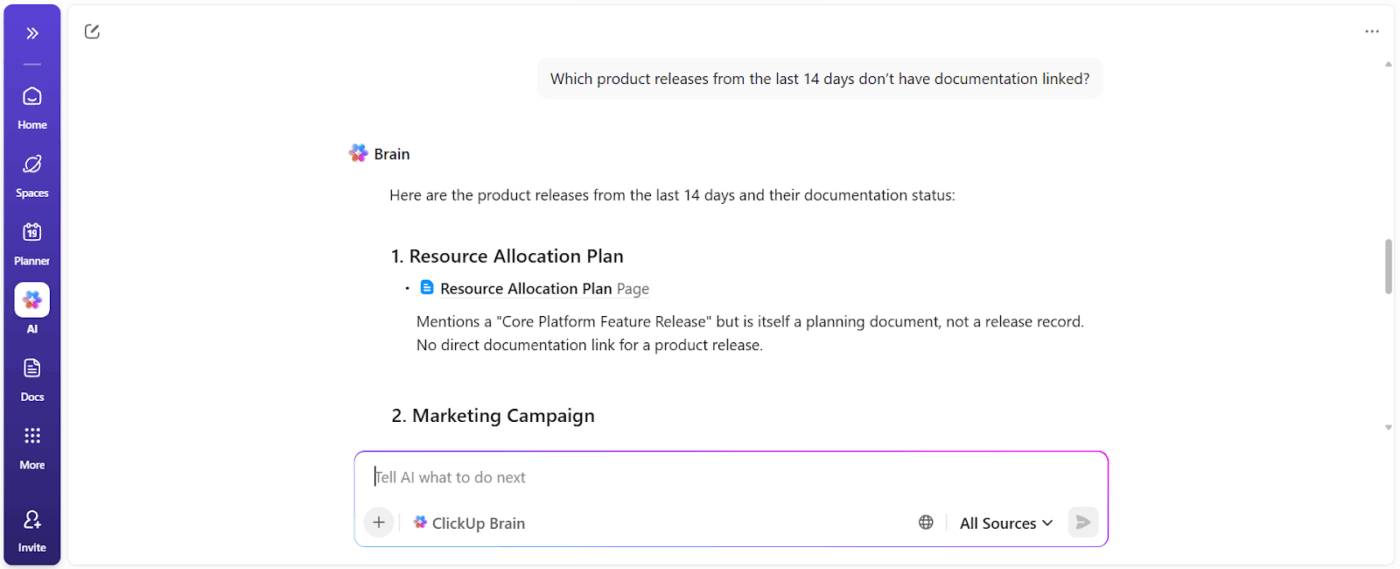
It pulls context from your ClickUp Tasks, Docs, comments, dependencies, statuses, timelines, and ownership. You don’t need to paste the background or explain the project history every time you ask it a question based on workspace data.
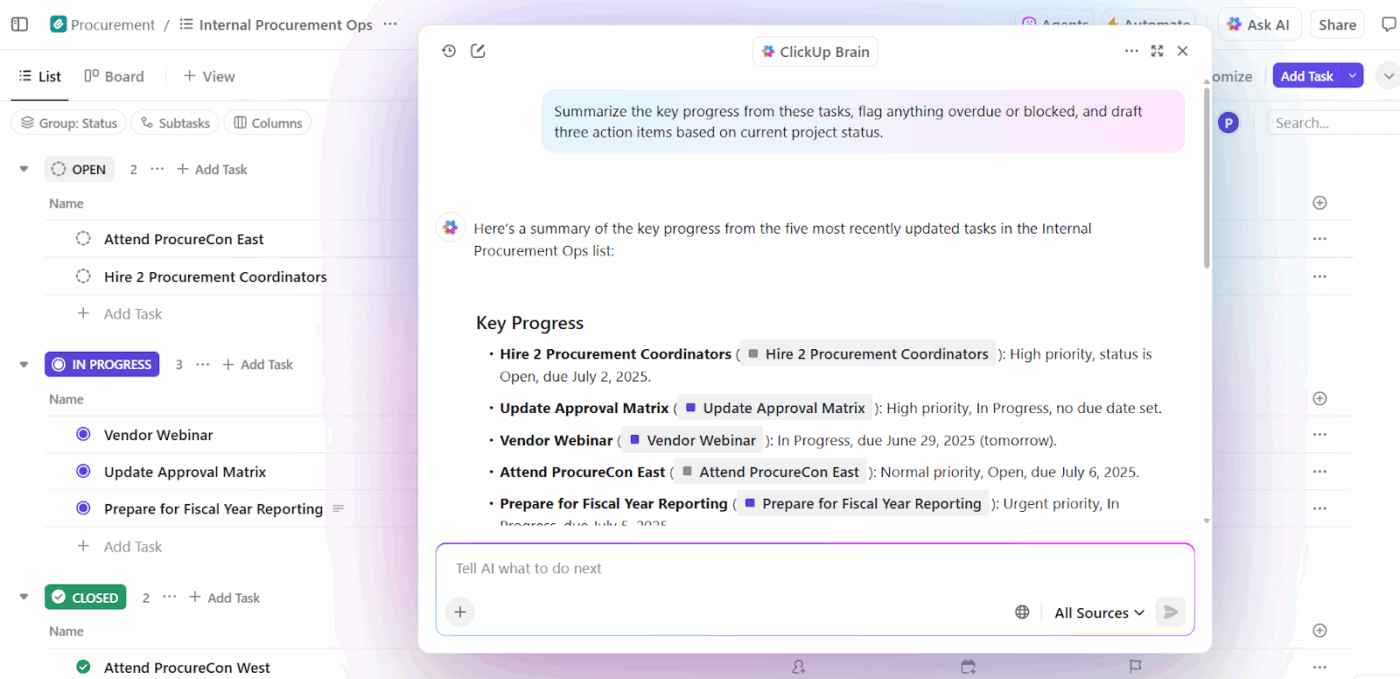
📌 For example, when a manager asks, “What’s slowing down the Q3 campaign?” It scans the workspace and surfaces, concrete blockers like:
You get a blocker report that shows action owners and time impact.
ClickUp Brain acts as an AI writing assistant, but with a critical difference: it writes with awareness of what the team is building.
When a PM or marketer drafts launch messaging inside a ClickUp Doc, Brain can:
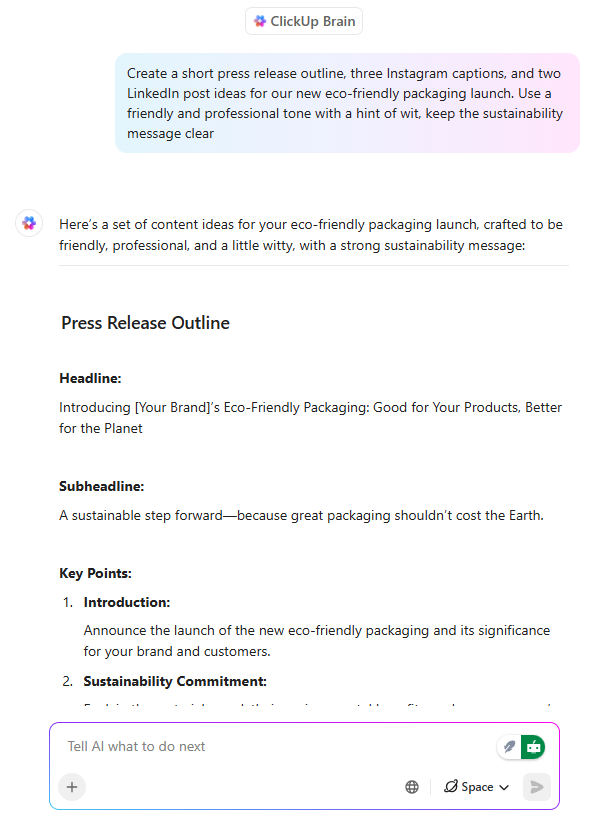
More importantly, that writing stays connected to tasks, timelines, and approvals. There’s no disconnect between the documentation and the work. A major timesaver as content doesn’t need to be reinterpreted later.
💡 Pro Tip: Choose between multiple AI models from ChatGPT, Claude, and Gemini families right inside ClickUp Brain!
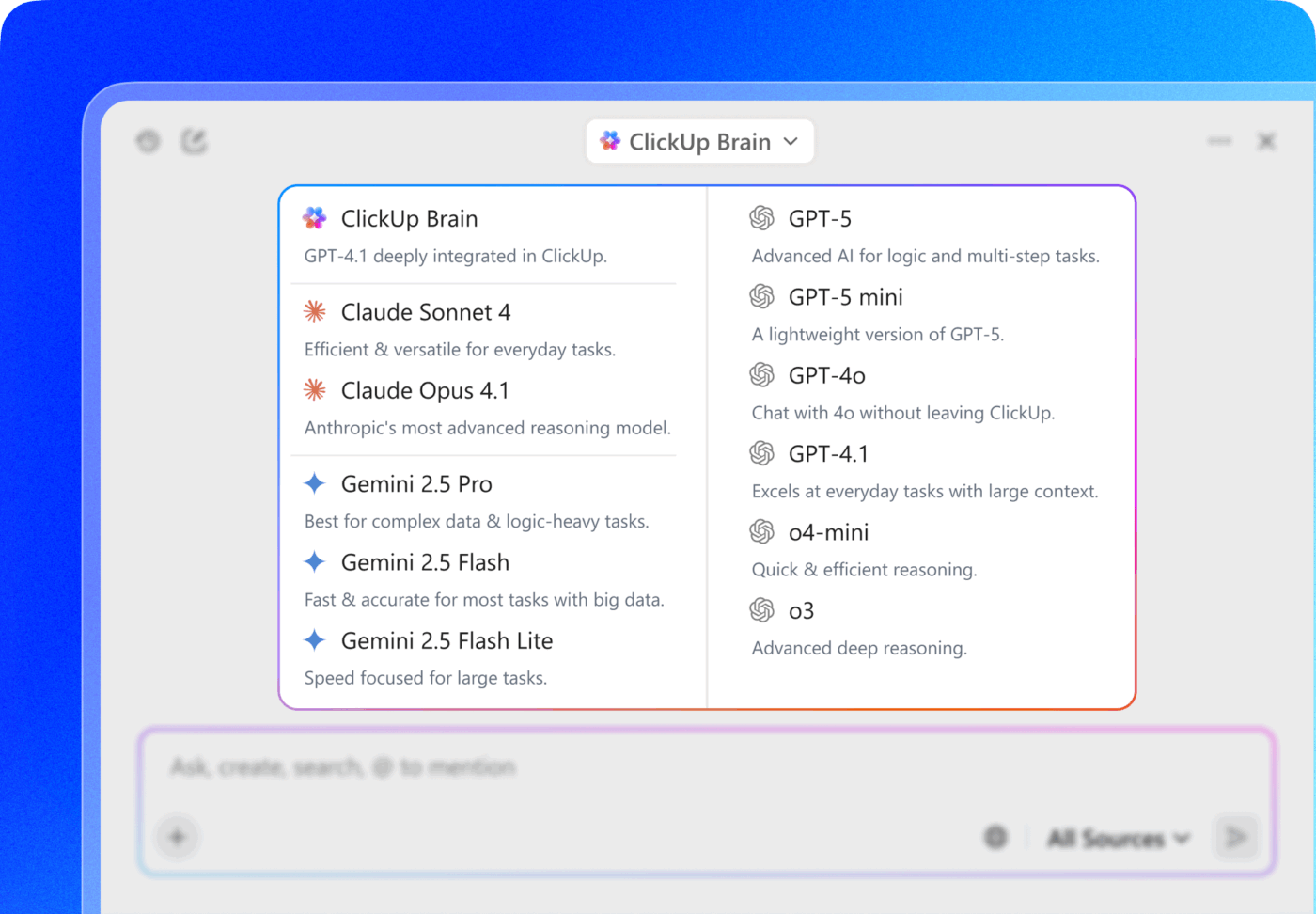
The real power move? Pair model selection with ClickUp’s connected context—Tasks, comments, Docs, and Custom Fields—so the model isn’t just “smart,” it’s operating inside your actual workspace reality.
With AI-powered Tasks, ClickUp turns context into action. The key features include:
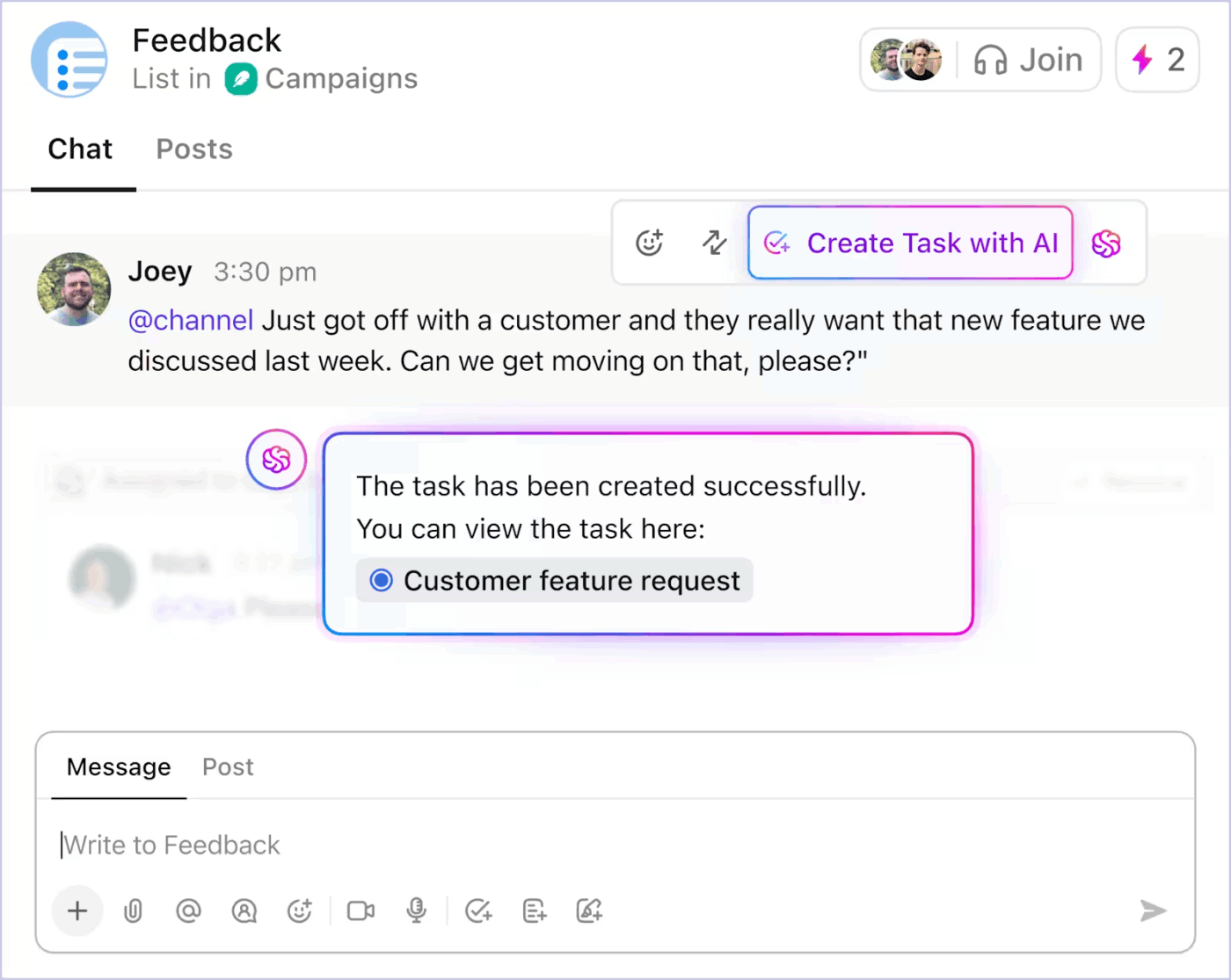
Here’s how you can use AI-powered task automation in ClickUp to reduce the grunt work 👇
Because automation is driven by live context, teams spend less time translating intent into structure. Work moves forward without constant manual intervention.
ClickUp Super Agents extend ClickUp’s contextual AI beyond single queries into autonomous, multi-step execution.
Instead of waiting for specific prompts, these AI agents for automation act on your behalf within the workspace, working through tasks, rules, and outcomes based on context and goals you define.
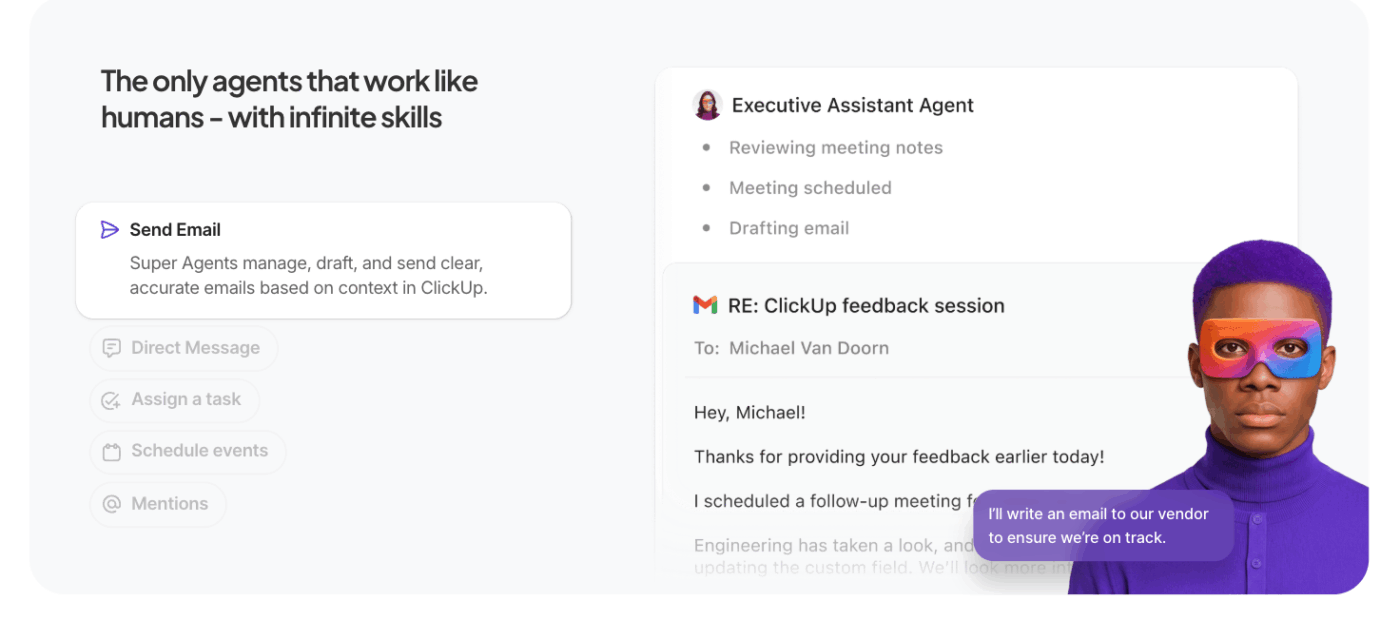
What separates them from regular agents:
📚 Read More: What are Model-Based Reflex Agents
A ClickUp user also shares their experience on G2:
ClickUp Brain MAX has been an incredible addition to my workflow. The way it combines multiple LLMs in one platform makes responses faster and more reliable, and the speech-to-text across the platform is a huge time-saver. I also really appreciate the enterprise-grade security, which gives peace of mind when handling sensitive information. […] What stands out most is how it helps me cut through the noise and think clearer — whether I’m summarizing meetings, drafting content, or brainstorming new ideas. It feels like having an all-in-one AI assistant that adapts to whatever I need.
Here are the key challenges you must be aware of. Context can get out of hand, even when the model supports 1 million token context windows. Here are the key challenges you must be aware of 👇
If a hallucination or incorrect inference slips into the context and is repeatedly referenced, the model treats it as fact. This poisoned context can lock workflows into invalid assumptions that persist over time and degrade output quality.
Bigger contexts are tempting, but when the context grows too large, models begin to over-focus on accumulated history and under-utilize what they learned during training. This can cause the AI to loop on past details instead of synthesizing the next best step.
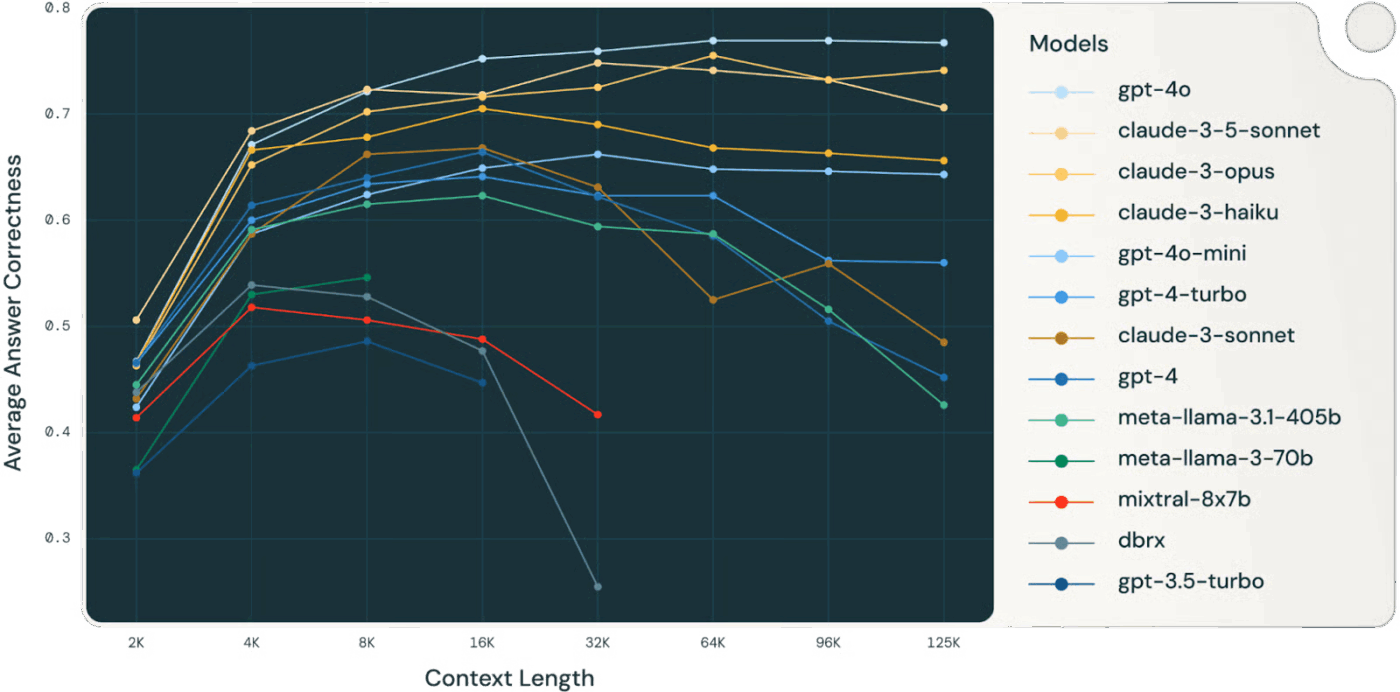
👀 Did You Know? A Databricks study found that model accuracy for Llama 3.1 405B began dropping around 32,000 tokens, well before the context window was full. Smaller models degraded even earlier.
Models often lose reasoning quality long before they “run out” of context, making context selection and compression more valuable than raw context size.
Irrelevant or low-signal information in the context competes for attention with critical data. When the model feels compelled to use every context token, decisions become muddled and accuracy suffers—even if there’s technically “more” information.
As information accumulates, new facts or tool descriptions can contradict earlier content. When conflicting context exists, models struggle to reconcile competing signals, leading to inconsistent or incoherent outputs.
When too many tool definitions are included in context, unfiltered, the model can call irrelevant tools or prioritize suboptimal ones. Selective loading of only relevant tools mitigates confusion and improves decision quality.
Effective context management requires ongoing pruning, summarization, offloading, and quarantining of context. Systems must decide when to compress history and when to fetch fresh information, demanding thoughtful infrastructure rather than ad hoc prompt tricks.
Every token influences behavior; larger context windows don’t guarantee better results. You need to treat context as a managed resource, weighing relevance and recency against token cost and model attention budget.
⚠️ Stat Alert: Nearly 60% of employees admit they use unauthorized public AI tools at work, often pasting sensitive company data into platforms with zero oversight.
And it gets worse: 63% of organizations don’t have any AI governance policies in place to monitor, restrict, or even detect this shadow AI usage.
Result? Your data is leaking because no one is watching how AI is being used.
This marks the transition from experimentation to scale. Context will no longer be managed by humans but generated and managed by code. It will be a function of the system’s own structure.
We’ll summarize this using the excellent article by Serge Liatko on the OpenAI developer community as our base:
Context engineering will increasingly give way to automated workflow architecture. The task won’t be limited to feeding the right tokens.
Effective context engineering will involve orchestrating entire sequences of reasoning, tools, and data flows that adapt automatically to changing needs.
This means building dynamic systems that will self-manage the right context within holistic workflows.
The next frontier is AI that organizes itself. It will connect retrieval, tools, memory, and business logic without humans hand-crafting each prompt or context bundle. Rather than explicitly supplying every piece of data, systems will infer which context is relevant and manage it automatically based on goals and history.
🧠 This is already happening with ClickUp Super Agents. They’re ambient and always on AI teammates, which helps them understand and execute work just as humans do. They continuously improve from past interactions using rich memory—learning preferences, recent actions, and project history—and can proactively take action, escalate issues, or surface insights without waiting for a prompt.
As context engineering evolves, productivity gains come from automated workflows. LLMs act as agents, coordinating tools, monitoring state, and executing multi-step logic without user micromanagement.
You won’t need to enter missing context manually. The system will curate context to support long-term memory and reasoning.
AI accuracy breaks where context fragments across tools, workflows, and people. When information is scattered, the models are forced to guess.
Converged AI workspaces like ClickUp excel at this—unifying work, data, and AI in your context strategy.
Ready to give it a try? Sign up on ClickUp for free.

© 2026 ClickUp

There’s an easier way. Try a free AI Agent in ClickUp that actually does the work for you—set up in minutes, save hours every week.