Sorry, there were no results found for “”
Sorry, there were no results found for “”
Sorry, there were no results found for “”
What makes a great presentation? Polished visuals? A compelling story?
Beautiful.ai, an AI-powered presentation maker, simplifies slide creation with drag-and-drop tools and AI-generated layouts.
But there’s a catch:
The good news? There are better alternatives in the market that have more flexibility, smarter AI suggestions, and seamless collaboration.
This guide covers the top AI-powered presentation tools to help you design, customize, and present like a pro. Let’s get started! 🚀
Here’s a quick overview of the best Beautiful.ai alternatives:
To choose the best alternative AI presentation tools for Beautiful.ai, focus on features that simplify the design process and make your presentations interactive.
Here are some essential features to prioritize:
➡️ Read More: Free Google Slides Templates for Impactful Presentations
Explore the best presentation maker alternatives to Beautiful.ai that bring the convenience of drag-and-drop functionality, help you build stunning visuals, and keep your brand on point.
ClickUp is the everything app for work that combines project management, documents, and team communication, all in one platform—accelerated by next-generation AI automation and search. It adapts to various industries and requirements, from managing small personal tasks to overseeing complex business operations.
Whether you’re leading a team, managing projects, or crafting engaging presentations, ClickUp streamlines workflows, boosts efficiency, and helps you stay organized. 🦾
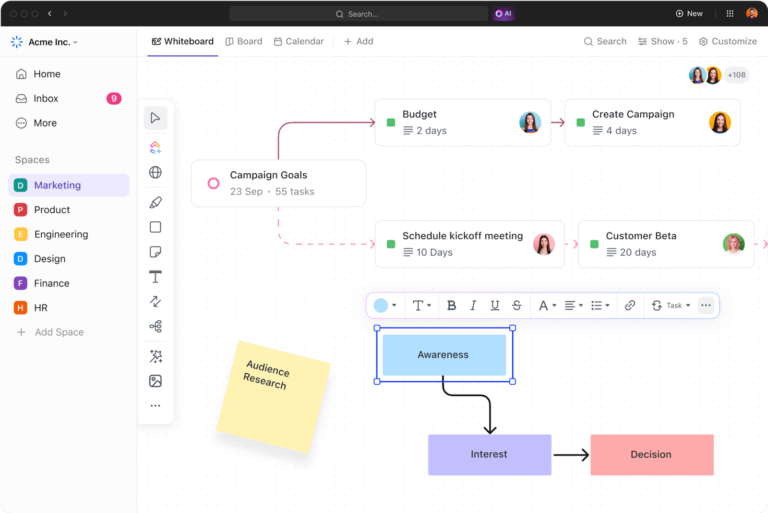
With ClickUp Whiteboards, add images, drawings, flowcharts, and other visual elements to your presentations and make them visually striking and engaging. This is a great workspace for brainstorming or creating presentations that captivate your audience. ✏️
For example, you could sketch an interactive sales strategy, integrate visuals for storytelling, and share it seamlessly with teammates.
You could also design a customer journey map or a product roadmap and then share it with your team for instant feedback. Its drag-and-drop functionality makes it intuitive, ensuring your ideas flow seamlessly onto the board. You can even generate images with AI on your whiteboard. 🧩
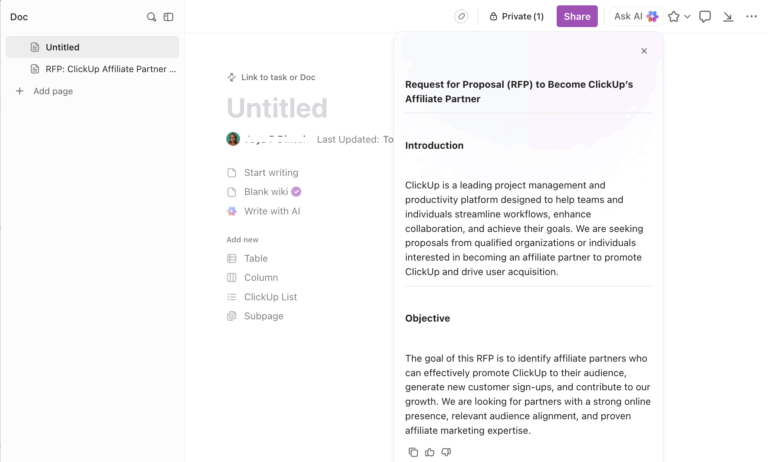
Need help crafting content for these presentations? ClickUp Brain steps in as your creative AI assistant. It generates presentation outlines, designs slides, and even provides tailored content for sales decks.
For instance, if you’re preparing a pitch, ClickUp Brain could draft a compelling introduction, suggest visual ideas, and recommend data insights to back up your message. Combined with Whiteboards, this lets you design an impactful presentation that is ready to share. 🤖

ClickUp also offers thousands of templates to streamline your workflows. For instance, the ClickUp Presentation Template allows you to organize and design professional presentations effortlessly. This customizable template helps you structure your ideas, track progress, and collaborate with your team in real time. 🌟
Here’s what you’ll love about it:
📮ClickUp Insight: We recently discovered that about 33% of knowledge workers message 1 to 3 people daily to get the context they need. But what if you had all the information documented and readily available?
With ClickUp Brain’s AI Knowledge Manager by your side, context switching becomes a thing of the past. Simply ask the question right from your workspace, and ClickUp Brain will pull up the information from your workspace and/or connected third-party apps!
💡 Pro Tip: Learn how to end a presentation effectively by trying these strategies:

Prezi is a compelling alternative to Beautiful.ai for individuals and teams seeking dynamic and engaging presentation tools. Unlike slide-based traditional presentation tools, Prezi offers a non-linear presentation style, allowing you to build from a single, large canvas. This will enable you to zoom in and out to emphasize different points when you want to create polished presentations.
The tool also offers advanced editing features, professional presentation templates, multimedia integration, and AI tools to help you arrange and animate content. Its collaboration features enable teams to design business proposals in real time.
Prezi has three pricing sections aimed at individuals, students, educators, and teams:
For individuals
For students and educators
For teams
➡️ Read More: Free Pitch Deck Templates to Create Compelling Pitches

If you’re looking for an easy, intuitive way to create eye-catching presentations without spending hours on design, consider Decktopus. It includes customizable templates, a presentation designer bot, and advanced features like analytics to help you craft beautiful slide decks.
This AI presentation maker also offers pre-designed themes to save time. It is especially useful for business pitches, educational content, or internal team meetings, and it integrates with tools like Google Sheets for data-driven presentations.
🔎 Did You Know? In 1982, VCN ExecuVision, the first software program to display a presentation on a personal computer screen, was introduced and allowed users to choose from a library of images to accompany the text of their presentation.

With Visme, you can access presentation software that lets you create branded presentations using advanced editing features. While Beautiful.ai focuses on automating design to streamline presentation creation, Visme gives users greater control over design elements, enabling the creation of highly personalized and unique presentations.
Visme’s professionally designed presentation templates and AI-driven tools optimize the presentation process. In addition to creating visually appealing presentations, Visme supports creating various visual content types, including infographics, reports, and social media graphics, as a comprehensive tool for diverse design needs.
💡 Pro Tip: To create a winning client presentation, follow these steps to impress and seal the deal:

Another strong alternative to Beautiful.ai is Pitch, a presentation tool that blends simplicity and design to produce fast and visually stunning results. With an intuitive interface, Pitch enables users to create sleek, on-brand, efficient presentations.
The tool’s collaborative features make it ideal for working with teams in real time, optimizing the process of editing and sharing presentations. Whether you pitch an idea, showcase data, or align with your team, Pitch equips you to craft engaging slides effortlessly.
Well, who hasn’t heard of Microsoft PowerPoint?
PowerPoint is one of the most recognized and widely used presentation tools, making it a reliable alternative to Beautiful.ai. Known for its extensive features and versatility, PowerPoint empowers users to create presentations with complete design control. Plus, unlike many web-based tools, it supports offline editing, making it ideal for users with limited internet access.
Design visually engaging content for business pitches, educational lessons, or creative projects. With features like customizable templates, animations, transitions, and real-time collaboration, PowerPoint helps you communicate ideas effectively and leave a lasting impression. Whether you showcase data with charts or embed videos for storytelling, PowerPoint adapts to your needs.

For a sleek and efficient way to create professional presentations, Wonderslide offers a user-friendly and versatile design platform. By allowing users to upload a basic draft, Wonderslide’s neural network swiftly transforms it into a polished presentation, significantly reducing the time and effort typically required for design.
It further simplifies new presentation creation by providing customizable templates, an extensive image library, and branded design options.

Slides is a presentation tool that combines user-friendly features with advanced customization options. Operating entirely in the cloud, it allows users to create, edit, and present from any device without downloading or installing. A user-friendly interface and a variety of customizable templates complement this accessibility.
One of Slides’ standout features is its open-source format, which grants users access to the full source code of their presentations.

Keynote, Apple’s signature presentation software, is a powerful tool for creating visually stunning presentations, making it a great free alternative to Beautiful.ai.
Known for its sleek and intuitive design, Keynote offers professionally designed templates, animations, and transitions that elevate the quality of any presentation. Its drag-and-drop interface ensures easy use, catering to beginners and seasoned professionals. Create and edit presentations on a Mac, iPad, or iPhone, with all changes syncing automatically via iCloud.
📌 Bonus: Looking for a way to enhance team communication? Check out these 15 Free Project Communication Plan Templates across Excel, Word, and ClickUp to streamline project workflows and keep everyone aligned! 📣

Known for its drag-and-drop interface, Canva is an AI-powered content creation tool that allows users to design visually captivating presentations with minimal effort. It offers a wide range of customizable templates, fonts, images, and animations, catering to personal and professional needs.
Use Canva’s collaborative design environment right from the first draft. Work together in real-time to create, edit, and review presentations, streamlining the workflow for both small projects and large campaigns. Additionally, Canva’s integration with tools like Slack and Google Drive enhances accessibility and usability.

Slidebean is perfect for startups, entrepreneurs, educators, and professionals who want visually compelling pitch decks, reports, or educational presentations without spending hours on design. It allows users to focus on the content and arranges the visuals seamlessly.
A unique aspect of Slidebean is its extensive library of customizable templates, including pitch decks from successful companies like Airbnb and Uber. These templates provide users with proven frameworks on which to build.
➡️ Read More: What is a Project Stakeholder & How to Manage Them

With Mentimeter, you transform your presentations into interactive experiences through real-time polling, quizzes, word clouds, and Q&A sessions.
Unlike Beautiful.ai, which focuses on automating slide design, Mentimeter emphasizes interactivity. Thus, it suits educators, event organizers, and business professionals who want to boost active participation during presentations.

Xtensio is a web-based platform that enables teams to create, manage, and share interactive documents, presentations, and web pages, positioning it as a versatile alternative to Beautiful.ai. It is great for startups, marketers, designers, and small teams looking for a simple way to make professional materials efficiently.
The platform offers real-time collaboration under a private, branded dashboard, making it ideal for teams to co-create, edit, and share documents as responsive links or PDFs.
Creating a compelling presentation is key when addressing your team or stakeholders. While Beautiful.ai offers simplicity, it lacks advanced features like branding consistency, seamless collaboration, and flexible exports.
For a more powerful solution, ClickUp goes beyond basic design. Brainstorm with whiteboards, generate content in seconds with AI, and collaborate in real time for feedback and revisions. Plus, manage your entire workflow with automation and advanced tracking. 🏆Ready to elevate your presentations and projects? Sign up for ClickUp today!

Arya P Dinesh
Max 27min read

Manasi Nair
Max 27min read
Manasi Nair
Max 32min read

© 2026 ClickUp