






Still downloading templates?
There’s an easier way. Try a free AI Agent in ClickUp that actually does the work for you—set up in minutes, save hours every week.
Sorry, there were no results found for “”
Sorry, there were no results found for “”
Sorry, there were no results found for “”

Every product launch feels like controlled chaos.
You’re juggling 47 chat threads about one campaign. Your designer is on revision #12 of the hero image. Legal wants “just one small change” to the copy. And your CEO just asked if you can move the launch up by a week.
Sound familiar?
Here’s what changes with AI: Instead of managing the chaos, you orchestrate the win. AI handles the busywork—brief coordination, asset variations, performance tracking—while you focus on the strategy that actually moves numbers.
This isn’t another “AI will save marketing” think piece. It’s a playbook you can implement to cut launch time in half and double your campaign effectiveness.
✨ Fun Fact: Pedigree’s “Adoptable” campaign used AI to match every ad with a locally adoptable shelter dog—so each Pedigree ad became an ad for a real dog nearby. When a dog was adopted, AI swapped in the next local dog in real time. In the first two weeks, about 50% of featured dogs were adopted, and traffic to shelter profiles jumped 6X.
AI campaign execution for product launches is the disciplined use of AI tools, models, and agents to plan, produce, launch, and optimize multichannel marketing campaigns end-to-end.
What does AI campaign execution cover?
Manage every phase of your product launch, from ideation to post-launch analysis, with the ClickUp Product Launch Checklist Template, a step-by-step checklist.
Yes, we get it. You’re tired of hearing about ‘AI-everything’ without ever getting to more than just a few simple automations. We’ll break this down further in the piece, but for now, here’s a table summarizing the key differences between traditional campaign execution vs. AI campaign execution for product launches.
| Category | Traditional campaign execution | AI-powered campaign execution |
|---|---|---|
| Planning | Channel-by-channel plans in scattered docs | Unified plan with automated workflows and clear owners (assigned by AI based on instructions or past campaigns) |
| Targeting | Broad segments from manual research | Smarter targeting using customer data and predictive modeling |
| Creative | Linear copy → design → review | Parallel asset generation with generative AI and brand guardrails |
| Orchestration | Managers chase updates and approvals | AI agents route briefs, approvals, and dependencies on time |
| Monitoring | Weekly reports with lagging insights | Live dashboards for real-time campaign optimization |
| Optimization | Infrequent, opinion-led changes | Continuous, data-driven adjustments to key metrics and KPIs |
| Governance | Messaging drifts across channels | Maintaining brand consistency with pre-publish checks |
📚 Also Read: How to Execute AI Marketing Campaigns
Here’s how AI turns ideas into results across your marketing campaigns with less manual effort, faster learning, and tighter alignment to key metrics.
📌 Example: Lexus launched the ES with a TV spot scripted by AI, accelerating creative development while keeping the story on brand.
🧠 Did You Know? ClickUp Brain users can access multiple external AI models like ChatGPT, Claude, Gemini, and more right from their ClickUp Workspace. Ditch the AI sprawl and use a contextual AI that has access to all your work data to produce campaign assets that are customized to your needs.
📌 Example: NBCUniversal rolled out an AI-driven planning and activation system to build predictive, privacy-first audience segments across channels.
📌 Example: The Estée Lauder Companies integrated generative AI into their marketing workflows to auto-generate campaign assets, route work through standard approvals, and speed handoffs across brands and markets. The result is faster timelines and tighter coordination without sacrificing governance.
📌 Example: Yum Brands reported AI-driven campaigns that adapt offers and timing based on live signals, improving engagement and purchase behavior across brands like KFC and Taco Bell.
📌 Example: The Barbie movie’s AI-assisted selfie generator fueled cross-channel UGC and rapid creative iteration, helping the campaign scale attention across social platforms ahead of launch.
📚 Also Read: How to Use AI in Advertising
Here’s the five-step flow you can use to ship launches without the scramble. Keep it simple, keep it live, and let AI handle the heavy lifting so your marketing team focuses on decisions, not busywork.
Set the destination so AI knows what “good” looks like
🟣 Don’t hand AI a blank slate. Clear guardrails and a single source of truth are what turn AI from a chaotic idea generator into a precision execution engine. Express your intentions clearly and equip your AI with all the supporting data it needs to support you.
Turn raw inputs into a clear, testable plan
🟣 From data to draft in minutes. Stop starting from scratch. Use AI to synthesize stakeholder meetings, past performance data, and market context into a structured, actionable brief. It’s your fastest first draft ever.
Make the plan visible and executable for every owner
🟣 Plans often fail not from bad strategy, but from unclear ownership. Always connect each deliverable to a name and a date.
Ship quality creative at speed—without message drift
🟣 Scale creation, not chaos. AI can produce 100 ad variants in an hour. The real win? Using automated approval workflows and version control to manage them without your team drowning in Slack threads and email chains.
Operate the launch like a live system, not a weekly report
🟣 Optimize in real-time, not in retrospect. The biggest shift AI enables? Moving from post-launch autopsies to live-campaign surgery. If an ad is failing at 2 PM, you can pivot by 2:15—not after the budget is already spent.
With the launch live and signals rolling in, the next move is simple—measure what matters and act in real time.
📚 Also Read: How to Create an Effective Product Launch Strategy
Launching a product is a high-stakes, multi-team effort that demands precision, speed, and adaptability. ClickUp and its suite of AI-powered features—ClickUp Brain, Brain Max, AI Agents, AI Notetaker, AI Calendar, Talk-to-Text, and multi-model AI—deliver targeted solutions for every phase of your launch.
With purpose-built workspaces for Marketing Teams and Product Teams, you get the most comprehensive platform for smarter planning, seamless execution, and streamlined operations.
ClickUp is the everything app for work, converging planning, production, and optimization into one AI-powered workspace, so launches run end-to-end without tool sprawl or context switching.
With ClickUp AI embedded across Docs, Whiteboards, Tasks, and Dashboards, your team moves faster, stays aligned, and keeps governance tight.
Check out this video to see how ClickUp AI integrates every part of your work👇
Strategic planning with AI
ClickUp Brain brings AI directly into your project management, helping you write, summarize, and automate inside ClickUp.
It acts as your campaign’s AI strategist. Instantly answers questions about your launch plan, retrieves competitor research, summarizes key documents, and generates campaign briefs—all within your workspace. Brain’s contextual awareness means you get precise, actionable insights tailored to your product and market.
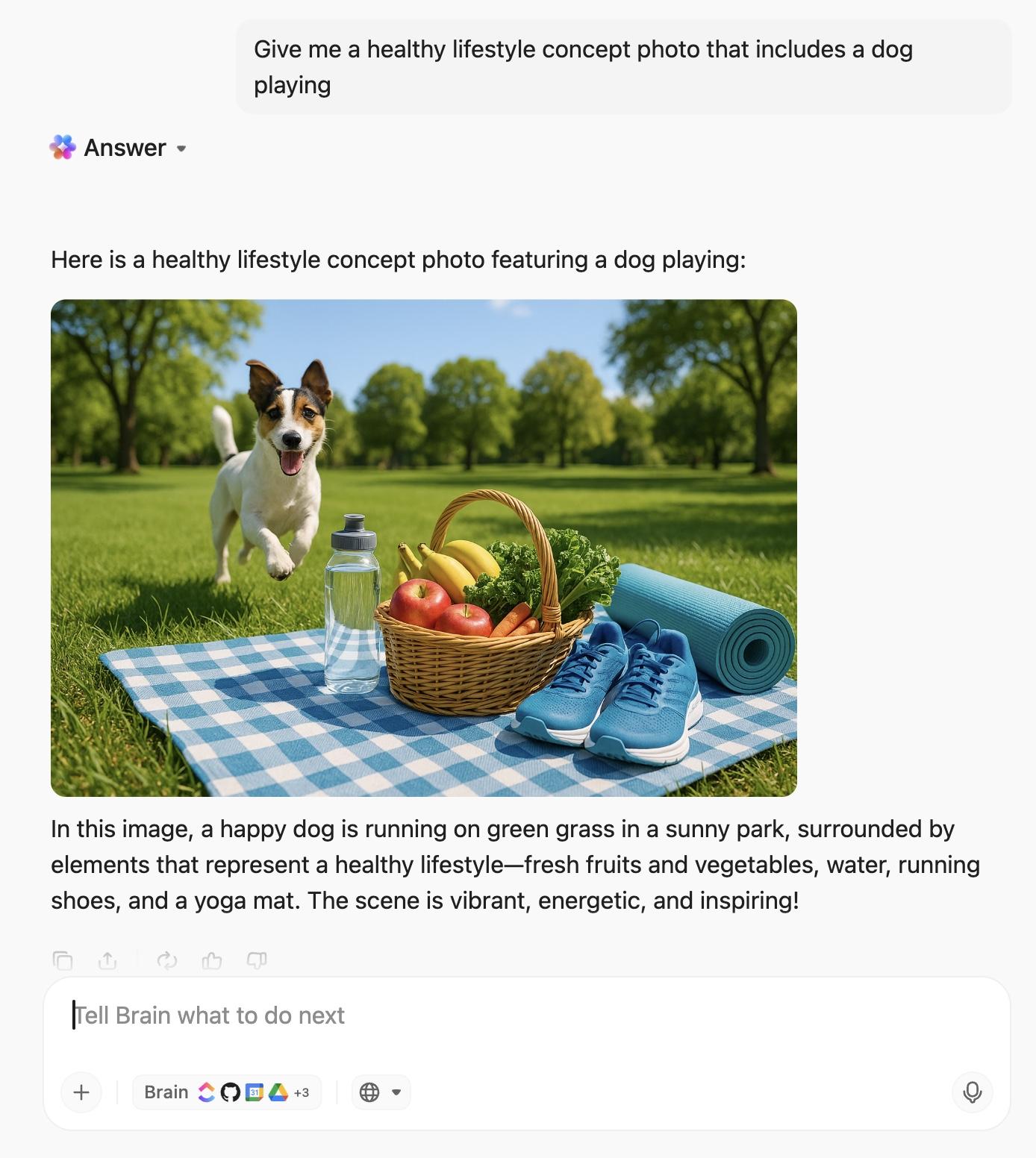
💡 Pro Tip: Create visuals with ClickUp Brain, and handle research and text using the newest GPT, Claude, Gemini, and others—from a single, unified workspace
Here’s an example of Brain at work👇
For marketers who want to go further—connecting every tool, automating across apps, and working hands-free—ClickUp Brain MAX is the next step. It takes intelligence to the next level with multi-model AI.
Brain Max can analyze vast datasets, forecast campaign outcomes, and provide advanced recommendations for go-to-market strategies. It can even simulate launch scenarios, helping you identify risks and optimize your roadmap before execution begins.
Here’s some more info about the AI super app that ends tool sprawl:
Brain MAX is a revolutionary AI desktop application designed to solve the growing problem of AI Sprawl—the productivity drain caused by juggling disconnected AI tools, fractured workflows, and lost context. To know more, watch this video 👇
Seamless operations with AI Agents and Automation
Automate repetitive and complex workflows with AI Agents. For example, an AI Agent can monitor your launch checklist, automatically assign tasks as dependencies are cleared, escalate blockers, and update stakeholders in real time. Agents can also integrate with external tools (like CRM or marketing platforms), ensuring your launch operations are always in sync.
Use ClickUp Automations and the AI Automation Builder to route briefs to reviewers, nudge owners before SLAs slip, and update status across lists—without manual follow-ups.
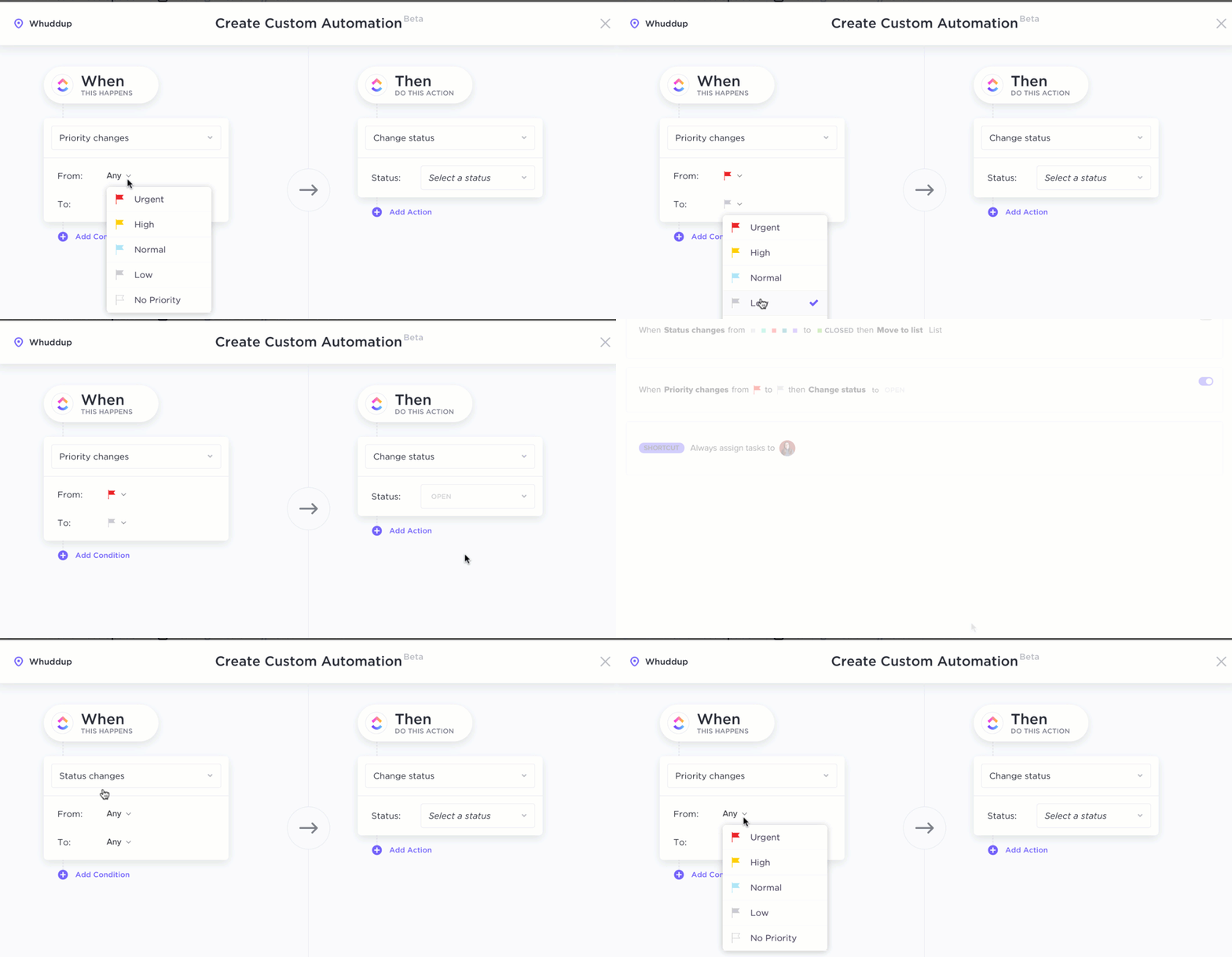
Never miss a deadline or milestone. ClickUp’s AI-driven reminders and notifications keep your team on track, flagging overdue tasks and surfacing urgent priorities so nothing slips through the cracks.
Effortless collaboration and documentation
ClickUp AI Notetaker joins your launch meetings (Zoom, Google Meet, Teams, etc.), transcribes conversations, and automatically generates structured meeting notes, action items, and follow-ups. It can summarize lengthy discussions into clear, actionable next steps, and instantly share them with your team—ensuring everyone is aligned and accountable.
You can capture ideas, updates, or feedback on the go with Talk-to-Text. Whether you’re in a brainstorming session or on a site visit, simply speak and let ClickUp transcribe your thoughts directly into tasks, docs, or comments. This accelerates documentation and reduces manual entry, making collaboration faster and more inclusive.

Flawless scheduling and coordination
Schedule all campaign activities, meetings, and deadlines in one place with the ClickUp Calendar. This AI calendar suggests optimal meeting times based on team availability, automatically resolves conflicts, and syncs with external calendars. It can also generate and update timelines as your launch plan evolves, ensuring every deliverable is perfectly timed.
Watch this video to know more about the calendar solution you’ve been waiting for👇
You can link calendar events to specific tasks, docs, or milestones. Receive proactive reminders and status updates, so your team is always prepared for what’s next.
Smarter insights and decision-making with multi-model AI
Leverage the power of multiple AI models for deeper insights. Analyze customer feedback, market trends, and campaign performance in real time. Generate competitor comparisons, sentiment analysis, and predictive reports to inform your launch strategy and adapt quickly to changing conditions.
Plus, ClickUp’s Enterprise AI Search digs across tasks, docs, chats, and even connected apps like Slack or Gmail to bring you the right resources at your fingertips.
Map strategy and workflows the smart way
Map ICPs, creative matrices, and launch workflows on a canvas that turns shapes into tasks—no copy-paste, no drift. ClickUp Whiteboards stay linked to Docs, Tasks, and sprints, so plans stay current as the launch evolves.

Templates for launch planning and content calendars
Use ClickUp Templates to spin up launch calendars, checklists, and creative briefs in minutes, then localize for regions without rebuilding the workflow. Templates tie back to tasks and timelines, so ops and creative stay aligned from day one.
Here are a few examples:
🚀 ClickUp templates for product launch planning
📅 ClickUp templates for content calendars
⭐️ Bonus: Try these free product launch templates to ensure your product launch goes smoothly from initial planning to release.
📚 Bonus Read: Want to learn more about running a high-velocity marketing revenue engine with ClickUp and AI? Get the playbook now! 👇🏼
You can’t fix what you can’t see. Use AI to turn raw campaign data into clear actions, so your marketing team steers performance in real time—not in a post-mortem.
Set your AI scorecard
⭐️ Quick Win: Start with just 3 KPIs for your first AI-powered launch. Most teams that try to track everything end up optimizing nothing. Focus beats fancy.
Read results in real time
⚠️ Watch Out: Don’t set action thresholds too tight. A 5% conversion rate drop might be normal daily variance, not a campaign crisis. Give your AI breathing room.
Find what’s working and double down
Forecast and close the loop
💡 Pro Tip: Keep a one-page scorecard visible to everyone—1 north-star KPI, 3 leading indicators, and the two actions you’ll take if results are above or below plan.
Heinz used the DALL·E image generator to create hundreds of unique, imaginative visuals depicting ketchup bottles for a major creative campaign. The best designs became part of a product launch and were rolled out across social, digital, and PR channels.
🎯 Results: The campaign generated organic buzz, drove high engagement, and reinforced Heinz’s brand recognition. AI enabled both rapid asset creation and a new way to test cultural relevance.
BMW used AI in digital billboards to analyze real-time traffic data and change creative depending on the speed of traffic flow: fast-moving traffic triggered brief announcements, while slower traffic showed detailed product info.
🎯 Results: Engagement and targeting improved as messaging adjusted dynamically to speed and context.
Sephora launched its Virtual Artist tool, which combines augmented reality and AI to let users try on thousands of makeup products virtually in real time using their phone or computer camera. The AI analyzes facial geometry and skin tone to apply realistic digital makeup, offering personalized recommendations and complete looks.
🎯 Results: Personalized product recommendations drove conversions; virtual try-ons boosted customer confidence for new launches and reduced product returns.
Nestlé uses AI-powered personalized product recommendations to enhance consumer engagement and sales. By analyzing consumer data such as purchase history, dietary habits, and lifestyle patterns, Nestlé’s AI-driven platforms deliver tailored nutrition and product suggestions. These systems include chatbots and recommendation engines that guide users through their buying journey with real-time, customized advice, improving customer satisfaction and retention.
🎯 Results: AI has helped Nestlé optimize marketing spend, improve conversion rates, and strengthen brand loyalty by providing relevant, personalized content at scale.
📮 ClickUp Insight: 37% of our respondents use AI for content creation, including writing, editing, and emails. However, this process usually involves switching between different tools, such as a content generation tool and your workspace.
With ClickUp, you get AI-powered writing assistance across the workspace, including emails, comments, chats, Docs, and more—all while maintaining context from your entire workspace.
Product launches compress months of work into a few sprints. Budgets are visible, timelines are tight, and every channel needs to tell the same story at the same time. Here’s where things get risky—and how AI helps you stay in control.
Launch windows are short, assets multiply fast, and every dependency adds risk. AI tools help campaign managers compress planning and production by automating briefs, approvals, and channel setup so small marketing teams can keep momentum.
📌 Example: Maybelline launched the Falsies Surreal Extensions Mascara using May, a digital avatar. May enabled the marketing team to create and adapt consistent visuals across many surfaces simultaneously, significantly cutting turnaround times.
Day one matters. You need reach, frequency, and consistent storytelling across marketing channels. AI-powered orchestration helps you adapt creatives to each surface while maintaining brand consistency.
📌 Example: Coca-Cola’s “Create Real Magic” invited fans to co-create AI art, then amplified it across billboards and digital touchpoints—a cross-channel moment built on generative AI and iconic brand assets, designed for scale and buzz.
Fragmented workflows cause missed handoffs and off-brand assets. AI campaign execution centralizes plans, surfaces blockers, and uses automation to keep approvals and assets aligned.
📌 Example: Cadbury India’s “Not Just A Cadbury Ad 2.0” used voice AI and ML to generate thousands of geo-personalized video spots featuring Indian superstar Shah Rukh Khan—maintaining a consistent brand message while localizing at scale, a model for avoiding misalignment under launch pressure.
AI helps marketing teams move faster, stay aligned, and make better decisions. With AI-powered tools and automated workflows, you turn a fragmented marketing strategy into a single plan that drives consistent campaign execution across channels.
Why it matters
📚 Also Read: How the ClickUp marketing team uses ClickUp to centralize plans, owners, and approvals.
AI accelerates campaign execution, but it also amplifies gaps if your foundations aren’t solid. Steer clear of these common traps:
💡 Pro Tip: Keep AI inside one source of truth—briefs, assets, timelines, and dashboards in a single workspace—so you can automate repetitive tasks without losing control or context.
The future of launches is collaborative by design—you set direction, and AI runs the loops. You’ll spend more time on positioning, offers, and story, while AI agents handle orchestration, insights, and real-time tweaks across channels.
What you’ll own
What AI will run
🎯 You are the conductor, AI is the orchestra. Your value isn’t in playing every instrument. It’s in knowing the score, setting the tempo, and guiding the performance. AI handles the execution; you own the masterpiece.
How your operating model shifts
🚀 From project to perpetual motion. Stop planning campaigns and start operating a launch machine. With AI handling real-time optimization, your “launch room” becomes an always-on engine for growth.
Skills to build now
💡 The new marketing MVP: The AI translator. The most valuable player on your team isn’t just a strategist or a creator—it’s the person who can translate business goals into AI-actionable prompts and interpret AI’s insights into business decisions.
Guardrails that keep you in control
📚 Also Read: A Guide to Using AI Workflow Automation for Maximum Productivity
You’ve seen how AI turns launch chaos into a clear, repeatable system. When you run planning, assets, timelines, and key metrics from one place, you make smarter calls in real time and ship on schedule across every channel
If you want that end-to-end flow without the tool sprawl, use ClickUp as your launch command center. You’ll draft stronger briefs with AI, keep approvals moving with automations, and steer a live launch room with dashboards—so you can focus on the work that moves the needle
No. AI accelerates the work, but you own the strategy, story, and guardrails. Use AI to automate repetitive tasks, surface insights, and suggest next steps while you make the calls on positioning, offers, and brand.
• Ad headlines and copy
• Email subject lines and body copy
• Landing page copy and product descriptions
• Video scripts, storyboards, and social posts
• On-brand variants for different audience segments and locales
• Drafts for briefs, FAQs, and stakeholder summaries
• Alt text and accessibility copy
Yes—use AI to produce translations, adapt tone, and localize examples
• Lock a glossary and claims list so wording stays consistent
• Run preflight checks for legal or region-specific claims
• Keep a human in the loop for nuance, compliance, and final QA
A GTM plan where AI supports every stage—research, segmentation, creative, orchestration, and optimization.
• Define ICP, positioning, and a message map
• Set channel mix and a creative matrix with clear guardrails
• Automate intake, approvals, and updates so work runs run on rails
• Measure from a live “launch room” and iterate based on early indicators
Keep it simple—use one hub instead of five tools with ClickUp
• Run briefs, assets, timelines, and dashboards all in ClickUp
• Use ClickUp Brain to enforce guardrails, automate workflows, and give real-time insights
• Automate reminders and approvals so campaigns move forward without stalls

© 2026 ClickUp

There’s an easier way. Try a free AI Agent in ClickUp that actually does the work for you—set up in minutes, save hours every week.