






Still downloading templates?
There’s an easier way. Try a free AI Agent in ClickUp that actually does the work for you—set up in minutes, save hours every week.
Sorry, there were no results found for “”
Sorry, there were no results found for “”
Sorry, there were no results found for “”
Self-serve. A world small businesses are very familiar with and secretly hate.
You hit a problem, something breaks, or you’re just trying to figure out how to make the tool actually work for your business.
Instead of real help, you’re sent to a chatbot, a help article that almost answers your question, or a support plan you have to upgrade just to access.
So you end up doing what small teams always do: Figure it out yourself.
That sounds efficient, but it’s expensive. Time gets lost, work slows down, and the person who should be running the business becomes the support team.
This guide explains why small businesses often receive poor software support, the hidden cost of self-serve everything, and how to choose tools that actually support your team without forcing you into enterprise pricing.
Software support for small businesses is the help vendors offer for implementing, using, and troubleshooting their tools.
When this support is lacking, your team ends up wasting precious hours on frustrating workarounds instead of focusing on growth. Vendors often design their support systems to prioritize enterprise clients over small businesses. Most SaaS companies prioritize their high-paying enterprise accounts, leaving you with slow chatbot responses and generic help articles.
The problem is structural. Support teams are often judged on how well they retain large enterprise clients, not on how satisfied their small business customers are.
This means your urgent ticket gets buried in the queue. This issue is amplified by context sprawl—when teams waste hours searching for information across multiple disconnected apps, switching between platforms, and hunting down files that no single support agent has full visibility into your problem.
Here are some common issues small businesses face with software support:
📊 Small businesses can’t afford to figure everything out on their own
Most tools leave you on your own. Slow responses, generic help docs, and no real guidance on how to make the product work for your business.
And because you don’t have a dedicated ops or IT team, that gap becomes your problem to solve. That’s where things break. Not in the software, but in the lack of support to actually use it well.
The ClickUp Small Business Suite is built to change that by combining the platform with hands-on support designed specifically for small teams.
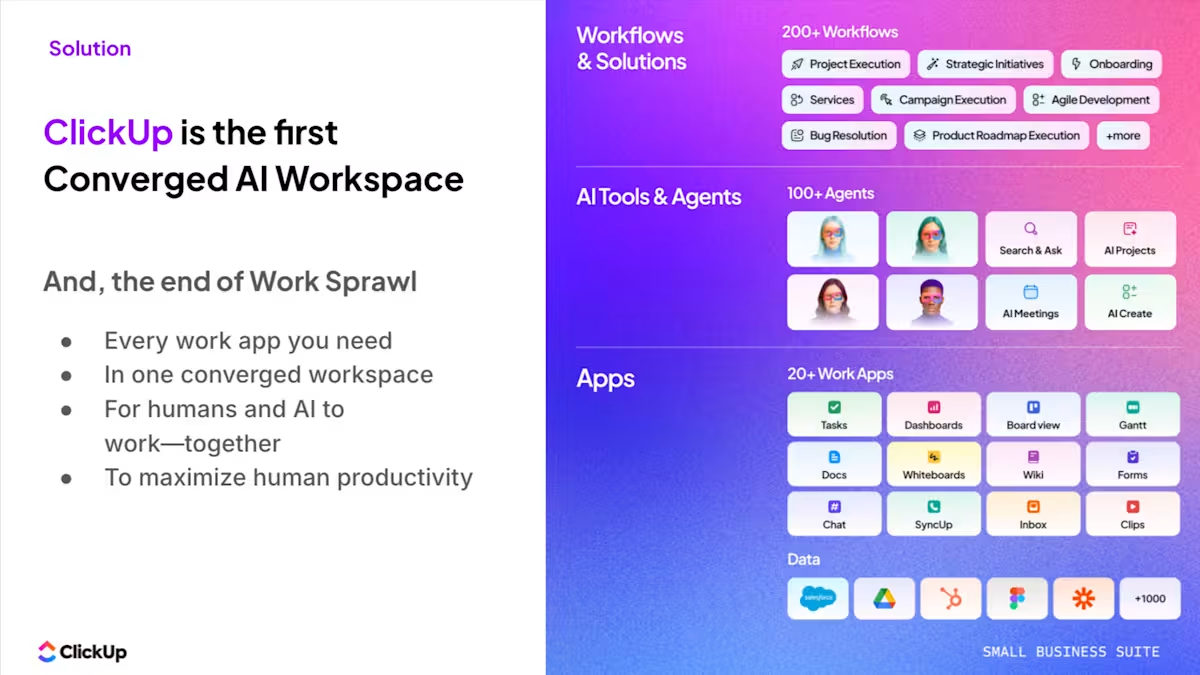
You get direct access to ClickUp Assist, which includes 2 hours per month with an AI expert, plus live training workshops and quarterly business reviews to help you integrate AI, agents, and workflows into your day-to-day operations.
At the same time, Premium Support for Small Business ensures you’re not stuck waiting when something goes wrong, with expedited support SLAs, escalated technical support, a dedicated support rep, and monthly video calls.
It’s a system designed to help you continuously improve how your business runs.
You’re not left figuring it out alone. The support scales with you. 🚀
When your design team can’t export a file or your sales team’s CRM integration breaks, work grinds to a halt. The immediate cost of this downtime is obvious, but the hidden costs are what truly hurt your business.
According to ITIC’s 2024 Hourly Cost of Downtime Report, even small businesses can incur costs of $8,000 to $25,000 per hour when critical systems fail. Every hour a team member spends searching forums or trying to fix a broken tool is an hour they aren’t spending on billable work or customer acquisition.
This creates a “frustration tax” that drains morale and contributes to burnout. To cope, your team creates fragile workarounds, manual processes that are prone to error and become permanent sources of technical debt.
This problem multiplies with work sprawl—the fragmentation of work activities across multiple, disconnected tools and platforms that don’t talk to each other. A dozen apps means a dozen potential points of failure, each with its own support system.
The hidden costs of poor support quickly add up:
Most small businesses don’t have a dedicated IT department. This often means the founder, an operations manager, or the most tech-savvy person on the team becomes the default IT support, pulling them away from their core responsibilities. This is a classic example of the business IT challenges growing companies face.
💡 Pro Tip: Before adding any new tool, audit your current stack. You might find that three of your existing apps overlap in functionality, and consolidating them could save both money and support headaches.
The pain of this DIY approach is made worse by tool sprawl. While each individual SaaS subscription might seem affordable, the total cost of 40+ different SaaS apps—the average for companies with under 200 employees—quickly balloons. Worse are the hidden costs that never appear on an invoice: the hours spent training the team on different platforms, troubleshooting broken integrations, and managing data migration between systems.
Reduce both direct and hidden costs by consolidating your work into a single platform. Instead of managing a dozen tools, you only need to learn one platform. This move makes your software management much simpler and easier to track.
| Cost Category | Multiple Tools | Converged Platform |
|---|---|---|
| Subscriptions | Multiple vendors, multiple bills | Single subscription, one bill |
| Training time | Learn each tool’s unique interface | One consistent learning curve |
| Integration maintenance | Ongoing, requires constant monitoring | Built-in, no maintenance needed |
| Support coordination | Juggling multiple help desks | A single, reliable support relationship |
Small businesses often get trapped with legacy tools because of tight budgets, the fear of a disruptive migration, or simply not having the IT resources to manage an upgrade. These tech issues slowing down your business create a “performance tax” on every task.
This tax shows up as slow load times, missing features that modern teams take for granted, and constant compatibility problems. Even worse, outdated software often has unpatched security vulnerabilities, leaving your business’s data exposed. Vendors know this and often deprioritize support for older versions, using the lack of support as leverage to push you into an expensive, painful upgrade cycle.
This problem is now being compounded by AI sprawl—the unplanned proliferation of AI tools and platforms with no oversight or strategy—where teams try to compensate for outdated core software by bolting on separate AI tools, adding even more complexity and cost.
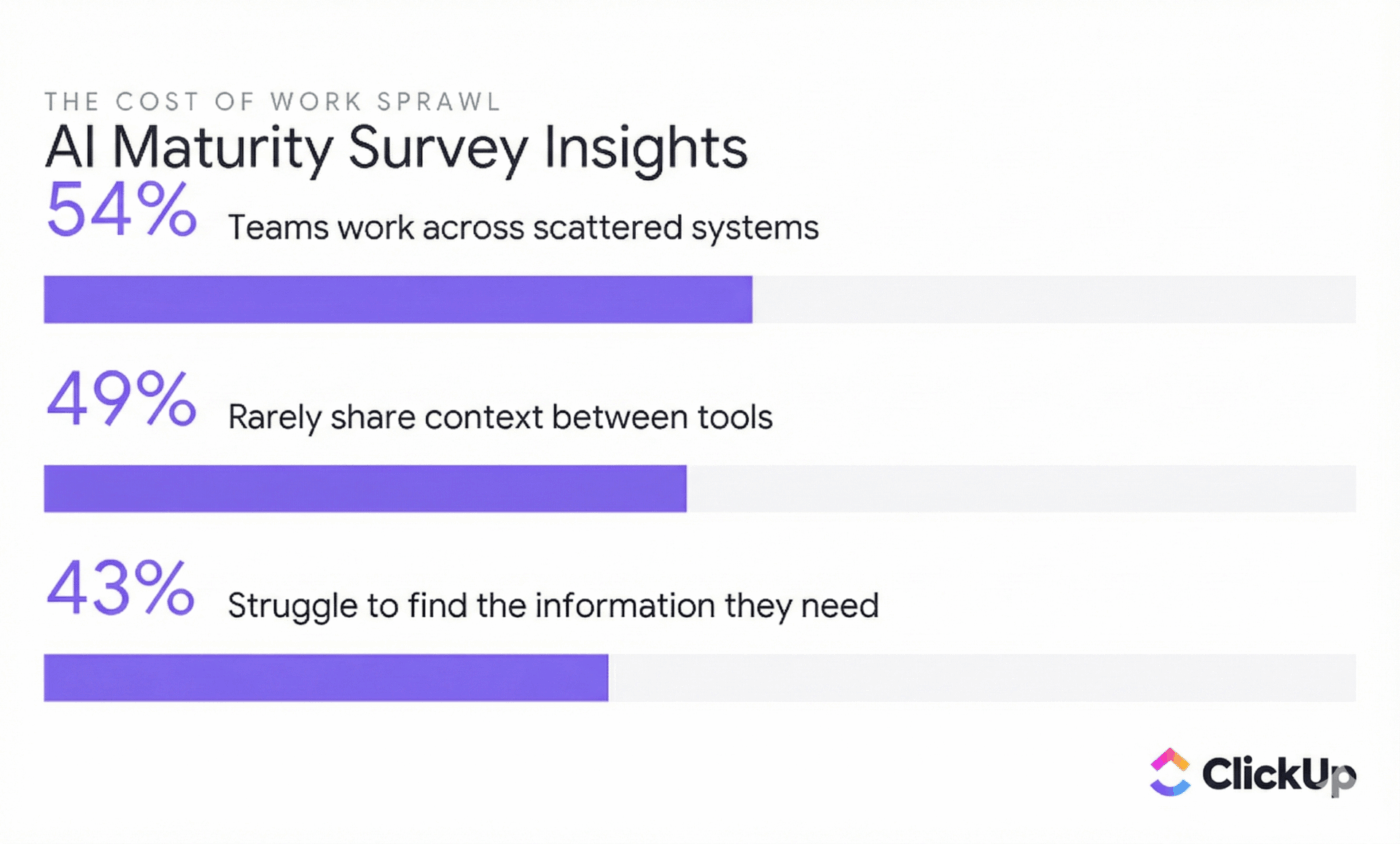
When your team’s work is spread across a dozen different apps, your security is only as strong as the weakest link. You have multiple vendors with varying security policies, inconsistent access controls, and numerous potential breach points. This creates a security paradox for small businesses: you’re an increasingly attractive target for attackers, but you have the fewest resources to defend yourself.
🧐 Did You Know? According to IBM’s 2024 report, one in every three data breaches now happens because of shadow IT. These breaches cost an average of $4.88 million each, and small businesses are particularly vulnerable.
When a security incident occurs, coordinating a response across multiple vendors becomes a support nightmare, with each vendor pointing fingers at the others. This is where context sprawl becomes a major liability. Sensitive information scattered across disconnected tools is nearly impossible to secure or audit effectively.
Easily manage permissions and access from a single location with ClickUp. Unified audit trails give you a clear, unbroken record of activity. This eliminates the gaps that leave your business vulnerable.
Common security gaps from using scattered tools include:
You’ve carefully built a workflow by connecting your project manager, chat app, and CRM with a third-party tool. It works perfectly—until it doesn’t. One small API update from a single vendor can bring your entire operation to a standstill, and when you reach out for help, you get stuck in a support black hole where each vendor blames the other.
This forces someone on your team—usually not a technical person—to become the unofficial “integration manager.” They spend their days troubleshooting sync errors and rebuilding broken workflows, rather than doing the job you hired them for. This hidden labor is a direct consequence of work sprawl.
The more tools you use, the more fragile connections you have to maintain.
Integration pain points that disappear with a unified platform:
For many small businesses, IT planning means firefighting.
You only deal with a technology problem after it has already caused a disruption. This reactive IT planning approach is expensive. Emergency fixes cost more than planned improvements, and downtime adds up with every minute your team is blocked.
This reactive posture makes you heavily dependent on vendor support. Because you haven’t had the time to build internal knowledge or redundant systems, you’re at the mercy of the vendor’s help desk when something breaks. This creates a vicious cycle: poor support leads to more firefighting, which increases your dependence on that same poor support.
Many non-software teams are adopting Agile methodologies to break this reactive cycle and build more proactive, structured workflows. Learning how to manage projects effectively can help your small business team plan better and reduce your reliance on emergency support.
💡 Pro Tip: Set up a simple weekly review where you identify one recurring technical issue and address it proactively. Over time, this small habit dramatically reduces emergency support needs.
Standardize your workflows and prevent common problems before they start by using ClickUp’s built-in Templates and Automations. When your processes are consistent and reliable, you spend less time reacting to issues and more time growing your business.
For remote teams, vendor support isn’t just a convenience—it’s a lifeline. You can’t just walk over to the IT department for help. This total dependence on vendor support is made worse by context sprawl. Without the shared context of being in the same room, your team needs tools that provide complete visibility into who is doing what and why.
Common software gaps that hurt remote teams:
Data loss for a small business can be an extinction-level event.
You don’t have the deep pockets or redundant infrastructure of a large enterprise to recover from a major incident. Yet, many small businesses operate with flawed or non-existent backup strategies, often assuming their SaaS vendors have them covered.
The painful truth is that most SaaS backup policies are designed to protect the vendor, not the customer. When you finally need that backup, you might discover it doesn’t cover user error or that restoration will take days. When your data is fragmented across multiple tools, your backup strategy becomes a patchwork of incomplete and untested processes.
Common backup failures that put small businesses at risk:
The premium support paradox is a core frustration for small businesses: the teams that can least afford delays are the ones who get the slowest support.
Most software vendors structure their support tiers to explicitly favor their largest customers, leaving smaller customers with a frustratingly inadequate experience. This isn’t about one or two bad companies; it’s an industry-wide pattern.
| Support Element | Typical Free/Basic Tier | Typical Mid Tier | Typical Enterprise Tier |
|---|---|---|---|
| Response time | Days to weeks | 24-48 hours | Hours or less |
| Channels | Email/forum only | Email + limited chat | Phone + dedicated rep |
| Onboarding | Self-service docs | Group webinars | Custom implementation |
| Success manager | None | Shared pool | Dedicated |
You deserve to be treated like a valued customer, no matter the size of your business. For a small business, genuine premium support isn’t about fancy perks; it’s about getting fast, effective help when you’re stuck. It means having access to a real person who can solve your problem quickly so you can get back to work.
Here’s what real premium support looks like for a small team:
A small number of software companies are changing the game by offering a bundled support model. This means they include premium-level support as standard, ensuring you get the help you need when you need it.
When support is bundled, the vendor’s incentives align with yours. They are motivated to make their product as intuitive and reliable as possible to reduce their own support costs.
This leads to a better product and a better experience for you, a stark contrast to models that profit from a confusing product that requires an expensive support package to use effectively.
You can avoid years of frustration by making support quality a primary factor in your software evaluation process. A little due diligence upfront can save you from the hidden costs of bad support down the road. When you’re comparing tools, don’t just look at features and price; investigate the support experience with the same rigor.
Choosing software with strong support for small businesses is a strategic decision. Here’s a checklist to guide your evaluation:
🛠️ Test support before you buy: Submit a pre-sales question through their standard support channel. Measure how long it takes to get a response and evaluate the quality and helpfulness of the answer
🛠️ Read support reviews: Go to sites like G2 and Capterra, but filter for reviews that specifically mention the support experience. Look for patterns, both good and bad
🛠️ Check support channels: Verify that the channels you need, like live chat or phone, are available on the plan you’re considering, not just on the enterprise tier
🛠️ Review the documentation: Is their knowledge base comprehensive, well-organized, and easy to search? High-quality self-service resources are a strong indicator that a vendor invests in customer success
🛠️ Ask about SLAs: Get specific, written commitments on support response times (known as Service Level Agreements or SLAs). Vague promises like “we’ll get back to you soon” are a red flag
🛠️ Evaluate the community: An active and helpful user community can be a great resource to supplement official support channels
For small businesses, software problems rarely come from the tool itself. They come from everything around it.
Too many apps. Too little context. And almost no support when something breaks or needs to evolve.
That’s what creates the real drag: work sprawl, context sprawl, and a lack of hands-on guidance to fix either.
The ClickUp Small Business Suite solves this at the root with a Converged AI Workspace, pairing it with dedicated support.
Instead of stitching together tools, processes, and answers, you’re working inside one platform where everything is aligned and continuously improving.
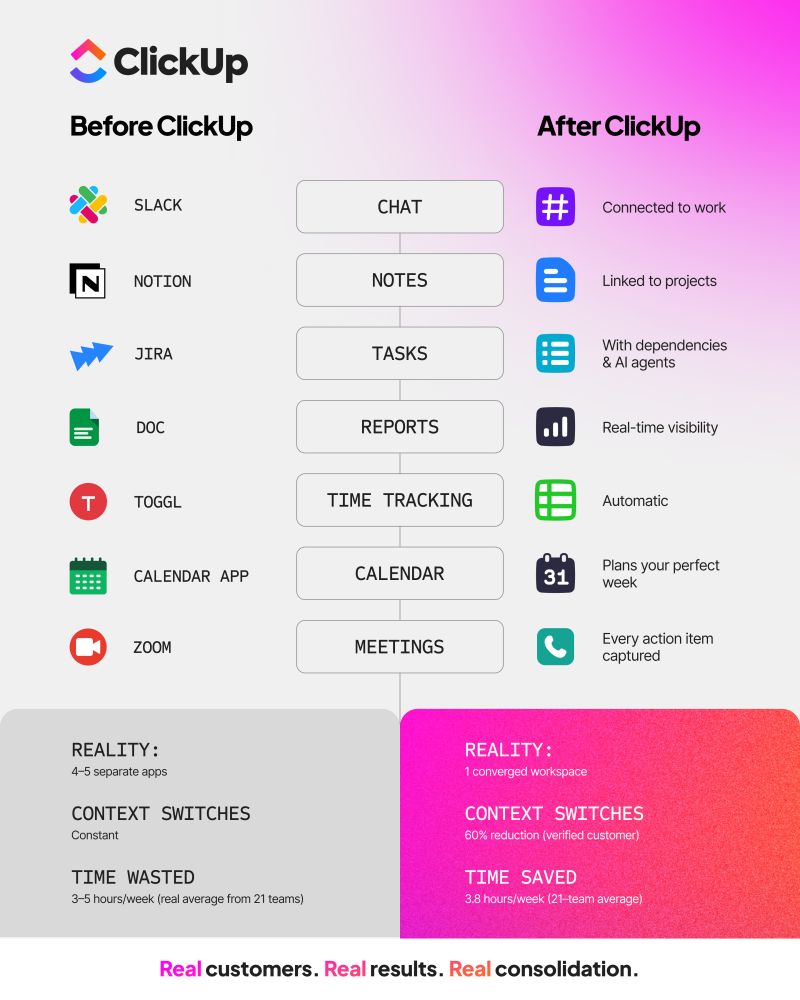
Most small teams are juggling multiple tools across projects, docs, communication, and reporting. When something breaks, you’re left dealing with different vendors, different support teams, and no clear answer.
ClickUp replaces that with a single workspace where Tasks, Docs, Chat, Dashboards, AI, Super Agents, Enterprise Search, and workflows live together. That means fewer tools to manage and only one place to go when you need help.
More importantly, support isn’t an afterthought.
With the Small Business Suite, you get ClickUp Assist built in, including 2 hours per month with an AI expert, plus live training workshops and quarterly business reviews. Instead of figuring things out alone, you get ongoing guidance on how to improve your workflows, adopt AI, and scale how your team operates.
At the same time, Premium Support for Small Business ensures issues don’t slow you down, with expedited response times, escalated technical support, a dedicated support rep, and monthly video calls.
With ClickUp, you get a system and a team behind it to support you through it all.
Free your team from repetitive, manual tasks by using ClickUp Automations.
With it, you can build reliable, automated workflows in minutes without writing a single line of code or paying for an external tool. These native automations are robust and reliable, unlike the fragile workarounds built on third-party integrations.
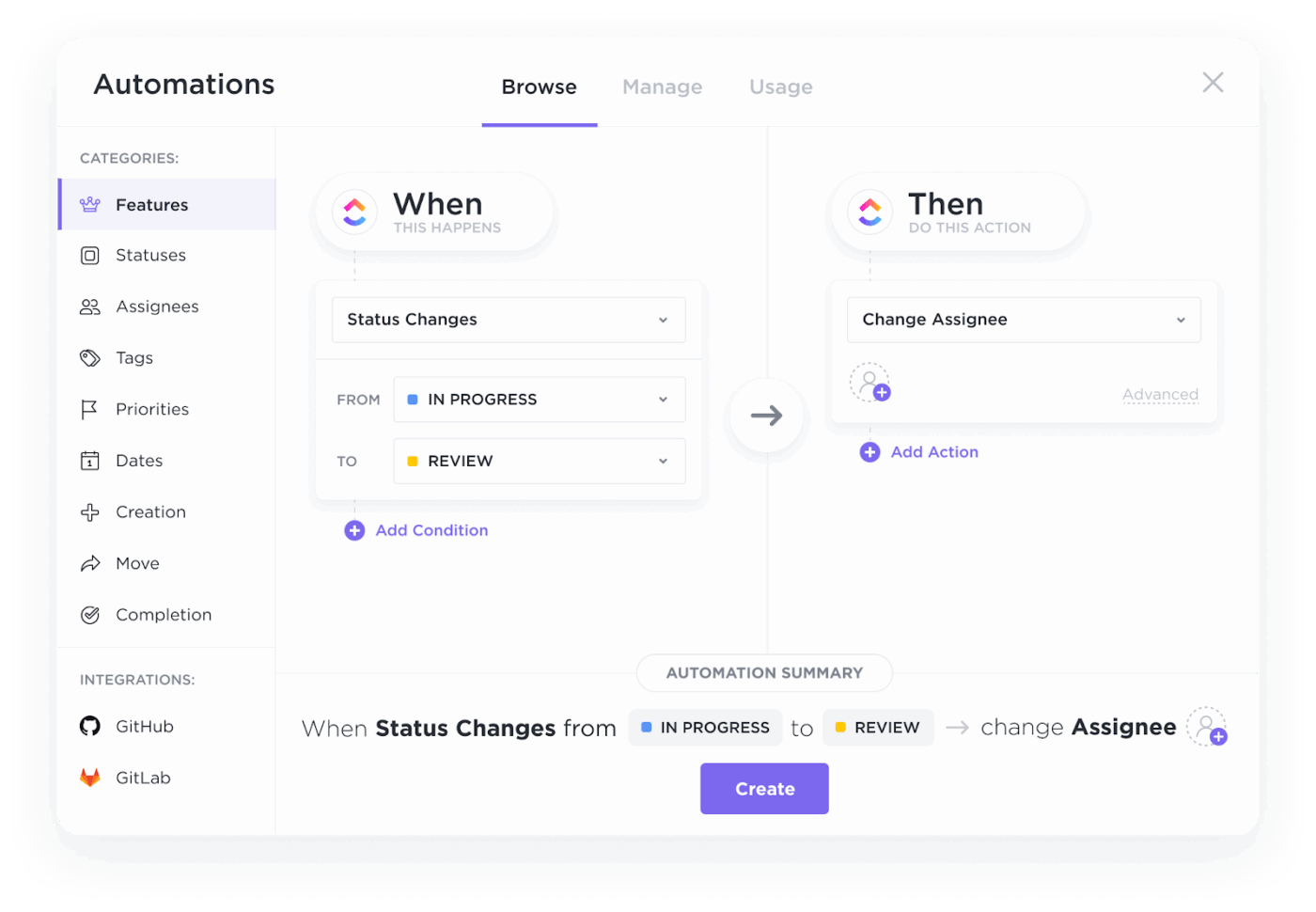
Imagine a world where:
With ClickUp Brain, our native AI feature, you can find anything in your workspace with a single query. ClickUp’s Connected Search understands the context of your work and can instantly pull information from your tasks, docs, comments, and even connected third-party apps.
When your team can find answers themselves, they become less dependent on vendor support for basic “how-to” questions. Because ClickUp Brain is a native feature, it has a deep understanding of your workspace, providing far more relevant answers than a generic, bolted-on AI tool ever could.
💫 Real Results: Atrato reduced software costs by consolidating multiple tools into ClickUp, eliminating the need for separate project management and communication platforms. The savings were immediate, and the productivity gains compounded over time.
Keep your distributed team in sync with connected chat in ClickUp. With real-time collaboration in ClickUp, you can see your teammates’ cursors as you edit a Doc together, eliminating version control issues.
Use threaded comments on tasks and docs to keep conversations organized and in context. Bring the right people into a discussion with @mentions, and get a high-level overview of all project activity with Activity views. These features are all native to the platform, so they work seamlessly without any complex setup or integration maintenance.
📊 Customer story: Cutting costs without adding operational overhead
For startups, speed breaks when coordination gets messy.
Video production company Path8 Productions hit that point as they scaled. Work was spread across tools like Smartsheet, Slack, Toggl, and Dropbox Paper. Producers spent time copying updates between systems rather than moving projects forward, slowing delivery and increasing the risk of slips.
Instead of adding more process or headcount, they consolidated everything into ClickUp’s Small Business Suite.
⚡ The impact
With communication, project tracking, and time logs centralized, the “update every tool” problem disappeared. Producers now log time directly on tasks, conversations stay tied to the work, and meeting agendas build themselves from live project data. Hear it from Pat! 👇🏼
For founder Pat Henderson, the biggest gain wasn’t just efficiency. It was the ability to keep the team moving fast without adding operational overhead.
📖 Also Read:
The support gap that leaves small businesses feeling ignored isn’t just a perception. It is often the result of a deliberate part of the business model for most software companies.
Understanding this dynamic empowers you to make smarter choices and avoid the hidden costs of inadequate support that drain your budget and your team’s morale.
Small teams are the engine of the economy, and you deserve software support that treats you like a partner, not an afterthought subsidizing enterprise clients. Choosing tools that bundle premium support and consolidate functionality isn’t just about convenience—it’s a strategic decision to build your business on a foundation that supports growth instead of hindering it.
If you’re ready to experience what premium support feels like, get started for free with ClickUp.
What’s the difference between IT support and software support for small businesses?
IT support handles your company’s hardware, networks, and overall tech infrastructure, while software support focuses on helping you with a specific application. For small businesses without an IT department, these roles often blur, making an all-in-one platform with a single support contact incredibly valuable.
How can small teams manage multiple software tools without dedicated IT staff?
You can reduce management headaches resulting from tool sprawl by consolidating onto fewer platforms, choosing tools with excellent self-service documentation, and prioritizing vendors that include responsive support with their standard plans.
How does an all-in-one platform compare to using separate tools for each function?
All-in-one platforms eliminate the need for fragile integrations and provide a unified context for all your work. Make sure the platform’s native features are robust enough for your team’s needs. The main tradeoff is between having the best-in-class tool for every function and the simplicity and support you gain from consolidation.
Is consolidating software tools worth the switching cost for small businesses?
Consolidation is usually worth the effort when the ongoing costs of your current tool sprawl—in both subscription fees and wasted time—exceed the one-time cost of migrating. A quick audit of your current software bills and the time your team spends fighting with tools can make the decision clear.

© 2026 ClickUp

There’s an easier way. Try a free AI Agent in ClickUp that actually does the work for you—set up in minutes, save hours every week.