






Still downloading templates?
There’s an easier way. Try a free AI Agent in ClickUp that actually does the work for you—set up in minutes, save hours every week.
Sorry, there were no results found for “”
Sorry, there were no results found for “”
Sorry, there were no results found for “”
OneNote for Mac is a solid note-taking tool. It’s organized and flexible and has helped plenty of people capture everything from grocery lists to genius-level brainstorming sessions.
But if you’re a Mac version user, you’ve probably noticed a few rough edges.
Maybe it’s the sync delays, or how some features feel like they were built with another OS in mind, or maybe you just wonder… if this note-taking experience could be smoother.
The truth is, OneNote does a lot, but it’s not the only player in the game. And depending on your workflow, setup, or creative process, there might be a note-taking application that feels more like a natural extension of your Mac environment.
In this blog, we’ll walk through some of the best Microsoft OneNote alternatives for Mac! Apps that offer an intuitive user interface design, seamless task integration, and productivity tools that just work the way you do.
| Key Features | Best for | Pricing* | |
| ClickUp | ClickUp Docs, AI Assistant (ClickUp Brain), real-time collaboration, templates, bi-directional linking | Freelancers, startups, mid-sized, and enterprise teams | Free plan available; Customizations for enterprises |
| Apple Notes | MacOS-native, rich media embeds, Smart Folders, Quick Note, note locking | Apple users, students, and personal note-takers | Free (included with Apple devices) |
| Evernote | Web clipper, notebook stacks, powerful search, task integration | Professionals, students, writers, and researchers | Free; Starts at $14.99/mo |
| Obsidian | Markdown editor, bi-directional linking, graph view, plugin support | Writers, developers, and knowledge management pros | Free; Starts at $5/month |
| Notion | End-to-end encryption, Markdown support, customizable sync, and offline mode | Block-based editing, linked databases, templates, real-time collaboration | Free; Paid from $10/user/mo |
| Joplin | Creative teams, students, and professionals | Open-source fans, developers, and budget users | Free; Custom pricing |
| Simplenote | Fast sync, Markdown support, version history, tag-based sorting | Writers, bloggers, and distraction-free notetakers | Free |
| Bear | Beautiful Markdown editor, tag-based organization, focus mode, themes | Creative teams, students and professionals | Free; Starts at $2.99/month |
| Zoho Notebook | Smart card system, voice notes, cross-platform sync, notebook covers | Freelancers, educators, and privacy-conscious users | Free |
| Google Keep | Sticky-note UI, voice notes with transcription, Google ecosystem integration | Casual users, families, and Google Workspace teams | Free (with Google account) |
Our editorial team follows a transparent, research-backed, and vendor-neutral process, so you can trust that our recommendations are based on real product value.
Here’s a detailed rundown of how we review software at ClickUp.
Switching note-taking apps ranks somewhere between untangling headphones and reorganizing your Google Drive—necessary, but tedious. If you’re hunting for a OneNote alternative on the Mac version, here are five things to watch for.
Can it handle the Apple Pencil? Clip from Safari? Tag, search, and stack your notes neatly? Microsoft Office OneNote offers a lot, but it can feel clunky on macOS. Prioritize features like Spotlight search, Markdown support, or clean offline access—things you’ll actually use.
Some note-takers coast on free plans. Others hit a paywall mid-thought. Apps like Bear and Apple Notes are generous with their free offerings, but if you want sync, backups, or AI features, ensure the upgrade is worth it. One-time purchases > subscriptions.
Ignore extremes. The 3–4-star reviews on the native Mac App Store or Reddit are gold. Seek feedback from users on M1/M2 Macs running macOS Sonoma to catch real issues—sync bugs, clunky UI, or shortcut gaps.
If it doesn’t sync with iCloud, Handoff, Shortcuts, and Apple’s core apps, it’s a silo, not a solution.
You need notes that sync instantly across your MacBook, iPhone, and iPad. OneNote’s OneDrive-based sync can stumble here.
💡 Pro Tip: Tired of note-taking that goes nowhere after the meeting ends? This guide to meeting notes will show you how to keep everything structured, action-oriented, and way less likely to disappear into the void (aka your downloads folder).
Here are the ten best Microsoft OneNote alternatives for Mac, apps built to keep up with your ideas, deadlines, and the occasional 2 AM existential spiral where you suddenly need to map out your five-year plan in bullet points.
From minimalist note-takers to full-on productivity ecosystems, there’s something here for everyone, including you, color-coded-tab enthusiasts.
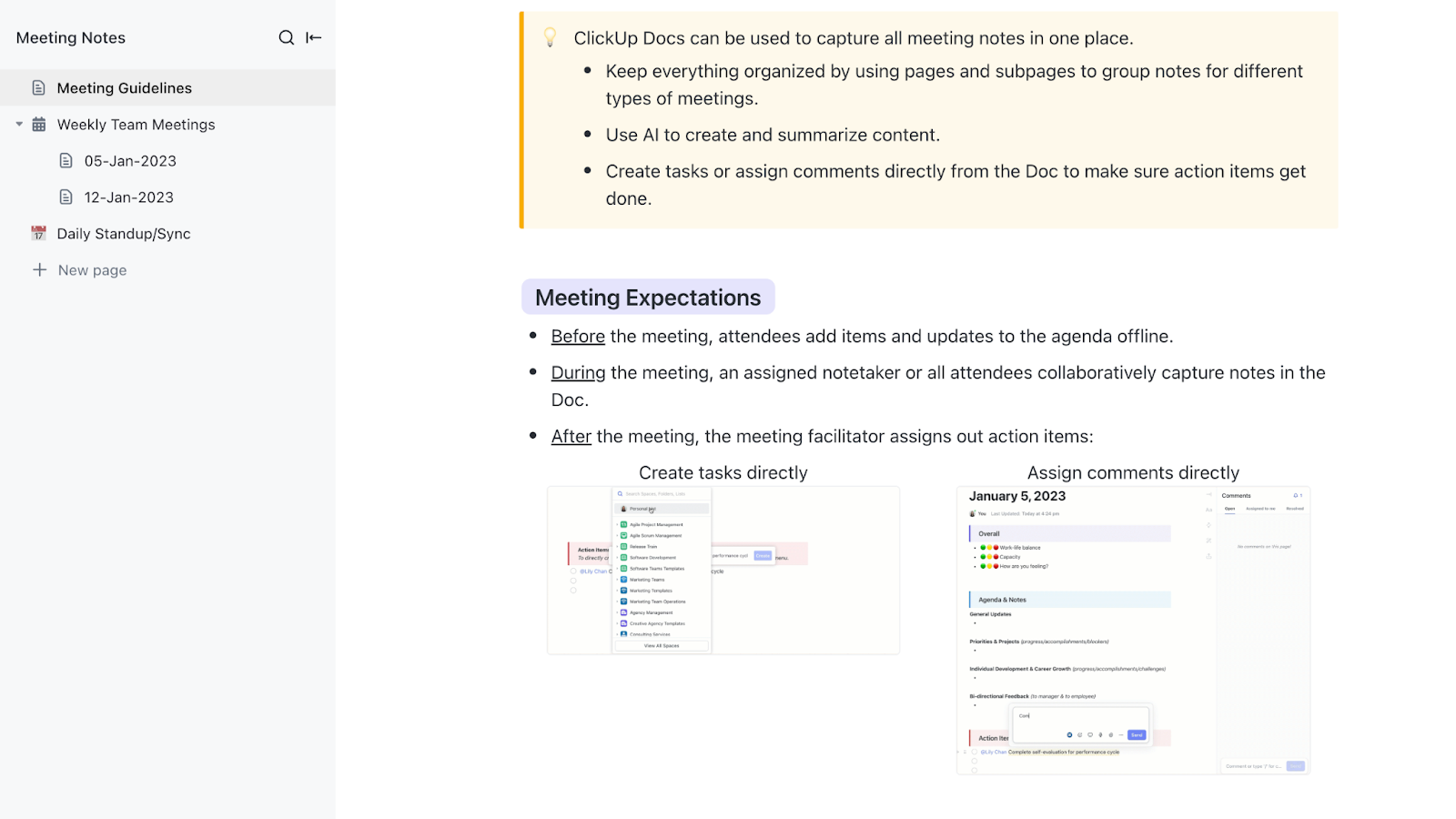
If you’re someone who expects your note-taking software to work as smoothly as the rest of your Apple ecosystem, ClickUp feels right at home.
It’s fast, responsive, and optimized for macOS—without the weird formatting bugs or lag that come from clunky cross-platform ports.
But what really sets ClickUp apart is that it’s not just a notes app. It’s your docs, tasks, AI assistant, and project dashboard—an everything app for work. That means no more multitasking five tools across twenty browser tabs.
Let’s start with ClickUp Docs. Docs offer you dynamic, structured documents built for modern workflows.

Docs lets you:
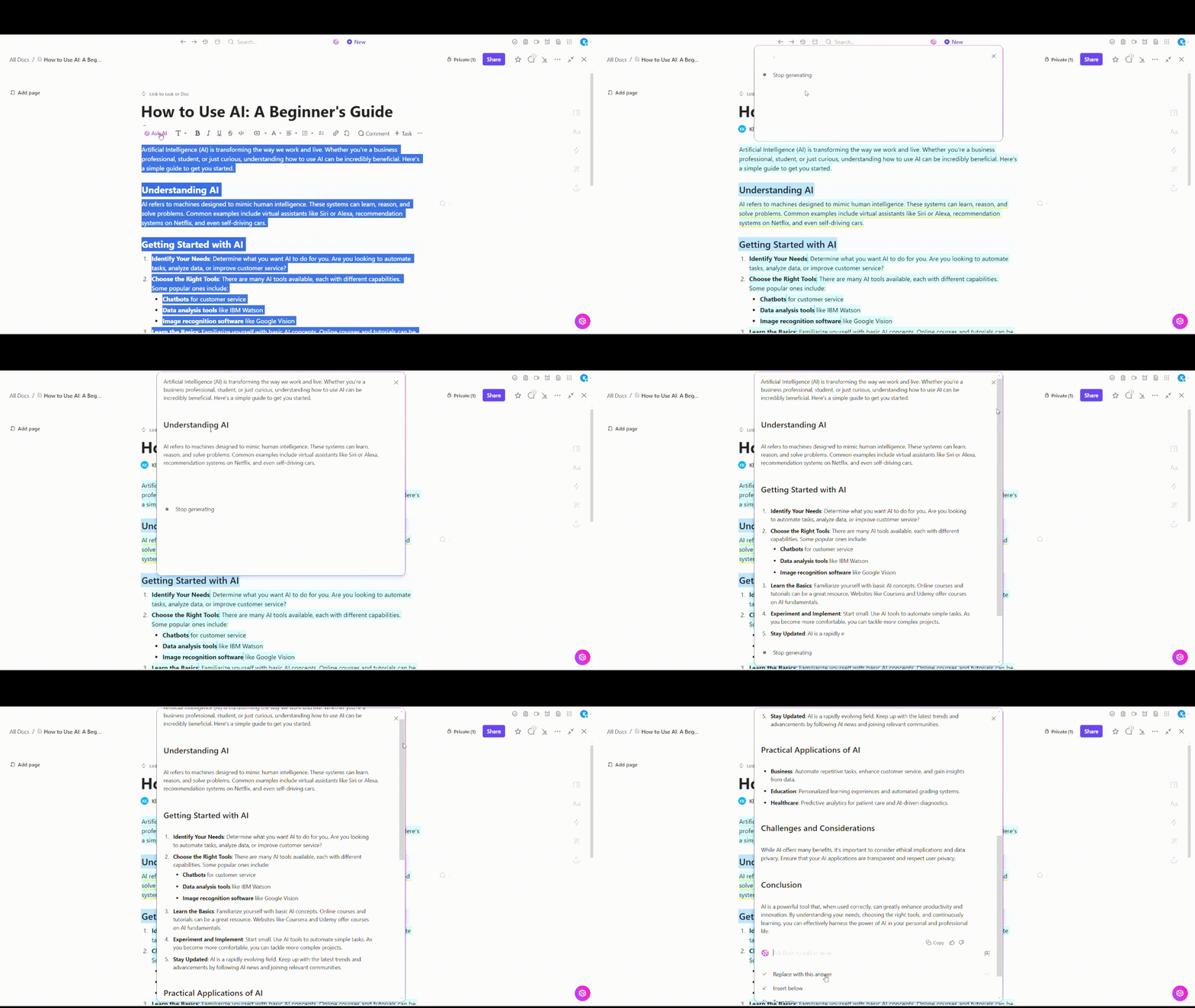
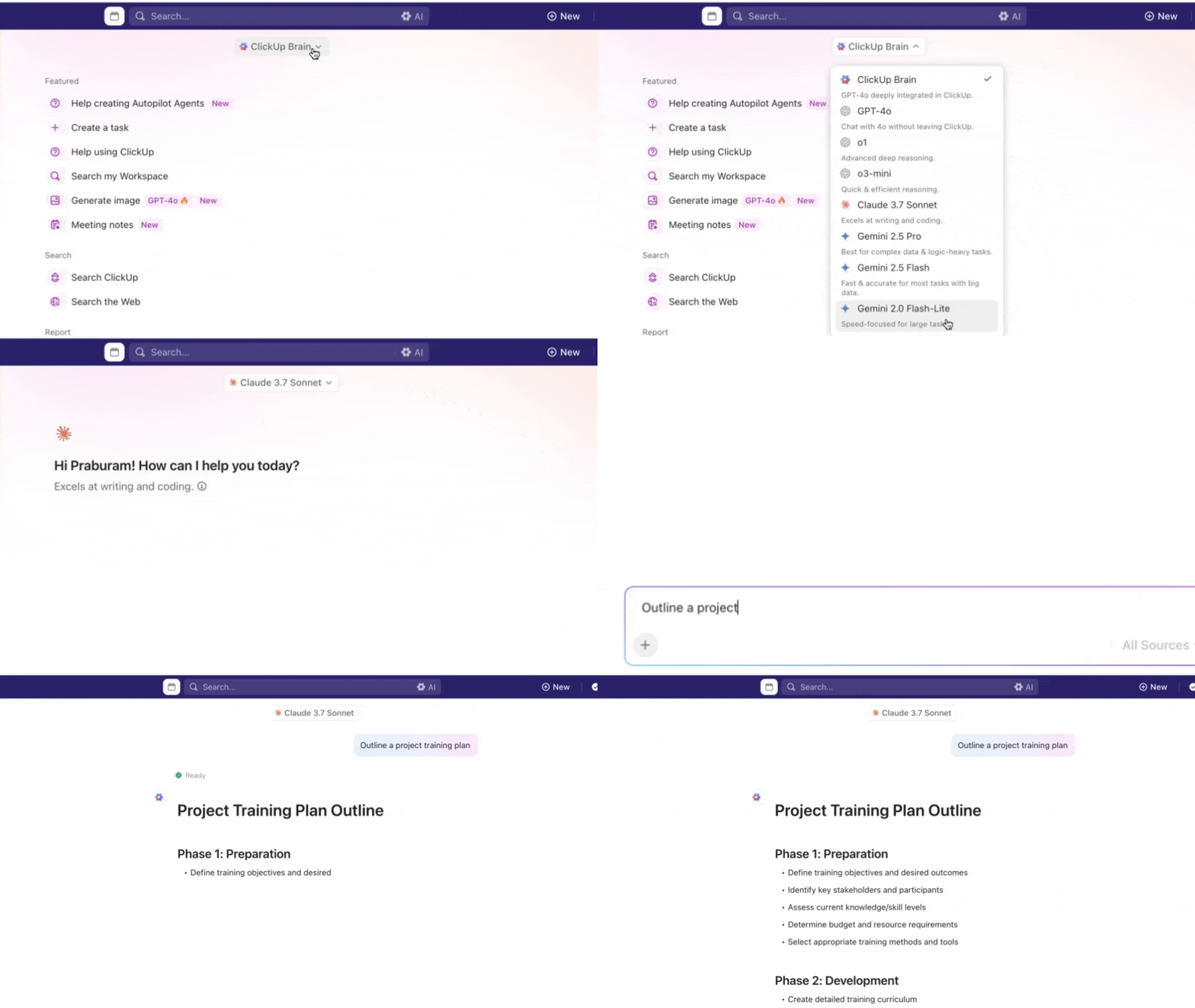
Pair that with ClickUp Brain, your built-in AI assistant, and you’ve got a powerful note-taking companion that actually thinks with you.
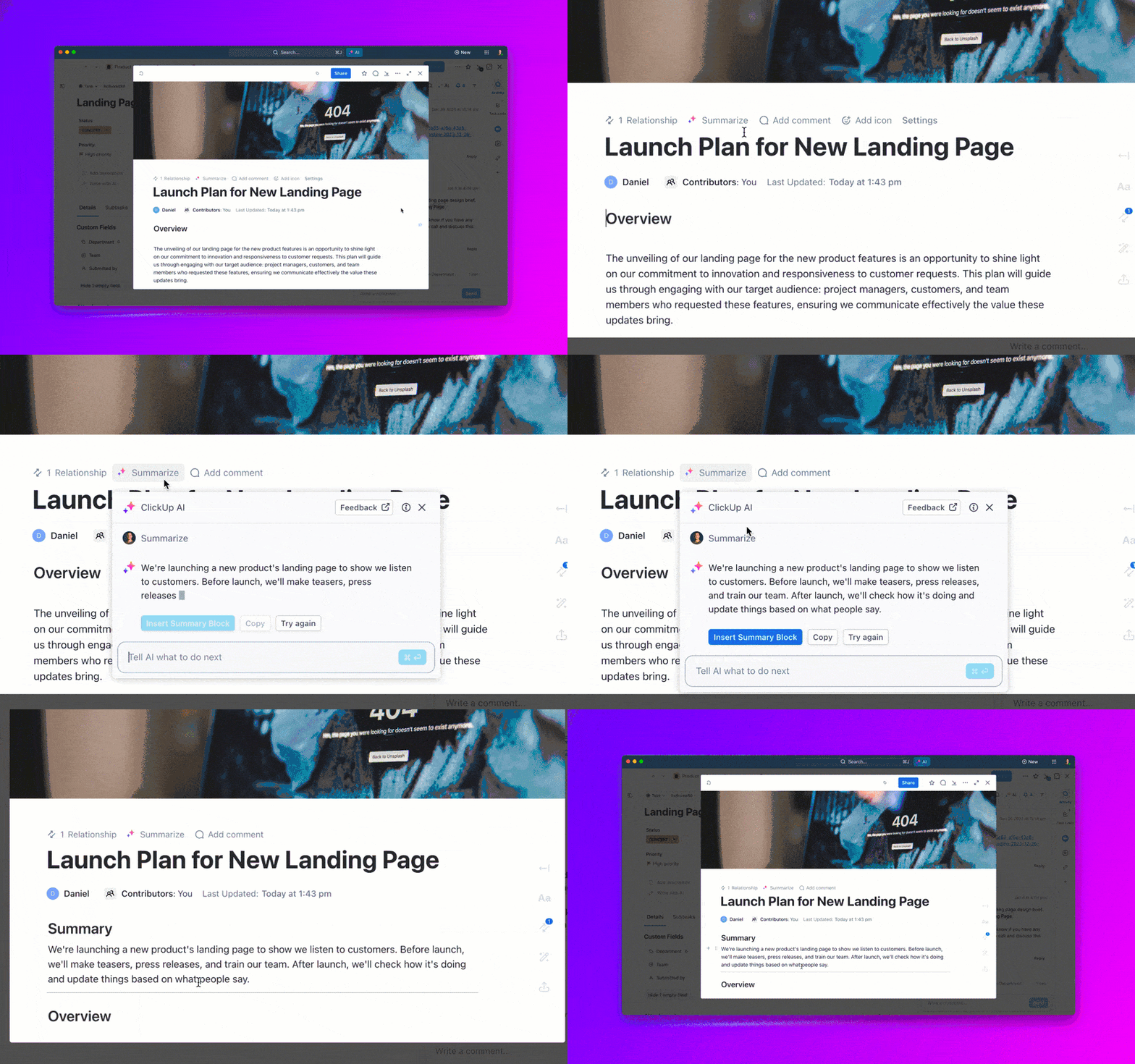
ClickUp Brain summarizes lengthy notes or meeting transcripts into crisp bullet points, so you can get the gist without rereading paragraphs. It also formats your content automatically, keeping everything clean and easy to scan—no manual clean-up required.
Do you need to capture the next steps or delegate follow-ups? Just ask. ClickUp Brain identifies action items as they come up in meetings and can instantly turn them into tasks, complete with assignees and due dates.
It can even help rewrite content in different tones or brainstorm ideas when you’re stuck staring at a blinking cursor. The best part? Brain includes the power of the best external AI models available today,, including Gemini, Claude, ChatGPT, among others.
And when inspiration strikes mid-scroll or during a call, there’s ClickUp Notepad—a distraction-free space for capturing quick ideas, to-dos, or draft thoughts before turning them into full-blown docs or tasks later.

ClickUp also supports bi-directional linking, letting you tie any doc directly to a task (and vice versa). So when someone asks, “Where’s the action item from this note?”, you won’t have to dig—it’s already connected.
And for those who want instant notes after their meetings, the ClickUp AI notetaker does the job like a pro.

Here’s how it helps:
Here’s a quick video on ClickUp’s AI notetaker turns meeting notes into tasks directly:
Lastly, one can’t miss ClickUp’s massive library of plug-and-play templates that are perfect for recurring workflows, such as the ClickUp Meeting Notes Template.
A G2 user says:
What I love most about ClickUp is how it’s genuinely transformed the way we work as a team.
💡 Pro Tip: Did you know you can effortlessly turn meetings into action? Find the Best Meeting Minutes Software.
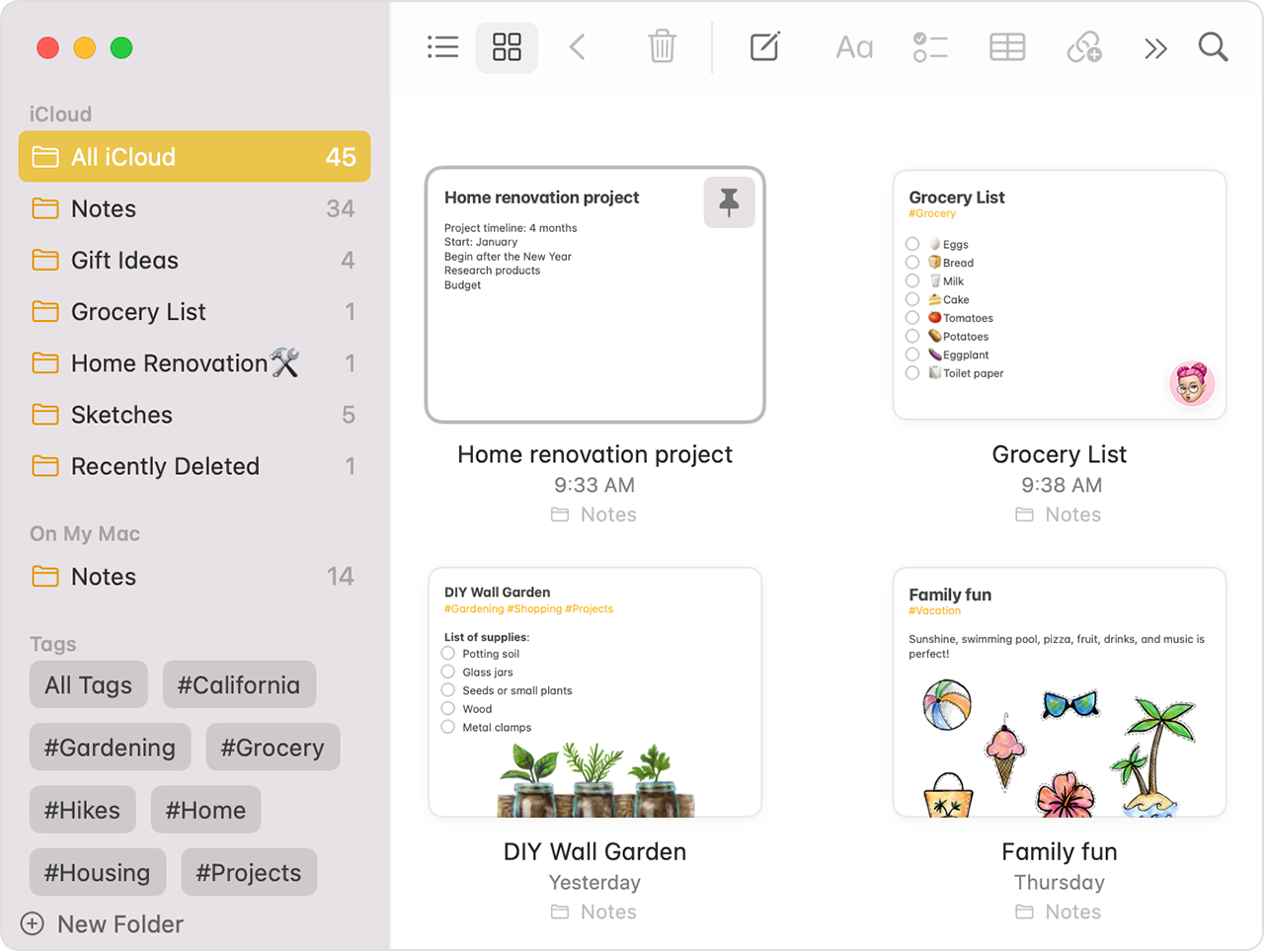
If you’re the kind of person who breathes in the Apple ecosystem, uses an iPhone as a remote, an iPad as a second screen, and talks to Siri more than actual humans, Apple Notes is your comfort zone.
It’s pre-installed, buttery-smooth on Mac, and syncs across your Apple devices without breaking a sweat.
The interface is clean, the performance is snappy, and everything just works, no extra sign-ups, no confusing onboarding. It’s the note-taking version of slipping into your favorite hoodie: cozy, familiar, and reliably there when you need it.
A Reddit user says:
I broke 1000 notes this past week, with a nice mix of .PDF’s and pictures included, and have no issues syncing between an iPhone, iPad, and my Mac.
📮ClickUp Insight: 37% of workers send follow-up notes or meeting minutes to track action items, but 36% still rely on other, fragmented methods. Without a unified system for capturing decisions, key insights you need may get buried in chats, emails, or spreadsheets.
With ClickUp, you can instantly turn conversations into actionable tasks across all your tasks, chats, and docs, ensuring nothing falls through the cracks.
💡 Pro Tip: Not all note-taking methods are created equal. Some are brilliant, others… not so much. Learn the difference (and find your style) with this smart breakdown of note-taking techniques. Your future self will thank you—and maybe even stay organized.
Master the art of seamless sharing: Learn how to share notes without the chaos.
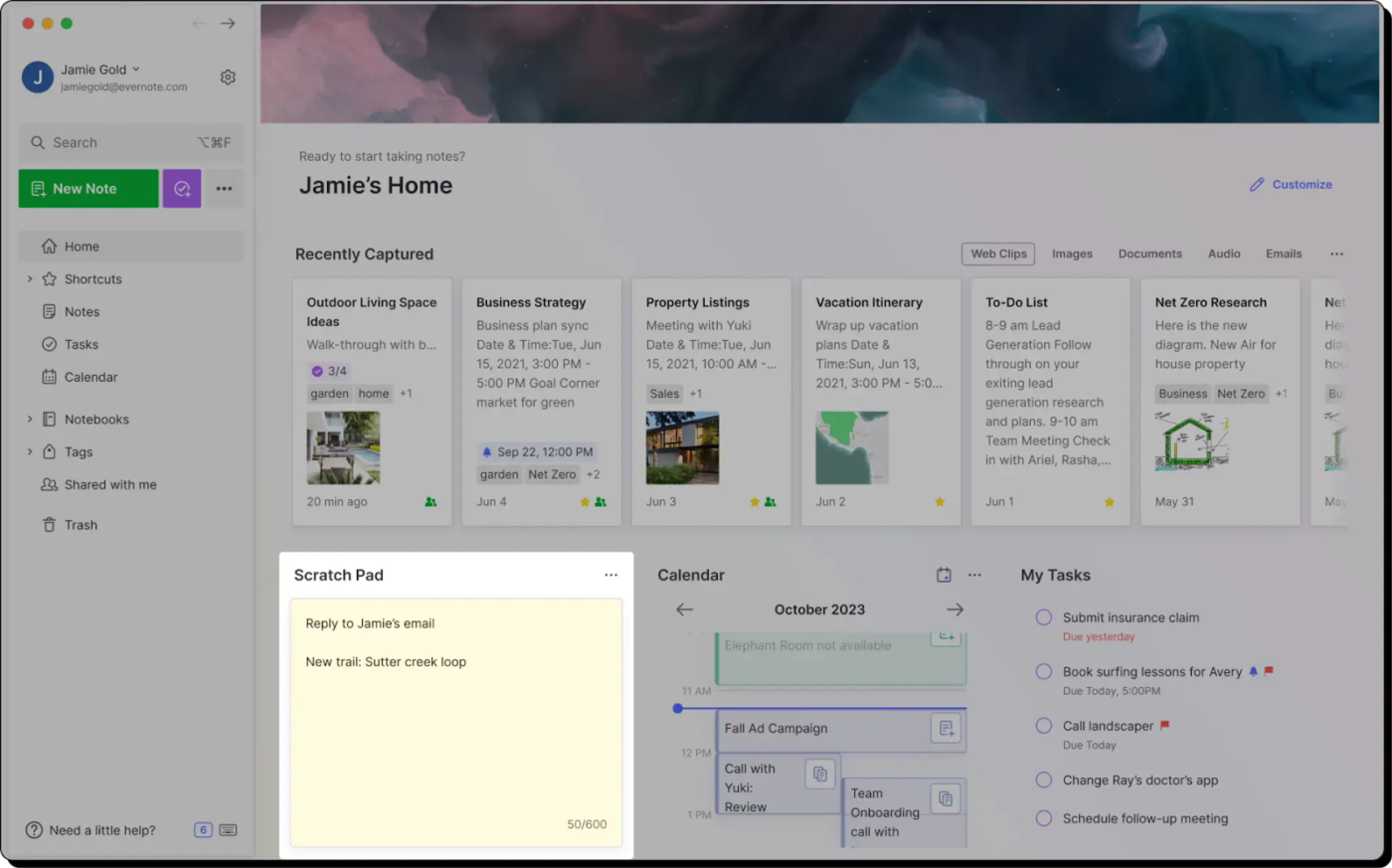
Evernote has been in the note-taking game longer than most apps have been alive. It’s the OG—back when “cloud sync” was still a buzzword, not just a given. And while it’s had its ups and downs (we all experimented in the 2010s), it’s still a powerful tool for organizing, storing, and syncing all kinds of notes, especially if you’re a Mac user with a flair for structure.
If you love categorizing everything, clipping articles like a digital squirrel, and turning notes into full productivity hubs, Evernote might be your jam.
A G2 user says:
Evernote is helpful because you can customize your organization to your needs and type of work you are doing.
💡 Pro Tip: Tired of drowning in meeting notes? Discover how AI note summarizes can do the heavy lifting so you can focus on sounding brilliant instead of scribbling frantically.

If Evernote is the suit-and-tie executive of note-taking, Obsidian is the indie hacker who drinks pour-over coffee and writes code in a cabin. It’s minimalist, Markdown-based, and fiercely local-first, meaning your notes stay on your device unless you want them to sync.
Obsidian isn’t trying to be cute—it’s trying to be useful. Especially if you’re a Mac user who wants total control over your knowledge base, no fluff attached.
A Capterra user says:
It was helpful in importing and reading markdown notes that I had exported from Mac Notes.
📚 Read more: Still drowning in a sea of half-finished notes and rogue bullet points? Here’s how to actually organize your notes so they stop looking like a crime board from a detective show and start working like a real productivity system.

Notion is what happens when a notebook, a wiki, and a task manager come together to collaborate. It’s sleek, powerful, and—let’s be honest—a little addictive once you fall down the rabbit hole of building dashboards and templates.
If you want a note taking app that’s as much about systems as it is about scribbles, Notion is a strong contender.
A G2 user says:
It optimizes information sharing within the team.
👀 Fun Fact: Thomas Edison kept over 5 million pages of notes throughout his life—so many that he once said that his main job was to gather ideas and make notes.

If you’re someone who reads privacy policies for fun (or at least out of principle), Joplin will speak to your encrypted soul. It’s an open-source, Markdown-friendly note app that puts data ownership front and centre. No surprise terms, no random sync issues—just notes that stay yours.
Joplin is especially appealing for Mac users who want cross-platform access without trusting a faceless cloud.
📚Read more: AI isn’t just for writing emails or generating cat memes. Discover the best AI tools for note-taking and how they can help you capture, sort, and even think better.

Simplenote is what it sounds like: a simple, distraction-free note-taking app. No crazy formatting. No bloated task integrations. No AI!
Just words. On a screen. Like nature intended. (or like it’s 2001)
If you’re on a Mac and want your notes to stay sleek, synced, and uncluttered, this one’s a no-brainer.
A G2 user says:
It’s help me lot in meeting to notedown the important things.
👀 Fun Fact: The world’s oldest known “notebook” was discovered in Vindolanda, a Roman fort in Britain. The wooden tablets date back to the 1st century AD and include shopping lists, invitations, and military records.

Bear feels like Apple itself made a notes app—but decided to make it aesthetic. It’s sleek, beautifully designed, and built for people who love writing… or at least love pretending they’re writing a novel while sipping espresso.
If you’re a Mac user wanting your notes to be clean, stylish, and elegantly tagged, Bear’s paws-itively everything you need.
💡 Pro Tip: Watching a 45-minute video to remember two bullet points? There’s a better way. Master the art of pulling key insights without hitting pause 47 times in this guide to taking notes from a video format. Your play button deserves a break.

Zoho Notebook often flies under the radar, but it’s a surprisingly capable (and completely free) note-taking app, especially if you like your pretty, colorful, and cloud-synced tools.
It’s also a great choice for Mac users who want cross-platform compatibility without sacrificing design or features.
A G2 user says:
We have been using our organisation’s Zoho services for years, and it has been an incredible journey.
👀 Fun Fact: Leonardo da Vinci wrote extensively in mirror writing. His notebooks weren’t just masterpieces of observation and invention—they were written backwards, readable only with a mirror.

Google Keep is what happens when sticky notes and cloud sync have a baby. It’s not the most powerful note-taking app, but it’s great at one thing: capturing quick thoughts fast.
Plus, it works well on Mac versions via the browser and syncs effortlessly with your Google account. If you like minimalism and need something that can keep up with your scattered brain, this one’s golden.
💡 Pro Tip: Take notes like a team that talks: Discover the secret to collaborative note-taking
Your Mac is sleek, fast, and built for people who get things done, and your note-taking app should be the same. If you’re tired of clunky interfaces, missing features, or tools that feel like they need an instruction manual (and a coffee), ClickUp is your upgrade.
Whether you’re creating notes in a meeting, connecting them to tasks, or letting ClickUp Brain do the heavy lifting with summaries and follow-ups, this is note-taking the way it should be: fluid, intelligent, and useful.
So if you’re looking for a Microsoft OneNote alternative that fits right into your Mac setup (without making you miss OneNote’s clunkier quirks), ClickUp it is.
👉 Sign up for the ClickUp free version today and let your notes do more than just sit there.

© 2026 ClickUp

There’s an easier way. Try a free AI Agent in ClickUp that actually does the work for you—set up in minutes, save hours every week.