






Still downloading templates?
There’s an easier way. Try a free AI Agent in ClickUp that actually does the work for you—set up in minutes, save hours every week.
Sorry, there were no results found for “”
Sorry, there were no results found for “”
Sorry, there were no results found for “”
Managing group travel or company spend shouldn’t feel like a full-time job on top of your actual job. Toggling between booking confirmations, stale spreadsheets, and bank statements to figure out where your budget went costs you time. Automation can save it.
You need a single view that pulls these disconnected pieces together in real time.
Integrated travel dashboard templates can help.
Let’s find out how to use them to stop the manual data chase and get a clear picture of your travel spend and schedules.
| Template name | Download link | Ideal for | Best features | Visual format |
| Business Travel Itinerary Template by ClickUp | Get free template | Operations managers and EAs managing multi-leg trips for leadership teams | Live timeline view; automated status updates; time zone handling; expense categorization | List-based timeline with shared, searchable location |
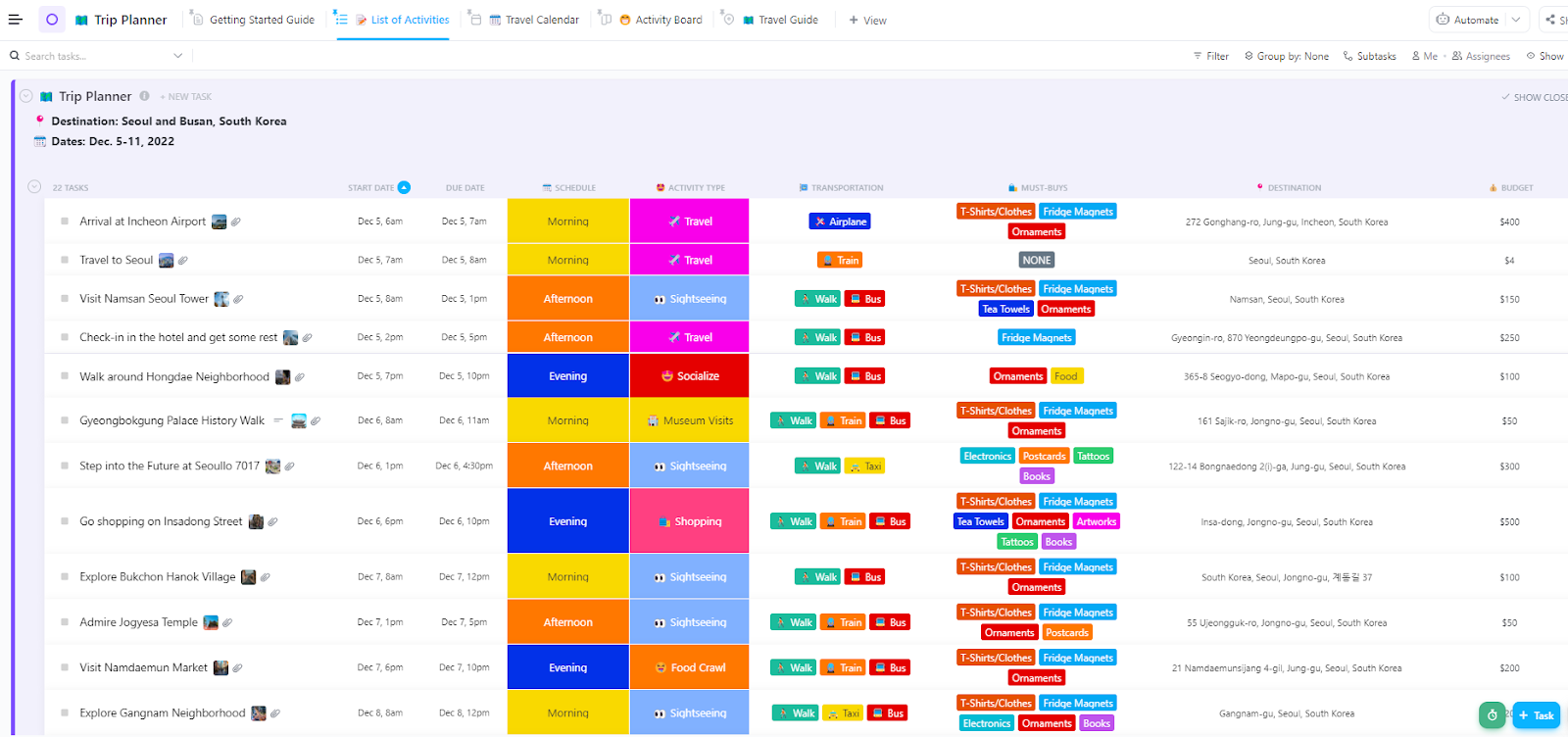
| Trip Planner Template by ClickUp | Get free template | Individuals and team leads moving from brainstorming to final itineraries | Budget vs. actuals tracking; nested research Docs; drag-and-drop calendar; Kanban boards | Multi-view workspace (Board, List, Calendar) |
| Travel Agency Template by ClickUp | Get free template | Boutique agencies and independent agents managing high-volume bookings | Automated lead intake via Forms; unified client profiles; visual booking pipeline | CRM-style unified workspace with 21 Custom Statuses |
| Vacation Planning Template by ClickUp | Get free template | Families and groups of friends coordinating logistics and shared costs | Collaborative activity wishlists; side-by-side lodging comparisons; centralized group Docs | Folder-based workspace with pre-built category lists |
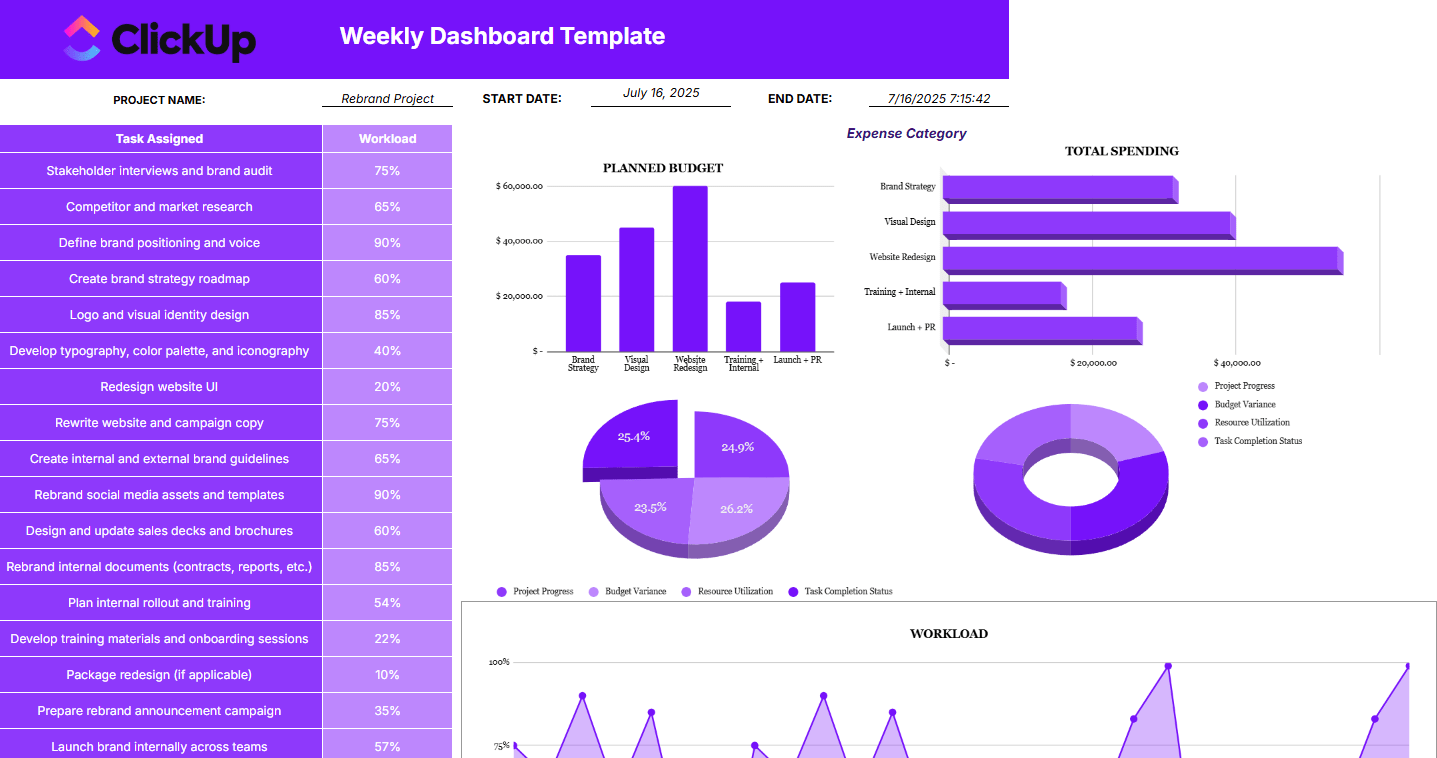
| Project Management Dashboard Template by ClickUp | Get free template | Corporate travel managers needing a strategic overview of company-wide spend | Portfolio visibility; resource allocation tracking; Milestone tracking for visas and deadlines | High-level reporting dashboard with visual widgets |
| Spreadsheet Weekly Dashboard Template by ClickUp | Get free template | Finance and ops teams transitioning from Excel to automated tracking | Sortable grid columns; formula-like rollups; date range filtering; department breakdowns | Responsive Table View (spreadsheet-style grid) |
| Travel Agency Performance Dashboard by Template.Net | Get free template | Agency owners moving away from lagging month-end reports | KPI widgets for revenue/conversion; agent leaderboards; visual booking funnel tracking | Analytics-focused performance dashboard |
| PPT Travel Dashboard Template by SlideTeam | Get free template | Travel admins and finance leads presenting ROI to stakeholders | Customizable financial models; 19 distinct reporting slides; executive-ready visuals | Professional PowerPoint PPT bundle |
An integrated travel dashboard template is a pre-built workspace that consolidates trip logistics, budgets, itineraries, and team coordination into a single visual hub.
Some focus on personal trip planning while others handle agency-level client management or corporate travel analytics. The templates we’ve chosen offer flexibility, visual clarity, and the ability to handle both simple trips and complex multi-destination coordination.
Since each template below addresses a different travel management scenario, pick what suits you best!
Does your team spend more time searching for flight confirmations than actually preparing for the meeting you’re flying for?
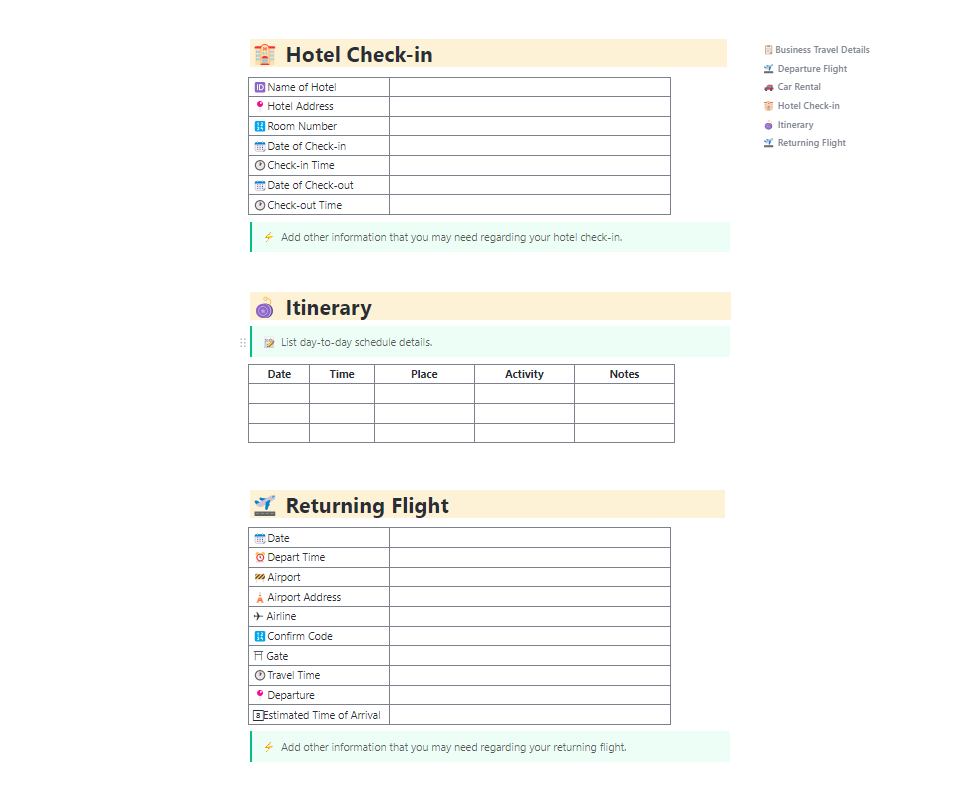
This Business Travel Itinerary Template by ClickUp manages corporate trips with multiple stakeholders—flights, hotels, meetings, and ground transportation—in one timeline view. It eliminates the ‘which email has the hotel confirmation?’ scramble by housing everything in a shared, searchable location. Now, you can see the entire trip timeline and make adjustments with confidence.
✈️ Ideal for: Operations managers and executive assistants who need to coordinate complex, multi-leg trips for leadership or large teams without losing the paper trail.
👀 Did You Know? Consolidating travel management into a single system reduces administrative chaos. You can spend more time on strategic planning and traveler support, achieving 21% annual cost savings compared to those using disconnected tools.
Planning a complex, multi-city trip? Chances are, you’re doing it using multiple tabs and multiple apps. You’ve got hotel options pinned across browsers, a separate document for notes and recommendations, and a spreadsheet to track your budget. Thanks to this tool sprawl, sooner or later, a critical detail might just slip through.
If you don’t want to show up in Budapest confidently searching for the Vienna State Opera, it helps to have everything in one place.
This Trip Planner Template by ClickUp eliminates the endless tab-switching by consolidating your planning into one workspace. It’s perfect for individuals planning detailed personal vacations, teams organizing off-sites, or anyone managing a trip with customizable stages from research to post-trip wrap-up. Instead of you feeling overwhelmed by scattered information, your planning becomes streamlined and focused.
✈️ Ideal for: Individuals and team leads who need to move from the brainstorming phase of a trip to a finalized itinerary without losing critical details along the way.
🎥 Bonus: Want to see how personal dashboard building works in practice? This video walkthrough demonstrates how to create a comprehensive personal life dashboard in ClickUp, including strategies for travel planning and vacation organization.
🧠 Fun Fact: While we use digital dashboards today, the earliest surviving travel itinerary for a journey was the Itinerarium Burdigalense, written in 333 AD. It was a literal list of cities and changing stations for a traveler going from Bordeaux to Jerusalem. It didn’t have real-time flight tracking, but it served the same purpose: preventing a logistics nightmare.
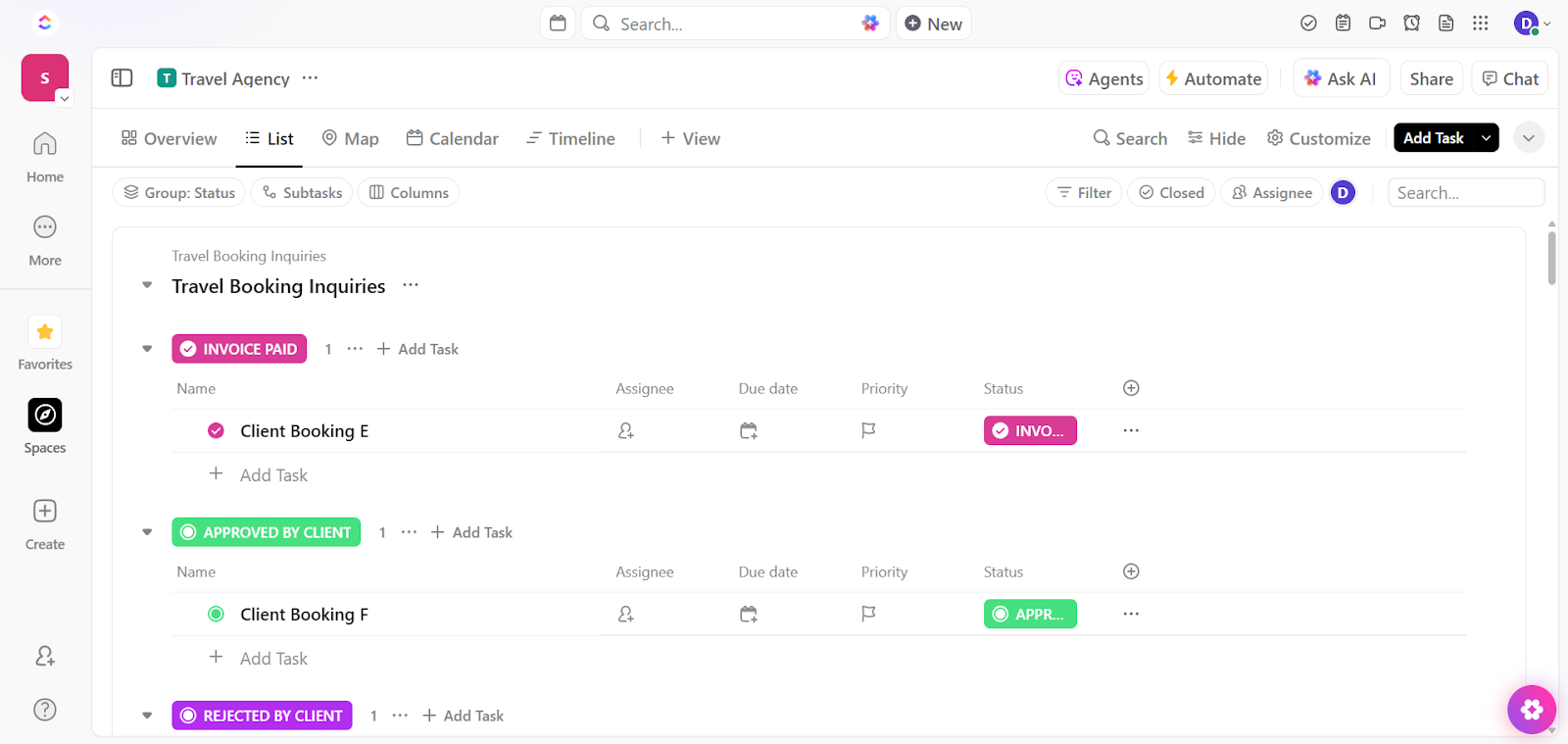
Managing a travel agency usually feels like a constant battle against fragmented data. The Travel Agency Template by ClickUp replaces the cobbled-together system of CRMs and spreadsheets with a single, unified workspace.
It’s designed to house every booking status, payment milestone, and client preference in one place, so you can provide personalized service without digging through disconnected tools.
✈️ Ideal for: Boutique travel agencies and independent agents who need to manage a high volume of bookings and vendor relationships while maintaining a white-glove client experience.
💡 Pro Tip: Build custom reports for your entire agency using ClickUp Dashboards. It turns your raw booking data into real-time business intelligence.
Instead of manually auditing your pipeline at the end of the month, you can use customizable cards to visualize your revenue, agent performance, and client health in one place. Stop reacting to the month-end scramble, and start making proactive decisions based on live data.
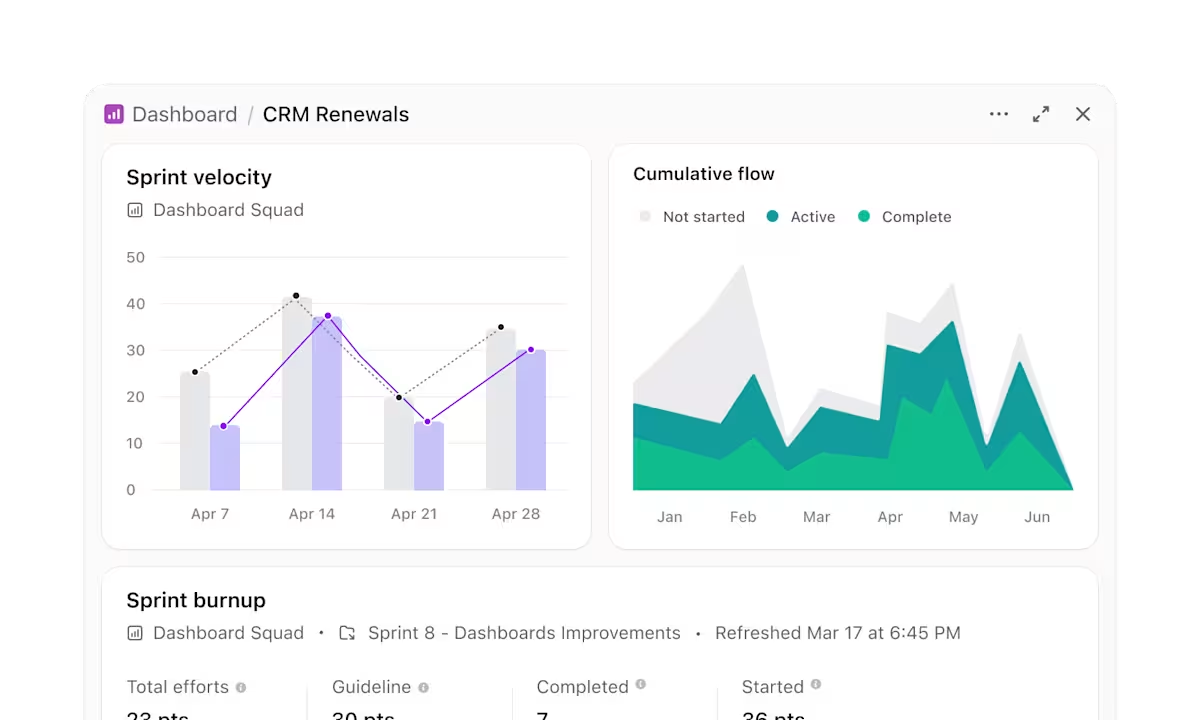
Use ClickUp Dashboards to:
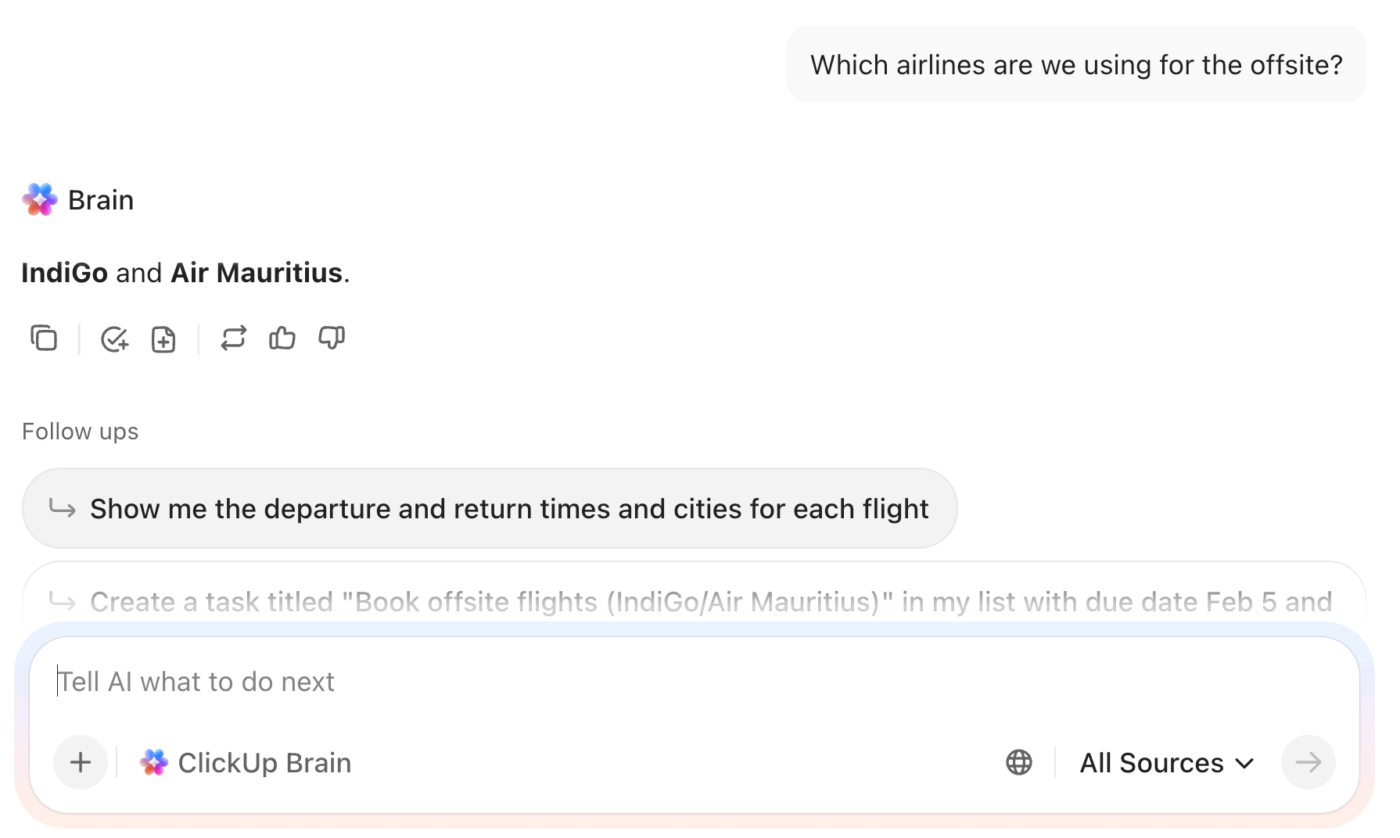
To get even more out of your reporting, use ClickUp Brain to query your travel data directly. Since this context-aware AI works in tandem with your ClickUp Dashboards, you can skip manual analysis and simply ask questions like ‘Which airline did we spend the most with this quarter? ‘
It delivers instant, reliable answers. ClickUp Brain draws from your tasks, docs, and chat in ClickUp to also identify critical points by surfacing hidden bottlenecks in your approval process or flagging budget overages that aren’t immediately obvious on a standard chart.
Planning a group trip in a chat app quickly goes from excitement to overlapping suggestions…and sheer noise.
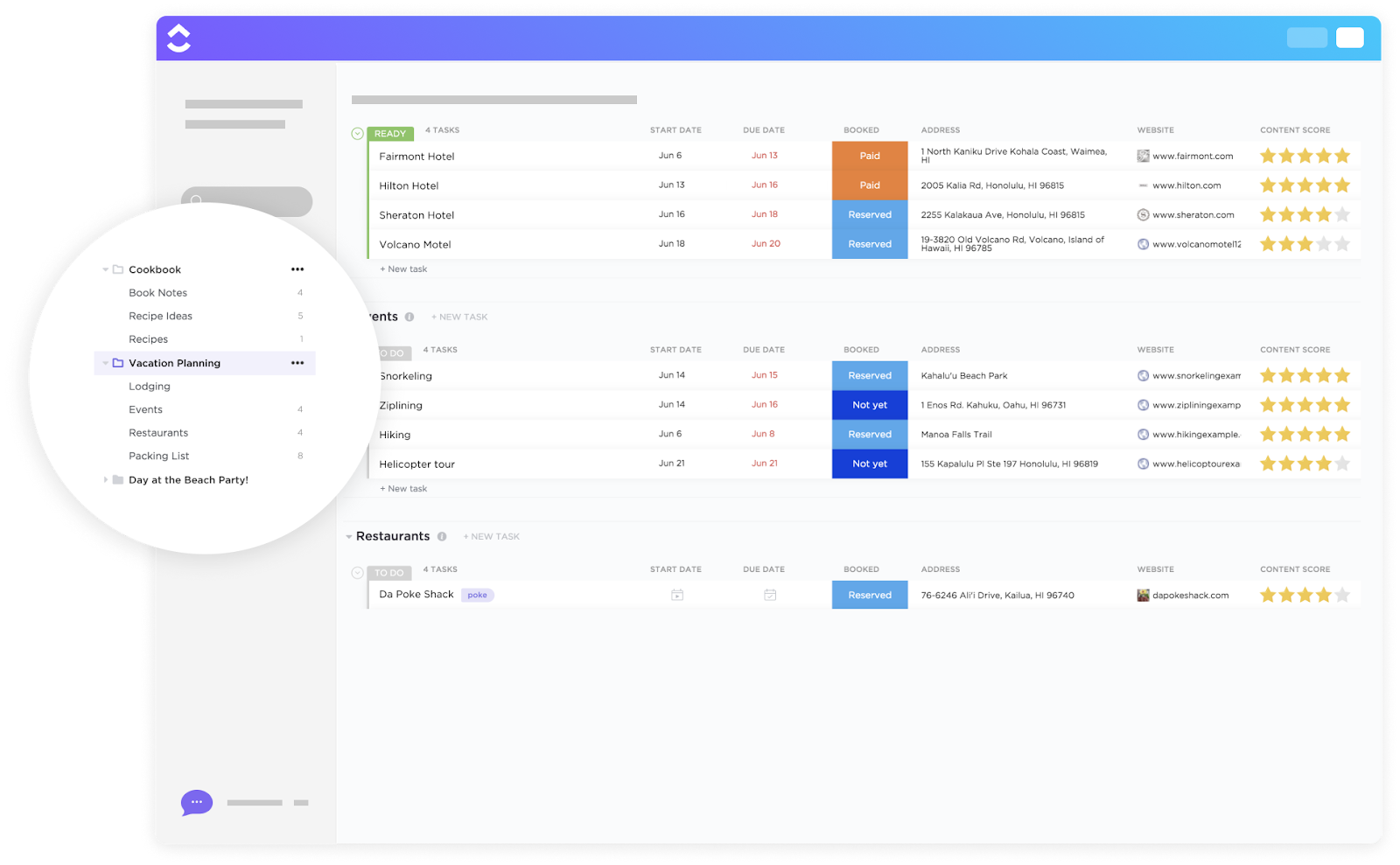
The Vacation Planning Template by ClickUp moves the conversation into a structured workspace. It provides a central hub for group communication. Everyone can contribute ideas, compare options, and finalize a schedule without the constant back-and-forth of ‘wait, what did we decide?’
✈️ Ideal for: Families and groups of friends who need a transparent way to coordinate logistics, split responsibilities, and build a shared itinerary for stress-free travel.
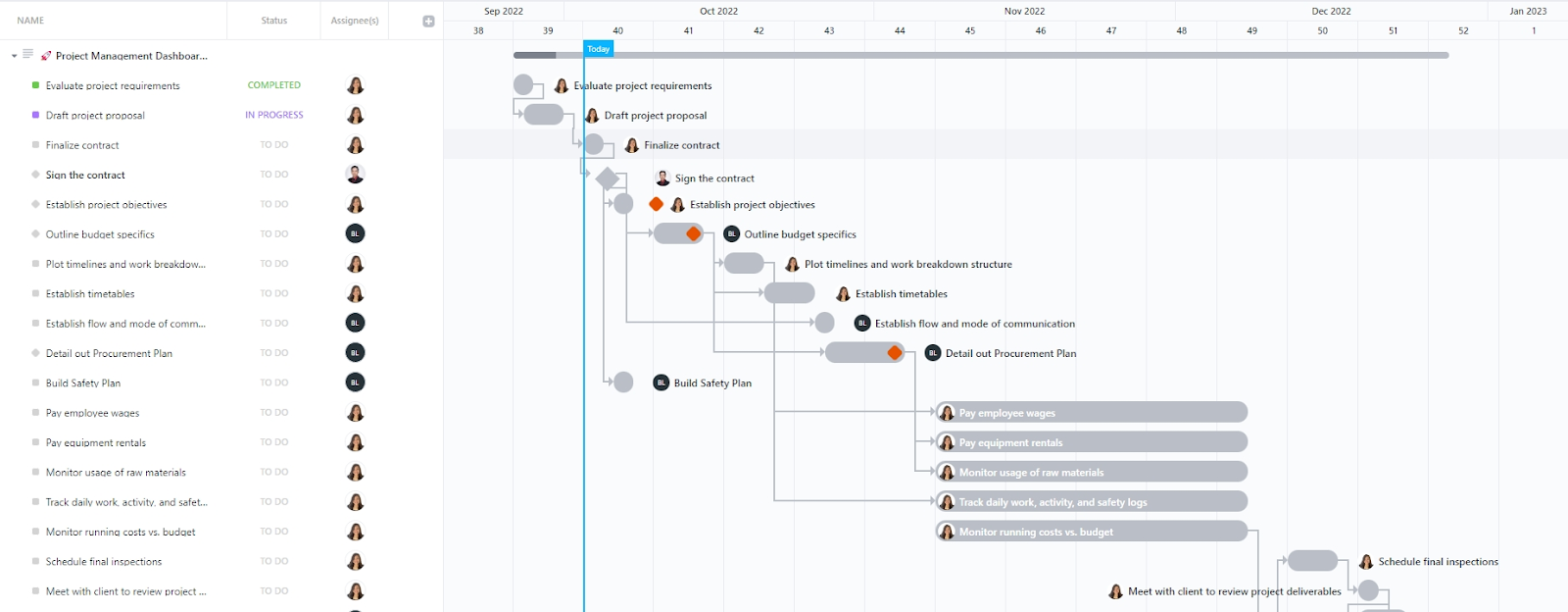
Reacting to individual booking requests and missing expense reports makes it impossible to see travel’s impact on organizational planning. The Project Management Dashboard Template by ClickUp shifts your perspective by treating every trip as a managed project with its own budget, timeline, and milestones. You get a high-level view of all active employee travel and pending approvals in a single, live report.
✈️ Ideal for: Corporate travel managers and department heads who need a strategic overview of company-wide travel spending and team availability to make data-driven decisions.
👀 Did You Know? Travel logistics are becoming a massive administrative hurdle. 46% of travel managers cite increased documentation and visa processing needs as a top long-term concern. Centralizing these deadlines in a dashboard ensures these hidden administrative tasks don’t derail your budget or your travelers.
Many finance and operations teams stick to spreadsheets for travel spend tracking because the grid format is comfortable. But the manual data entry is a constant drain on time.
This Spreadsheet Weekly Dashboard Template by ClickUp offers a familiar spreadsheet-style layout for teams who want to move beyond static files without a steep learning curve. It keeps the intuitive grid format while adding the collaboration, automation, and real-time updates that spreadsheets lack. You get the comfort of a spreadsheet with the power of a modern work platform.
✈️ Ideal for: Teams and operations leads who want to move away from error-prone Excel files but still prefer a column-and-row format for auditing weekly travel spend.
📮ClickUp Insight: 47% of people rely on pivot tables, dashboards, and charts inside spreadsheets to understand their work.
These tools are undoubtedly powerful. But even a small change: a shifted column, a renamed sheet, an extra row can break your formulas, ranges, or visualizations.
Keeping your reports accurate often means revisiting filters, refreshing connections, and re-mapping data to keep everything aligned.
ClickUp stands out as an alternative for teams who want real-time visibility without the upkeep. Its no-code Dashboards use pre-built cards for charts, calculations, time tracking, and workload insights that pull directly from live tasks, lists, and statuses. That means, everything updates in sync with work!
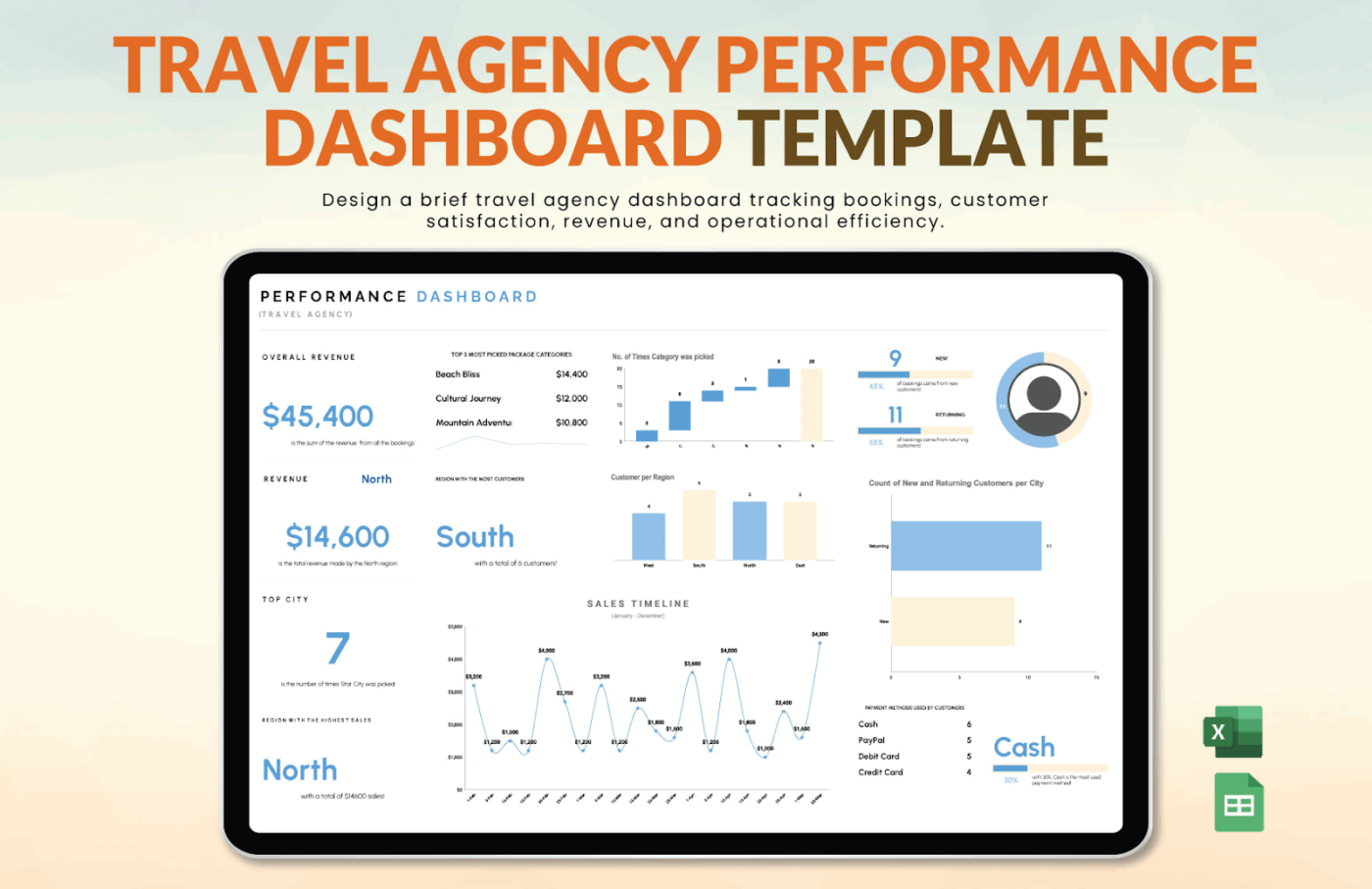
Agency owners often spend the last few days of the month manually stitching together data from booking platforms, commission spreadsheets, and client feedback forms. The Travel Agency Performance Dashboard Template by Template.net offers an analytics-focused approach. It replaces the end-of-month scramble with always-on performance visibility.
✈️ Ideal for: Agency owners and managers who need to move away from lagging monthly reports and start making data-driven decisions based on live revenue and workload trends.
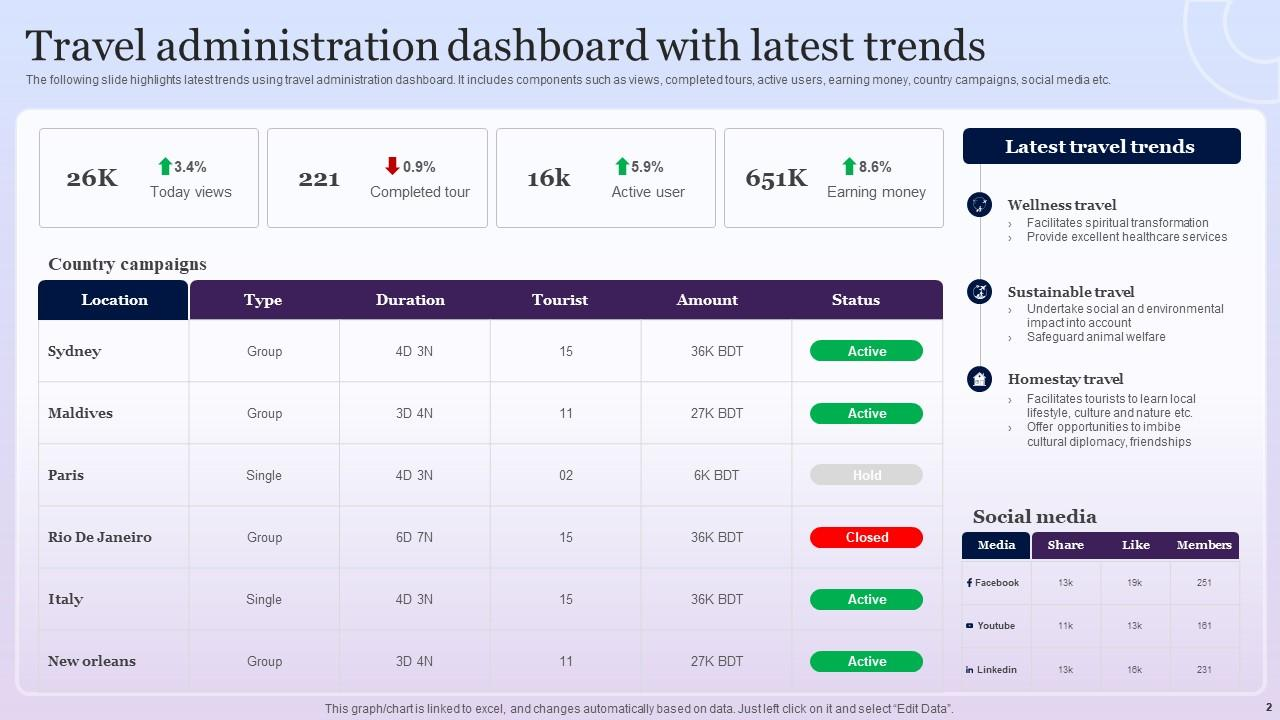
Sometimes the hardest part of travel management is presenting data to stakeholders in a scannable format. The Travel Dashboard PowerPoint Template by SlideTeam moves your reporting out of spreadsheets and into high-quality, executive-ready visuals. It’s a good choice if you want to justify travel spend, highlight industry trends, or present a budget analysis to leadership without spending hours on slide design.
✈️ Ideal for: Travel administrators and finance leads who need to deliver polished, data-driven presentations to stakeholders or clients to prove the ROI of their travel programs.
We hope this blog post showed you how an integrated travel dashboard template makes travel coordination less stressful. You can stop oscillating between emails, spreadsheets, and chat threads for critical details, eventually falling victim to context sprawl.
What makes these pre-built templates even better is a Converged AI Workspace that centralizes budgets, approvals, and team communication in a single location. The traveler knows their schedule, the admin tracks all active trips, and the finance team sees spending against the budget. Everyone works from the same source of truth, reducing Work Sprawl and saving resources.
With ClickUp’s pre-built templates, Dashboards, and AI-powered features, you can build your integrated travel dashboard in minutes.
Get started for free with ClickUp today and transform your travel management workflow.
A travel dashboard provides a high-level overview of multiple trips, managing budgets and statuses, while a trip itinerary focuses on the day-by-day details of a single journey.
Cross-functional teams use integrated dashboards to centralize logistics that usually live in isolated email threads. For complex off-sites, these dashboards enable organizers to track RSVPs, dietary requirements, and flight arrivals in real time.
Yes, modern dashboard templates offer the same familiar grid structure as a spreadsheet but add layers of functionality that static files lack. Unlike spreadsheets, which require manual data entry and are prone to version-control issues, integrated dashboards provide real-time status. This shift ensures that every stakeholder is looking at the most current information.
Modern travel dashboards move beyond basic expense logging by tracking comprehensive analytics that drive strategic decision-making. By monitoring real-time spend-to-budget ratios and detailed expense categorizations, organizations can maintain tighter financial control. These tools also surface critical insights into vendor use to help negotiate better corporate rates and identify approval bottlenecks that often lead to costly booking spikes.

© 2026 ClickUp

There’s an easier way. Try a free AI Agent in ClickUp that actually does the work for you—set up in minutes, save hours every week.