

Sorry, there were no results found for “”
Sorry, there were no results found for “”
Sorry, there were no results found for “”
Staring at the same template for the hundredth time can make even the most exciting presentation feel dull. If you’ve found yourself thinking, ‘There’s got to be a better way,’ you’re not alone.
Educators designing lessons, professionals preparing pitches, and teams collaborating on ideas often need tools that go beyond the basics.
While Google Slides is a popular choice, it doesn’t always offer the flexibility or features to match your unique needs.
Let’s explore 13 Google Slides alternatives that can transform how you create presentations. 🧑💻
Here are the top 10 Google Slides alternatives for you to try:
Google Slides, while widely used, comes with several limitations that can hinder its usability:
🔍 Did You Know? Google Slides was initially called ‘Google Presentations’ in 2007. It became ‘Slides’ in 2012 to align with Google’s branding for its productivity suite.
To help you navigate the choices, here’s a quick overview of some of the top Google Slides alternatives. 👇
| Tool | Standout feature | Best for |
| ClickUp | Customizable templates, Whiteboards, and AI-powered tools all in one place | Collaborative presentations and workflows |
| Canva | Extensive library of templates and media assets | Visually stunning presentations |
| Beautiful.ai | AI-powered smart templates and layout adjustments | Fast, professional presentations |
| Prezi | Non-linear, zoomable canvas | Dynamic storytelling presentations |
| Powtoon | Animation-focused tools for engaging video presentations | Training, education, and marketing projects |
| Microsoft PowerPoint | Versatile features with offline and online compatibility | Traditional multimedia presentations |
| Pitch | Real-time collaboration and data integration | Modern, team-based presentations |
| Mentimeter | Interactive polling and real-time audience engagement | Facilitators and educators |
| Keynote | Sophisticated animations and seamless Apple ecosystem integration | Apple device users and high-design needs |
| LibreOffice Impress | Open-source solution with extensive compatibility | Cost-effective presentations |
| Visme | Data-driven visual content with interactivity | Marketing, education, and business visuals |
| Gamma | Adaptive card-based storytelling format | Fresh and flexible presentation designs |
| Zoho Show | Robust collaboration with seamless Zoho app integration | Teams using Zoho’s productivity suite |
🔍 Did You Know? The earliest ‘presentations’ can be traced back to ancient civilizations. Like modern slideshows, the Egyptians used hieroglyphics on walls to tell stories and convey messages.
Google Slides is a solid option, but sometimes you need something more to make your presentations stand out.
From better design options to smoother collaboration, some tools can offer just what you’re missing. Here are 13 alternatives to bring your presentations to life. 🛟
ClickUp is the everything app for work, designed to help teams stay organized and work more efficiently. It brings everything into one place, from task management to knowledge management, to real-time communication and beyond, all powered by AI.
When it comes to creating presentations, ClickUp stands out by offering a variety of tools that make collaboration easy and design simple. Let’s explore these. 👀
First up, ClickUp’s presentation templates provide a simple yet effective way to create polished, professional presentations. They’re fully customizable, so you can tailor them to your needs.
For example, an educator could easily create a lesson plan presentation, adding visuals, text, and notes to engage students. Similarly, a project manager could use one of these templates to pull in task updates, timelines, and key deliverables, all while keeping everything aligned.
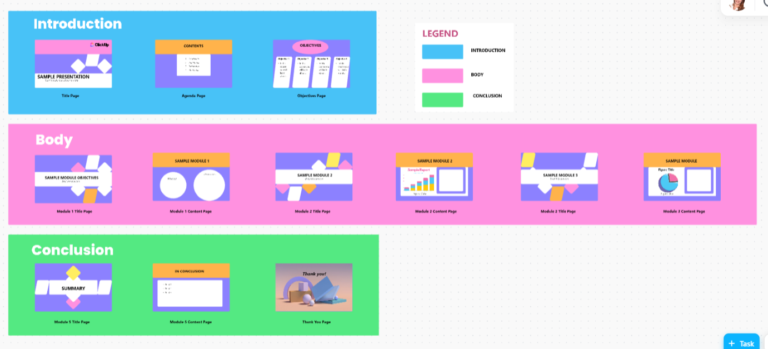
The ClickUp Presentation Template offers pre-designed slides that cater to various presentation styles and needs.
You can easily customize your presentation to fit your audience, whether for a formal business meeting, a creative pitch, or an educational seminar. The sleek, engaging design keeps your audience interested, which is crucial for effective communication.
The template also includes visual elements like charts and graphs that you can quickly edit to reflect your data.
ClickUp Whiteboards take collaboration up a notch. These interactive spaces let you and your team create together in real time.

You can add images, draw flowcharts, brainstorm ideas—whatever you need to bring concepts to life visually. For instance, a marketing team could sketch out a campaign, drop sticky notes for ideas, and share visuals all in one place. The whole process feels quicker and more seamless.
You can even use the AI image generator to create images for you, if you’re struggling to turn your thoughts into an appealing visual.
Once everything’s mapped out, you can effortlessly turn your Whiteboard into a presentation.
Then there’s ClickUp Brain, an AI-powered tool that helps generate and refine your content. This feature suggests text, refines writing, and even sparks new ideas based on what you’ve already created.

So, if you’re an educator working on a lesson plan, this AI tool for presentations can help you draft clear, engaging content that’s aligned with the topic. Or, a professional creating a proposal could use Brain to improve messaging, ensuring the tone matches the audience’s needs.

And don’t forget about ClickUp Docs. You can easily write and edit content in Docs, then embed the text into Whiteboards for seamless collaboration.
For example, you might write the initial draft of your presentation’s key points in Docs and have your team work on Whiteboards to build the final product.
I love ClickUp! I’ve used many tools to manage my project workflows and whatnot, but nothing has quite covered my needs as well as ClickUp. It has everything you need (with it being the everything app for work) and caters to all your personal and professional needs. My favourites are the templates (what’s not to love!) and Docs.
🧠 Fun Fact: The first slide projector, called the magic lantern, was invented in the 17th Century. It used light, glass slides, and lenses to project images, making it a precursor to today’s digital slides.

Canva prioritizes design-first thinking, making it the go-to platform for visually compelling presentations. With its vast template library and user-friendly tools, Canva allows even non-designers to create professional-grade content.
Beyond presentations, Canva is a comprehensive design ecosystem that is ideal for social media posts, marketing materials, and more.
I love that I can quickly create professional looking graphics without feeling. The wide range of templates, photos, and customization options make it easy to create unique designs for anything I need to ease of implementation for social media, presentations, or personal projects. It’s also great that I can use it on my phone or laptop, so I can design on the go.

Beautiful.ai leverages artificial intelligence to simplify presentation design, automating layouts, formatting, and design decisions.
With its smart slide functionality, the platform ensures a professional finish without requiring advanced design skills. Its AI-driven approach is ideal for users prioritizing speed and efficiency in the presentation creation process.
I like the AI Bot that creates beautiful slides with great visuals. This enables one to create an entire presentation in a short time. It is better than other platforms because of the numerous templates available and the accuracy. The suggestions to shorten or change the tone of the text are also plus.
💡 Pro Tip: Less is more when it comes to slide design. Use minimal text and focus on key points. Aim for clarity and simplicity to avoid overwhelming your audience.

Prezi redefines presentation formats with a zooming interface and spatial storytelling approach.
Instead of moving slide by slide, Prezi allows you to explore a dynamic canvas where topics connect visually. This format is especially effective for creating non-linear, engaging presentations that adapt to audience interactions.
Easy to use and presents well with clients. I love the fact that it changes your presentation options to give you transitions, fade in and outs, zoom in and out, and a great way to engage clients as the movement draws them in and the software is clean and intuitive.
🔍 Did You Know? The term ‘Death by PowerPoint’ was popularized in the early 2000s to describe overly long and unengaging presentations. It inspired a wave of training sessions on how to create more compelling slides.

Powtoon brings animation studio capabilities to everyday users, turning static presentations into dynamic video content. Using professional-grade tools and pre-built assets, Powtoon enables you to create animated presentations for training, education, and marketing.
It’s a reliable choice for projects where traditional slides may lack impact.
One of the most attractive elements is that we can start using Powtoon without the need to have knowledge about the use of the tool since its use is very intuitive, and if you have used another type of animation software, Powtoon will surely be very familiar to you, in addition to being able to use it in the cloud, which means that each change and each update is saved directly, which minimizes the loss of information.
📖 Also Read: How to End a Presentation (Tips + Examples)
Microsoft PowerPoint is a widely recognized choice for presentation software, offering a comprehensive range of features for both simple slideshows and multimedia presentations. As the OG presentation tool. tts offline capabilities and extensive toolset make it a practical and dependable option for users across various industries, catering to beginners and experienced professionals.
Microsoft PowerPoint is well suited for creating projects to use with other software such as Captivate or Articulate 360 in order to create web-based content for training modules. It is less well suited if you have to use different-sized slides for your presentation, it tends to skew the next slide in the project.
🧠 Fun Fact: PowerPoint, released in 1987, revolutionized the way presentations were created. Before this, most presentations relied on physical slides or transparencies on overhead projectors.

Pitch offers presentation software designed for today’s workplaces, combining collaboration tools with advanced design features. Its real-time collaboration and data integration make it a practical option for teams working on data-focused client presentations or reports.
It also includes a range of customizable templates that help teams create professional presentations quickly, saving time on design. Its integration with tools like Slack and Google Drive ensures seamless workflow management.
So much easier to make customized, attractive decks than google slides or ppt. It’s easier to use custom fonts and to set templates and the grid makes a much more visually appealing slide than other tools. The project management features are a nice touch.
💡 Pro Tip: Structure your presentation like a story: an engaging beginning, a clear middle, and a strong conclusion. This approach helps keep the audience interested and makes your message more memorable.

Mentimeter transforms presentations into interactive experiences by enabling real-time audience participation. Whether through live polls, quizzes, or word clouds, it helps presenters engage audiences dynamically, making it ideal for educators, conference speakers, and facilitators.
Additionally, Mentimeter supports a wide range of devices, so participants can join and engage using their phones, tablets, or laptops without any special setup. This flexibility makes it particularly useful for hybrid or remote settings.
For professionals:
For education:
I use Mentimeter on our monthly team calls. It’s a great tool to warm the group up and put everyone in a place to contribute to the remainder of the meeting. Some months I leverage the templates and pre-built slides provided by Menti. Other months I build a quick deck with custom or team-specific questions. Both methods are super straightforward and require minimal effort (but create maximum fun).
🤝 Friendly Reminder: Use your slides as a guide, not a script. Engage with your audience directly and elaborate on the points you’re presenting instead of simply reading the content.

Keynote works smoothly with Apple’s ecosystem, making it easy to create presentations that look polished and professional. The rich library of animation tools helps you add movement and effects without much hassle, and the straightforward interface keeps things simple while you focus on your ideas.
Plus, with iCloud collaboration and compatibility across Apple devices, it’s a solid option if you value design and ease of use.
I am not a big fan, but the small things I do like are 1) the long list of possible animations (that used to be unique but is currently getting more trivial); 2) the ability to open the proprietary Keynote files that you might still have lying around somewhere; 3) the pricing (free for MacOS users); and 4) the fact that it can automatically animate existing presentations and create movie clips.
💡 Pro Tip: Choose high-resolution images that support your message. A visually appealing image can be more effective than a block of text and help keep your audience engaged.
LibreOffice Impress is an open-source presentation tool that provides a solid range of features without requiring a subscription. It’s a practical option for those who want to avoid ongoing costs while still having access to essential presentation functions.
Impress is compatible with various file formats, making it easy to import and export presentations from different platforms. It’s a good choice for anyone who values control over their data since it doesn’t rely on cloud storage, keeping everything stored locally.
The first time I tried LibreOffice, it seemed like a decent alternative to MS Office, at least for my needs. However, my first impression wasn’t great. First of all, it’s not very smooth! it’s a bit laggy, or I’m not sure how to describe it.
💡 Pro Tip: Too many fonts can make your presentation look chaotic. Stick to one for headings and another for body text, or use a third for emphasis.

Visme bridges the gap between presentations, infographics, and interactive content, offering tools to create visually compelling and dynamic materials. Its versatility makes it ideal for marketers, educators, and business professionals seeking to maintain audience engagement across different formats.
Its versatility ensures it can meet the needs of different industries and user types, making it a go-to tool for creating effective, attention-grabbing content across multiple formats.
Visme is great for our team of 8 marketing professionals to create and share graphics, presentations and other marketing collateral. I could see that it would also be effective for a larger, enterprise marketing department. It is a bit pricey when your team grows, and at times our newer team members have struggled to learn the tool.

Gamma introduces a new way to create presentations through an adaptive, card-based format that blends storytelling with visual impact. This innovative tool caters to professionals looking for a fresh approach to slide design and structure.
Its design enables smooth transitions between content, allowing users to create a narrative flow that feels natural and engaging. The flexibility of the card system ensures that users can easily focus on one concept at a time, without cluttering the screen with too much information.
Gamma is pretty cool for creating presentations if you want something different from the usual options. The card-based system is a nice change, making it easy to build and adapt your slides on the fly. The AI suggestions help with layout, so you don’t have to stress over design, and it’s great for working with teammates in real-time. That said, the template options are kind of limited, and you can’t animate individual slide elements, which is a bummer.

Zoho Show combines user-friendly design features with robust collaboration tools, making it a strong contender for team-focused presentation projects. Its integration with Zoho’s ecosystem provides additional benefits for those already using their suite of applications.
Beyond that, Zoho Show offers a wide variety of templates and customization options, which can help teams create presentations that are both functional and visually appealing. It also allows for easy cloud storage and sharing.
Zoho Show is very easy to use and supports almost all types of devices. Can share easily important office presentations on the cloud from anywhere. Also, it supports remote presentation and Powerpoint files. It’s easy to create, share and modify presentations also it works very fast too. I like the way how I can share important office PPT presentations while I’m on mobile using Zoho Show.
🤝 Friendly Reminder: Before presenting, test your equipment to ensure everything works smoothly—especially multimedia elements like videos or audio files.
Creating impactful presentations doesn’t have to be a tedious process. Whether you’re an educator crafting lesson plans, a professional delivering a proposal, or a team collaborating on a pitch, the right tools can make all the difference.
With so many Google Slides alternatives, you’re sure to find a solution that fits your needs perfectly. Among these, ClickUp is the ultimate all-in-one platform for presentations, seamless collaboration, and workflow management. Its customizable templates, AI features, and interactive Whiteboards redefine what presentation tools can do.
ClickUp doesn’t just help you create presentations—it transforms how you plan, design, and collaborate.
Why settle for less? Sign up for ClickUp today! ✅

Praburam Srinivasan
Max 22min read

Manasi Nair
Max 45min read
Manasi Nair
Max 32min read

© 2026 ClickUp





