






Still downloading templates?
There’s an easier way. Try a free AI Agent in ClickUp that actually does the work for you—set up in minutes, save hours every week.
Sorry, there were no results found for “”
Sorry, there were no results found for “”
Sorry, there were no results found for “”
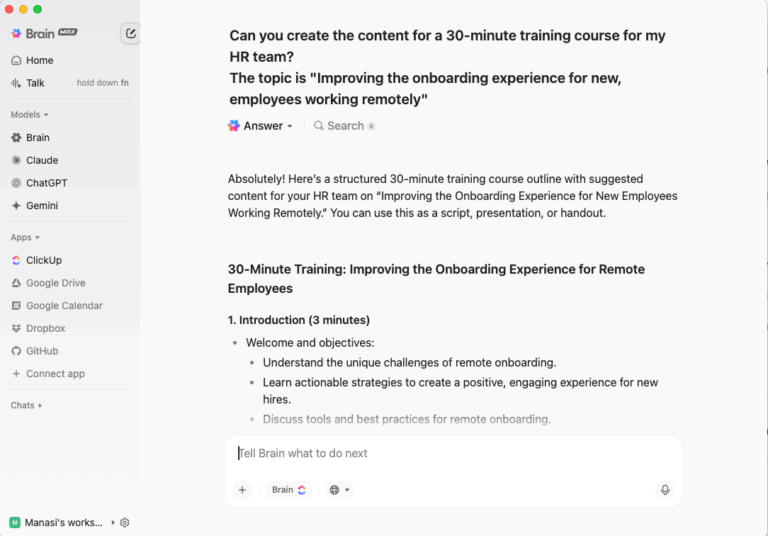
Employee training isn’t broken because people don’t want to learn. It’s broken because work is scattered. A course request starts in email, content lives in slides, scheduling happens in spreadsheets, and reporting hides in a standalone LMS no one opens twice. That fragmentation—what productivity experts call work sprawl—kills context, slows down launches, and makes ROI impossible to prove.
The stakes are only getting higher. Companies that invest in continuous learning cultures see 17% higher productivity and 21% higher profit margins when training reaches engaged workers. Yet only 25% of employees say training measurably improved their performance. The gap between investment and impact represents billions in wasted resources across global organizations.
2025 marks a turning point. Hybrid work is here to stay, skills gaps are widening with AI, and employees expect the same personalization in training that they get from consumer apps. L&D leaders can no longer afford to treat training as a compliance checkbox or a cost center. Done right, it’s a strategic growth driver—one that keeps employees engaged, closes skill gaps faster, and connects directly to business goals.
The opportunity lies in unifying the entire training lifecycle—requests, content creation, scheduling, delivery, and measurement—on a single platform powered by AI. That’s where ClickUp comes in.
The L&D landscape is shifting faster than most organizations can adapt. From AI-powered personalization to immersive simulations, the tools and methodologies reshaping corporate training require new thinking about how learning happens at work. The following trends represent where forward-thinking organizations are investing their attention and resources.
Old-school training made everyone drink from the same firehose—one course, one test, one outcome. Most of it landed flat because it rarely matched someone’s real challenges on the job.
Now, AI is turning that model on its head. Modern platforms watch how learners engage, where they stumble, and what they already know—then dynamically adjust what comes next. If someone aced module A, the system skips ahead. If they struggled, it gives extra practice before moving forward.
Research backs this approach. In education contexts, AI tutors that generate personalized micro-questions have improved retention by moving average accuracy from approximately 73% to 89% in technical courses. The same principles apply to corporate training: learners get what they need when they need it, which means less wasted time, more meaningful practice, and faster proficiency.
Skill sets are evolving so fast that roles today may not exist tomorrow. Hiring alone won’t keep up—organizations must invest in upskilling (deepening capabilities within a role) and reskilling (pivoting employees to entirely new roles).
In practice, this looks like creating modular learning paths that support new tech stacks, business models, or domain shifts. Amazon’s multi-year commitment to retraining employees into cloud and machine learning roles demonstrates how large companies are betting on internal mobility over external hiring.
Organizations that build internal capability stay competitive while employees feel more loyalty when they see growth paths inside their company rather than outside. According to Deloitte research, 90% of executives are implementing skills-based practices, transforming how they hire, train, and develop their teams.
Certain skills simply can’t be taught well through slides—emergency response, factory maintenance, sales role-plays, complex negotiations. VR and AR let learners simulate real tasks safely, make mistakes, and repeat until confident.
Walmart used VR simulations for Black Friday training. Participants reported feeling more prepared, and managers saw smoother execution during high-traffic periods. The hands-on interaction replaces rote memorization with muscle memory and lived experience.
Immersive learning compresses time. Learners retain more because they act and reflect, not just observe. As hardware costs decrease and development tools mature, immersive training is moving from innovation showcase to practical deployment.
💡 Pro Tip: Link simulation modules to training tasks in Docs. Use AI note-taking or comments to log feedback from simulations directly alongside the course, so iteration becomes seamless and learnings aren’t lost in separate systems.
When learners try to absorb hours of content at once, their brains overload. Microlearning breaks training into small, digestible chunks—modules of two to seven minutes, delivered when relevant.
These “snackable” lessons fit into busy schedules and reinforce knowledge over time. Studies show microlearning can boost knowledge retention by approximately 18% compared to forgetting curve baselines, with some sources reporting retention gains of 60% or more over traditional methods.
Microlearning combats information decay by helping learners revisit small concepts, which strengthens memory through spacing and retrieval—well-established cognitive science principles.
Training often feels like a chore, and people behave accordingly. Gamification injects game mechanics—badges, levels, missions—to transform “do this course” into “beat the next level.”
Well-designed gamification taps into motivation, autonomy, and mastery, not just points. Deloitte’s Leadership Academy uses gamification (missions, challenges, badges) and reported faster completion times and higher engagement. Studies of corporate programs suggest up to 60% increases in engagement from gamified design.
More engagement means more learning, more completion, and better outcomes—but only when game mechanics align with actual learning goals rather than becoming distractions.
Purely digital or purely in-person training rarely delivers optimal results. Blended models—mixing self-paced modules, live sessions, and in-practice tasks—bring balance and depth.
Learners absorb content at their own pace, then discuss it live, then apply it in real work—all within a unified flow. Organizations that adopt blended learning report higher retention and learner satisfaction compared to rigid single-format approaches.
Different learners thrive in different modes. Blending captures that variety while maintaining the structure needed for consistent outcomes.
🔍 Did You Know? Companies that embrace microlearning have observed a 130% increase in both employee engagement and productivity versus those using only traditional training. Short modules keep learners consistently engaged, leading to direct on-the-job performance improvements.
AI can do analysis—but it can’t negotiate, empathize, or lead through uncertainty. Soft skills such as communication, resilience, and adaptability are irreplaceable.
Training in soft skills is shifting from one-off workshops to continuous development embedded in daily work. Research increasingly shows microlearning helps soft skill development across domains, making these capabilities more accessible to develop at scale.
Teams with strong communication, conflict resolution, and adaptability outperform those with technical skills alone. By 2030, Deloitte estimates that two-thirds of job positions will heavily rely on these skills.
In the past, L&D relied on “smile sheets” and completion rates. Now, analytics lets teams connect training to actual business impact—closing deals, reducing errors, improving customer satisfaction.
Predictive models flag learners likely to drop off, identify gaps early, and forecast ROI. Education AI tutors that model student performance show significant gains through personalized retrieval practice. The spacing effect and testing effect are well-known cognitive science principles: spaced learning and retrieval improve retention measurably.
Leaders want evidence, not anecdotes. Data turns L&D from cost center to strategic lever. According to Deloitte research, 95% of L&D organizations don’t excel at using data to align learning with business objectives—creating massive opportunity for teams that build this capability.
Rigid job descriptions are giving way to fluid skill maps. Instead of “become Manager X,” employees climb by mastering skills that unlock new roles across the organization.
Organizations build ecosystems where “Skill A leads to B leads to C,” combined across departments. This reduces turnover, increases internal promotion rates, and aligns development with strategy.
Many talent frameworks are shifting toward skills-first models, fundamentally changing how organizations think about career paths and development investments.
Learning is inherently social. Peer discussion, co-creation, and shared review accelerate insight far beyond solo modules can achieve.
Collaboration surfaces tacit knowledge that formal training often misses. Organizations that weave peer learning into programs see higher engagement and retention because ideas, best practices, and experience get richer when shared.
No training exists in a vacuum—the context of colleagues, shared challenges, and collective problem-solving makes learning stick.
Burnout undermines learning. Training that ignores stress, overload, and resilience becomes less effective regardless of content quality.
Programs now embed micro-workshops on energy management, mental health, and recovery. Research consistently shows mental health impacts performance and learning directly. People learn best when they feel psychologically safe and energized.
Who knows the work best? Your team. Encouraging employees to build training—how-to videos, guides, micro-lessons—enriches content and ownership.
IBM’s “Expertise Locator” and internal sharing programs demonstrate how user-generated content scales development while creating a living knowledge base. Training becomes collaborative, emergent, and always evolving rather than static documents that age quickly.
✨ Real Results: Organizations using AI-powered onboarding programs report 80% higher new hire engagement, according to Brandon Hall Group research. When training systems understand context and personalize delivery, engagement becomes a natural outcome.
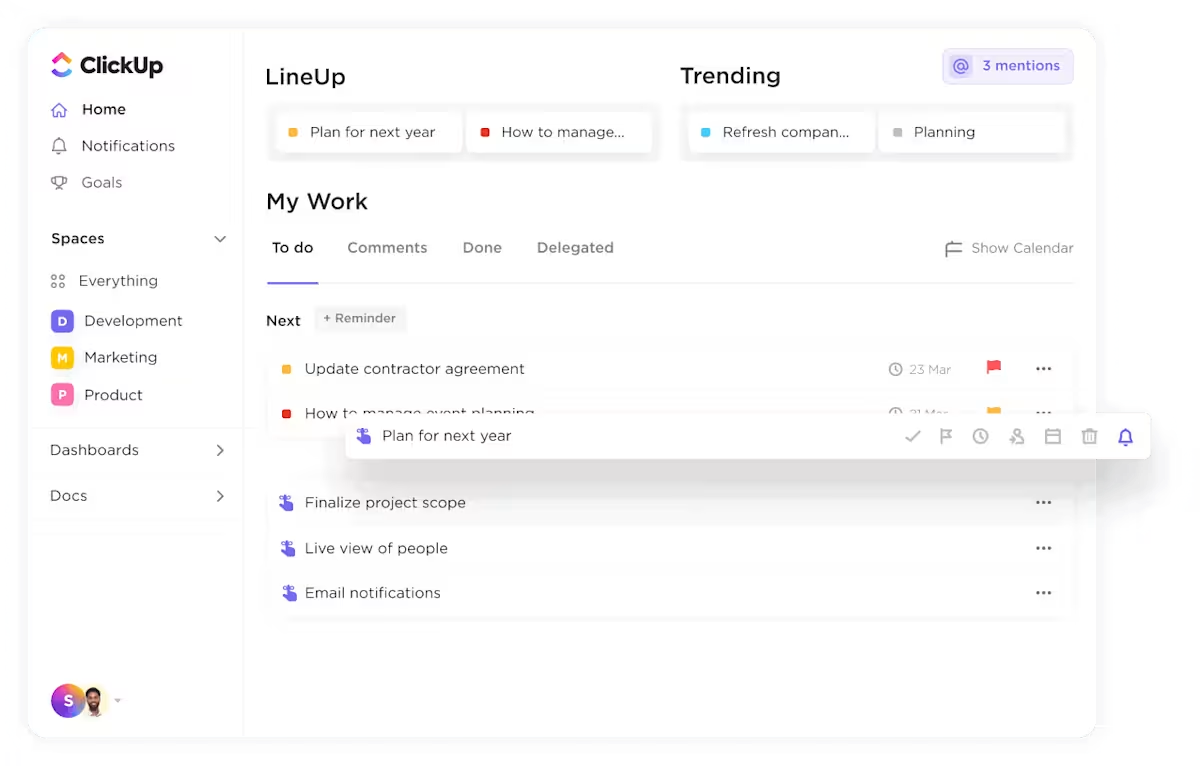
Training operations suffer when work is scattered across email, slides, spreadsheets, and disconnected LMS platforms. ClickUp for HR Teams brings the entire training lifecycle into one intelligent workspace where requests, content creation, scheduling, delivery, and measurement happen together. The platform addresses a critical gap: most training tools handle delivery but ignore the operational work that determines whether programs launch on time, reach the right people, and achieve measurable results.
[Image placeholder: ClickUp HR workspace showing training programs, course development tasks, and learning dashboards]
Ad-hoc training requests buried in email and Slack create chaos. ClickUp Forms capture what matters and route instantly to the right workflows.

Build intake forms that collect business goals, target audience, KPIs, due dates, region, and manager approval. When someone submits a training request, automations create tasks in your L&D space, auto-assign owners based on program type, and set priorities based on urgency. High-compliance-risk requests can automatically route to compliance teams with elevated priority.
This transforms triage from a meeting into a board. Every request has context, accountability, and visibility from the moment it arrives. For onboarding specifically, forms capture new hire information that feeds directly into personalized training paths.
Turning a request into a realistic project shouldn’t require spreadsheet ping-pong. ClickUp project templates give you pre-built course launch workflows with subtasks for briefing, outlining, scripting, SME review, pilot, revision, finalization, launch, and retrospective.
Set dependencies so work flows in the right order—outline must complete before script, script before review. Add checklists inside launch tasks covering communications, calendar invites, LMS sync, and survey setup.
In Gantt View, set your launch date on the parent task. Enable auto-shift so all subtasks cascade from that single date. One change ripples through the entire timeline, keeping the plan realistic as circumstances evolve.
Moving from blank page to usable draft is where many programs stall. ClickUp Docs provides collaborative workspaces for building training materials, with AI assistance built directly in.
Start from module templates that include learning outcomes, key content, activities, and assessment items. Use ClickUp Brain to draft content, tighten voice, chunk material into microlearning segments, and generate quiz items. Convert comment threads into tasks with assignees, so SME feedback becomes trackable work rather than lost email threads.
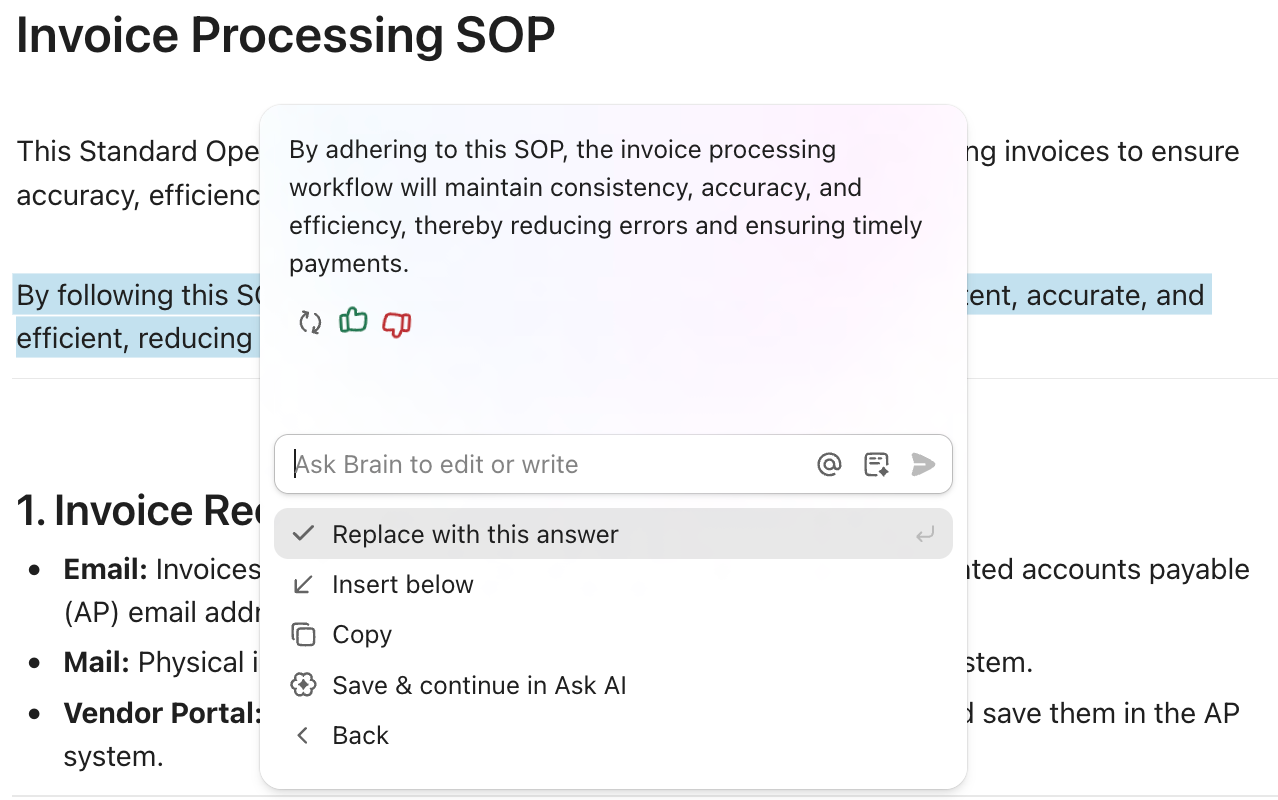
Version hygiene becomes automatic when you prefix Doc versions (v0.1-Outline, v0.5-Draft, v1.0-Live) and link live versions to parent tasks. No more “final-final.pptx” floating around disconnected from context.
Running sessions without manual calendars and “did you see this?” nudges requires systematic automation. ClickUp Calendar shows sessions by program, with tasks for each cohort including modality, region, and time zone.
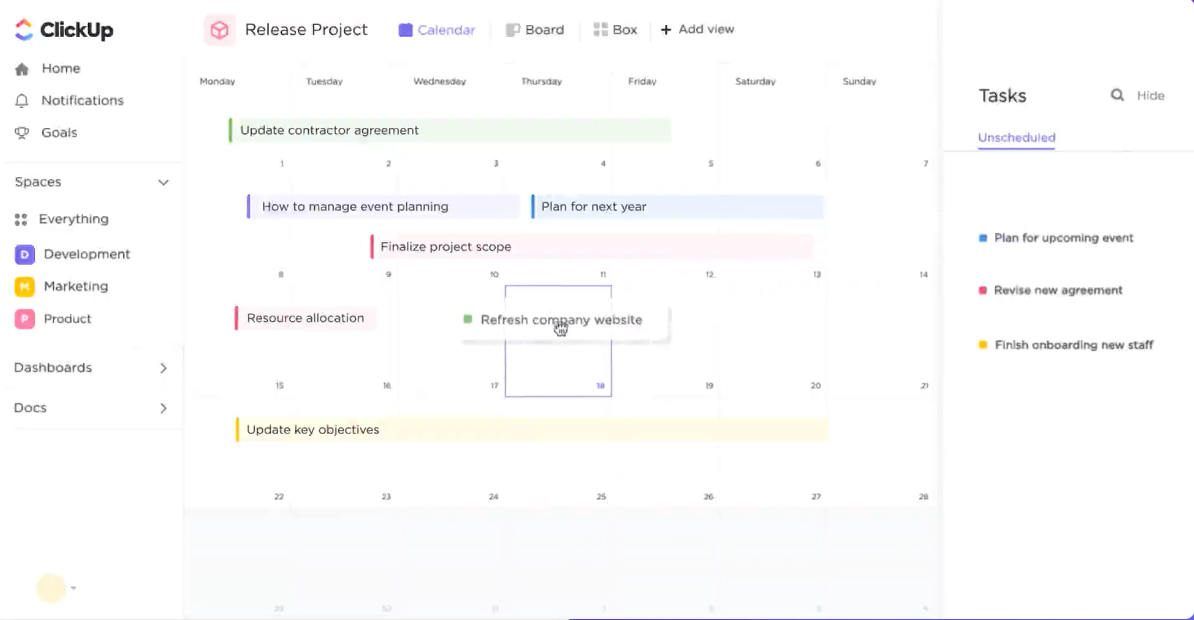
Automations handle the rest. When a session status changes to “Live” and modality is “Live,” ClickUp creates subtasks for sending invites, sending 24-hour reminders, and capturing attendance. At start time, comments post automatically with links and facilitator checklists.
Invites and reminders become rules, not chores. Facilitators show up prepared, and learners don’t miss sessions buried in email.
Every live session should produce clear takeaways and follow-ups. ClickUp AI Notetaker attaches to session tasks and outputs summaries saved in linked Docs with sections for summary, decisions, action items, and parking lot items.
Post-session automations create tasks from action items with owners and due dates, upload recordings linked to parent courses, and add resource checklist items. “Who took notes?” never needs asking when the system handles capture automatically.
Seeing who’s engaging, who’s stuck, and why requires systematic tracking. Use ClickUp Forms to capture session feedback—CSAT, NPS, free text, “most useful/still unclear”—and knowledge checks that record pass/fail in custom fields.
Build saved views for cohort progress grouped by manager, showing completion, knowledge check results, and CSAT scores. Create “at-risk” views filtering for completion below 60% or CSAT below 3, highlighted by region or role.
When learners hit at-risk thresholds, automations create coaching follow-up tasks for managers with gap summaries attached. Intervention happens before problems compound.
Live ClickUp Dashboards replace stale decks and status meetings. Build a Training Ops Dashboard showing throughput (programs launched by type), engagement (enrollment vs. completion), learning outcomes (pre/post knowledge delta, pass rates), quality (CSAT/NPS trends, top comments), business impact (tied to Goals like reduced onboarding time), and ops health (items stuck over 7 days, review turnaround, cycle time).
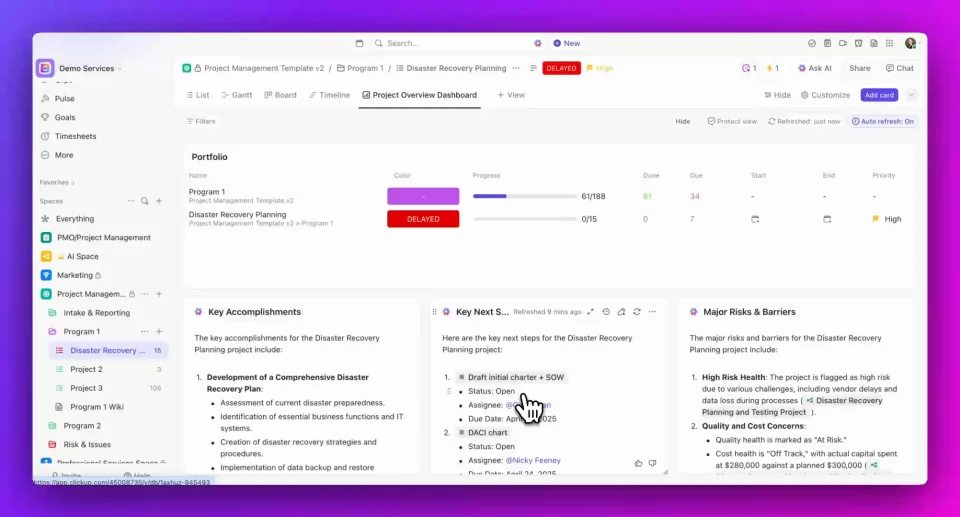
Add an AI Card that posts weekly briefs—”Big wins, Risks, Decisions needed”—kept to six bullets maximum for executives. You replace status meetings with a URL that stakeholders can check on their own schedule.
📌 ClickUp Insight: 83% of organizations plan to maintain or increase career-driven learning investment in 2025, indicating resilience in strategic training categories despite economic pressure. The organizations that connect training to measurable business outcomes will justify those investments most effectively.
Training without connection to outcomes is activity without impact. ClickUp Goals let you tie training programs directly to business metrics.
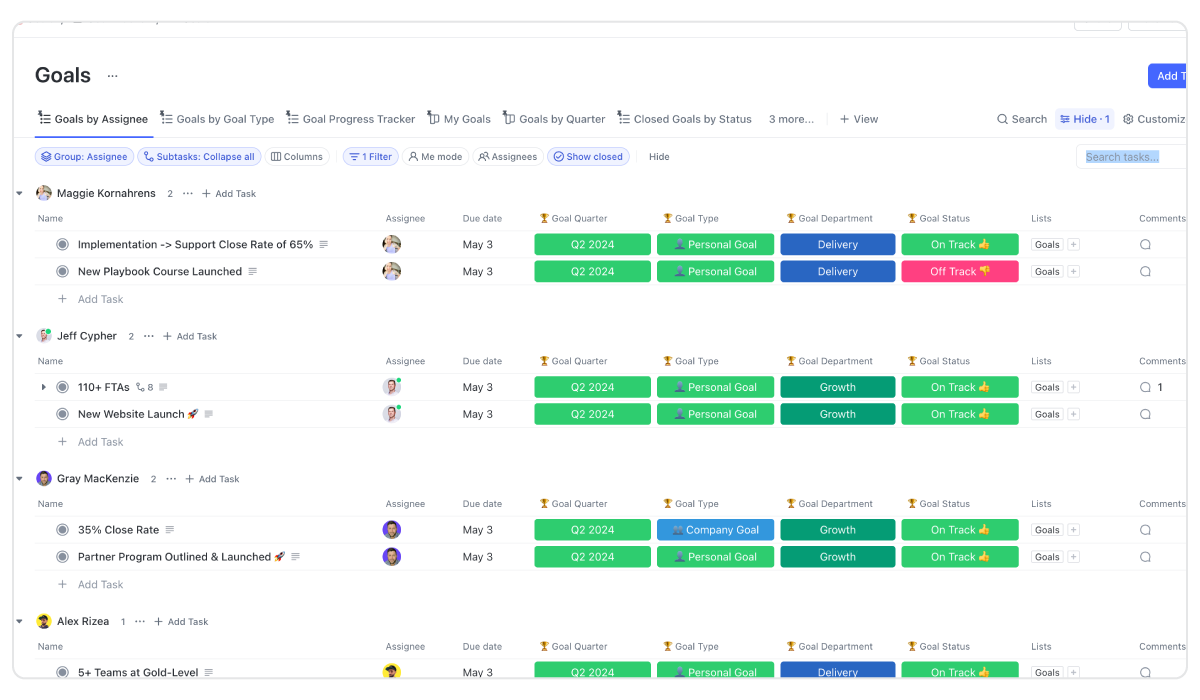
Create skill pathways as Goal trees (Beginner → Proficient → Advanced). Use automations to unlock next training tasks when someone completes a path segment. Track progress toward competency targets with automatic rollup from tasks to Goals.
When executives ask whether training improved onboarding time or reduced support tickets, the data already exists in connected Goals—no manual compilation required.
Training operations don’t exist in isolation. ClickUp connects to the tools your organization already uses, creating data flow rather than data silos.
Calendar integrations (Google, Outlook) ensure sessions appear for facilitators and learners automatically. Drive and SharePoint connections store slide decks and recordings with links directly in tasks and Docs. Slack and Teams integrations send announce-only messages from automations to avoid notification noise.
If you maintain a dedicated LMS for content delivery, run planning and building in ClickUp while syncing completions back via integration or CSV routine. HRIS connections import org structure to power cohort grouping and manager rollups automatically.
Each integration serves a single, traceable purpose. The goal is unified context, not tool proliferation.
🔍 Did You Know? 48% of L&D professionals expect budget increases for 2025—a significant jump from 33% the prior year. This budget growth creates opportunity for teams ready to think strategically about resource allocation and impact measurement.
ClickUp Automations handle the administrative work that otherwise consumes L&D teams. Build an automation library with patterns that scale:
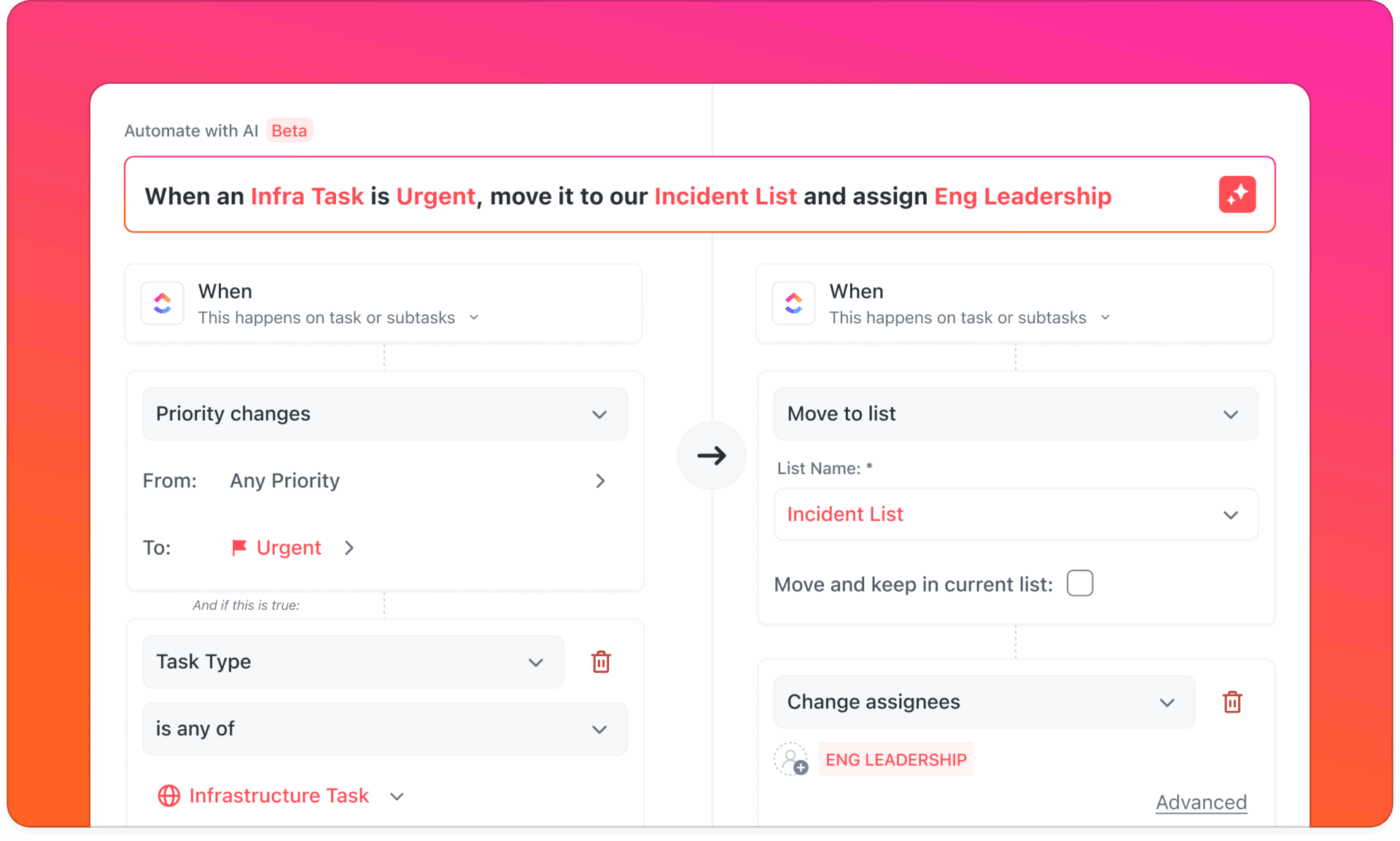
Intake routing: When a form is submitted, create a task in L&D Intake and set owner based on program type.
Compliance fast-track: When compliance risk equals high, move to Compliance Space with urgent priority.
Stale nudge: When no update occurs in 3 days, comment @assignee with “Update needed” and move due date forward.
Review window: When a Doc moves to In Review, assign reviewers with 48-hour deadline and 24-hour reminder.
At-risk learner: When completion falls below 60% or CSAT below 3, create coaching task for manager with summary link.
Each automation eliminates manual work that otherwise fragments attention and creates delays.
📖 Also Read: AI for Employee Training and Development
Rolling out a new training operations system works best in phases that build momentum without overwhelming teams. The following timeline provides a practical roadmap for moving from scattered tools to unified operations.
Days 1-14: Centralize the foundation
Create Spaces for L&D (all training build and delivery), Enablement (sales/product training), and Compliance (mandatory courses and audits). Define standard statuses: Intake → Planned → In Progress → In Review → Pilot → Live → Retrospective → Done.
Set up core Custom Fields for program type, modality, audience, skill tags, owner, target KPI, due date, budget link, and compliance risk. Build the Course Launch template and publish two Forms (Intake and SME Review). Create your Training Ops Dashboard skeleton and select a lighthouse program—one team, one measurable outcome.
Weeks 3-6: Automate and instrument
Turn on 6-8 core automations from the patterns above. Enable Brain and AI Notetaker in your L&D Space. Connect Calendar and Drive integrations, then integrate HRIS for manager rollups.
Run a pilot of one live session and one async module. Document what works and what needs adjustment. The lighthouse program generates real data for refinement.
Weeks 7-12: Scale and prove
Publish before/after metrics for the lighthouse: time to launch, completion rates, knowledge lift. Template the working process and extend to Compliance and Enablement Spaces.
Decommission duplicate trackers and announce the “one place” rule. Training operations now have a single source of truth with data to defend it.
💡 Pro Tip: Track four metrics from day one: time to launch a course, review turnaround time, enrollment-to-completion conversion, and knowledge delta with CSAT. These create the baseline that proves improvement over time.
Sustainable training operations require discipline beyond the initial implementation. These guardrails help teams maintain momentum and avoid regression to scattered workflows.
“If it’s not in ClickUp, it didn’t happen.” Use automations to nudge, not nag. When work happens outside the system, context is lost and reporting becomes unreliable.
Keep LMS for delivery if needed, but plan, build, and measure in ClickUp. Splitting the source of truth creates conflicting data and manual reconciliation work. Do the coordination work in one place even if content delivery happens elsewhere.
Short SOPs beat long manuals. Capture decisions in Docs, link to tasks, and add Brain summaries on top. Documentation that lives with work gets used; documentation in separate repositories gets ignored.
Reduce noise. Use announce-only channels for launches and reminders. Everything else lives in task comments where context is preserved and searchable.
Corporate training has traditionally been treated as a cost center. But in a market where skills expire fast, it’s the engine of resilience and growth.
With ClickUp, training isn’t scattered work—it’s a strategic command center. Every request, every session, every outcome lives in one place, with AI handling administration and surfacing impact.
Training is no longer overhead. It’s how you build the workforce that wins.
Try ClickUp for free and turn training into a growth driver.
What are the biggest employee training trends currently?
AI-powered personalization, microlearning, skills-based development, and data-driven measurement dominate the 2025 landscape. Organizations are moving from one-size-fits-all courses to adaptive learning paths that respond to individual progress and connect directly to business outcomes.
How can I prove ROI on training investments?Connect training metrics to business outcomes beyond completion rates. Track correlations between training completion and performance improvement, retention rates of trained versus untrained cohorts, and productivity gains measured through actual output. Build dashboards that show these connections in real-time rather than annual reports.
What’s the difference between upskilling and reskilling?
Upskilling develops deeper capabilities within someone’s current role—a salesperson learning advanced negotiation techniques. Reskilling prepares employees for entirely different roles—a customer service representative transitioning to data analysis. Both address skills gaps but serve different strategic purposes.
How do I implement microlearning effectively?
Break content into 2-7 minute modules focused on single concepts or skills. Deliver content when it’s relevant to the learner’s current work rather than in large batch sessions. Use spaced repetition to reinforce learning over time, and measure knowledge retention rather than just completion.
What tools do I need for modern training operations?
At minimum, you need intake management, content creation workflows, scheduling automation, learner tracking, and ROI reporting. These typically require multiple tools that don’t communicate. A converged platform like ClickUp brings all these capabilities into one workspace where context flows between functions automatically.

© 2026 ClickUp

There’s an easier way. Try a free AI Agent in ClickUp that actually does the work for you—set up in minutes, save hours every week.