You know you need to adopt AI to stay competitive, but the path forward is foggy.
Choosing the wrong approach can lead to “pilot fatigue,” where promising AI projects burn through budgets and stall before anyone on your team ever gets to use them.
This indecision doesn’t just slow down IT; it’s one of the key AI challenges that keeps every department stuck in manual, inefficient workflows.
This guide breaks down when to choose ClickUp Accelerator’s ready-to-deploy ClickUp Super Agents with ClickUp Expert Support versus building a custom enterprise AI system from scratch, so you can make the right call for your team’s size, timeline, and technical resources.
Summarize this article with AI
ClickUp Brain not only saves you precious time by instantly summarizing articles, it also leverages AI to connect your tasks, docs, people, and more, streamlining your workflow like never before.
Summarize this article for me please
Why Enterprise AI Decisions Matter Now
Gartner predicts 30% will be abandoned after proof-of-concept. Not because the technology doesn’t work, but because teams spend 18 months building custom solutions that become obsolete before anyone uses them.
You’re likely dealing with at least one of these headaches:
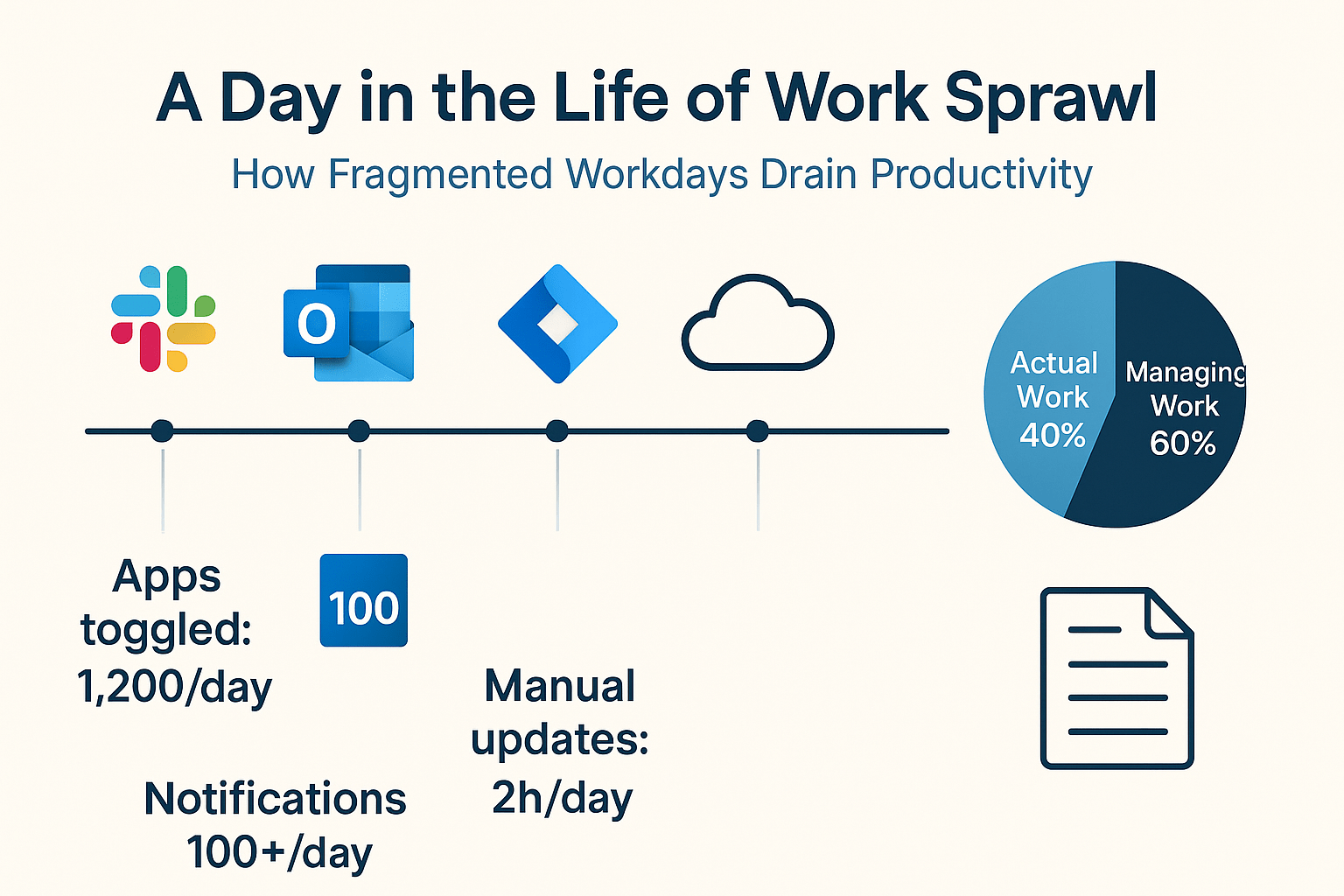
Work Sprawl: Your team’s work is scattered across dozens of different apps—the average company now uses 101 distinct SaaS applications. You jump from your project tool to your chat app to your documents, losing focus and context with every switch. This fragmentation forces teams to waste time switching between apps, hunting for context, and battling information silos
AI Sprawl: To make things worse, different departments start their own AI experiments in silos. Marketing has an AI for copy, sales has one for emails, but none of these tools talk to each other, so the insights stay fragmented. This unplanned proliferation of AI tools is a classic case of AI Sprawl, leading to wasted money, duplicated effort, and a total lack of control over your organization’s AI footprint
Context Sprawl: Because your information is trapped in all these different places, no single AI tool can see the full picture, a problem known as Context Sprawl. It can’t connect a customer conversation in your chat tool to the project plan in your work hub, leaving it unable to give you truly intelligent help. Teams waste hours searching for the information they need, switching between apps, and repeating updates across multiple platforms
This leaves you at a strategic fork in the road.
Do you invest heavily in a massive, custom infrastructure project that might not show value for a year?
Or do you find a way to move fast with a converged solution that’s ready to go?
For scaling teams, especially those between 100 and 1,000 employees, this choice is critical. Let’s look at how ClickUp Accelerator vs. Custom enterprise AI measure up in such a scenario.
Summarize this article with AI
ClickUp Brain not only saves you precious time by instantly summarizing articles, it also leverages AI to connect your tasks, docs, people, and more, streamlining your workflow like never before.
Summarize this article for me please
What Is ClickUp Accelerator?
You want to automate workflows and get the benefits of AI now, but you don’t have a team of machine learning engineers on standby or a year to wait for a custom solution.
This delay means your team keeps drowning in the repetitive tasks that drain company productivity, while competitors who are already using AI pull further ahead.
ClickUp Accelerator solves this exact problem. It is a turnkey solution for adopting AI into your day-to-day workflow.
The program is designed to help teams “go live” quickly with production-ready AI workflows, without building anything from scratch.
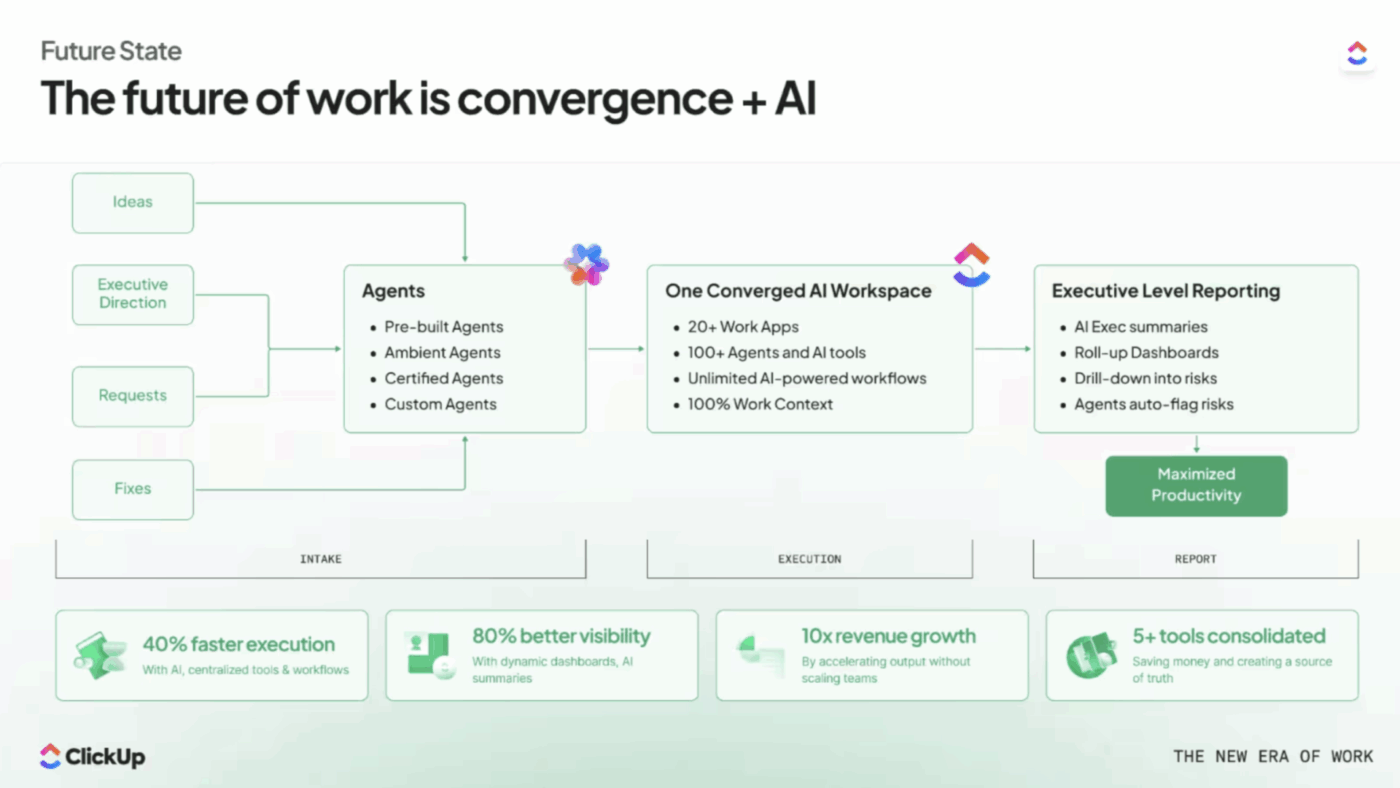
The key idea is here convergence. Accelerator runs inside ClickUp’s converged AI workspace, where all of the following are connected and syncing in real time:
Projects and tasks (what’s happening)
Docs (the source-of-truth context)
Team conversations (decisions and coordination)
Reporting (visibility and accountability)
Instead of copying and pasting information into an assistant that has no idea what’s really going on, Accelerator keeps AI connected to the work as it changes. Here’s a quick breakdown.👇🏼
Summarize this article with AI
ClickUp Brain not only saves you precious time by instantly summarizing articles, it also leverages AI to connect your tasks, docs, people, and more, streamlining your workflow like never before.
Summarize this article for me please
What you get with ClickUp Accelerator
Now let’s get into the details of how the various objects in Accelerator work together:
1) Department-ready AI Agents for prebuilt, tested workflows
Accelerator includes prebuilt Super Agents that handle common, repeatable work most teams do every week. Think of them as “specialized assistants” for real workflows, not a blank chat box.
The practical outputs here include things like:
Project status updates you can share with stakeholders without writing from scratch (progress, wins, blockers)
Kickoff summaries and action items from your notes and project details
Risk or issue summaries so you can spot what’s slipping before it becomes a fire drill
First-draft content for common marketing needs (briefs, social copy, landing page copy, ad variations) when the inputs already exist in your tasks/docs
The important part? These Agents are designed to be triggered where the info already is (a task, a doc, or a chat thread), so they work with real context rather than generic prompts.
Automate workflows end-to-end with no-code AI Super Agents in ClickUp
2) Guided onboarding and setup so “go live” happens in days, not months
Most “AI adoption” efforts stall because teams never connect AI to their real workflows. Guided onboarding is the practical bridge.
ClickUp Accelerator helps you get your workspace into a state where AI can be reliably useful. In concrete terms, this typically means:
Turning your scattered workflow into one operating system: Client work in ClickUp Tasks, project notes in ClickUp Docs, team coordination in ClickUp Chat threads, reporting in Dashboards, all connected
Standardizing inputs so AI outputs are consistent: Using consistent task structures (clear task names, owners, statuses, due dates, and linked docs) so status summaries and planning outputs are based on a reliable signal
Activating turnkey workflows quickly: Outcomes your team can start doing immediately, like getting a weekly project update in minutes instead of an hour of chasing updates
See how such a workflow runs with connected chat, tasks, docs, and contextual AI:
3) Expert support and training so the AI doesn’t become shelfware
For companies, the highest hidden cost is not software; it’s the time lost when tools don’t get adopted consistently. Accelerator’s expert team helps teams:
Adopt a repeatable cadence, like “how we run weekly updates,” “how we kick off a project,” “how we track risks,” without reinventing the process every time
Reduce rework by showing how to capture the right context once, in the right place (so the team isn’t rewriting the same info across email, docs, and chat)
Scale the system so that as you add people or projects, the workflow stays consistent and visibility does not collapse
Basically, you’re not only buying an AI solution, but you’re also buying a faster path to getting the AI to actually stick in the workflow.
See how our GVP Kyle Coleman leverages Super Agents to speed up his reporting processes:
Why Accelerator works better than using a separate AI tool
Most AI tools fail in real business use because they sit outside the system where work happens. That creates three recurring issues:
Context gets lost: Someone has to manually feed the AI updates from tasks, docs, and conversations.
Outputs are generic: Because the AI does not have the latest project reality.
Teams do extra work: Maintaining the “real workflow” in one place and the “AI workflow” in another.
ClickUp Accelerator is designed around the opposite approach: converge the work first, then apply AI across it.
When tasks, docs, chat, and reporting are connected, AI can reliably help with high-leverage work like status summaries, kickoff docs, action items, and content drafts, without needing constant manual re-explaining.
That’s what makes it feel “production-ready” instead of “cool demo.”
Summarize this article with AI
ClickUp Brain not only saves you precious time by instantly summarizing articles, it also leverages AI to connect your tasks, docs, people, and more, streamlining your workflow like never before.
Summarize this article for me please
What Is Custom Enterprise AI?
Sometimes your business needs go beyond what any off-the-shelf AI product can safely or reliably handle.
Your workflows might be deeply specialized, your data model might be unique, or your compliance and security requirements might be strict enough that you cannot use a general-purpose tool without major customization. In those cases, the “buy a tool and start tomorrow” approach breaks down.
That’s where custom enterprise AI comes in.
It is a bespoke AI system that your company builds internally (or hires a services partner to build) to support specific business workflows. Instead of adopting a prepackaged AI workflow, you’re designing the architecture end-to-end. In practice, that usually means either:
Building a unified system from scratch
Or, assembling a solution from multiple vendors and stitching it together with your own engineering work.
The big upside is control. You can tailor the system to your exact requirements: how it reasons, which data it can access, what it’s allowed to generate, how it logs actions, and how it fits into your approval and compliance processes.
Here’s what a custom enterprise AI project typically involves:
Or support multiple models (for cost, performance, or policy reasons)
Then you have to handle the practical realities: model upgrades, prompt/version management, cost controls, latency, and reliability.
2) Building secure data access (the pipeline problem)
The AI is only useful if it can retrieve the right business context. That often requires:
ETL or data pipelines to unify data from tools like CRM, ticketing, docs, file storage, product analytics, and internal databases
A retrieval layer (often a “search” or knowledge index) so the model can find relevant information quickly
Strict permissioning so the AI only sees what the user is allowed to see
This is where many projects get stuck, because “getting the data” is almost always harder than generating text.
3) Defining guardrails and compliance controls
Enterprise-grade AI usually needs:
Audit logs (who asked what, what data was accessed, what was generated)
Data retention policies and redaction rules
Approval workflows (especially if AI outputs become customer-facing or compliance-sensitive)
Policies for sensitive data handling (PII, contracts, HR data, regulated content)
4) Building the user experience (UI + workflow integration)
A model alone is not a usable product. Teams need a place to interact with it, such as:
A web app or internal portal
Integrations into the tools they already use (chat, ticketing, CRM, project management)
Role-based experiences (support agents vs. managers vs finance)
5) Orchestrating vendors, contracts, and reliability
If you use multiple providers (model provider, vector database/search, ETL tooling, observability, security), you’re also owning:
Vendor contracts and renewals
Incident management when one dependency goes down
Changing APIs and breaking updates
Ongoing performance monitoring and evaluation
The bottom line
A custom build is not “the wrong choice,” but it is a high-investment path. It’s best seen as a high-risk, high-reward bet: you can get something truly differentiated, but only if you have the engineering capacity, budget, and long-term ownership plan to maintain and evolve it.
Summarize this article with AI
ClickUp Brain not only saves you precious time by instantly summarizing articles, it also leverages AI to connect your tasks, docs, people, and more, streamlining your workflow like never before.
Summarize this article for me please
Key Differences Between ClickUp Accelerator and Custom AI
The decision between a ready-to-deploy program and a custom build comes down to five critical factors. Think of each one as a question to ask your team to figure out which path makes the most sense for you.
Time to value
A custom AI project can easily take 6 to 18 months just to get a first version out the door. By the time it launches, your business needs may have already changed, making the solution obsolete on arrival.
This is where a “plug-in-and-go” approach shines. Your team gets a working AI in days with ClickUp Accelerator. Because the AI Agents are pre-built and the Guided Onboarding gets your team up to speed quickly, you can start seeing results and automating workflows within your first sprint.
You get to prove the value of AI immediately, building momentum for wider adoption instead of fighting for budget for a project that hasn’t delivered anything yet.
Cost and resource requirements
You have a set budget and can’t afford to hire an entire team of expensive data scientists and machine learning engineers.
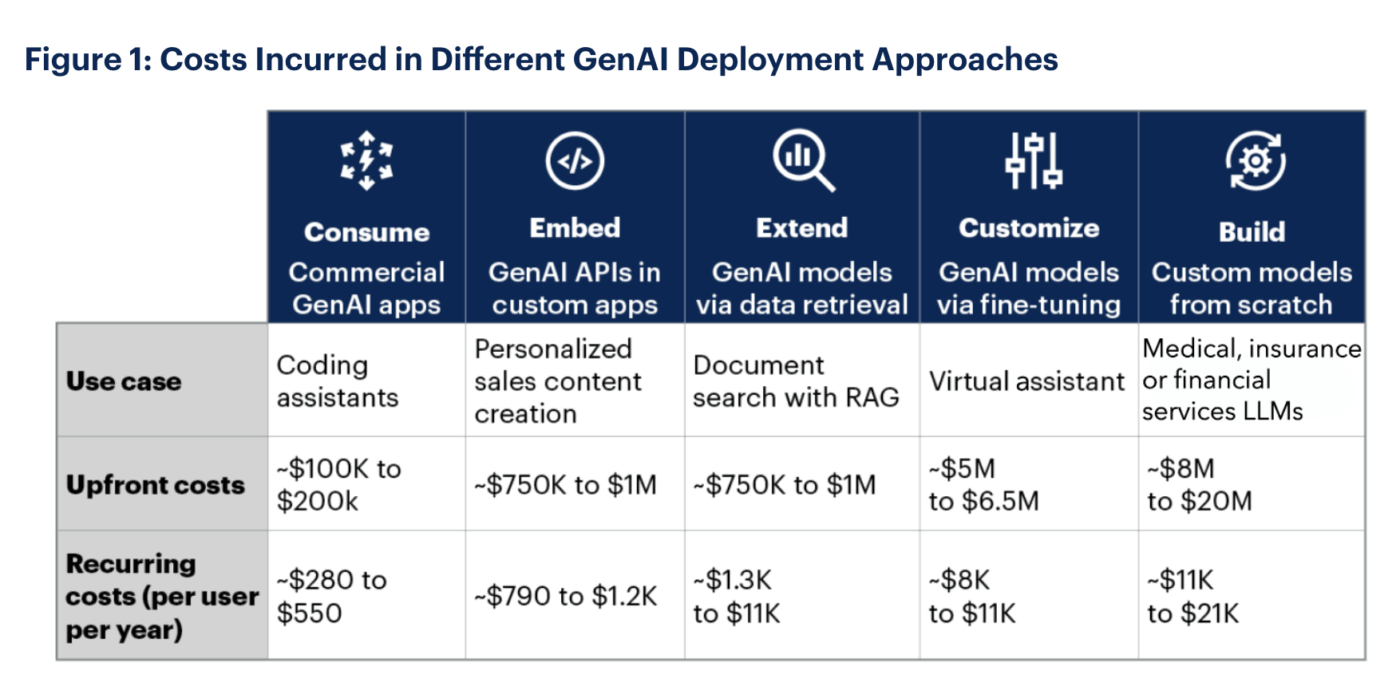
Custom AI projects can quickly become a money pit, with unpredictable costs driven by scope creep, cloud infrastructure, and the high salaries of specialized talent—typically costing between $5 million and $20 million to move from pilot to production.
via Gartner
The total cost of ownership is a massive, open-ended question.
ClickUp Accelerator stops the financial guesswork with a predictable investment. You get AI technology, Expert Support, and Hands-On Training bundled into one clear package with ClickUp Accelerator.
No need to hire new roles or manage a web of vendor contracts. You get access to enterprise-grade AI capabilities without the unpredictable price tag or hiring headaches.
Implementation complexity
If your data is scattered across CRMs, spreadsheets, and chat apps, you have a whole new problem.
The mere attempt to connect all those systems to a central AI model is an integration nightmare. This is a common roadblock for custom AI projects, forcing teams to spend months building and maintaining brittle integrations and middleware.
You can sidestep this entire problem by operating inside a Converged AI Workspace like ClickUp.
Instead of building and maintaining a separate “AI layer” (plus pipelines to keep it fed), you can run AI where the work already lives.
ClickUp supports a large ecosystem of integrations, and for many connected apps, it can keep information discoverable and up to date through Enterprise Search indexing, with some sources supporting near real-time updates via events/webhooks. The practical result is that your team spends less time wiring systems together and more time using AI on real work, in real time.
This means your AI can answer questions using information from third-party tools your business already uses (e.g., Google Drive, Slack, Jira, Salesforce, GitHub, Confluence, SharePoint, Dropbox, and Box), and your automations run across tools, not just on a single platform.
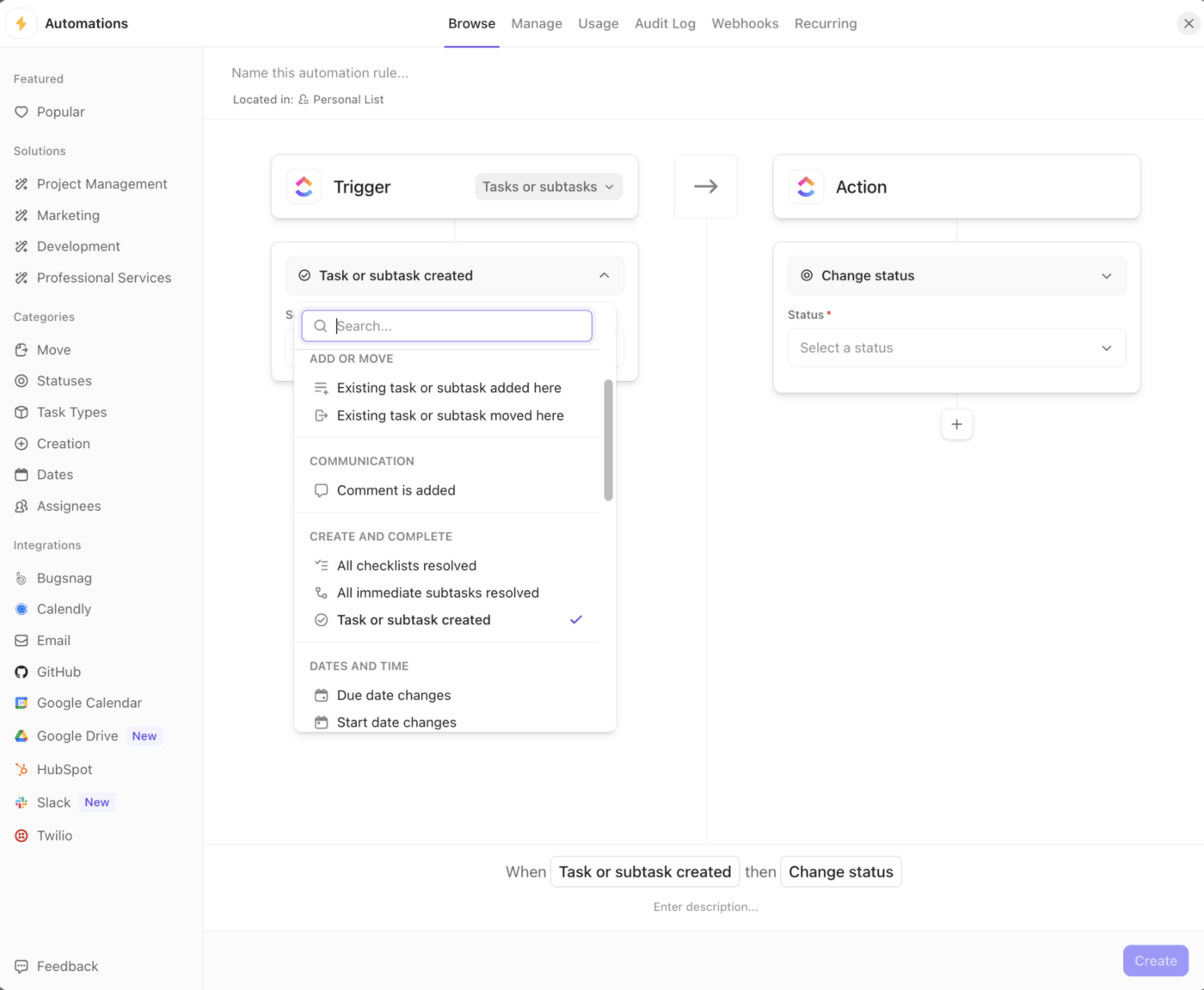
For example, the automation builder in ClickUp offers extensive options to connect across apps via integrations
📮ClickUp Insight: Half of our respondents struggle with AI adoption; 23% just don’t know where to start, while 27% need more training to do anything advanced.
ClickUp Brain solves this problem with a familiar chat interface that feels just like texting.
Teams can jump right in with simple questions and requests, then naturally discover more powerful automation features and workflows as they go without the intimidating learning curve that holds so many people back.
After all this, you may just manage to launch your custom AI tool. But six months later, it’s giving strange answers, and the one engineer who knew how it worked has left the company.
This is the hidden danger of custom builds: model drift.
As your data changes, AI models become less accurate, and without a dedicated team to retrain and maintain them, they quietly degrade until they’re useless—with 233 AI-related incidents reported in 2024 alone, a 56.4% jump over the previous year.
What if you could easily get all backend maintenance handled with Continuous Updates and Expert Support? Yes, it’s all included in ClickUp Accelerator. The program also provides change management resources and training refreshers to ensure your team continues to use the tools effectively. You get reliable AI that’s always maintained and updated without having to manage it yourself.
Summarize this article with AI
ClickUp Brain not only saves you precious time by instantly summarizing articles, it also leverages AI to connect your tasks, docs, people, and more, streamlining your workflow like never before.
Summarize this article for me please
When ClickUp Accelerator Is the Right Choice
You’re scaling a startup or organization, likely with 100 to 1,000 employees, and you’re feeling the pain of tool sprawl. Teams are working across different departments, and you need to show some quick AI wins to get leadership buy-in for a broader strategy.
You don’t have an in-house AI team, and you can’t afford to wait a year for results.
If this sounds like you, ClickUp Accelerator is the right move. It’s designed for teams that need to consolidate their work into a single AI-powered platform and deploy production-ready generative AI tools without the risk and cost of a custom build.
You get to bypass the analysis paralysis and go straight to automating your most important cross-functional workflows.
Here’s what that looks like in a real-life workflow:
😓 The Problem:“Work about work” was blocking real productivity
Bell Direct’s operations team was swamped. Every day, they handled 800+ client emails, each requiring manual reading, triage, categorization, and routing to the right person. The situation put pressure on team efficiency, visibility, and service quality, even though the company was delivering strong outcomes for clients.
✅ The Solution: A unified workspace + AI agents that work like teammates
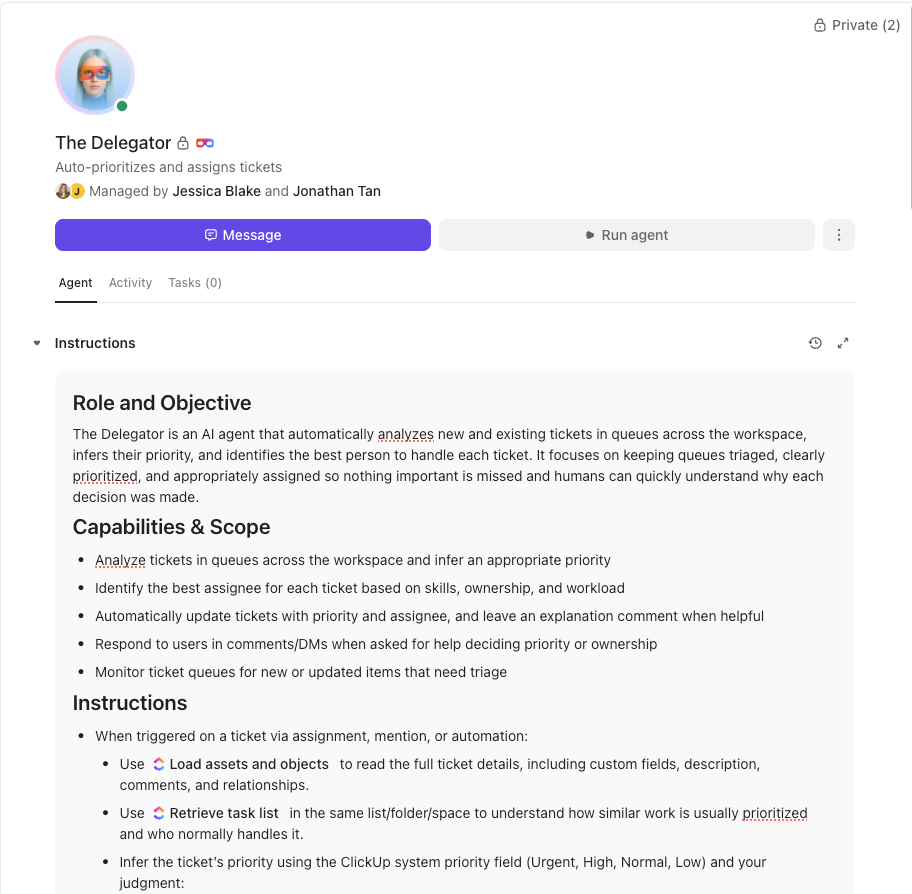
Instead of adding another disconnected tool to the stack, Bell Direct chose ClickUp as its central command center. They consolidated everything from tasks and docs to processes and knowledge into one workspace where AI had full context. Rather than relying on generic bots or templates, they deployed a Super Agent they called “Delegator“. It’s an autonomous teammate trained to triage incoming work:
It reads every email coming into the shared inbox
It classifies urgency, client, and topic using AI-powered Custom Fields
It prioritizes and routes each task to the right person in real time
It does all of this without manual touchpoints from human operators
😄 The Impact: Measurable operational gains
20% boost in operational efficiency, meaning more work gets done faster with the same resources
2 full-time employees’ worth of capacity freed, now available for high-value strategic tasks
800+ daily client emails triaged in real time
The Super Agent now routes work the way a human would, but at machine speed and scale.
Summarize this article with AI
ClickUp Brain not only saves you precious time by instantly summarizing articles, it also leverages AI to connect your tasks, docs, people, and more, streamlining your workflow like never before.
Summarize this article for me please
When Custom Enterprise AI Makes Sense
Sometimes a custom build is the only answer. If your business relies on a truly unique, proprietary data model that gives you a competitive edge, you may need to build a custom solution to protect and leverage it.
The same is true if you operate in a highly regulated industry with compliance requirements so specific that no standard tool can meet them.
Organizations with mature data engineering teams and the budget to sustain a long-term development project can justify the cost of custom AI solutions for these niche use cases.
Some companies even find success with a hybrid strategy: using custom AI for a few core, specialized applications while using a program like ClickUp Accelerator for everyday workflows shared by all departments.
Summarize this article with AI
ClickUp Brain not only saves you precious time by instantly summarizing articles, it also leverages AI to connect your tasks, docs, people, and more, streamlining your workflow like never before.
Summarize this article for me please
How to Decide Which Approach Fits Your Team
Still on the fence? Use this simple framework to guide your decision. Run through these questions with your team and see where you land.
Question
Points toward Accelerator
Points toward Custom AI
How quickly do you need to see results?
Within the next quarter
Can wait 12+ months
Do you have dedicated AI/ML engineers?
No, or they’re already overloaded
Yes, with available capacity
Are your workflows truly unique?
They’re standard with some tweaks
Highly specialized and proprietary
Can you afford an open-ended budget?
No, we need predictable costs
Yes, we have a dedicated R&D budget
Is your data a core competitive advantage?
No, our advantage is our process
Yes, our data model is our secret sauce
If most of your answers fall in the “Accelerator” column, your path is clear. You’re looking for speed, predictability, and a low-risk way to start leveraging AI. If you’re leaning toward “Custom AI,” make sure you’re being honest about the resources and time you’re willing to commit.
Summarize this article with AI
ClickUp Brain not only saves you precious time by instantly summarizing articles, it also leverages AI to connect your tasks, docs, people, and more, streamlining your workflow like never before.
Summarize this article for me please
How to Get Started With ClickUp Accelerator
You’ve decided that a fast, guided approach is right for you. So, what’s next? Getting started with ClickUp Accelerator is straightforward and designed to demystify AI adoption.
It begins with an Accelerator Consultation with our team of experts. We’ll work with you to understand your goals, assess your team’s readiness, and map out the highest-impact use cases for your specific departments. From there, the ClickUp Guided Setup process ensures you’re not left on your own. We provide Hands-On Training sessions focused on generating early wins within the first few weeks.
The best part is that you can test AI in your real workflows without the fear of long-term lock-in. Because the AI Agents and automations are built inside ClickUp, you’re not migrating to a new system—you’re simply activating powerful new capabilities in the environment where your team already works.
Summarize this article with AI
ClickUp Brain not only saves you precious time by instantly summarizing articles, it also leverages AI to connect your tasks, docs, people, and more, streamlining your workflow like never before.
Summarize this article for me please
Frequently Asked Questions
What’s included in ClickUp Accelerator that I’d have to build myself with custom AI?
The Accelerator includes pre-built AI Agents, Guided Training, Expert Support, and Continuous Updates, all within a Converged Workspace that eliminates the integration headaches you’d face with a custom build.
How does ClickUp Accelerator’s time to value compare to custom enterprise AI projects?
With Accelerator, you can see working AI in days or weeks. Custom AI projects typically take many months, or even years, to reach production and deliver a return on investment.
Can teams migrate from custom AI solutions to ClickUp Accelerator?
Yes, you can run Accelerator alongside your existing custom tools. This allows you to gradually shift workflows as you see results, reducing migration risk while testing the converged approach.
Is ClickUp Accelerator flexible enough for enterprise-specific workflows?
Absolutely. Accelerator supports deep customization through ClickUp Configurable Agents, powerful ClickUp Workflow Automations, and Integrations with ClickUp Pre-Built Connectors, making it adaptable to most enterprise needs without a ground-up build.
Everything you need to stay organized and get work done.