






Still downloading templates?
There’s an easier way. Try a free AI Agent in ClickUp that actually does the work for you—set up in minutes, save hours every week.
Sorry, there were no results found for “”
Sorry, there were no results found for “”
Sorry, there were no results found for “”
New survey data shows that half of knowledge workers spend hours managing chat instead of doing their actual job.
Chat was introduced as a shortcut. A faster way to align, ask, clarify, and decide.
Instead, for many teams, it has become a layer of invisible labor wrapped around the actual work.
You open chat in the morning to ease in, scan a few threads, respond to updates, and search for a link that feels familiar. By the time you dig up your real priorities from threads, nearly an hour has passed.
Our latest survey reveals a pattern that is difficult to ignore: managing chat is increasingly a job in itself.
Here is what the data shows.
Chat overload at work refers to the time and cognitive effort spent managing workplace messaging instead of executing core responsibilities.
75% of respondents say opening chat each morning feels like easing into the workday. It feels productive. connected and in motion.
But that sense of momentum masks a deeper cost.
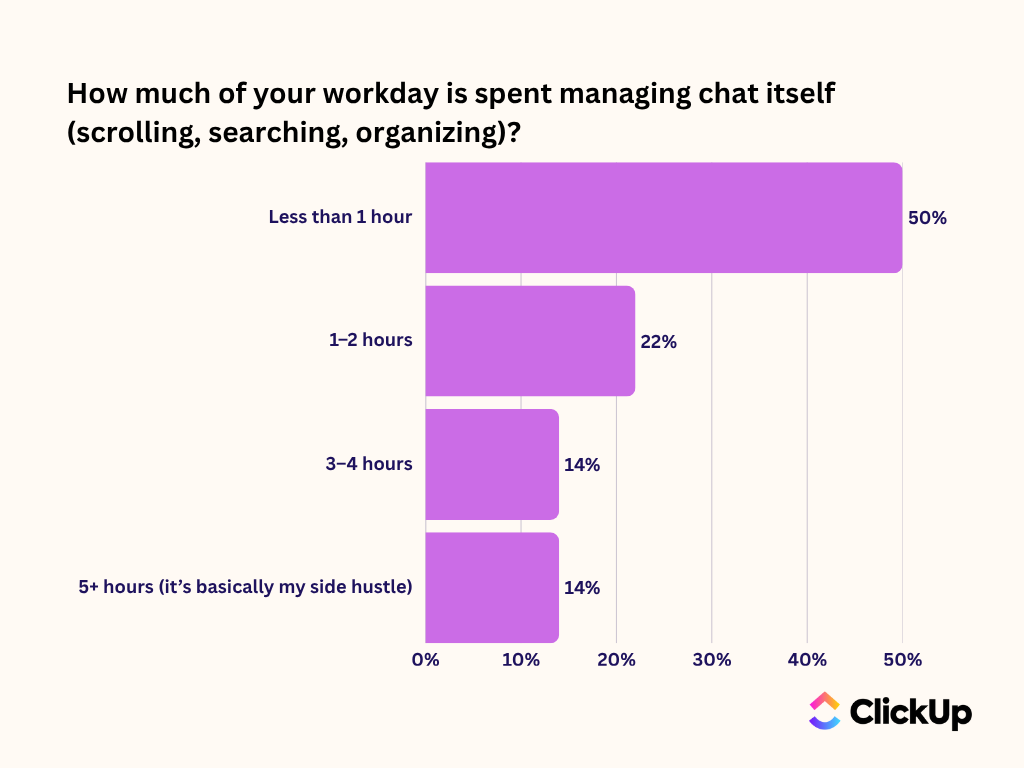
Half of knowledge workers report spending 2 or more hours a day managing chat, simply triaging the conversation around them.
14% percent go further. They describe chat as a side hustle layered on top of their actual role.
📖 Read More: Email vs. Chat at Work: Which Is Best for Your Team?
When tasks are mentioned in chat, they do not always translate into action.
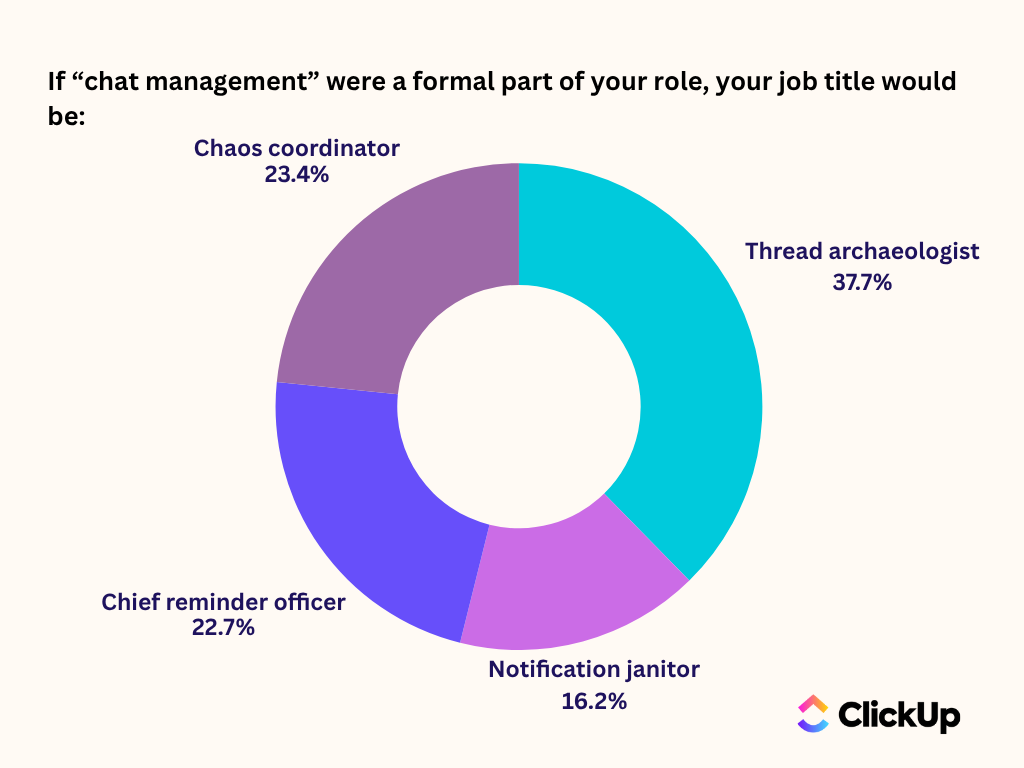
Some respondents even gave themselves titles. 37% identified as “Thread Archaeologists” while 23% called themselves “Chaos Coordinators.”
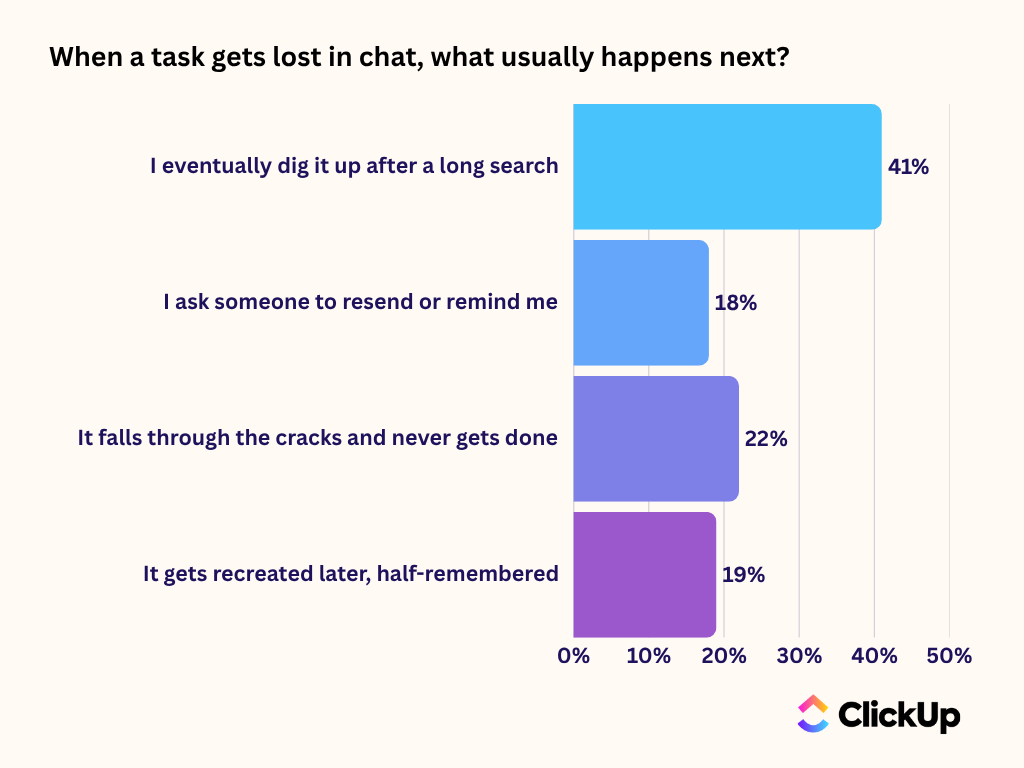
The humor reflects a serious reality: chat is often where decisions are made, but not where work is tracked. When accountability sits outside the conversation, context fades the moment the thread moves on.
Nearly half of the respondents say the biggest extra step chat introduces is manually moving tasks into another tool.
Another 20% spend time re-reading long threads simply to clarify what needs to happen next.
Each transfer is small. Copying a message → Creating a task → Assigning an owner → Adding context again.
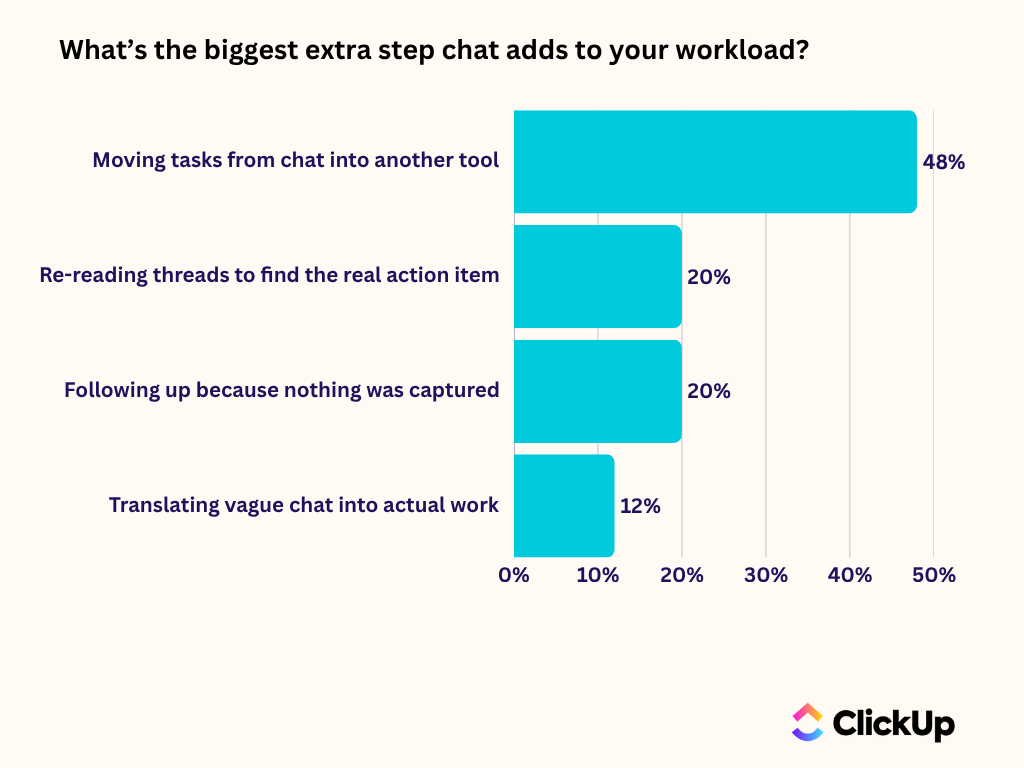
But across teams and weeks, those micro-handoffs compound. The biggest disconnect? Chat feels immediate, but execution still lives somewhere else. And that gap is exactly where time disappears.
26% of workers say chat would feel less overwhelming if notifications were adapted to their priorities rather than flooding them with volume.
That may sound like a usability issue. It is not.
When every message is treated as equally urgent, teams operate in a constant state of interruption. Attention shifts dozens of times per hour.
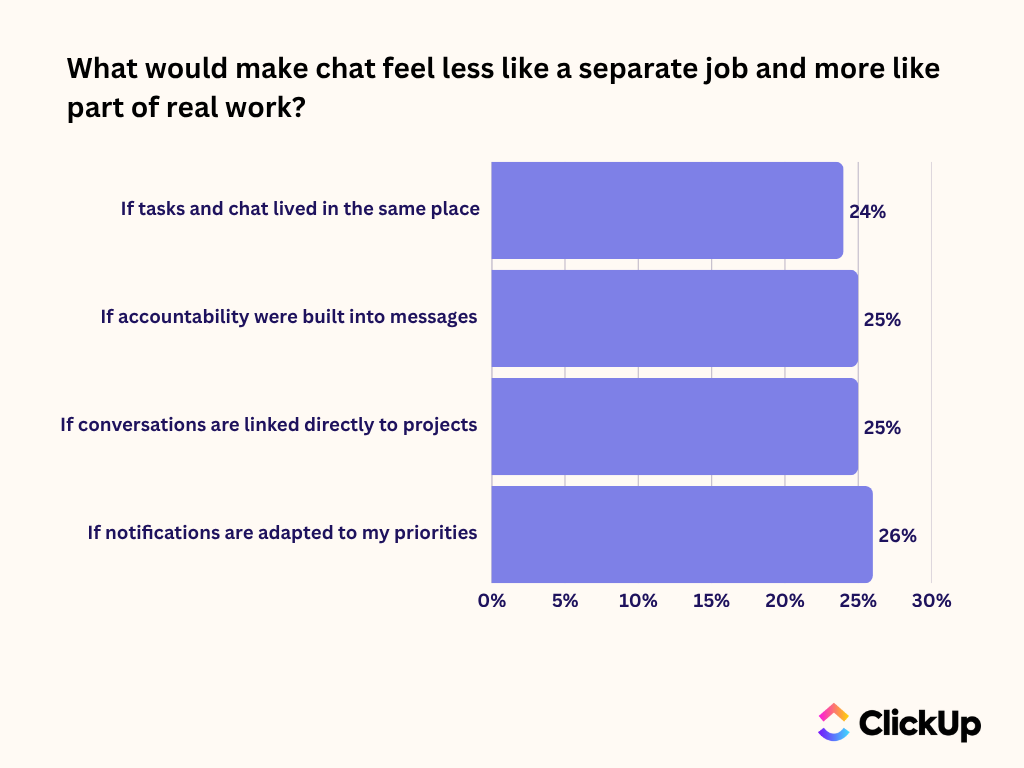
Each notification forces a cognitive reset. Each context switch stretches timelines. Multiply that across teams, across weeks, across salary bands, and the cost compounds quickly. High-value contributors spend their time reacting instead of advancing meaningful work.
It is important to note that people are not asking for fewer messages; they just want better signals over noise. After all, relevance is an operational advantage.
On the surface, chat accelerates everything. Messages move instantly.
But the data tells a more complicated story. More than one in five say tasks mentioned in chat never get done at all.
Speed is not a problem. The friction lies in what happens after the message is sent.
When action items are buried inside threads, clarity depends on someone remembering, re-reading, or reconstructing context.
Chat delivers immediacy. It does not automatically deliver structure. And without structure, speed becomes noise. That is how a tool designed to streamline collaboration slowly turns into a second layer of work.
As long as chat remains central to collaboration, it has to be treated as part of the execution system, not just the communication layer. Here are three practical shifts teams can make.
If a thread results in action, do not leave it in the scroll.
Before the conversation moves on, clarify:
If that information cannot be captured directly in the chat environment, it should be transferred immediately into the system where work is tracked. The longer the delay, the higher the chance it disappears.
A simple rule helps: no decision without an owner, no owner without a deadline.
Nearly half of workers report manually moving tasks out of chat into another tool. That extra step is where context starts to erode.
Audit your workflow:
The goal is to reduce that relay race. The fewer transfers required, the less cognitive overhead the team carries.
If every ping feels urgent, nothing is truly prioritized. Establish clear norms:
Where possible, configure notification settings around role, project ownership, or priority level instead of default volume settings.
The aim is not to mute collaboration. Rather, we are preventing attention from being fragmented by default. The result is connected chat!
What the data ultimately reveals is not a messaging problem. It is a structural one.
When chat, tasks, and documentation operate in separate systems, teams create an invisible coordination layer just to keep work aligned. Decisions must be translated into tasks. Context must be recopied. Ownership must be re-established. That translation work is where time and clarity erode.
This is Work Sprawl in action: not simply too many tools, but too much distance between conversation and execution.
A Converged AI Workspace collapses that distance.
In ClickUp, chat is not an overlay sitting beside work. It is part of the same operating system.
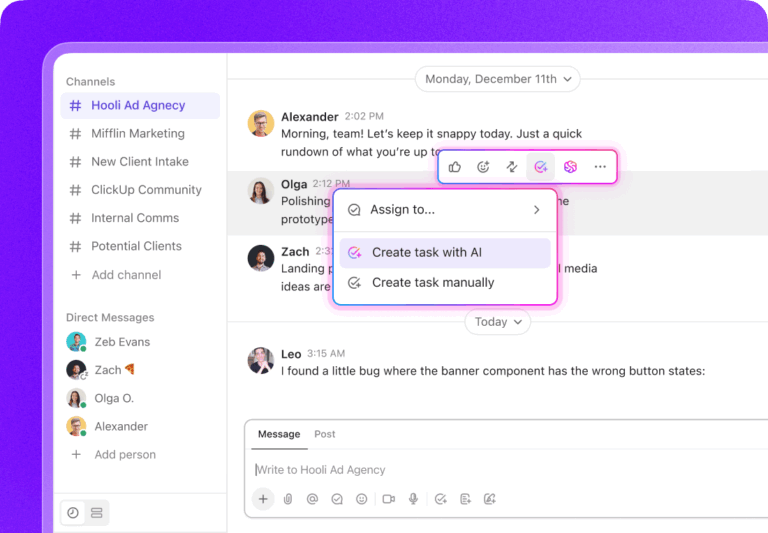
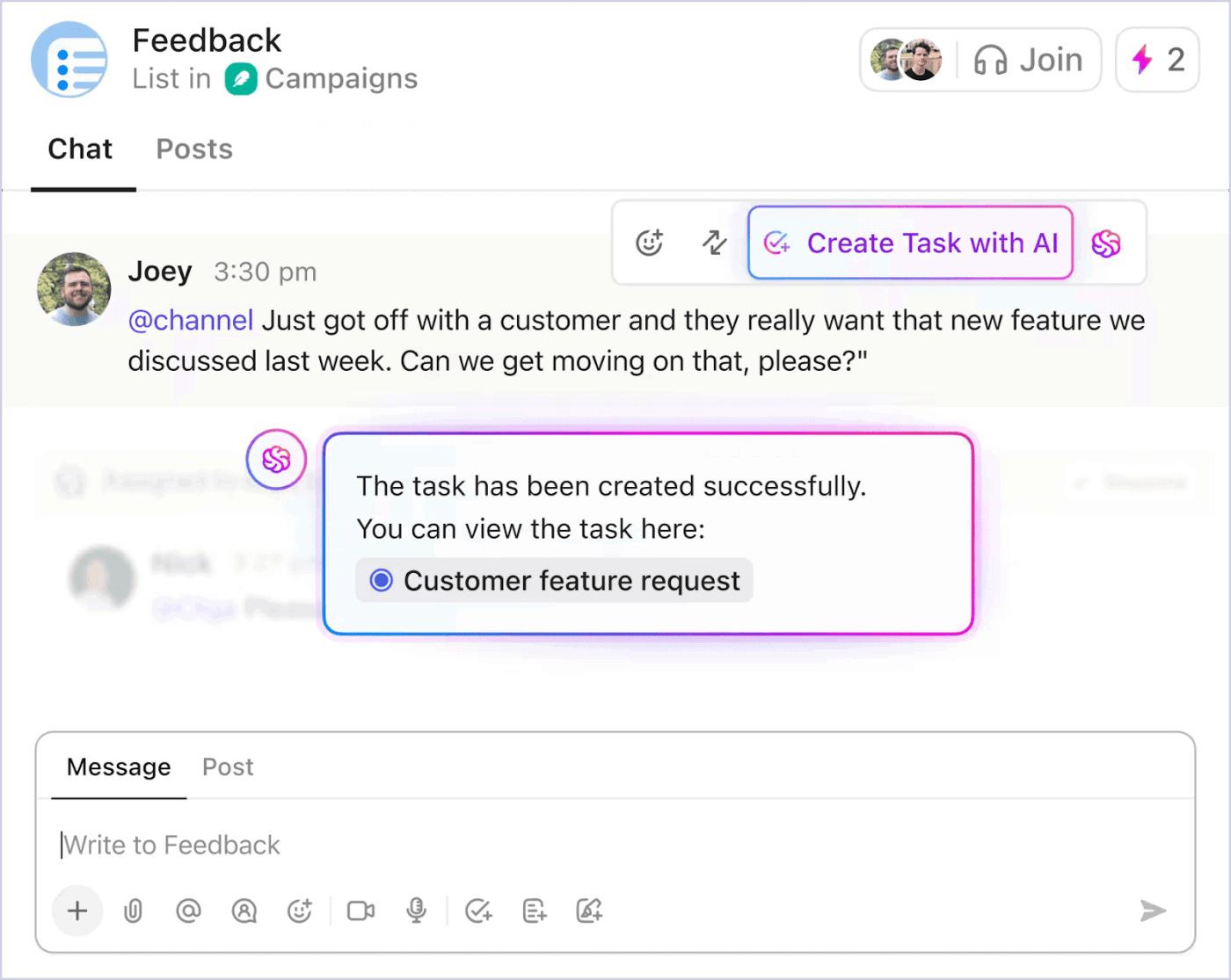
With ClickUp Chat, messages are not isolated streams of text. A conversation can become a task in real time, with ownership, due dates, and context preserved automatically.
There is no need to summarize a thread manually or recreate details elsewhere. The discussion and the deliverable share the same foundation inside a single workspace.
Think of what typically happens in a long project thread.
A decision is made halfway through. A deadline is mentioned casually. Someone volunteers to handle it. The conversation moves on. Two days later, no one is entirely sure what was agreed upon, or whether it was ever formalized.
Instead of manually reconstructing that thread, a teammate can tag ClickUp Brain directly in the chat.
Brain reads the full conversation in context and produces a structured summary of what was decided.
It highlights commitments that were implied but not assigned and surfaces action items that may not yet be tasks. If needed, the AI can draft those tasks immediately, carrying forward the discussion history so context is not lost in translation.
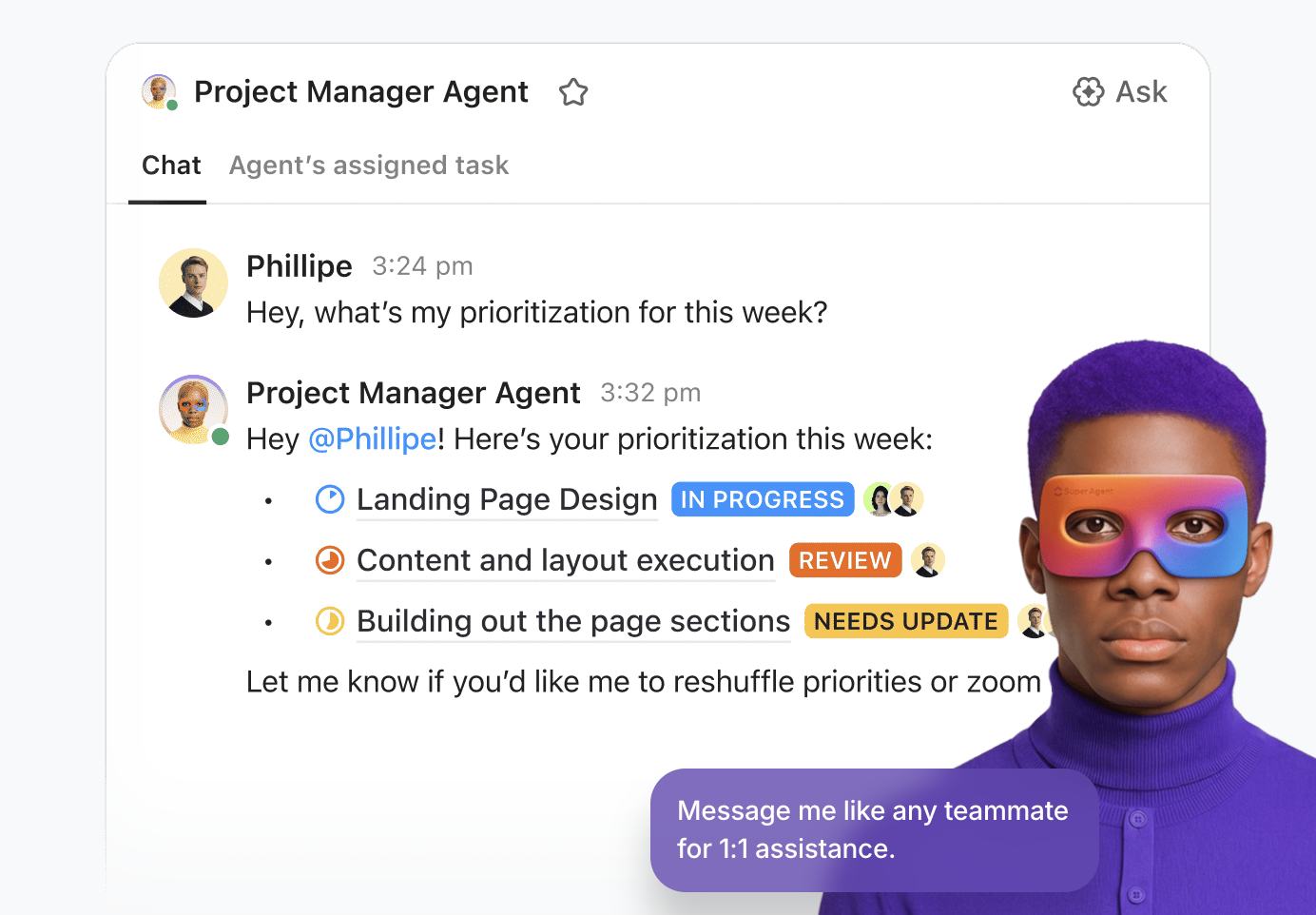
The workflow does not stop at summarizing. If someone needs an update, they can mention a Super Agent directly in the same thread.
Rather than asking a colleague to resend a link or provide a status recap, the Agent retrieves the relevant task, document, or milestone from the workspace and responds in context.
Because chat, tasks, and docs are connected inside the same system, the response is grounded in live project data rather than guesswork.
Notifications become overwhelming when they are disconnected from the work that actually drives outcomes.
In ClickUp, priorities are not just labels. Tasks can be assigned priority levels, due dates, time estimates, and statuses. The ClickUp Calendar reflects that underlying task data, giving you visibility into what is urgent, what is upcoming, and what is already scheduled.
With AI-powered scheduling, tasks can be auto-slotted into your calendar based on availability, deadlines, and workload. Instead of manually dragging every task into a time block, the system helps structure your day around your commitments.
If deadlines shift or new high-priority work appears, your calendar can be adjusted accordingly.
This matters because chat updates are no longer isolated signals.
When a high-priority task is discussed in chat, it is already connected to a scheduled block of time in your calendar. The conversation is tied to a task, and the task is tied to your timeline.
The data is clear on one thing: We have optimized for speed of messaging but not for continuity of work.
Chat was meant to simplify coordination. Instead, it often demands coordination of its own.
The solution is not fewer conversations but a tighter integration between conversation and accountability.
When dialogue, decisions, and delivery live in the same environment, chat returns to its original purpose: enabling work, not becoming it. Ready to close that gap? Give ClickUp Chat a shot!

© 2026 ClickUp

There’s an easier way. Try a free AI Agent in ClickUp that actually does the work for you—set up in minutes, save hours every week.