Sorry, there were no results found for “”
Sorry, there were no results found for “”
Sorry, there were no results found for “”
As a project manager, have you ever faced any of these situations?
If the answer is yes, it’s time to find project budget software to suit your needs.
Your project budget management software must help you figure out how to manage budgets in good times—and during stressful times. You need a solution that helps you correct course when you face unforeseen expenses and cost overruns.
Well, the good news is that we have you covered. We’ve researched what to look for in budget management software, the top tools available today, and their features, limitations, and pricing.
Let’s help you choose a clear winner.
Some of the top reasons that you need to invest in a project budget management tool include:
📚 Also Read: Free Project Budget Templates in Excel and ClickUp
| Tool | Key Features | Best for | Pricing* |
|---|---|---|---|
| ClickUp | – Custom dashboards and automations – Budget templates & custom fields – Built-in time tracking & cost formulas – AI assistant and milestone tracking | Best for individuals to enterprise teams managing budgets, tasks, and timelines all in one platform | Free plan available; Custom pricing for enterprises |
| Teamwork | – Custom financial dashboards – Time tracking, billables & workload management – Workflow automation – Client collaboration tools | Best for client service teams and agencies needing to track budgets, hours, and deliverables | Free trial available; Paid plans start at $10.99/user/month; Custom pricing for enterprises |
| Monday.com | – Custom budget dashboards & automations – Approval workflows – Integrations with Excel & QuickBooks – Visual task & spend tracking | Best for cross-functional teams and enterprises standardizing workflows and cost tracking | Free plan available; Paid plans start at $12/seat/month; Custom pricing for enterprises |
| Productive | – Time tracking, budgeting & invoicing – Forecasting & profitability analysis – Centralized dashboards & collaboration | Best for growing agencies and service teams managing budgets and client profitability | Free 14-day trial; Paid plans start at $11/user/month |
| Adobe Workfront | – End-to-end project cost tracking – Budget forecasting & actuals view – Adobe ecosystem integration – Resource & compliance management | Best for large enterprise marketing/creative ops teams managing complex workflows and approvals | Custom pricing |
| Smartsheet | – Centralized financial tracking dashboard s- Budget tracking by currency/type – Alerts, workflows & audit trails – Spreadsheet-style UI | Best for mid-sized to enterprise teams familiar with spreadsheets and managing complex financial workflows | Free trial available; Paid plans start at $12/user/month; Custom pricing for enterprises |
| Harvest | – Real-time budget vs. actuals tracking – Invoice automation – Visual reporting & utilization insights – Mobile-friendly time tracking | Best for freelancers and small teams tracking billable hours and project budgets | Free plan available; Paid plans start at $13.75/user/month |
| Zoho Projects | – Budget tracking and threshold alerts – Income/expense dashboards – Milestone and task-level costing – Real-time reports | Best for budget-conscious small to mid-sized teams needing simple, integrated project financials | Free plan available; Paid plans start at $4/user/month |
| Hubstaff | – Project-level budget limits & alerts – Automated time & payroll tracking – Cost per project/user reports – Remote workforce insights | Best for remote/hybrid teams needing granular time, budget, and productivity tracking | Free 14-day trial; Paid plans start at $7/user/month |
| Wrike | – Default hourly rates & budget automation – Resource planning- 400+ integrations – Advanced analytics | Best for mid-sized to large teams managing multi-departmental projects and cost plans | Free plan available; Paid plans start at $10/user/month; Custom pricing for enterprises |
| Birdview PSA | – Centralized dashboards – Budget planning via AI assistant – Client collaboration portals – Power BI integration | Best for mid-sized to large service orgs balancing client budgets, resources, and profitability | Paid plans start at $9/user/month; Custom pricing for enterprises |
| QuickBooks | – Profit tracking per project – Expense assignment & invoicing – Recurring billing & tax compliance – Real-time financial reporting | Best for freelancers and small businesses needing detailed financial oversight and reporting | Custom pricing based on modules and user count |
Our editorial team follows a transparent, research-backed, and vendor-neutral process, so you can trust that our recommendations are based on real product value.
Here’s a detailed rundown of how we review software at ClickUp.
Here are our top picks for budget management tools:
For project managers who want to keep budgets in check and costs under control, even across complex, multi-team initiatives, ClickUp is a great bet. While it may not be an accounting platform, as the evrything app for work, it offers a suite of features that make it easy to track financials, forecast resources, and flag budget risks early.
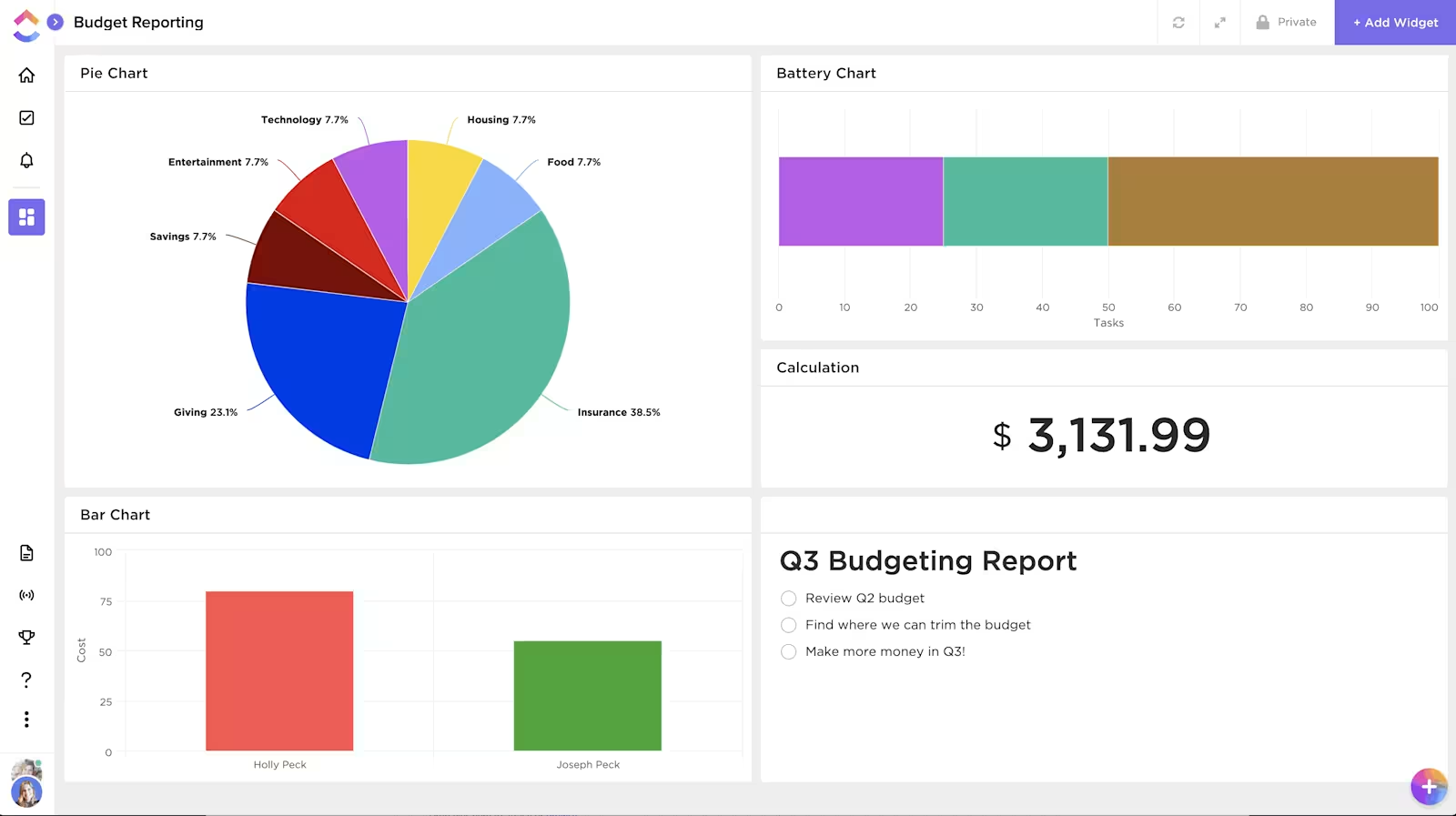
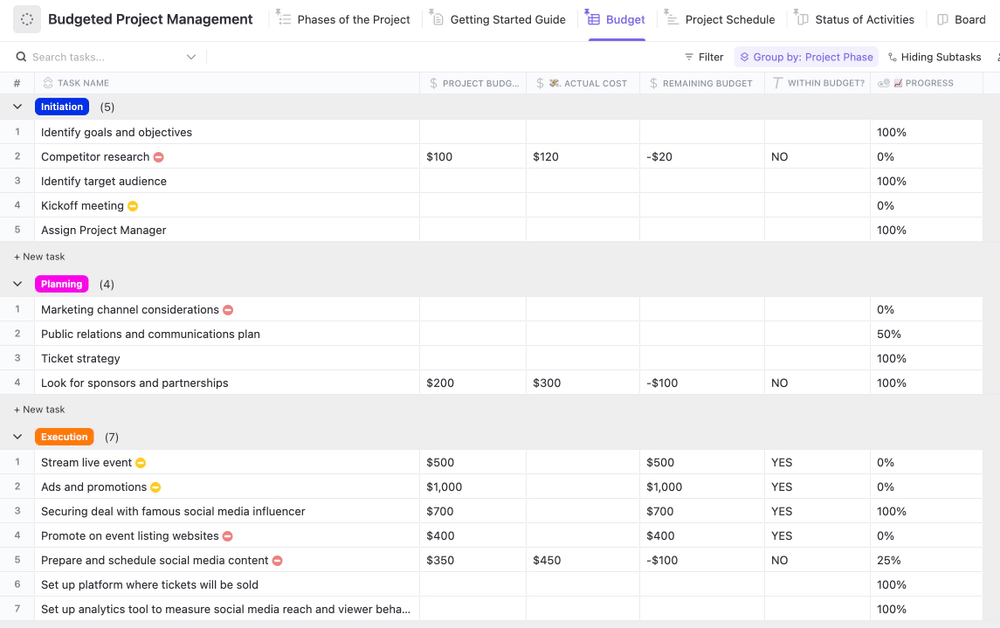
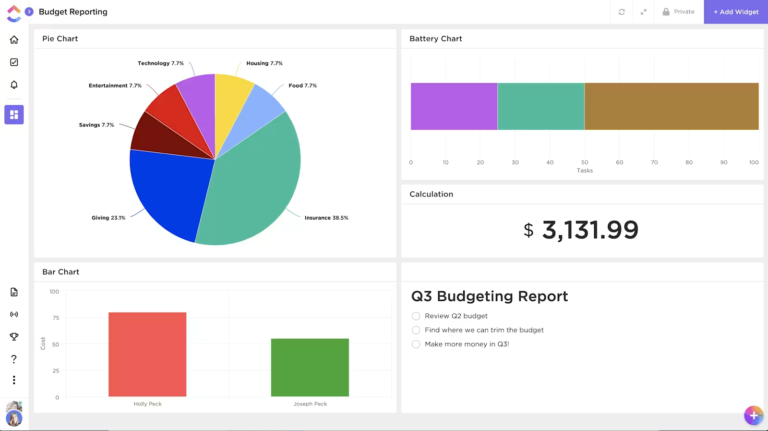
Start with the ClickUp Budgeted Project Management Template, which lets you set up cost estimates, actuals, and variances right inside your workspace. You can customize fields for billable rates, vendor costs, and phase-specific budgets—then view it all in a Table view or a custom ClickUp Dashboard for real-time visibility.
Set up ClickUp Automations with AI and natural language commands to alert stakeholders when a budget threshold is crossed or when costs exceed forecasts.
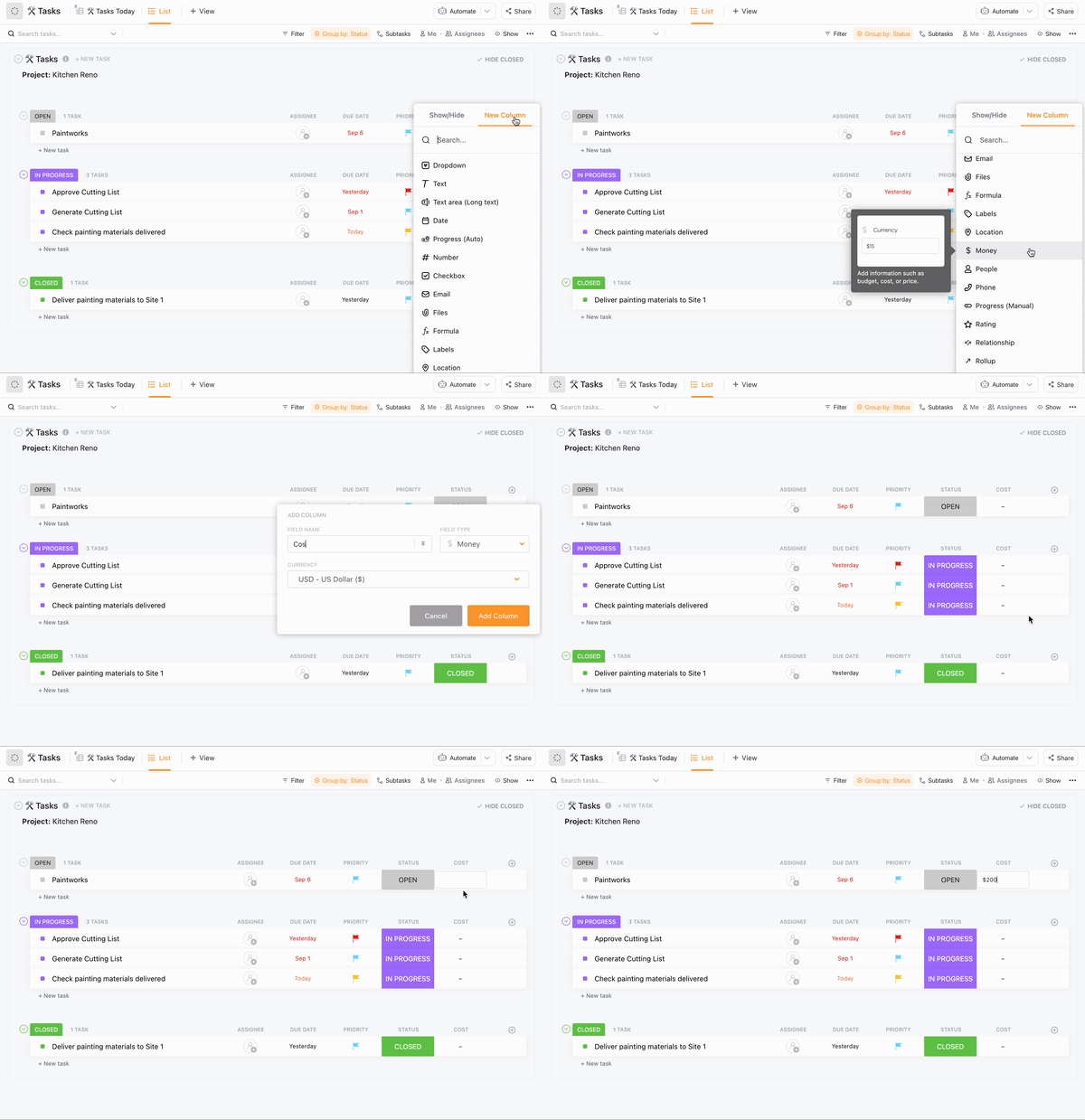
Even without using budget templates, you can add Custom Fields in ClickUp like “Estimated Budget,” “Actual Spend,” and “Cost Variance” to any ClickUp Task to track financial progress down to the detail.
For time-based costing, ClickUp’s Native Time Tracking and Time Estimates help you log hours against tasks and compare those with projected effort and build detailed Timesheets. You can also integrate tools like Harvest or Everhour if you need deeper time-based billing data.
ClickUp also supports Milestones and Task Dependencies, helping you tie budget checkpoints to critical deliverables and keep an eye on resource-heavy phases in task management.
💡 Pro Tip: ClickUp’s detailed Work Breakdown Structure (WBS) template allows you to break down complex projects into more manageable components and supports in mapping out activities in the form of Kanban boards and cost estimates.
⏩ AI Capability: ClickUp AI offers an integrated suite of context-aware AI tools, including the AI Knowledge Manager for instant answers from tasks and docs, the AI Project Manager for automating updates and stand-ups, and the AI Writer for Work to assist in content creation and editing across various roles. You also get access to Autopilot Agents for handling repetitive tasks such as posting answers in chat channels, compiling daily and monthly activity reports, and more.
Teams of all sizes, from solopreneurs to enterprise
By Industry:
By Persona:
We use ClickUp’s Start and Due Dates to plan all our tasks — this keeps everything clean and works perfectly with Calendar and Workload Views. Everyone knows what they’re working on and when, and we can see team capacity at a glance, which helps avoid overbooking and burnout…ClickUp’s time tracking is another bonus — we track hours against tasks to keep budgets on point, and it gives us real data to refine future project scopes.
While it’s awesome to have so many tools at your disposal, it can be a bit much for those who prefer a simpler, more straightforward approach. Also, when you’re juggling a ton of tasks, ClickUp can start to lag, something that I think has gotten a lot better since ClickUp 3.0 but I’m not sure.
If you’re looking for simple project management software to monitor project costs and budget, Teamwork should be your pick. Teamwork goes the extra mile with its reporting dashboard. You can build tailored dashboards to track metrics related to project finances, workloads, and much more.
⏩ AI Capability: Teamwork’s AI Assistant, powered by ChatGPT, aids in drafting and refining content within the platform. It can brainstorm ideas for budget management, generate project summaries, simplify complex text, and perform grammar checks directly in text editors.
Client service teams and marketing agencies with mall to mid-sized teams (10–200)
Ideal for agencies managing billable hours, client deliverables, and profitability in one place
It’s hard to organize tasks by category and sub category, and tracking changes or updates on a task is much harder than in other tools, making Teamwork messy for project management.
Monday.com is a work operating system that helps teams plan, track, and manage any workflow—including project budgets. With its customizable boards, teams can build budget trackers, cost forecasting dashboards, and approval workflows tailored to their needs. It’s especially popular for its ease of use, visual dashboards, and flexible templates.
⏩ AI Capability: Monday.com integrates AI through features like AI Automation Blocks for summarizing, improving, translating, and detecting sentiment in text. It also offers AI Templates and a Digital Workforce of AI agents to automate tasks such as ticket resolution and resource scheduling
Cross-functional teams and enterprises with 10–1,000+ users
Great for enterprise companies standardizing workflows and automating approvals with built-in cost tracking
It helps me and my team stay organized, prioritize tasks, and track progress in real time. I also like how customizable the boards and automations are, which makes it easy to adapt the system to our workflow.
Some features are only available on higher-tier plans, which can be limiting for smaller teams. The mobile app sometimes feels less responsive. Also, while the platform is generally easy to use, reaching customer support can occasionally take longer than expected when dealing with more technical questions.
Productive is an all-in-one agency management platform built for professional service firms, especially digital and creative agencies. It combines project management with time tracking, budgeting, invoicing, and profitability tracking—all under one roof. Productive gives teams detailed insights into where time and money are spent, helping improve operational efficiency and financial performance.
Growing agencies and service-based teams of 10–200 people
Perfect for project-based agencies tracking time, budgets, and profitability across multiple clients and projects
From an initial quote/budget, through the life of a project and into invoicing, the tight integration of relevant data makes errors far less likely. Being able to see all of our resourcing and utilisation (did I mention you can pull a report for just about anything?) all in one dashboard is really useful.
TIme reporting, it always assumes current day as default. My suggestion is: If there’s time report missing for previous days, use the oldest missing day as default.
📮ClickUp Insight: Low-performing teams are 4 times more likely to juggle 15+ tools, while high-performing teams maintain efficiency by limiting their toolkit to 9 or fewer platforms. But how about using one platform?
As the everything app for work, ClickUp brings your tasks, projects, docs, wikis, chat, and calls under a single platform, complete with AI-powered workflows. Ready to work smarter? ClickUp works for every team, makes work visible, and allows you to focus on what matters while AI handles the rest.
A collaborative project management platform, Adobe’s Workfront, helps manage budgets, plans, and actual spending. The native capabilities let everyone involved in the budgeting process, from stakeholders, internal teams, vendors, and network teams, manage and track hard and soft costs, fixed cost, project expenses, and resource costs.
⏩ AI Capability: Adobe Workfront’s AI Assistant streamlines workflows by summarizing tasks and documents, retrieving in-app instructions, and helping build or validate formulas—all through natural language prompts.
Enterprise-level marketing and creative operations involving 200+ users in large organizations
Great for enterprises needing end-to-end work management with structured workflows, compliance, and approvals
It provides an integrated shared platform, which helps users view and edit Outlook and team files through a single platform. It’s easy to use and also user-friendly. Although it does not have a free plan, I recommend people buy it as it’s totally worth the cost.
As we expanded and sought to do more robust reporting, there was resistance to using what was generated, or could be screen-captured from Workfront…Having more dynamic imagery in the project report-outs would have been of benefit.
Smartsheet removes the guesswork from project budgeting. It brings the C-suite and project teams on the same page for planning, tracking, data storage, file sharing, and reporting of project tasks. It offers a central repository that hosts all budget components, generates invoices, and allows stakeholders, accountants, and project managers to track budgets diligently and take corrective action when needed.
⏩ AI Capability: Smartsheet’s AI tools enable users to generate complex formulas by simply describing desired calculations in plain language, eliminating the need to learn intricate syntax. Additionally, the platform offers AI-driven text and summary features that can craft ad copy, perform sentiment analysis, translate content, and summarize task statuses directly within your sheets.
Mid-sized to enterprise teams (50–500+) familiar with spreadsheets and managing complex projects
Ideal for operations, PMOs, and IT teams managing projects via grid-like views and automations
Smartsheet has streamlined our finance operations by replacing manual, excel / google sheet reliant processes with automated, collaborative workflows – eliminating 1000s of mails. From managing approval workflows to tracking budget allocations and monthly reporting, it offers real-time visibility that traditional tools lack
The ability to set up automated alerts, conditional logic, and dashboards ensures timely follow-ups and accountability. With built-in audit trails it’s easier to maintain compliance and fulfill audit compliance
Despite having many of the features of Excel, it does not have capabilities such as tabs or pivot tables within a single document. You often have to stitch multiple documents together to manipulate data which can be tricky and a hassle. I would also like it to integrate better with other products.
Expense management information is critical for accurately budget-proofing future projects. Harvest’s project management software for small businesses makes creating a tracker for project hours and fees easy. Get visibility into the project budget used and leftover in real time to avoid scope creep. Harvest also provides custom reports to view the tasks that take up your team’s time and how they impact the estimated costs to take corrective actions.
Freelancers and small teams of 1-20 people
Ideal for tracking time, invoicing clients, and monitoring project budgets in service-based businesses
I love the way it shows your invoices, and tallys up your numbers for the month, year or set to custom. It’s very simple to use and I’ve been using it for years alongside my business to track time and do my invoicing
I would like an easier download process for invoices (at the end of the month), so that I could download invoices all together, or from the invoice list, to click a download button and it just does it. I currently have to go into each invoice to download it separately.
🧠 Fun Fact: Time is money—literally. The average employee spends 30+ minutes a day searching for information, ClickUp discovered. With ClickUp’s all-in-one workspace, Connected Search, and AI Knowledge Manager, you can reduce that dramatically and reallocate that time to billable work!
Project managers control finances by creating, tracking, and forecasting budgets, tracking expenses, and analyzing reports. Managing all these tasks on different tools that do not sync with each other makes the monitoring process cumbersome for everyone involved in the project.
Zoho Projects allows you to create a profitability summary dashboard with the status of income and expenses in your project. This project management software offers real-time monitoring capabilities for budgets, threshold and overrun alerts, and planned vs. actual reports.
⏩ AI Capability: Zoho Projects incorporates Zia, an AI assistant that provides generative AI features like content creation, tone adjustment, and summarization. It also offers NLP search, AI-driven data insights, and translation capabilities to enhance project management.
Budget-conscious small to mid-sized teams of 5-100 users
Ideal for tracking time, invoicing clients, and monitoring project budgets in service-based businesses
The real-time collaboration features, including comments, chat, and file sharing, are very useful for team communication.
One downside is the learning curve for new users unfamiliar with the Zoho ecosystem. Some of the advanced customization features could be more user-friendly…With some improvements to user-friendliness and mobile app functionality, it could become even more powerful.
In large organizations, where a team typically works on multiple projects, you must set budget thresholds for each project and receive alerts in case of overspending. Hubstaff‘s workforce management app allows users to set budget limits, get real-time notifications for scope creep and cost overruns, and automate time-tracking for maximizing resources. With real-time insights into the expenses, you can ensure you stay on track.
Small to mid-sized remote or hybrid teams of 5-200 users
Ideal for remote teams that need granular time tracking, productivity monitoring, and payroll features
It makes time tracking super easy, so you can see exactly how much time is spent on projects and tasks, which helps keep everything on budget. Plus, it takes care of payroll and scheduling, saving managers a lot of hassle.
While it’s rare, HubStaff occasionally doesn’t sync completely with ClickUp, and you have to sync it manually. Also, I wish we could set different budgets per month for our projects vs a singular monthly budget
Wrike’s project management software helps small and medium businesses, startups, and large enterprises manage budget variance and create a budget plan. When actual costs vary from those planned, it helps busy project managers investigate the reasons for the variance and manage the budget effectively by reallocating resources or implementing cost-saving measures.
⏩ AI Capability: Wrike’s Work Intelligence® suite leverages AI to automate workflows, predict project risks, and transform notes into actionable tasks, enhancing overall productivity. Its generative AI capabilities assist in creating and editing content, summarizing discussions, and enabling voice-command task management on mobile devices.
Cross-functional mid-sized and enterprise teams (50–1000+ people)
Ideal for large teams managing complex, multi-departmental projects with budget and resource tracking
Wrike has a flexible architecture that made it easy for us to customize it to fit our needs…Wrike allows us to use automations to perform our routine tasks with lesser time and work input.
Performance Can Lag with Large Projects: When managing very large or complex projects, Wrike can occasionally feel a bit slow or unresponsive.
Pricing Can Be High for Small Teams: The full-featured plans are quite powerful, but they can be costly for smaller teams or startups on a tight budget.
As a project manager at a professional service organization (PSO), your criteria for measuring project success are based on completion and delivery to clients. What if you delivered the project to the client before the proposed delivery date, but it was over budget by 15%? Would you consider it a win?
As per Harvard Business Review research, one in every six projects has an average cost overrun of 200% and schedule overrun of 70%.
Birdview PSA helps PSOs avoid becoming part of that statistic by giving you real-time visibility into budgets, resources, and timelines—all in one place. From planning to billing, it equips your team with the insights you need to make smart decisions before small issues become costly mistakes.
⏩ AI Capability: Birdview PSA’s AI Assistant enhances project management by generating comprehensive plans from project titles, forecasting timelines using machine learning, and matching tasks with suitable team members based on skills and availability. It also streamlines communication by assisting in drafting, summarizing, and refining messages with context-aware suggestions.
Mid-sized to large service organizations (50–500)
Great for professional service delivery teams balancing client work, time tracking, resource planning, and profitability
Beautiful UI, intuitive in use, simple to find what you need – searching engine is working really great! Easy task planning and resources chasing, great reporting engine and Power BI connectors.
Sometimes displays incorrect progress towards task completion. You are still able to view actuals, but seems like a bug that occurs on occassion (i.e., budget 20 hours, completed 15 but shows 10 to go).
QuickBooks by Intuit is one of the most well-known accounting tools, used by small businesses and enterprises alike to track income, expenses, invoices, and taxes. The tool includes project profitability tracking, allowing you to assign expenses and time to projects and generate cost and profit reports. It’s not a traditional project management tool, but it excels in financial oversight and cost tracking for service-based projects.
⏩ AI Capability: QuickBooks’ Intuit Assist automates accounting tasks by generating invoices and expense records from notes, emails, and photos, and by sending personalized invoice reminders that help users get paid five days faster on average. It also identifies potential cash flow issues and suggests optimal payment methods to enhance financial management.
Small businesses with teams of 1–20, and service-based freelancers
Perfect for small teams needing detailed financial oversight and client billing for project-based work
The automated features like invoicing, expense tracking, and bank reconciliation save a lot of time and reduce the chance of erros. Additionally, the integration with other financial tools and apps streamlines our workflow, making it more efficient
The thing I like least about Quickbooks Online is a necessary evil, unfortunately…the updates. I get in my routine and rhythm when entering information in the system, but I find that a lot of the updates, which I know are necessary for an ever changing technology, tend to add steps to my process and can slow me down and take time to get used to
As a project manager, you know the inefficiencies of manual or spreadsheet-based budget management.
Here’s a better way to identify cost-saving opportunities and communicate with your stakeholders in an easy-to-understand format.
ClickUp’s project cost management software makes it easy to create a realistic budget plan, track the risks, and adjust costs as per your business needs to avoid overspending. Bringing all your work over a single dashboard using 100+ integrations with other project management budgeting tools.
Try ClickUp for free to access different templates, views, and customization options for smarter budget management.
Project budgeting software focuses on planning tracking and forecasting costs at the task and project level, while accounting software records finalized financial transactions for compliance and reporting.
Yes. The best tools provide real-time budget vs actuals tracking alerts and forecasts so teams can course-correct before overspending escalates.
Absolutely. Modern tools are designed for project managers operations teams and department leads who need visibility without deep accounting expertise.
Time tracking connects effort to cost. When hours are logged against tasks budgets become more accurate and future estimates improve significantly.
If budgets depend on tasks timelines and resources an all-in-one platform reduces data gaps and manual reconciliation across tools.

Arya P Dinesh
Max 27min read

Manasi Nair
Max 27min read
Manasi Nair
Max 32min read

© 2026 ClickUp