

Taking notes during meetings can be challenging, especially when everyone contributes actively. It can be difficult to capture all the essential information without getting lost in the details.
Ideas can easily get lost during translation, and critical information can slip through the cracks. To overcome this, a popular note-taking method that has gained traction is the sentence note-taking method.
This method does not use bullet points or short phrases. Instead, it focuses on writing complete sentences, briefly touching upon past discussions, and referencing future meetings and tasks.
It can be challenging to balance capturing all the essential information and avoiding adding too much detail to your notes. A common hurdle is balancing the need to capture all the necessary details while maintaining clarity.
In this article, we’ll explore practical techniques for mastering the sentence method and provide the tools to take clear, concise, and effective notes during meetings and discussions.
How to Use the Sentence Note-Taking Method (With Templates!)

 Summarize this article for me please
What is the Sentence Note-Taking Method?
The sentence method is a concise way of summarizing information during meetings, classes, or talks by using short sentences.
This method involves writing down important points and details, focusing on clarity and brevity to capture all essential information accurately.
The steps include capturing key points or concepts, using short sentences, organizing information, and reviewing and revising notes for accuracy.
This method can be beneficial whether you’re a professional in a team meeting trying to write down key points, a student trying to keep track of lecture material, or a researcher gathering information.
When to use the sentence note-taking method
The sentence method is most effective in these situations:
- Meeting summaries: During team meetings, use the sentence method to quickly capture and summarize main points, action items, and decisions. You can enhance this method by using note-taking apps for Android, which offer features like organization, search, and accessibility
- Project management: Whether you’re providing updates to stakeholders, brainstorming ideas with your team, or conducting training workshops, the sentence method allows you to turn complex information into accessible, digestible points
- Performance tracking: Use the sentence method to document employee performance and feedback. By capturing these metrics in short sentences, you create a clear record of each employee, allowing an easy review of specific information and taking necessary actions as and when required
Apart from these scenarios, you can use the sentence method during fast-paced classes, when lessons lack structure, and when you need to review the information quickly before a meeting or exam.
However, this method may not be the best choice for taking notes during technical or science classes, structured classes, or classes with visual aids. Instead, you can proceed with other note-taking strategies or methods, such as charting, Cornell, mapping, or outline methods.
Summarize this article for me pleaseHow to Take Notes Using the sentence method
The sentence method is all about creating a narrative of the information presented. It is effective when detailed explanations, thorough information, or comprehensive concepts must be captured clearly and organized.
Here’s a step-by-step guide on how to take notes using the sentence method: 👇
Step 1: Choose your format
- Decision: Choose between paper or note-taking apps like ClickUp, Google Docs, etc. Digital tools offer the advantage of easy editing, formatting, and sharing of notes. Consider using templates that provide pre-designed formats and make your work easy
Step 2: Listen carefully
- Pay attention: Focus your attention on the speaker and listen for keywords and phrases that indicate essential points or concepts
- Avoid distractions: Actively engage in the conversation or presentation and minimize distractions by turning off your phone or other devices
Step 3: Write complete sentences
- Express clearly: Write down each key point or idea in a complete sentence to ensure your notes are clear and easy to understand. Keep your sentences short and to the point, but make sure they contain all the necessary information
- Avoid fragmentation: Avoid using bullet points or brief phrases. Instead, use conjunctions like ‘and,’ ‘but,’ and ‘or’ to connect related ideas
Step 4: Follow the sequence
- Maintain order: Write your sentences in the same order they are presented or read to maintain the flow of information
- Use markers: Number your sentences or use indentation to show the hierarchy of main ideas and the relationship between different concepts. Use abbreviations to write faster and in a concise way
Step 5: Create line breaks
- Organize thoughts: Group related ideas together and separate them from unrelated concepts or ideas using line breaks, making it easier to follow the flow of a meeting. Line breaks and indentations make your notes visually appealing and easier to read and understand
Step 6: Review and revise
- Check for errors: Look for any errors or inaccuracies in your notes right after the meeting and correct them as needed
- Clarify and revise: Revise your notes and clarify any unclear sentences or points for better understanding. If there are any details you missed during the initial note-taking process, add them now before you forget them and lose the chain of thought
Examples of notes using the sentence method
Here’s an example of notes taken using the sentence method of note-taking:
Meeting date: April 25, 2024
Meeting title: Product launch brainstorming session
Agenda:
- Product features and target audience
- Launch strategy and marketing channels
- Beta testing and feedback collection
- Action items and follow-up
Meeting notes:
- Product features discussed and target audience identified (techies aged 24-40)
- Launch strategy – phased rollout starting with beta users
- Proposed marketing channels – social media, tech blogs, email newsletters
- Action item: Sarah is to create a marketing plan and content calendar by next Friday
- Action item: David to reach out to tech influencers for collaboration
- Discussed beta testing process and collection
- Action item: Emily to set up the beta testing program and feedback collection system
As you can see, these notes effectively capture the main discussion points and action items from the brainstorming session, ensuring clarity and accountability for follow-up tasks specific to a tech company’s product launch.
Summarize this article for me pleaseSentence Note-Taking Method Tools
Traditional note-taking methods with pen and paper can feel outdated and inefficient when you’re in a meeting where information is constantly flowing.
While scribbling notes on paper may seem like the go-to option, it has drawbacks, from the risk of losing your notes to the hassle of carrying around bulky notebooks.
This is where ClickUp, a free product management software, offers organized and more efficient note-taking solutions.

In addition to note-taking templates, time-tracking features, and goals, ClickUp offers everything you need to capture, organize, and access your notes seamlessly.
One such feature is ClickUp Docs, a powerful tool that integrates your documents and workflows in one place. It makes it easy to manage critical information and enhance your note-taking skills. It allows you to create meeting minutes, knowledge bases, digital journals, and more, all in an easy-to-use interface.

Here’s how it helps in note-taking:
- Rich editing features: Quickly take notes and format them with rich editing options. Add headers, bullets, colors, and more to customize your notes exactly how you want
- Transform notes into tasks: Instantly convert any note into trackable tasks with ClickUp. Add due dates, assignees, priorities, and more to turn your ideas into action items

- Access anywhere, anytime: Stay connected to your notes with ClickUp’s Chrome Extension and mobile app. Whether you’re on your computer or up and about, you’ll always have access to your important notes and key concepts
ClickUp Brain revolutionizes note-taking by providing a writing assistant to help brainstorm, create action items, summarize notes, and more.
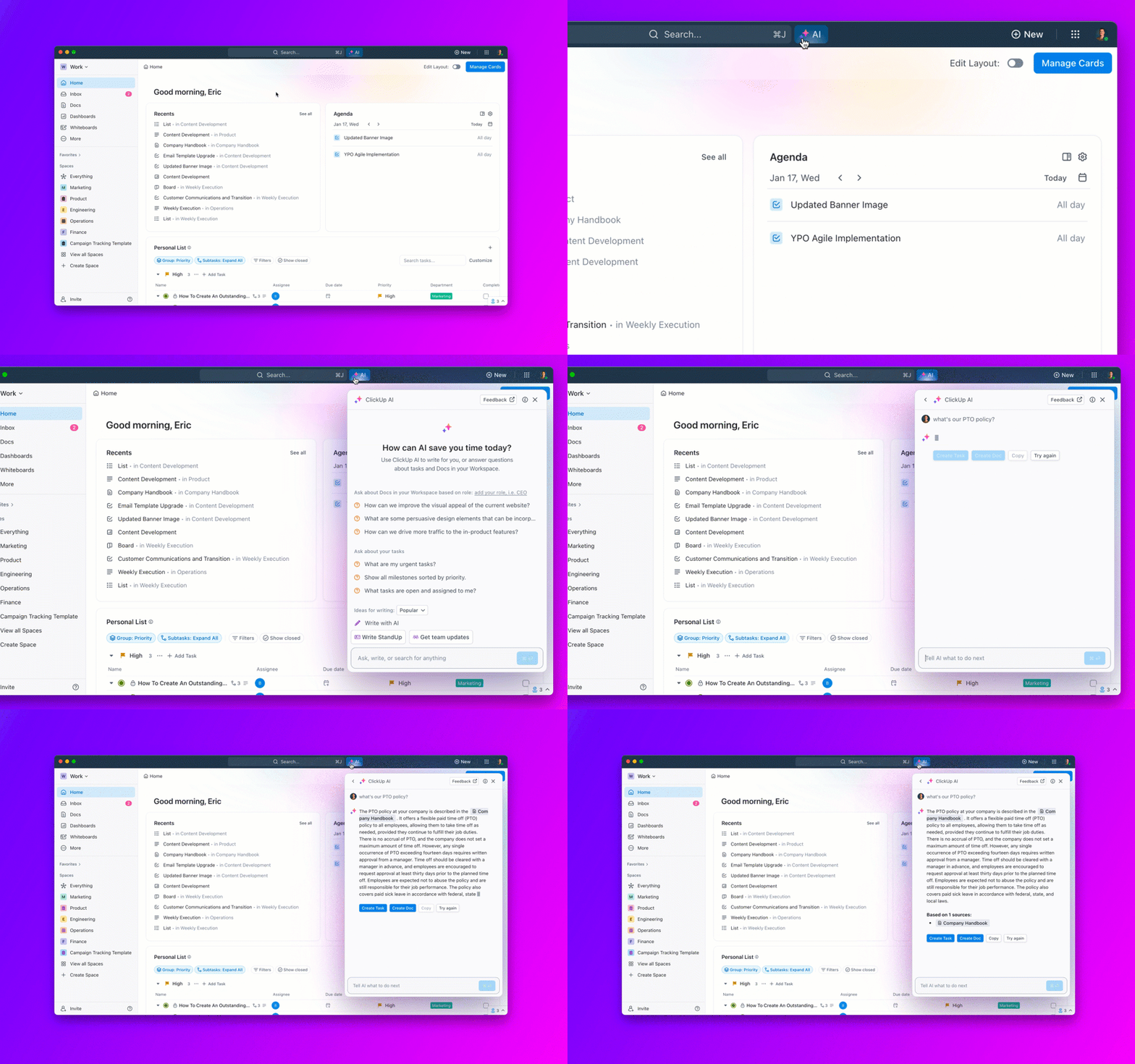
This note-taking app for Mac also helps you with:
- Contextual Q&A: Get instant answers to all your work-related questions with this AI tool for meeting notes. It provides accurate responses based on context from any work within and connected to ClickUp, including tasks, docs, and people.
- Automated project management: Automate project and note summaries, progress updates, and stand-ups, helping you save time on mundane and routine tasks
- Integration: Seamlessly integrate all your data within ClickUp Docs and ClickUp Notepad, and convert any note into trackable tasks within just a few clicks
- Seamless editing: Perfect your writing with built-in spell check, AI quick replies, table creation, and template generation, making sure that your notes are well-structured and comprehensive
Here are some other ways in which this digital tool helps:
- All-in-one solutions: ClickUp Docs combines all the tools you need for documentation and productivity in one place, making it easy to manage your notes effectively
- Attachment support: Embed files, images, videos, and other media directly into your notes for a rich note-taking experience
- Customization and structuring: Create nested pages and use advanced formatting options like typography, color highlights, and banners to organize your notes exactly how you want
- Digital Whiteboard: Use ClickUp Whiteboards as your personalized online sticky notes for brainstorming, organizing, and visualizing ideas. With real-time collaboration features, you can work with others on the same board, making sharing and discussing notes seamless

ClickUp Notepad is your all-in-one solution for note-taking, checklist organization, and task management.
 Summarize this article for me please
Take notes and get productive with ClickUp
The sentence method provides a concise and organized way to capture key points and essential details during meetings, lectures, or discussions.
Focusing on writing complete sentences ensures that you capture all the essential information.
With tools like ClickUp, you can further enhance your note-taking process. ClickUp’s AI features seamlessly integrate into your workflow, making it easier to capture, organize, and access your notes.
Stay organized with ClickUp Docs and access your notes with ClickUp Notepad.
Try ClickUp now and experience the difference for yourself!


Everything you need to stay organized and get work done.

Recent Articles
What Is Tacit Knowledge? Definition, Benefits and Examples 
What Is Tacit Knowledge? Definition, Benefits and Examples

