

Steve Jobs famously said, “Design is not just what it looks like and feels like. Design is how it works.”
The principles of design are everywhere, shaping our experiences—from app interfaces to workspace layouts to how airline seats are spaced—and they go beyond aesthetics, guiding the way we organize elements, communicate ideas, and solve problems.
Spend a day in the life of a UX designer, and you’ll see that design is a part of everything they do. So whether you’re redesigning your digital strategy or enhancing user experience, understanding design principles is key.
In this guide, we’ll explore the principles of design and show you how to integrate them into your daily processes using the best workflow design software.
How to Apply the Principles of Design
- What Are the Principles of Design?
- Understanding Different Principles of Design
- 1. Emphasis and how it’s achieved in design
- 3. Repetition and how to effectively use it
- 4. Unity and why it matters
- 5. Scale and balance in design
- 6. Hierarchy as one of the principles of design and its effect on user experience
- 7. Movement and its role in design
- 8. The use of white space in design
- 9. The importance of proportion in design
- 10. Understanding patterns and rhythm in design
- How to Implement Design Principles
- Implement the Principles of Design in Your Workflow Using ClickUp

 Summarize this article for me please
What Are the Principles of Design?
The principles of design serve as a foundational framework that helps designers create visually appealing and functional output without limiting their creative freedom.
By understanding the principles of design, you can:
- Improve design appeal: Design principles transcend specific design styles and trends. They are timeless and serve as a foundation for creating effective designs across various mediums
- Enhance user experience: Applying these principles creates visually appealing elements and clear, engaging digital experiences that resonate naturally with users, enhancing both web design and UX efficiency
- Communicate effectively: Effective communication, supported by attention to detail and design focus, ensures messages resonate across platforms—from websites to logos and marketing materials—ultimately impacting long-term brand management strategies
- Improved problem-solving: By understanding how these principles influence user perception, you can create solutions that efficiently address user needs and solve problems effectively
Summarize this article for me pleaseUnderstanding Different Principles of Design
While there are many design principles that people rely on for different purposes, most designers agree that these design principles form the foundational aspects of any design and contribute to a successful design strategy:
1. Emphasis and how it’s achieved in design
Emphasis, within the principles of design, means highlighting key elements or areas to attract the viewer’s attention. Whether it’s a headline, a call-to-action button, a logo, or a product image, emphasis places the most critical information or visual elements prominently within your design, so they are impossible to miss by the human eye.
To draw emphasis to something, you can use certain elements, like:
- Size and scale: Making an element larger or placing it in a dominant position naturally draws the eye
- Contrast: Using contrasting colors, fonts, or space can make an element stand out
- Isolation: Surrounding an element with white space can make it pop
- Color: Using a vibrant color against a neutral background can create a focal point

Remember, the key to emphasis is correctly identifying the focal point. For instance, when designing with text, it’s crucial to anticipate where the viewer’s attention will naturally be drawn. This helps in creating a hierarchy and guiding the viewer through the information effectively. This is why the priciple of emphasis is a central pillar of any design strategy.
2. Contrast and its importance in design
Contrast refers to the noticeable difference between elements in your design. It is a powerful tool for creating a visual hierarchy, guiding the user’s eye, and adding visual interest.
When it comes to designs for branding, most companies tend to have a favorite color. However, when a background motif or element doesn’t blend well with these colors, contrast becomes crucial.

Consider this design example: a red-colored font may be barely noticeable and easily overlooked by viewers unless they make a concerted effort to notice it. However, when the font is in a light green shade, it stands out prominently.
This is why it’s crucial for brands to choose contrasting colors in their brand guidelines. By using the design priciple of contrast, you can empower designers to play with options that best suit specific requirements and ensure elements are effectively emphasized.
Effective contrast ensures your design is clear, readable, and avoids monotony. To maintain contrast in your design, you should focus on elements like:
- Contrasting colors: Using contrasting colors, such as black and white or bright and muted tones, creates a clear distinction
- Value: Contrasting light and dark values (shades and tones of a single color) can also be effective
- Texture: Combining smooth and rough textures can add depth and dimension to your design
In this context, a brand playbook or style guide can give brands a structured framework for creating excellent designs while maintaining a consistent brand identity. By using style guide templates, you can achieve a cohesive brand appearance while ensuring that all design elements—from colors and typography to imagery and layouts—are aligned with your brand’s visual identity and values.
3. Repetition and how to effectively use it
Repetition, when used correctly, creates a sense of unity, consistency, and rhythm, making your design feel cohesive and instantly recognizable. Repeating subtle design details, like shapes or icons, can subconsciously reinforce a brand message or theme.
For example, think of Coca-Cola’s iconic bottle design. Its repeated visual elements—the classic red color and distinctive curliscues—are key to its brand identity.
You can achieve a similar impact for your brand using graphic design templates. These templates come with pre-defined assets that allow you to customize your images, text, colors, and branding. They help you build outstanding brand assets and marketing materials with just a few clicks.
4. Unity and why it matters
Unity refers to the principle of design associated with creating a sense of wholeness and coherence in your design. All the elements in your design should work together to form a unified whole, even if they are visually distinct.
You can achieve unity using various techniques, including:
- Visual consistency: Using elements like color palettes, fonts, and spacing consistently creates a sense of order and connection
- Alignment and proximity: Arranging elements in a way that feels visually balanced, cohesive, and interconnected helps establish unity
- Dominant element: Using a dominant element, like a bold headline or a central image, can unify the composition and draw the eye toward a focal point
For example, the Apple iPhone maintains unity with its minimalist design, sleek typography, and functional focus. This consistency strengthens the brand identity and improves the user experience across devices and marketing materials.
5. Scale and balance in design
Scale in design refers to the relative size of elements within a composition, ensuring they harmonize visually. It allows designers to create a cohesive layout where each element fits proportionally.
Meanwhile, balance addresses the distribution of visual weight among elements like typography, colors, shapes, images, and patterns.
Scale and balance are an important tenet in the principles of design as the create visual harmony and equilibrium for viewers.
In a symmetrical design, for example, equal weight is distributed evenly across both sides, promoting a sense of stability and order. Conversely, asymmetrical balance intentionally emphasizes certain elements more than others, guiding the viewer’s focus to key aspects of the design.
Bonus: Types of Design Jobs!
6. Hierarchy as one of the principles of design and its effect on user experience
Hierarchy in design arranges elements to guide users’ focus toward the most important information first. This structured approach improves the user experience by creating a clear path through the design, making information easy to navigate and understand.

For instance, on a business card, a large headline with the main message (the name of the card holder) grabs attention, followed by smaller subheadings and bullet points for details. This hierarchy ensures users quickly grasp key information.
As you look to apply the principles of design, such as hierarchy, within your organization, using design document templates is crucial for streamlining your design workflow. These templates act as guides, helping you manage multiple projects by outlining each step clearly, and ensuring everyone stays aligned throughout the process.
7. Movement and its role in design
Movement in design involves creating a sense of visual motion or flow that guides the viewer’s eyes through the composition. It introduces dynamism and enhances visual interest using various techniques.

To create movement in design elements, you can use:
- Leading lines: Using lines, shapes, or patterns that lead the eye across the composition creates a sense of movement
- Diagonal lines: Diagonal lines create a sense of dynamism and action compared to horizontal or vertical lines
- Eye tracking: Placing elements strategically can guide the user’s eye in a specific direction
- Repetition and rhythm: Repeating elements in a particular sequence can create a sense of rhythm and visual flow
- Animation: Animations and subtle interactive elements can add dynamic movement to digital designs
8. The use of white space in design
White space, or negative space, is crucial in design. It’s the empty areas around and between elements that enhance readability and visual appeal.
Typically, the more white space or fewer elements in your design, the more aesthetically pleasing, minimalistic, and premium it will appear.

Consider this Rolex ad, where the brand focuses on its product image and highlights key elements with a minimalistic approach. This reflects the brand’s unique identity and uses white space and negative space effectively to stand out from other watchmakers.
9. The importance of proportion in design
Proportion in design refers to the relationship between the sizes of elements, aiming to give viewers a sense of comparative sizes or importance. Well-proportioned visual elements can help designers achieve visual balance and harmony throughout the composition.

Follow these simple design techniques to achieve this:
- The golden ratio: Use the golden ratio or rule of thirds to create naturally pleasing compositions
- Grid systems: Employ grid systems to organize elements systematically, ensuring consistent proportions
- Visual comparison: Compare element sizes relative to each other to achieve a balanced visual weight
- Understanding content needs: Organize your content hierarchy by sizing and proportioning elements according to their importance, ensuring that key elements stand out prominently
10. Understanding patterns and rhythm in design
Adding visual interest to design often involves repeating patterns or rhythms. Patterns are the repeated use of visual elements or motifs, while rhythm creates visual flow through elements repeated at regular intervals or in a predictable sequence.
In design, patterns and rhythm help create:
- Visual interest and unity: Patterns and rhythm add visual interest and create a sense of unity by connecting elements across the design
- Memorable design: Repeated elements can contribute to a memorable design experience
- Consistency and coherence: By establishing a consistent pattern or rhythm, designers can ensure that the design feels cohesive and harmonious
Summarize this article for me pleaseHow to Implement Design Principles
Now that we’ve explored the fundamental principles of design, it’s time to integrate them into your design workflow and processes.
Step-by-step guide to applying the principles of design
Follow these steps to implement design principles effectively:
Planning and brainstorming
During the initial stage of your project, plan how you can leverage the principles of design to achieve your desired outcome. To get started, follow unique ideation techniques to ensure you’re aligning your design goals with the principles that matter most for your project.

ClickUp’s Design Brief Whiteboard Template helps you brainstorm with your team, ensuring that all aspects of your design align with your project’s objectives from the outset.
This template allows you to capture all the information you need for your designs, including client requests, objectives, target market, direction, branding insights, references, and more.
This helps you:
- Clarify the project scope and objectives
- Outline the team’s responsibilities
- Help ensure everyone is working towards the same goal
- Enable teams to collaborate more effectively
Breaking down design tasks
Breaking down design tasks is crucial for managing complex projects effectively.
Instead of tackling large, overwhelming tasks all at once, breaking them into smaller, manageable components ensures that each aspect of your design process receives focused attention.

ClickUp’s Design Brief Template helps you plan out a creative process with clearly identified goals, direction, scope, and timeline. It comes with a customizable subcategory and all the information you need to easily manage your design processes.
With this template, your design teams can:
- Promote seamless teamwork
- Communicate requirements between teams
- Ensure alignment of goals across stakeholders
💡 Pro Tip: Use ClickUp Design, a comprehensive project management tool, to brainstorm design ideas, collaborate seamlessly, and manage tasks—all within a single platform. Explore its customizable design templates, tailored to adapt to any phase of your design process and effectively apply the priciples of design.
Establish approval processes
Establishing project monitoring and approval processes is critical for ensuring the success of your project, as they define whether desired outcomes and deliverables are achieved.
This involves:
- Defining roles and responsibilities for each team member
- Identifying and defining key performance indicators (KPIs) that directly align with the project’s objectives and success criteria
- Breaking down the project timeline into significant milestones
- Selecting suitable tools and systems for monitoring project activities, including efficient tracking and reporting
💡 Pro tip: Use a design collaboration software to improve team communication, track progress, and ensure project alignment effortlessly. It will help you simplify workflow management and enhance overall project efficiency in the long run.
Tracking of design activities
Once tasks are broken into smaller parts, effective tracking ensures progress and keeps the project on course.
In this regard, use a project management software to see how work is progressing and share feedback easily. It helps break tasks into smaller parts and lets you view all project details in one place. This organizes tasks into manageable subtasks, allowing teams to switch between different project views within a single, unified space.
Overcoming challenges in integrating design principles
Finding a middle ground between what designers want and what business teams except can be challenging. Some challenges in integrating the principles of design into your workflow could include resistance to change, lack of stakeholder education, and inconsistency in application.
Here are some ways to tackle potential hurdles:
- Addressing resistance to change: Address resistance by emphasizing the benefits of design principles in enhancing user experience and achieving project goals
- Educating stakeholders: Educate stakeholders about the importance of the principles of design through workshops, presentations, or case studies
- Establishing consistency: Create clear guidelines and standards for the consistent application of design principles. Develop design templates and style guides that outline best practices, ensuring uniformity in implementation across projects and teams
- Optimizing resources: Allocate sufficient resources for training and implementing design principles effectively. Prioritize projects where these principles can have the most significant impact
By addressing these challenges proactively, teams can successfully integrate design principles into their workflow, enhancing creativity, and overall project success. ClickUp is the perfect tool to make this happen.
Combining principles of design to create visual interest
While we’ve examined various principles of design and their roles in creating visual interest, remember that these principles don’t need to be used in isolation.
Instead of applying them in silos, integrate elements from multiple principles into your design, while centering one core principle as the focal point.
For example, contrast can be effectively used to highlight important elements, such as a call-to-action button. This technique not only draws attention to the button but also improves visual hierarchy by creating visually appealing focal points, guiding the viewer’s eye, contributing to a well-balanced and symmetrical design.
Experienced designers often use multiple design principles consciously, creating designs that captivate and stand out.

Consider this 2023 Art and Design Webby ‘People’s Voice’ Award-winning website that showcases the ancient sights of Persepolis. This design masterfully uses repeating elements and white space to create visual harmony. It also incorporates movement and engaging patterns, which highlight various components through smaller design elements.
Think of design principles as the instruments in an orchestra. Each one plays a unique role, but it’s their collaboration that creates a harmonious composition.
Similarly, effective design blends various basic principles and different elements to highlight its distinctiveness and appeal.
How ClickUp helps in implementing design principles
When it comes to implementing design principles, using a design project management software can streamline the process and ensure effective integration into your workflows.
ClickUp, stands out in this context, integrating design principles into workflows with versatile features and customizable templates.
Here’s how:
- Use ClickUp Docs to gather inspiration and establish a visual direction by creating mood boards. Upload images, color palettes, and text snippets to explore various design approaches and ensure alignment with your chosen principles
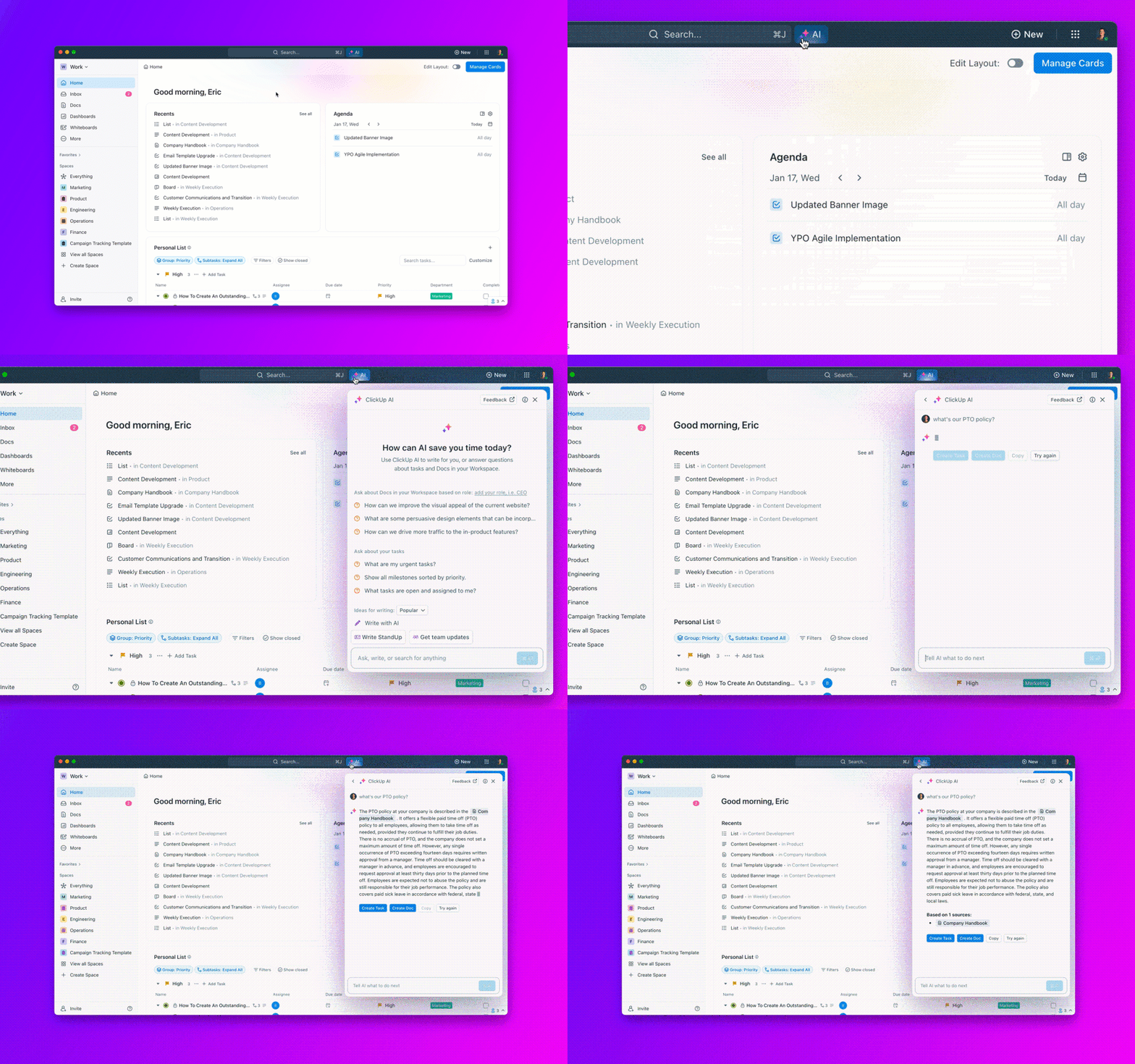
- Fast-track creativity and design processes using ClickUp Brain, a built-in AI assistant. You can create design personas, user journeys, and much more with prompt-based instructions. This way, your design processes will be automated, and your teams will become more productive over time
- Share mockups, capture ideas, and gain feedback across your team with ClickUp Whiteboards. This helps you run effective brainstorming sessions and capture all your ideas for better context and fewer surprises in the later stage
- With ClickUp Goals, you can visually organize your ideas, explore how different principles can be applied, and collaboratively define how you’ll achieve your design goals
- Create clear task lists within ClickUp Tasks, outlining specific actions related to each design principle. Assign dependencies to ensure tasks are completed in the proper sequence, maintaining a logical flow that prioritizes the application of these design principles

- Visualize your design process using the ClickUp Kanban Board View. You can move tasks through different stages (e.g., “Concept,” “Refine,” “Approved”) and track progress to ensure each design iteration adheres to the established principles. Additionally, use ClickUp Gantt Chart View to visualize deadlines and dependencies within your design project

- With ClickUp Automations, you can automatically assign tasks, post comments, update statuses, and perform multiple actions, streamlining the design process. This allows you to dedicate more time to creative tasks and less to routine administrative work
Summarize this article for me pleaseImplement the Principles of Design in Your Workflow Using ClickUp
Remember, the design process is a journey, not a destination. Implementing design principles means seamlessly integrating them into every stage of your creative workflow.
While many web design tools can create impressive designs. ClickUp helps you go beyond the basics by seamlessly integrating design principles into your daily processes. From brainstorming and collaboration to task planning and adherence to best practices, ClickUp empowers you at every step.
This tool acts as your central hub for design management, keeping design projects organized, teams aligned, and creative workflows uninterrupted. So, what are you waiting for?
Sign up on ClickUp to implement design principles effortlessly and elevate your creative outcomes today!


Everything you need to stay organized and get work done.

Recent Articles
How AI Agents Help Designers Without Killing Creativity 
How AI Agents Help Designers Without Killing Creativity

