


Sorry, there were no results found for “”
Sorry, there were no results found for “”
Sorry, there were no results found for “”
Project updates need not be painful. Nor do they need to have you drowning in spreadsheets.
They can be exciting, instead. Imagine clearly overseeing the big picture—the interconnectedness of every task, the subtle shifts in momentum, and the emerging patterns that could make or break your project.
As a project manager who’s been there and done that—wrestling with endless email chains and deciphering countless confusing reports—I’m here to share the tools that have helped me achieve my goals.
I’ve compiled a list of the best 15 status reporting tools as my top recommendations. These recommendations are based on my experiences with status reporting tools and the ClickUp team’s research.
Here are the top 15 status-reporting tools:
When you’re choosing a status reporting tool, there are a few key features to keep in mind:
Creating a clear and accurate picture of your project’s progress begins with effective status reporting. This analysis helps identify potential roadblocks and delays, ensuring that you address the areas that need attention, proactively. There’s a tool for every reporting style—you just have to find the one that best fits your team’s needs.
I’ll now cover all the status reporting platforms that offer the essentials for creating and sharing insightful project updates.

If you’re looking for a tool that goes beyond basic status reporting, you’ll be as thrilled to discover ClickUp for Project Management as I was.
The average knowledge worker switches between different applications nearly 1200 times per day. This constant context-switching costs organizations up to 9% of productive time per employee annually.
As the everything app for work, ClickUp consolidates your tasks, goals, notes, and conversations into one interface. This, plus the platform’s native AI, makes it easier to visualize and report on all your projects—without switching across dozens of siloed apps.
📮ClickUp Insight: Context-switching is silently eating away at your team’s productivity. Our research shows that 42% of disruptions at work come from juggling platforms, managing emails, and jumping between meetings. What if you could eliminate these costly interruptions?
ClickUp unites your workflows (and chat) under a single, streamlined platform. Launch and manage your tasks from across chat, docs, whiteboards, and more—while AI-powered features keep the context connected, searchable, and manageable!

Track project progress using ClickUp’s Custom Task Statuses which clearly show whether a task is to-do, in progress, or done. But don’t limit yourself to these categories. For instance, you can tweak these labels to ‘Design’, ‘Develop’, ‘Test’, and ‘Ready’ for your software projects or ‘Pending’, ‘Packaged’, ‘Shipped’, and ‘Delivered’ for your eCommerce orders.

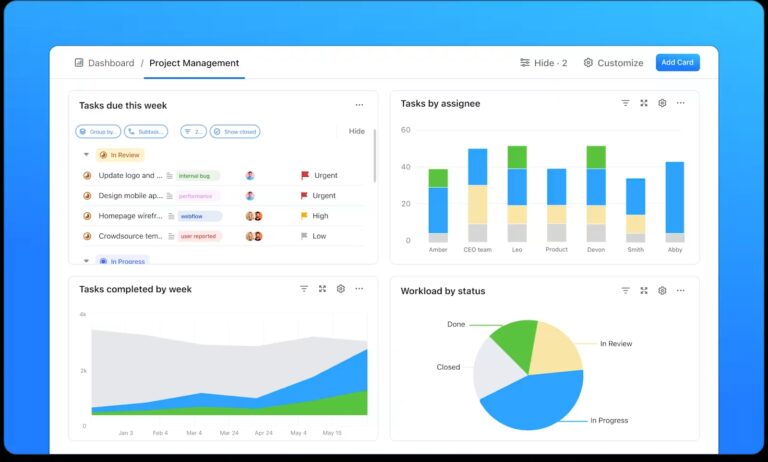
Consolidate this information across multiple tasks and projects (yes, even cross-functional ones!) using ClickUp Dashboards. Its 50+ custom cards, including pie charts, bar graphs, burnup and burndown charts, line graphs, and more, are excellent for real-time project monitoring and status-reporting automation.
Want to learn how to create a project management dashboard? Here’s a step-by-step explainer!
ClickUp Brain also enhances status reporting by using AI-powered insights, automation, and knowledge management to streamline updates and decision-making. You can use it to:


If you prefer the structure of classic OKRs in goal setting, you would also love the ClickUp Goals feature.

I used this to set up time-bound goals and add target metrics or completion percentages. Based on my experience with ClickUp alternatives, I believe ClickUp Goals is the easiest way to quantify progress and get clarity on what’s needed for success.
ClickUp’s pre-built templates further simplify status reporting by offering structured formats for tracking project progress and goals.
ClickUp’s Project Status Report Template is ideal for organizing updates, action items, and project highlights, giving stakeholders a comprehensive view of project status in one place.
You can regularly update the template with key metrics or milestones to maintain a clear snapshot of project progress. Customize the template sections to sync with your team’s unique reporting needs, such as adding a risk assessment section if your project has complex dependencies.
Use the Goals and OKRs feature alongside the project status report template to keep performance targets and project updates linked for easy reference.
💡Pro Tip: Create a custom view in your ClickUp Dashboard that filters tasks by:
⛳️ Status (e.g., “In Progress,” “Blocked”)
⌚️ Priority (e.g., “High Priority” only)
📆 Due Date (e.g., “Tasks due this week”)
Save different filtered views for executives, team leads, or specific departments to give them only the insights they need—no fluff.
ClickUp’s built-in features made it easy to set up projects, track deadlines and generate reports. The ability to assign tasks and track progress was very helpful, and it comes with a lot of pre-designed templates that can be used. We were able to delegate responsibilities to different team members, set priorities, and monitor the status of each task in real time. Projects stay on schedule because there is less confusion and more individual accountability.
💡Pro Tip: Schedule weekly, monthly, or quarterly status report meetings to review goal progress. Use ClickUp Goals during these meetings to update team members on what’s been accomplished and what still needs attention.

You will find Trello useful if you need simplified, visual status reporting Its intuitive Kanban board system and card-based layout lets you organize and track tasks visually.
Each card represents a task. You can drag and drop tasks into different stages and label them based on priority. You can also add more context on the task within the cards, ensuring easy access to information like task due dates and assignees. Trello is a fit for for teams looking for a straightforward, visually appealing way to keep track of status updates.
🧠 Fun Fact: The name Trello comes from the word trellis, which was the codename for the project in its early stages.

Asana is known for its simplicity and straightforward features for project management, which include task assignments, real-time status tracking, and detailed reporting options.
Asana’s timeline view can help you easily track project progress, while its portfolio feature offers a simultaneous overview of multiple projects. I found this useful for project managers handling several teams.
I loved being able to separate tasks out between multiple departments and then sub tasks within department themselves. I’ve used both Asana and ClickUp, and I felt that Asana had a weaker UI and wasn’t as intuitive or easy to learn.

I used Monday.com to build workflows and dashboards while collaborating with multiple teams. Its customizable workflows and visual interface make it ideal for collaborative projects with dynamic status reporting.
The visual status tracking is intuitive, and the tool integrates well with the most commonly used apps, such as Slack and Google Workspace.

Airtable combines the functionality of a spreadsheet with the power of a relational database, offering a unique way to manage project data and track status across tasks.
I have experimented with this platform to implement RAG status tracking and customize several status report formats. It easily lets you create a grid, calendar, Kanban, or gallery view to visualize project status.

Basecamp is a straightforward project management tool that simplifies team communication.
It includes a distinctive ‘Hill Charts’ feature that intuitively allows teams to update and track project progress. Team members use it to drag project scopes into position, visually representing work status.
This gives managers a powerful second-order view that shows the current status of each task and how work is progressing and evolving over the duration of the project.
🧠 Fun Fact: Basecamp was initially developed as an internal tool for 37 signals to manage projects and clients.

👀 Did You Know? Lack of access to necessary information negatively impacts the morale of 88% of employees.
Smartsheet combines the familiarity of a spreadsheet with project management capabilities.
The platform allows users to build sophisticated status reports with multiple columns tracking initiatives, ownership, progress, and contextual notes. Teams can leverage cell linking to automatically pull data from existing project tracking sheets, reducing manual reporting effort.
Smartsheet makes it possible to plan, track, automate, execute and report on work in real-time. I like that Smartsheet has robust backed integration capability which help connect with a wide range of external apps such as Okta, Tableau, Google Calendar etc.

An advanced project management software, Wrike comes with built-in tracking and high-precision status reporting capabilities. It’s designed to help teams stay organized and productive.
The platform offers multiple data visualization methods, including pie charts, graphs, and dynamic activity streams that chronologically display tasks and project milestones. You can also analyze time-based trends by month, quarter, or year, helping teams gauge project trajectory and spot potential issues early.
Wrike has implemented a dashboard that allows us to create better transparency. This transparency is not just for the program team but also for people outside of our program. We have implemented a weekly readout that goes to many stakeholders to help keep everyone informed of our progress across our project portfolio.

I found Notion quite versatile and valuable for teams looking to consolidate project status updates with team documentation in one place.
Notion’s status property allows for granular tracking, preventing the common pitfalls of inconsistent status reporting. The system prevents team members from creating undefined status categories, ensuring standardized communication.
You can add custom fields like project milestones, challenges, and next steps, creating comprehensive status reports that provide deep insights into project progression.

Zoho Projects offers customizable dashboards that allow project managers and teams to quickly get an overview of the project status, task progress, and chosen KPIs.
The platform’s reporting system includes innovative features like chronology Gantt charts, resource utilization graphs, and variance reports that help teams understand project trajectory and potential risks. Users can easily slice and dice project data, creating insightful visualizations without requiring technical expertise.
Small businesses need to keep track of each project individually at a micro level and Zoho projects provides a pocket friendly way to do just that. The UI and set up are too complex, would have been nice to have clear youtube tutorials or an AI that could set up the tasks for you.

Atlassian’s Jira is popular among Agile teams, especially for software development projects. It offers detailed status tracking for tasks, sprints, and issues.
Though ClickUp does a better job here, I still like the variety of built-in reports it offers, including burndown charts, velocity charts, and sprint reports that Agile teams will find very useful.
One of Microsoft Project PPM’s key strengths is its ability to help you manage entire portfolios of projects. Portfolio managers can view the status of all projects within the portfolio, prioritize them based on strategic objectives, and adjust resources and timelines to ensure successful outcomes.
This is particularly useful for senior leadership and stakeholders who must make informed decisions about project prioritization.

Although Hive is a versatile project management tool offering various customization options and collaboration features, I liked its automated reporting the most.
Automated reports can include task progress, project health, team performance, and upcoming deadlines. You can also schedule regular updates for them to send to stakeholders, saving time on status-tracking.
It is easy to access as it is compatible with a variety of operating systems. When I start new projects, I can keep track of the ongoing ones. My favorite aspects are the division of projects by phases, the customizable timeline, being able to budget/schedule, and set a defined framework. The labels and colors help me individualize and highlight project phases for a better overview and control.
For teams seeking to boost engagement and motivation through data transparency, Plecto specializes in creating real-time dashboards that visualize project status.
Beyond traditional reporting, Plecto incorporates gamification elements like live performance notifications, competitive tracking features, and real-time recognition. This approach transforms reporting from a mundane task into an interactive, motivational tool that drives organizational performance.

Geckoboard is designed for real-time reporting and data visualization. It transforms data tracking by providing context through goals, status indicators, and real-time updates.
It is ideal for managers who need quick snapshots of key metrics and works well for teams focused on customer support, sales, and other performance-driven functions.
This is a wonderful way to share KPIs with your team in a visually-pleasing way. The easiest way to build dashboards that are both meaningful as well as effective.
My top work priorities are monitoring project progress for our editorial ops and ensuring seamless team communication. After evaluating all these tools, ClickUp remains my top recommendation.
ClickUp Dashboards let you create customized reports with custom cards for task progress, workload, time tracking, and more, while Goals let teams track objectives, key results, and progress in a structured way, aligning everyone with company priorities.
What makes ClickUp different is its all-in-one project management capabilities. It can adapt to multiple project types, scale for all sizes of projects and organziations, and doesn’t need you to modify your existing workflows.
Its ability to integrate various project management features into a single platform makes it invaluable for anyone looking to improve project transparency and reporting.
So, why wait? Try ClickUp for free and replace your scattered tools with a single, powerful project management solution.

Manasi Nair
Max 24min read
Manasi Nair
Max 30min read
Manasi Nair
Max 28min read

© 2026 ClickUp





