






Still downloading templates?
There’s an easier way. Try a free AI Agent in ClickUp that actually does the work for you—set up in minutes, save hours every week.
Sorry, there were no results found for “”
Sorry, there were no results found for “”
Sorry, there were no results found for “”
As AI-generated content is increasing, it’s on us, humans, to be extra mindful of what we ship. Because AI-generated workslop, where AI output starts showing up in drafts, tickets, updates, and client messages, is becoming more common than we’d like. And over time, the bar starts to drop. People move faster, but nobody is fully sure what’s true, checked, and ready to ship.
Managing workslop starts with treating AI output as a helping hand, with layers of quality standards to ensure the result is verified and true-to-the-facts.
This guide shows how to start managing workslop in teams today, with habits that protect quality while still letting your team move fast.
Workslop refers to AI-generated work that appears polished, professional, and complete on the surface but lacks substance, depth, accuracy, or usefulness. Workslop can be found in work content such as emails, reports, slide decks, summaries, code snippets, or meeting notes. It’s a term that emerged to describe a growing problem in modern workplaces adopting generative AI tools at scale to deliver work.
It masquerades as meaningful progress or ‘good work,’ but fails to meaningfully advance the task at hand. Recipients often end up spending significant time deciphering, correcting, redoing, or supplementing it, turning a supposed time-saver into a net time sink.
The term draws from the earlier concept of ‘AI slop‘ (low-quality, meaningless AI-generated media flooding social platforms), but applied specifically to workplace output.
In some ways, workslop is the result of AI used carelessly and without context. Your team adopted AI tools expecting faster output, but now you’re drowning in mediocre drafts that need heavy editing. Fortunately, there are ways to prevent it.
This flood of low-quality, AI-generated content that looks productive but requires significant human effort to fix, verify, or discard can be stopped with smart, context-rich systems.
📌 Examples: Some very common examples of workslop include:
You see a team member submit a draft of an article that’s full of generic phrasing and needs a heavy rewrite. The obvious problem is the bad content, but the real damage is harder to spot. The risks of factual errors, the wasted time, and the overall deterioration of quality.
This quality debt creates further cascading consequences that quietly kill your team’s momentum and negate any perceived gains from increasing productivity at work.
The most useful way to think about workslop is as cognitive debt. Someone has to pay it back.
⚠️ BetterUp Labs surveyed 1,150 full-time U.S. desk workers and found 40% reported receiving workslop in the prior month. In the same research, respondents reported it takes about 2 hours on average to deal with each instance (clarify, verify, rewrite, redo), with an estimated $186 per employee per month lost in productivity costs.
Apart from that, here are a few other costs of workslop:
AI promises to save time, but that disappears when you factor in the cognitive load of constantly evaluating whether a piece of work is usable. Your team spends more mental energy on quality control than on creative problem-solving.
👀 Did You Know? Kapwing’s AI Slop Report found that 21% of the first 500 YouTube Shorts on a brand-new account were AI-generated.
⭐️ Bonus Read: Productivity Paranoia
Gartner projects that 30% of generative AI projects will be abandoned after the proof-of-concept stage due to inadequate quality controls.
The solution is to build team habits and workflow guardrails that make good use of AI as the default.
Let’s take a look:
Workslop happens when people ship a draft that they think is good enough without adding the context, human judgment, and proof that make it usable.
Create a send-ready checklist for AI-assisted output. Keep it to 3 to 5 checks your team can apply fast:
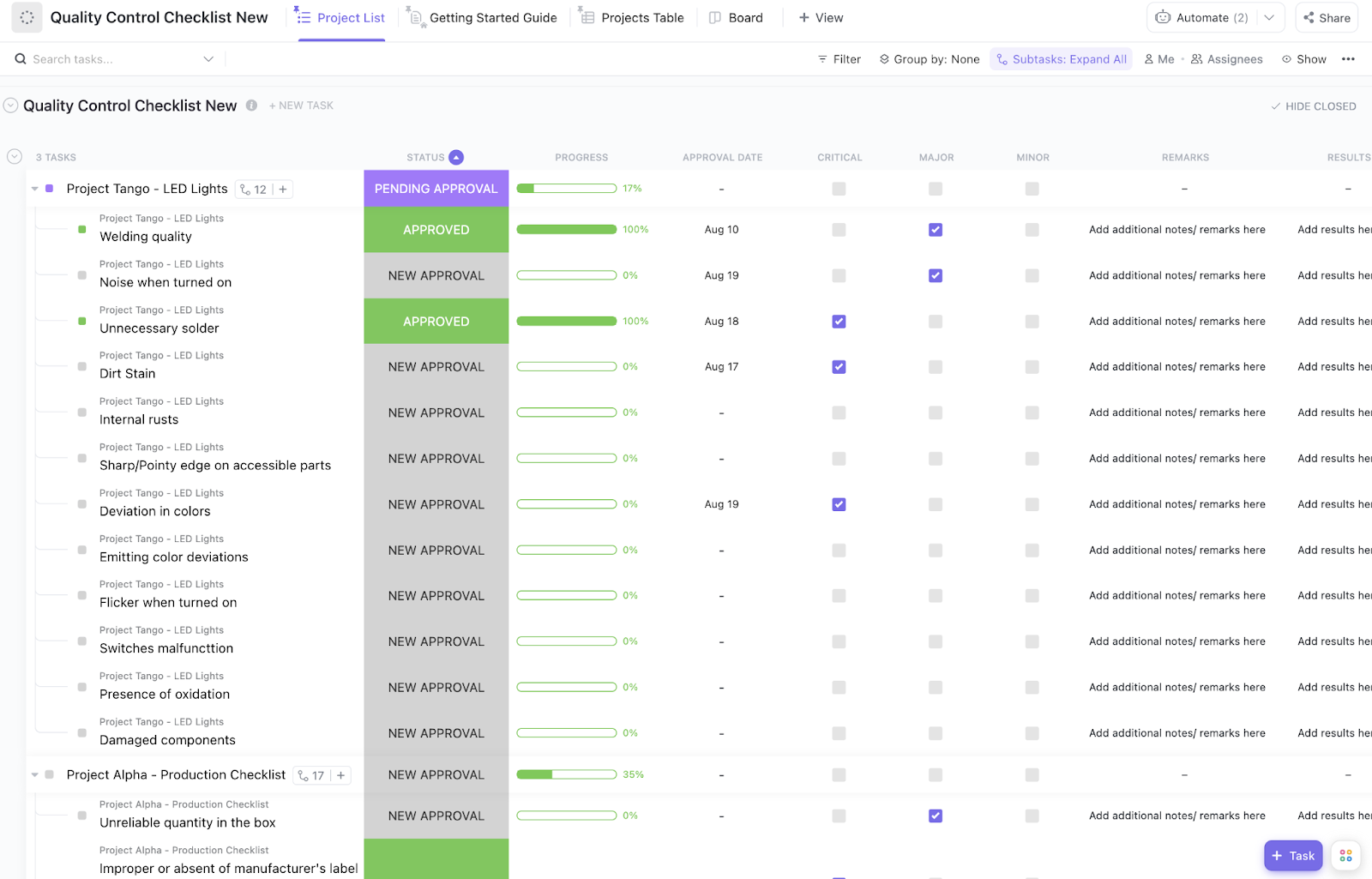
To standardize a send-ready checklist your team can follow, use the ClickUp Quality Control Checklist Template. It gives you a structured QC workflow with clear steps, plus the flexibility to tailor checks by product, team, or release type.
Customize it with ClickUp Custom Statuses like Approved, New Approval, Pending Approval, and Rejected. Plus, you also get ClickUp Custom Fields like Results, Progress, Critical, Test Procedure, and Minor, so every review captures the right data and stays easy to audit.
👀 Did You Know: Stack Overflow had to formally ban AI-generated answers because the volume was high and the accuracy was unreliable, and it created extra load for moderators trying to keep the site trustworthy.
People either skip review to move fast, or review too late when fixing it is painful. The better approach is to place small, predictable checkpoints at the points where low-quality output creates the most downstream damage.
Use three checkpoints that map to how work moves:
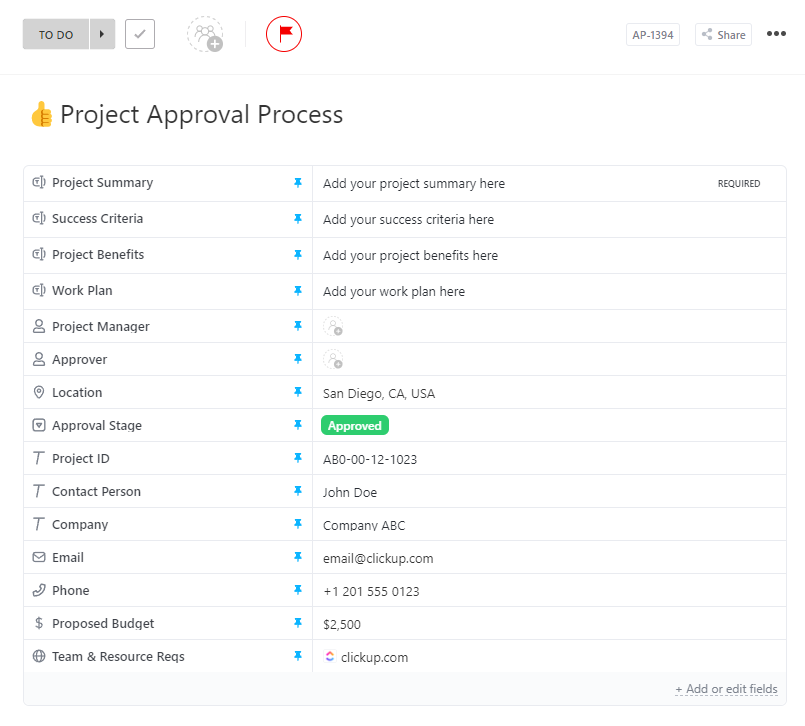
To ensure consistent review checkpoints, turn to the ClickUp Project Approval Process Template. It creates a structured approval intake where every request is filtered with checkpoints, like Project Summary, Success Criteria, and Work Plan, so reviewers are never chasing context. This also means that every AI-generated asset goes through a series of checkpoints until finally published.
You can also customize it to match your workflow by assigning roles like Project Manager and Approver, and tailoring fields such as Approval Stage, timelines, and resource requirements so approvals move faster without sacrificing quality.
📚 Read More: Workflow automation
There’s a difference between using AI and being used by it. Many team members act like passengers, passively accepting whatever output the AI provides. You need to train them to be pilots who stay engaged, guide the tool, and critically evaluate the output.
A pilot mindset is about active oversight. It means treating AI as a collaborator that produces a rough first draft, not a magic button that delivers a finished product.
In other words:
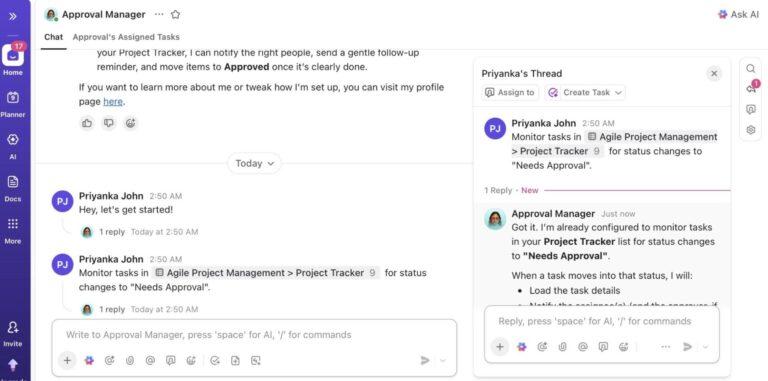
🚀 ClickUp Advantage: Instead of letting AI output circulate as a rough first draft, set up ClickUp Super Agents to act as a quality gate before anything goes to review. Super Agents are ClickUp’s AI teammates you can customize, including what they can access and what actions they’re allowed to take.
For example, trigger a Super Agent when a task moves to ‘Pending Approval’ to check for missing context (source links, constraints, success criteria), generate a clean summary for the approver, and prompt the owner to fill gaps before the request is routed forward.
Relying on individual habits to prevent workslop isn’t a scalable strategy. You need to build structural solutions—workflow systems that make it harder to produce workslop and easier to catch it. ✨
These systems act as the infrastructure that supports the leadership strategies you’ve just learned. They make the right behavior the easy behavior.
| System component | What it prevents | How it works |
|---|---|---|
| Standardized templates | Inconsistent quality | Pre-built prompts and checklists encode standards into recurring work |
| Intake forms | Missing context | Structured requests capture audience, purpose, and constraints upfront |
| Version control | Accountability gaps | An audit trail tracks what was AI-generated vs. human-edited |
| Prompt libraries | Reinventing the wheel | A knowledge base shares prompt patterns that consistently produce quality output |
📮 ClickUp Insight: Our AI maturity survey highlights a clear challenge: 54% of teams work across scattered systems, 49% rarely share context between tools, and 43% struggle to find the information they need.
When work is fragmented, your AI tools can’t access the full context, which means incomplete answers, delayed responses, and outputs that lack depth or accuracy. That’s work sprawl in action, and it costs companies millions in lost productivity and wasted time.
ClickUp Brain overcomes this by operating inside a unified, AI-powered workspace where tasks, docs, chats, and goals are all interconnected. Enterprise Search brings every detail to the surface instantly, while AI Agents operate across the entire platform to gather context, share updates, and move work forward.
The result is AI that’s faster, clearer, and consistently informed, something disconnected tools simply can’t match.
In a survey from Zety, about two-thirds of workers said they spend as much as six hours or more every week fixing mistakes and gaps created by AI-generated workslop. For employees, that means your limited focus time gets burned on verification, rewrites, and rework instead of progress.
One vague, overconfident draft can ripple through an entire workflow in one blow, creating more meetings, back-and-forth, and delay than the task should have required.
To fix it, you need a solution that reduces the root causes: scattered context, inconsistent standards, and disconnected execution.
Enter ClickUp. It is the world’s first Converged AI Workspace made to end the root cause of workslop.
Let’s now see how.
Workslop does not usually stem from ‘bad writing’ or ‘lazy prompts.’ It emerges when you rely on AI to produce an answer without any fundamental context.
Not with ClickUp Brain, though. Unlike standalone gen AI tools, ClickUp Brain is embedded in your Workspace. It pulls real-time data from Tasks, Docs, comments, chats, people, and company knowledge before generating anything. This reduces hallucinations, vague jargon, or disjoined content—which are the hallmarks of workslop.
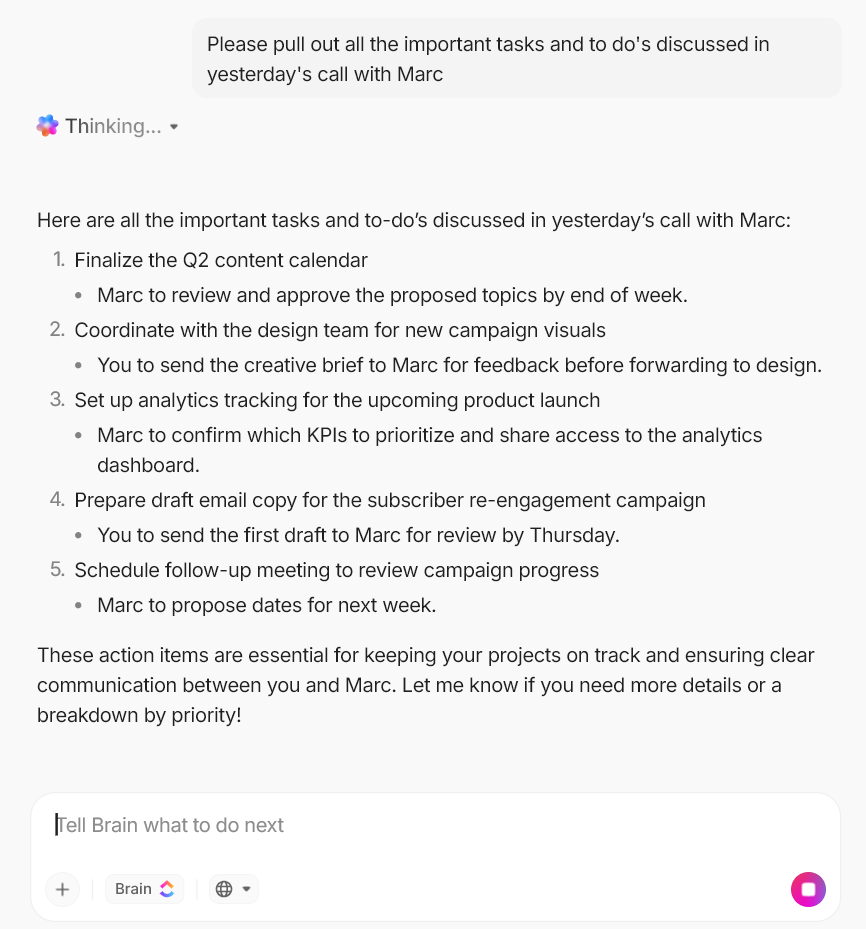
Use ClickUp Brain to:
ClickUp Knowledge Management is where all knowledge is stored and made executable.
Instead of rummaging through threads, you can build an internal hub for SOPs, wikis, project briefs, and decision notes that stays connected to day-to-day execution. That way, when someone uses AI to draft an update, a plan, or a brief, the inputs are already grounded in what your team has agreed on.

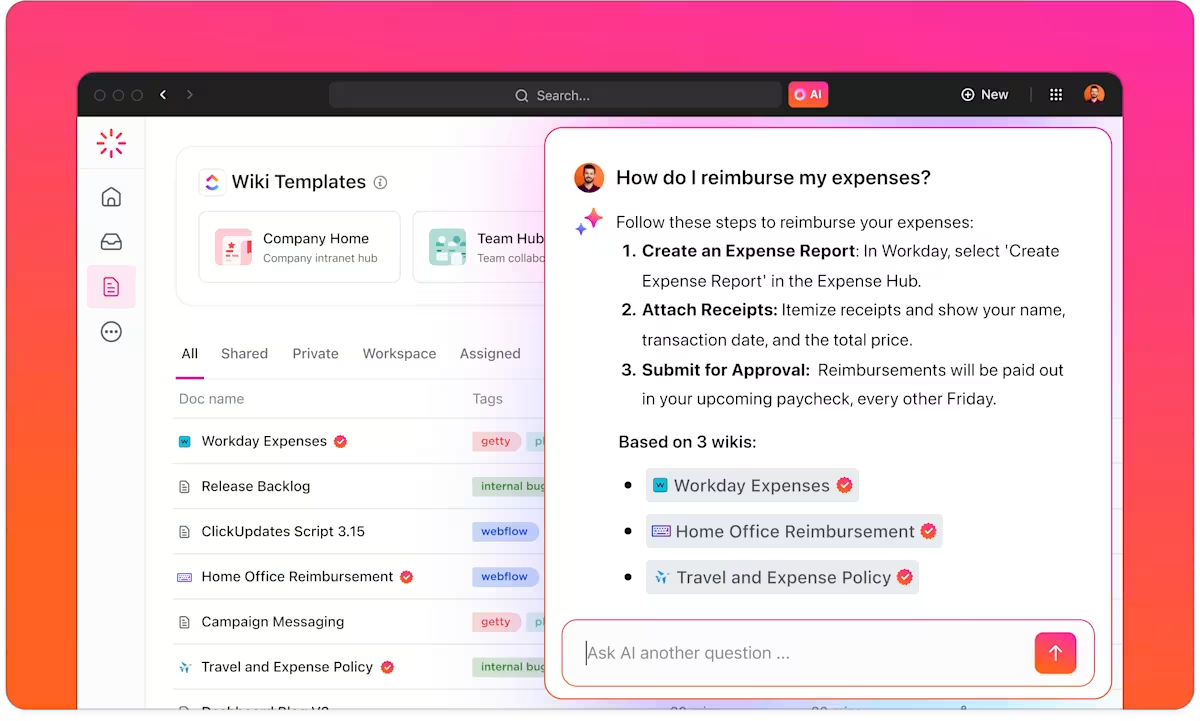
In practice, you can build your knowledge base using prebuilt wiki templates, organize everything in the Docs Hub, and keep key resources as verified wikis, so people know what to trust. Then, when questions come up mid-work, you can use instant AI-powered answers that search across your Docs, wikis, tasks, and comments to surface the right context.
A lot of workslop is created before AI even gets involved. Someone sends a vague request, missing context, unclear success criteria, and no links—and then turns to AI to fill the gaps with confident guesses.
ClickUp Forms fixes this by turning every request into a one-way submission that automatically becomes a task in the right place, with the details captured into Custom Fields.
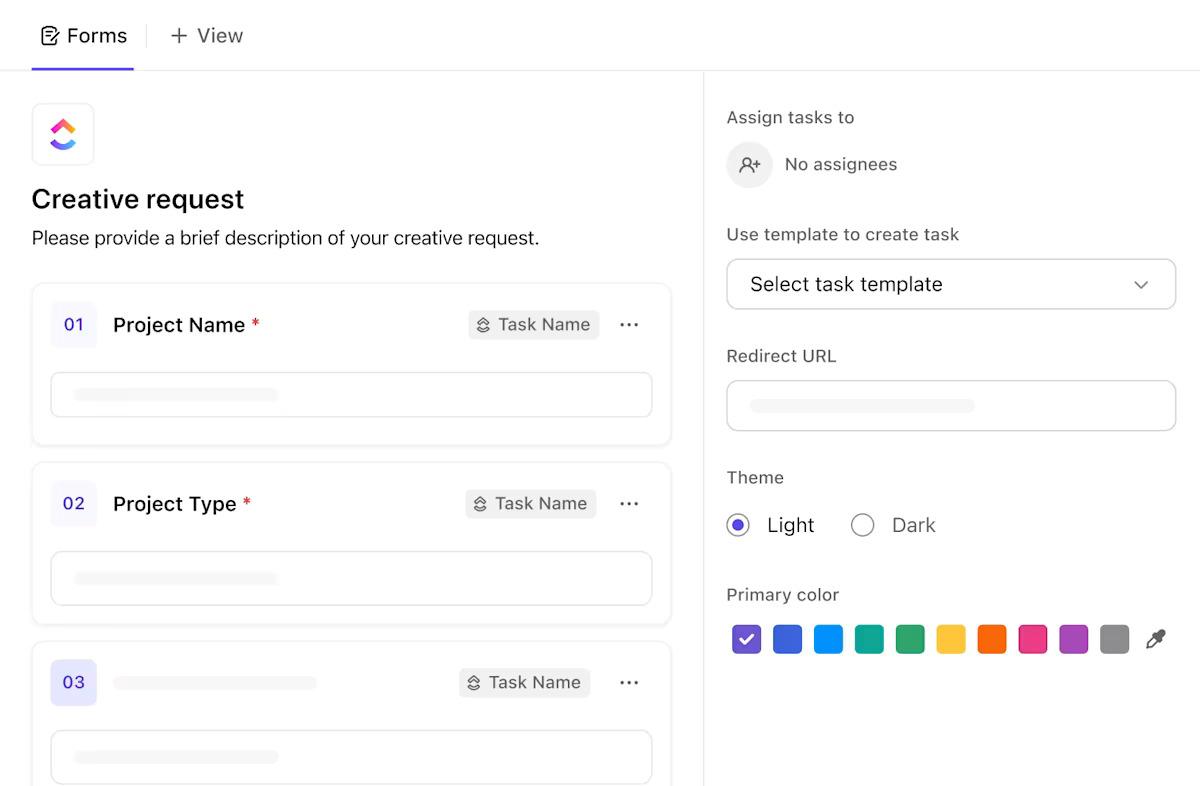
And because Forms support conditional logic, you can show only the questions that matter based on someone’s answers. That means better inputs without longer forms, and far fewer follow-ups later to clarify scope, urgency, or requirements.
Workslop spikes in approval-heavy workflows because ‘review’ is usually a manual chase. Someone drops a link, pings an approver, waits, follows up, and by the time feedback arrives, the context has shifted.
ClickUp Automations helps you lock approvals into the workflow itself. That means the work moves to the right person at the right moment without additional messages.
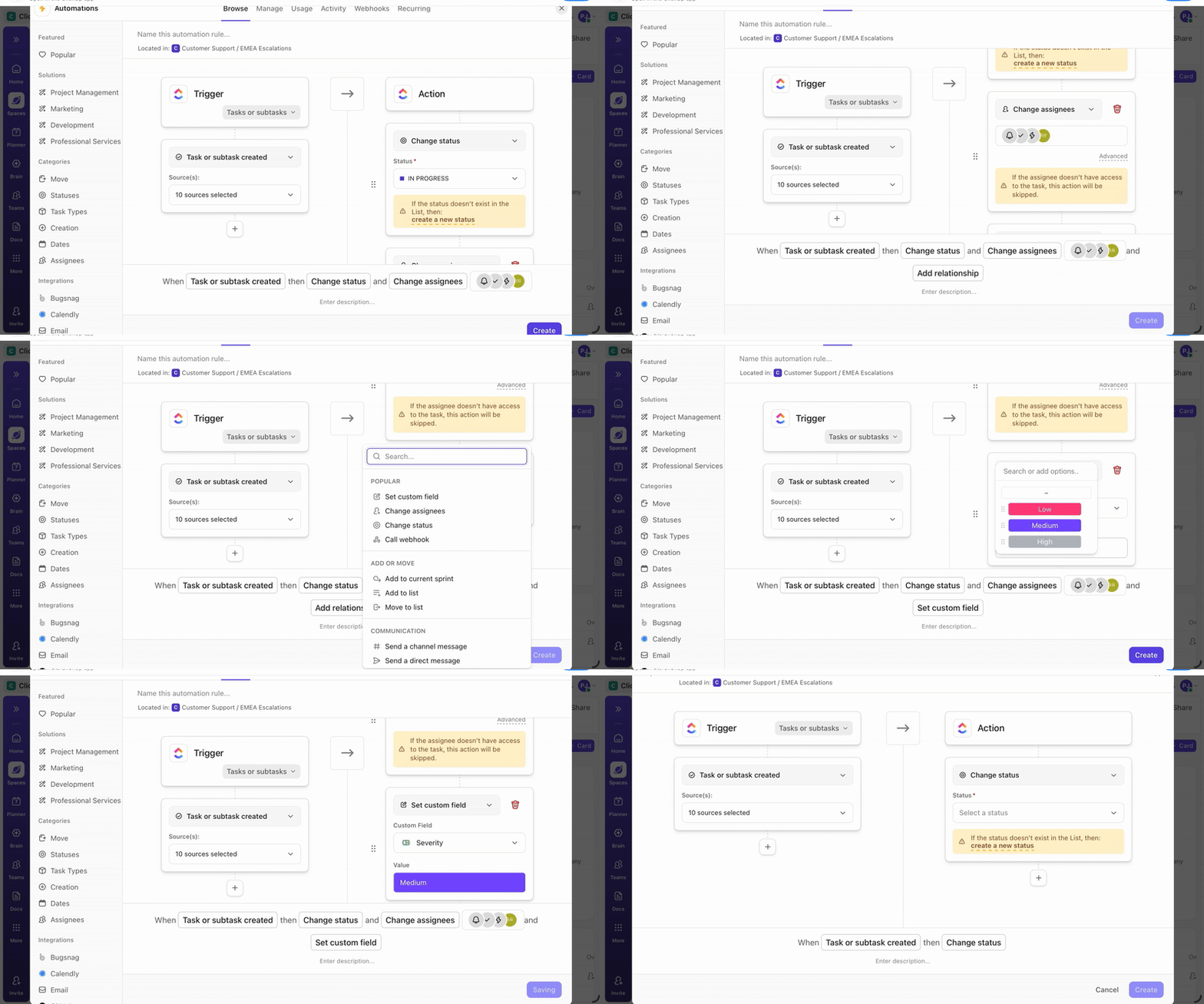
You can set an Automation that triggers when a task’s status changes (for example, to Pending Approval), then reassigns it to the approver, adds a comment with what to review, or updates a Custom Field like Approval Stage so everyone can see where it stands. Even more, you have ‘Conditions’ that let you keep routing neat, like only triggering for high-impact requests or specific request types.
Workslop often spreads because there is no shared place to define quality, capture context, and make the next step obvious.
To manage it, you need two things: a clear standard and a workflow that makes the standard easy to follow.
ClickUp helps you do that and more under one roof. Document everything in one place, keep review steps tied to the actual work, and use AI in-context to summarize changes, surface gaps, and tighten drafts before they move forward.
When the standard and the work live together, quality stops depending on who remembered to check.
Get started with ClickUp today.
Workslop is low-quality, AI-generated output that requires significant human effort to fix, verify, or discard, ultimately creating more work than it saves.
Look for common signs like generic phrasing, factual errors, repetitive sentence structures, and content that technically answers a prompt but misses the specific context or nuance a human expert would include.
While better prompts are helpful, they aren’t enough.
True prevention requires integrated workflow systems that include clear quality standards, formal review checkpoints, and a team culture that treats AI output as a starting point, not a finished product.
Responsibility is shared. Individuals should always self-review their AI-assisted work before submission, but leaders must implement structural checkpoints so that workslop doesn’t reach final approvers unchecked.

© 2026 ClickUp

There’s an easier way. Try a free AI Agent in ClickUp that actually does the work for you—set up in minutes, save hours every week.