
Sorry, there were no results found for “”
Sorry, there were no results found for “”
Sorry, there were no results found for “”
Imagine a place where answers, resources, and solutions are just a few clicks away. That’s the power of a well-organized knowledge base—it transforms chaos into clarity.
A knowledge base helps users find answers quickly, reducing frustration and boosting productivity. But without a strong search function, even the best content can get lost.
That’s why optimization is key—ensuring every query leads to the right solution.
Read on to discover how to enhance your knowledge base search and make every interaction smoother for your users. 🚀
We also touch on how knowledge base search works, how to build an internal knowledge base system, and the best internal knowledge base software to help you do it!
Here’s what you need to know about knowledge base search:
The effectiveness of search capabilities is the key to keeping your knowledge base users happy. A well-optimized search enables faster access to accurate and relevant information, ensuring seamless knowledge transfer and retrieval.
Here’s why search optimization is crucial for knowledge-base users:
💡 Pro Tip: Wondering how to become a knowledge base manager?
Here are some strategies to follow:
Optimizing your knowledge base search functionality is critical for improving user experience and making information easily available.
Below are some suggested practices to consider:
Implementing a knowledge-based search system is like creating a powerful tool that connects users to the answers they need quickly and easily.
Here’s how to make it happen:
Begin by defining the purpose of your knowledge base search system. Whether it’s helping customers quickly find solutions or providing documentation for your support team, a clear vision ensures that the system meets the specific needs of your users and guides the entire implementation process.
Before diving into implementation, evaluate your current knowledge base. Are your articles current and well-organized? Understanding the state of your existing resources helps identify gaps and informs your strategy for improvement.
Look for knowledge base templates or tools that include advanced search tools, such as natural language processing, autocomplete, and filtering. A user-friendly interface is also beneficial, as your team and users will appreciate it. Here’s how ClickUp functions as a knowledge management tool. 👇🏼
Your content needs a clear structure for easy navigation. Use categories, subcategories, and tags to keep information accessible. Think of it as creating a digital filing system where every piece of content has a specific place.
Enable your search feature to manage complex tasks. Predictive search, autocomplete, and filters for search results transform a simple query into a precise result. This enhances the user experience, making it functional and enjoyable.
Before going live, test your system thoroughly. Test it with multiple teams or simply a small group of users. Pay heed to their feedback: what works and what doesn’t? Use it to finetune the system.
When your search system is ready, make sure everyone understands how to use it. Provide training sessions or brief lessons, and emphasize cool features that they may not see. The more confident individuals are in using it, the more value they will derive.
Launching your system is only the beginning. Set up metrics to track its progress, such as how many searches return useful results or how many support issues are reduced. Use this data to improve over time.
When it comes to optimizing knowledge sharing, it’s crucial to create systems and processes that make information easily accessible and usable.
Here are some steps to follow to optimize knowledge management:
Think of your workplace as a big potluck dinner. Everyone brings something unique to the table, but only if they feel welcomed and valued. Encourage your team members to contribute their thoughts, observations, and lessons gained. When people sense their contributions are valued, they will automatically provide more.
Use intuitive tools like wikis, shared drives, and cloud platforms to simplify information storage, organization, and retrieval. These tools enhance engagement and ensure that valuable knowledge is always accessible.
Why wait for an issue to inspire collaboration? Create regular opportunities for your team to share what they know. Consider brainstorming meetings, quick “how-to” demos, or simply casual coffee discussions where folks share what’s working for them. These rituals result in a continuous flow of thoughts.
Everyone enjoys receiving some form of appreciation. Give a shoutout to team members who go above and beyond to share their knowledge. Showing thanks, whether through a statement in a meeting or a feature in the corporate newsletter, will inspire others to take action as well.
Ensure that everyone, from interns to senior leaders, has access to the same resources and feels encouraged to contribute to the internal knowledge base. Inclusivity builds trust and brings diverse perspectives, strengthening the team’s collective expertise.
If your knowledge base is your team’s or customers’ default resource, it should be more than a collection of articles; it should feel like a super-smart assistant that quickly provides the answers they require.
Here are some optimized knowledge management system examples that improve user experience and streamline information retrieval:

Zendesk Help Center: Known for its clean design and straightforward navigation, Zendesk’s knowledge base makes it simple to locate tutorials, FAQs, and support articles. The search bar is the focal point, offering quick and intuitive choices every time.

Nike Support: Nike’s support website is as elegant as its footwear. It’s simple, quick, and loaded with sophisticated search features, so you don’t have to go through endless pages to find what you’re searching for.
Optimizing knowledge base search can enhance user experience by enabling fast, relevant results.

Helpjuice: This tool aims to make your knowledge base smarter. With comprehensive search tools and real-time filtering, users find what they’re looking for without having to wade through irrelevant results.

Document360: Document360 stands out for its sophisticated search engine, which returns accurate, real-time results. It also has built-in statistics to assist you in understanding what consumers are looking for and what is lacking.
These tools make knowledge base search smoother, ensuring users find what they need quickly.
ClickUp, as the everything app for work, offers a range of tools designed to optimize search functionality within knowledge bases. Its features, including customizable filters, AI-driven search suggestions, and real-time collaboration, make finding relevant information faster and more efficient.
Whether managing internal resources or customer-facing knowledge hubs, ClickUp enhances user experience by streamlining how knowledge is organized and accessed, ensuring quicker and smarter results.

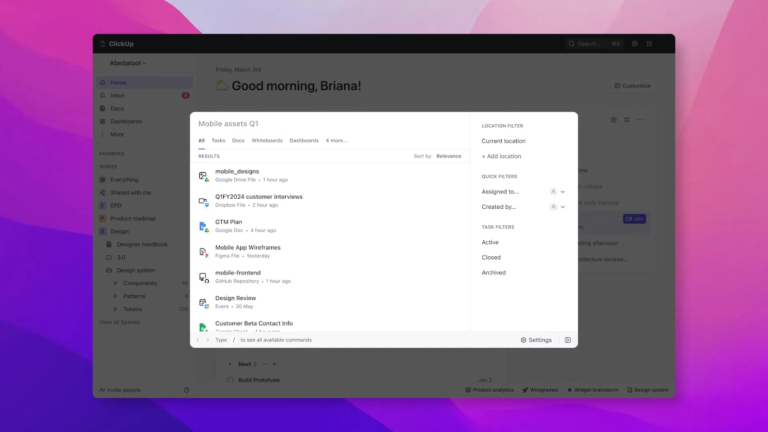
For instance, ClickUp’s Connected Search serves as your comprehensive resource for locating information across multiple knowledge bases. It allows you to search across Integrated third-party tools without leaving your workspace.
It helps you with:

ClickUp’s Connected AI makes searching seamless and intuitive. Even if your query isn’t perfectly phrased, ClickUp Brain understands it using natural language processing (NLP), delivering relevant results without the need for excessive scrolling.
It also suggests related tasks and documents, ensuring you have everything you need. As it learns over time, it adapts to better meet your team’s needs, providing smarter, more efficient search experiences.

ClickUp Docs and Wikis are the foundation of your knowledge base. They’re designed to keep everything nicely arranged and easily accessible. It lets you link a document to a task, assign it to a team member, and communicate in real time. You can also mark pages as wikis to ensure that your team has a single source of truth that is always up-to-date and easily accessible.
Plus, ClickUp offers customizable templates to optimize document creation and management, making knowledge sharing more efficient.
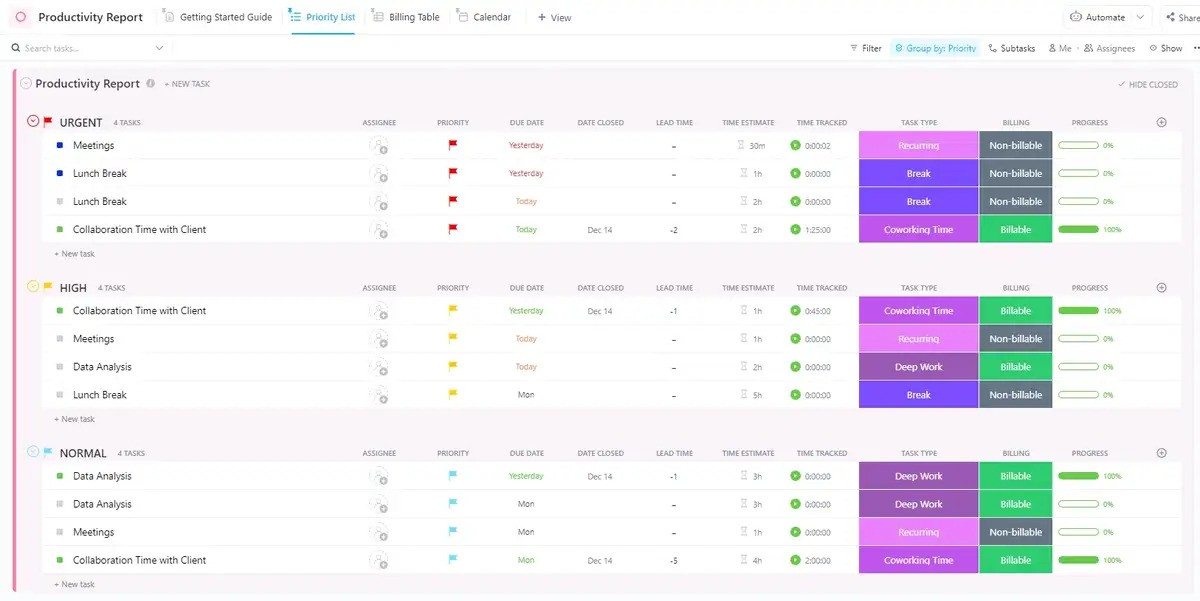
For instance, ClickUp’s customizable Knowledge Base Template offers an ideal starting point for creating an organized, searchable knowledge base. It allows for easy navigation with customizable categories and tags. This template is designed to help teams quickly set up a streamlined, efficient resource hub.
Ideal for: Teams and organizations looking to create a structured, user-friendly knowledge base for both internal and customer use.
What are real-life users saying about ClickUp?
Our company didn’t experience the project management tools before, but my team started using ClickUp to manage the project regarding Marketing activities. ClickUp provides me with an accessible overview, understandable and customizable what you would like to add or track with your team and projects. After that, I introduce it to the other teams. My company is much more organized and able to control the timeline on each project, tracking all activities that happen in there. I love the calculate function that gives you a quick review of numbers instead export them in excel and doing a manual calculation.
Even the best-designed knowledge bases encounter certain search functionality issues. Here’s how to address the most common difficulties and keep your knowledge base working smoothly:
A knowledge base requires ongoing attention to stay relevant. Regular updates, feedback collection, and performance monitoring ensure it evolves to meet user needs.
➡️ Also Read: 8 Best Practices for Managing Time with a Knowledge Base
Your knowledge management software bridges the gap between questions and answers, transforming confusion into clarity. Its effectiveness, like any tool, depends on how well it’s optimized.
ClickUp takes it to the next level by providing customizable templates, powerful search capabilities, and intuitive collaboration tools. These features optimize content organization, enhance real-time updates, and ensure seamless access across your team.
So why wait? Sign up on ClickUp to optimize your knowledge base and boost team productivity today!

Sudarshan Somanathan
Max 22min read

Manasi Nair
Max 23min read

© 2026 ClickUp