


You’re staring at a block of code that should work but doesn’t. You double-check the logic, sprinkle in print statements, and comb through documentation, yet the bug persists. Every fix leads to another dead end, turning what should’ve been a quick solution into a coding rabbit hole.
Even the most experienced developers hit walls when programming progress feels elusive. Developed by Anthropic, Claude AI is a large language model (LLM) that simplifies programming tasks, provides logical solutions, and handles automation with ease.
While other AI models like Google’s Gemini and GPT-4 excel in versatility, Claude is strong at handling logic-heavy problems and providing clarity in confusing moments.
In this blog post, we’ll explore how to use Claude AI as a go-to resource for programming assistance. 🎯
How to Use Claude AI for Programming Assistance

 Summarize this article for me please
⏰ 60-Second Summary
- Claude AI is a generative artificial intelligence (AI) chatbot and language model developed by Anthropic
- You can use and access Claude AI by following these steps:
- Visit the official website, log in, or create an account
- Explore the interface to start chats, revisit past conversations, or access support
- Update profile settings, set tone preferences, and integrate with tools like calendars for a tailored experience
- Claude AI helps with coding by generating code snippets, debugging, and explaining programming concepts with real-world examples
- It struggles with highly specialized or domain-specific queries that require deep contextual understanding beyond general training data
- Try ClickUp Instead: You can use ClickUp Brain to check your code and resolve queries, ClickUp Docs to document AI-generated code explanations, Automations to streamline AI-driven workflows, and ClickUp Dashboards to track AI-assisted development progress
Summarize this article for me pleaseWhat Is Claude AI and How Does It Work for Developers?
Claude AI is a generative artificial intelligence chatbot developed by Anthropic, designed to excel in natural language processing (NLP) and multimodal interactions. It processes and responds to text, audio, and visual inputs, making it versatile for many applications.
Built on the principles of Constitutional AI, it emphasizes ethical norms and safety in AI interactions. This approach aims to minimize biases and harmful outputs, providing users with trustworthy assistance in their programming endeavors.
Plus, it has advanced reasoning capabilities, helping it perform cognitive tasks beyond simple task generation.
Here are some key features and capabilities of the AI model. 📃
- Multilingual support: It supports languages like English, Spanish, French, Japanese, Portuguese, and German to cater to a global audience
- Contextual conversation management: The tool tracks context during multi-turn conversations, ensuring relevant and natural responses
- Code generation and debugging: You can rely on Claude to generate code snippets, troubleshoot bugs, and understand coding concepts in a straightforward way
- Large context window: With the ability to process up to 200,000 words at once, Claude is equipped to analyze lengthy documents or manage detailed, long-form discussions
🔍 Did You Know? Claude was specifically designed with safety at its core. Anthropic’s Constitutional AI aligns Claude with ethical principles, making it less likely to generate harmful or biased responses.
Summarize this article for me pleaseHow Do You Use Claude AI Effectively for Programming Tasks?
Using Claude AI effectively starts with logging in, understanding the interface, and tailoring response preferences like tone, language, and verbosity. Customization options and multi-turn context tracking help refine outputs, while advanced users can extend functionality through APIs and task automation for coding workflows.
You must go beyond fundamental interactions to get the most out of Claude AI.
Here, we’ll guide you through how to set it up and use AI for software development. From refining prompts to integrating advanced features, these tips will ensure it becomes a reliable tool in your kit. 🧰
Step #1: Log in or register
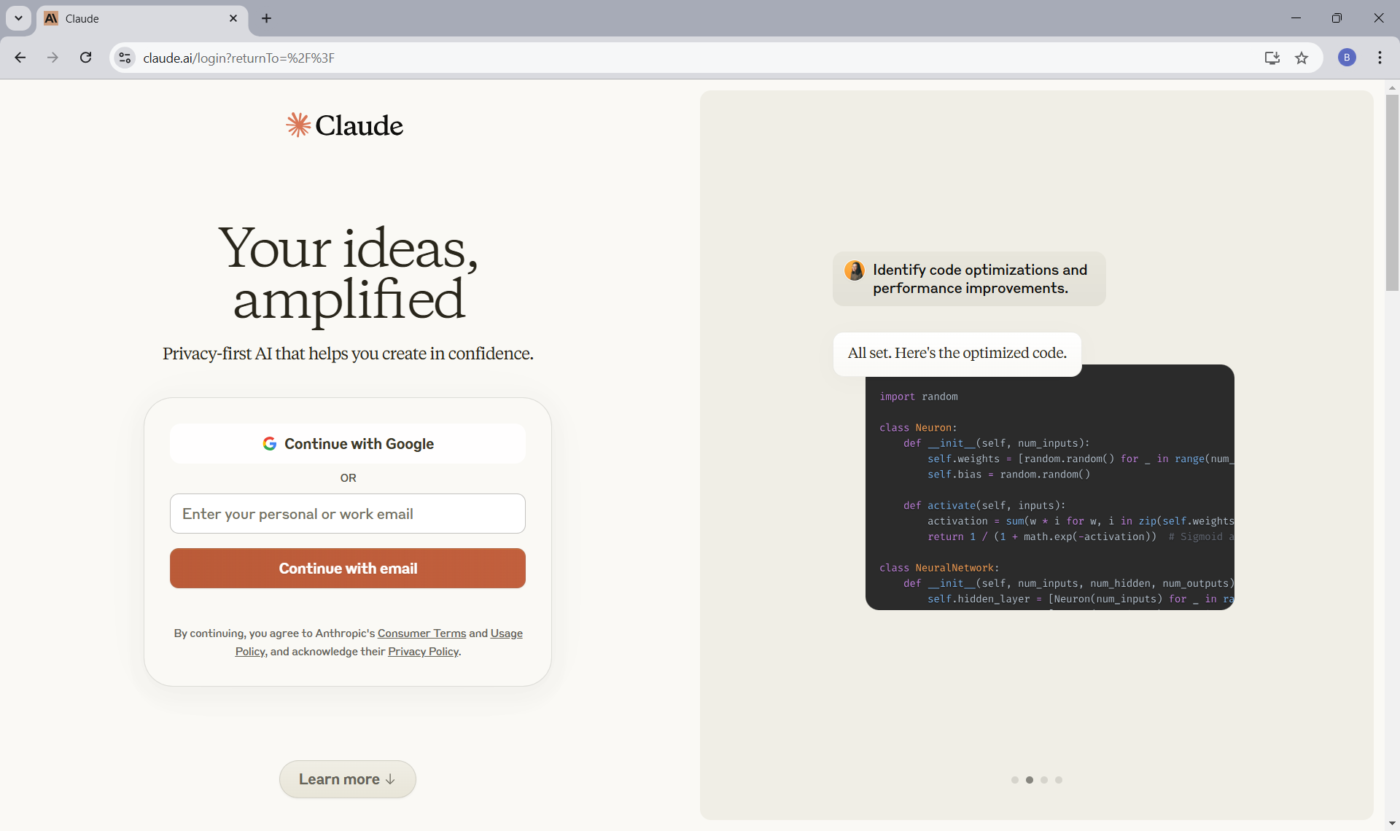
Open a web browser like Chrome, Firefox, or Safari, and go to the Claude website.
If you already have a Claude account, click the Login button and enter your credentials. For new users, click Sign Up on the Claude website to create an account. You’ll need to provide an email address, set a password, and verify your account through an email confirmation.
🤝 Friendly Reminder: To manage Claude AI cost-effectively, track your usage closely and identify areas where you can streamline tasks. Adjust your subscription or usage limits based on your needs, ensuring you’re paying for the value you’re getting without unnecessary overhead.
Step #2: Explore the interface
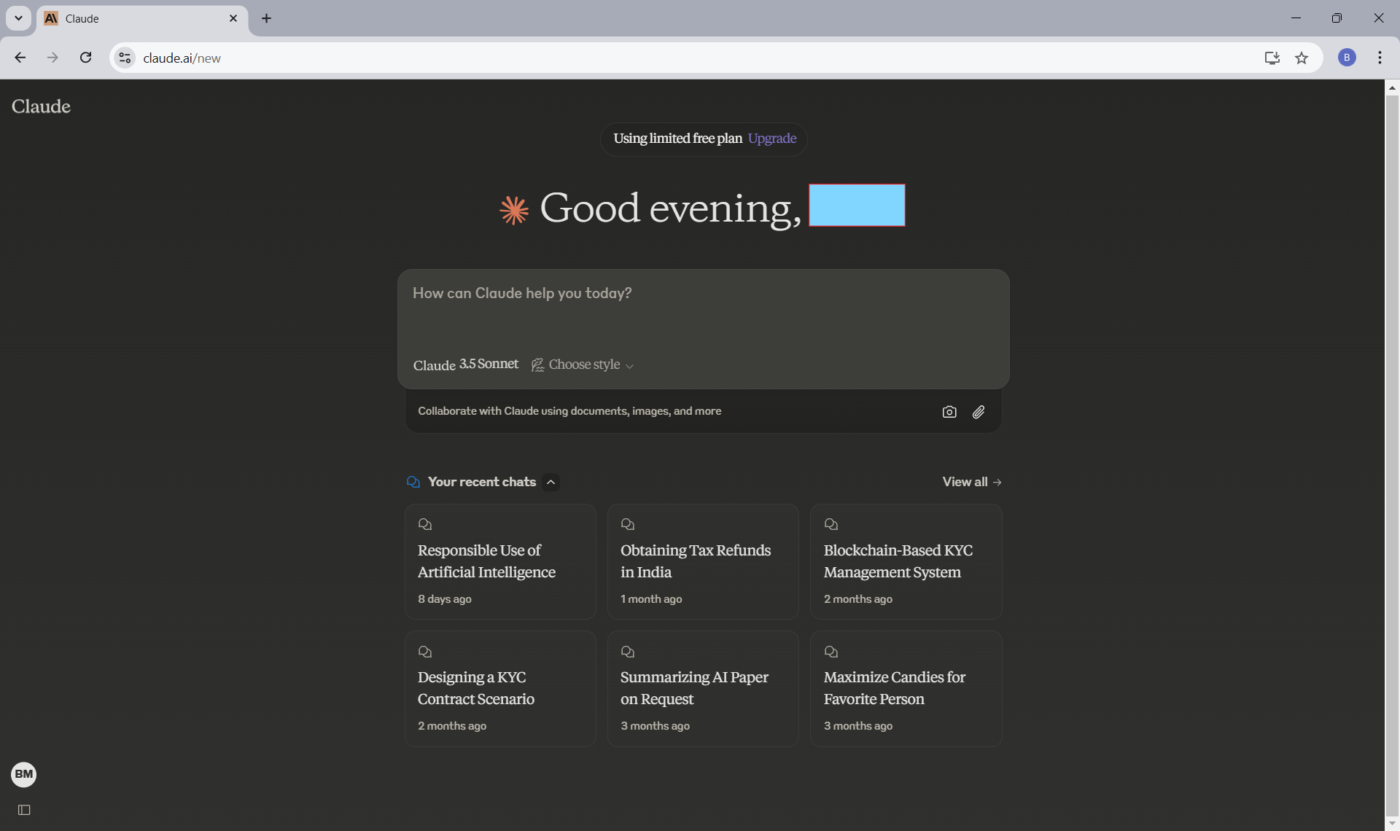
After logging in, you’ll land on the main interface, where all of Claude AI’s features are ready. You can begin by exploring the Start menu:
- Start a new chat: Click Start New Chat to interact with Claude. Use this section to type queries or commands and receive responses
- Access starred conversations: Locate any interactions you’ve marked as crucial under Starred Conversations for quick and easy retrieval
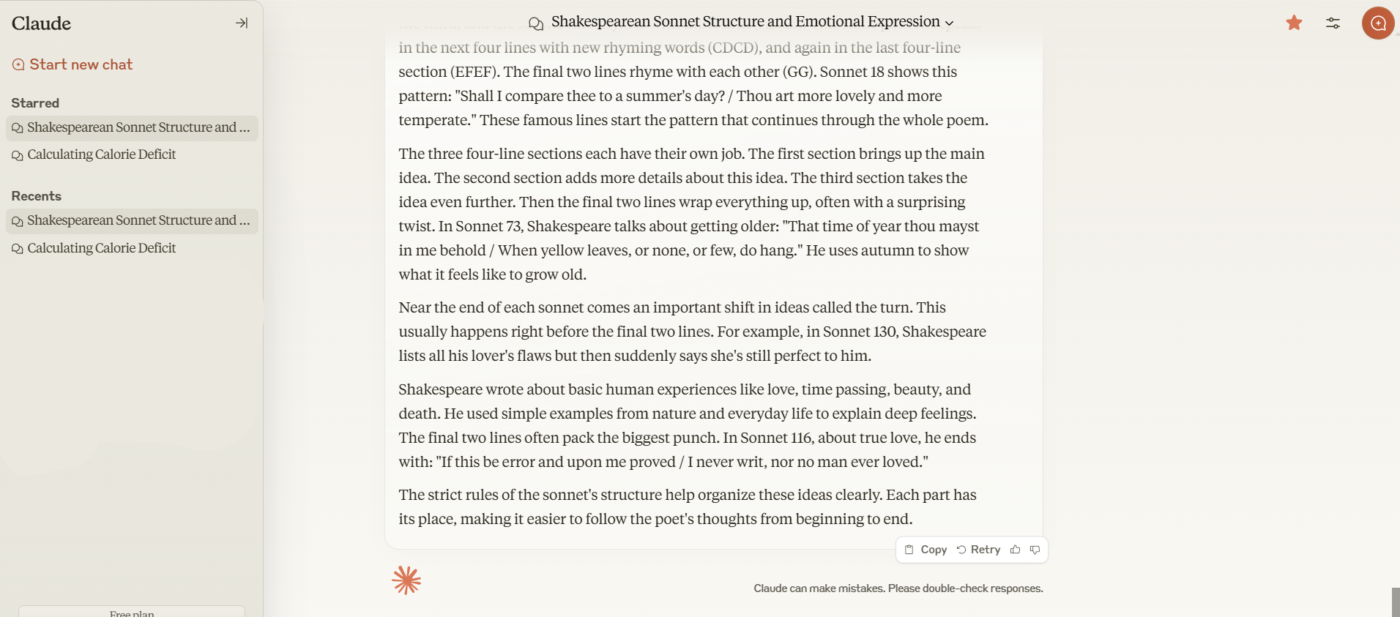
- Review recent conversations: Use the Recent Conversations section to revisit your latest chats, allowing you to pick up right where you left off
- Explore help and support: Navigate to the Help & Support section for assistance, FAQs, and troubleshooting resources to address any issues
💡 Pro Tip: If you have programming expertise, consider using Claude’s API to create custom automation scripts tailored to your specific workflow needs. This automates complex or repetitive tasks unique to your operations.
Step #3: Customize
The platform offers many customization options. Here are some functionalities you can explore to become a better programmer:
- Update profile settings: Access your profile icon to update personal info, manage notifications, and change your password

- Change interface preferences and add personal answer preferences to customize your profile Adjust interface preferences: Switch themes (light/dark) or rearrange interface elements for a personalized setup
- Set language preferences: Select your preferred language in settings for smoother interactions
- Fine-tune response styles: Choose between concise or detailed answers based on your preferences
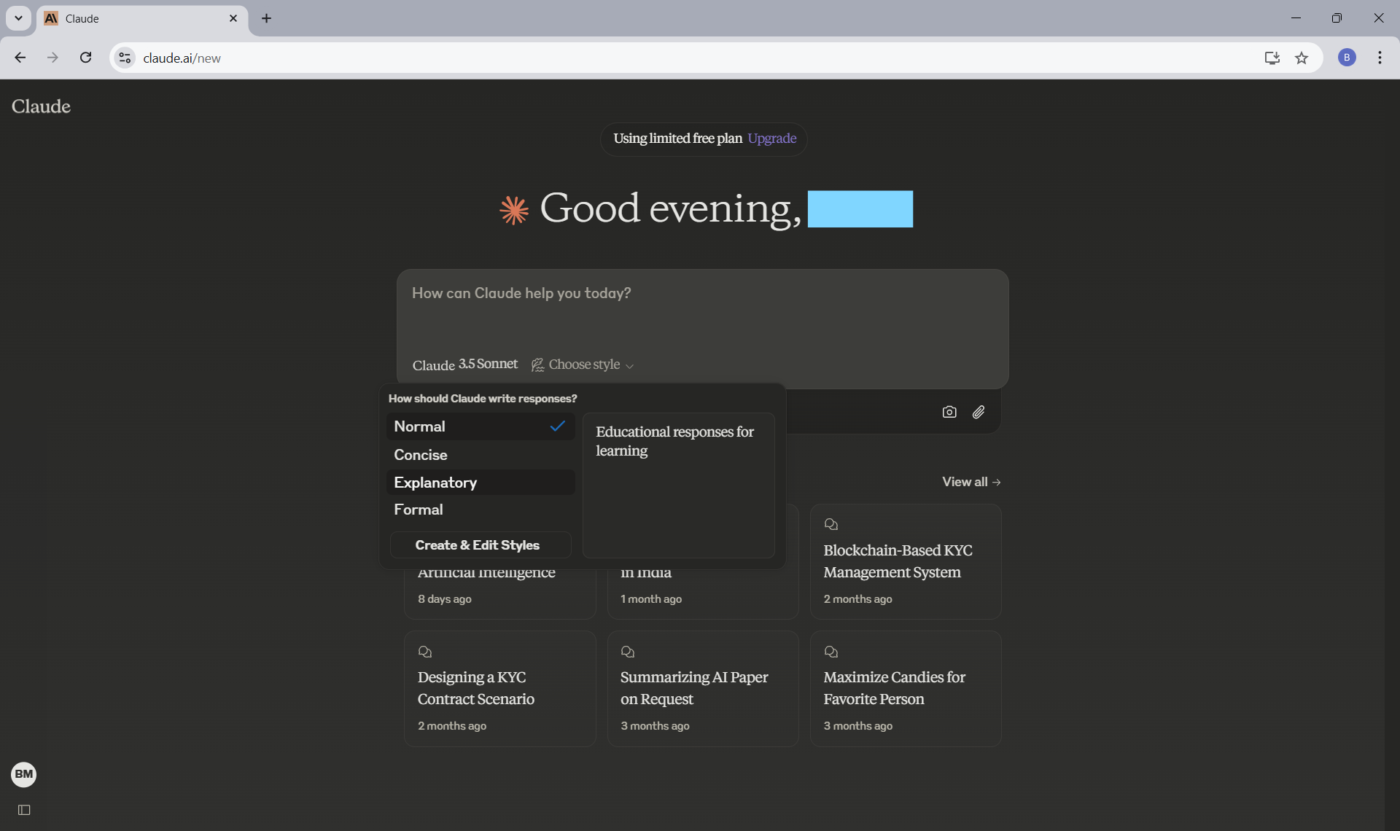
- Explore integration options: Look for integrations like calendar syncing or tool connections to expand capabilities
You can also utilize Claude’s ‘computer use’ capability to automate desktop tasks such as form filling, web browsing, and scheduling. Activating this feature allows Claude to control your computer similarly to a human, enhancing efficiency in repetitive tasks.
🧠 Fun Fact: The first high-level programming language, Fortran (Formula Translation), was developed in the 1950s for scientific computing. Fortran was so powerful that it’s still used for high-performance computing tasks today.
Summarize this article for me pleaseWhat Can Claude AI Be Used for in Software Development?
- Generate and debug code with clear explanations
- Automate repetitive operational and data tasks
- Improve technical writing, research, and documentation
- Solve logic-heavy, multi-step reasoning problems
Claude AI has a knack for solving problems in ways that feel effortless. Here are some key areas where it works best. 💁
Coding and programming assistance
You’re racing against a deadline to complete a complex coding project.
Here’s how Claude AI can act as your on-demand coding solution:
- Generates code: You can create code snippets tailored to your needs for faster development
- Fixes bugs: It helps pinpoint and resolve bugs, making debugging less time-consuming
- Explains programming concepts: Claude AI provides easy-to-understand explanations for complex code and programming concepts
- Integrates with your software development tools: The app integrates with popular platforms like Cursor.so and Replit, providing real-time suggestions directly in your coding environment
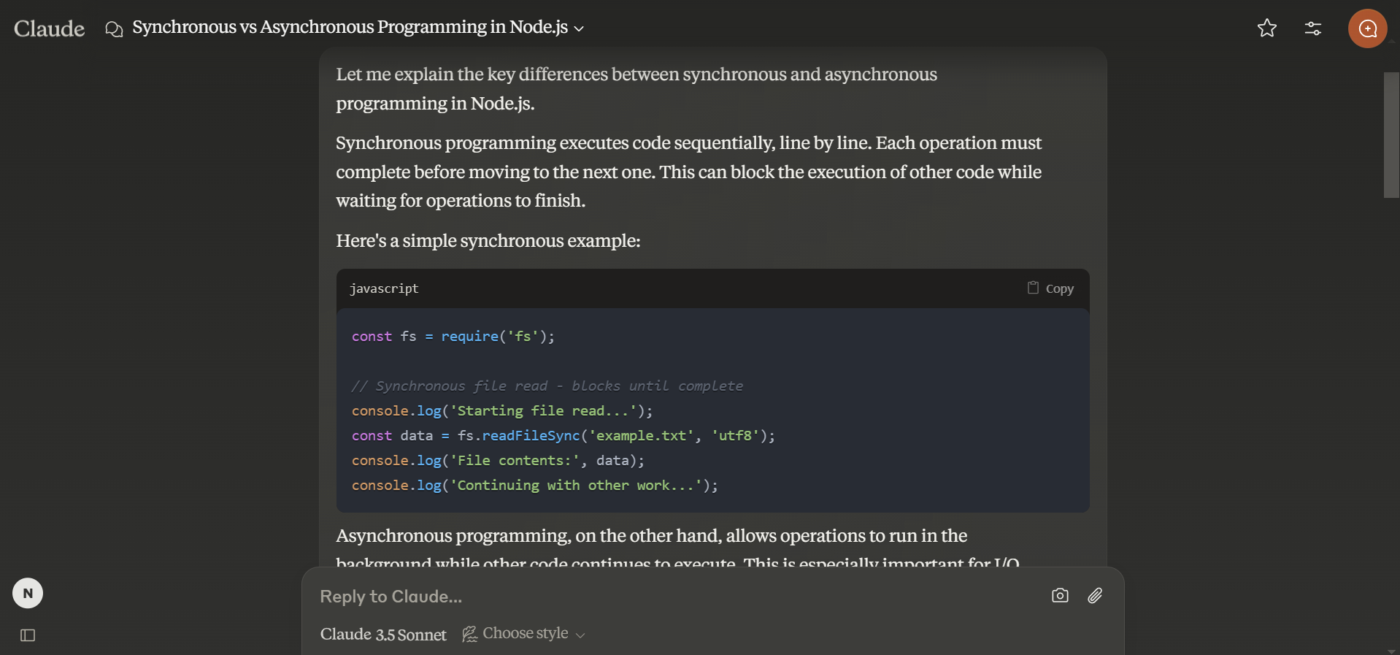
📌 Example prompt: ‘Explain the difference between synchronous and asynchronous programming with examples in Node.js’ or ‘Write a Python function that takes a list of dictionaries and returns a new list sorted by the value of a given key. Include error handling for missing keys.
🧠 Fun Fact: Whitespace is a programming language where only spaces, tabs, and newlines have meaning. All visible characters are ignored, making the code completely invisible to the naked eye unless opened in a specific editor.
Automating operations
Tedious, repetitive tasks like sorting data or responding to routine customer queries can eat into your day. Claude AI automates these operations to help you focus on strategic activities.
Here are some ways you can use it:
- Customer service: Automate customer service responses, improving response times and customer satisfaction
- Robotic process automation (RPA): Reduce manual effort by automating repetitive business tasks
- Data analysis: Quickly analyze large datasets, giving you insights for informed decisions
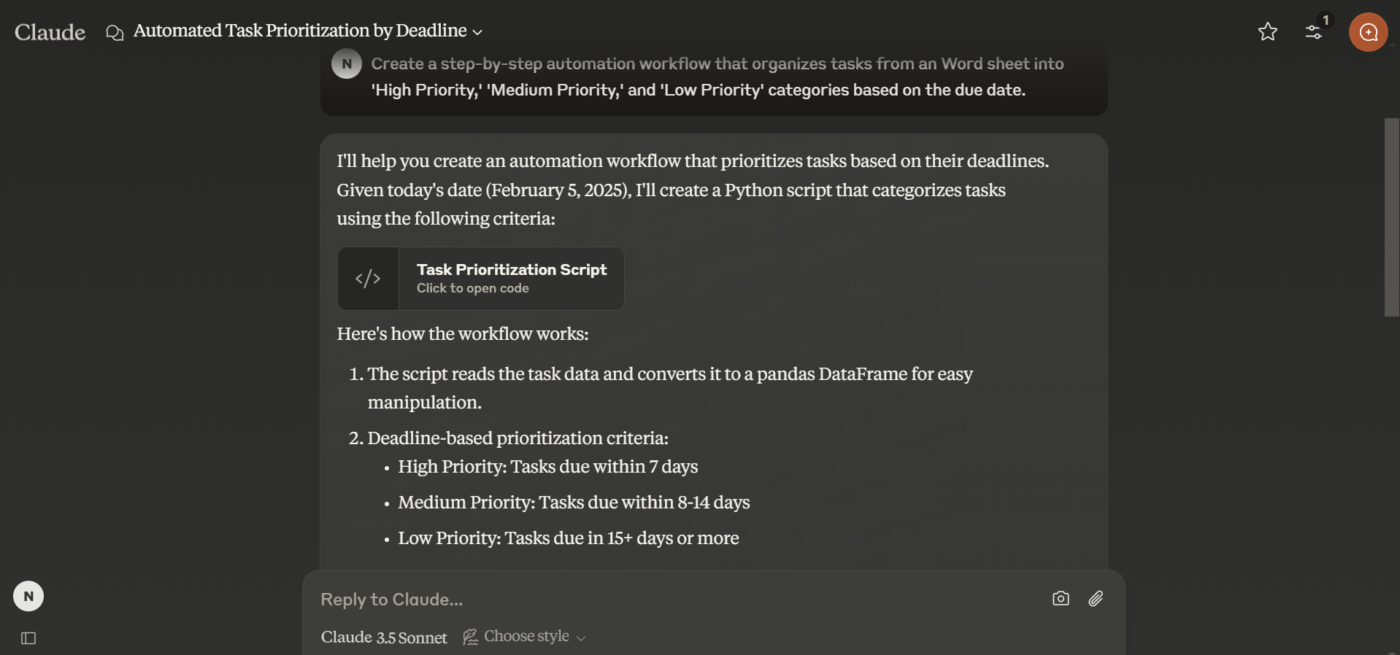
📌 Example prompt: Create a step-by-step automation workflow that organizes tasks from a Word document into ‘High Priority,’ ‘Medium Priority,’ and ‘Low Priority’ categories based on the due date.
Enhancing narrative and argument structuring
Struggling to craft a compelling report or pitch? Claude AI refines your ideas, improves clarity, and ensures your arguments flow logically.
Let’s look at its use cases:
- Content creation: Claude generates high-quality content with customizable tones and styles to suit your audience
- Refining drafts: It improves grammar, flow, and overall readability
- Research assistance: You can use it to quickly summarize complex topics and gather relevant information, streamlining the research process
📌 Example prompt: Rewrite this persuasive paragraph to target a skeptical audience: Remote work increases productivity and employee satisfaction by providing flexibility and reducing commute times.’ Include specific data-backed claims if possible.

🔍 Did You Know? Stack Overflow, the popular Q&A site for programmers, was created in 2008. As of today, it hosts over 50 million questions and answers, making it a vital resource for developers and a hub of knowledge sharing in the programming world.
Solving logic and reasoning tasks
Claude AI helps simplify multi-step problems and decisions that require careful analysis. It gives you logical, step-by-step insights to guide your decision.
Here’s how:
- Multi-step reasoning: Tackles complex, multi-step questions with ease, providing clear and coherent answers
- Test hypotheses: Tests different scenarios and uncovers insights that might not be immediately obvious
- Decision-making: Summarizes key information, aiding logical analysis and decision-making
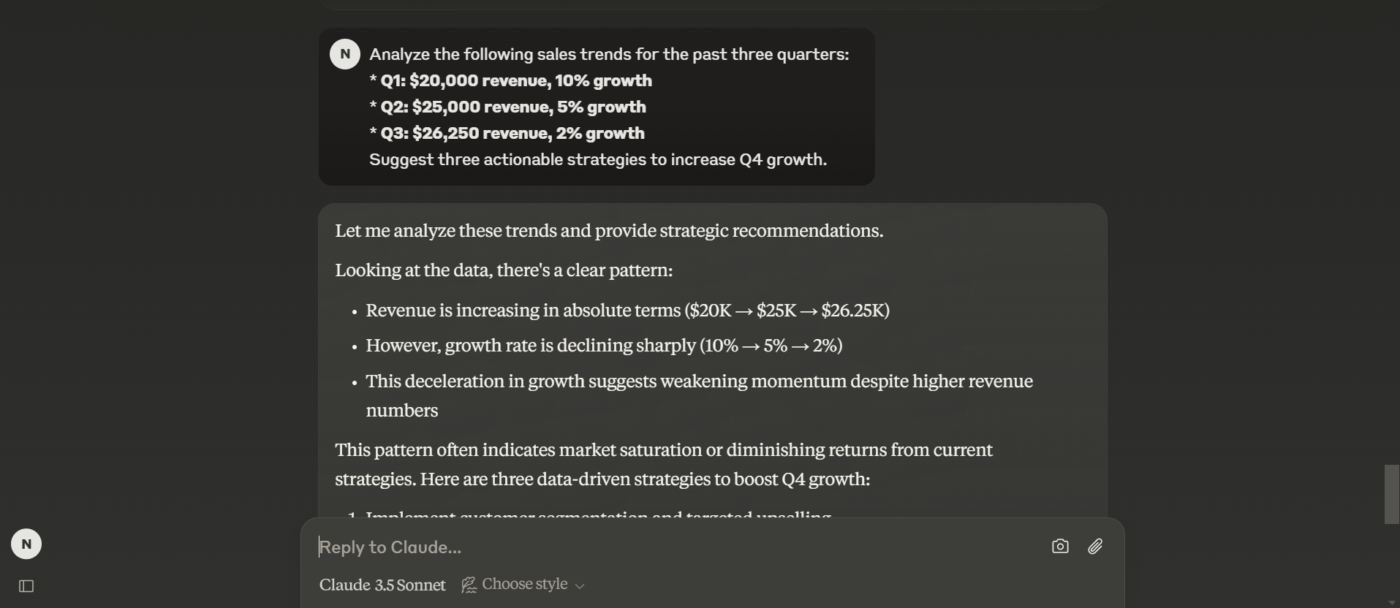
📌 Example prompt: Analyze the following sales trends for the past three quarters:
- Q1: $20,000 revenue, 10% growth
- Q2: $25,000 revenue, 5% growth
- Q3: $26,250 revenue, 2% growth
Suggest three actionable strategies to increase Q4 growth.
 Summarize this article for me please
What Are the Limitations of Using Claude AI?
When using Claude AI, you may encounter many standard challenges that can impact the quality and effectiveness of your interactions. Understanding these limitations is crucial to improving the overall experience and maximizing the AI’s potential.
Let’s go through some limitations Claude AI reviews have disclosed. 👇
- Misinterprets inputs: It sometimes misunderstands user prompts, resulting in off-topic or inconsistent responses to similar queries ❌
- Generates hallucinations and inaccuracies: The AI can confidently generate false or fabricated information, requiring users to verify critical outputs carefully ❌
- Relies on outdated information: Its knowledge base may not reflect the latest events or developments, limiting its usefulness for current topics. Additionally, it often struggles with subtle language cues, such as sarcasm or cultural references, leading to misunderstandings ❌
- Lacks advanced integration capabilities: Users face challenges integrating Claude into existing systems, with issues like glitches or slow performance disrupting workflows ❌
🔍 Did You Know? The phrase ‘Hello, World!’ is traditionally the first program many new programmers write. It dates back to the book The C Programming Language (1978), written by Brian Kernighan and Dennis Ritchie, and it’s often used to teach syntax.
Summarize this article for me pleaseHow Can ClickUp Replace or Extend Claude AI for Development Workflows?
ClickUp consolidates AI assistance, documentation, task execution, and reporting into a single workspace. With ClickUp Brain, developers can debug code, generate documentation, and turn prompts into structured tasks—bridging the gap between AI insights and execution.
ClickUp for Software Teams is an excellent task and project management tool that lets your team collaborate, plan, and execute projects efficiently.
With ClickUp Brain, an AI personal assistant, the platform accelerates tasks like development planning and documentation.
Teams can brainstorm product ideas, create detailed roadmaps, and harness AI tools to streamline workflows—all within a unified environment designed for productivity. ClickUp becomes an all-in-one task management platform, consolidating cross-functional collaboration, essential tools, and centralized knowledge for maximum efficiency.
Let’s look at how you can use ClickUp as a Claude alternative! 💪
Maintain technical documentation
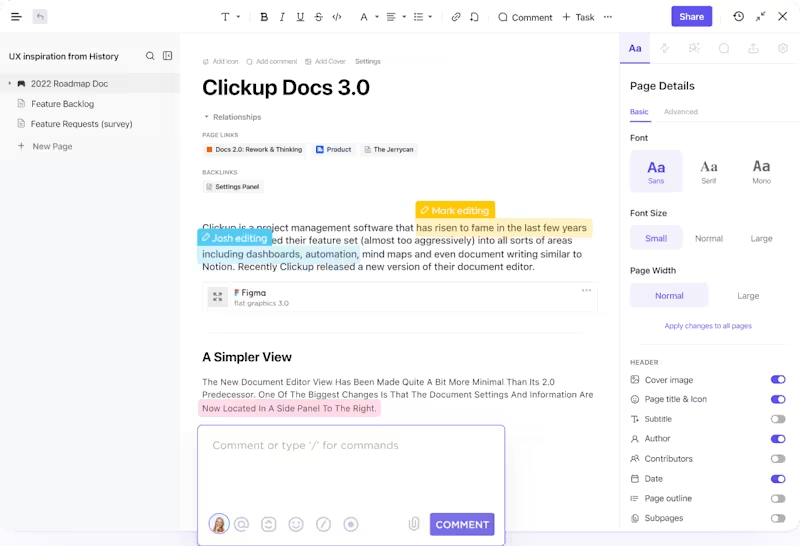
ClickUp Docs transforms how teams create and manage technical documentation.
You can collaboratively draft, edit, and organize product requirements, technical specs, or user manuals in a streamlined workspace.
It’s also easy to embed lists, tasks, and spreadsheets directly into documents for context-rich, actionable content. Real-time commenting and version control make collaboration effortless, keeping everyone on the same page and ensuring your documentation stays updated.
Generate customized technical content
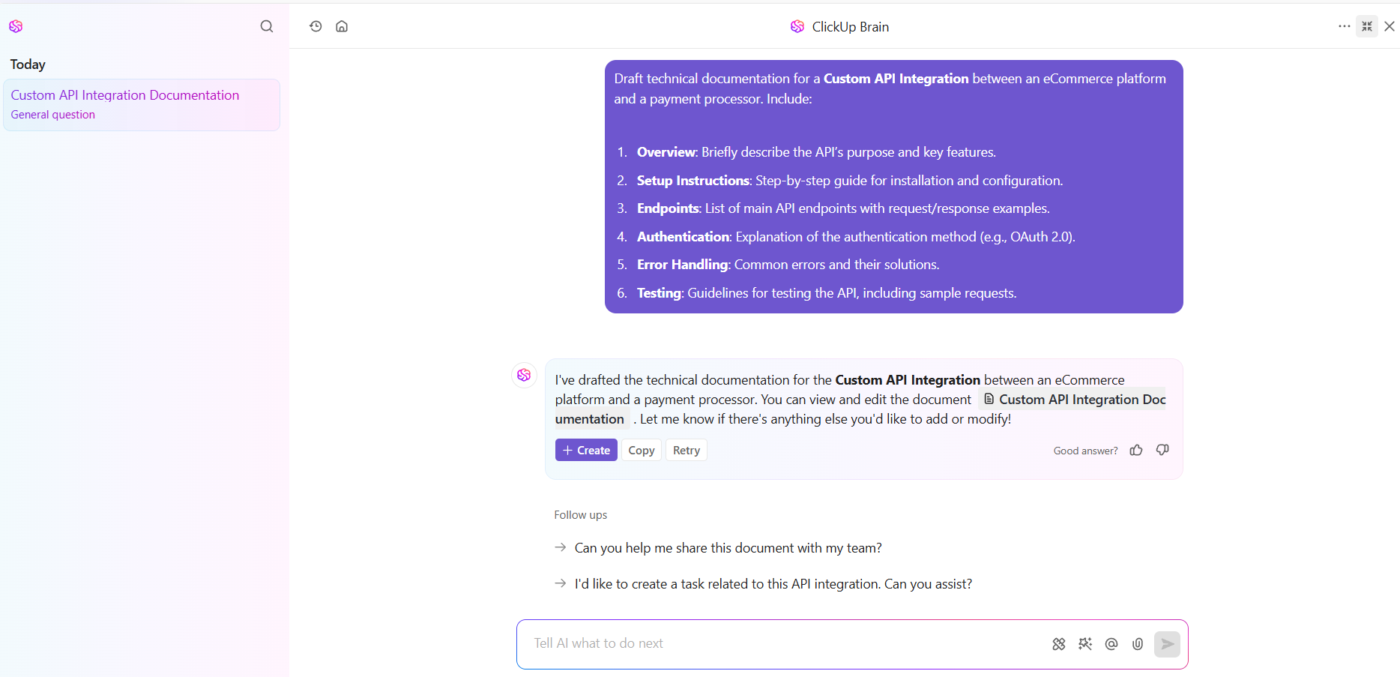
All you need to do is share code snippets, and ClickUp Brain can answer your coding questions, help with debugging, and provide suggestions or explanations for your code.
As an innovative AI-powered neural network that refines task management, content creation, and workflow organization for tech-savvy users, developers, and businesses. ClickUp Brain can help with task in a programmer’s workflow.
It also acts as an AI writing tool with its AI Writer to help you quickly draft project documentation, summarize meeting notes, or generate content for various use cases.

What’s more, it transforms user inputs into actionable ClickUp Tasks with clear objectives and deadlines. For instance, the project manager at a software development company is preparing to launch a new feature input, ‘Develop and test the payment gateway integration for our app.’
You can also ask Brain to write task descriptions and create relevant subtasks.
Using ClickUp Brain for software teams will create actionable subtasks, each with clear objectives and deadlines, such as setting up the payment API, writing test cases, and performing end-to-end testing. As the team works on these tasks, ClickUp Brain retrieves updates from related project files and summarizes the progress.
🔍 Did You Know? Python has a guiding philosophy known as The Zen of Python, written by Tim Peters. It’s a set of 19 aphorisms, including famous lines like ‘Readability counts’ and ‘There should be one—and preferably only one—obvious way to do it,’ influencing the language’s design.
Automate repetitive tasks
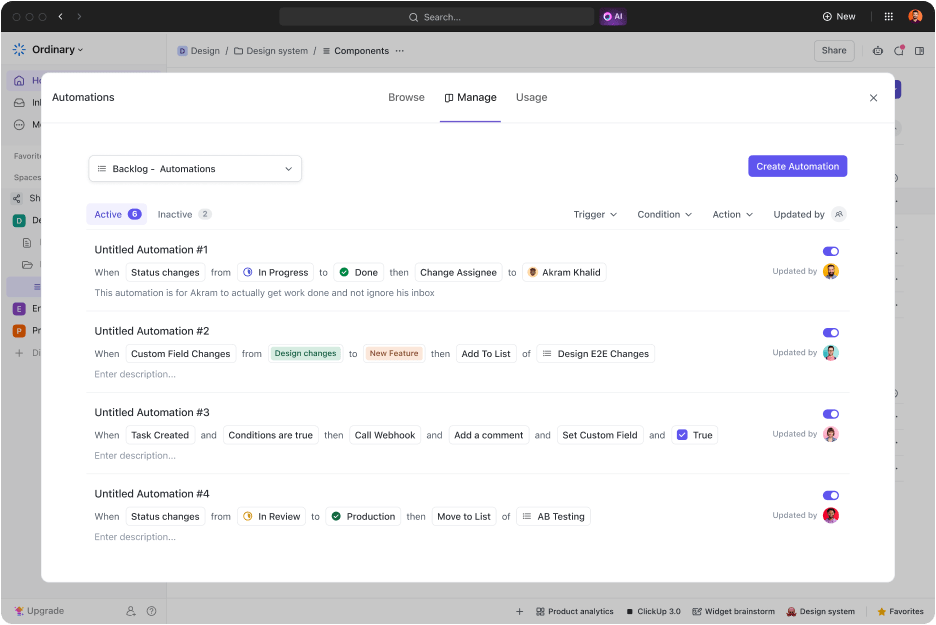
ClickUp Automation is a great way to optimize your workflow for maximum productivity. It allows you to automate repetitive tasks, freeing up time for high-priority activities.
Built around ‘Triggers,’ which include events like task creation or status updates, and ‘Actions,’ which are responses, the feature lets you maintain momentum.
For instance, you can automate task assignments based on team members’ availability or workload. When a bug report is submitted, an automation could instantly assign it to the right team member, set a priority level, and notify stakeholders.
🔍 Did You Know? Despite their intelligence, large language models don’t have long-term memory, so they can’t remember past interactions once the session ends.
Plan sprints effortlessly
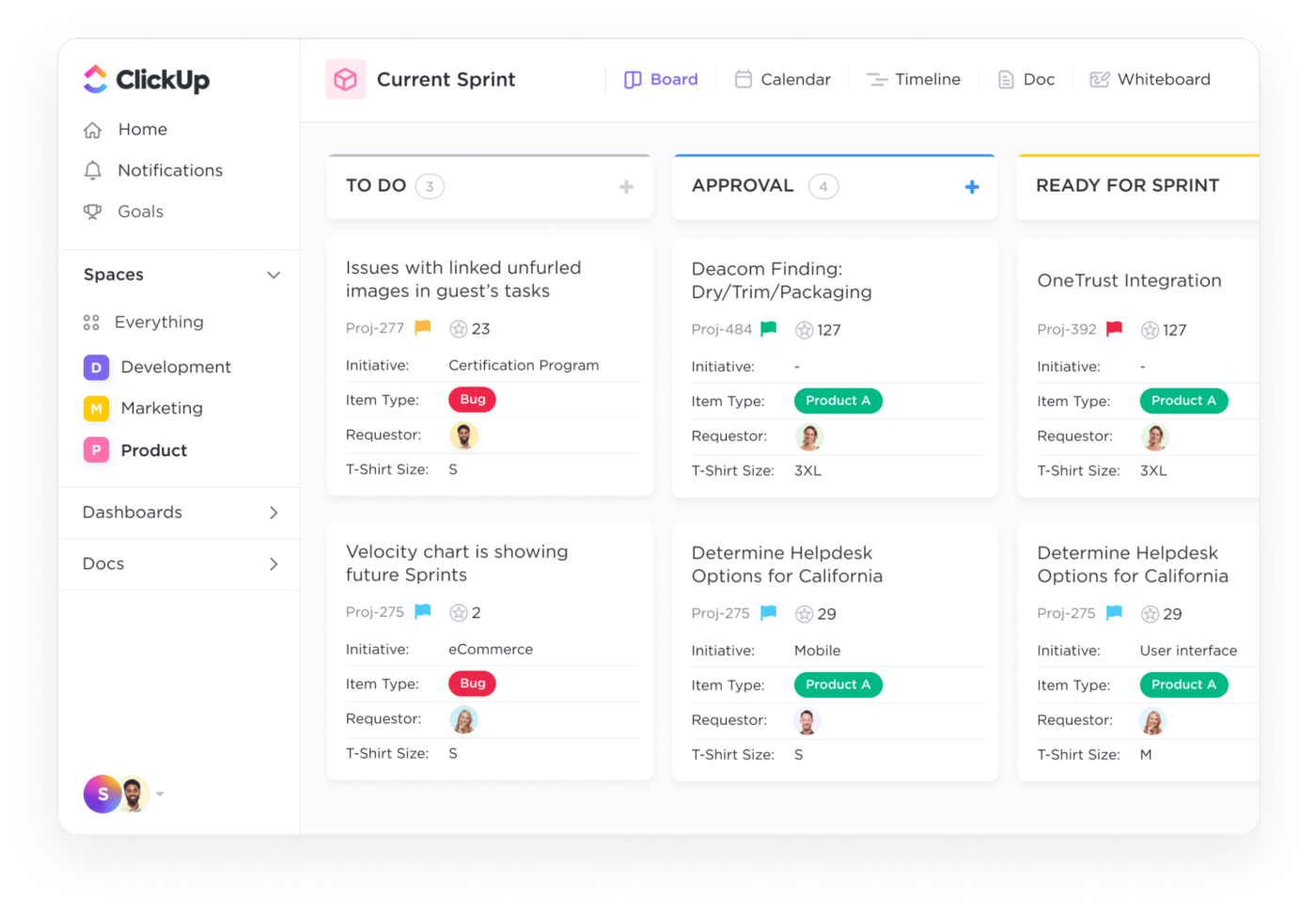
Sprints in ClickUp make managing agile projects intuitive and adaptable. Designed for flexibility, you can organize work into short, focused iterations that align with agile methodologies like Scrum, Kanban, or hybrid approaches.
They also help identify blockers, pivot quickly, and stay on top of deadlines for enhanced developer productivity. Even better, its reporting features provide valuable insights by tracking velocity, cumulative flow, burnups, and burndowns.
💡 Pro Tip: Save time and reduce errors by using software development templates. These pre-built frameworks for bug tracking, sprint planning, and release management provide a solid foundation, ensuring consistency and boosting project efficiency.
Visualize your workflow like a pro
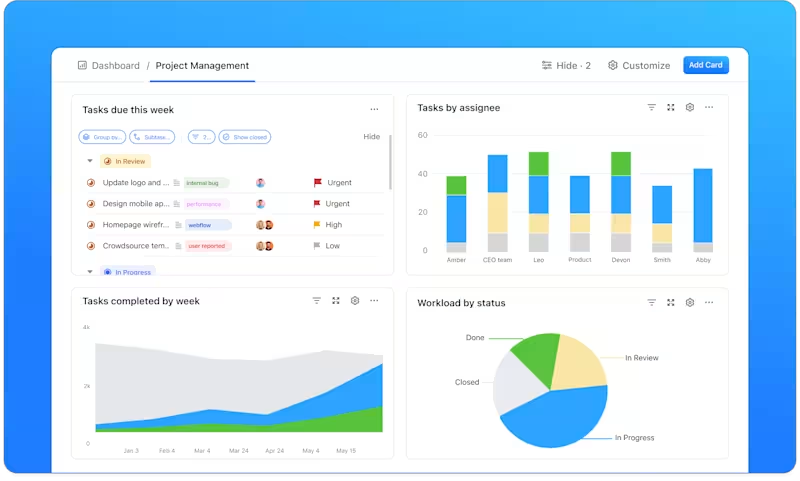
ClickUp Dashboards is a centralized platform for bug tracking, offering a real-time snapshot of your software development project’s health. Visualize key metrics, including open bugs, severity levels, and resolution timelines, all in one place.
You can also turn bug reports into actionable tasks and prioritize them effortlessly within your workflow.
🧠 Fun Fact: Less a fact and more a silly but popular programming joke: Why do programmers prefer dark mode? Because light attracts bugs!
Summarize this article for me pleaseIs ClickUp a Better All-in-One Alternative to Claude AI for Teams?
Claude AI offers a wide range of capabilities, from answering questions and generating code to automating tasks and managing conversations easily. Its strength lies in understanding context, providing creative ideas, assisting with debugging, and even analyzing complex data.
However, it has its limitations.
As an excellent alternative and more, ClickUp, the everything app for work, stands out. With Brain, you can do everything Claude AI does and more. From task management to team collaboration, it offers a comprehensive solution for organizing work, tracking progress, and ensuring you don’t miss anything.
Sign up to ClickUp for free today! ✅


Everything you need to stay organized and get work done.

Recent Articles
7 Best Zoom Alternatives in 2026: Free Plans and Meeting Limits 
7 Best Zoom Alternatives in 2026: Free Plans and Meeting Limits
How to Create a Fillable Form in Microsoft Word (With Templates)
How to Create a Fillable Form in Microsoft Word (With Templates)
