






Still downloading templates?
There’s an easier way. Try a free AI Agent in ClickUp that actually does the work for you—set up in minutes, save hours every week.
Sorry, there were no results found for “”
Sorry, there were no results found for “”
Sorry, there were no results found for “”
Most teams don’t have a communication problem.
They have a Communication Sprawl problem.
Updates are in Slack. Decisions are in DMs. Files are in email. Status lives in someone’s head. And somehow, the one thing you always can’t find is the message you actually need.
Teams spend 60% of their time on “work about work”—status checks, context hunting, tool-switching, and repeated follow-ups. Communication Sprawl is how that number quietly becomes your normal.
I’m Christopher Day, the founder and chief architect of Upficient, a solutions architecture agency that specializes in building ClickUp workspaces for businesses of all shapes and sizes. As a ClickUp Verified Consultant and Top-Rated Plus freelancer on Upwork, I spend my days designing highly optimized ClickUp workspaces for teams around the world.
In this article, I walk through how I used ClickUp Chat to tackle one of the most universal problems modern teams face: Communication Sprawl.
My perspective comes from years of building ClickUp workspaces and/or optimizing existing ClickUp environments, not just theory—so my approach to chat is grounded in workflow design.
Like many teams, our agency started out living in Slack. Messages, updates, and decisions bounced around between chat threads, while the actual work sat somewhere else.
That meant:
When ClickUp Chat shipped in Q3 of 2024, I did a deep review and quickly saw the potential of bringing communication into the same platform as tasks, docs, and templates. We preemptively migrated from Slack to ClickUp Chat—and we haven’t looked back.
If you’re curious, here’s a quick look at how ClickUp Chat works:
Now, the real win for us didn’t come simply from having our “chat inside ClickUp”. No, it was much more than that.
ClickUp offered us a Converged AI Workspace—where conversations, work, and context are all connected by default.
In a system like that, a message isn’t just a message. It can point directly to a task, pull in a doc, trigger an automation, or become the start of real work. No one has to waste time copying links between tools or repeating the same context five different times.
And with ClickUp’s Contextual AI, ClickUp Brain, added to the mix, your workspace is no longer just a place to store communication. It’s one where AI actually understands it, summarizes it, and helps your team act on it faster.
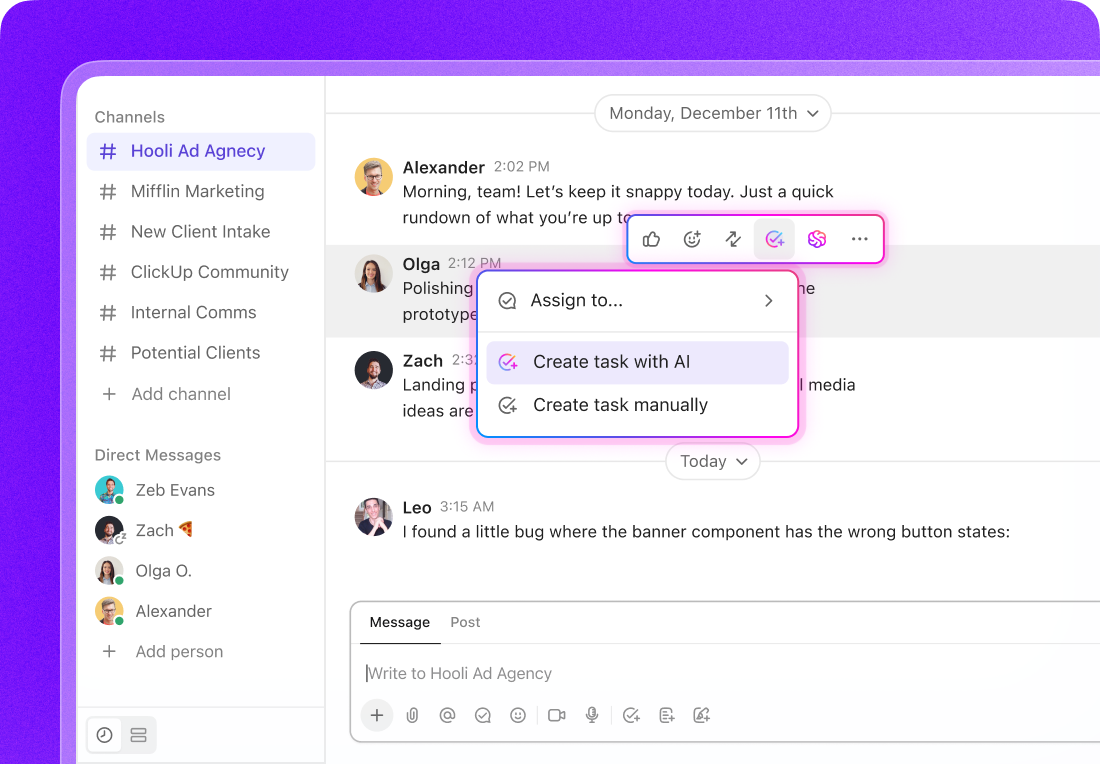
That’s the difference between a simple chat app and one that’s built to cut off Communication Sprawl at the root.
The workspace architecture is both the beginning and the end of your ClickUp experience.
My core mantra is simple: your workspace architecture should drive your chat strategy.
If you’re not a ClickUp power user yet, here’s the easiest way to think about ClickUp’s architecture (or Project Hierarchy):
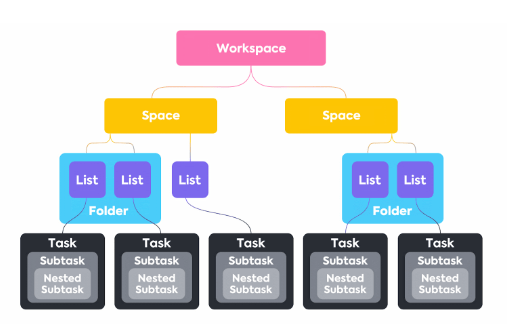
Most teams do the opposite. They start with chat first. They make a long list of channels like #announcements, #bugs, #random, #client-requests…and only later try to connect those conversations back to the work.
That’s how Communication Sprawl starts.
In ClickUp, the Hierarchy and ClickUp Chat live together in one sidebar.
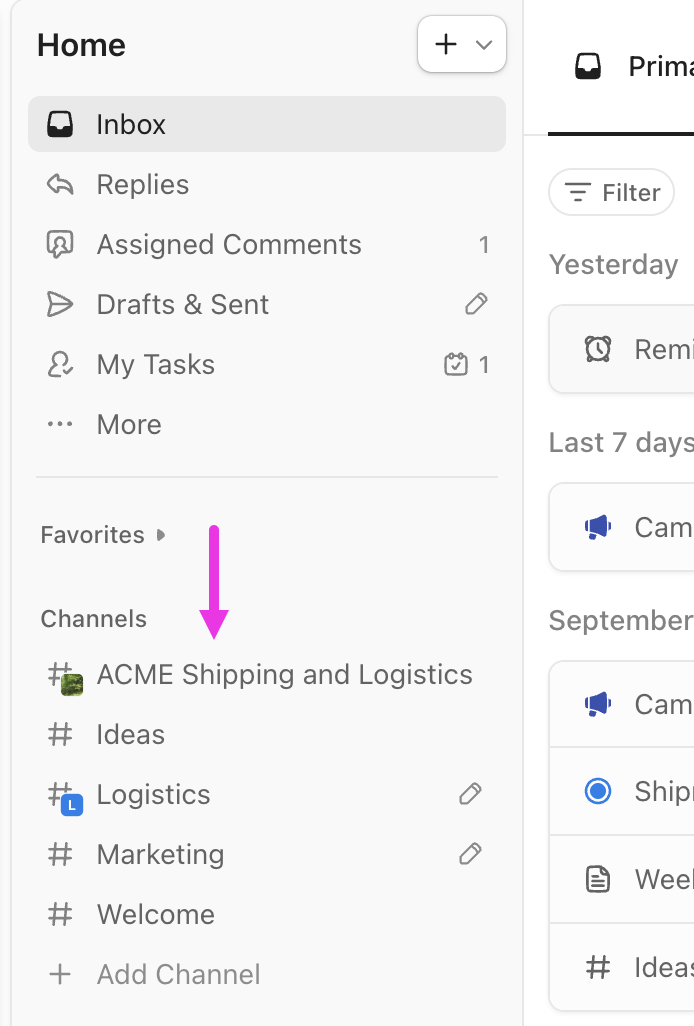
Every Space, Folder, and List can have its own dedicated chat channel.
It’s “dormant” by default—it’s there when you need it. But the moment you click Add channel, that exact location gets a focused conversation stream tied to real work.
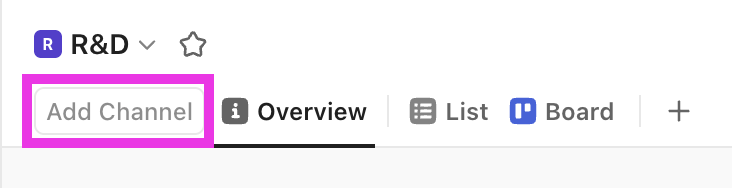
Here’s why that matters:
When you build chat around the shape of the work, teams spend less time sorting messages and more time moving projects forward.
Take a Product Development space, for example, which our Upficient team collaborates inside to build ClickUp templates.
Normally, teams would handle this by creating a broad #product-announcements channel in Slack (or whatever chat tool they use). The problem is that the channel lives away from the actual work. It becomes another stream of updates people skim, miss, or forget to connect back to tasks.
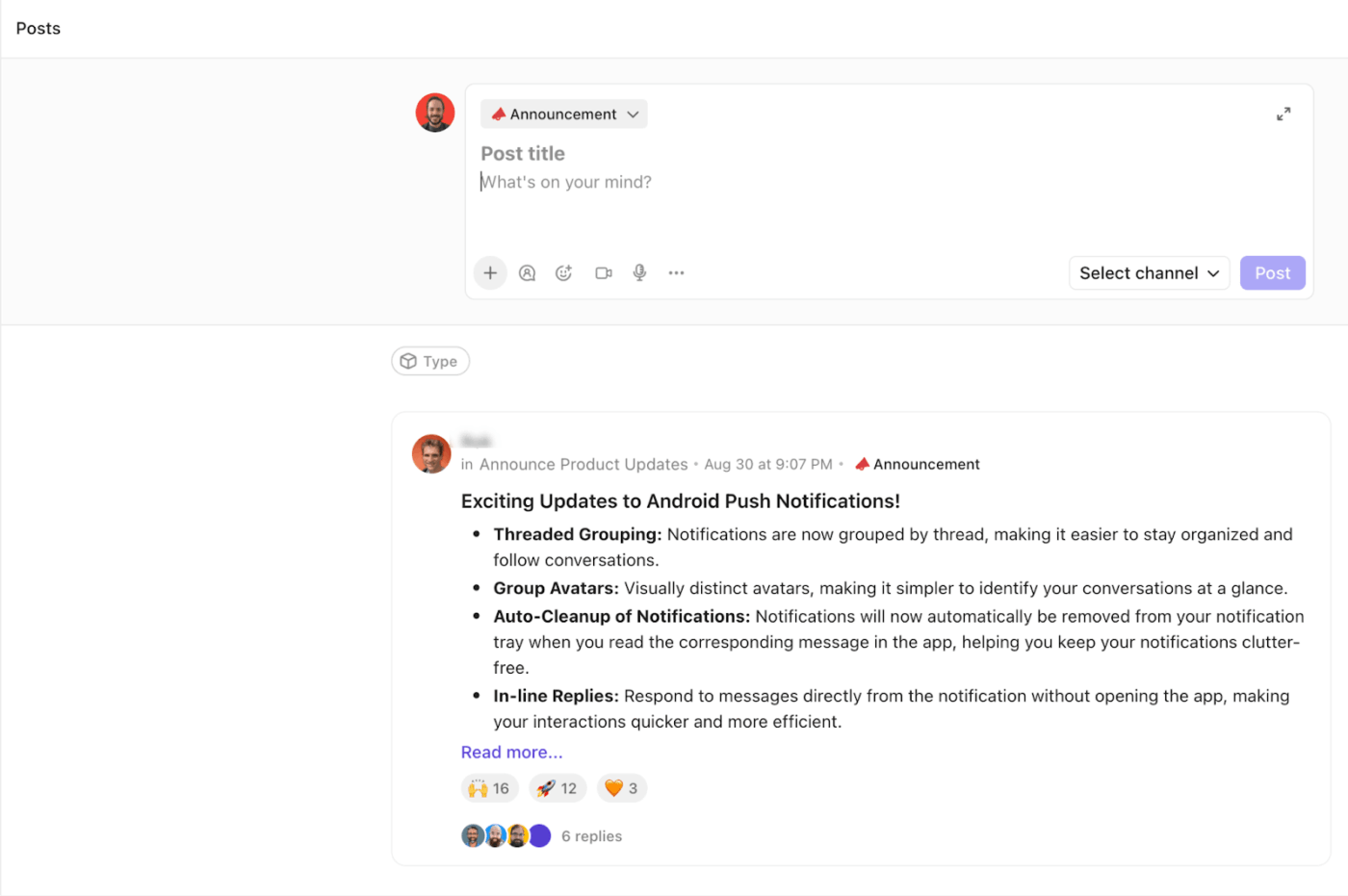
So instead, we did something simpler inside ClickUp:
Now, every announcement about our digital products shows up in the same place where the actual product work is structured.
Because channels are tied to locations, the people who can see and follow a channel are already defined by the workspace’s sharing settings. We use this to keep comms both targeted and discoverable:
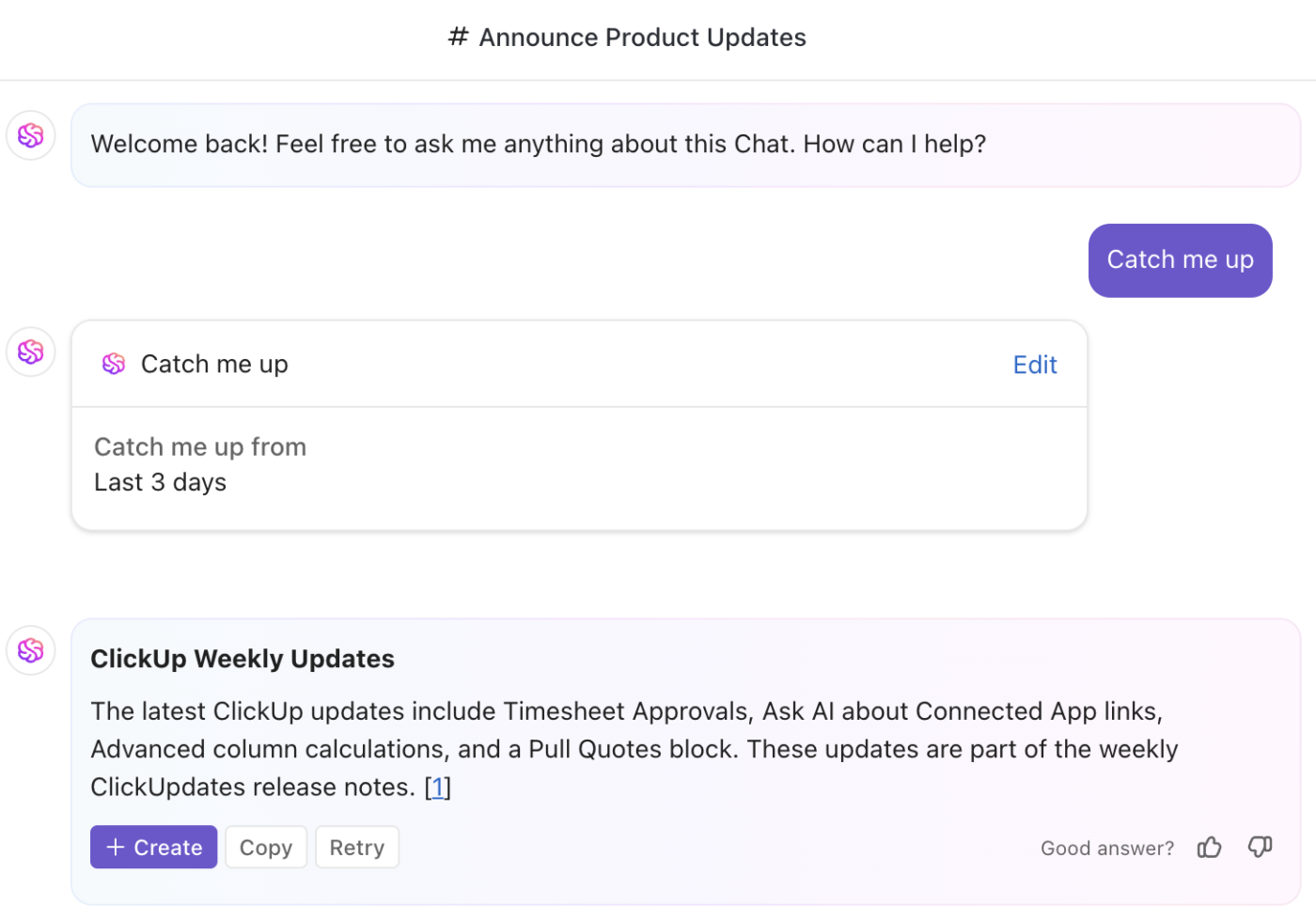
💡 Pro Tip: When new people join a channel, don’t make them scroll through weeks of messages trying to piece things together. Use AI CatchUp in ClickUp Chat to instantly summarize what they missed—key decisions, current priorities, and open threads—so they can get context fast and start contributing without pinging the team for a recap.
We lean on task relationships to make sure chat stays connected to the work it’s about.
If you’re new to ClickUp, here’s the simple version: a task relationship is just a way to link two pieces of work together so the context stays connected. Instead of a conversation living in isolation inside a chat tool, ClickUp lets you tie that conversation back to the task it impacts—so the message doesn’t get lost the moment the thread goes quiet.
For example, when a teammate records a video update about a ClickUp template we’re building—say, a detailed Getting Started guide for an Agile Scrum project template—we:
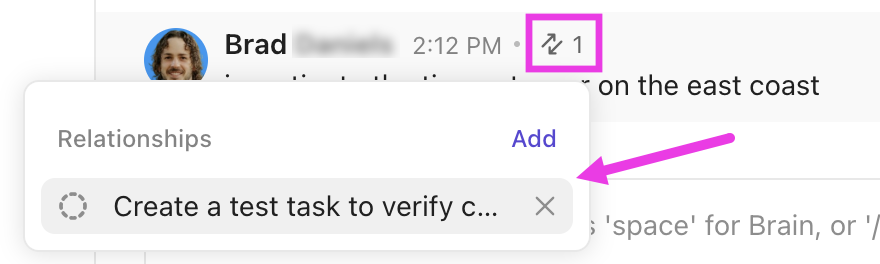
That means anyone opening the task later sees:
This is one of the easiest ways to reduce comms sprawl long-term. It turns chat from a disposable conversation into durable context that lives with the work.
📮ClickUp Insight: 75% of people say opening chat each morning feels like easing into the workday. The rest describe it as a second job!
The paradox? Chat feels productive until you realize half your day is spent scrolling, searching, or re-reading long, rambling threads.
We’ve made chat too fast for context and too fragmented for clear follow-through.
ClickUp Chat brings focus back. It anchors conversations to real work, where a message can instantly become a task, a follow-up, or a decision point. ClickUp Brain also summarizes those because your work and chat are finally connected!
⚡️ Here’s one of my best (if sneaky!) pro tips from Upficient: Let ClickUp’s Automations and AI handle the summarizing, notifying, and answering where possible in your Chat channels. This way, your team can focus on decisions, not digging for information.
Two patterns stand out:
My team is always looking for innovative ClickUp solutions to reduce human effort.
For example, we use the Teams feature of ClickUp to create an empty team called “AI-Doc”. When the @AI-Doc team is mentioned in a comment on a task, ClickUp generates a summary doc for that task—pulling together the key details and activity so far. There are other applications for such an approach that we encourage you to try.
Oftentimes, ClickUp channels can get flooded with messages, and one doesn’t have the time to scan through the channel for an important update. In such channels (for example, a webdev channel), we enable Autopilot Agents so that when a message is posted, the agent replies automatically.
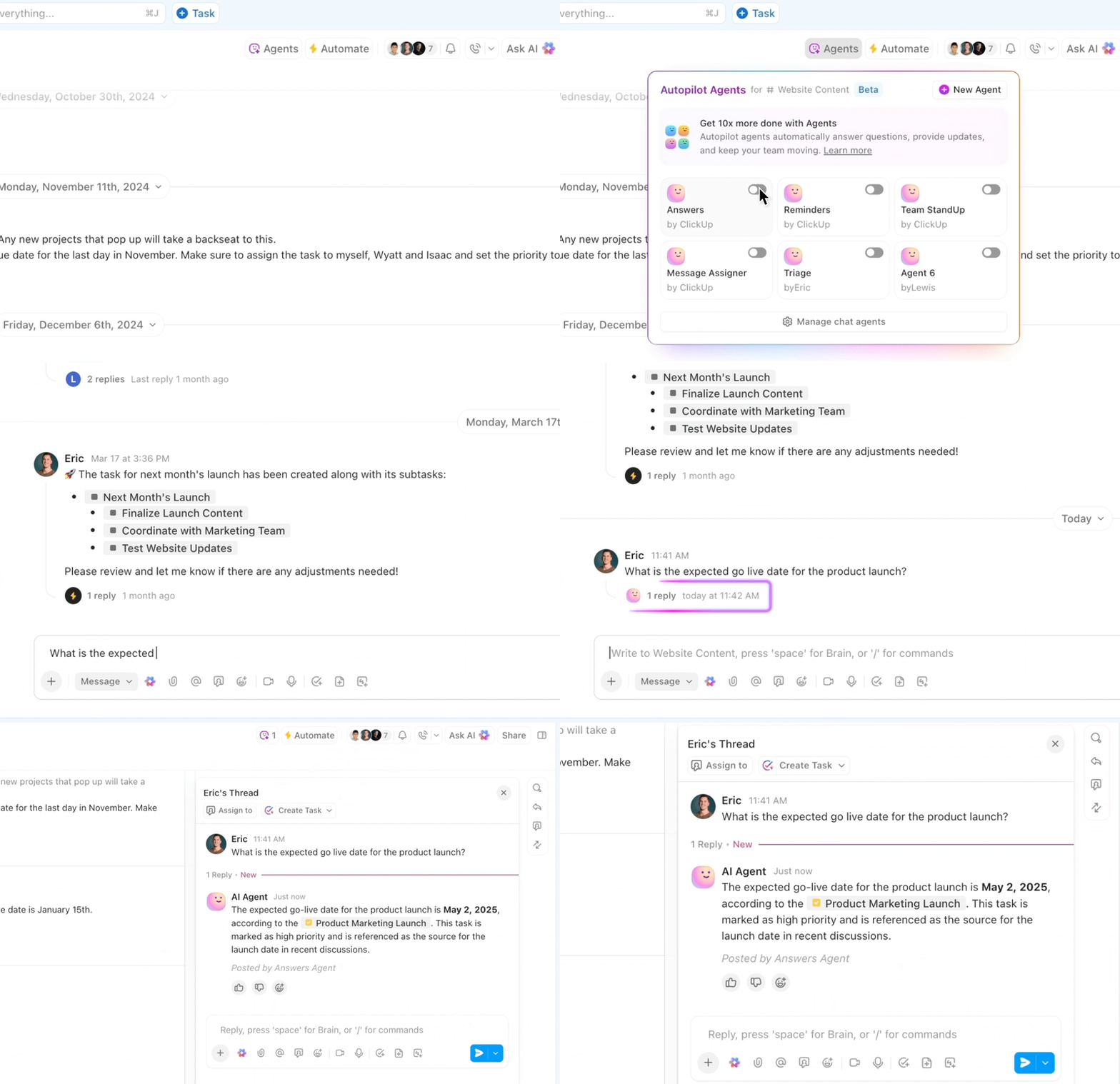
That response might:
So people get help in the moment, without someone on the team needing to stop what they’re doing to respond.
📚 Read More: These patterns line up with ClickUp’s broader vision for AI-powered work management, where features like ClickUp Super Agents and ClickUp Brain help teams work more productively and stay on top of fast-moving conversations.
If you’re exploring this direction, these deep dives are helpful companions:
Upficient is fully remote, with team members spread across multiple time zones. And in a distributed setup, comms sprawl shows up fast. To reduce back-and-forth pings and “are you around?” messages, we built a Daily Logs system in ClickUp.
Here’s how it works:
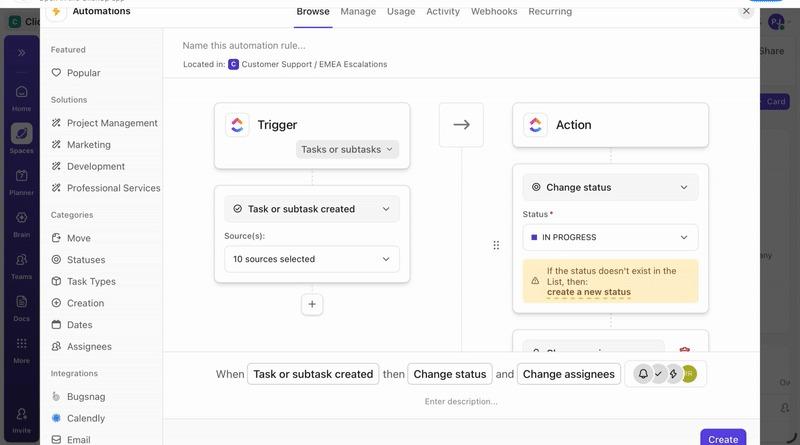
So if I set my status to Break for thirty minutes, the automation posts a friendly update into the Daily Logs channel with the task name, status, and duration—essentially saying, “I’m on break right now, please don’t interrupt.”
📌 The result: everyone on the team can instantly see who’s available for quick calls, who’s heads-down, and who’s offline—without flooding random channels with status updates.
This pattern gives remote teams like ours a lightweight way to:
We even use these statuses when scheduling follow-ups in other channels. If someone is on break or out of office, we can schedule a message for when they’re back. This keeps communication essential rather than constant.
Our approach to ClickUp Chat is less about “yet another messaging tool” and more about building an intentional communication system that mirrors how our work is structured. And you can copy it too!
This system has helped us move from Slack-style sprawl to ClickUp-powered clarity.
But don’t worry, you don’t need to adopt every pattern at once. Start by asking:
Then, iterate from there.
Start with a free ClickUp account and get building!
Christopher is the founder of Upficient, an independent ClickUp solutions provider serving businesses big and small around the world with powerful ClickUp solutions. Their team at Upficient is continuously updating a ClickUp Chat guide so that teams can be empowered further to get the most out of their ClickUp environments. They also have a marketplace for ClickUp templates geared towards Business Plus and Enterprise users. Follow them on LinkedIn to stay tuned about their offers.

© 2026 ClickUp

There’s an easier way. Try a free AI Agent in ClickUp that actually does the work for you—set up in minutes, save hours every week.