






Still downloading templates?
There’s an easier way. Try a free AI Agent in ClickUp that actually does the work for you—set up in minutes, save hours every week.
Sorry, there were no results found for “”
Sorry, there were no results found for “”
Sorry, there were no results found for “”
20 tabs, 10 logins, and 4 subscription renewals you forgot about. If this is your day, you probably own or are working with a small business.
Here’s the thing: most small businesses don’t realize until it’s too late that the tools you bought to save time are actually stealing it. Every “quick solution” you add to your stack comes with a hidden price tag, and it’s not just the subscription fee.
The real damage shows up when tools don’t share context: scattered information, duplicated work, and a team that spends more time managing software than actually doing their jobs.
That’s app sprawl for you, and it’s costing you way more than money. In this article, we show you how!
No one sets out to create app sprawl. It starts small.
A project tracker to stay organized. A doc tool to collaborate. A chat app to stay connected. An invoicing tool, a scheduling tool, a CRM, a design platform.
Each one made sense at the time. But now they’re fighting each other.
This is App sprawl, which happens when your business runs on too many overlapping tools, purchased ad hoc, with no single owner. Work, information, and decisions get scattered across a dozen different platforms.
The result? Nobody knows which version of a file is the current one. Important decisions get lost in an endless scroll of chat threads. And your team spends half their day just figuring out where the work lives.
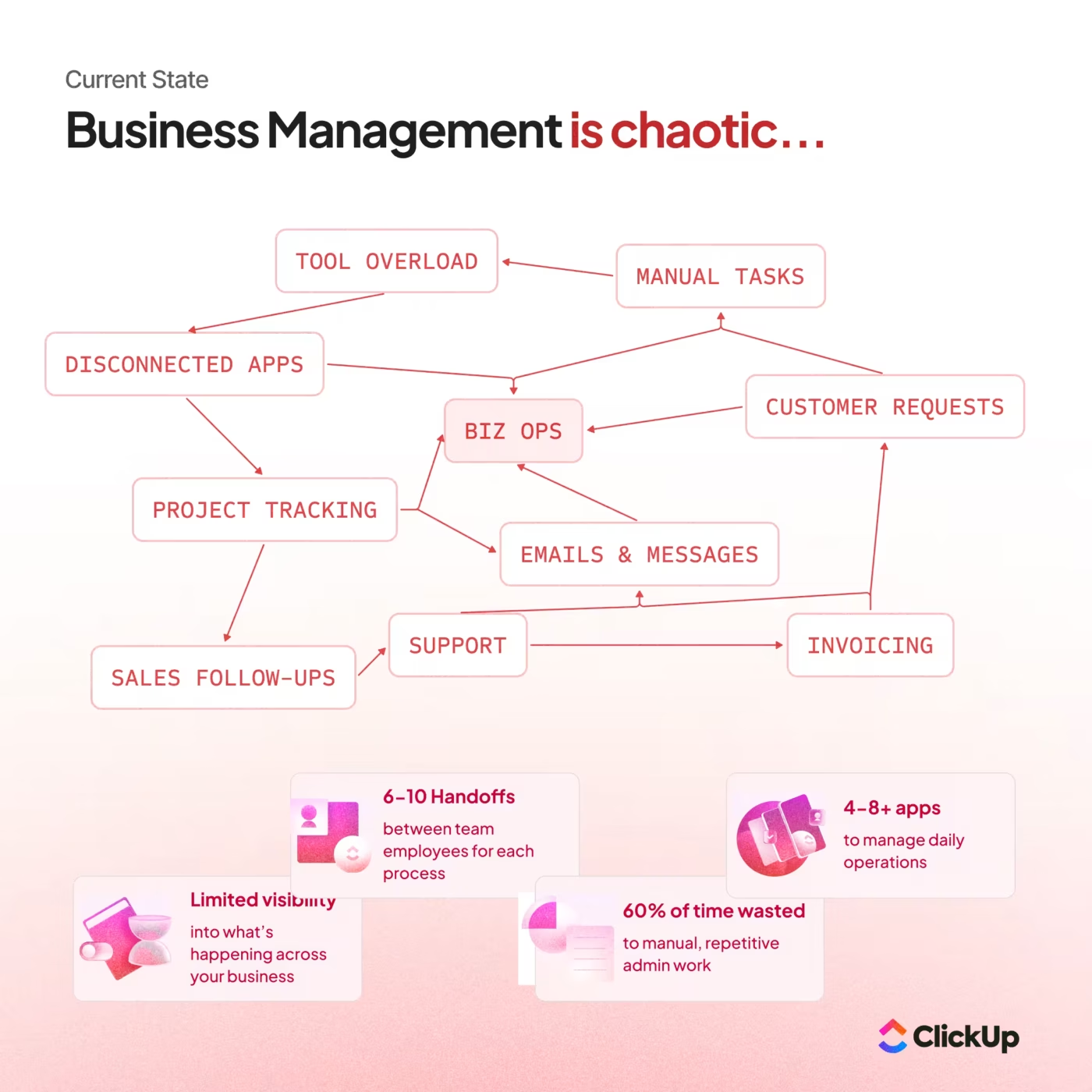
There’s a significant difference:
When your tools multiply but don’t integrate, every new app becomes another place to check, update, and explain. That’s when simple tasks start feeling like mini-projects—and your team starts feeling the drag.
🎉 Fun Fact: The average knowledge worker toggles between applications and websites nearly 1,200 times per day, according to Harvard Business Review. That’s over four hours per week just reorienting themselves after switching apps. Over a year? That’s five full working weeks lost to the toggle tax.
📘 Also Read: What Is Tool Sprawl and How Can It Be Avoided?
Not sure if this applies to you? Here’s a quick self-check. If you nod at four or more of these, you’ve got app sprawl:
❌ You pay for multiple tools that kind of do the same thing
❌ You don’t know who owns renewals (surprise invoices are common)
❌ New hires ask “where do I find…?” and get three different answers
❌ Tasks live in one place, files in another, decisions get lost in messages, comments, or email
❌ You’ve got files named “final_final_v7” floating around
❌ Nobody can confidently answer: “How many tools do we pay for?”
❌ Onboarding a new team member takes a week just to cover all the logins
❌ You’ve paid for a tool for six months that only one person uses
❌ Your team schedules meetings just to figure out project status, because no single tool shows the full picture
Litmus test: If your team needs a meeting just to find information, you’re paying convergence debt—time spent coordinating instead of executing.
The tricky part is that app sprawl often feels productive. Every tool exists because someone thought it would help. But when you zoom out, you realize your team is burning hours just navigating between systems. Hours that could go toward actual work.
Our Small Business AI Playbook breaks down exactly how to use AI to reduce complexity rather than adding more tools.
📖 Read More: Why ClickUp Loves Small Businesses
Here’s the thing: app sprawl doesn’t happen because people make bad decisions. It happens because everyone’s trying to solve real problems, and the quick fix usually wins.
Here are some of the common scenarios:
| Problem | Why it happens |
| Best-of-breed creep | It starts with one specialized tool. “We’ll just add this for invoicing.” Then another for scheduling. Then another for customer support. Each one is great at its job. But together? They create a maze. |
| Freemium-to-paid creep | Your team signs up for free tools without telling anyone. They work great for a while. Then suddenly you’re paying for five different apps that all do variations of the same thing, and nobody remembers who subscribed to what. |
| Remote and async work acceleration | Distributed teams need more tools to stay connected: chat apps, video platforms, recording tools, whiteboards, and document editors. Together, they fragment context even further. |
| Department-by-department buying | Marketing picks their stack. Sales picks theirs. Operations has their own setup. Pretty soon you’ve got three different project management tools and no one can see across teams. This is why SaaS procurement processes matter—even for small businesses. |
| AI sprawl (the newest culprit) | People are adding AI tools on top of an already fragmented stack: ChatGPT here, a writing assistant there, an AI scheduling tool over here. It’s best-of-breed creep all over again, just with a shinier label. |
👉🏽 Quick note on AI Sprawl: 80% of organizations report no tangible enterprise-wide impact from their generative AI investments—despite AI spending skyrocketing 130% in the past year. The culprit? Disconnected tools that lack the context of your actual work.
And here’s what makes all of this worse: shadow IT is now a top concern for tech leaders, with 69% of executives flagging it as a security risk. When teams self-serve tools without oversight, the sprawl accelerates—and so do the risks.
This video breaks down why overlapping AI apps and poor search create more chaos than productivity. ⬇️
📘 Also Read: AI Sprawl in the Workplace: How to Regain Control
The subscription fees are just the surface. The real damage happens underneath—in wasted time, broken visibility, and higher risk.
This one’s the most obvious, and still most teams miss it. Most small businesses find that 20-40% of their software spend is either unused, duplicated, or directed to tools adopted for a project that ended months ago.
📌 Imagine this: A 25-person consulting firm realizes they’re paying for three different project management tools simultaneously. Each was adopted by different project teams over a period of three years. Annual waste: $4,800 in subscription fees alone. And that doesn’t count the productivity cost of nobody knowing which tool has the current project status.
Run this quick audit:
🎉 Fun Fact: A whopping 48% of enterprise applications are unmanaged—meaning nobody is assigned to monitor usage, renewals, security, or compliance. For small businesses without dedicated IT staff, that number is likely even higher.
This is the big one. And it’s almost impossible to see until you measure it.
According to McKinsey Global Institute research, employees spend roughly 20% of their time (nearly one full workday per week) searching for and gathering information. Another 28% goes to managing email and communication across platforms. That’s nearly half the workday lost to coordination, not execution.
Here’s what that looks like in practice: Your ops lead needs to update a client on project status.
She checks the project tracker (Tool #1), pulls notes from the shared drive (Tool #2), digs through chat threads for the latest decision (Tool #3), and emails the summary (Tool #4). Time spent: 25 minutes. Value created: one email.
Now multiply that by every status update, every handoff, every “can you send me that file?” moment—across your entire team, every week.
🧐 Fact check: Research from Gloria Mark at UC Irvine found it takes an average of 23 minutes and 15 seconds to fully refocus after switching tasks. Multiply that by the dozens of switches most workers experience daily, and the productivity math becomes alarming. According to Atlassian, lost productivity due to context switching costs the global economy an estimated $450 billion annually. AI-powered search can drastically cut costs here for you. See how.👇🏼
Every tool you add is another surface for risk.
When employees sign up for apps without IT approval, those tools often bypass security reviews. They might store customer data, sync with other systems, or have weak authentication. You don’t know—because nobody vetted them.
🎉 Fun Fact: According to BetterCloud, 30% to 40% of IT spending in large organizations is Shadow IT (systems and software employees use without leadership approval). For small businesses, that percentage can be even higher because there’s often no formal approval process at all.
For small businesses in regulated industries (healthcare, finance, legal), this becomes a real liability.
The fix? Give your team better options so they don’t need to go rogue. When people have a unified platform that actually works, shadow IT becomes unnecessary. Proper SaaS vendor management can help you stay on top of what’s in your stack and what shouldn’t be.
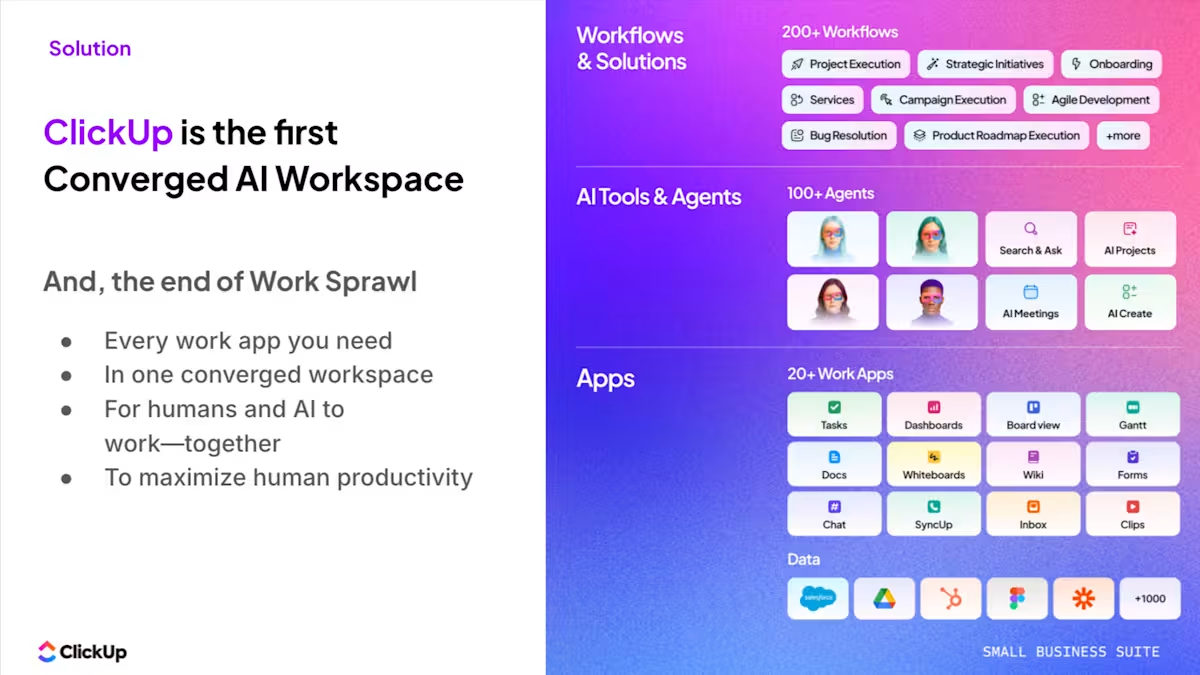
The ClickUp Small Business Suite consolidates projects, docs, chat, dashboards, and AI into a single workspace, so teams operate from a single system of record rather than five disconnected tools. This means eliminating operational overhead that typically requires additional coordination roles. When tasks, knowledge, conversations, and reporting all live in one system:
The result is a leaner operating model where a single platform absorbs work that previously required multiple tools and up to three layers of coordination. Your team stays the same size. But the system carries the operational weight. See how!
The impact is measurable:
Let’s make this concrete. Here’s a simplified cost calculator for a 20-person small business:
Direct Software Costs:
Productivity Costs:
Total annual cost of app sprawl: ~$182,000
That number represents a full-time employee (or a significant investment in growth) disappearing into the sprawl.
📘 Also Read: IT Budgeting: How to Plan and Allocate Resources
The good news? You don’t need a massive IT overhaul to fix this. You need a clear-eyed audit, intentional consolidation, and a simple policy to prevent the sprawl from returning.
Here’s how to run a proper audit:
| Week | Focus | Actions | What You’ll Discover |
|---|---|---|---|
| Week 1 | Discovery | Pull the last 90 days of invoices across credit cards, bank accounts, PayPal, and expense reports. Search your inbox for “receipt,” “subscription,” “renewal,” and “invoice.” Ask team leads what tools their teams use daily, weekly, or rarely. Check browser bookmarks and password managers for forgotten logins. | Hidden subscriptions, duplicate tools, abandoned logins, and purchases made outside official procurement. |
| Week 2 | Documentation | Map tools and usage across teams. | Overlaps quickly surface: a chat tool with more seats than active users, a docs tool only a few people use weekly, and a project tool no one agrees is the source of truth. |
| Week 3 | Classification | Categorize each tool as Core, Support, Nice-to-have, or Unknown. | A clear framework for consolidation. “Unknown” tools usually become the first cuts. |
💡 Pro Tip: Pay special attention to tools in the “Unknown” category. If nobody can articulate what a tool does or who relies on it, that’s a strong signal that it can go. Also, flag any tool that only one person uses—that’s often a personal preference masquerading as a business need.
To tackle this, you need a toolkit. The ClickUp Tech Stack Audit Template fits perfectly here.
Instead of juggling spreadsheets and finance reports, you can log every tool in one place and track the details that matter: owner, cost, renewal dates, and actual usage. As teams document what each tool is for and who relies on it, overlaps and unused subscriptions become obvious quickly.
Because it lives inside ClickUp, your audit doesn’t just produce a report. It becomes a living inventory of your software stack, connected to the workflows where decisions actually happen.
🎉 Fun Fact: According to Zylo’s 2025 research, an average of 7.6 new applications enter the typical tech environment each month. Without active management, your software portfolio could grow 33% in a single year!
📘 Also Read: Software Asset Management Tools: What to Look For
Once you’ve mapped your stack, focus your consolidation on where your team spends the most time.
For most small businesses, that’s the collaboration layer: the places where work gets discussed, decided, and tracked. If your tasks live in one tool, your documents in another, your conversations in a third, and your goals in a fourth, you’re paying a coordination tax on every single project.
Use this decision rubric for what stays:
✅ Deeply adopted: The team actually uses it daily, not just during onboarding
✅ Unique or irreplaceable: It does something no other tool in your stack can do
✅ Security-approved: Leadership has vetted it for data handling
✅ Cleanly integrated: It connects to your other systems without manual workarounds
Everything that doesn’t meet at least three of those criteria? Fair game for consolidation.
What to cut first:
The hardest cuts are usually the “nice to have” tools that people are attached to but don’t actually move work forward. Someone loves their standalone note-taking app. Someone else swears by a niche task tracker. But if those tools create silos and force manual syncing, the attachment isn’t worth the overhead.
🧐 Did You Know? According to ClickUp research, 83% of users feel relief at tool consolidation—because everything they need is finally in one place. The resistance you anticipate is often much smaller than the relief people actually feel.
Where ClickUp helps: Instead of asking “which of these five tools should we keep,” ask “can one platform handle all five workflows?”
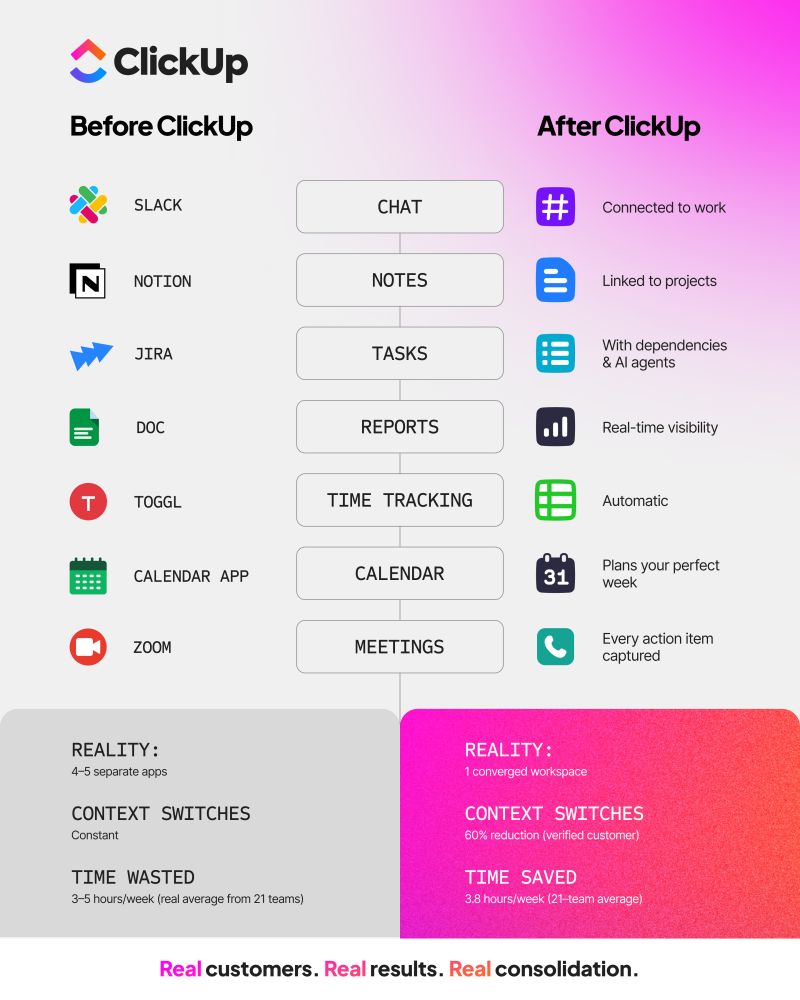
Here’s what that looks like in practice. Say your team currently uses Asana for tasks, Notion for docs, Slack for chat, and Loom for async updates. That’s four apps, four logins, four places to check, and zero shared context between them. When a client asks for a status update, someone has to pull info from all four places, stitch it together, and hope nothing’s out of date.
In ClickUp, that same workflow happens in one place. The project tasks, the brief, the team discussion, and the recorded walkthrough all live together. When someone asks, “Where are we on this?”, the answer is one click away, not a 20-minute scavenger hunt.
That’s not just consolidation. That’s getting your time back.
👀 The 3 fears everyone has (and what to do):
Consolidation only sticks if you prevent the sprawl from building back up. That means putting guardrails around how new tools enter your stack.
You only need a few simple rules here:
Rule 1: One owner for approvals
Designate someone (usually from Ops or Finance) who must sign off on any new tool before it is added. This doesn’t mean they review every app in detail. It just means there’s a checkpoint before another subscription shows up on the credit card.
Rule 2: One renewal calendar
Maintain a single, visible calendar that shows when every tool renews. No more surprise invoices. No more “I didn’t know we were still paying for that.” Everyone can see what’s coming up and when decisions need to be made.
Rule 3: One rule for replacements
If a new tool is supposed to replace an old one, cancel the old one that month. Not “eventually.” Not “when we finish migrating.” That month. Otherwise, you end up paying for both indefinitely.
Rule 4: Pilot before rollout
Before any tool goes company-wide, run a 30-day pilot with a small group. Set clear success criteria upfront: Does it actually solve the problem? Is adoption easy? Does it integrate with what we already have? If it doesn’t pass, it doesn’t stay.
Rule 5: Sunset by default
When you add a new tool, decide upfront: “If this doesn’t prove its value in 90 days, we cancel it.” Put that date on the calendar. Assign someone to run the evaluation. Make the default “no” unless the tool earns a “yes.”
💡 Pro Tip: The reason most purchasing policies fail is that nobody tracks them. They are referenced in a document somewhere, mentioned once during onboarding, and then ignored. Integrate your policy into your project management system to ensure compliance occurs automatically.
Where ClickUp helps: With ClickUp Automations, you can build your software governance directly into your workflow:
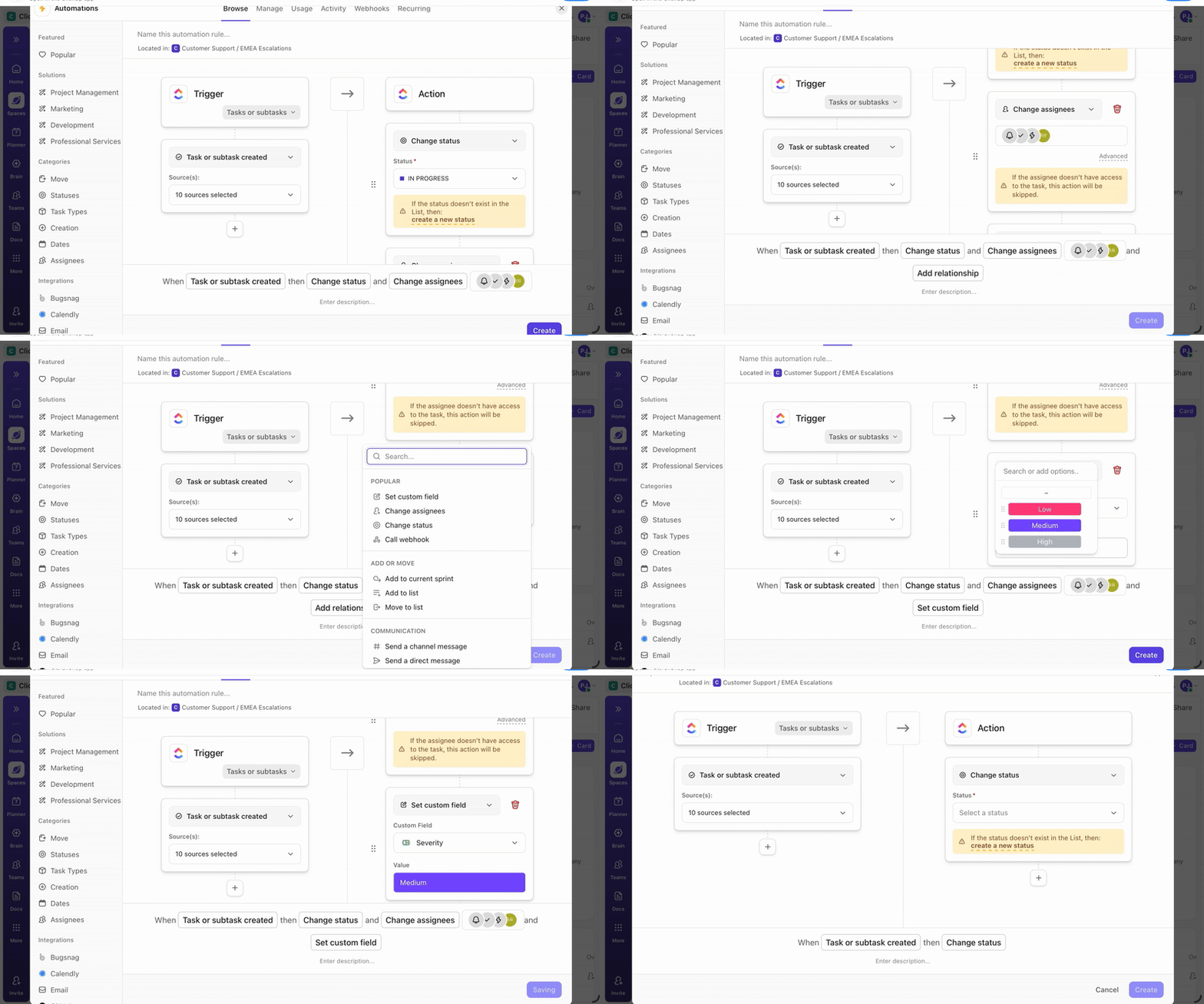
The policy enforces itself because the system does the remembering.
Point solutions made sense when each tool was best-in-class at a single task. But the coordination cost of stitching together a dozen apps has become higher than the benefit of any single feature.
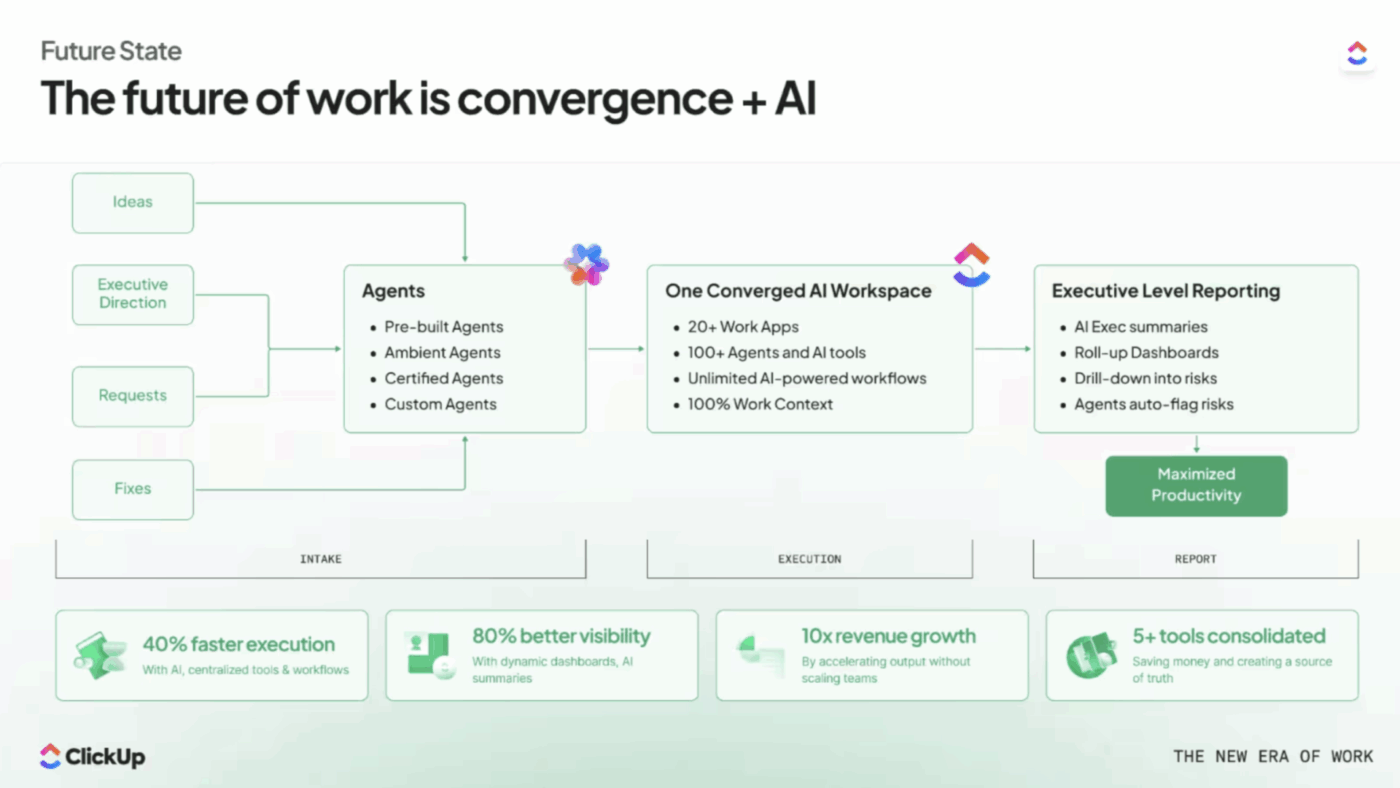
The shift happening now is toward converged platforms: single systems that handle multiple workflows well enough that you no longer need specialist tools.
The concept of “Convergence” is different from simple consolidation. It’s about bringing people, processes, and technology together in a way that preserves context and enables collaboration. Sometimes that means fewer tools; sometimes, better integration. The goal is always the same: clarity.
For small businesses, this is where the real leverage lives. Instead of paying for (and managing) separate tools for project management, documentation, team communication, goal tracking, and automation, you consolidate them into one platform that does all of it.
📊 Mini case study: Replacing 5+ tools with one workspace
When marketing agency Hit Your Mark Media examined its operations, the problem was obvious. Work lived across Slack, Miro, Toggl, Loom, and other tools. Projects moved more slowly than they should have because information was scattered across multiple tools.
So the team consolidated everything into ClickUp.
⚡ The results were immediate:
Founder Derek Archer says the shift changed how the agency operates.
Instead of stitching together updates across multiple apps, the team now runs client work, communication, documentation, and reporting from one workspace. 🚀
Here’s what your day actually looks like after convergence:
You start your morning in ClickUp.
Your tasks for the day are right there, prioritized. You check a project status by glancing at the ClickUp Dashboard, not by pinging three people. A teammate left a comment on a deliverable overnight, and you respond in the same thread where the work lives, not in a separate chat app.
You need last quarter’s campaign brief, so you ask ClickUp Brain, and it pulls the doc in seconds, with context about who wrote it and which project it was tied to.
Every time you hop on a client call, notes are captured by AI Notetaker directly in ClickUp Docs. Those notes are automatically linked to the project. Action items become tasks with one click. No copy-pasting between apps.
Your afternoon includes a quick async update to your team. Instead of recording it, uploading it somewhere, and then linking it in a different chat app, you record a Clip in ClickUp and attach it to the task.
Everyone who needs to see it gets notified. The discussion happens in the comments, right next to the video. By the end of the day, you’ve done actual work instead of spending half your time coordinating across tools.
The AI difference
Most teams are now juggling ChatGPT, a writing assistant, a meeting transcription tool, and maybe an AI search product on top of everything else. That’s AI sprawl layered on top of app sprawl.
ClickUp Brain is different because it has context. It knows your tasks, your docs, your conversations. When you ask, “What did we decide about the pricing change?”, it doesn’t hallucinate. It pulls the answer from the actual discussion thread where your team made that decision.
And with Enterprise Search, you can search across connected apps (Google Drive, Slack, GitHub) from one place. Information stops being trapped in silos.
For teams ready to go further, ClickUp Super Agents act as AI teammates you can @mention, assign tasks to, and message directly. They handle the repetitive stuff (triaging tickets, drafting status updates, managing approvals) so your team focuses on work that actually requires human judgment.
In fact, a small business can automate entire workflows with a chained set of Super Agents via ClickUp Accelerator.👇🏼
What about the tools you can’t replace?
You probably can’t eliminate every external tool. Maybe you need QuickBooks for accounting, Google Drive for file storage, or a specialized CRM for sales. ClickUp Integrations connect those essentials to your central hub so information flows in without creating new silos. You keep what works; you just stop the fragmentation.
💡 Pro Tip: Don’t start from scratch. ClickUp’s Template Library has 1,000+ pre-built workflows for project management, client onboarding, sprint planning, and more. Import one, customize it to your team, and skip weeks of setup time.
BEFORE (Typical 20-person small business):
Monthly software cost: ~$680
Annual cost: ~$8,160
Context switches per day: 1,200+
Hours lost to coordination: 80+ per week (team-wide)
AFTER (Same team on ClickUp):
Monthly software cost: ~$280
Annual cost: ~$3,360
Context switches per day: Dramatically reduced
Hours lost to coordination: 20 per week (team-wide)
Annual savings: ~$4,800 in direct costs + 3,000+ hours in productivity
That’s tool consolidation that saves real money (fewer subscriptions), real time (less context switching), and real frustration (one place to look instead of ten).
🎉 Fun Fact: RevPartners, a revops platform company, consolidated its productivity apps from three to one after adopting ClickUp, resulting in a 50% cost savings for the organization. “With ClickUp, we can access all the functionality we need in one place, which is huge for us,” said their Traffic Partner.
Before you start using slashing tools, watch out for these pitfalls:
❌ Cutting too fast
Ripping out tools overnight creates chaos. Phase out one tool at a time. Migrate workflows over 2-3 weeks, confirm everything works, then sunset the old tool.
❌ Ignoring power users
That one person who really loves the niche tool? Talk to them first. Understand what they use it for. Often, you can replicate the functionality in your consolidated platform, but only if you know what they actually need.
❌ Forgetting about data migration
Before canceling anything, export your data. Historical project info, documents, conversation archives: make sure nothing critical disappears when you flip the switch.
❌ Consolidating into the wrong platform
Not all “all-in-one” tools are created equal. Some are just project management tools with docs bolted on. Others are docs tools with tasks added as an afterthought. Look for a platform that was built from the ground up to handle multiple workflows natively.
❌ Not measuring the impact
Track your before and after. Document how many tools you had, how much you spent, and how long common tasks took. Then measure 90 days post consolidation again. The numbers will justify the effort and help you make the case for future improvements.
💡 Pro Tip: Create a “consolidation log” that tracks the following information: tool removed, date removed, replacement solution, any issues encountered, and estimated savings. This becomes your playbook for future cleanup and helps you avoid repeating mistakes.
If app sprawl is draining your team, the goal isn’t perfection—it’s momentum.
You don’t need to solve everything this quarter. You just need to stop the bleed, simplify the workflows that hurt most, and give your team a clearer place to work from.
Our Small Business AI Playbook breaks down exactly how to use AI to reduce complexity rather than add more tools.
App sprawl isn’t just expensive. It’s how small teams accidentally turn speed into drag.
The costs stack up in three buckets:
The fix isn’t complicated. It’s intentional.
Audit what you have. Consolidate where it hurts most. Set a simple policy to prevent the creep from coming back. And consider a platform that lets you do more in fewer places.
Your team didn’t sign up to manage a software portfolio. They signed up to do great work. Give them the tools actually to do it.
Ready to see what consolidation looks like in action? Try ClickUp for free!
App sprawl is the messy state—too many tools, poor integration, scattered work. SaaS rationalization is the deliberate cleanup: auditing your stack, consolidating redundant apps, and putting governance in place to prevent the sprawl from coming back. Think of app sprawl as the problem and SaaS rationalization as the solution.
Add up your subscription costs, then factor in unused seats (check your license utilization—industry average is only 49%). The harder number to calculate—but often the bigger one—is time cost. Estimate how many hours your team spends coordinating across tools weekly, multiply by 50 weeks, then multiply by their loaded hourly rate. Add that to the direct software spend. For most small businesses, the productivity cost is 3-5x higher than the subscription cost.
Absolutely. Start with a simple inventory of what you’re paying for. Select one workflow to consolidate first—typically the one where your team spends the most time coordinating. Set a basic purchase rule (one owner, one approval). And standardize around a single operating system for your core work. You don’t need an IT department. You need intention—and about 4-6 hours for an initial audit.
Start with the lowest-hanging fruit: tools with low usage (check login data), tools that duplicate functionality you have elsewhere, and tools adopted for projects that are long finished. Then look at tools that create the most coordination overhead—usually the ones that force your team to copy information manually between systems. Cut those next. Save deeply-adopted, business-critical tools for last.
Integration connects separate tools, allowing data to flow between them. Consolidation replaces multiple tools with one platform that handles all those functions natively. Integration reduces friction; consolidation reduces complexity. For most small businesses, consolidation delivers bigger long-term benefits because you eliminate the maintenance, cost, and context-switching overhead of multiple tools entirely.
Yes—if you choose AI that’s integrated into your workflow. Standalone AI tools (ChatGPT, writing assistants, transcription apps) can actually add to sprawl. But AI embedded in your work platform—like ClickUp Brain—can help you find information across systems, automate repetitive tasks, and reduce the need for multiple point solutions. The key is contextual AI that understands your workspace, not another disconnected tool.
Keep a simple “tool registry” that includes: tool name, owner, purpose, cost, renewal date, and what breaks if it goes away. Review it quarterly. When you add or remove a tool, note why—including who requested it and what problem it was supposed to solve. This becomes your institutional memory for software decisions and prevents the same sprawl from building back up over time.
For a small business (under 50 people), expect 2-4 weeks for the audit phase and 1-3 months for phased consolidation. Don’t try to do everything at once—that’s how you break workflows and create resistance. Pick your highest-impact consolidation first (usually the collaboration layer: projects + docs + chat), execute that transition fully, then move on to the next category.

© 2026 ClickUp

There’s an easier way. Try a free AI Agent in ClickUp that actually does the work for you—set up in minutes, save hours every week.