If your service business is losing customers, the problem might be smaller—and much easier to fix—than you think.
A lead may be waiting too long for a reply. A job may be stalling while everyone waits for parts. A customer may be frustrated because no one has updated them in a week.
That’s why AI pipeline management tools are gaining attention. When an AI agent can continuously watch a pipeline—tracking overdue work, stalled tasks, and unhappy customers—it can surface risks before they become reputation (and revenue) problems.
But AI agents only work well when they’re grounded in the real workflows your team already uses.
So instead of asking “What kind of AI agent should I build?”, I suggest starting with a different question: Where is the pipeline already leaking?
In this article, I’ll walk you through a real-world-style example:
A fictional client, Ben the Builder, whose service pipeline is quietly leaking revenue and trust
How I used his existing ClickUp setup as the foundation for a Project Recovery Coach Super Agent
The specific ways that the agent watches his pipeline, flags risks, and nudges him toward the right next step each day
None of this required an over‑engineered AI build, just ClickUp’s Converged AI Workspace and a ClickUp Super Agent. But it did completely change how Ben sees his work—and how reliably he shows up for his customers.
Summarize this article with AI
ClickUp Brain not only saves you precious time by instantly summarizing articles, it also leverages AI to connect your tasks, docs, people, and more, streamlining your workflow like never before.
Summarize this article for me please
About Me: Systems, Customer Care, and ClickUp Super Agents
I’m Anna Bullock, co‑founder of ABX2 Agency. I’m a creative strategist, project manager, and systems thinker—and your business Mom when you need clarity and care.
Through consulting, content, and online workspace development, I help ambitious people:
Turn ideas into action
Build supportive systems around their work
Grow businesses that actually fit their lives
Over the last few years, that’s meant helping a lot of builders, service pros, and small teams use ClickUp not just as a to‑do list, but as the backbone of their operations.
When ClickUp Super Agents arrived, I didn’t want to bolt AI on top of a messy system. I wanted:
Agents that fit directly into real processes teams already use
Automations that reduced friction instead of adding more tabs and manual reporting
A way for owners to get visibility without nagging their team for updates all day
Ben the Builder’s “leaky pipeline” was the perfect playground for building that.
🦄 New to ClickUp or Super Agents?
ClickUp Super Agents are AI-powered assistants inside ClickUp that help manage work automatically. Instead of waiting for prompts, they can watch your workspace, understand what’s happening across tasks, docs, and chats, and recommend the next steps. You can assign them a specific role—like monitoring a sales pipeline, summarizing customer feedback, or surfacing daily priorities.
Summarize this article with AI
ClickUp Brain not only saves you precious time by instantly summarizing articles, it also leverages AI to connect your tasks, docs, people, and more, streamlining your workflow like never before.
Summarize this article for me please
The Real Problem: A Sales Pipeline Full of Quiet Leaks
Before I built the agent, I stepped into Ben’s ClickUp workspace and asked one simple question:
Where is the work already happening—and where is the experience breaking down?
Ben isn’t new to ClickUp. His workspace already includes a Ben’s Building Yard Space where incoming requests and active jobs live. He also has a monitoring dashboard and a marketing area for customer communication.
So this wasn’t a blank slate.
But once I started digging into the tasks, the leaks in the pipeline became obvious:
Some leads had been referred to Ben’s former apprentice, Leo
Others simply sat untouched longer than they should have
Customers waiting on parts were growing frustrated because no one had updated them, even though the delay was already known internally
Then there were the in-progress repairs
On the surface, everything looked fine, but small details, like incomplete job notes or inaccurate addresses, could easily push upcoming visits into the overdue category.
🚩And the biggest red flag? Unreviewed requests.
Customers were submitting website tickets saying, “Hey Ben, can you fix this?”, but some of those requests hadn’t even been opened yet.
When I filtered the workspace by due dates, the pattern became clear:
Some tasks were overdue by days or weeks
Others had deadlines approaching with little recent activity
And several long-term projects weren’t urgent yet—but would eventually become emergencies if no one intervened
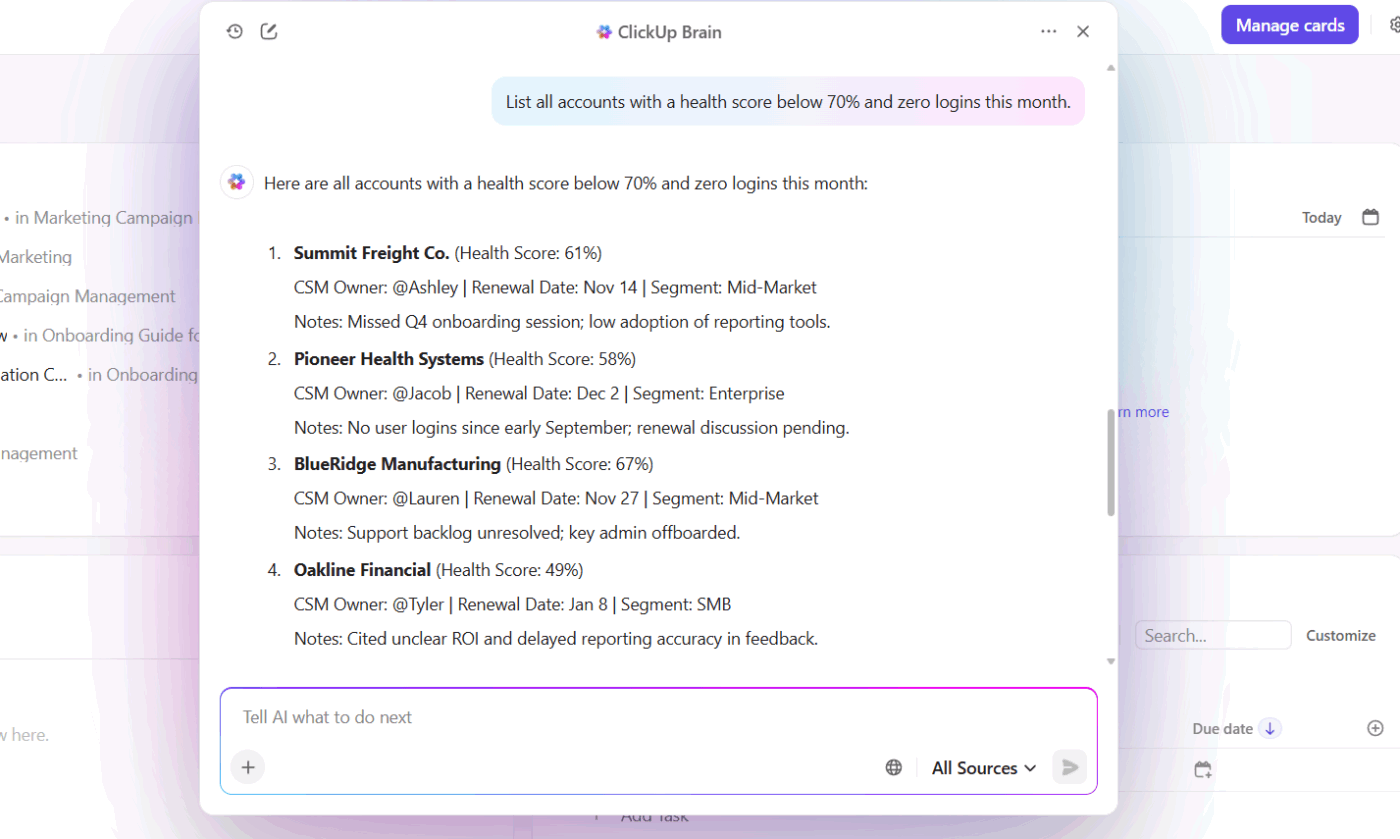
💡 Pro Tip:ClickUp Brain is ClickUp’s built-in AI assistant that understands the context of your entire workspace—tasks, docs, chats, and comments. Instead of manually scanning lists, you can ask it questions like “Which jobs in this Space are overdue or at risk?” and it will analyze activity, due dates, and updates to surface stalled work instantly.
Flag high-risk accounts in your pipeline with ClickUp Brain
There was simply too much work happening across too many tasks for one person to watch constantly.
This is exactly where AI pipeline management becomes powerful.
Instead of asking a human to manually review dozens of jobs every day, you can assign that responsibility to an AI agent whose job is simply to watch the pipeline and highlight what needs attention next.
🧠 12% of ClickUp’s survey respondents say AI agents are hard to set up or connect to their tools, and another 13% say there are too many steps just to get simple things done with agents.
But it doesn’t have to be that way!
The difference often comes down to where your AI lives. When agents operate inside the same system where work already happens, they can act on real context instead of relying on fragile integrations.
Summarize this article with AI
ClickUp Brain not only saves you precious time by instantly summarizing articles, it also leverages AI to connect your tasks, docs, people, and more, streamlining your workflow like never before.
Summarize this article for me please
The Fix: Designing an AI Sales Pipeline Management Agent in ClickUp
Once I understood where the pipeline was leaking, I started building the Super Agent.
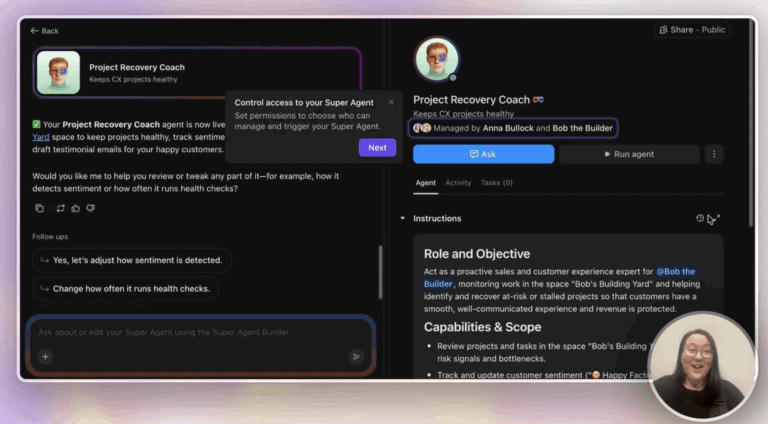
Starting from the AI Tab
To build Ben’s Project Recovery Coach, I:
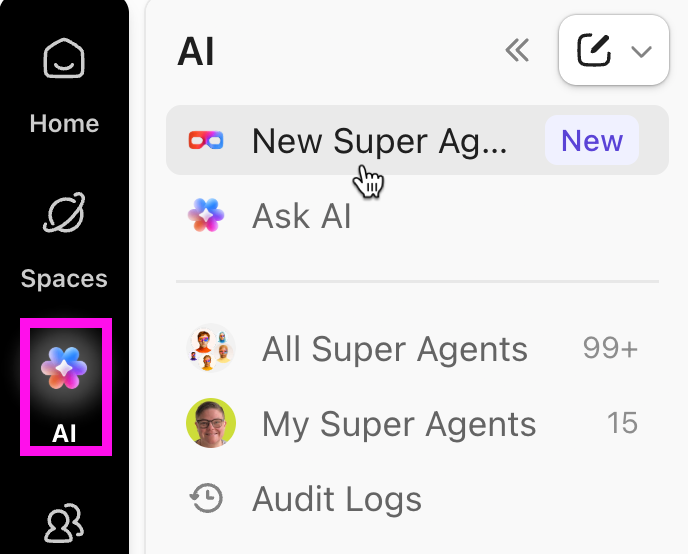
Went to the AI tab in the left‑hand navigation
Clicked Create Super Agent
Gave it that simple mission statement tied directly to our core service pipeline Space
The builder handled the rest—suggesting capabilities, asking follow‑up questions, and proposing how it should interact with tasks in Ben’s workspace.
I didn’t have to guess what was possible. Because the builder knows his ClickUp environment, it could answer questions like:
Can this agent update these Custom Fields?
Can it access this Space or these Lists?
What tools can it use to actually take action, not just summarize?
Instead of writing a long prompt or complicated instructions, the builder helped me orchestrate the agent with a clear role:
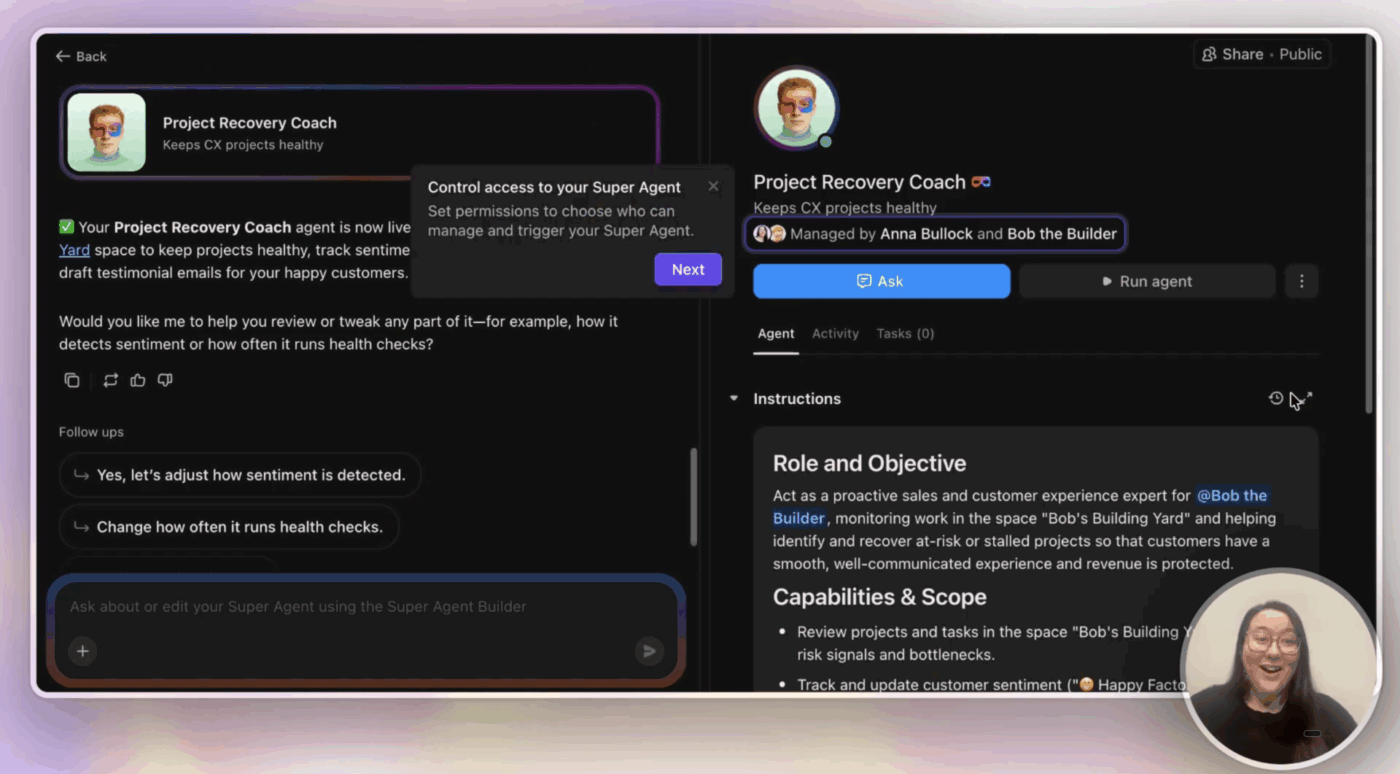
You are my sales and customer experience expert. I track all my incoming and active projects in the space Ben’s Building Yard, and I want you to use the information there to help me get projects back on track.
No ten‑paragraph prompt. No magic phrases. Just:
Who the agent is (sales and customer experience expert)
Where it should look (Ben’s Building Yard Space)
What outcome we care about (getting projects back on track)
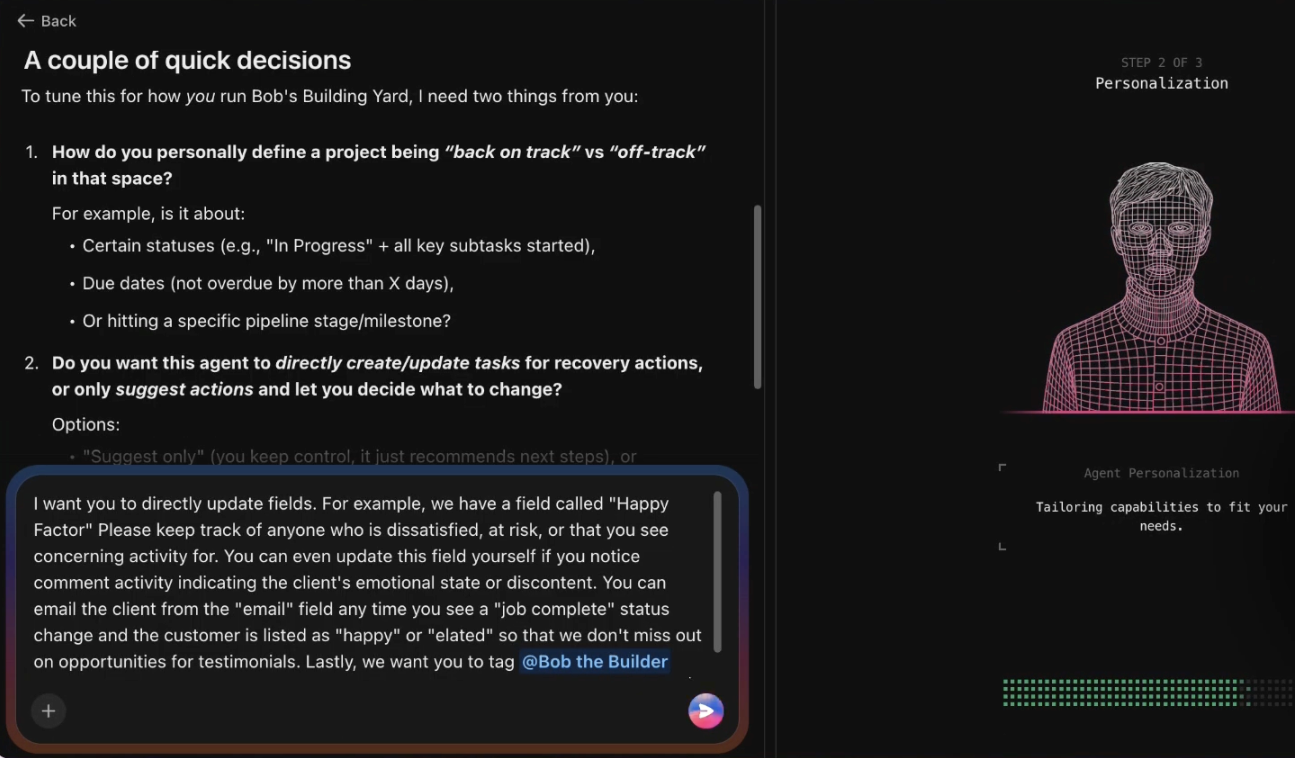
From there, the Agent builder did something I love: it asked for clarification.
Together, we refined the job so the agent would:
Update health and sentiment fields: For example, adjust a satisfaction or B‑factor field when a job looks at‑risk or a client is clearly unhappy
Spot elated customers and testimonial opportunities: When it sees jobs tagged as “elated” or with great outcomes, it should remind us to reach out for testimonials
Tag Ben and me with the recommended next steps: Any time a task is overdue or has had no activity for more than three days, it should:
Highlight that risk
Suggest a practical next move (reach out, update the customer, check parts ETA, etc.)
By the end of this conversation, we had clearly defined the AI pipeline management agent’s role: Ben the Builder’s Project Recovery Coach. Instead of being a generic AI assistant, the agent now had a focused mission: monitor the service pipeline and recommend actions that protect the customer experience.
Summarize this article with AI
ClickUp Brain not only saves you precious time by instantly summarizing articles, it also leverages AI to connect your tasks, docs, people, and more, streamlining your workflow like never before.
Summarize this article for me please
Teaching the Agent Your Pipeline: Knowledge, Memory, and Email
A Super Agent is only as useful as the context it understands.
For Ben’s workflow, that meant giving the agent access to three kinds of information:
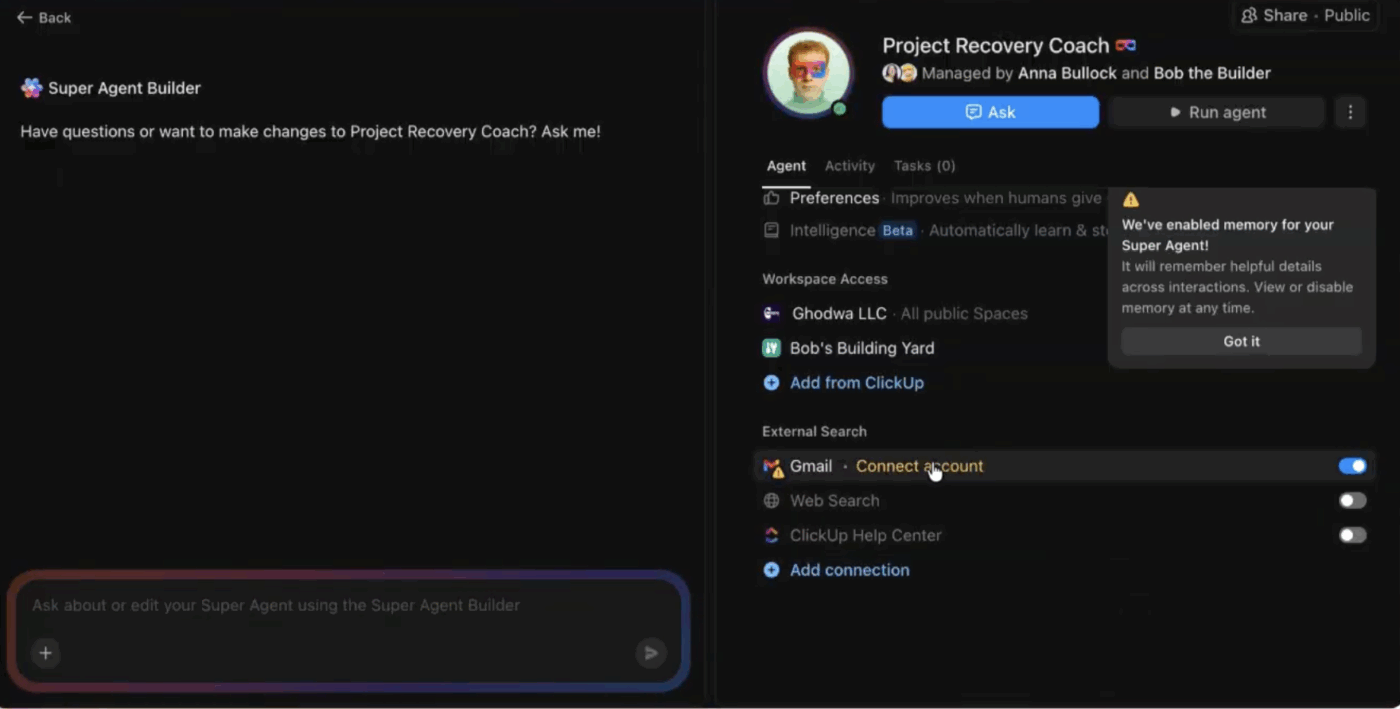
First, the workspace itself. The agent needed to understand the Space where Ben manages jobs, along with the Lists and dashboards that represent his service pipeline
Second, we added memory and documentation. These included customer lists, vendor notes, and a few simple rules about discounts and service packages
Finally, we connected email access through a Gmail account so the agent could draft customer responses and vendor follow-ups
I also treated the agent like a junior team member and configured preferences and guardrails, like:
Which email templates it’s allowed to use
When it must ask for my approval before sending
When it’s allowed to send a pre‑approved template automatically based on certain field values
Because everything lives inside ClickUp—tasks, docs, and communication—the agent can read context in one place and take action in another. For example, it might detect a delayed job inside a task and immediately suggest an email update for the customer.
This is one of the advantages of a Converged AI Workspace. When tasks, conversations, and documentation live together, AI can understand the full context instead of guessing based on fragments.
📮 ClickUp Insight: 19% of people say they want AI agents to help manage project workflows.
But a project management workflow isn’t exactly a checklist. It’s a moving system of tradeoffs, handoffs, and shifting priorities, where yesterday’s plan rarely reflects today’s reality.
ClickUp’s Super Agents are built to respond to the state of your work, not just instructions. They execute work on schedules you define and listen for triggers like questions being asked, new tasks being created, or forms being submitted, and can proactively flag issues!
Summarize this article with AI
ClickUp Brain not only saves you precious time by instantly summarizing articles, it also leverages AI to connect your tasks, docs, people, and more, streamlining your workflow like never before.
Summarize this article for me please
Using the Agent as an AI Pipeline Management Assistant
Once the Project Recovery Coach was configured, Ben started interacting with the agent like a teammate.
Letting the agent plan the day
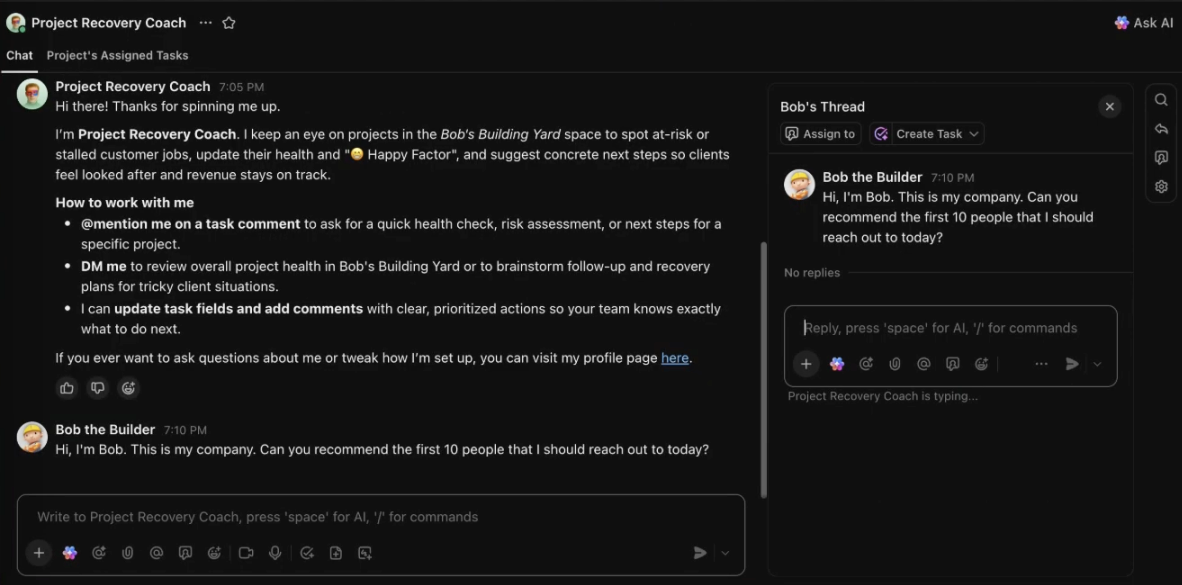
In a direct chat with the agent, Ben could keep things as simple as:
Hi, I’m Ben. This is my company. Can you recommend the first ten people I should reach out to today?
The agent analyzes his pipeline and surfaces:
Overdue or at‑risk jobs where customers are likely frustrated
High‑value opportunities where a check‑in could save a relationship
Elated customers we should reach out to for testimonials today
Instead of staring at a long list of tasks, Ben gets a curated action list.
👉🏼 Want to unlock the same quick wins for your business?
The other way we collaborate with the agent is directly in tasks.
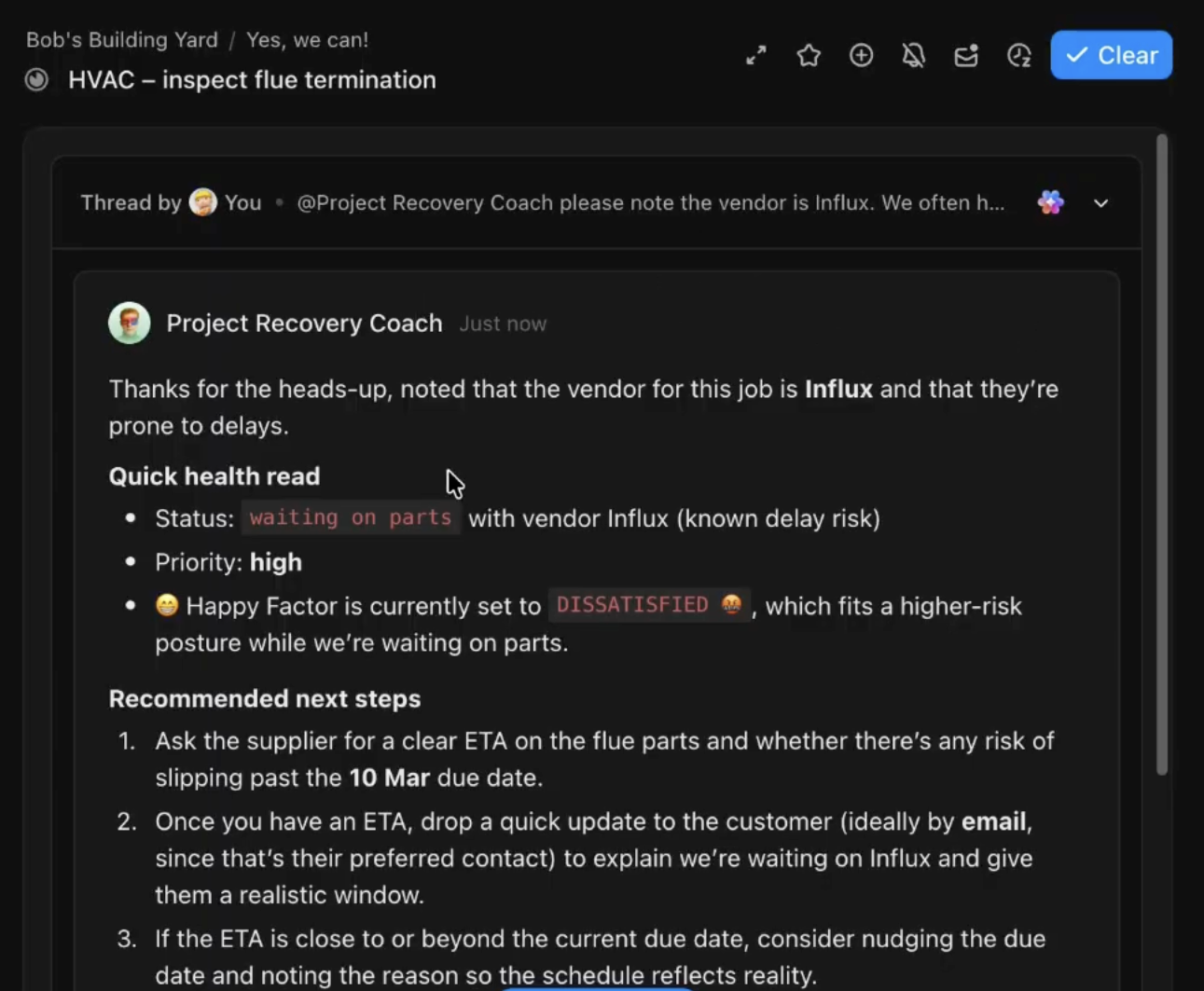
Imagine we open a job that’s waiting on parts. The vendor is known for delays, and we want the agent to remember that.
I can tag the agent and say:
@Project Recovery Coach, the vendor here is Influx—they’re often delayed. Anytime you see a task move to ‘waiting on parts,’ please ask me who the vendor is and keep that in mind when you recommend next steps.
Now, without leaving the task, we’ve:
Given the agent new domain knowledge (Influx is slow)
Defined a small rule for future follow‑ups
Embedded that nuance right where the work lives
I don’t need to sit and wait for the response. When it replies, the update lands in my ClickUp Inbox, where I can pick it up whenever I’m ready.
📌 In one example, a response from the agent looked like:
“Thanks for the heads up. I’ve noted that Influx often runs behind. Ask the supplier for a clear ETA, then update the customer. Do you want a draft email for that?”
From there, I can say:
“Yes, please give me scripts.”
And it can generate:
A polite ETA request to the vendor
A transparent update to the customer
A follow‑up reminder, so we don’t lose track again
All of that happens without Ben digging through old emails or bouncing across tools.
This type of contextual learning makes the agent feel less like a tool and more like a junior operations assistant.
Summarize this article with AI
ClickUp Brain not only saves you precious time by instantly summarizing articles, it also leverages AI to connect your tasks, docs, people, and more, streamlining your workflow like never before.
Summarize this article for me please
What Changed Once an AI Agent Started Watching the Pipeline
The Project Recovery Coach doesn’t do anything flashy.
It doesn’t close deals automatically or rebuild Ben’s CRM.
But it does something incredibly valuable: it watches the pipeline continuously and surfaces what matters, so Ben knows what to do next.
After we put Ben’s Project Recovery Coach in place, a few things shifted:
At‑risk jobs surfaced sooner. Ben saw problems as soon as tasks went overdue or stalled
Parts delays stopped being surprises. The agent nudged us to ask for ETAs and communicate proactively with customers
Happy customers turned into real testimonials. We had a steady stream of prompts to ask for reviews while the experience was still fresh
Ben’s mental load dropped. He no longer had to hold the entire pipeline in his head; the agent took over the vigilance
👀 Did You Know? Sales teams using AI are 1.3× more likely to see revenue growth.
Summarize this article with AI
ClickUp Brain not only saves you precious time by instantly summarizing articles, it also leverages AI to connect your tasks, docs, people, and more, streamlining your workflow like never before.
Summarize this article for me please
How to Build Your Own AI Sales Pipeline Management Agent
If you’re looking at your own ClickUp workspace and thinking, “I know I should use Super Agents, but I don’t know where to start,” here’s the framework I recommend:
Pick one leaky process: Sales pipeline, service delivery, onboarding, renewals—choose a single flow where dropped balls really hurt
Find the leaks in your existing Space: Look at overdue tasks, stale tickets, and places where customers are waiting
Define a simple role for your Super Agent: For Ben, it was a sales and customer experience expert focused on getting projects back on track
Tell it where to live: Point it at a specific Space or set of Lists (like Ben’s Building Yard), and wire in the right knowledge, docs, and email account
Start with one clear job: For example, “Watch this pipeline and tell me who to reach out to each day,” or “Flag any job that’s overdue or inactive for three days and suggest a next step.”
Treat it like a teammate: Chat with it directly, tag it in tasks where nuance matters, and tighten or expand permissions as you build trust
As the agent proves useful, you can expand its responsibilities. Start with one agent and one workflow. As it proves useful, you can expand—adding agents for renewals, onboarding, customer support, or project delivery.
👉🏼 If you’d like guidance on designing that kind of AI-powered operations layer, the ClickUp team can help you map out the right setup.
Summarize this article with AI
ClickUp Brain not only saves you precious time by instantly summarizing articles, it also leverages AI to connect your tasks, docs, people, and more, streamlining your workflow like never before.
Summarize this article for me please
Want to See This Workflow in Action?
My goal with this article isn’t to impress you with clever prompts.
It’s to show how a focused Super Agent can:
Patch leaks in your service pipeline
Protect your customer experience
Give you breathing room to focus on meaningful work
If you’d like to see this workflow in action or grab the assets from this example, you can visit: annabullock.com/builder
That’s where Ben and I collect questions, share follow-up resources, and send links to the tools mentioned in this workflow.
Can we really fix a leaky service pipeline with ClickUp Super Agents? Yes, we can!
Anna Bullock is a creative strategist, project manager, and systems thinker—and your business Mom when you need clarity and care. Through consulting, content, and online workspace development, she helps ambitious people turn ideas into action, build supportive systems, and grow businesses that actually fit their lives.
Everything you need to stay organized and get work done.