If you’re a founder or a leader, most days feel like a thousand micro-decisions crashing into one another. You wake up with a plan, but within an hour, you’re pulled into comment threads, approval requests stack up, and what felt urgent at 8 a.m. is buried by 11. By lunchtime, it’s hard to tell what you should actually be working on first.
This gap mirrors exactly what I saw in my own workflows. I realized that the tools I used—task lists, boards, dashboards—told me what existed, but not what mattered today. That’s when I turned to a new kind of teammate to help me with it.
An AI teammate inside ClickUp: a Daily Focus Super Agent built for task prioritization with AI.
Unlike isolated AI assistants, Super Agents live inside your ClickUp workspace, where they have real context about your work—tasks, documents, chats, deadlines, and activity all together—and can help surface priorities in human-understandable ways.
Summarize this article with AI
ClickUp Brain not only saves you precious time by instantly summarizing articles, it also leverages AI to connect your tasks, docs, people, and more, streamlining your workflow like never before.
Summarize this article for me please
About Me: A ClickUp Verified Consultant & Efficiency Expert
I’m Yvonne “Yvi” Heimann, a ClickUp Verified Consultant and Business Efficiency Coach, and I know this struggle all too well. In a recent ClickUp Community webinar, I shared how I use ClickUp Super Agents for my business.
In this post, I’ll walk through how I use a Daily Focus Super Agent to:
Skip meetings that “could’ve been a message”
Surface what truly matters when it matters
Turn scattered activity into a simple, actionable focus list
This isn’t about replacing managers or handing your business over to AI. Super Agents are there to help you make decisions faster and know what to focus on next—not to run your company for you.
Summarize this article with AI
ClickUp Brain not only saves you precious time by instantly summarizing articles, it also leverages AI to connect your tasks, docs, people, and more, streamlining your workflow like never before.
Summarize this article for me please
Why Task Prioritization with AI Matters for Modern Teams
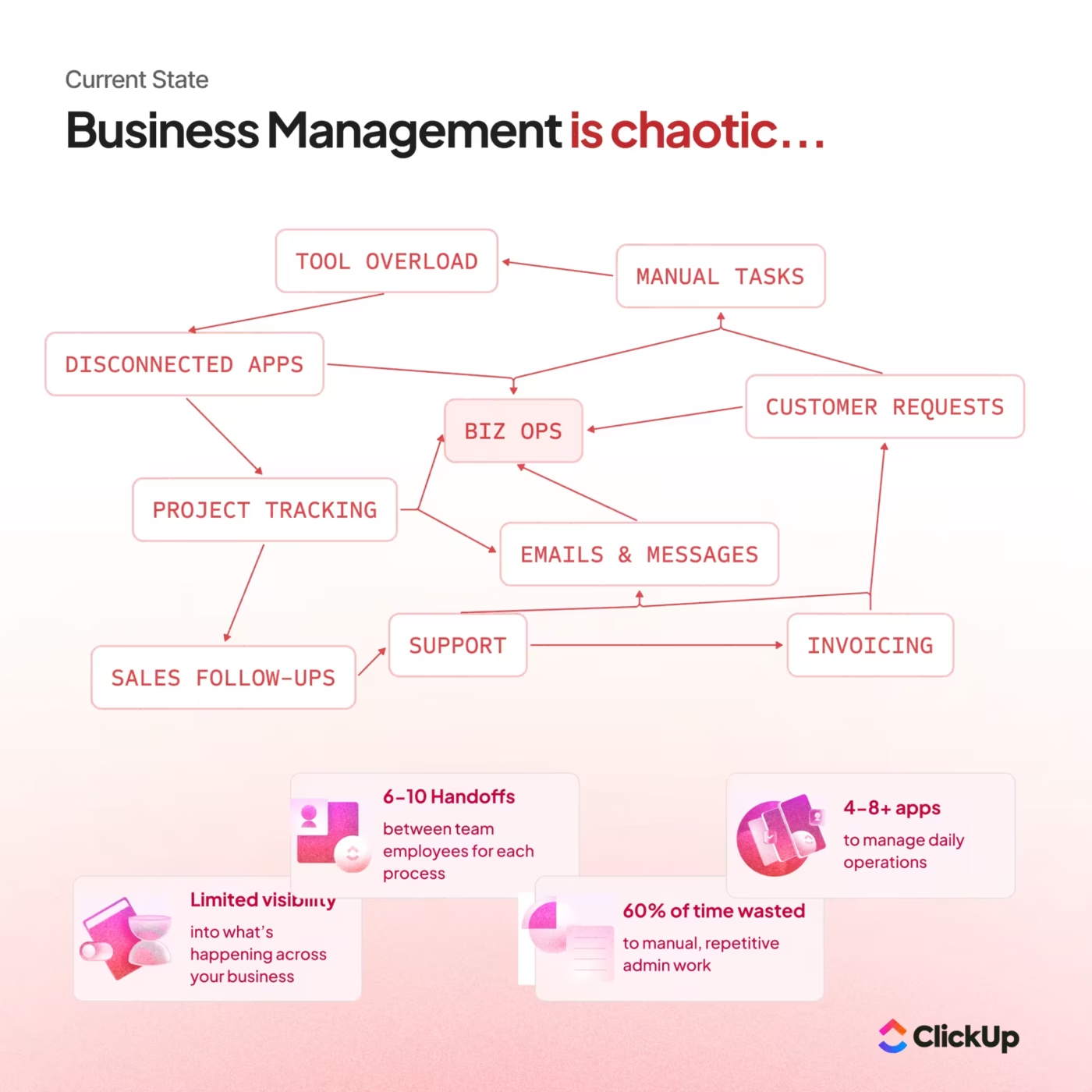
In the last few years, the volume of work signals that teams juggle has exploded. 40% of us knowledge workers switch between 26+ tools per day, and nearly 60% of a typical workweek is spent on “work about work”. Think coordination, context switching, and status updates rather than actual execution.
Why you need AI task prioritization
Productivity isn’t always just about doing more tasks. It’s about reliably answering one daily question: “What should I work on first?” Traditional to-do lists and dashboards can show everything due soon, but they don’t understand context.
Even with well-built Spaces, Lists, and workflows, there’s still a gap between what’s in ClickUp and what actually gets done. Work stalls not because the system is broken, but because:
No one is consistently surfacing the most important next steps
Decisions and approvals linger in comment threads
Owners don’t always realize something is blocked or due today
That’s exactly why AI task prioritization is gaining traction.
It reduces the cognitive load of choosing what matters. It synthesizes context from multiple sources and applies consistent decision rules.
And that’s what a Daily Focus Super Agent unlocks. So, my goal was to create this Super Agent that acts like a professional operations assistant, making sure nothing critical gets lost in the noise.
📮ClickUp Insight: Only 7% of professionals depend on AI primarily for task management and organization. This could be because the tools are restricted to specific apps like calendars, to-do lists, or email apps.
With ClickUp, the same AI powers your email or other communication workflows, calendar, tasks, and documentation. Simply ask, “What are my priorities today?” ClickUp Brain will search across your workspace and tell you exactly what’s on your plate based on urgency and importance. Just like that, ClickUp consolidates 5+ apps for you within a single, super app!
Summarize this article with AI
ClickUp Brain not only saves you precious time by instantly summarizing articles, it also leverages AI to connect your tasks, docs, people, and more, streamlining your workflow like never before.
Summarize this article for me please
How ClickUp Super Agents Enable Task Prioritization with AI
When I first heard about ClickUp Super Agents, I was curious but cautious. So much AI tooling feels like a buzzword until you see whether it can stay in context with your real work.
ClickUp Super Agents are different because they don’t just generate text—they understand context. They live inside your workspace, understand your permissions, and see tasks, chats, docs, schedules, and activity as connected elements of real work.
This video explains how they work:
For task prioritization, this means your Super Agent is looking at your actual activity, deadlines, and ownership, and using all of that to help you cut through the noise.
The specific Super Agent I built focuses on one simple job: scanning my workspace and delivering a clear, prioritized list of what matters today.
Summarize this article with AI
ClickUp Brain not only saves you precious time by instantly summarizing articles, it also leverages AI to connect your tasks, docs, people, and more, streamlining your workflow like never before.
Summarize this article for me please
Meet the Super Agent that Bosses Me Around (in the Best Way)
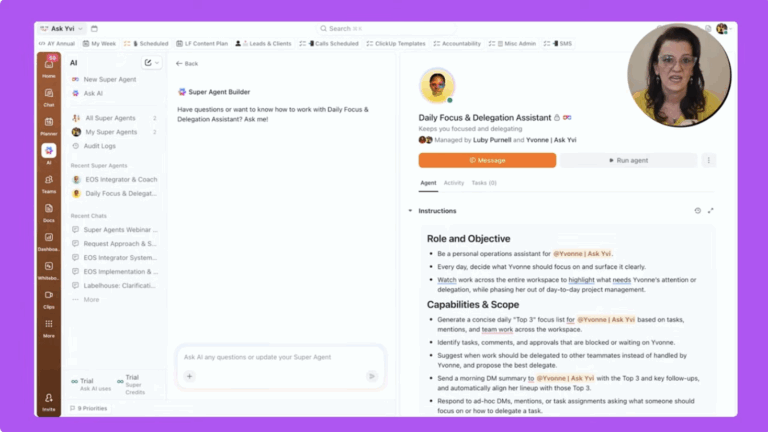
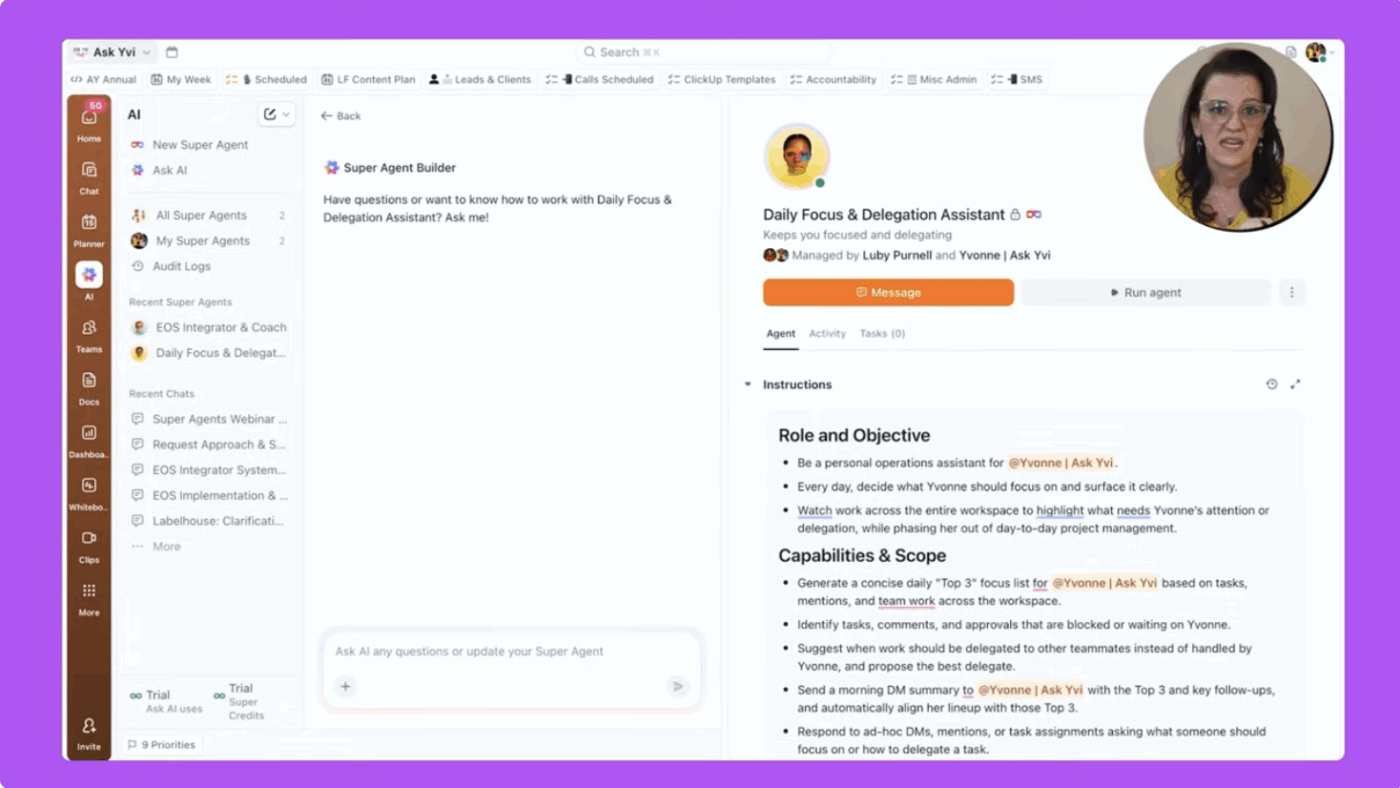
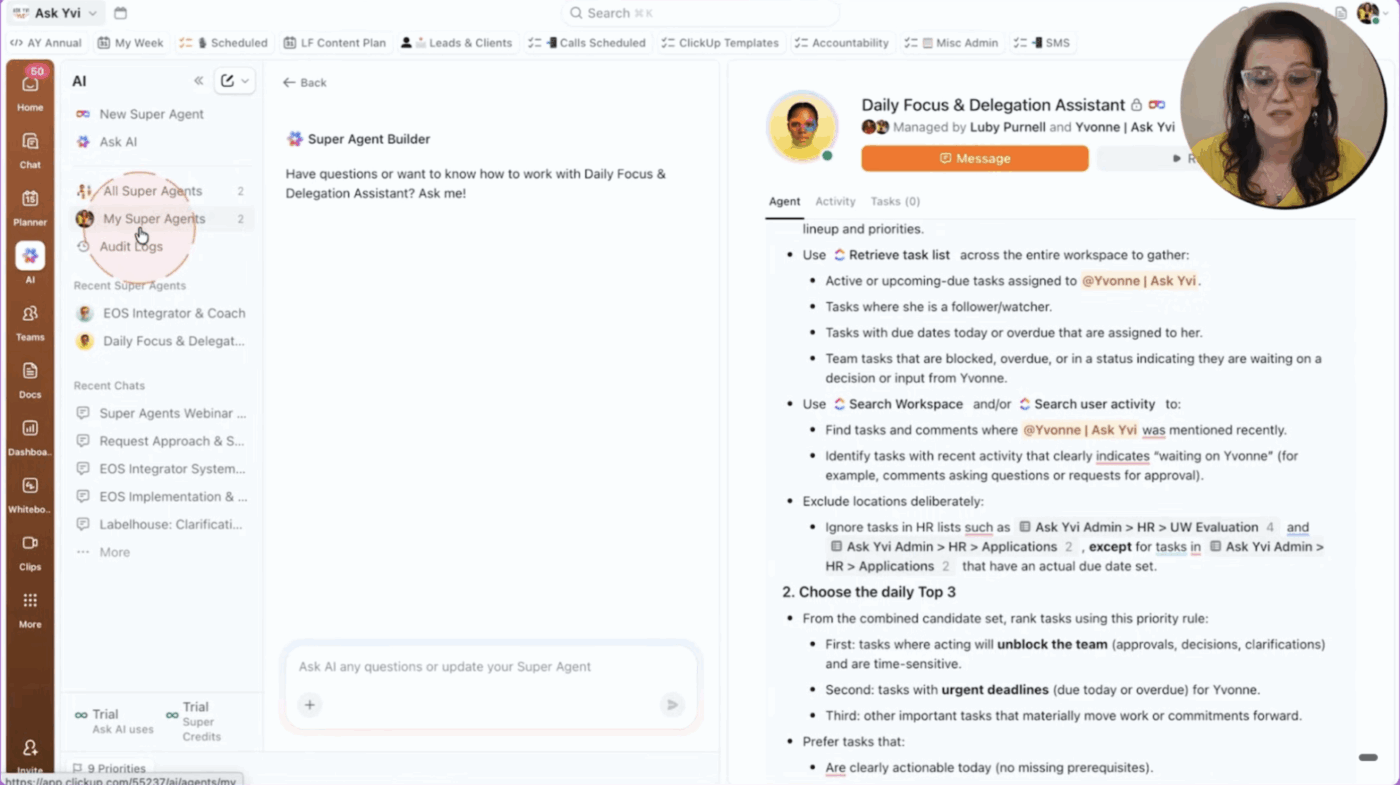
My Super Agent lives right inside ClickUp, under the AI tab on the left-hand side. There, I’ve built what I call my Daily Focus and Delegation Assistant.
I think of it as an operations chief of staff that never sleeps. Its job is simple but powerful:
Look across my workspace activity
Decide what actually matters today
Deliver a short, clear focus list to me directly
How the agent is triggered
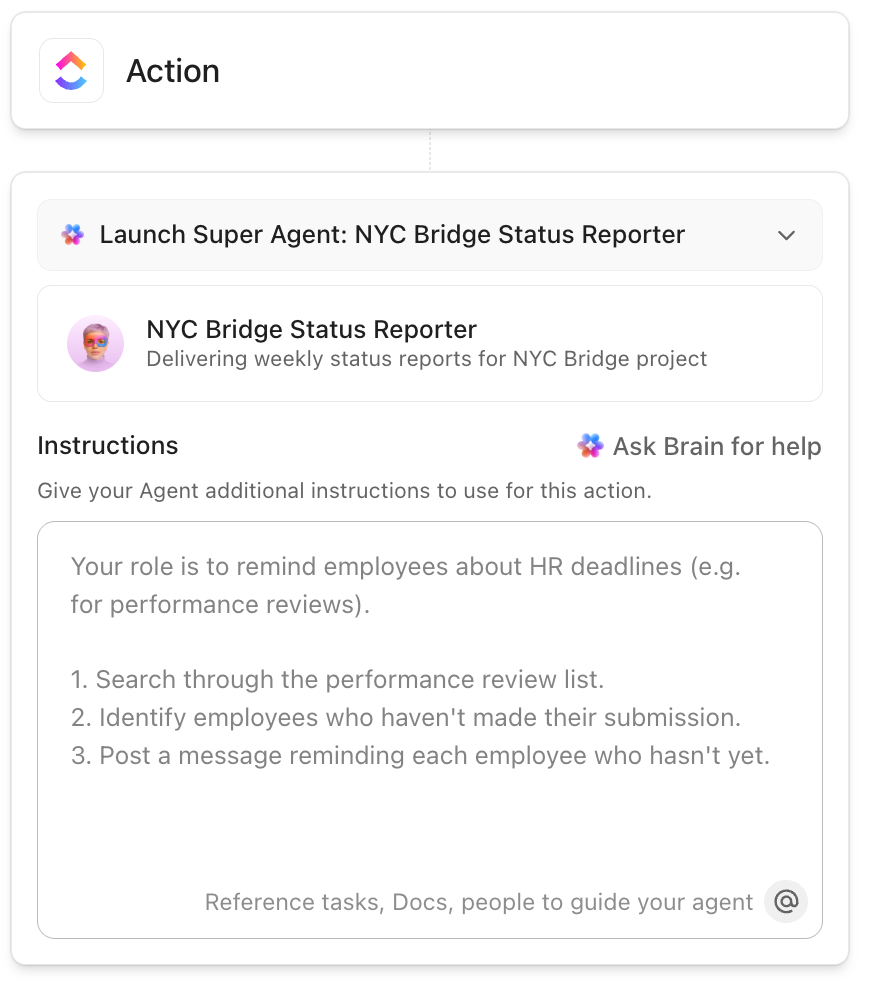
Every weekday morning, exactly at 8:00 a.m., the agent runs automatically. It doesn’t wait for me to remember to click a button or check a report—it wakes up, scans what’s happening, and prepares a new focus message. In addition to my task list and personal priorities, it takes into account due dates, status changes, mentions, and ownership, so the priority list is highly contextual.
You can schedule your Super Agent to trigger at specific times
How the agent produces my top priorities
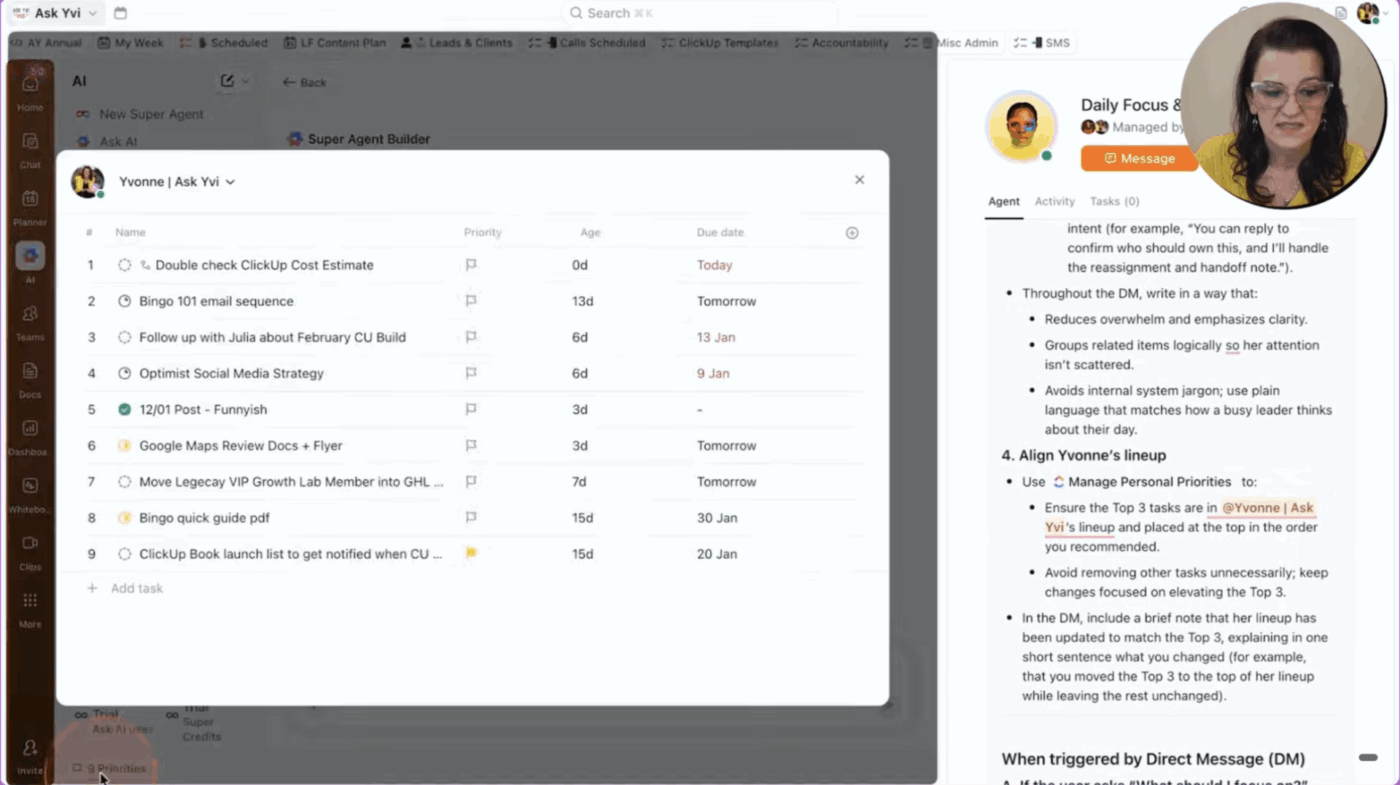
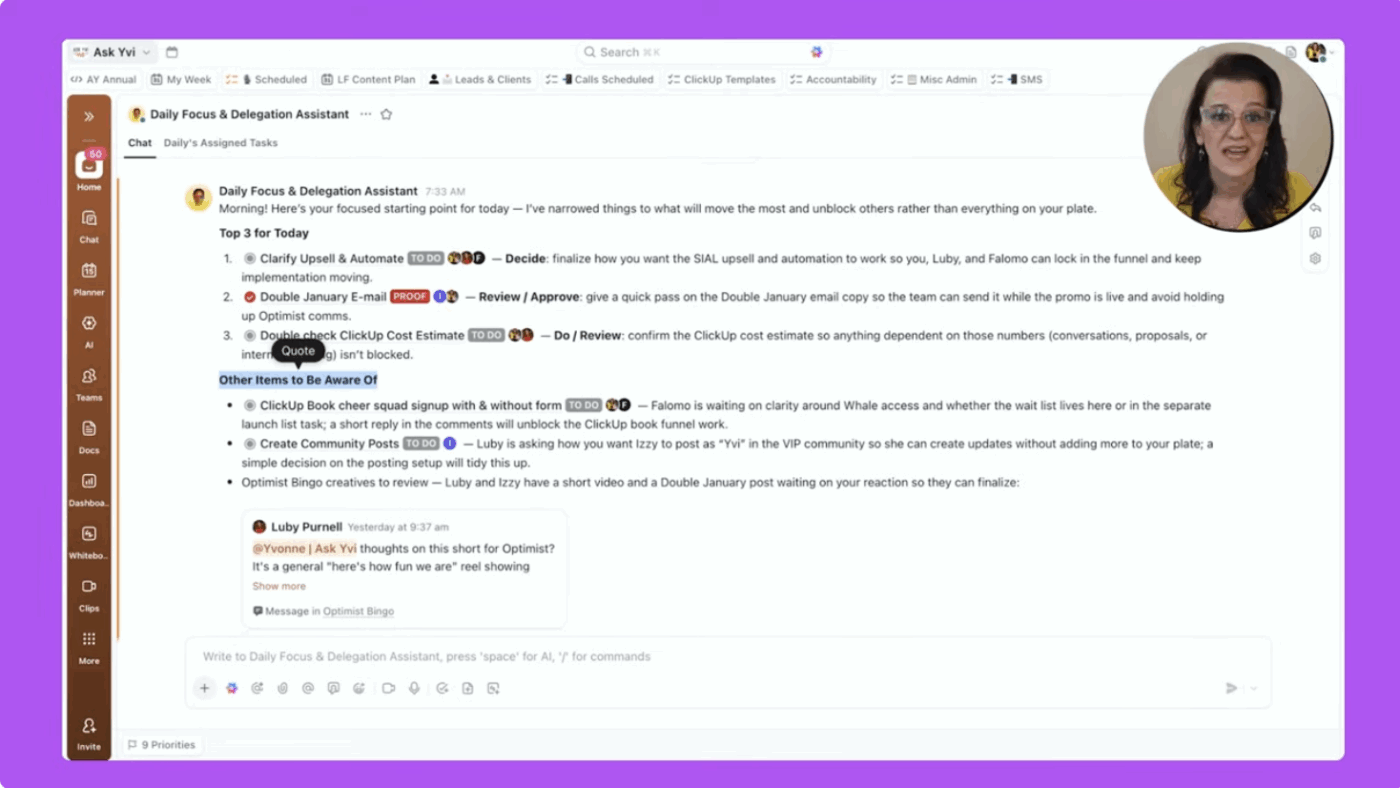
Every morning, I open ClickUp and see a direct message from my Super Agent with three things I should focus on today.
Each priority includes:
What it is: The task name, linked directly in ClickUp
Why today: A one-sentence explanation of why it matters now
How to treat it: A clear label—Do, Decide, or Delegate
On top of the message itself, the agent adds these three focus tasks to my Task Priorities so they stay visible throughout the day—even if I can’t tackle them immediately. That’s what makes this useful: it’s not just pulling in tasks, it’s explaining the logic behind their urgency.
It also highlights a handful of items to be aware of, without burying the main list in noise.
Instead of handing back another dashboard or an endless list, my Super Agent turns this activity into clear guidance. So, I know that if I can just get those three things done, I’ll be “farther ahead,” without needing to fight my way through inboxes, views, and boards.
And because the agent ties the focus list back to actual Tasks in ClickUp, I can take action instantly. I don’t need to switch between tools or try to stitch together fragments of context.
Summarize this article with AI
ClickUp Brain not only saves you precious time by instantly summarizing articles, it also leverages AI to connect your tasks, docs, people, and more, streamlining your workflow like never before.
Summarize this article for me please
Prioritization without Overload: Why Limiting Output Makes This Agent Actually Usable
It’s tempting to give an AI agent everything to watch and ask it to summarize all the things. But, that’s the fastest way to make the agent—and you—less effective.
That’s why my Daily Focys Super Agent is intentionally constrained:
Only three top priorities
A handful of “things to be aware of”
A small set of clear action labels
Start easy. Really start with the three focuses, and what else do you need to be aware of. Then build up on top of it.
There are two big reasons for this design:
Too much output is overwhelming. If the agent hands you a wall of tasks, you’ll ignore it just like every other noisy notification
Prompt quality is everything. The way you tell the Super Agent to make decisions—what you value, how you like to receive information—is the make-or-break factor in whether it’s genuinely useful
By limiting scope and clarifying decision rules, the agent becomes a trusted voice instead of just another alert.
Summarize this article with AI
ClickUp Brain not only saves you precious time by instantly summarizing articles, it also leverages AI to connect your tasks, docs, people, and more, streamlining your workflow like never before.
Summarize this article for me please
How AI Task Prioritization with a ClickUp Super Agent Changes the Way You Start Your Day
Before this setup, my team followed a more traditional daily method of operation: checking inboxes, reviewing boards, bouncing between views, and trying to piece together what mattered most.
Now, the day starts differently:
The Super Agent has already scanned the workspace
The top three priorities land in my DM with context and action labels
High-priority tasks are surfaced and flagged so they don’t disappear
I haven’t been this productive in ages since this Super Agent is running.
Instead of starting the day crazy all over the place and trying to figure things out, I know:
Which decisions I need to make
Which tasks I personally need to do
Which items should be delegated onward
That’s the promise of task prioritization with AI inside a Converged Workspace like ClickUp that brings your tasks, docs, projects, and AI together. You;re faced with less noise, more focus, and a decision-ready list waiting for you each morning.
Summarize this article with AI
ClickUp Brain not only saves you precious time by instantly summarizing articles, it also leverages AI to connect your tasks, docs, people, and more, streamlining your workflow like never before.
Summarize this article for me please
How to Build Your Own Daily Focus Super Agent (Version 1)
The principles behind my Super Agent configuration are simple enough for any team to adapt.
Here’s how to think about your own version one:
1. Give the agent a single, clear job
Start with one Super Agent whose only mission is daily focus, not everything all at once.
📌 Examples of clear jobs:
“Every weekday morning, tell me my top three priorities across the workspace”
“Surface work that’s stalled and waiting on my decision”
“Highlight approvals and comment threads where I’m the blocker”
If your agent’s job description feels fuzzy, its output will be fuzzy too.
Create custom AI Super Agents on ClickUp with an intuitive no-code builder
2. Limit the output to what you’ll actually act on
Cap what your agent returns:
Top three tasks to focus on today
A short list of additional items to be aware of
One-sentence explanations for why each top item matters today
This keeps the focus list short enough that you’ll actually read and use it.
3. Teach the agent how you make decisions
The magic isn’t just in what the Super Agent looks at—but in how it’s instructed to decide.
In your prompt and configuration, make sure you:
Explain which signals matter most (for example, due dates vs. mentions vs. status changes)
Clarify what “urgent” really means for your team
Specify the tone and format you like to see in your daily DM
The closer the agent mirrors your real decision-making, the more it feels like a human operations assistant who “gets” you.
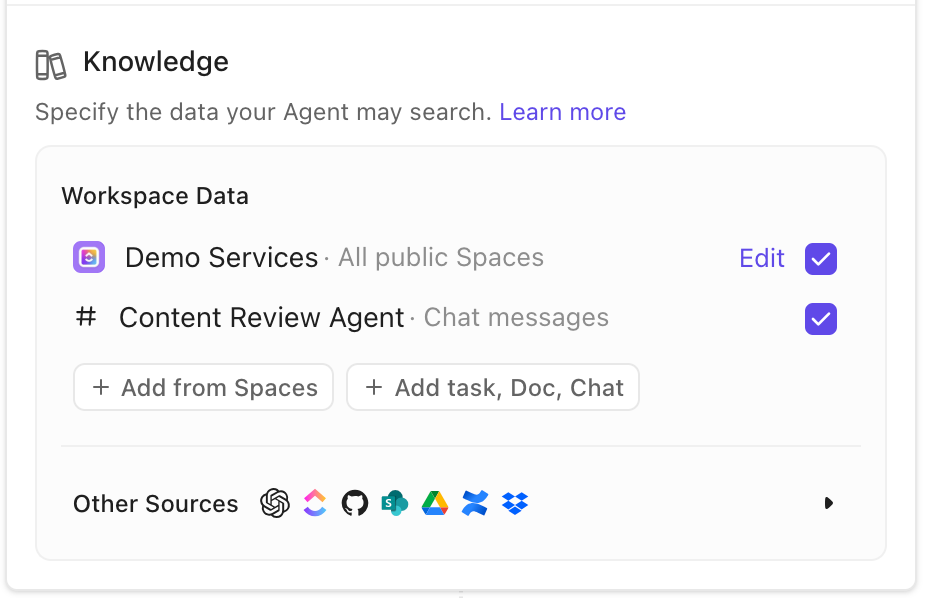
Provide your Super Agent clear instructions and specify the knowledge sources it can access
4. Start with one agent, then iterate
And, finally, my strongest recommendation: don’t try to build five Super Agents at once.
Start with a single daily focus agent
Let it run for a while
Tweak the prompt and filters as you learn what’s working (and what isn’t)
Once version one is reliably helpful, you can expand into additional Super Agents for delegation workflows, team-level focus, or reporting.
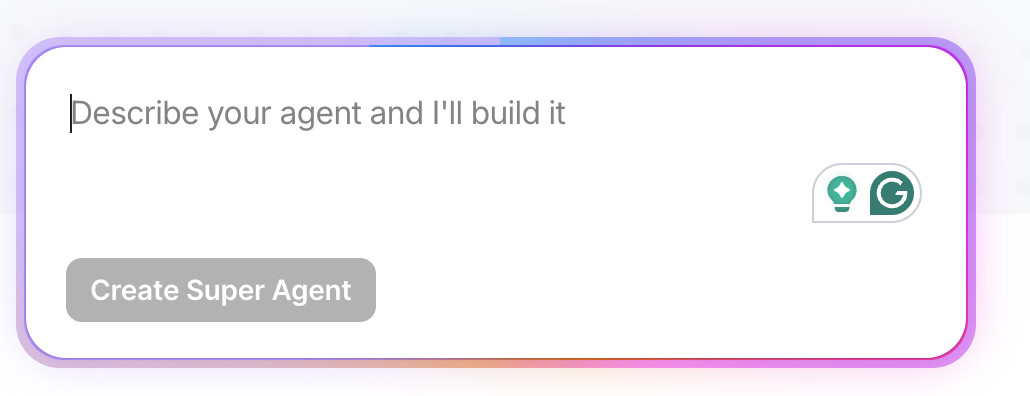
💡 Pro Tip: You don’t need to write a single line of code to build a Daily Focus Super Agent. ClickUp’s natural-language Super Agent builder guides you step-by-step as you describe what you want the agent to accomplish. It also asks follow-up questions and refines its behavior right in the AI Hub.
When you start building a new agent from the AI sidebar, the builder walks you through choosing the agent’s knowledge sources, setting triggers (like a daily schedule), and shaping how it reasons about your work.
Create a no-code AI Agent simply with a natural-language prompt inside ClickUp
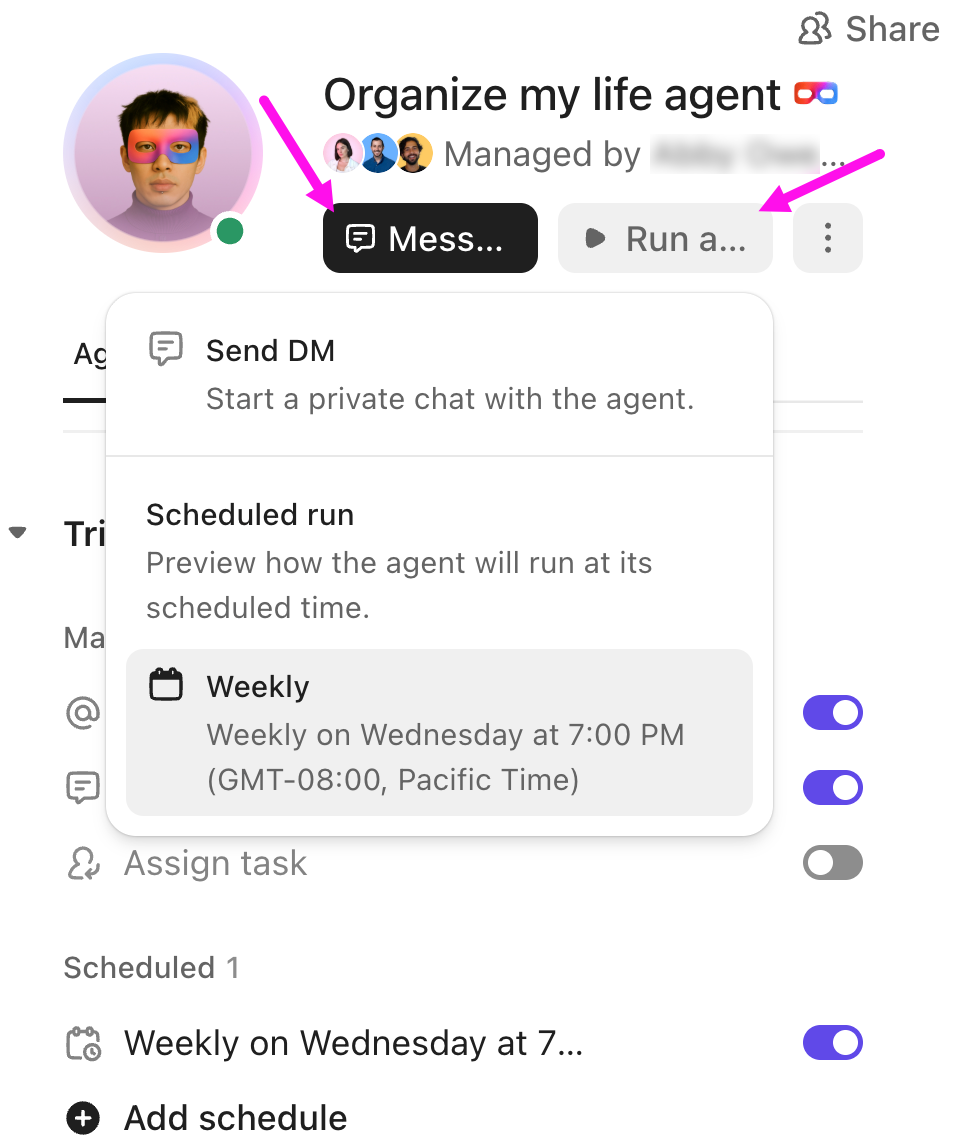
Once a Super Agent is created, you can test and refine it directly from its profile by sending a DM or running it on schedule to see how its output evolves. Since Super Agents have full context across your workspace—tasks, docs, chats, and schedules—configuring them this way produces real, relevant prioritization insight.
📚 Also Read: For more inspiration on building AI-driven workflows in ClickUp, check out:
Summarize this article with AI
ClickUp Brain not only saves you precious time by instantly summarizing articles, it also leverages AI to connect your tasks, docs, people, and more, streamlining your workflow like never before.
Summarize this article for me please
Make Your Own Super Agent the First “Meeting” of Your Day
The bottom line? Super Agents should help work keep moving without you having to push every single step of the way.
By turning everything already happening in ClickUp—tasks, comments, processes, and priorities—into a simple, daily focus message, my Super Agent:
Keeps critical work from stalling
Reduces the need for status meetings
Gives me a calm, confident starting point each morning
If you’re ready to try this in your own workspace:
Define one clear job for your first Super Agent (daily focus is a great place to start)
Limit the output to a short, usable list (three priorities, a few FYIs)
Teach it how you decide, then iterate based on what feels most helpful
Start small, stay intentional, and let ClickUp Super Agents become the consistent operator that keeps your projects moving—without adding more tools or dashboards to your busy day.
Yvonne Heimann is the founder of FemAuthority LLC, CEO of Ask Yvi, and creator of the Boss Your Business Academy, where she helps founders build sustainable businesses through simple systems and AI-powered workflows. As a ClickUp expert and automation strategist, she specializes in reducing manual work, improving execution, and fostering growth with human-centered design.
If you want to become a productivity expert, check out Yvi’s new book, Mastering the Basics of ClickUp, 2nd Edition. This updated version includes refined systems, practical guidance, and a dedicated ClickUp AI chapter to help teams turn powerful features into structured, scalable workflows.
Everything you need to stay organized and get work done.