










Still downloading templates?
There’s an easier way. Try a free AI Agent in ClickUp that actually does the work for you—set up in minutes, save hours every week.
Sorry, there were no results found for “”
Sorry, there were no results found for “”
Sorry, there were no results found for “”
Most research papers don’t fall apart because the ideas are weak. They fall apart because your sources, notes, and draft pieces are scattered, so writing turns into a constant scavenger hunt. Research-heavy work makes this worse: knowledge workers spend roughly 20% of their day searching for and gathering information.
This article walks you through six free research paper organizer templates that help you track sources, build outlines, and manage multi-phase projects without losing key details along the way.
| Template | Download Link | Ideal For | Best Features | Visual Format |
|---|---|---|---|---|
| ClickUp Research Report Template | Get free template | Students and professionals writing structured research papers | Executive summary, methodology, findings sections, Custom Fields for source tracking, AI summaries | Structured research report |
| ClickUp Research Whiteboard Template | Get free template | Visual thinkers brainstorming arguments and mapping ideas | Drag-and-drop nodes, idea clustering, convert whiteboard items to tasks or doc sections | Visual whiteboard |
| ClickUp Research Memo Template | Get free template | Researchers synthesizing findings as they read | Standardized memo layout, annotated summary building, supports annotated bibliographies | Memo format |
| ClickUp User Research Plan Template | Get free template | Graduate students, UX researchers, multi-phase academic projects | Sections for hypotheses, research questions, methodology, milestone tracking, collaboration | Research project plan |
| ClickUp Market Research Template | Get free template | Academic or business researchers running literature reviews or landscape analyses | Organized research categories, trend tracking, source comparison, task assignments | Research database + task workflow |
| ClickUp Equity Research Report Template | Get free template | Finance, economics, and quantitative research writers | Executive summary, data-driven analysis, structured recommendations, evidence-focused layout | Equity research report |
| ClickUp Data Analysis Findings Template | Get free template | STEM students, analysts, and quantitative researchers | Data organization, statistical test tracking, clear audit trail, findings documentation | Data analysis findings |
| ClickUp Grant Proposal Template | Get free template | Researchers applying for grants or funding | Problem statements, methodology, timeline sections, deadline tracking, team collaboration | Grant proposal |
| ClickUp LMS Implementation Template | Get free template | Research teams needing structured training, protocols, or onboarding | Training checklists, certification tracking, protocol documentation, progress tracking | LMS workflow |
| Research Paper Graphic Organizer by Template.net | Download this template | Students needing a simple printable outline | Thesis mapping, arguments layout, visually structured sections | Printable graphic organizer |
| Bit.ai Research Paper Template | Download this template | Teams co-writing a research paper | Real-time coediting, embedded media, structured academic sections | Collaborative document |
A research paper organizer template is a structured framework for collecting, organizing, and connecting the key components of a research project, including sources, notes, outlines, and drafts, in one place.
Without a clear system, research often slows due to context sprawl. Information gets scattered across tabs, documents, bookmarks, and notes, making it harder to locate sources, track ideas, and maintain progress.
A strong organizer template typically includes:
Unlike a basic outline that only maps the argument, a research organizer supports the whole workflow, from gathering material to shaping and refining the final paper. Some are simple and linear, while others function as complete project workspaces with task tracking and collaboration.
📮 ClickUp Insight: More than half of all employees (57%) waste time searching through internal docs or the company knowledge base to find work-related information. And when they can’t? 1 in 6 resorts to personal workarounds—digging through old emails, notes, or screenshots just to piece things together.
ClickUp Brain eliminates the search by providing instant, AI-powered answers pulled from your entire workspace and integrated third-party apps, so you get what you need—without the hassle.
Downloading the first template you find often leads to more frustration. You spend an hour setting it up, only to realize it doesn’t track what you need or it’s too rigid to adapt to your evolving argument. You end up abandoning it and going back to your chaotic system of scattered files.
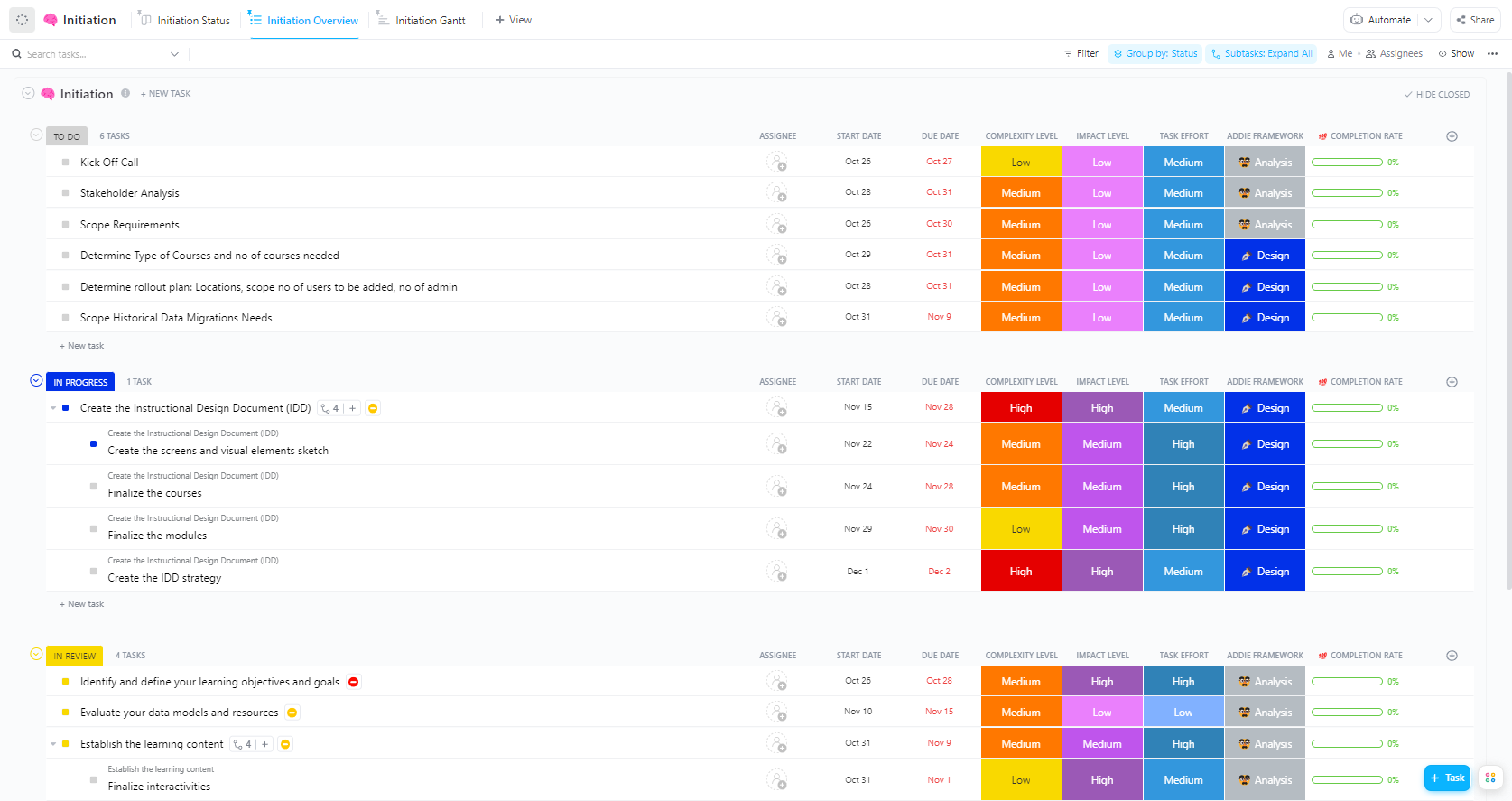
To avoid this, you need to know what separates a helpful template from a useless one. Here are the key features that make a research paper organizer useful rather than just another abandoned document. ✨
Now that you know what to look for, here are some templates worth considering.
These templates range from visual brainstorming tools to structured project trackers. Some are better for solo academic work, while others shine for team research projects. The key is to pick one based on how you actually work, not how you think you should work.
These templates range from visual brainstorming tools to structured project trackers. Some are better for solo academic work, while others shine for team research projects. The key is to pick one based on how you actually work, not how you think you should work.
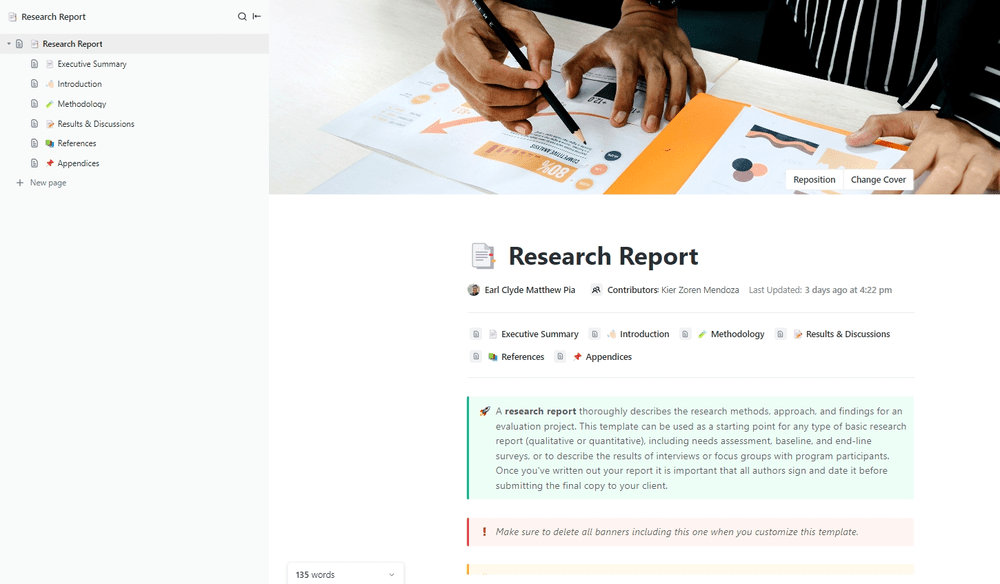
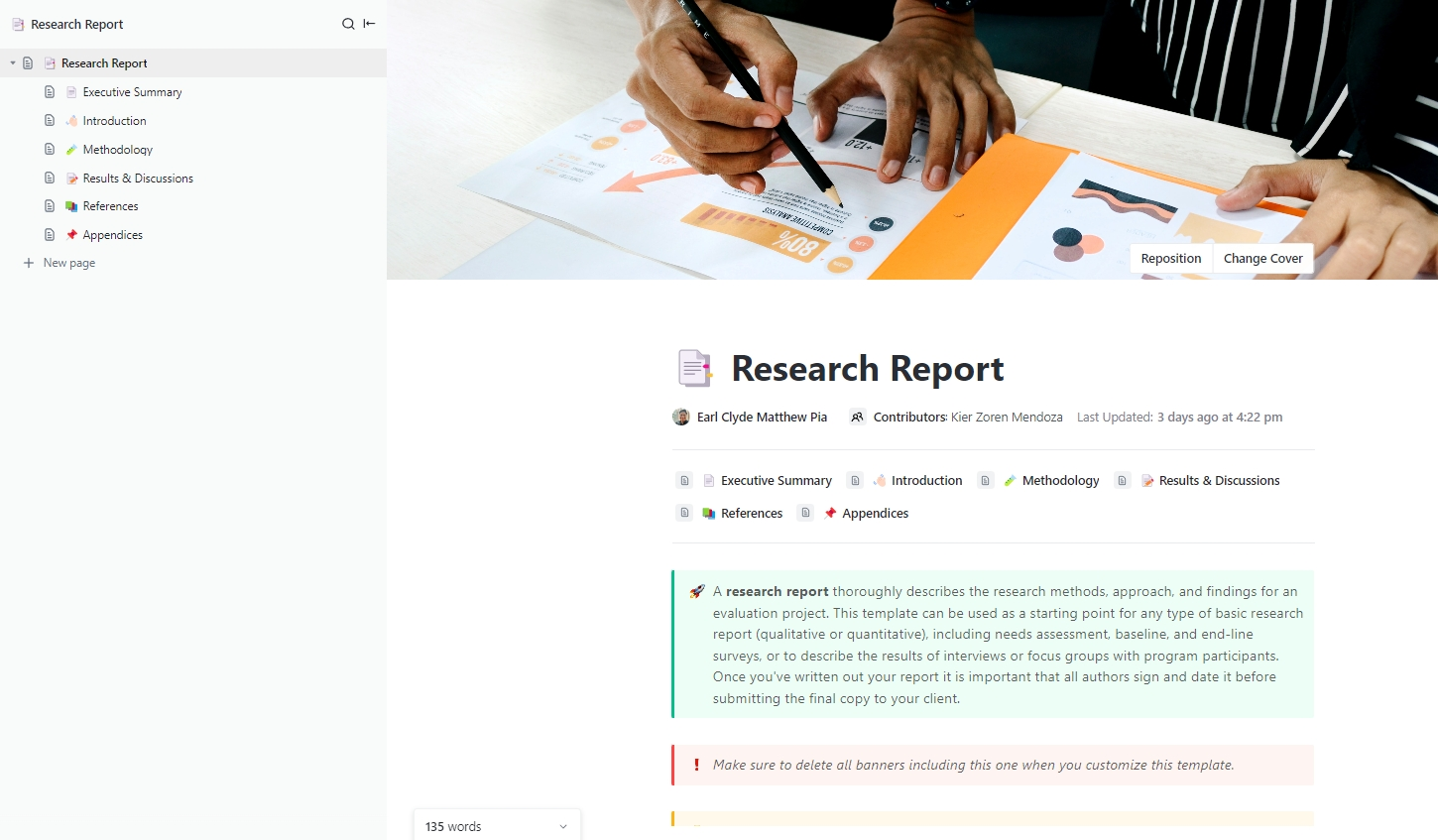
Starting a formal research paper from a blank page is intimidating. You’re not just writing; you’re trying to remember the standard academic paper format while juggling your research. The ClickUp Research Report Template solves that by giving you a ready-made structure for formal reports, complete with sections for an executive summary, methodology, findings, and conclusions. Instead of a messy folder of documents, you get a single workspace for your entire project.
The ClickUp Research Report Template’s pre-built sections mirror a standard scientific paper format so that you can focus on the content rather than the structure. Build a source table directly into your workflow with ClickUp Custom Fields, tracking everything from author names and publication dates to citation status for each source. Write your draft right next to your research with ClickUp Docs, keeping your outline, notes, and sources in a single view. Synthesize information and spot patterns faster by using ClickUp Brain to summarize dense source materials or suggest connections between your notes.
The ClickUp Research Report Template is perfect for students and professionals who need to produce structured research reports and want their organizational system and writing environment unified in one place.
The best ideas don’t always arrive in a neat, linear order. Trying to force your early brainstorming into a rigid, top-down outline can kill creativity. You need space to explore connections, group related thoughts, and see the bigger picture before you commit to a structure.
The ClickUp Research Whiteboard Template provides this visual canvas. It’s a flexible space that lets you map out concepts, draw connections between sources, and play with your argument flow before committing to a linear structure.
The ClickUp Research Whiteboard Template gives you a flexible space to cluster ideas instead of a restrictive list visually. Use drag-and-drop nodes to group related sources and concepts, making it easier to see how different pieces of your research fit together. Bridge the gap between brainstorming and execution—when an idea is ready, you can convert whiteboard elements directly into tasks or doc sections with a single click, turning your visual map into an actionable plan.
It is ideal for visual thinkers who need to understand the overall structure of a paper before getting lost in the details. Use it to create a visual literature review, mapping how different authors and studies relate to your central thesis and to one another.
📚 Watch this video to see how second brain tools help you organize notes, connect ideas, and turn scattered information into actionable knowledge.
You just spent a whole day in the library and read a dozen articles. Now, you have a pile of notes and a vague memory of the key takeaways from each source. When you finally sit down to write, you’ll have to re-read everything just to remember what was important.
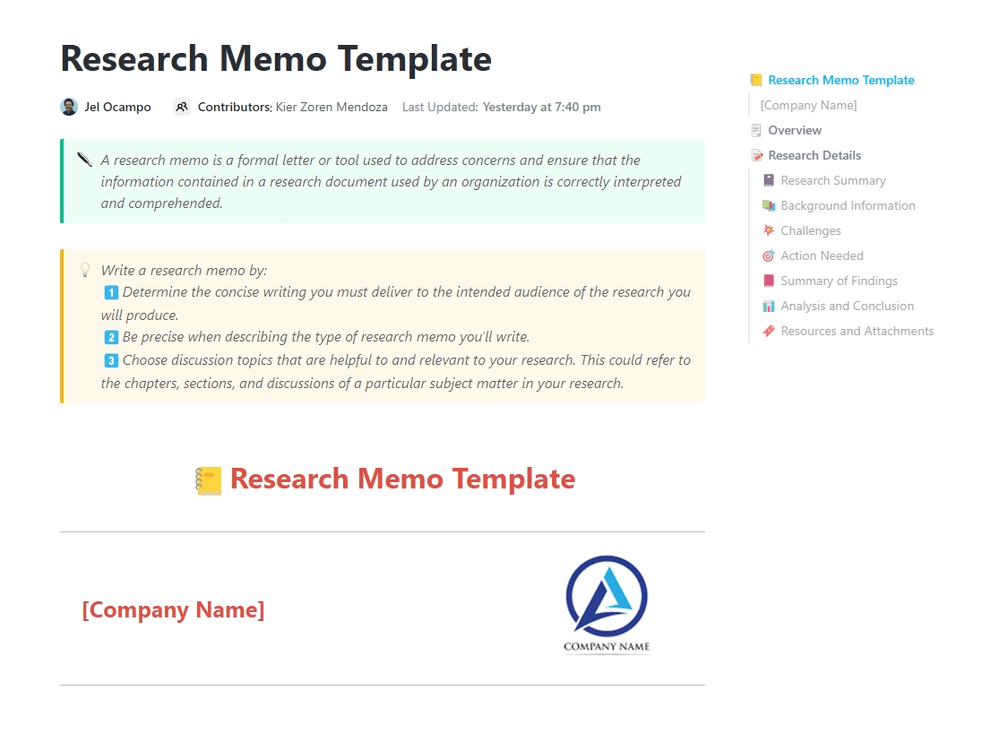
The ClickUp Research Memo Template prevents this massive time-waster. It’s a streamlined template for documenting your findings in a concise memo format as you go, ensuring no insight gets lost along the way.
The ClickUp Research Memo Template forces you to synthesize your findings for each source. At the same time, they’re still fresh in your mind, creating a library of summaries you can easily reference later. Because each memo follows the same standardized format, you can quickly compare findings and arguments across different sources without having to hunt through your raw notes. The memo format is a natural fit for creating annotated bibliography entries, saving you a step when it’s time to compile your references.
The template is best for researchers who prefer to document and synthesize as they go. You build your organized research library continuously, so you’re not left with the overwhelming task of organizing everything at the very end of your project.
A thesis or dissertation isn’t just one project—it’s a dozen smaller projects rolled into one. You have to manage IRB approvals, participant recruitment, data collection, analysis, and writing, all while keeping your advisor in the loop. A simple document template just won’t cut it.
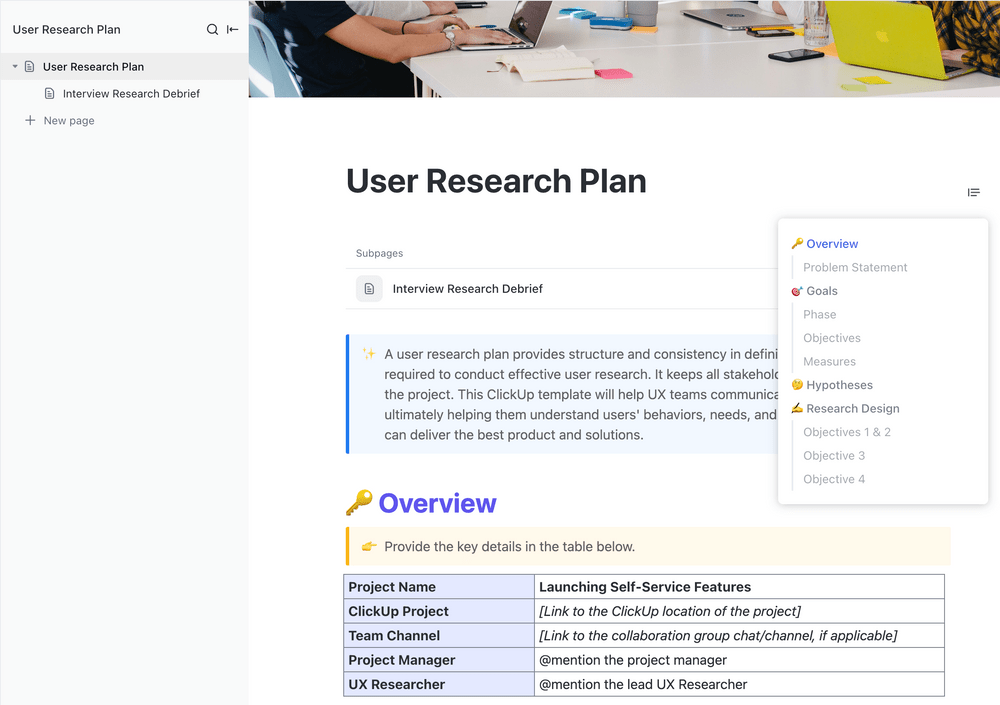
Though initially designed for UX research, the ClickUp User Research Plan Template is perfectly adaptable for large-scale academic projects. It provides the structure needed to manage both the research process and the writing simultaneously.
The ClickUp User Research Plan Template includes clear sections for defining your research questions, hypotheses, and methodology, keeping your project focused from the start. Stop letting deadlines sneak up on you—use built-in ClickUp Tasks tracking to monitor every milestone, from submitting your proposal to completing your final draft. End the back-and-forth email chains with your advisor or co-authors by keeping all feedback and communication with the work itself using collaboration features like real-time editing, commenting, and task assignments in a shared workspace.
It provides robust project management capabilities for graduate-level work, helping you stay on track for months or even years. It works well for graduate students or research teams managing complex, multi-phase projects that require serious organization.
Academic research doesn’t exist in a vacuum—understanding how your work fits into the broader landscape of existing studies is critical. The ClickUp Market Research Template provides a systematic framework for gathering, organizing, and analyzing information from multiple sources, making it invaluable for literature reviews and competitive analysis sections.
The ClickUp Market Research Template helps you structure your secondary research by organizing sources into logical categories and tracking key findings across studies. Use it to identify gaps in existing literature, compare methodologies across different researchers, and document trends that support your thesis. The template’s built-in task management lets you assign specific research areas to team members when working on collaborative projects.
It’s also for business school students, social science researchers, and anyone conducting systematic literature reviews who need to synthesize large volumes of existing research into coherent insights.
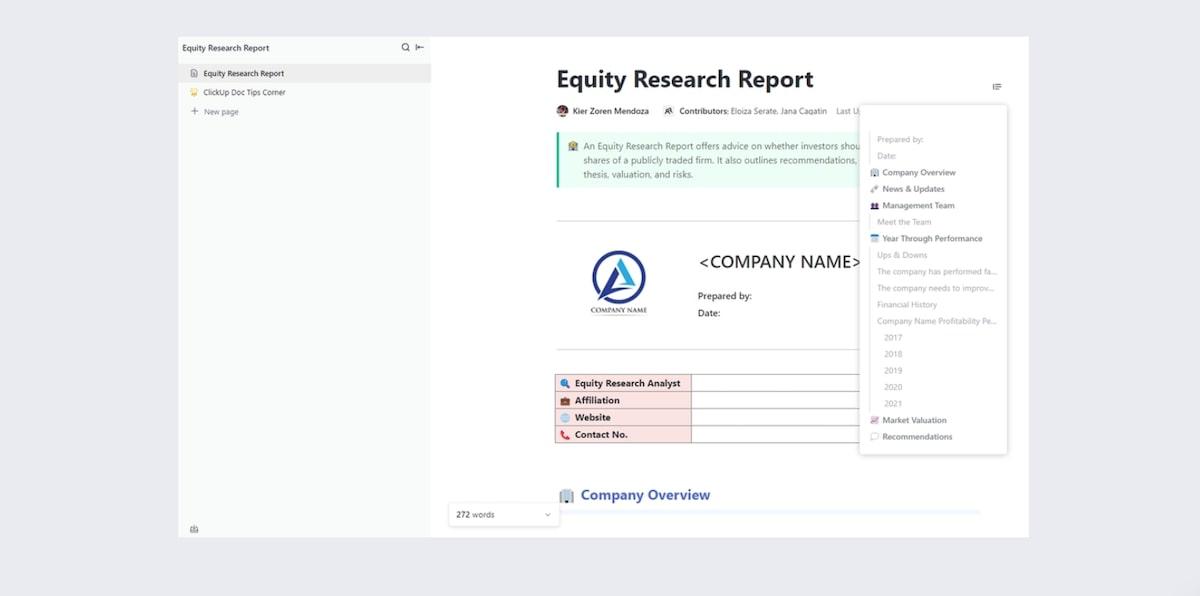
For researchers in finance, economics, or business disciplines, the ClickUp Equity Research Report Template offers a specialized structure designed for analytical depth. While initially built for financial analysis, its rigorous framework translates well to any research requiring data-driven arguments and structured recommendations.
The ClickUp Equity Research Report Template provides pre-built sections for executive summaries, detailed analysis, supporting data, and conclusions with recommendations. Its emphasis on evidence-based argumentation makes it ideal for quantitative research papers that require presenting complex data clearly. The template’s structured approach ensures you don’t skip critical analytical steps that reviewers expect.
The ClickUp Equity Research Report Template works best for MBA students, economics researchers, and anyone writing papers that require extensive quantitative analysis and formal recommendation frameworks.
The analysis phase of research is where many projects stall—you have data, but turning it into coherent findings feels overwhelming. The ClickUp Data Analysis Findings Template provides a structured framework for documenting your analysis process and presenting results in a clear, reproducible format.
The ClickUp Data Analysis Findings Template helps you organize raw data, document your analytical methods, and present findings in a logical sequence. Use it to track which datasets you’ve analyzed, what statistical tests you’ve run, and what conclusions each analysis supports. The template ensures you maintain a clear audit trail from data to insight, which is essential for research credibility.
The template is ideal for quantitative researchers, STEM students, and anyone working with datasets who need to document their analysis methodology alongside their results.
Securing funding is often the first hurdle in any major research project. The ClickUp Grant Proposal Template provides a comprehensive framework for organizing the many components of a successful funding application, from research objectives to budget justifications.
The ClickUp Grant Proposal Template walks you through each section funders expect to see, including problem statements, methodology, timelines, and expected outcomes. Use ClickUp Tasks to track deadlines for different proposal sections and assign components to co-investigators. The template’s progress tracking helps you see at a glance which sections are complete and which still need work before submission deadlines.
It essential for faculty members, doctoral candidates, and research teams applying for institutional or external funding who need to coordinate multiple contributors and meet strict submission requirements.
Large-scale research projects often involve training team members, managing protocols, and ensuring consistent methodology across multiple researchers. The ClickUp Learning Management System Implementation Template provides a framework for organizing research training materials and tracking team competencies.
The ClickUp Learning Management System Implementation Template helps you document research protocols, create training checklists for new team members, and track who has completed required certifications or training modules. For multi-site studies or projects with research assistants, this ensures everyone follows the same procedures and maintains data quality standards.
The ClickUp Learning Management System Implementation Template is particularly valuable for lab directors, principal investigators managing research teams, and anyone running studies that require standardized training across multiple contributors.
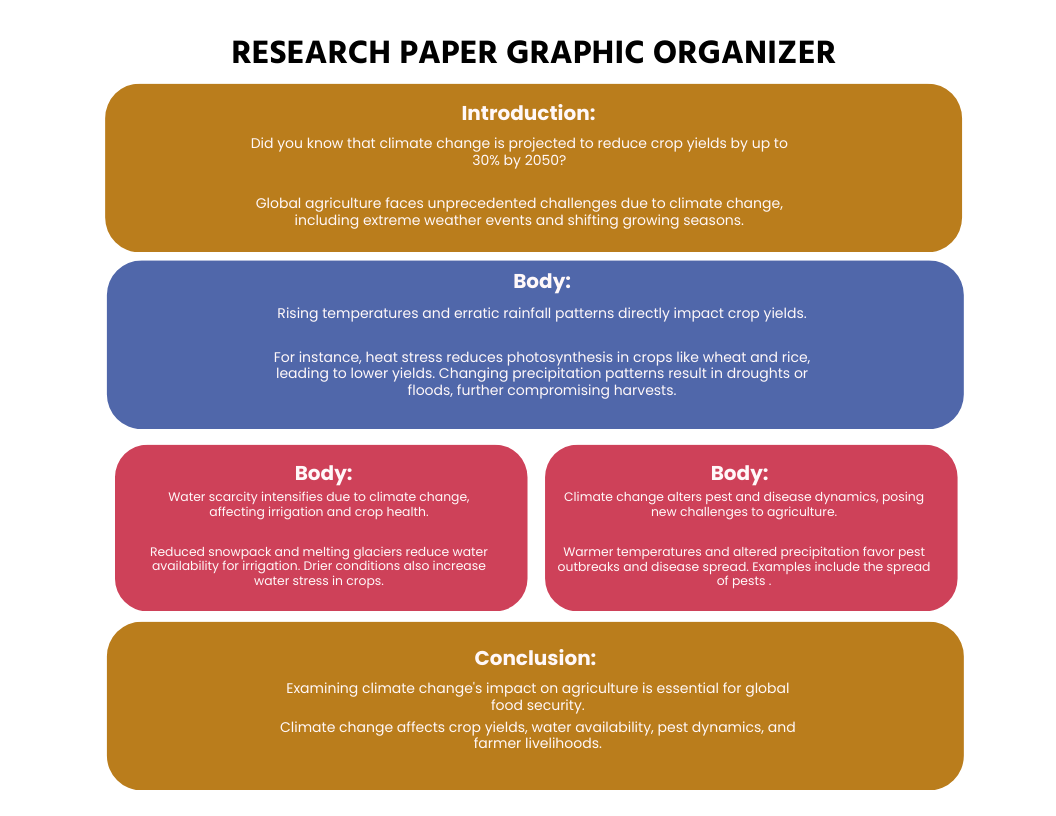
Sometimes you just need to get your thoughts down on paper before you open a computer. If you’re someone who needs to sketch out an argument visually, a simple, printable graphic organizer can be a great starting point. The Template.net Research Paper Graphic Organizer focuses on mapping the core structure of your paper—your thesis, your supporting arguments, and the evidence for each.
The Template.net Research Paper Graphic Organizer offers a simple printable format that’s perfect for those who prefer the tactile experience of pen-and-paper planning before moving to a digital draft. The clear visual layout helps you see the relationship between your main thesis statement and your supporting points. It’s a fast way to get a high-level view of your paper’s structure during an initial brainstorming session.
This template has limitations. It’s a static, standalone document with no task tracking, no collaboration features, and no real source management. You’ll need to build separate systems for those critical functions, which can lead back to the same disorganization you’re trying to avoid. It’s best for students who want a quick, visual essay graphic organizer for initial brainstorming only.
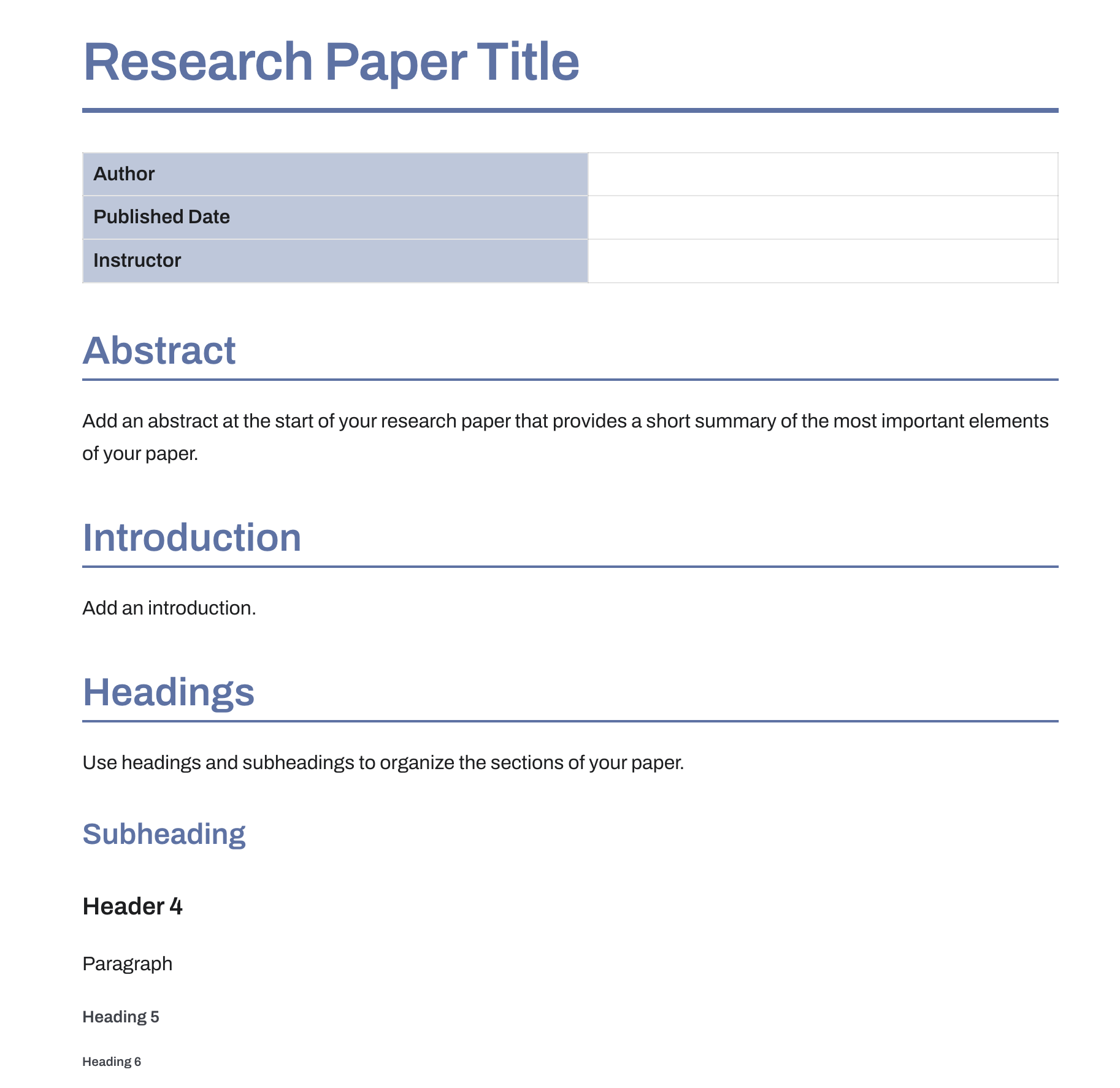
When you’re working with a team on a research paper, having everyone in a different version of a Word document is a recipe for disaster. You need a single, collaborative space where everyone can write together. The Research Paper Template by Bit.ai offers a collaborative document with pre-structured sections for a research paper, real-time co-editing, and support for embedded media.
The Bit.ai Research Paper Template comes with ready-made areas for the standard components of an academic paper format. You can add videos, files, and links directly into the document to provide richer context for your team. Multiple authors can edit the document simultaneously, which is useful for group writing sessions where coordination matters.
However, the Bit.ai Research Paper Template functions more as a shared document than a true project organizer. It’s less robust for tracking sources in a separate database or managing the entire research process as a multi-phase project. It’s a good choice for teams who are primarily focused on co-writing and want a polished document template with collaboration built-in.
The right research paper organizer template helps you move from chaos to a clear, manageable workflow. It gives you one central place to track your sources, develop your argument, and monitor your progress from the first note to the final draft. 📚
Research papers rarely fail because of bad ideas. They struggle because of lost sources, forgotten connections, and disorganized drafts. A good template prevents these common pitfalls by building structure into your process from day one.
Whether you’re tackling your first term paper or your tenth thesis chapter, starting with an organizer saves you hours of backtracking and finally ends the “where did I read that?” frustration that kills your writing momentum. Get started for free with ClickUp today and spend less time searching and more time writing. 🙌
Yes—templates built on project management platforms like ClickUp include collaboration features like real-time editing, commenting, task assignments, and shared workspaces, making them ideal for co-authored papers.
A research graphic organizer is a visual tool for mapping the relationships between sources, concepts, and arguments, while an essay outline template provides a linear, text-based structure for the paper itself.
You can adjust section headers and citation fields to match your required style, like APA or MLA, and customize the structure to align with your discipline’s conventions.

© 2026 ClickUp

There’s an easier way. Try a free AI Agent in ClickUp that actually does the work for you—set up in minutes, save hours every week.