







Still downloading templates?
There’s an easier way. Try a free AI Agent in ClickUp that actually does the work for you—set up in minutes, save hours every week.
Sorry, there were no results found for “”
Sorry, there were no results found for “”
Sorry, there were no results found for “”
You can assemble a team of the world’s best coders and programmers, but no software development project is complete without bugs! They can range from small annoyances to critical crashes, and knowing which bugs to address first can make all the difference in saving time, resources, and customer sentiment! ⏳
However, without a proper bug prioritization strategy, it’s easy to get overwhelmed by a long list of issues.
In this post, we’ll cover how to prioritize bugs effectively to keep your project on track and minimize delays. Let’s start!
Not all bugs are equal; treating them that way wastes time and resources. Bug prioritization helps you focus on issues that impact users and business goals the most. It’s about smarter decisions, better product quality, and happier customers.
🔎 Did you know? The term ‘debugging’ was coined by Grace Hopper in 1947. She famously removed a moth from a computer, marking the first documented instance of a “bug” being fixed in a computer system.
Managing bugs often feels like handling chaos. While bugs may not swarm like insects, they can certainly disrupt your development process, each presenting unique challenges.
To establish an effective bug prioritization process, it’s important to be aware of these key hurdles.
Bugs rarely show up alone—they arrive in hordes, overwhelming teams with too much to handle. Sorting through them without a strategy may lead to delays and frustration. It’s the classic “too many cooks” situation but with bugs.
Stakeholders, developers, and users all have different priorities for bug fixes. What seems urgent to one person may appear trivial to another, creating decision-making paralysis. Aligning everyone’s needs feels like walking a tightrope.
With limited time, budget, and personnel, teams often struggle to address all the bugs at once. Critical issues might compete for attention with less pressing ones, leaving resources stretched thin. This constant balancing act leads to inefficiencies and missed deadlines.
Without a robust management system, it’s easy to lose sight of bug statuses. Duplicate fixes, overlooked reports, and unresolved issues instantly derail progress. The result? Confusion, wasted effort, and frustrated teams.
Bug management under time pressure often sacrifices quality for speed. Teams rush to fix visible issues, sometimes ignoring the root cause. This approach creates a cycle of recurring problems and mounting technical debt.
Bug prioritization combines both science and strategy, with impact being the key driver.
Before diving into specific frameworks for evaluating each bug’s importance, here are the key factors to consider when deciding how to prioritize:
Review how badly a bug affects your software’s functionality or disrupts user experience. Critical issues that cause crashes or prevent core functionality demand immediate attention. And minor bugs that are annoying but non-blocking could wait their turn.
Bugs that affect many users or appear frequently have a larger impact and should be prioritized higher. Make sure you have your team review if the bug is a rare hiccup or a constant headache.
A bug impacting your entire user base should be fixed before one affects a niche group. When bugs have a broader reach, there’s greater potential harm to your product’s reputation.
Consider how many users are impacted by the bug, as this will guide you in prioritizing fixes that have the most significant overall effect.
Bugs that are hard to replicate also take longer to fix. In fact, they may need more investigation. Analyze whether your team can reproduce the bug consistently.
Focus on fixing reproducible bugs first to maximize your team’s efficiency. Also, addressing reproducible bugs helps in identifying patterns, which can prevent similar issues from arising in the future, improving long-term product stability.
Does the bug relate to deeper structural issues in the codebase? Some bugs signal larger underlying problems that will worsen if left unaddressed.
Prioritizing these bugs prevents future headaches and creates long-term stability.
Bugs that create noise from user feedback harm your brand reputation if ignored. Resolving these issues quickly shows that you value customer feedback and satisfaction.
So, factor in if users repeatedly report the bug and incorporate improvement during release management.
Choosing a framework for bug prioritization improves decision-making and consistency. These frameworks offer structured approaches to tackle bugs effectively and align with your team’s goals.
Here are some popular methods to check out:
This framework categorizes bugs into four levels: Must-Have, Should-Have, Could-Have and Won’t-Have.
Here, must-have bugs are considered critical, while others are tackled based on importance. It’s a simple yet effective method to prioritize under tight deadlines.
Let’s take an example. When reviewing a list of bugs from user feedback reports,
With this logic, issues under Must-Have are prioritized first, followed by Should-Haves. Could-Have and Won’t-Have categories are addressed based on available resources.
Using this method, teams assign numerical values to factors like severity, impact, and frequency. This way, a total score is calculated for each bug.
Higher scores indicate higher priorities, making decisions that are data-driven and unbiased. This method is ideal for teams that must manage multiple factors.
Based on what the software delivers, your team could assign a data loss bug like this:
With a total score of 27, it’s confirmed as a top-priority issue.
This method involves classifying bugs into four quadrants: urgent and important, not urgent but important, urgent but not important, and neither.
It’s a visual way to prioritize high-impact, time-sensitive issues. This framework helps avoid wasting time on less critical bugs.
Here’s one applied for a mobile app’s latest bug reports:
| Type of bug | Urgent | Not urgent |
|---|---|---|
| Important | Server crash | Performance upgrade |
| Not important | Minor UI bug | Ignoring outdated feature ideas |
One look at this categorization helps the team address the server crash and begin preparing resources for the performance bug.
With this method, teams prioritize bugs based on their impact on user satisfaction. Fixing “performance” bugs (those that directly impact functionality) is prioritized over “basic” or “delight” bugs.
For example, a bug that causes the app to crash during checkout (a performance issue) would be prioritized over a minor bug that changes the color of a button on the homepage (a “delight” feature). The performance bug directly impacts user experience and could lead to lost sales, making it a higher priority.
💡 Pro Tip: Want to boost your testing approach? Explore Black Box, White Box, and Gray Box Testing—each provides unique insights into your software, from user behavior to system internals. Find the one that aligns best with your needs.
Now that you have the fundamentals, let’s explore how to prioritize bugs for effective bug prioritization and management:
Start with a centralized system to eliminate confusion and duplication. This ensures clear visibility of all reported bugs and helps your team stay organized.
Bug tracking solutions are key to visualizing your bug reports and tracking their status, progress, bottlenecks, and efforts. It also presents key information for managers to step up and support the team before an escalation is triggered.
For many businesses, this step is sidelined because it’s resource-intensive. After all, teams are already running behind on how to fix those bugs.
As the everything app for work, ClickUp simplifies complexity with its wide range of features and ready-to-use templates. It offers comprehensive solutions for organizations looking to maintain productivity and efficiency.
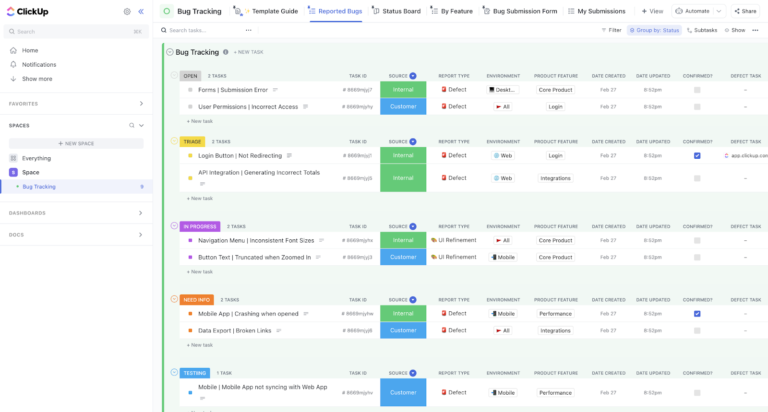
ClickUp’s Bug Tracking Template makes bug management effortless and efficient. With pre-built views like List, Board, and Workload, you can seamlessly log, prioritize, and monitor bugs.
It also offers a bug submission form for teams and users to report issues. Once added, the form details are instantly populated. It features nine custom fields and eight statuses to help capture every detail.
This prioritization template is also great for QA teams, engineers, and Agile experts to collaborate and review in real time.
Prioritization Template is ideal for: Software development teams, QA specialists, engineers, and Agile experts looking to optimize bug management, enhance collaboration, and improve overall workflow efficiency.
ClickUp’s powerful GitHub integration enhances bug tracking. Software development teams can view all GitHub activity related to a task, receive notifications when items are added, and even update task statuses in ClickUp automatically from GitHub.
Once a tracking system is set up, you must improve its organization. Here, each bug is categorized and grouped based on the key factors. Through this step, accessing and addressing bugs gets infinitely faster.
This step requires a feature focused on flexibility and advanced calculations. ClickUp Custom Fields is a nifty feature that customizes your bug management process with formulas, categories, and data fields.
It integrates key metrics like priority, severity, and resolution time into your workflow. Plus, it doubles as a quick reporting tool, highlighting factors like bug impact and team workload for better prioritization.
➡️ Also Read: Best Free Bug Report Templates & Forms for Bug Tracking
A clear score reveals the bug’s priority and what the team must resolve first. But that’s just the beginning. Make sure you assign it to the right team member to resolve the problem efficiently.
ClickUp simplifies this process with a dedicated task management tool and advanced automation.

ClickUp Tasks simplifies task creation and execution, allowing you to swiftly assign and delegate bugs with clear priorities and a ready team. You can easily attach documentation or past reports for context, ensuring smooth handoffs.
With this tool, everyone knows their responsibilities, whether you’re assigning bugs to a single developer, a team, or multiple assignees. For bugs requiring multiple iterations, sub-tasks help keep things organized. Additionally, you can link tasks and projects as dependencies, ensuring a streamlined flow of information.
ClickUp Automations eliminates manual tasks by using conditional logic and advanced algorithms to route issues to the appropriate team members automatically.
It considers workload, expertise, and other predefined criteria, ensuring critical bugs are addressed quickly and efficiently. Additionally, the AI-powered automation builder allows you to create custom workflows with just a few lines of text.
💡 Bonus Tip: Wondering how to prioritize tasks at work?
Here are some strategies to follow:
Once bug assignments are streamlined, the next step is keeping stakeholders informed. Regular updates prevent panic, offer reassurance, and help management stay on top of critical issues.
Based on bug priority levels, here are a few effective ways to communicate:
I use ClickUp for centralizing my daily basis work. It helps me in every aspect If I want to manage any meeting with clients or with a team or want to check the status of my previous work then ClickUp is best for that
Dashboards transform bug management from a static list into an interactive, dynamic tool. They provide a real-time overview, enabling you to track trends, monitor progress, and make informed, data-driven decisions.
To create a dashboard that enhances prioritization and management, follow these steps:

ClickUp Dashboards is the platform’s go-to tool for visualization and analytics. It features customizable widgets for key metrics like resolved bugs, active bugs, and team workload. The tool also has built-in visualizations, ranging from pie charts to in-depth combination graphs, that update in real time.
Plus, sharing and filtering are seamless with this tool, which makes it easy to view bug priorities, assignees, real-time progress, or reports in seconds.
➡️ Also Read: 25 Software Development KPIs with Examples
With scoring and communication in place, standardize your practices with comprehensive software. This step is key in streamlining how you prioritize bug reports in every project and release update.
Wondering what to look for? Here are a few pointers to consider:
ClickUp Software Team Management Software is the ultimate end-to-end solution for software delivery teams. It optimizes collaboration with 30+ ClickUp tools and 1,000+ integrations, creating seamless workflows across platforms.
It also offers a dedicated ClickUp API for syncing external software and building bug-management solutions. Plus, brainstorming and planning become a breeze with dynamic visualization tools like Whiteboards, Gantt Charts, and Mind Maps.
With built-in AI and automations, you’ll have everything your team needs for smarter issue tracking and resolution.
Effectively prioritizing bugs not only saves time and effort but also maximizes your team’s impact. While no one welcomes bugs, resolving them promptly boosts customer satisfaction and helps cut costs by preventing future disruptions.
Now that you have a clear framework for bug prioritization, the next step is adopting the right tools. ClickUp stands out with its powerful task management, analytics, and automation features designed to optimize bug management from start to finish.
It also offers multiple customizable templates that go beyond simple bug tracking, allowing for a tailored approach to fit your team’s specific needs. Ready to transform your bug management? Sign up on ClickUp to optimize your workflow today!

© 2026 ClickUp

There’s an easier way. Try a free AI Agent in ClickUp that actually does the work for you—set up in minutes, save hours every week.