


Sorry, there were no results found for “”
Sorry, there were no results found for “”
Sorry, there were no results found for “”
Checklists aren’t just for project managers or business leaders. They’re incredibly useful tools for anyone who needs to ensure that a task or project is completed thoroughly and consistently—more so if you juggle multiple tasks or work as a marketer.
Think about it: creating a blog post, video, or even a social post involves a lot of steps.
There is much to track, from research and planning to editing, publishing, and promotion. And then there are all the stakeholders—SEO specialists, writers, fact-checkers, content ops teams, designers, editors, and more. It’s easy for things to fall through the cracks.
Worry not. In this article, we’ll discuss how to create the perfect content creation checklist for your team and share some tactical tips, tools, and checklist template suggestions for creating valuable content.
Ready to create a list and tick it off?
A comprehensive content creation checklist should cover keyword research, audience personas, content briefs, creation, SEO, distribution, and performance tracking. In the AI era, use tools for faster keyword discovery, persona building, and brief generation. Draft content with generative AI, optimize with AI-powered SEO, and automate distribution. Track performance in real-time and let AI reveal insights. The goal? Content that ranks, converts, and scales efficiently
So, whether you’re a freelance content creator or part of a large marketing team that wants to create engaging content, a checklist can be a great tool for streamlining your workflow, producing high-quality content, and boosting organic traffic.
Now that we’ve seen why you need a content creation checklist, let’s explore how to create one. We’ll cover every step of content creation—from planning to promotion—along with additional tips on how to customize the checklist to work for you.
But first, here’s a quick TL;DR of the content creation checklist.
1. Define your content format, goals, and audience
2. Conduct thorough research
3. Outline your content structure
4. Create high-quality content
5. Edit and proofread your content
6. Finalize visuals
7. Publish and promote your content
8. Analyze your content’s performance
This is where it all begins—you figure out who you’re writing for, which channel you plan to use, and how you can best resonate with that target audience’s pain points. While a newbie would prefer how-to guides, leadership teams are more likely to read industry reports or expert interviews.
Additionally, GenZ audiences and B2C customers might resonate with TikTok and meme-based content, while older millennials and B2B companies may prefer more research-backed content.
We suggest you start by asking yourself these questions:
💡Pro Tip: Add these questions to your checklist as sub-points. Your content strategist (or content lead) can then be tasked with answering these questions and incorporating them into the content outline or brief. This provides a failsafe framework for planning targeted, engaging content that resonates with your audience and drives results.
Once you’ve defined your goals and audience, it’s time to get into the research phase.
Here’s a breakdown of key areas you can explore:
This is your first step for any SEO-driven content piece—blog post, ebook, or white paper. Some points that you can ask your team to check off at this stage are if they have:
This is where you identify gaps in your competitors’ content pieces on the same topic. Are there any topics they haven’t covered? Can you offer a unique perspective or additional insights?
By understanding your competitors’ strengths and weaknesses, you can position your content to stand out and provide greater value to your audience.
You can keep this step simple and ask your content team if they’ve completed the competitive analysis or break it down into steps such as:
If you’re writing about technical or complex topics, industry reports, or thought leadership pieces, then sourcing insights from subject matter experts is non-negotiable. This is not a one-step process.
If you’re sourcing SME insights for your content, you can create a separate, more detailed checklist. This will arm your writers with a structured approach to the process, ensuring they follow all necessary steps.
You can then add the link as a note to your ‘Have you interviewed SMEs?’ checkbox in your content creation checklist. This will remind your team to refer to the SME sourcing checklist for specific guidance.
Here’s what you can add to your checklist:
💡Pro Tip: Add a note to your checklist to specify which types of research are required for each content type so your team knows what to focus on.
Depending on your content creation process, your team might need to create a content brief and several types of outlines before getting to the actual draft.
Here’s what this process looks like:
This process helps align stakeholders and reduces back-and-forth during the writing (and editing) phase.
💡Pro Tip: Like with the SME interview sub-checklist, you can also create individual checklists for the content brief and each outline type.
Now, we come to the main part—producing quality content that’s loved by both humans and search engines. Broadly speaking, here are three key factors that contribute to high-quality content:
By focusing on these areas, you can create content that is not only informative but also engaging to your audience.
Writing your content is only the first step. The next step is to review it thoroughly to ensure it meets your standards. A structured framework (aka editing and proofreading checklist) can help you standardize this review process and maintain consistent quality.
Here are some points to include:
Apart from this, you can also add a section asking writers if they’ve run their drafts by a plagiarism checker or AI content detector.
💡Pro Tip: Instead of assigning individual checklists to your writers and editors, add a self-review process. Have your writers use the checklist to assess their work before passing it to the editor. The editor can then review the content using the same checklist, providing targeted feedback and suggestions for improvement. This approach can speed up the review process and make it more collaborative.
Even if your design team has its own checklist, it’s a good practice to include key design steps in your overall content creation process, especially if you’re sourcing your images.
Here are some points to keep track of:
Once your content and visuals are finalized, it’s time to publish and promote your piece.
While the first step here is creating your content promotion strategy, the following steps can vary depending on your promotion channel.
For example, if you’re promoting a blog on social media, then you need to:
Email distribution, on the other hand, would mean:
Also Read: 10 Best Content Marketing Software Platforms
Finally, it’s time to check if your content marketing strategy is successful. Revisit the goals you set for your content and determine whether it has met or exceeded those goals. To get a complete picture, include both quantitative and qualitative results.
We suggest reviewing your content’s quantitative and qualitative performance monthly or quarterly to identify areas for improvement in your content marketing efforts. This way, you can analyze your content’s results and make data-driven decisions for future content marketing strategies.
According to a 2023 McKinsey Survey, middle managers spend more than half their working time on administrative work. For content leads, this could also include creating and managing content checklists.
The solution?
Use a project management platform like ClickUp, which allows you to create checklists, save them as templates, and integrate them into your larger content production operations.
This means you can use ClickUp as a content management tool to do it all—manage your content operations, create content, and analyze content performance.
As Cristina Willson, Director of Content at Graphite, put it,
We not only started writing articles, but we decided to do so at scale, so we needed a robust platform that could easily adapt to our increasing number of deliverables. ClickUp was the best choice.
Graphite scaled their content production by an impressive 12x using ClickUp!
Here’s how you can leverage ClickUp’s content management capabilities:
First, you can elaborate on the various steps in your content creation process with a checklist. For this, use the ClickUp Checklist Templates feature. You can easily build and reuse content creation processes across your team.

Here are a few standout features:
Then, you can use the ClickUp Task Checklists to create simple to-do lists within a task.

Here’s how this helps:
This not only saves time but also ensures that everyone is clear on their roles and responsibilities, leading to an efficient and effective content creation process.
🎯Also Read: How to Make a Checklist in Google Docs
Use ClickUp Automations to automatically assign the task to different team members based on the task’s status.
For example, if the writer moves the blog to ‘editing,’ you can automatically assign it to your Editorial Lead, who can then re-assign it to one of the editors.

Now that you have your content creation workflow finalized, the next step is setting up a system to actually create and publish your content. For this, you can leverage the ready-to-use ClickUp Content Production Scaling Template.
This pre-built template is based on ClickUp’s own content production process—so you know it’s scalable. While the default template focuses on blogs, you can easily customize it to accommodate other content formats like videos or webpages.
Here’s how to use the template:
This template is a great option to manage all the operational aspects of your content creation process and streamline your workflows—so you can scale your content production process.
Whether it’s documenting your research, creating your content briefs and outlines, or drafting the actual content—you can do all of this with ClickUp Docs, the built-in document processing solution.
And the best part is that ClickUp Docs comes with nested pages—unlike regular document processors—so you can consolidate all your various documents easily. This includes your briefs, outline, research, SME interview recordings, drafts, and more.
Moreover, ClickUp Docs comes with a variety of collaboration options like commenting, live editing, and tags so you can get stakeholder feedback and ensure everyone’s on the same page.

Another excellent feature is ClickUp Brain, the writing assistant that acts as your AI content marketer—helping you create and localize your blogs faster. It can correct your grammar and spelling errors, change the tone of your blog to match your brand’s voice, and even repurpose your blog into social media posts for distribution.
It can also draft emails for your clients to speed up the review and approval process.
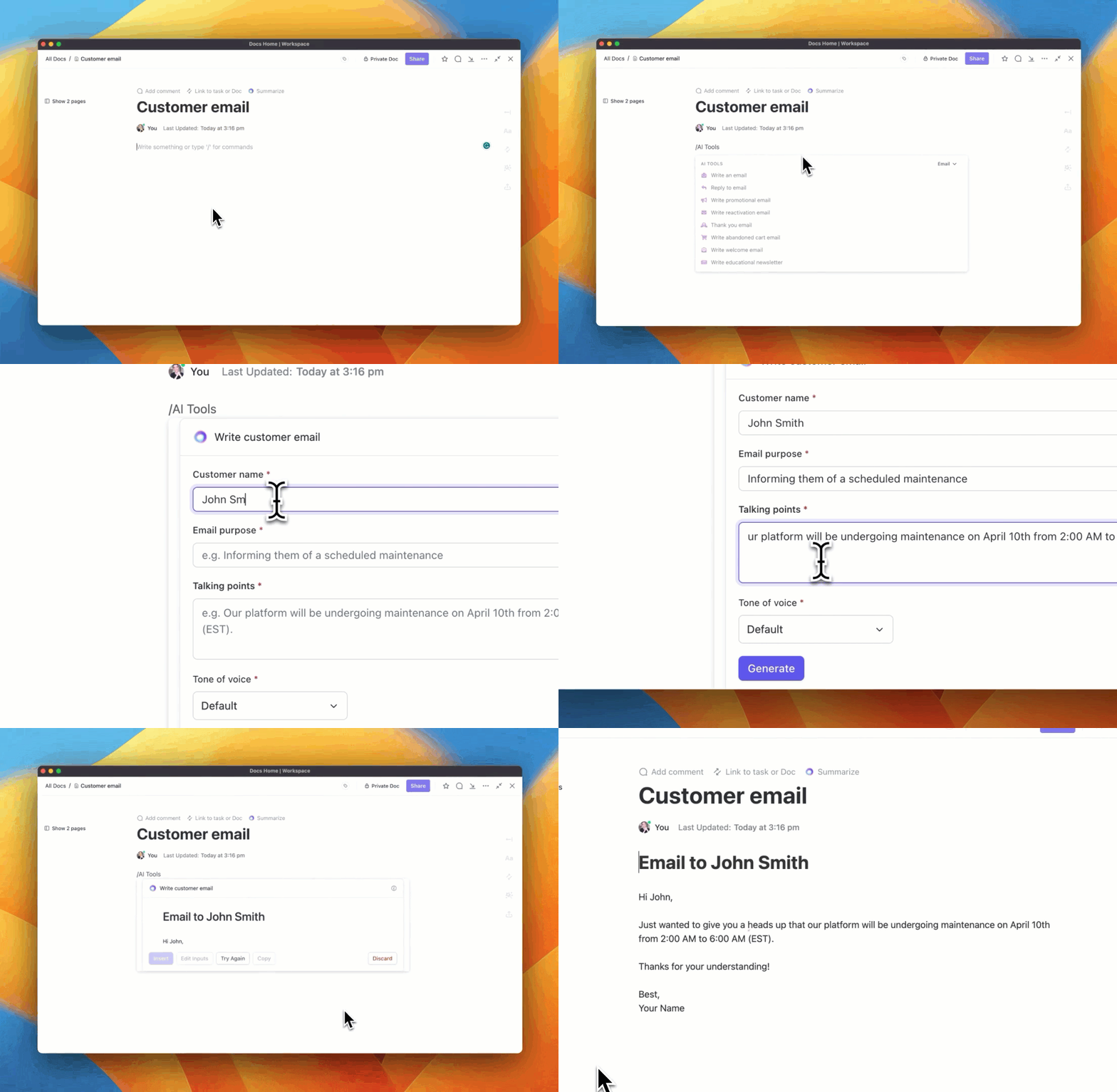
ClickUp Brain quickly answers any questions you have about your content progress, from finding specific checklists to accessing distribution plans or research. All the essential information is at your fingertips, saving you time and effort.
💡Pro Tip: Embed the blog’s content creation task checklist in ClickUp Docs. This way, writers can easily access the checklist and track their progress, ensuring that no step is overlooked.

Also Read: 10 Best AI Content Creation Tools in 2024
Once you’ve drafted your content, the next step is publishing it.
But this is not so simple. You don’t only publish your blog but also a series of shorter content pieces to distribute and promote it. This can be email, social media posts, engaging in community forums, and more.
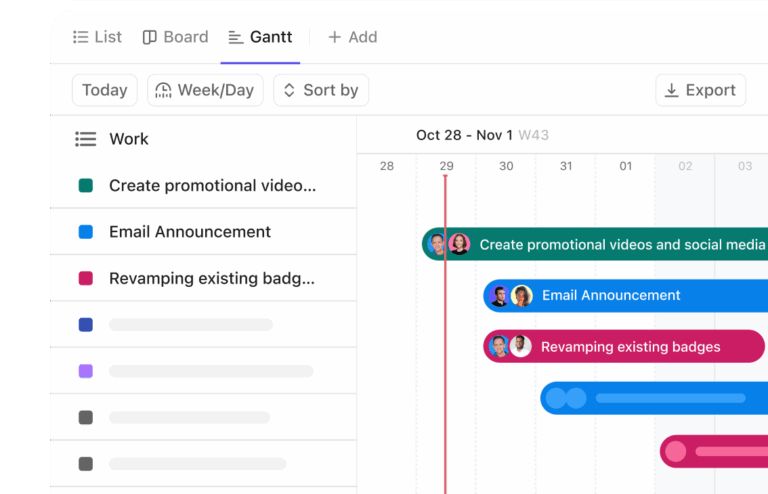
Here’s where a content calendar can help. It provides a visual representation of your publishing schedule, ensuring that you stay organized and avoid missed deadlines.
We suggest using the ClickUp Content Calendar Template to manage your publishing and promotion schedule.
Here’s how this template works:
Now, you can focus on upcoming deadlines and plan projects accordingly, spot scheduling clashes, and monitor the status of your content pipeline. Super convenient, right?
A content creation checklist is a must-have tool for any content or digital marketing team. It’s your roadmap to non-chaotic content production—guiding your team through each stage of the content creation process and ensuring that nothing falls through the cracks.
The real power of ClickUp lies in its ability to centralize your entire content creation process.
You can host your checklists, project management tasks, and content drafts on the same platform. Your team doesn’t need to switch between multiple tools.
Bringing all your content creation operations into ClickUp has many more benefits, but we’ll let you see for yourself. Sign up to ClickUp for free and get started right away.

Manasi Nair
Max 20min read

Sean Hardy
Max 26min read
Manasi Nair
Max 29min read

© 2026 ClickUp





