






Still downloading templates?
There’s an easier way. Try a free AI Agent in ClickUp that actually does the work for you—set up in minutes, save hours every week.
Sorry, there were no results found for “”
Sorry, there were no results found for “”
Sorry, there were no results found for “”

Whenever you attend a strategic meeting—whether company-wide or within your team—you’ve likely encountered slides that document Objectives and Key Results (OKRs), and Key Performance Indicators (KPIs).
Businesses rely on them for a good reason—they provide a data-driven, quantitative approach to the performance management process.
79% of companies design and implement KPIs annually.
But here’s the big question: When should you use OKRs, and when should you use KPIs?
In this blog, we’ll break down their key differences (with real-world examples) and show you how to integrate both into your processes for maximum impact.
OKR (Objectives and Key Results) refers to a goal-setting framework used by organizations (and teams) to define goals and measure performance.
Generally speaking, an OKR has three components:
OKRs provide a sense of purpose, direction, and ownership. They push teams to focus on what matters most without being distracted by the tens of low-priority, low-impact tasks on their to-do list.
Some scenarios where OKRs work well are:
And now, let’s look at how you can set up and track OKRs:
Now that we’ve discussed OKRs and when they can benefit your organization, let’s examine some specific OKR examples.
📚 Also Read: Best OKR Software (Reviews and Pricing)
Key Performance Indicators (KPIs) are standalone, quantifiable metrics that demonstrate how effectively an organization is achieving a particular business objective. KPI examples include revenue, customer churn rate, website traffic, and employee turnover.
There are two types of Key Performance Indicators (KPIs)—leading indicators (predictive metrics) and lagging indicators (reflective metrics).
Leading indicators can help organizations anticipate future performance, while lagging indicators provide insights based on past results (historical data).
You’ll find organizations using KPIs in multiple settings:
Here’s a quick guide to implementing KPIs:
👀 Did You Know? 80% of your results come from 20% of your efforts. So, focus on a small number of critical KPIs that drive the most significant impact.
📌 Performance appraisal metrics
📌 Business performance metrics
📮 ClickUp Insight: 78% of our survey respondents struggle with staying motivated on long-term goals. It’s not a lack of drive—it’s how our brains are wired! We need to see the wins to stay motivated. 💪That’s precisely where ClickUp delivers.
Track achievements with ClickUp Milestones, get instant progress overviews with rollups, and remain focused with smart Reminders in ClickUp; visualizing these small wins builds momentum for the long haul.
💫 Real Results: ClickUp users report they can handle ~10% more work without the overwhelm.
Now that we’ve seen how OKRs and KPIs can individually benefit your organization and how you can set them up, let’s dive into the nitty-gritty to explore their distinct purposes.
| Aspect | OKRs | KPIs |
| Goal-setting | Ambitious, qualitative objectives with supporting quantitative key results | Specific, measurable, achievable, relevant, and time-bound (SMART) metrics |
| Purpose | Define strategic direction and inspire action | Track progress toward specific objectives |
| Scope | Broad goals | Narrow, specific metrics |
| Time-frame | Typically quarterly | Can be for various time frames—daily, weekly, monthly, and others |
| Flexibility | More flexible and adaptable to changing circumstances, often established for longer periods | Less flexible |
OKRs emphasize qualitative, ambitious, long-term goals that inspire and challenge the organization. They focus on ‘what’ the organization aims to achieve, such as ‘Increase market share’ or ‘Become the industry leader in customer satisfaction.’
KPIs, on the other hand, focus on SMART metrics and how you can achieve a super-specific objective like ‘increasing website visits by 15% by next month.’
🧠 Fun Fact: Some experts call OKRs ‘KPIs with Soul’ because they add context and purpose to metrics, linking outcomes directly to an organization’s mission.
OKRs serve as a powerful tool for defining strategic direction, inspiring action, and aligning teams within the organization. They provide a shared understanding of organizational goals, motivate employees, and foster a culture of accountability.
KPIs are more decision-oriented. Their primary purpose is to track progress, measure performance, and identify areas for improvement within a particular process or aspect of the business, and to support data-driven decision-making.
OKRs typically provide a high-level framework that guides the overall strategic vision for the organization, team, or project.
👉🏼 For example, an OKR might be ‘Increase market share in the European region’ or ‘Launch a new product that achieves 10,000 downloads within the first quarter.’
KPIs provide detailed insights into specific business areas, such as sales, marketing, revenue, or employee performance. They focus on narrower, more specific metrics that provide a granular view of performance.
👉🏼 For example, for a sales team, the KPIs related to the ‘Increase market share in the European region’ OKR might include ‘Increase sales revenue in Europe by 15%’ or ‘Expand distribution channels in three new European countries.’
OKRs work best when planned for the long term, typically at least a quarter. This timeframe strikes a balance between short-term focus and long-term strategic direction, allowing for regular reviews and adjustments to keep the organization on track and adaptable to change.
KPIs, on the other hand, are more flexible. They simply need a time frame and can be tracked over days, weeks, or even years, like the widely used Annual Recurring Revenue (ARR) metric in most organizations.
👉🏼 For instance, daily website traffic helps monitor short-term trends, while the customer churn rate is usually measured monthly or annually. This flexibility allows businesses to track performance at different levels of detail, gaining insights into both immediate progress and long-term trends.
OKRs are inherently flexible and adaptable to each organization’s unique needs and circumstances. They are grounded in the company’s goals, mission, and vision. This flexibility allows adjustments to reflect changing market conditions, emerging opportunities, and unexpected challenges.
👉🏼 For example, if a competitor launches a disruptive new product, an organization can quickly adjust its OKRs to address the latest threat and maintain its competitive advantage.
On the other hand, KPIs should generally remain consistent over time to ensure meaningful comparisons of performance trends and identify areas for improvement. Frequent changes to KPIs can make it difficult to track progress accurately, identify root causes of performance issues, and demonstrate the impact of improvement initiatives.
Another framework that’s often confused with OKR and KPI is KRA (Key Result Areas). KRAs are SMART goals that organizations set to track progress and success in various roles. They list the main responsibilities associated with a particular job or role.
To sum it up:
Similarly, MBO (Management by Objectives) is a framework often used with KPIs and OKRs to track performance. MBO is a process where managers and individual team members collaboratively set objectives, aligning individual objectives with broader organizational goals.
👉🏼 Let’s say a marketing team aims to increase brand awareness for a new line of eco-friendly athletic wear:
📚 Also Read: OKR vs. MBO
By making OKRs and KPIs part of your project management system, you can tie each of your individual projects to your main, overarching goal. At the same time, the data collected through KPIs enables data-driven decision-making throughout the project lifecycle.
ClickUp, the everything app for work, brings all your goal-setting, tracking, and project management needs into one place, making performance monitoring effortless.
📮 ClickUp Insight: Think your to-do list is working? Think again. Our survey shows that 76% of professionals use their own prioritization system for task management. However, recent research confirms that 65% of workers focus on easy wins over high-value tasks without effective prioritization.
ClickUp’s Task Priorities transform how you visualize and tackle complex projects, easily highlighting critical tasks. With ClickUp’s AI-powered workflows and custom priority flags, you’ll always know what to tackle first.
Let’s look at how you can implement OKRs and KPIs in your project management system.
Start by reviewing your organization’s overall strategic objectives and relevant company-level OKRs. Then, ask yourself how a particular project can contribute to these higher-level goals.
You can also conduct a brainstorming session with your leadership team to gather input on potential project-level OKRs. Remember, the goal is to set ‘ambitious,’ outcome-focused objectives.

Using ClickUp Docs, you can centralize important documentation around the goal-setting process while ClickUp Brain—ClickUp’s proprietary AI—helps you brainstorm ideas and come up with relevant goals to chase. It can also summarize decisions around goals and objectives, keeping everyone aligned.

Simply ask ClickUp Brain to review your various documents and suggest OKRs connecting your larger goal with a specific project. And voila! You’ll get contextual suggestions that you can further refine using prompts.
Once you’ve decided on your objectives, ask AI to create a proof-ready document explaining your objectives and key results to share with the rest of your team.
The next step is to choose KPIs that calculate progress towards the Key Results you set for your objectives. This will give you valuable insights into project performance, help you identify areas for improvement, and, eventually, make data-driven decisions to ensure project success.
💡 Pro Tip: Ask yourself: “Does this KPI truly show if we’re moving closer to achieving our objective?” Another tip is to avoid overly complex or difficult-to-measure KPIs. Instead, choose metrics that are easy to understand, track, and interpret.
Once you’ve decided on your KPIs and checked the accuracy of their data source, you can include them in your tasks and projects. For example, you can use ClickUp’s Custom Task Statuses such as ‘On Track,’ ‘Delayed,’ ‘Off Track,’ and more to monitor your KPIs.
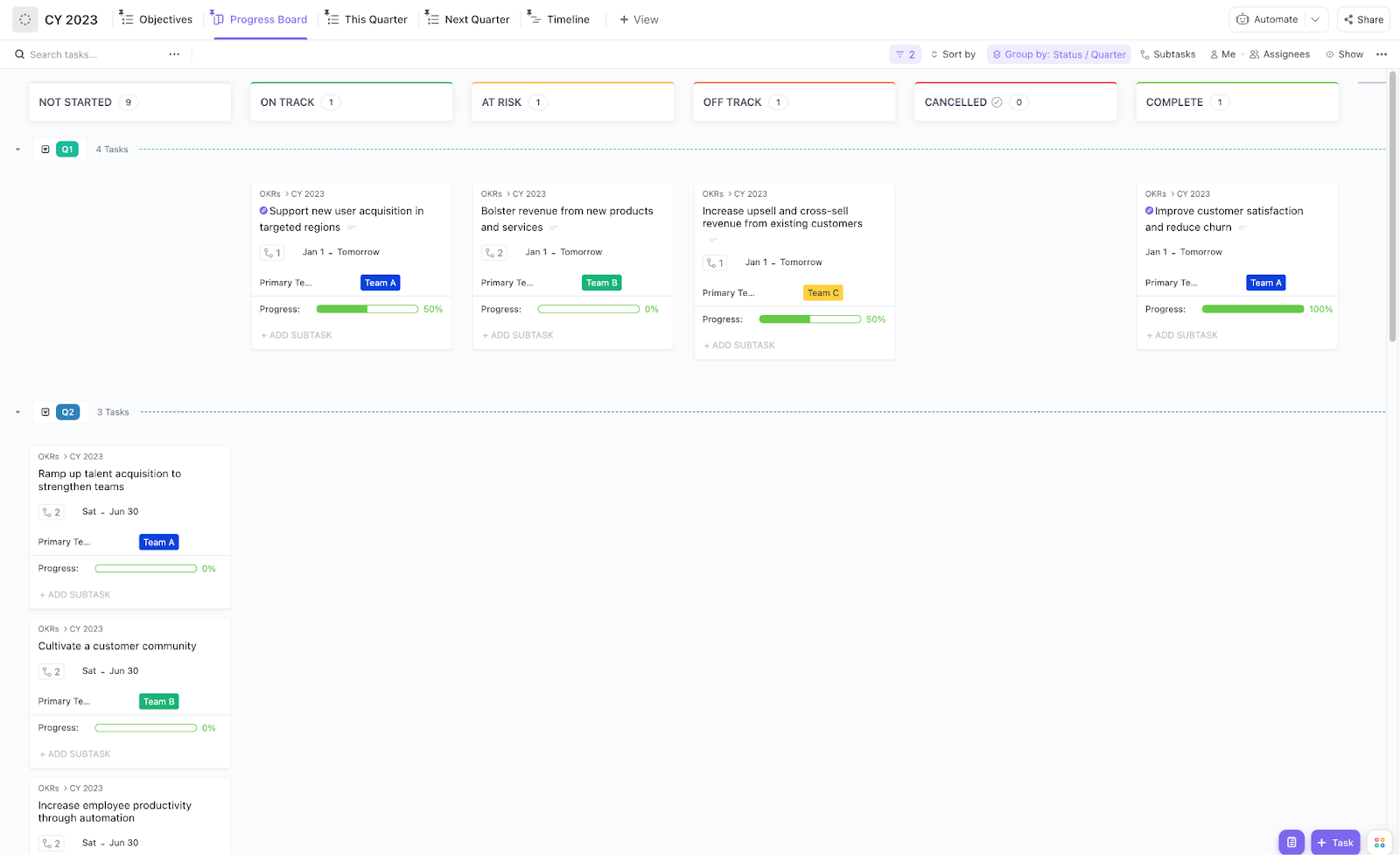
ClickUp even offers free templates that simplify this process, like the ClickUp OKRs Template. This super-intuitive planning tool is designed to help teams effectively set, track, and achieve their OKRs.
Here’s what this OKR template includes:
The template also has multiple Custom Fields to help you categorize and organize your OKRs. For each task, you can add a tag such as Objective, Key Result, Planning, and Play.
Similarly, you can also bucket tasks into a specific ‘Initiative.’ Even better, a progress bar tracks the completion rate based on the number of action items you check.
Once you’ve created your OKR system, the next step is adding your KPIs. You can do this by adding a few more Custom Fields for your tasks:
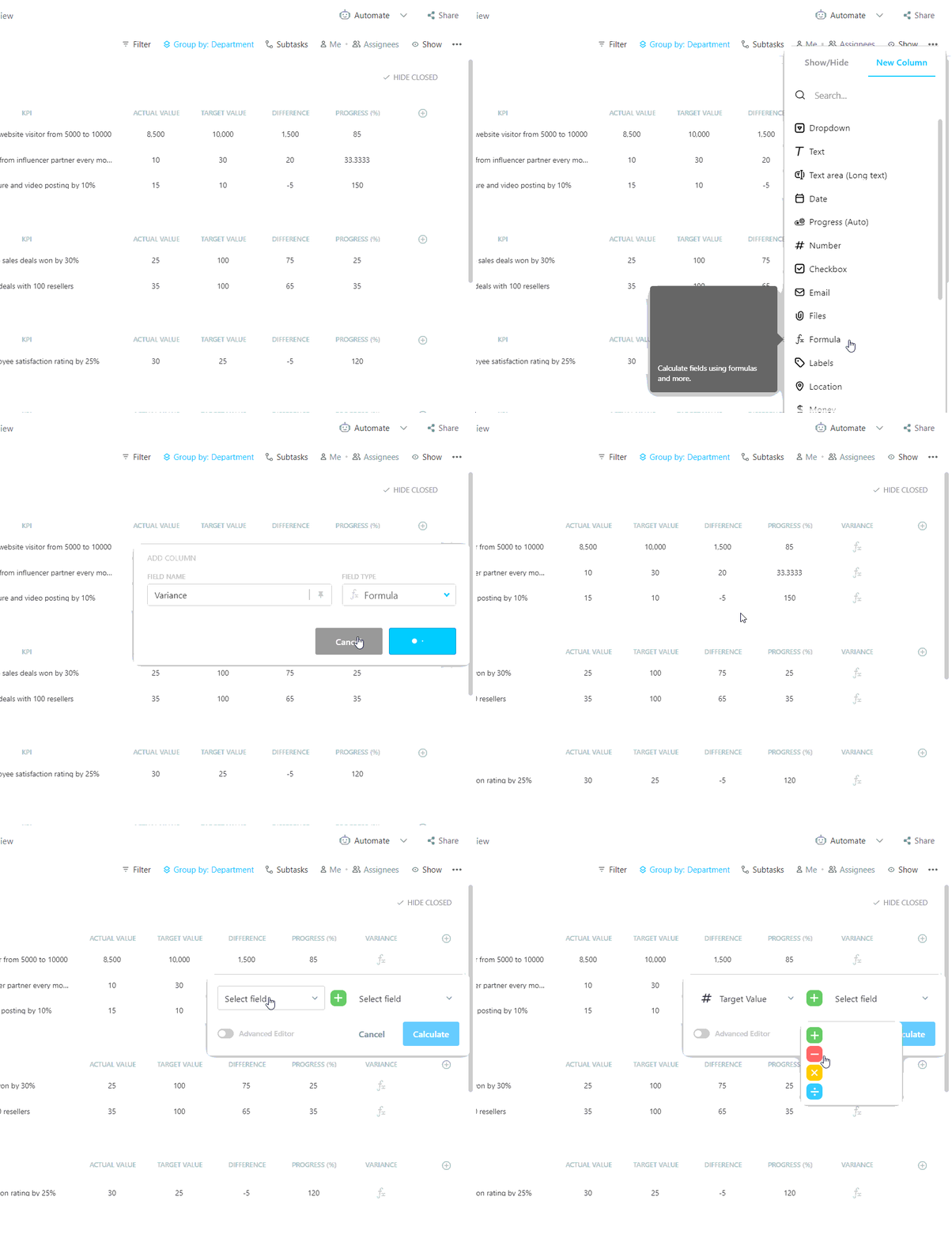
In ClickUp, you can use the below codes to set up these formula fields:
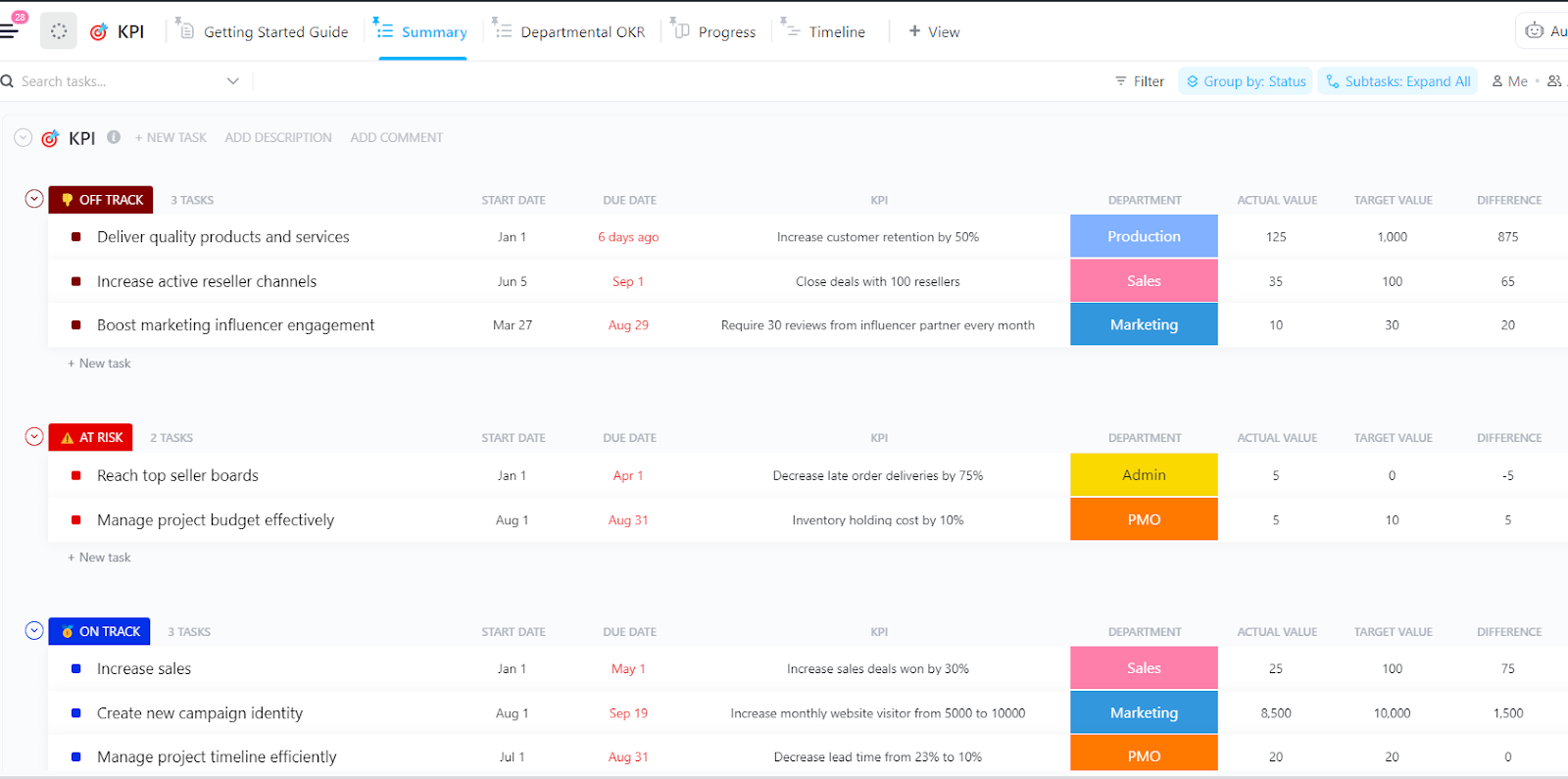
Of course, you can use the KPI Template by ClickUp to seamlessly set, monitor, and analyze key performance indicators, ensuring your team stays on track toward business goals. Customize it to fit your industry and gain real-time insights into performance trends.
Here’s what this template can do for you:
💡Pro Tip: Pair your KPI Tracking Template with the SMART Goals Template by ClickUp to set clear, actionable objectives that align with your key performance indicators, ensuring every goal is specific, measurable, and impactful!
Now that you’ve set up your OKRs and KPIs, the next step is to track them. The best way to do this is by using OKR dashboards and KPI progress charts.
These consolidate key metrics and progress updates in a single, easily accessible location so you don’t need to sift through various spreadsheets, reports, and data sources.
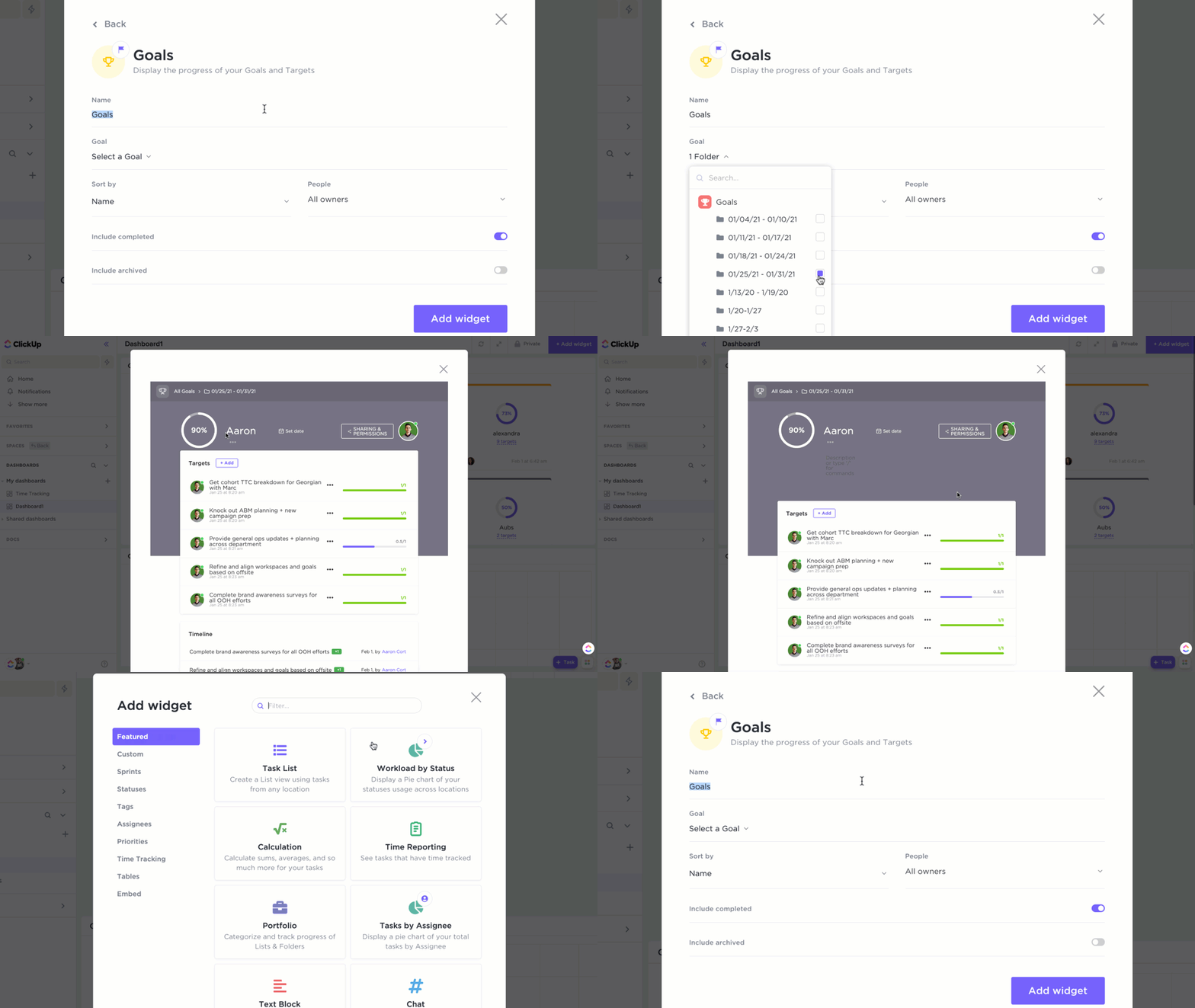
In ClickUp, you have a built-in goal-setting and tracking feature—ClickUp Goals—that allows you to monitor progress toward your goals in real time using customizable dashboards and progress bars. It also gives you quite a few options to organize your data, including:
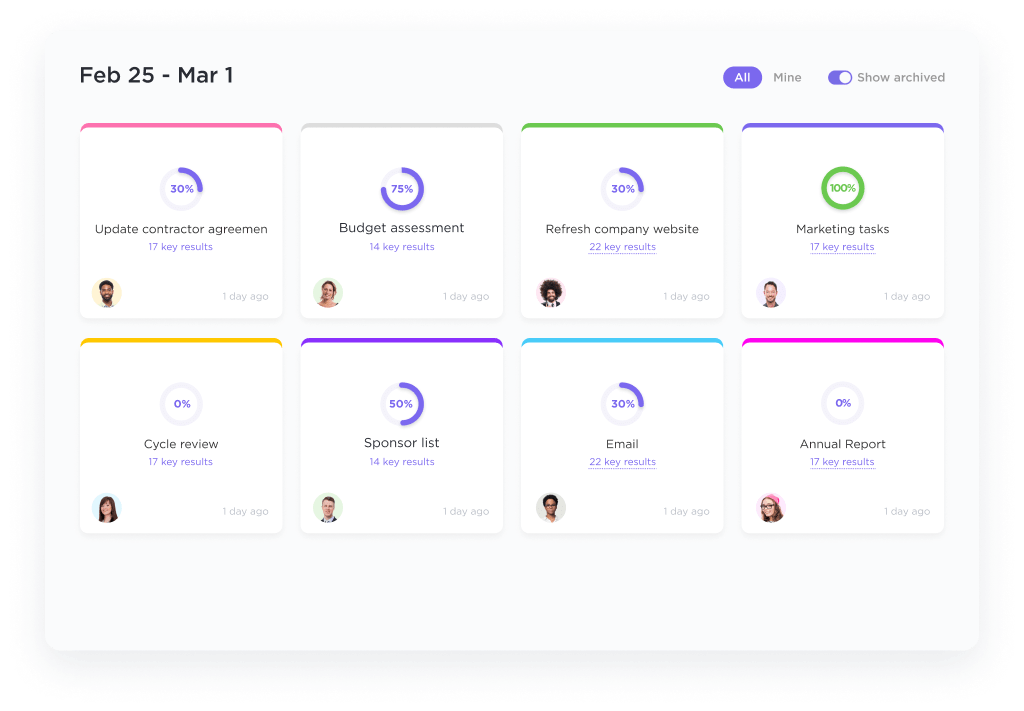
These visual reports can help you identify areas of strength and weakness, identify potential risks, and make informed decisions about various aspects of your project, ensuring everything is on track.
📚 Also Read: How to Track Project Progress With KPI Scorecards
The final step is to schedule regular check-ins (e.g., weekly, bi-weekly) to review progress. During this time, you can analyze the data collected through KPIs to adjust key results, revise timelines, or reallocate resources.
Finally, here are some best practices for setting and managing OKRs:
Similarly, when setting KPIs, make sure to:
Finally, ensure that KPIs support the achievement of OKRs by selecting metrics that directly measure progress toward the key results. This alignment creates the perfect harmony between organizational alignment and accelerated growth.
To wrap up, OKRs focus on ‘what’ you want to achieve and ‘why’ it’s important. They provide a framework for ambitious goal-setting and strategic direction.
KPIs focus on ‘how’ you’re progressing towards your objectives. They provide data to track performance measures and identify areas for improvement. Typically, you’ll need a few KPIs related to each Key Result to measure progress and maximize your OKR efforts.
While this can be done manually, automating many of these processes using a project management tool like ClickUp can significantly increase efficiency and streamline the entire OKR process.
For example, you can trigger task updates based on KPI progress, visualize performance in real time with nifty charts, and leverage ClickUp Brain for brainstorming and busy work—two tasks that often take the most time. The result: less effort and more impact!
Want to better manage your OKRs and KPIs? Sign up for ClickUp for free.

© 2026 ClickUp

There’s an easier way. Try a free AI Agent in ClickUp that actually does the work for you—set up in minutes, save hours every week.