Sorry, there were no results found for “”
Sorry, there were no results found for “”
Sorry, there were no results found for “”
The OKR playbook sounds easy. Set a few ambitious objectives, attach measurable key results, score them at quarter’s end, repeat.
The trouble starts after the kickoff. Nobody owns the weekly update, the scores drift out of date, and within a few weeks, the objectives describe a plan the team has already moved past. ClearPoint’s analysis of 21,000+ plans found 81% of assigned goal owners never update their progress.
A good OKR template keeps objectives, key results, owners, and scores in one place people revisit, so progress stays visible past the first check-in.
Below are 10 free OKR templates, four in ClickUp and six in spreadsheets, sorted by where your OKRs tend to break: planning, tracking, scoring, or rollup. Start with the one that fixes your failure point.
Pick based on where your OKRs usually fall apart. If the breakdown is connecting goals to actual work, owners, and updates, a ClickUp template fits. If you’re locked into Excel or Google Sheets and just need a structured file to score a quarter, an external spreadsheet is the faster path.
| Template | Download Link | Best For | Key Features | Format |
|---|---|---|---|---|
| OKR Template by ClickUp | Get free template | Teams moving OKRs off a static sheet onto live tasks | Field-tagged objectives, status-based progress bars, quarter-grouped views | List, Board, Timeline |
| OKR Framework Template by ClickUp | Get free template | Teams linking key results to the projects that deliver them | Three-tier objective-to-project nesting, OKR Type tagging, color-coded health | List |
| Company OKRs and Goals Template by ClickUp | Get free template | Leadership rolling team goals up to company objectives | 0.0–1.0 grading field, Play Category buckets, five region and team views | List, Form |
| Strategic Marketing Plan Template by ClickUp | Get free template | Marketing teams running channel-based campaigns | Channel tagging, 0–100 progress slider, multi-quarter objectives | Board, List |
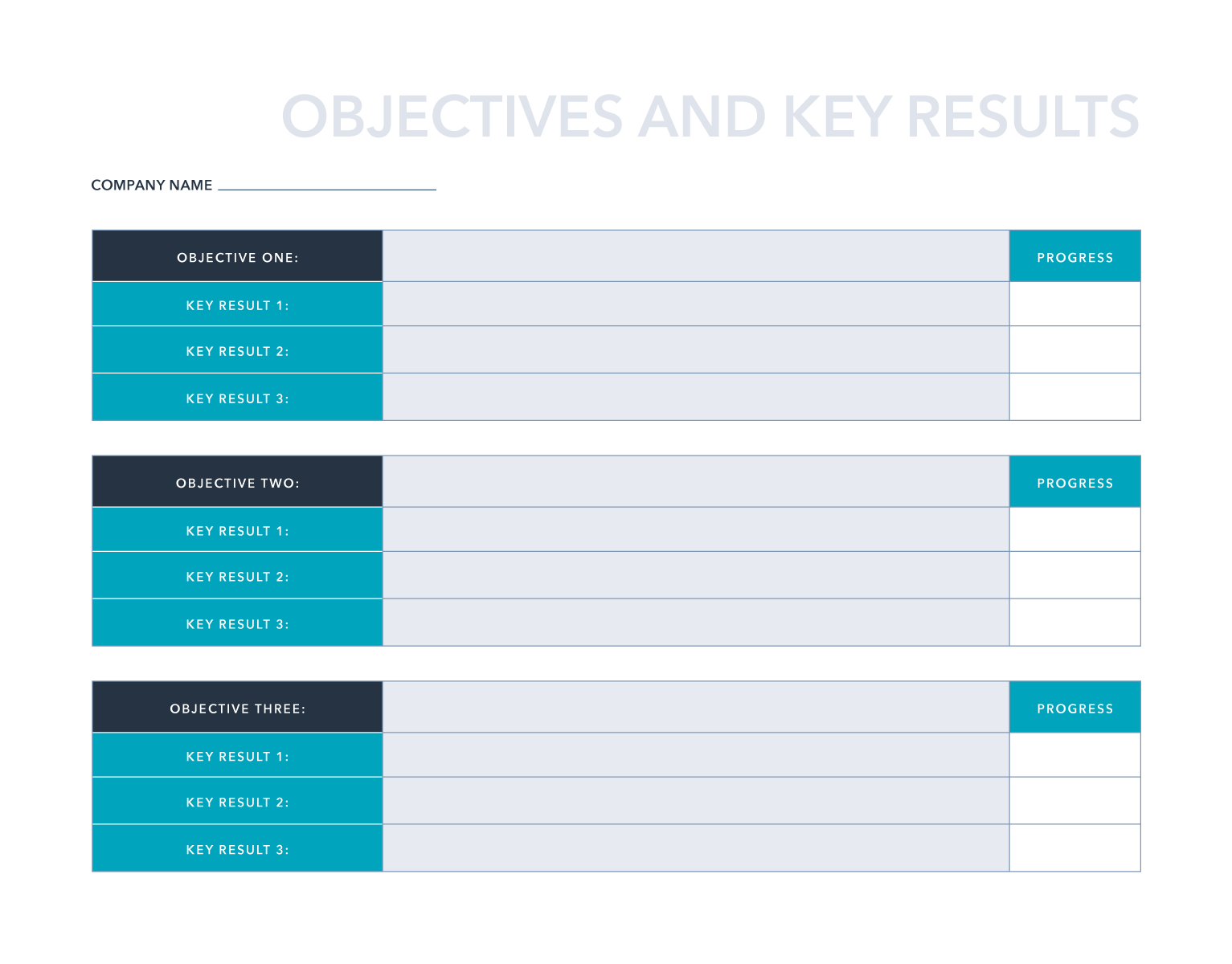
| OKR Template by HubSpot | Get free template | First-timers who need one doc for mixed toolsets | Three file formats, plain objective-and-key-result layout, manual progress column | Excel, Google Sheets, PDF |
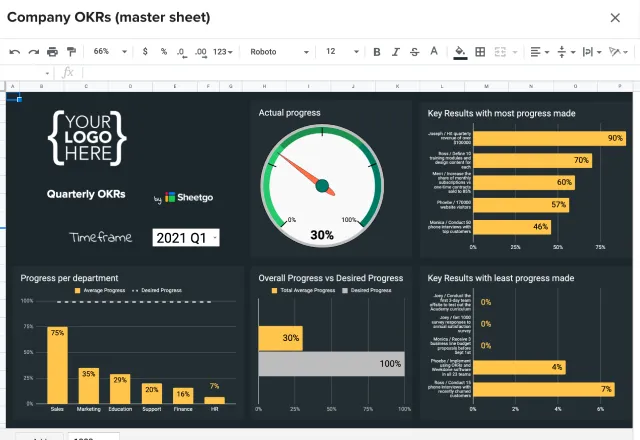
| OKR Template in Google Sheets by Sheetgo | Get free template | Multi-department orgs wanting roll-up reporting in Sheets | Six-to-one file roll-up, tab-based entry, run-to-refresh updates | Google Sheets |
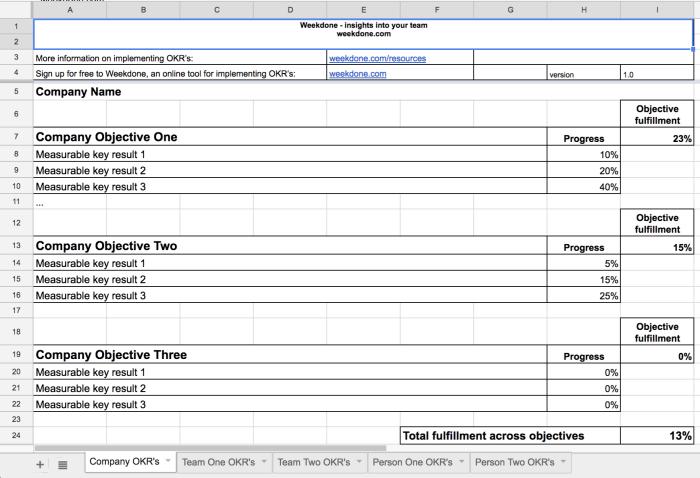
| OKR Template by Weekdone | Get free template | Small teams cascading company goals down to per-team tabs | Company-down structure, weekly check-in progress column, three file formats | Google Sheets, Excel, Word |
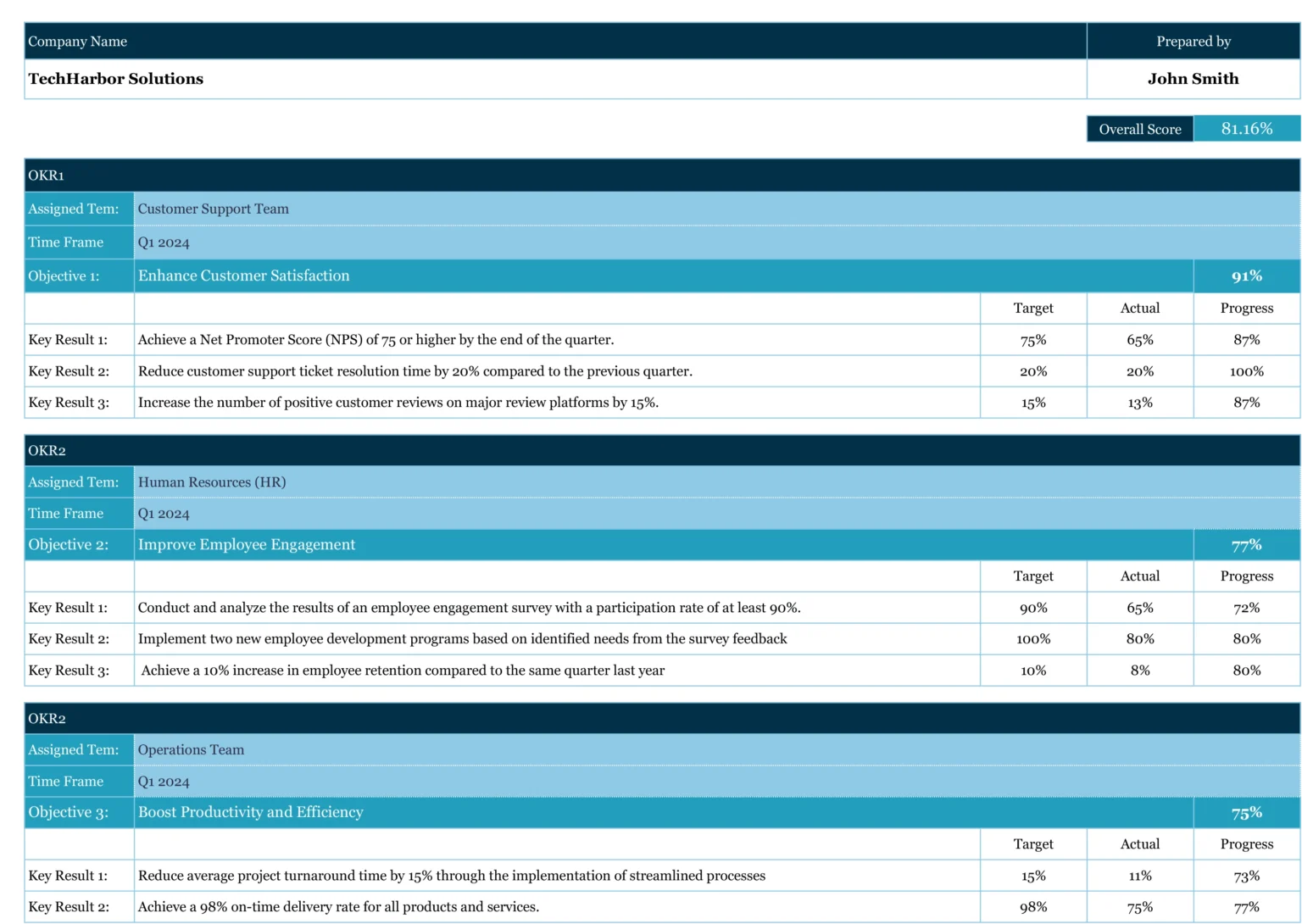
| Team OKR Template by Coefficient | Get free template | Multi-team orgs wanting one rollup score | Team-tagged blocks, target-vs-actual scoring, company-wide overall score | Google Sheets, Excel |
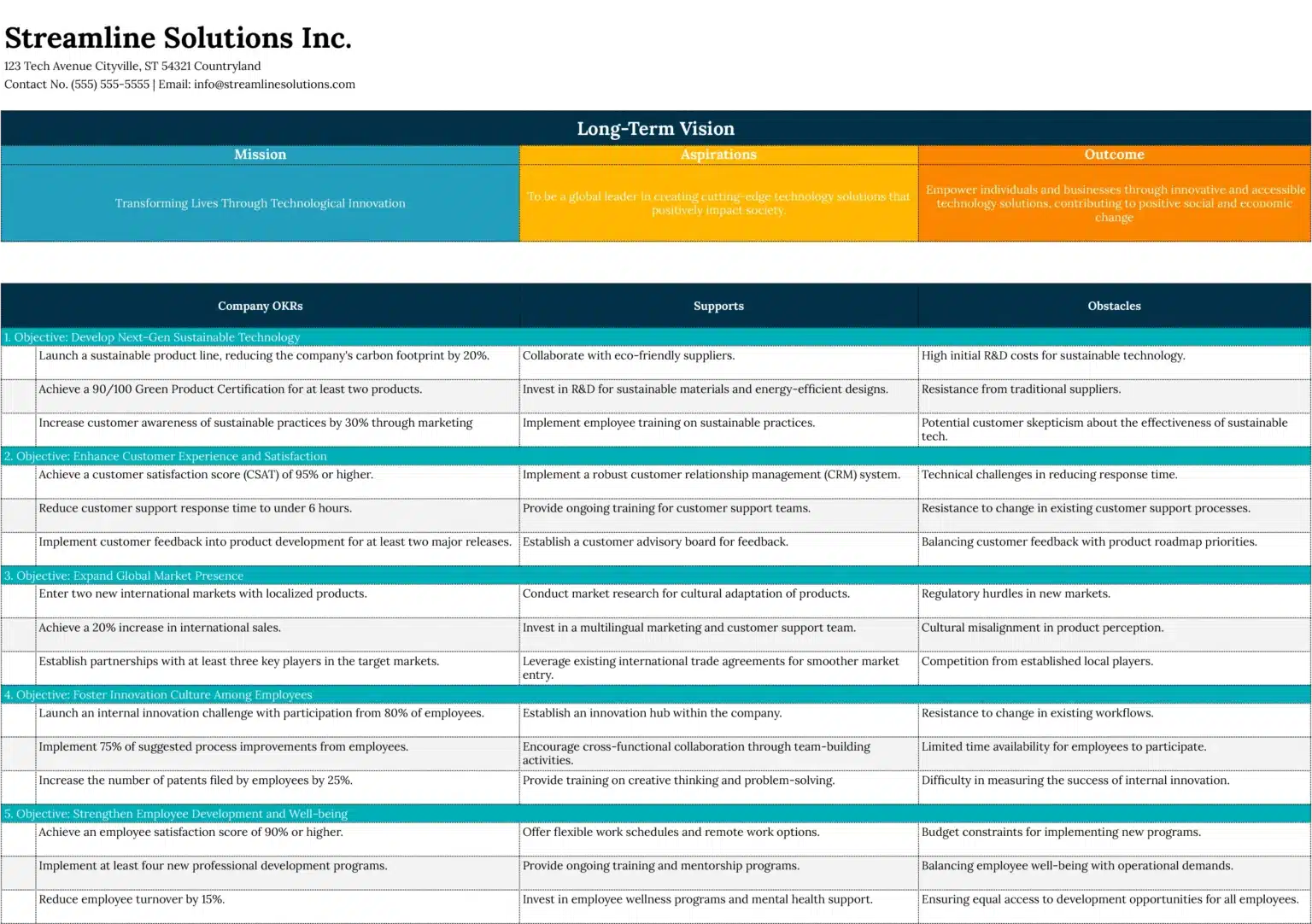
| OKR Goal Setting Template by Coefficient | Get free template | Managers pressure-testing objectives before tracking | Long-Term Vision band, Supports and Obstacles columns, planning-first layout | Google Sheets, Excel |
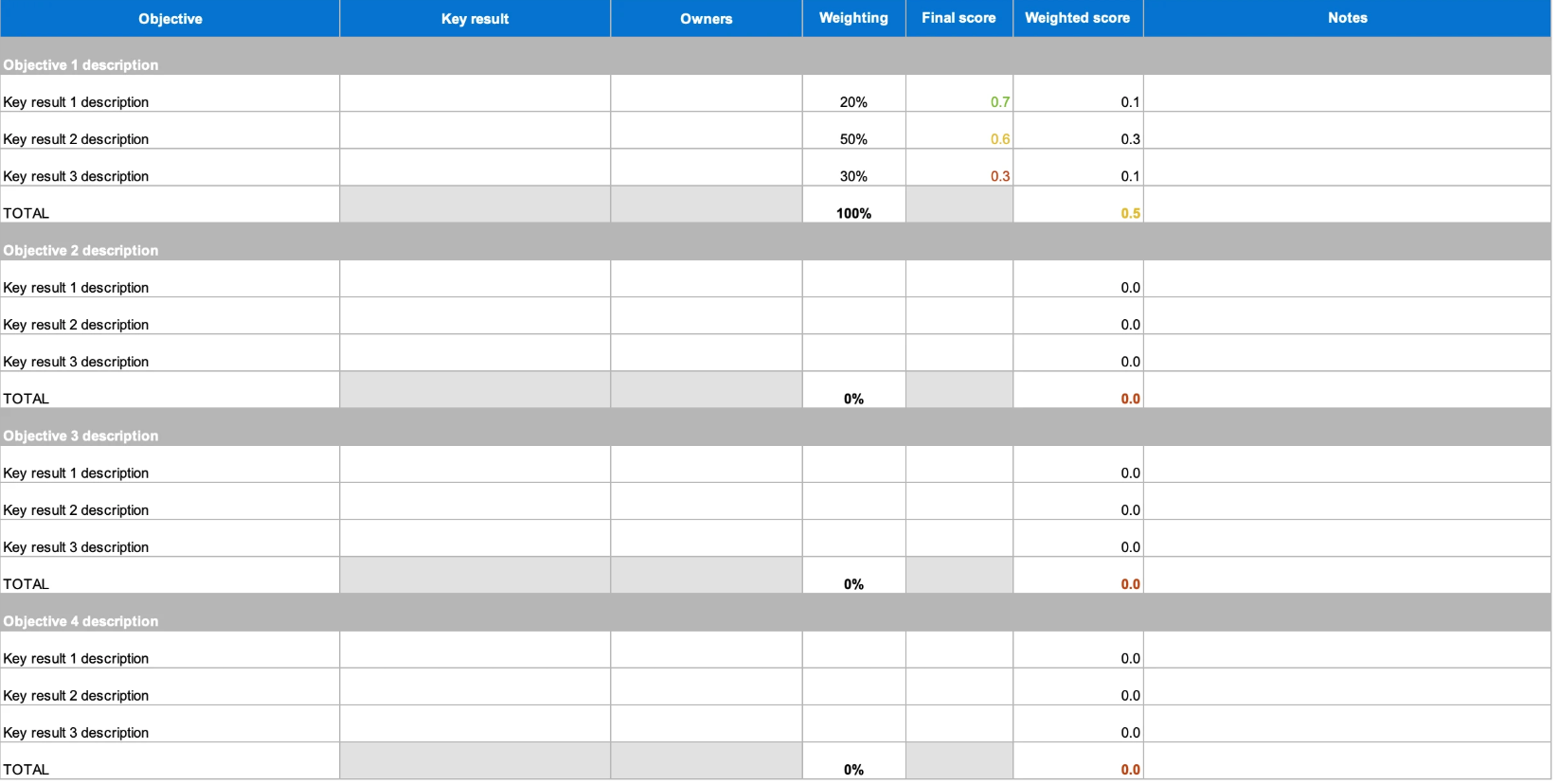
| Weighted OKR Template by Aha.io | Get free template | Managers scoring objectives where some results matter more | Custom weighting, auto-calculated weighted totals, named owners | Excel |
OKRs are a goal-setting framework built on two components: an objective (a qualitative, ambitious statement of where you want to go) and key results (two to four measurable outcomes that prove whether you got there).
The OKR structure has three core parts:
Every template on this list is genuinely free, covers at least one stage of the OKR tracking lifecycle (planning, tracking, review, or presentation), and works in tools most teams already have.
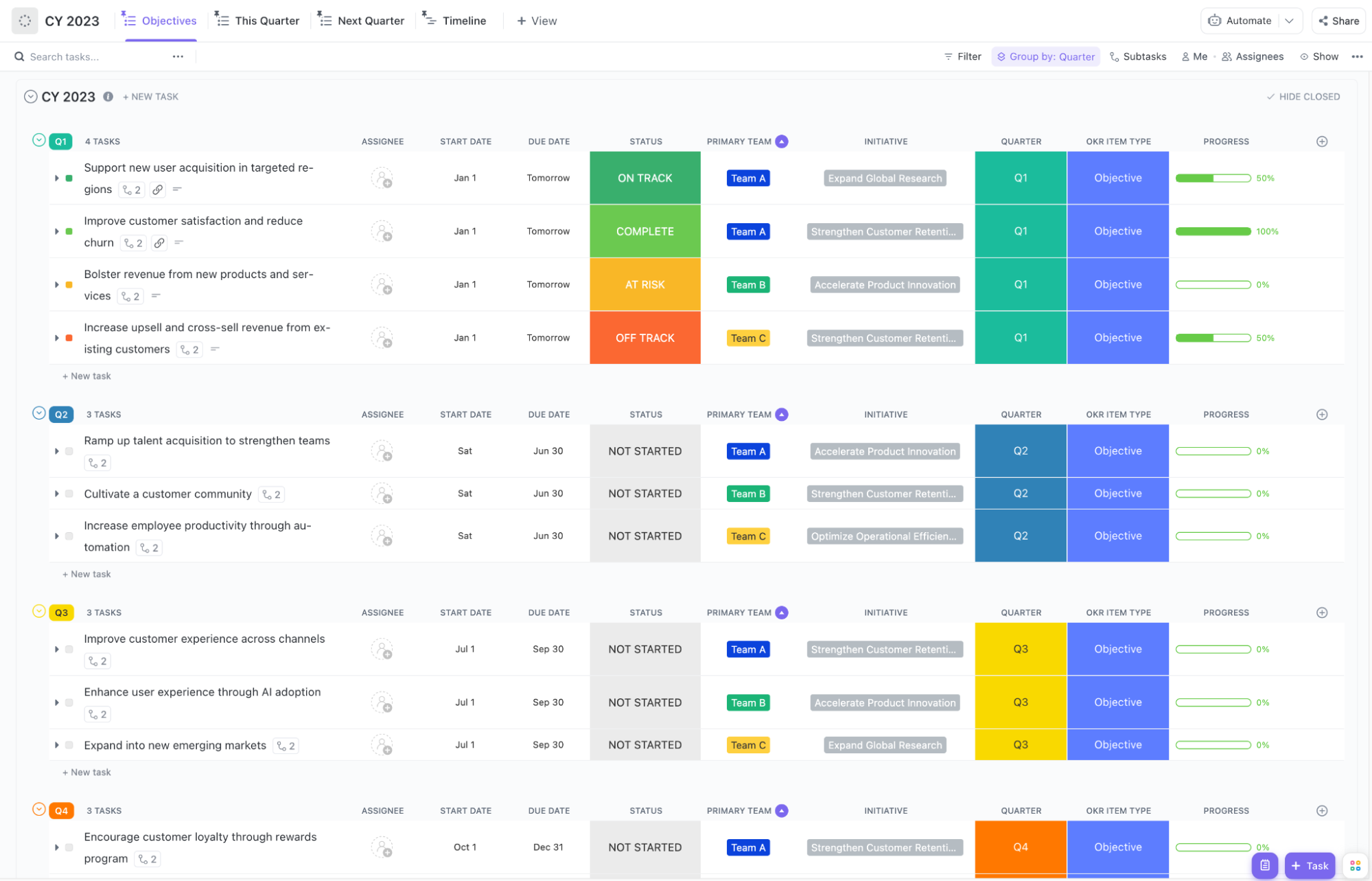
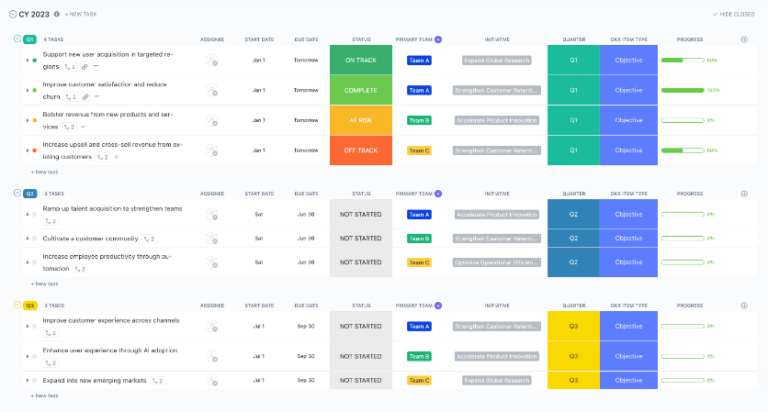
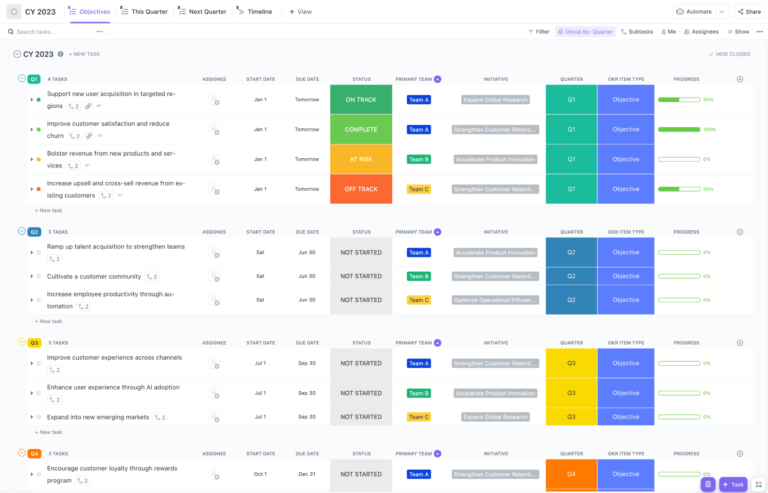
Use the OKR Template by ClickUp when you want objectives and key results tracked as live tasks across a full year. It details quarterly objectives, each with a status, owner, Initiative tag, and progress bar that advances as key results are completed. This shifts from a manual sheet to self-updating OKRs.
Use case: You’re a team lead whose spreadsheet OKRs go stale the second someone forgets to update a cell. Add each objective, break it into key results as subtasks, and the progress rolls up on its own. When leadership asks how the quarter’s tracking, you open the Progress Board and the answer’s already grouped by status.
Best for: Teams ready to move OKRs out of a static sheet and connect objectives to live tasks, owners, and statuses
Skip it if: You only need a one-page snapshot to email around once a quarter. The view-and-field structure is more setup than a quick spreadsheet for a team that won’t track week to week
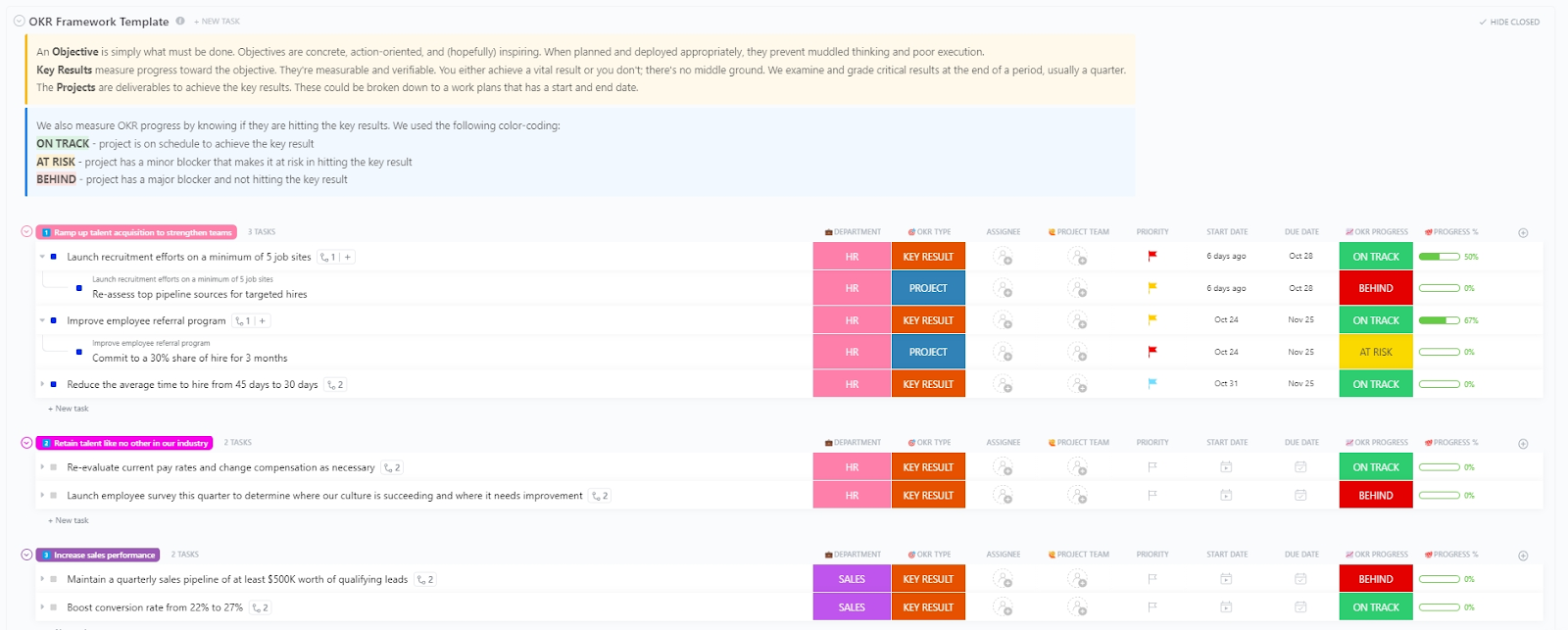
Use the OKR Framework Template by ClickUp when you want key results tied to the actual projects that move them. It has three levels. Each objective holds its key results, and each key result holds the projects delivering it. Every row is tagged with a department and a color-coded status: On Track, At Risk, or Behind.
A built-in header defines objective, key result, and project up front, so a new team isn’t guessing at terminology.
Use case: You’re a People or Sales lead whose key results keep stalling because nobody tied them to real deliverables. Nest “Launch recruitment on 5 job sites” under “Ramp up talent acquisition,” then nest the projects beneath that. When a key result reads On Track but the project under it flashes Behind, you spot the breakdown before the whole objective slips.
Best for: Teams that want key results explicitly linked to the projects and deliverables driving them, with health visible at every level
Skip it if: Your OKRs don’t break down into discrete projects, or you just want objective-level tracking. The nested structure adds layers that a simpler goals list doesn’t ask for
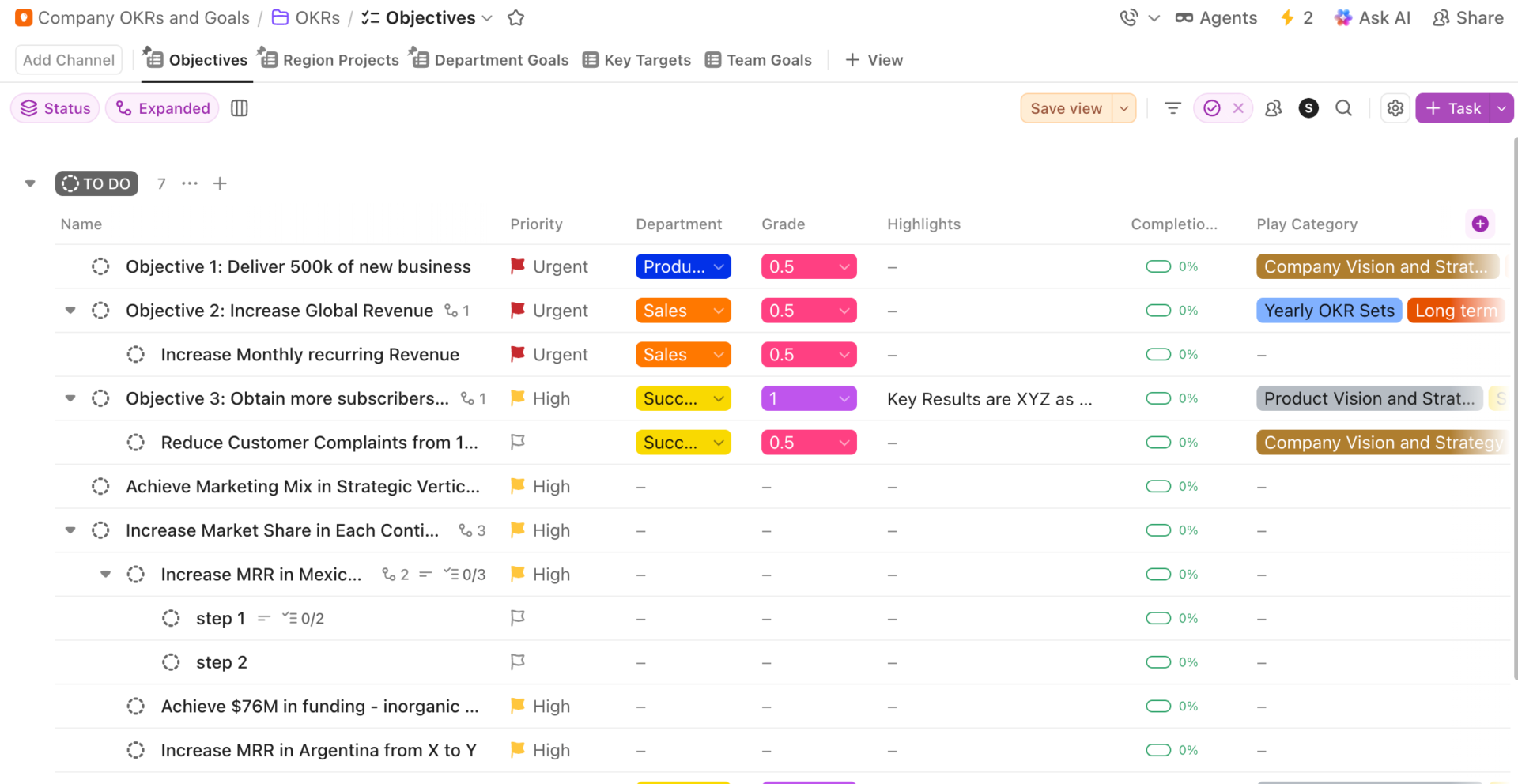
Use the Company OKRs and Goals Template by ClickUp when objectives have to roll up from individual teams to the whole company.
It grades every objective on the 0.0–1.0 scale right in the list, tags each one with a Play Category like Company Vision or Yearly OKR Sets, and splits the same goals across five views for region, department, and team. Leadership reads the company picture while each team still sees only its slice.
Use case: You’re an exec or Ops lead who needs a team’s MRR goal in Argentina to ladder up to “Increase Global Revenue” at the top. Nest team and regional goals under company objectives, then grade each one at quarter’s close. Open any view, and the same data reorganizes around whoever’s asking.
Best for: Leadership and Ops teams aligning company objectives with department, region, and team goals in one graded structure
Skip it if: You’re a single team that just needs to track its own OKRs. The company-wide cascade and five views are more scaffolding than a one-team goal list calls for
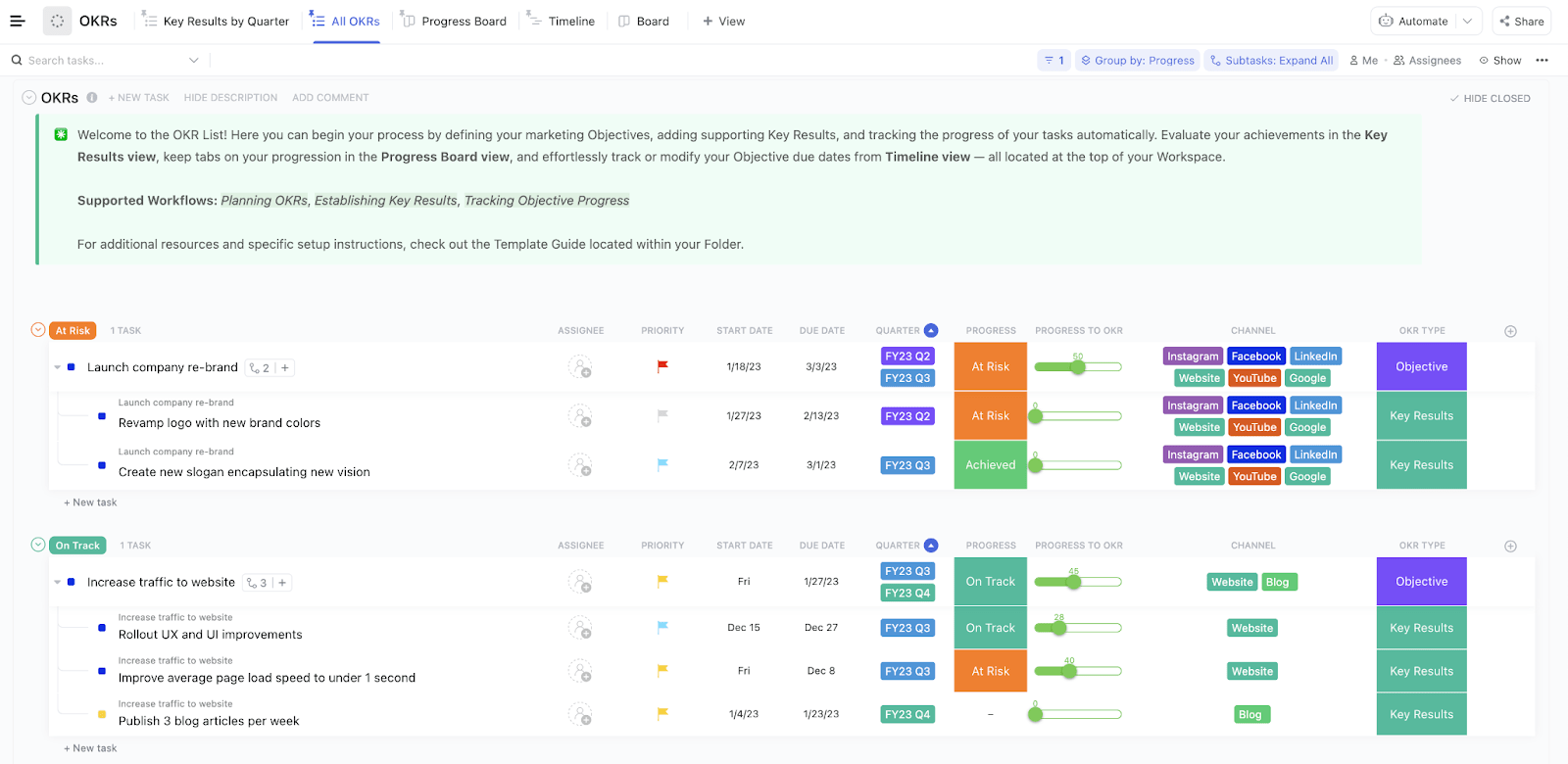
Use the Strategic Marketing Plan Template by ClickUp when your objectives live and die by channel. It tags every key result with the channels driving it (Instagram, LinkedIn, YouTube, Blog, and more). Plus, it scores progress on a 0–100 slider instead of a flat status.
Use case: You’re a marketing lead running a rebrand across six channels with a traffic goal split between blog and website. Nest key results like “Revamp logo” under “Launch company re-brand,” tag each with its channels, and drag the slider as work lands. One glance shows the rebrand is At Risk while paid has already hit, no pinging required.
Best for: Marketing teams running channel-based campaigns who want OKRs scored by percentage and split by platform
Skip it if: Your OKRs aren’t organized around marketing channels. The channel field and campaign framing are built for marketing, and a general-purpose goals template fits a non-marketing team better
Use the OKR Template by HubSpot when you need a single OKR doc you can hand to any department, regardless of the software they use. It comes in Excel, Google Sheets, and PDF, so nobody’s blocked by tooling on day one.
Use case: You’re rolling out OKRs across teams on different tools: finance in Excel, ops in Sheets, and a couple who just want a printout. Everyone fills the same structure in their own format. By Friday’s review, they’re all reading the same numbers off one layout.
Best for: First-time OKR adopters who need one shareable document that works across mixed toolsets
Skip it if: You want live collaboration, automated roll-ups, or stalled key result alerts. Every update here is a manual edit and re-share, which falls apart once more than a couple of people touch it
Use the OKR Template in Google Sheets by Sheetgo when one shared sheet stops scaling, and you need department OKRs that roll up to a company view.
It installs six department spreadsheets plus one company master sheet, wired together with Sheetgo connections. Each team works in its own file. Click Run and the numbers flow up.
Use case: You’re an Ops lead at a 6-team company where everyone tracks OKRs differently, and two teams track nothing. Hand each team their own file, let them log progress in their own space, then click Run once before the leadership review and watch all six roll into the master dashboard.
Best for: Multi-department orgs that want roll-up OKR reporting in Google Sheets without buying new software
Skip it if: You’re a single team that just needs one tracker. The six-file system is overkill, and the roll-up depends on Sheetgo to move data between sheets
Also Read: How to Track Project Progress
Use the OKR Template by Weekdone when you want a free spreadsheet that starts at the company objective and hands each team its own tab to fill in.
You set the top-level objective first, open the discussion, then let teams build their OKRs underneath. A progress column on every key result updates during a weekly check-in, so the sheet reflects where things actually stand.
Use case: You’re a team lead at a small company setting up your first OKR cycle. Fill in the company objective, share the sheet, and let each team build their own OKRs in their tab. Book a weekly check-in for owners to update progress, and by week three, anyone can read where each team sits without chasing a status.
Best for: Small teams setting up their first OKR cycle who want a free, shareable sheet that cascades from company to team
Skip it if: You’re past 10 people or running cross-functional goals. The tab-per-team setup gets unwieldy at scale, and every update is manual, so progress drifts the moment a check-in gets skipped
Use the Team OKR Template by Coefficient when multiple teams need to track OKRs side by side and leadership wants one number for the whole picture.
Each OKR block is tagged with an Assigned Team and Time Frame. An Overall Score at the top rolls every objective into a single company-wide percentage.
Use case: You’re coordinating OKRs for Support, HR, and Ops in one quarter and want every team visible at once. Give each team a block, list each key result with a Target and Actual, and the Overall Score at the top tells you the company’s at 81% before you’ve opened a single sub-tab.
Best for: Multi-team orgs that want side-by-side OKR tracking with a single rollup score that leadership can read at a glance
Skip it if: You need automated alerts when a key result stalls or live links to the work itself. Progress only moves when someone updates the Actual column by hand
Use the OKR Goal Setting Template by Coefficient when the problem is writing good OKRs in the first place.
It starts with a Long-Term Vision band (Mission, Aspirations, Outcome) to anchor the quarter to direction. Then each objective gets a Supports and an Obstacles column, so you name what helps and what blocks it before you commit.
Use case: You’re a manager heading into planning with draft objectives still as vague as “improve customer experience.” Set the mission up top, then for each objective, name what you’ll lean on and what could derail it. You walk out with objectives that already survived a stress test.
Best for: Managers and team leads who want to pressure-test objectives and key results before any tracking begins
Skip it if: You’ve already locked your objectives and just need to score progress. This is a planning canvas, and the day-to-day tracking lives in a separate sheet
Use the Weighted OKR Template by Aha.io when your key results don’t all carry equal weight. You assign each one a share of the objective, score it on a 0.0–1.0 scale, and the sheet automatically recalculates the objective’s total. A make-or-break result weighted heavily moves the objective far more than a minor one.
Use case: You’re a manager with a three-key-result objective where one carries the quarter. Weight that one at 60%, split the rest, and score at close. The two minor wins hit 0.9, but the make-or-break stalls at 0.3, so the total lands at 0.5, not the rosy 0.7 a flat average would’ve shown.
Best for: Managers scoring objectives where some key results genuinely matter more than others
Skip it if: All your key results carry equal weight, or you just want a simple pass/fail tracker. The weighting math adds a step a flat OKR sheet skips
If you’re deciding between spreadsheet templates or dedicated OKR software, this video reviews the top OKR software options to guide your choice:
Start by finding where your OKRs tend to break. Each stage of the cycle has its own failure point, and the best template is the one that fixes yours.
The full list covers every stage, but most teams only need one to start. Match your immediate need to the right starting point.
| If you need to… | Start with this template |
|---|---|
| Connect OKRs to the actual tasks and projects driving them | OKR Template by ClickUp |
| Tie each key result to the deliverables behind it | OKR Framework Template by ClickUp |
| Roll team and regional goals up to company objectives | Company OKRs and Goals Template by ClickUp |
| Track marketing OKRs by channel and campaign | Strategic Marketing Plan Template by ClickUp |
| Hand a single OKR doc to teams on different tools | OKR Template by HubSpot |
| Pull department OKRs into one master view in Sheets | OKR Template in Google Sheets by Sheetgo |
| Cascade one company objective down to per-team OKR tabs | OKR Template by Weekdone |
| Track multiple teams side by side with one rollup score | Team OKR Template by Coefficient |
| Write sharper objectives before any tracking begins | OKR Goal Setting Template by Coefficient |
| Score objectives where some results matter more than others | Weighted OKR Template by Aha.io |
Here’s a five-step process that works regardless of which template you chose above.
Start with the strategic conversation. Objectives should be qualitative and directional, like “Become the go-to resource for enterprise onboarding.” Save the hard numbers for the key results underneath.
Each key result needs a number attached: a target metric, a deadline, and a clear owner. If you can’t measure it, it’s not a key result. Use the 0.0–1.0 scoring scale to set expectations upfront for what “done” looks like and what qualifies as a successful stretch.
Every key result gets one person accountable—not a team, not “everyone.” Fill in the owner and deadline columns immediately. Templates without assigned ownership become decorative documents that no one updates.
Block a recurring 15-minute slot for the team to update scores and flag blockers. That’s because the follow-through is where most OKR processes break down.
Use a review template to score each key result, document what worked and what didn’t, and decide which objectives carry into the next quarter. OKRs that scored below 0.3 need a conversation about whether the objective was wrong or the execution stalled.
You don’t need a pre-made file to run OKRs well. If none of the templates above fit your team, build one in an afternoon using a tool like Google Sheets or ClickUp Docs. Here’s what every working OKR template needs.
Build it once, lock the columns, and reuse the same structure every quarter. In ClickUp, you can turn OKRs into tasks with Custom Fields and statuses, so the scoring and roll-ups happen on their own instead of by hand.
Both kinds of templates score the same OKRs. The difference is what happens between planning and review.
Spreadsheet and presentation templates work best when you want a self-contained file you can download, fill in, and share without committing to a platform. They’re fast to start, they live wherever your team already works, and they ask nothing of anyone who just needs to read them.
The catch: every update is manual. Someone has to open the file, change a number, and re-share it, and the moment that stops happening, the scores drift out of date.
ClickUp templates work better when OKRs need to connect to the work itself. Key results become live tasks with owners, due dates, and progress that rolls up automatically. Status changes show up without anyone re-sharing a file, and the same objectives can be viewed by quarter, by team, or by status without rebuilding anything.
That structure takes more setup than a blank spreadsheet, but it pays off for teams that track week to week rather than once a quarter.
Here’s how one reviewer on G2 puts it:
ClickUp is flexible. You can customize almost everything: views, fields, dashboards, and communication. So you can adapt it for use as a CRM, OKR tool, task management tool, wiki, etc.
A simple rule: if your OKRs are a quarterly document, a spreadsheet is enough. If they’re a weekly operating rhythm, put them where the work lives.
The template is rarely the problem. The same handful of habits sink OKRs, no matter how clean the file is. Here’s what breaks and the specific fix for each.
| Problem | Solution |
|---|---|
| Key results owned by “the team“: When a result belongs to everyone, updates stop, and by mid-quarter, nobody can say whether it’s on track | Put one named person in the owner column of every key result, and have that owner post the score at each check-in, even when the number hasn’t moved |
| Filed at kickoff, never reopened: OKRs written at a January offsite describe a plan the team drifted from weeks ago | Book a recurring 15-minute check-in the same week you set the OKRs, and use it to update scores and flag blockers before they compound |
| Measures that track effort: “Launch the campaign” records activity, so a team can finish every line item and still miss the objective | Write each key result as a number that moves (“lift trial-to-paid from 12% to 18%”) and push the launch itself into the tasks beneath it. |
| Flat scoring across results: Grading every key result equally lets three easy wins bury one critical miss, while the objective still looks healthy | Weight each key result by importance, or grade on the 0.0–1.0 scale, and read the low scores first instead of the average |
| Eight objectives per team: Spread that thin, attention scatters, and nothing gets a real push | Cap each team at three objectives a quarter, and park the rest in a backlog list you revisit at the next planning cycle |
| Manual process: If someone has to regularly pull data and update your OKR template, it is likely to become redundant soon | Let status and roll-ups calculate automatically |
When the quarter gets busy and priorities shift, do your objectives still describe what the team is actually working on? That’s the real test of an OKR system.
Picking the template is the easy part. Choose the one that matches where your OKRs tend to break (planning, tracking, scoring, or rollup) and run it for a full quarter before deciding whether it stays. The hard part comes after the kickoff, when scores need updating, and nobody scheduled the time to do it.
That’s where ClickUp earns its keep. Objectives, key results, owners, and progress all live in one workspace. Plus, the key results link straight to the tasks that move them, so the goals you set in week one still reflect reality in week ten. Get started for free.
Three objectives is the sweet spot, with two to four key results under each. More than that, attention scatters across too many fronts. The point of OKRs is to force a choice about what matters most this quarter, so a long list usually means the prioritization hasn’t happened yet.
KPIs track the ongoing health of something you already do, like monthly churn or support response time, and they run continuously. OKRs are time-boxed goals for change you want to drive this quarter. A KPI can become a key result when you set a target to move it, for example, turning “churn rate” into “cut churn from 5% to 3% by Q3 end.”
SMART goals define a single well-formed target; OKRs pair a directional objective with two to four measurable key results under it. SMART is a quality checklist for one goal. OKRs are a hierarchy that connects an ambition to the metrics proving you reached it, scored 0.0–1.0 at quarter’s end. Teams often write key results that are themselves SMART.
Andy Grove developed the objectives-and-key-results approach at Intel, framing it around two questions: where do I want to go, and how will I know I’m getting there? John Doerr later brought it to Google and popularized it in Measure What Matters, which is why most modern OKR practice traces back to Grove’s original model. (Google re:Work)
Quarterly is the standard, long enough to drive real change, short enough to stay honest. Some companies pair quarterly OKRs with an annual set for direction. Monthly cycles rarely give a stretch goal time to move and turn into busywork. Match the cycle to how fast your strategy actually shifts.
A key result is the measurable outcome (“cut onboarding from 14 to 7 days”); a project is the work that delivers it (“rebuild the setup wizard”). Key results say whether you won. Projects and tasks are how you get there. Strong templates keep the two separate, so finishing the work never gets mistaken for hitting the goal.

Praburam Srinivasan
Max 19min read
Praburam Srinivasan
Max 20min read
Praburam Srinivasan
Max 27min read

© 2026 ClickUp