
Sorry, there were no results found for “”
Sorry, there were no results found for “”
Sorry, there were no results found for “”
The phrase ‘time management’ is somewhat misleading. In reality, you can’t manage time, but you can manage your choices around it.
No matter how much you want it, you only get 24 hours, 1,440 minutes, or 86,400 seconds each day, and that number never changes. What you do with that time depends on how well you plan, evaluate, act decisively, and stay honest with yourself. Just like money, you either have to spend time with purpose or let distractions steal it right from under you.
Knowledge workers toggle between apps 1,200 times a day—nearly 4 hours a week in attention resetting, or 9% of workers’ annual work time. However, they still miss messages, actions, and deadlines because of the constant distraction.
In this article, we’ll explore how to save time, boost productivity, and protect your peace of mind while you’re at it. Plus, we’ll introduce you to the one magical tool to improve your time management skills—from time-blocking and time-tracking to smarter planning: ClickUp!
Every choice you make with your time shapes what you accomplish and how satisfied you feel each day. If you learn how to manage your daily or weekly schedule properly, you can binge-watch your favorite show, spend time with your family, or dive into deep work without missing a beat.
Mastering time management allows you to accomplish important tasks and still enjoy a whole night’s sleep, highlighting the importance of time management more than ever.
Ever get that panicky feeling at 4 p.m. when you realize you’ve barely scratched the surface of your to do list and you’re losing track of time? That creeping sense of dread is precisely what smart time planning helps you avoid.
When your tasks are clearly laid out and spaced over blocks, you are giving your brain a map instead of dropping it into a maze. You’re not frantically reacting to everything, but you’re calmly moving from one thing to the next.
📮 ClickUp Insight: 63% of our survey respondents rank their personal goals by urgency and importance—but only 25% organize them by timeframe.
Meaning? You know what matters, but not necessarily when. ⏳
ClickUp Goals, enhanced by ClickUp Brain’s AI assistance, brings clarity here. It helps you break down large goals into time-bound, actionable steps.
ClickUp Brain provides intelligent suggestions for timelines and keeps you on track with real-time progress updates and automatic status changes as you complete tasks.
💫 Real Results: Users report a 2x boost in productivity after switching to ClickUp
When every minute feels urgent, decision-making becomes survival mode: quick, messy, and often wrong. But what if you had time carved out to actually think? Not in between meetings, not while replying to texts, but real, undisturbed time. That’s where time blocking comes in.
Want to compare three vendors for an event? Book a 45-minute decision block. Need to weigh pros and cons before a big career move? Give yourself space to breathe and reflect. By planning your day around deep work blocks, you address one of the biggest time management problems many people struggle with.
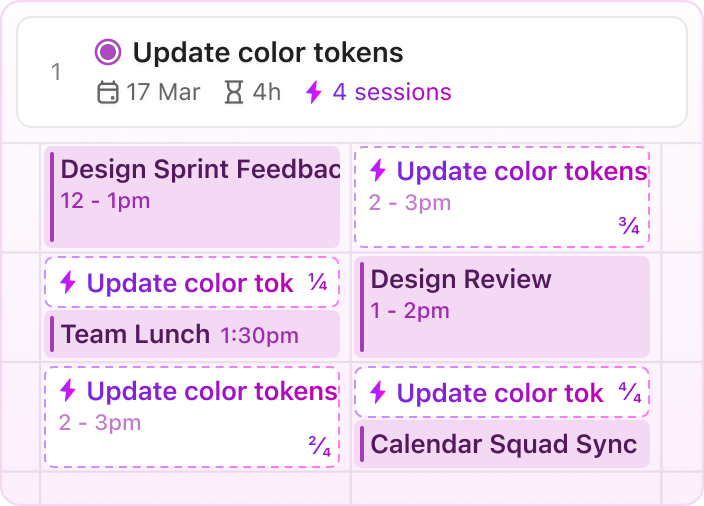
Being busy isn’t the same as being productive. Effective scheduling helps you prioritize what matters and avoid burning energy on low-value tasks. Finishing a report when your brain is fresh means fewer errors and edits later. You’re using your peak hours wisely.
Try timing yourself on regular tasks, such as a slide deck, a write-up, or a customer follow-up. You’ll be shocked at how much time you end up losing to distractions or indecision.
📖 Also Read: Tips to Improve Time Management Skills at Work
Free time doesn’t magically appear, but you have to earn it through clarity and pacing. When you know what your day looks like, you stop overcommitting or stretching one task into three hours. That means you finish to do list faster and find yourself with those rare open pockets of ‘bonus’ time.
💡 Pro Tip: Instead of cramming lunch into a slot for work or skipping breaks altogether, you can use time management techniques to finish early and go for a walk, catch up with a friend, or simply rest without guilt. When you plan your priorities and respect them, you give yourself the gift of time. And nothing feels better than enjoying that time fully unplugged.
👀 Did You Know? 42% of disruptions at work come from juggling multiple tasks and platforms, managing emails, and jumping between meetings.
If you want a longer attention span, it’s important to actively protect your deep work periods. Think of your brain like a spotlight, which can only shine brightly on one thing at a time. When you keep switching tasks, it’s like flipping that spotlight in every direction, and it weakens.
So, close the tabs, silence the phone, and dig into one task. You’ll notice you finish faster and better. With consistent practice, your attention span improves. Your work becomes tighter, cleaner, and more thoughtful. And yes, you’ll even start enjoying the process.
‘Work-life balance’ sounds great, but what does it actually look like?
It’s not about splitting your day evenly, but more about designing your time both professionally and personally. Maybe that’s wrapping up by 6 p.m. every day so you can cook dinner peacefully. Or skipping late-night emails to read with your kid.
Whatever balance looks like for you, planning your time helps protect it.
📮 ClickUp Insight: Only 36% of employees fully disconnect when their shift ends—meaning nearly two-thirds work extra hours or worry about work in their free time. This “always-on” culture is a fast track to burnout. 🔥
Automate your shut-down routines with ClickUp! Set up AI-powered end-of-day summaries, AI-generated catch-ups for comment threads, and automated time-blocking in ClickUp Calendar to schedule work-free time blocks for a clean break!
💫 Real Results: Lulu Press saves 1 hour per day, per employee using ClickUp Automations—leading to a 12% increase in work efficiency.
🧠 Fun Fact: 82% of people don’t use any proper time management system. That means fewer than one in five actually follow a structured approach to planning their day.
So, how do most people handle their time?
Lastly, 25% “just deal with whatever seems most important at the time”.
*shudders*
You might think you’re doing okay, but that kind of approach often creates hidden time management problems. You waste time switching tasks, reacting to chaos, and losing momentum all day. If you want a smarter way to work, personalized time management techniques help you organize better, focus faster, and free up more time without burning out.
Top performers use executive time management to take control of their day and accomplish more without increasing their workload.
And they don’t do it alone. They use ClickUp, the everything app for work, to keep every task, doc, chat, and goal in one place, so priorities stay clear and work stays on track. Let’s see how. 💪🏼
Your brain thrives on structure. Time-blocking offers your mind a roadmap, eliminating the need to decide what to do next every few minutes.
📌 Say you block 10:00 to 11:30 for report writing—not just generic “work,” but one specific task. During this period, close your inbox, silence notifications, and focus on the task at hand. You minimize the mental energy spent on task-switching and enhance the quality of your work.
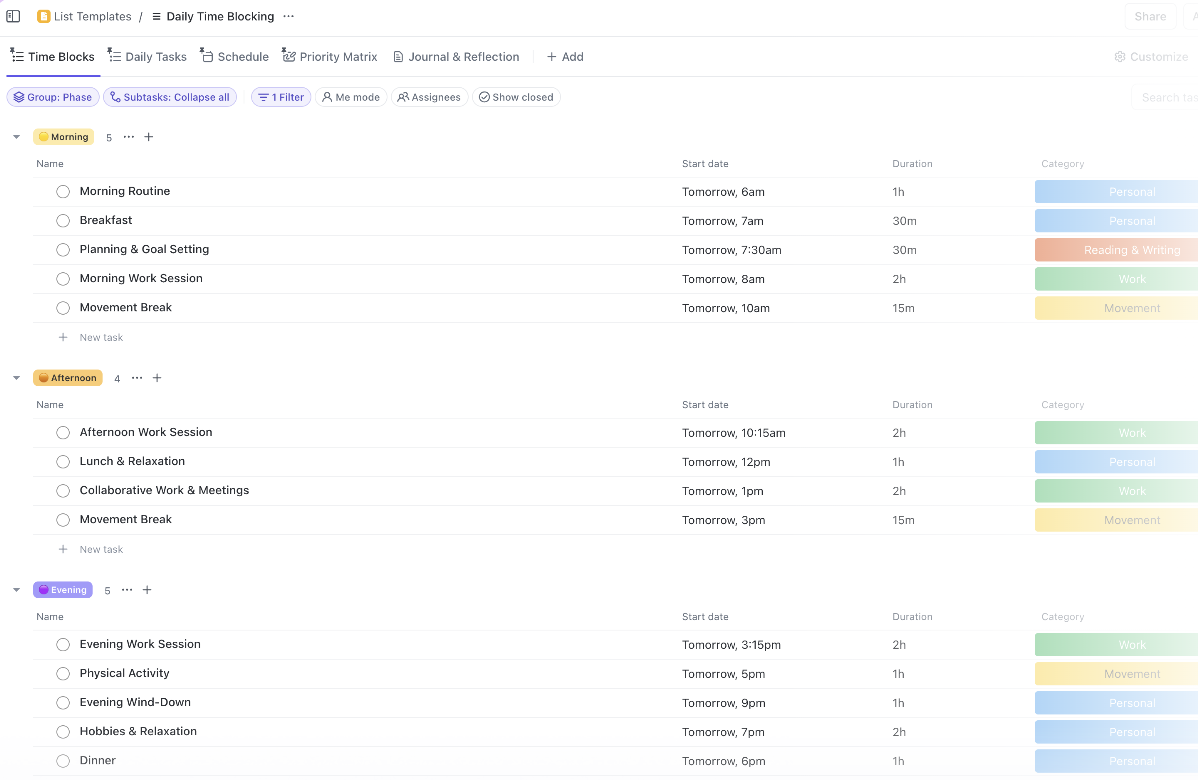
To do this right away, you can use time blocking templates to plan your day around your energy levels and stay motivated throughout.
The ClickUp Daily Time Blocking template is a great way to organize key tasks and clearly structure your schedule.
With time blocking, you can:
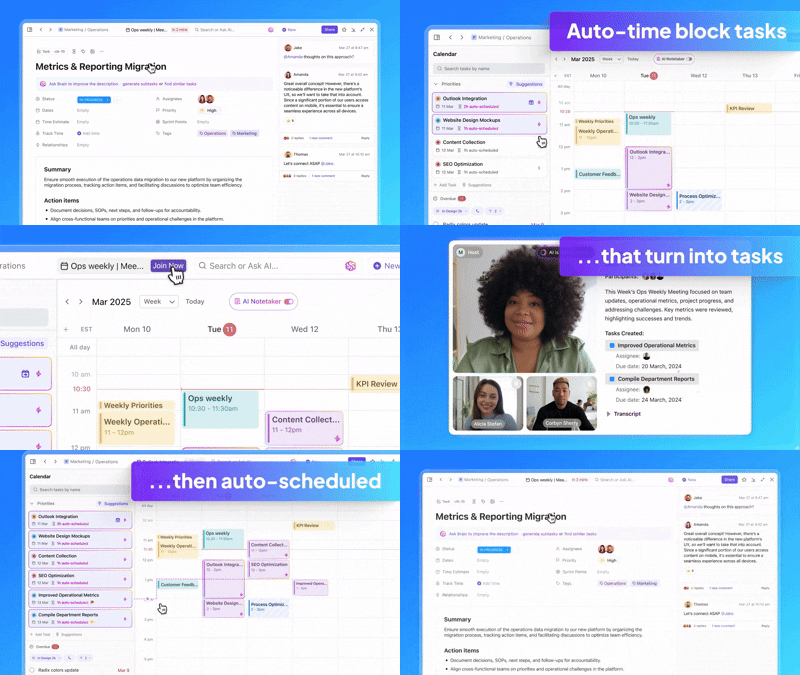
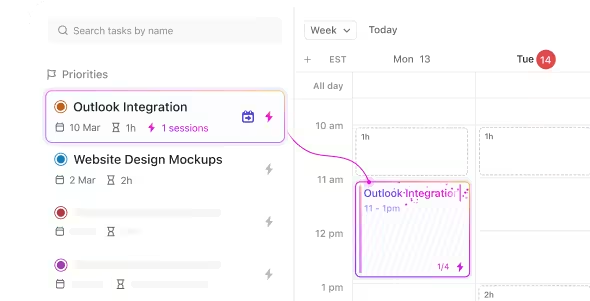
💡 Pro Tip: If manually blocking time for every task seems overwhelming, try ClickUp Calendar’s AI-powered suggestions to automate the process. It also lets you schedule tasks into time blocks by dragging and dropping them from your priority or backlog list into your calendar.
🔑 Key Insight: In The 4-Hour Workweek, Tim Ferriss introduces the concept of ‘batching’ as a way to escape time-wasting habits and reclaim productivity. He recommends setting specific times during the day to tackle similar tasks like answering emails or making calls, instead of letting them interrupt you throughout the day.
📌 For example, Ferriss shares how he only checked emails once a week. Even if this meant losing out on two sales totaling $80, the ten hours he saved were worth $200 to him. That gave him a net gain of $120, along with the mental clarity to focus on more meaningful work.
Batching was not just about getting more done. It gave him control over how he spent his time.
Effective time management starts with setting clear priorities. When you prioritize and batch tasks based on their importance, you can tackle your most urgent tasks first, reduce stress, and complete high-priority tasks without distractions.
👀 Did You Know? Studies show hiring someone to handle chores or errands can boost your mood and life satisfaction. Outsourcing these tasks frees up your time, allowing you to focus on more meaningful activities and practice better time management.
To prioritize, identify time-sensitive or impactful tasks and complete them before moving on to others.
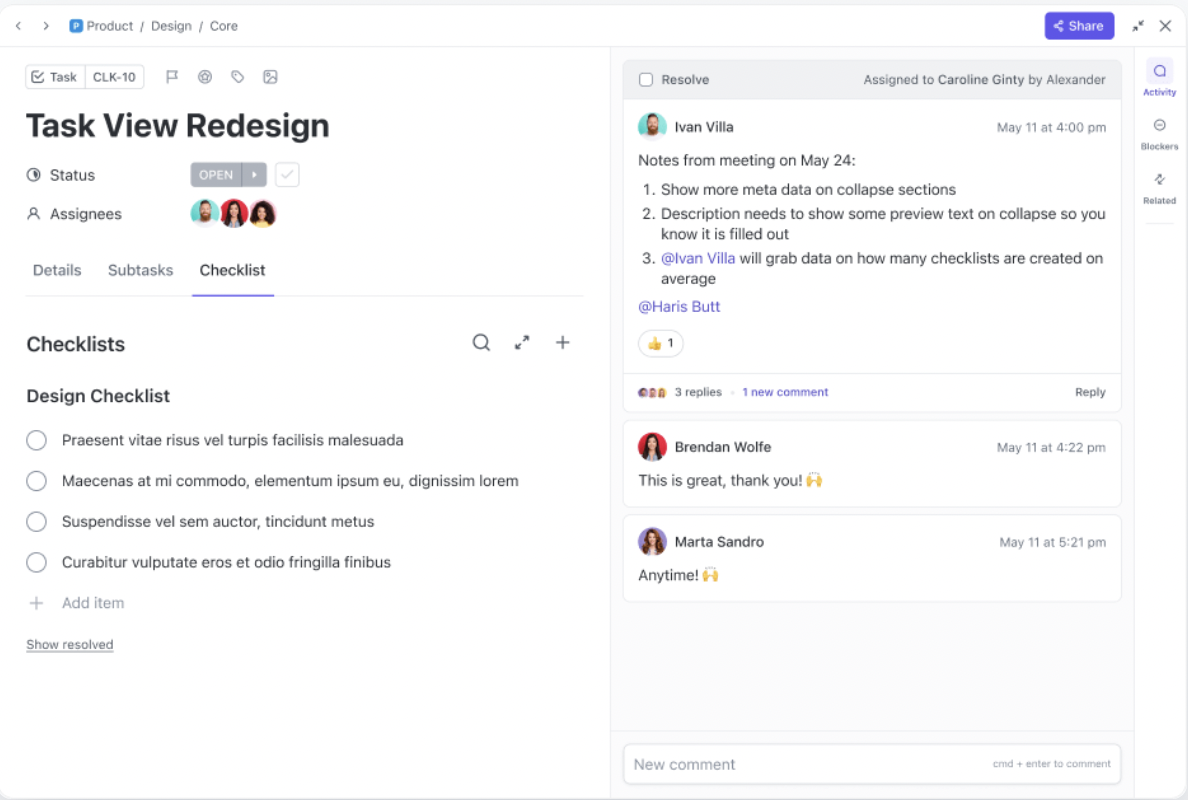
ClickUp Tasks help you organize different tasks with key details, such as descriptions, deadlines, and attachments, so you stay on top of your workload.
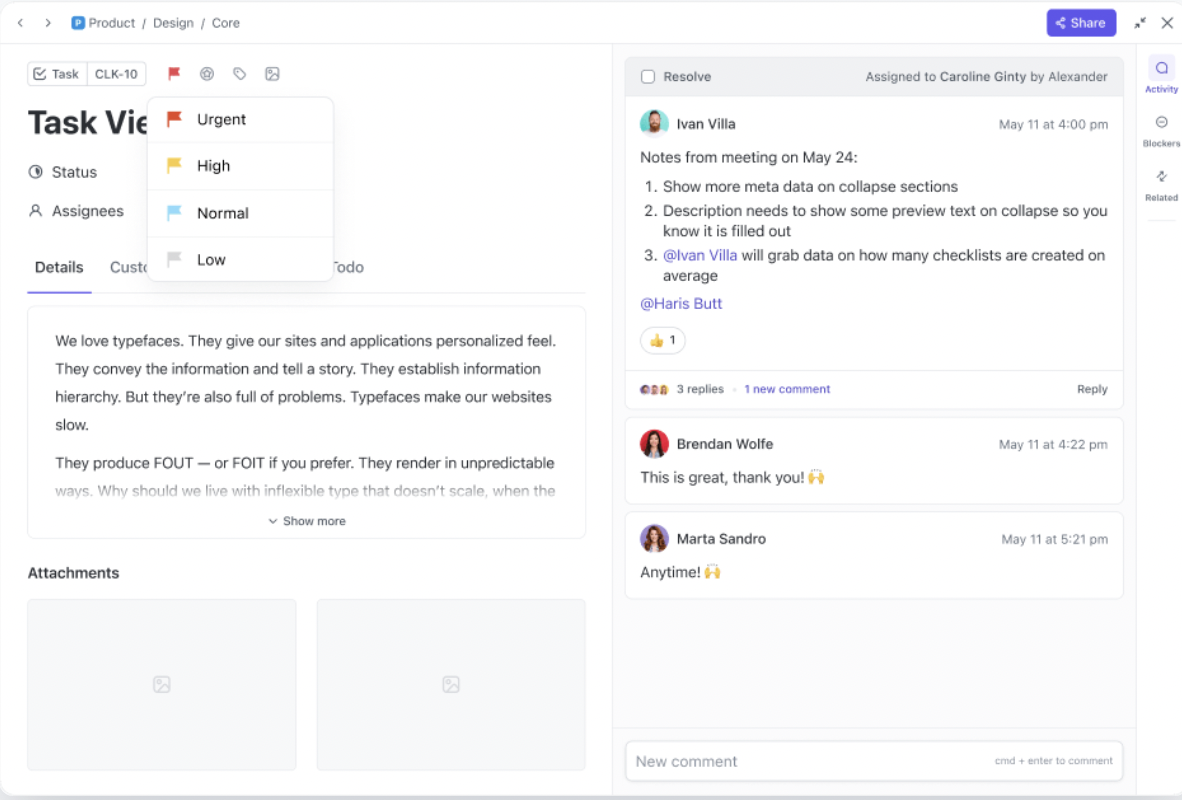
Once organized, use ClickUp Task Priorities to sort your work. Label each task as ’Urgent’, ‘High,’ ‘Normal,’ or ‘Low’ priority to easily visualize your focus areas and keep your attention on high-priority tasks.
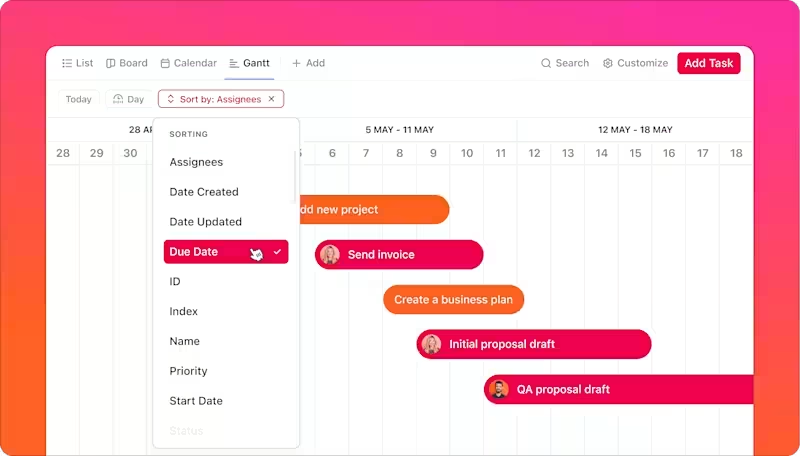
To set priorities across your Workspace, switch between different ClickUp Views for a better perspective on your tasks. Here are three examples:
After assigning priorities and due dates, head to ClickUp Calendar View to manage your schedule, filter tasks by priority, or make bulk edits with ease.
Need tips on smarter prioritization? Check out this video:
📖 Also Read: Best Time Management Apps
To improve time management, you must tackle distractions head-on. Identifying what pulls you away from your work is the first step. Once you identify your distractions, take action to limit them during your workday.
💡 Pro Tip: Use ClickUp’s Do Not Disturb mode to silence notifications, allowing you to work uninterrupted. Plus, setting clear work hours in ClickUp also defines when you’re available for collaboration, protecting your valuable time.
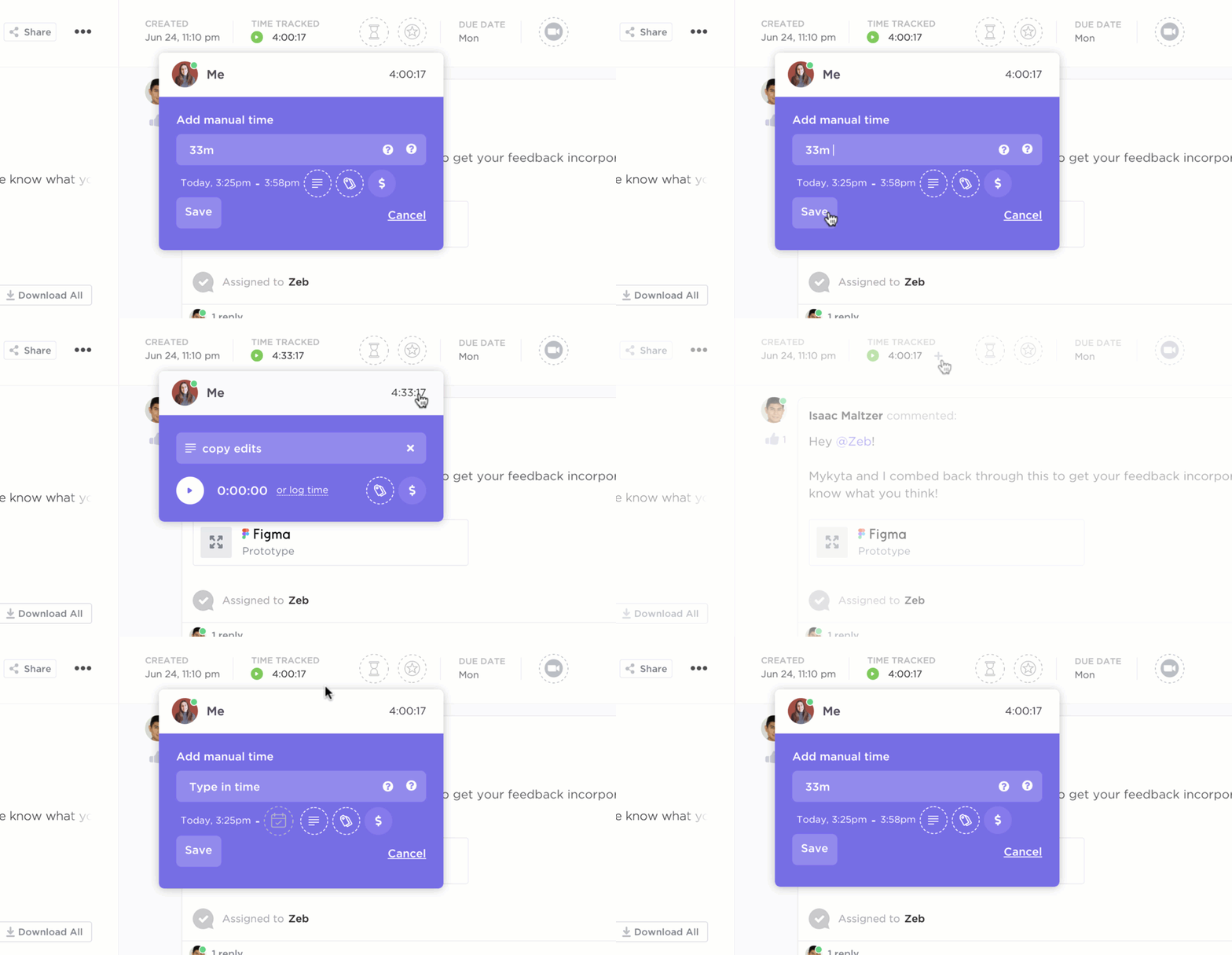
Similarly, ClickUp Project Time Tracking gives you insights into how much time you spend on different tasks, making it easier to analyze productivity and manage projects effectively. You can start and stop timers directly within tasks, log time manually, or connect with popular time-tracking tools like Toggl and Harvest.
And if you ever need a quick start, ClickUp’s ready-to-use templates can always save you a significant amount of time and get your projects up and running faster.
Timelines help project managers and individuals visualize progress and stay aligned with key milestones. Instead of generic tracking, leverage established tools and methodologies to build structured, actionable plans.
Here are a few widely used frameworks for timeline creation:
Using these frameworks, you can structure both team-based and personal timelines grounded in strategy, not just to-dos.
💡 Pro Tip: Sort tasks by urgency and importance using ClickUp’s free Eisenhower Matrix Template.

Breaks aren’t a waste of time; they’re an underrated productivity strategy. Methods like the Pomodoro technique structure your work into focused intervals (typically 25 minutes of work followed by a 5-minute break), helping you maintain concentration and avoid burnout. After four cycles, a longer break (15–30 minutes) helps reset your mental energy.
🤝 Friendly Reminder: If 25/5 doesn’t suit you, alternatives like the 52/17 method (52 minutes of work, 17-minute break) or ultradian rhythm scheduling (90-minute work blocks followed by 20-minute rests) may align better with your natural energy levels.
The best part? Pomodoro apps can help you stick to this routine and track your progress.
When preparing ahead, you don’t always need to rigidly schedule every minute. All you’ve to do is think strategically about your day. Look for natural opportunities to combine tasks or align them for efficiency.
📌 For example, if you have an appointment across town, plan nearby errands, like picking up dry cleaning or grocery shopping, on the same trip. Before heading out, jot down exactly what you need to avoid wasting time. This kind of foresight helps reduce backtracking, lowers mental load, and frees up more time later for rest or focus.
🔑 Key Insight: James Clear, author of Atomic Habits, emphasizes the power of environment design, saying that your surroundings shape your behavior. A dedicated workspace creates a mental cue for focus. Just as a gym primes you to exercise, a work zone signals it’s time to perform.
To boost productivity and reduce context switching:
Even in small spaces, consistency and cues matter more than size. A simple setup used intentionally can dramatically improve your ability to focus and save time.
📖 Also Read: Top Productivity Books That Can Transform Your Work
Microproductivity focuses on working smarter, not just harder. AI-powered tools can automate routine tasks, organize your workload, and summarize key updates to take busywork off your plate.
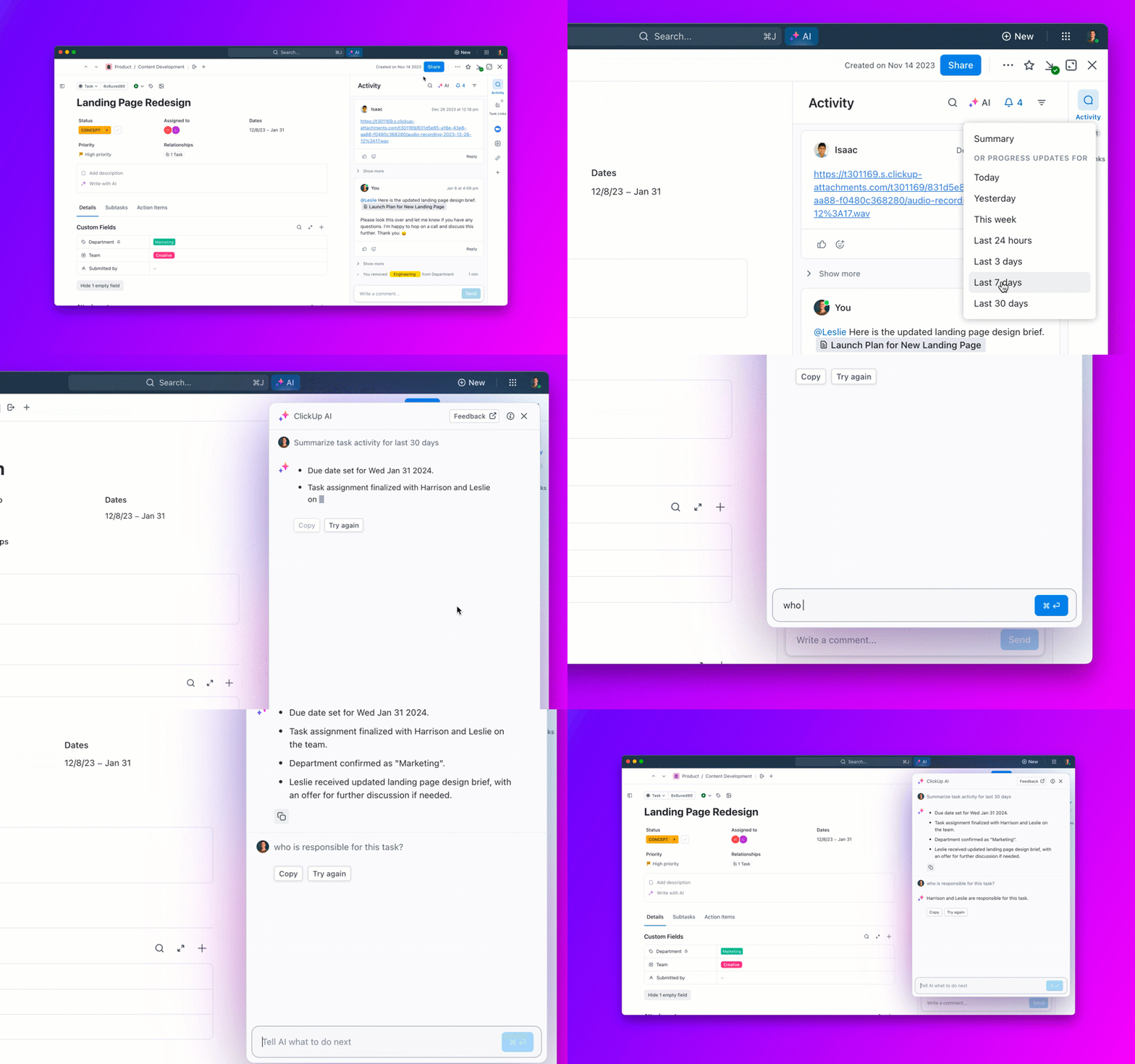
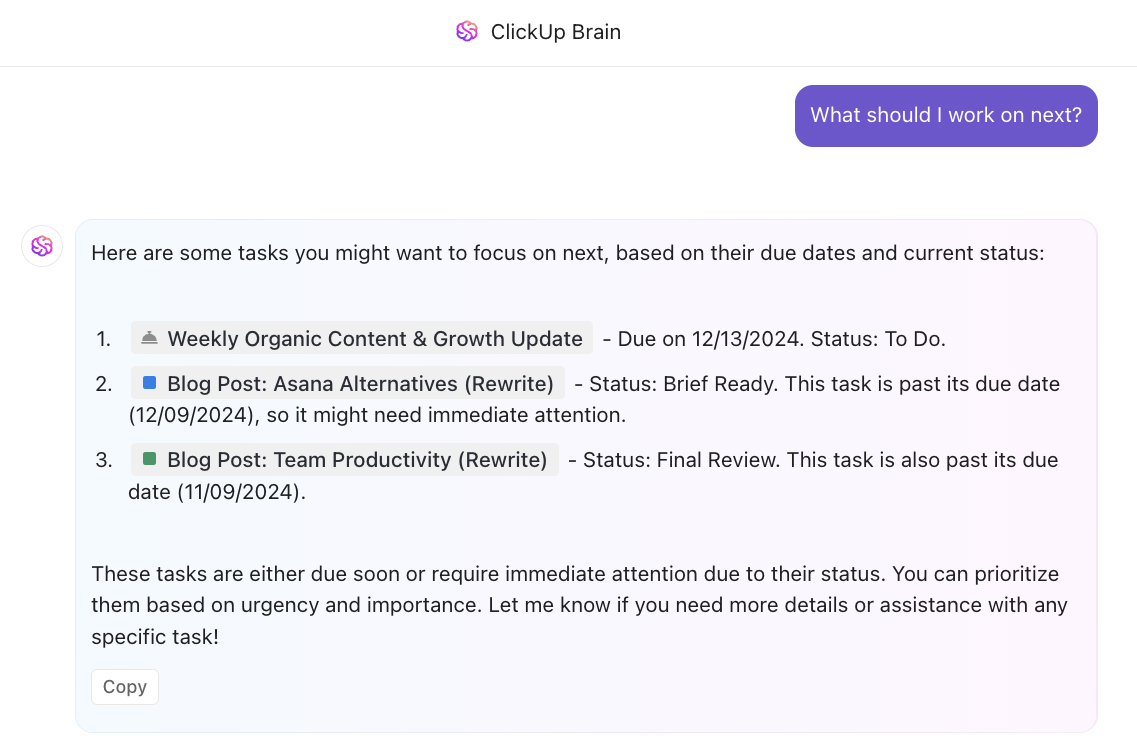
ClickUp Brain, an advanced AI-powered and context-aware productivity assistant in ClickUp, helps you manage your work better by handling repetitive tasks:
ClickUp’s Autopilot Agents are intelligent, AI-driven assistants that autonomously manage tasks and workflows within your workspace.
They operate based on defined triggers, conditions, and instructions, allowing them to perform actions like creating tasks from meeting notes, summarizing complex documents, or providing contextual status updates.
These agents can be deployed across various locations in ClickUp, including Spaces, Folders, Lists, and Chats, ensuring seamless integration into your team’s workflow.
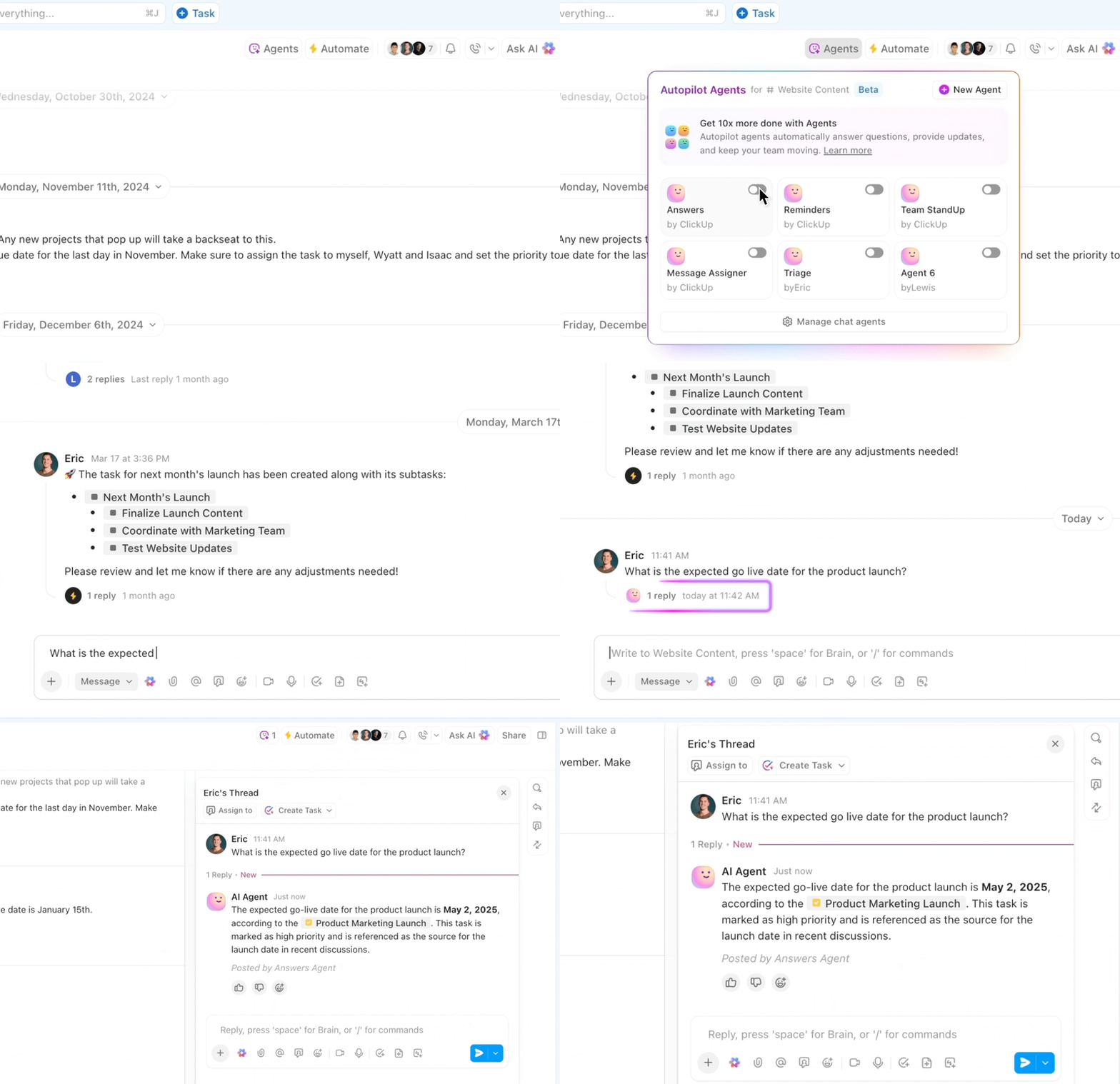
There are two types of Autopilot Agents: Prebuilt and Custom.
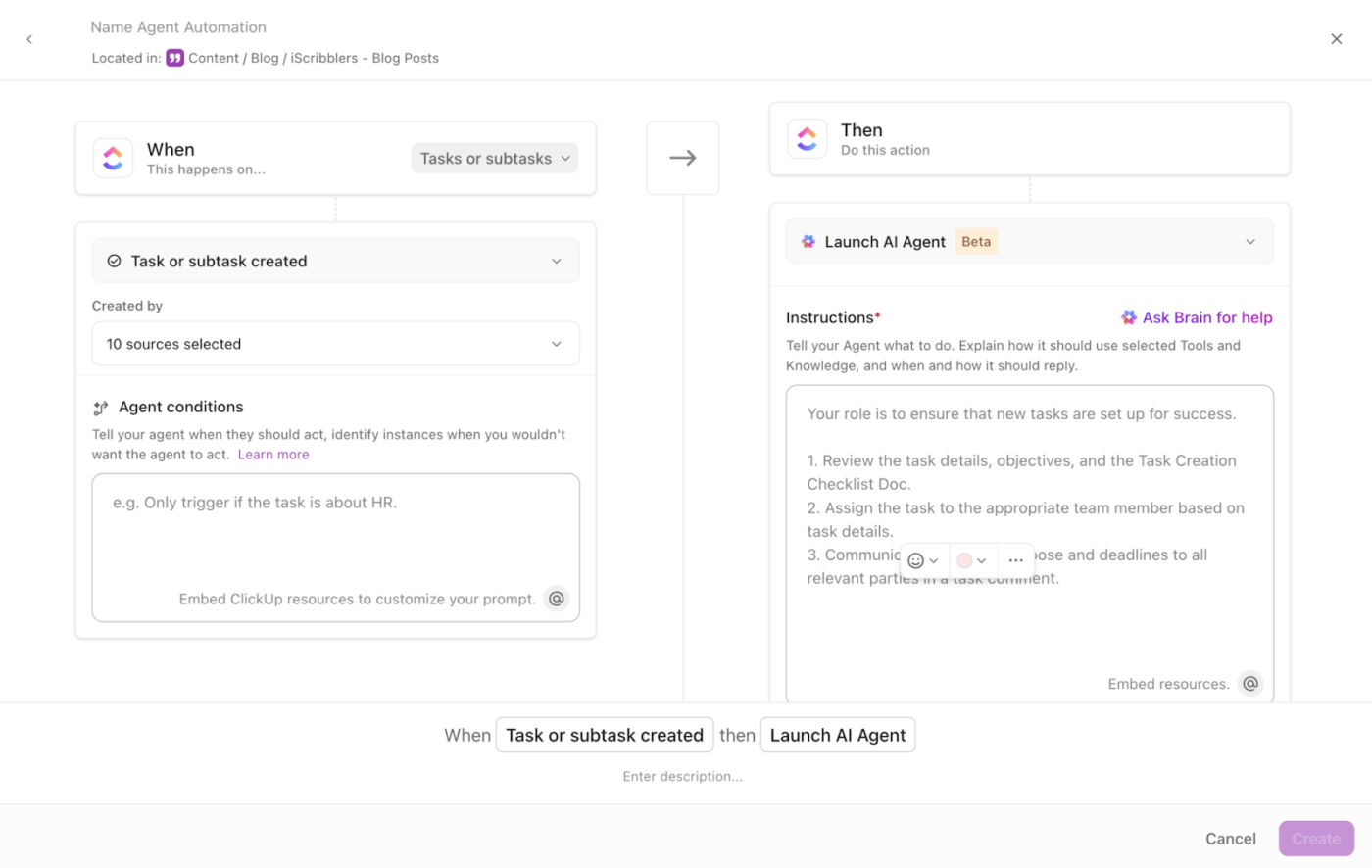
ClickUp AI’s interactive Q&A, AI-powered chat, and task creation features benefit in-office and remote teams. Brain and Agents eliminate back-and-forth communication and ensure everyone stays informed with minimal effort.
📮 ClickUp Insight: 21% of people say more than 80% of their workday is spent on repetitive tasks. And another 20% say repetitive tasks consume at least 40% of their day.
That’s nearly half of the workweek (41%) devoted to tasks that don’t require much strategic thinking or creativity (like follow-up emails 👀).
ClickUp AI Agents help eliminate this grind. Think task creation, reminders, updates, meeting notes, drafting emails, and even creating end-to-end workflows! All of that (and more) can be automated in a jiffy with ClickUp, your everything app for work.
💫 Real Results: Lulu Press saves 1 hour per day, per employee using ClickUp Automations—leading to a 12% increase in work efficiency.
When work starts piling up, stress increases and productivity drops. You need to recognize your limits and set boundaries.
Saying no to additional tasks becomes crucial when you already have enough on your plate. Most managers will appreciate your honesty and directness. It’s part of their role to ensure workloads are manageable for everyone.
As long as you communicate clearly and respectfully, saying no won’t be an issue.
Ever notice how a task that should take an hour somehow stretches into an entire afternoon? That’s Parkinson’s Law in action: Work expands to fill the time available.
📌 For example, a project that was expected to take several days can often be completed in just a few focused hours when a tight, realistic deadline is set. By setting shorter, realistic deadlines, you create just enough pressure to keep yourself motivated and avoid procrastination.
🤝 Friendly Reminder: It’s important not to make deadlines so tight that they induce stress or anxiety. Think of them as a way to challenge yourself without overwhelming yourself. You’ll be surprised how much you can achieve when you stop overestimating the time needed!
If you find yourself repeating the same actions, an automation tool can help you get rid of the redundancy. ClickUp Automations eliminates the need for repetitive tasks. Instead of updating task statuses or reminding team members about deadlines, automated workflows keep projects on track without disruptions.
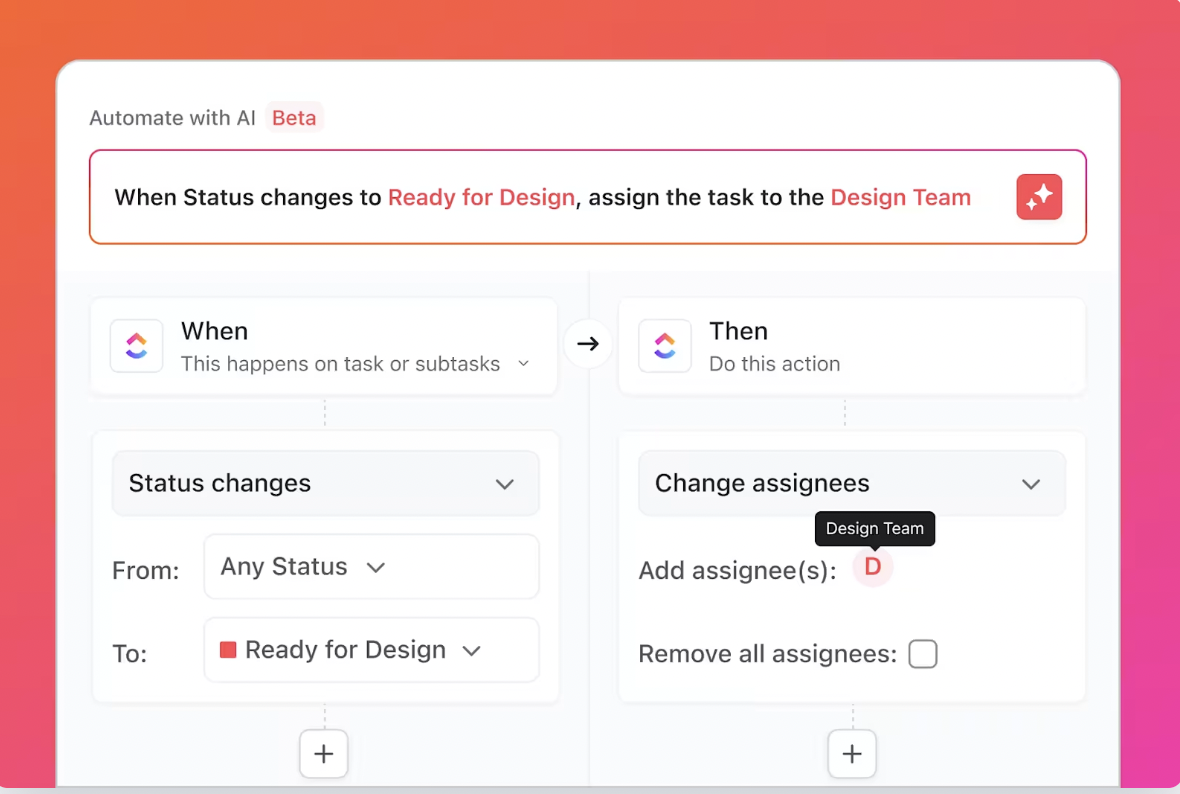
ClickUp also boosts collaboration with threaded comments and @mentions, ensuring seamless teamwork and keeping discussions and feedback tied to specific tasks.
With ClickUp’s Assigned Comments feature, you can turn comments into actionable tasks and notify the assigned team members instantly. The comment will appear in their ‘comments and mentions’ sections on the home page, making sure it doesn’t get missed.
Once they finish the task, they can resolve the comment to prevent unnecessary follow-ups.
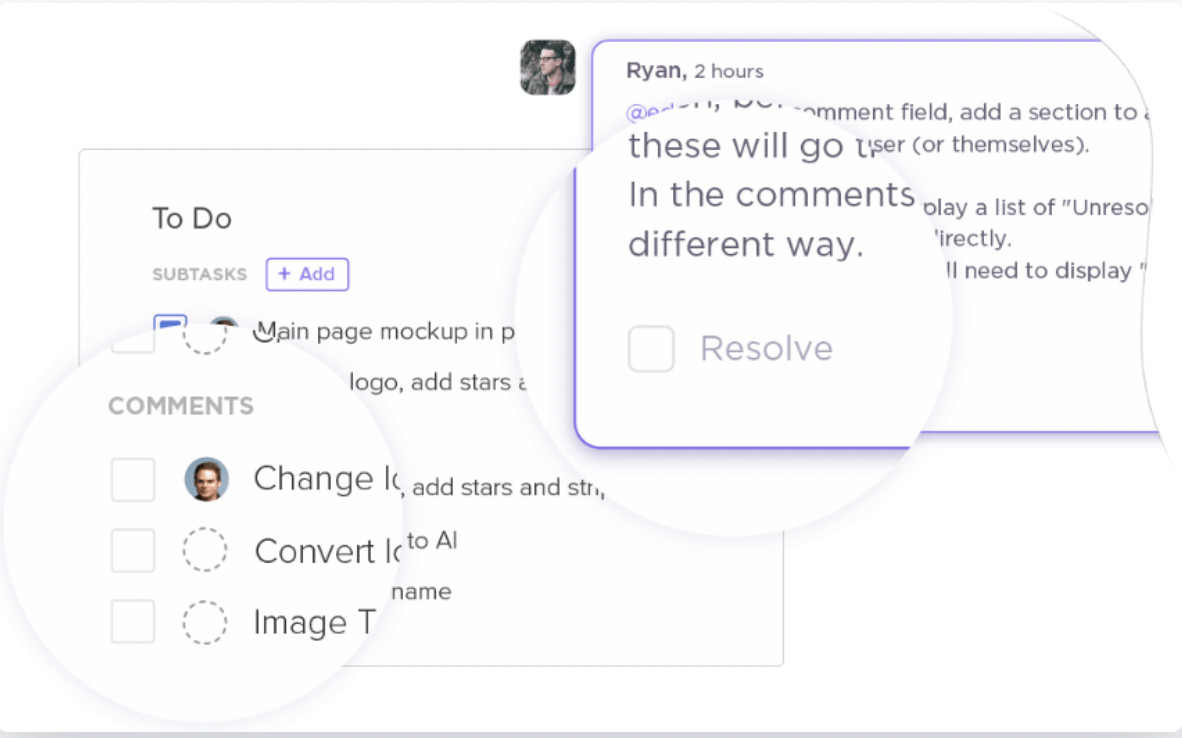
You can use this to:
🧠 Fun Fact: Over 60% of teams that use ClickUp report saving 3+ hours every week!
Switching between disconnected apps causes ‘toggle tax,’ which wastes time and adds mental strain. Jumping between project management tools, note-taking apps, and communication platforms fragments tasks, making work inefficient and slow.
ClickUp eliminates this problem by bringing all your tasks, docs, goals, and chats into one platform. ClickUp’s Time Management features combine key project management capabilities with advanced planning strategies to help teams increase productivity and meet project goals.
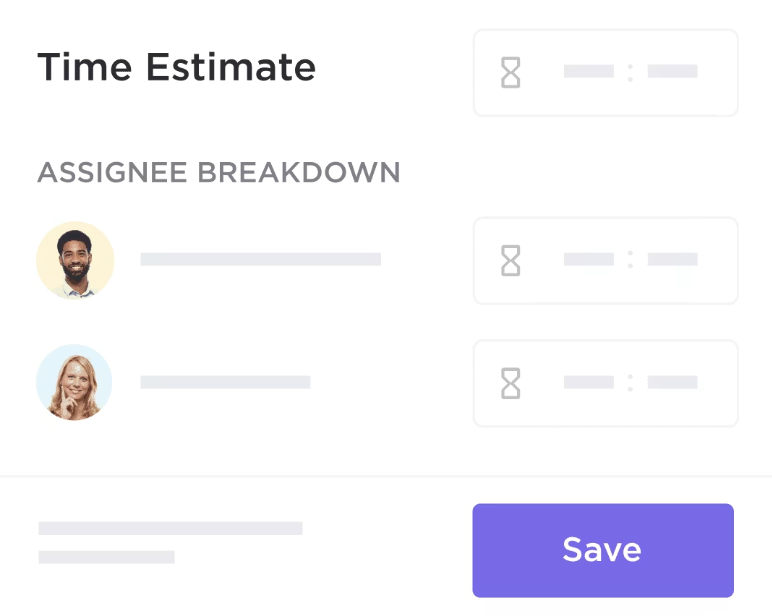
ClickUp Time Estimates helps teams set realistic expectations for task duration, which is key for planning and meeting deadlines. This feature lets you:
You can also use ClickUp Goals to set different types of targets, including numerical, monetary, and true/false. This flexibility gives you complete control over goal-setting based on your team’s needs.
For example, a sales team can set revenue targets, while a content team can track article production. Time management goals help maintain focus and accountability, building a culture of achievement.
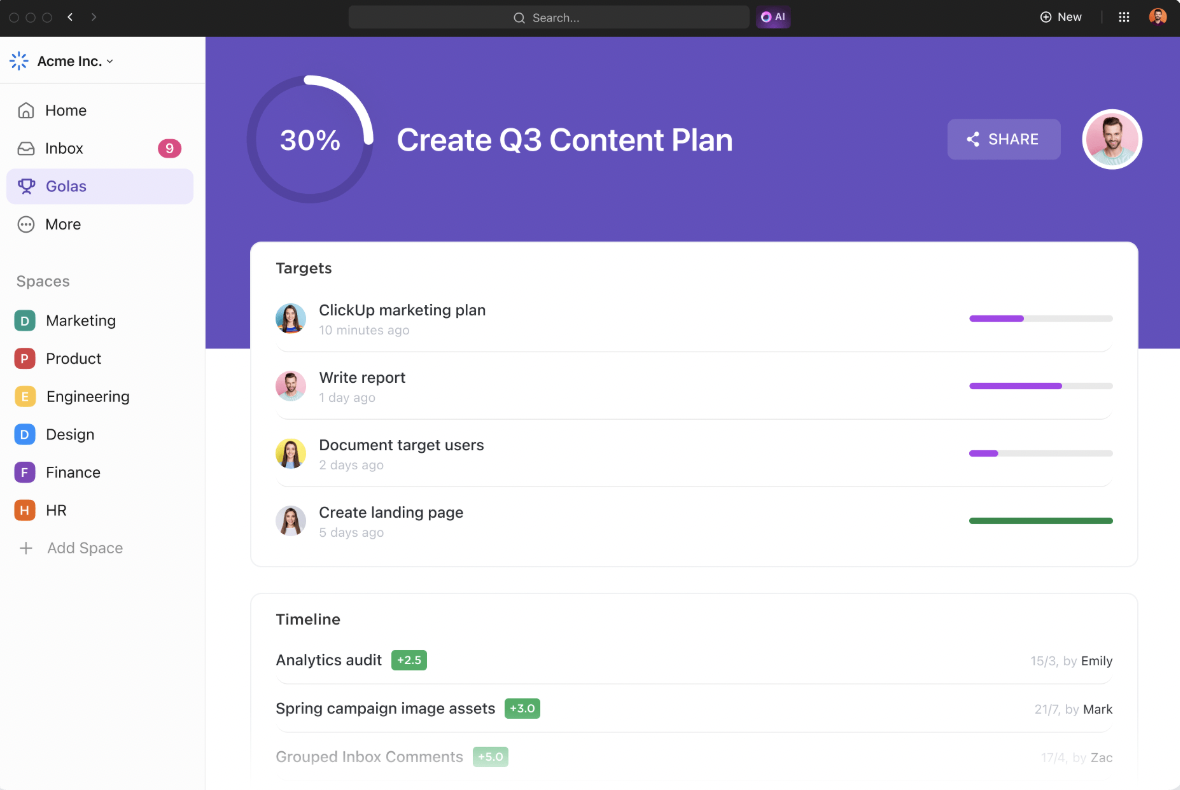
Here are some more ways in which ClickUp helps you save time:
We vetted multiple options and felt that overall ClickUp gave us the right combination of power and flexibility. We also needed to solve the time tracking issue to measure track and measure external contractors’ time logs without needing additional external apps and services. ClickUp’s native time tracking works seamlessly between mobile, tablet and desktop.
📮ClickUp Insight: Low-performing teams are 4 times more likely to juggle 15+ tools, while high-performing teams maintain efficiency by limiting their toolkit to 9 or fewer platforms. But how about using one platform?
As the everything app for work, ClickUp brings your tasks, projects, docs, wikis, chat, and calls under a single platform, complete with AI-powered workflows. Ready to work smarter? ClickUp works for every team, makes work visible, and allows you to focus on what matters while AI handles the rest.
If you use outdated reports to track progress, they’ll lose relevance the moment you generate them. ClickUp Dashboards update automatically as work happens, so you always have the most current information at your fingertips.

For example, let’s say you’re managing a product launch. Your ClickUp Dashboards can display:
💡Pro Tip: With ClickUp Dashboards, you can drill deeper into each metric with various measurement cards and charts to uncover the data behind the numbers. If you notice a drop in your team’s velocity, you can click on the line chart to identify which tasks are taking longer than planned and why. This insight lets you adjust resources or timelines accordingly and keep your project on track.
ClickUp also provides multiple ready-to-use templates for setting deadlines, assigning tasks, and tracking progress. These templates help keep your project on schedule and within budget.
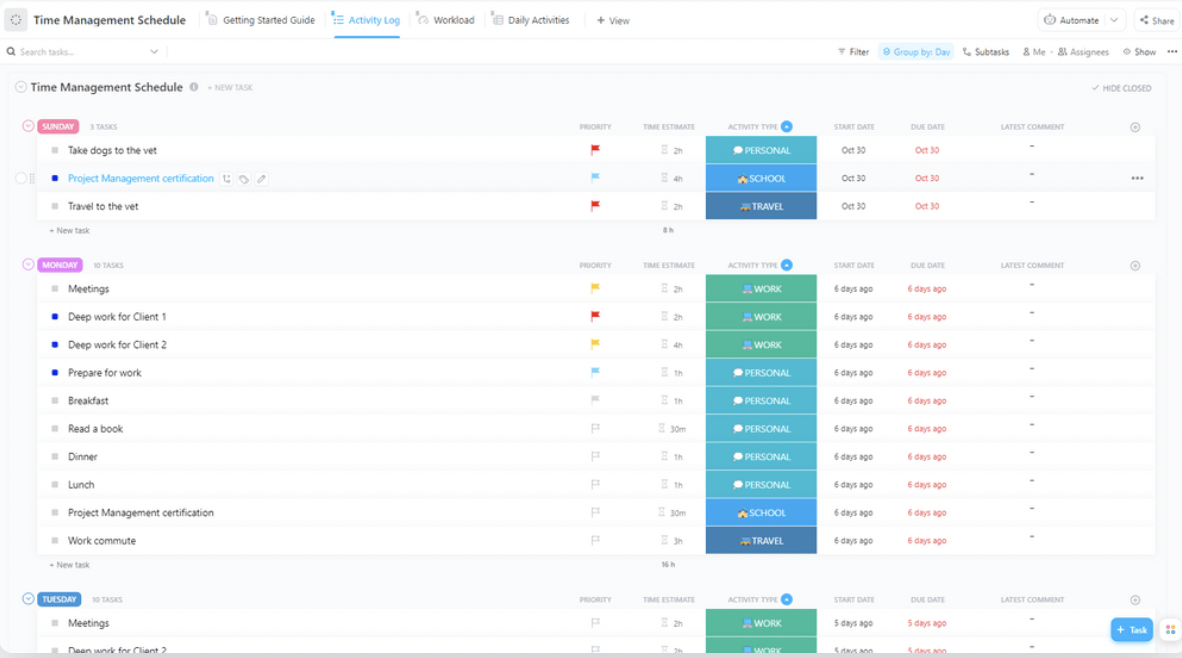
For example, the ClickUp Time Management Schedule Template transforms how you and your team handle daily tasks. It helps your team use time efficiently and meet deadlines effectively.
With this template, you can:
This template simplifies project planning and keeps your team focused and on task.
Here’s what Mahinur K., Unbounce CRO Specialist, had to say about ClickUp saving their team time.
ClickUp brings all our tasks, documents, goals, and time tracking into one unified workspace. We’ve been using it since 2018, and it’s incredibly flexible for managing both internal workflows and client projects. The customizable views (List, Board, Calendar, etc.) and detailed automation options save us hours each week.
Effective time management comes down to the habits you build every day. The small actions you repeat can either hold you back or set you free.
Here are some time-saving habits you can incorporate into your routine to boost productivity and make the most of your time:
Effective time management isn’t about meeting deadlines, but reclaiming your day and boosting productivity. In fact, when you switch to an all-in-one project management tool like ClickUp, you can save up to one full day every week, equating to 52 days annually.
93% of organizations feel they’re falling short on productivity.
ClickUp consolidates automation, timelines, and communication, helping teams stay aligned and efficient. With tools like time tracking and integrated task management, you can prioritize tasks and stay better organized.
Want to know how to save time yet get more done? Start using ClickUp for free today!

Manasi Nair
Max 20min read
Manasi Nair
Max 31min read

Sudarshan Somanathan
Max 19min read

© 2026 ClickUp