Sorry, there were no results found for “”
Sorry, there were no results found for “”
Sorry, there were no results found for “”
Even the most celebrated writers get buried by their own timelines.
Take George R.R. Martin. In the opening days of 2016, he sat down and told millions of fans what none of them wanted to hear: The Winds of Winter was still not finished. He had promised the manuscript by Halloween, then by the end of the year, and both of those dates had come and gone without it. Because the book was not ready in time, season six of Game of Thrones would go on to tell the story before he could.
And you don’t need a TV empire to know that feeling. Maybe you’re the freelancer juggling three clients who all want copy by Friday, or the content writer who loses a whole weekend to one blog post that refuses to come together. The scale changes, but the trap is the same.
Frankly, missed deadlines aren’t due to laziness but a gap between the plan and the work it relies on, affecting writers at all levels.
So let’s close that gap.
Deadline management is simply the practice of scheduling, tracking, and adjusting your work so a due date arrives without a frantic scramble. Most articles frame it as a test of willpower: make a list, prioritize, and focus harder. The approach that actually survives a rough week works differently, because it assumes the plan will break at some point and reschedules itself when that happens. Below, you’ll find both, along with how a writing team holds steady when three deadlines land in the same week.
Deadline management is the process of estimating how long work will take and scheduling it against real capacity. It also means tracking progress and rebalancing the plan when reality diverges from it.
It is not the same as time management. Time management is about how you spend an hour; deadline management is about whether the sum of those hours lands the deliverable on the day you promised.
What that means is you can have a perfectly productive Tuesday and still blow Friday’s deadline, because the estimate was wrong three weeks ago and nothing in the plan flagged it. Good deadline management surfaces that drift early, while there is still time to act.
Cal Newport, the Georgetown computer science professor who writes about focused work, uses this idea in what he calls the retreating deadline method:
What’s nice about the retreating deadline method is that it doesn’t require more work. It simply shifts your existing work by a small amount.
That is the point. You don’t always need more hours. You need the dates you work toward to sit earlier than the dates other people are waiting on.
A priority deadline, or internal deadline, is the earlier date you work toward. A final deadline is the external date the client, editor, or publisher expects the work.
The gap between the two is your buffer.
| Aspect | Priority deadline | Final deadline |
|---|---|---|
| Who sets it | You | Client, editor, or publisher |
| Purpose | Create buffer and start earlier | Set the official delivery date |
| What happens if you miss it | You still have time to recover | Trust, payment, or reputation may take the hit |
| How to treat it | Work toward it as your real date | Protect it from last-minute work |
Missed deadlines are easy to blame on focus. The usual advice is to be more disciplined, block distractions, and try harder.
Sometimes that helps. But for writers, the bigger problem is usually structural. The deadline slips because the work was estimated badly, packed too tightly, or hidden until it was too late to recover.
To be fair, sometimes it is avoidance, too: the piece you dread, the topic you don’t yet understand, the perfectionism that won’t let a rough sentence stand. That’s real, and no amount of scheduling fixes a draft you’re afraid to start.
But even then, structure helps more than willpower does, because a scary task broken into a 45-minute research block is easier to face than “write the whole thing.” Discipline problems and structural ones usually travel together, and the plan is what makes the discipline part smaller.
The common failure points are simple:
The fix is not complicated. Break each writing project into research, outline, draft, revision, and final checks. Estimate each part separately. Then add a buffer before the real due date.
Which parts matter most depends on how you work. Solo writers live or die by estimation and buffer, since there’s no one else to absorb a slip. On a team, dependencies and clear owners do the heavy lifting because most missed deadlines there come from a stalled handoff. Read the list below through whichever lens fits your week.
Deadlines can help you finish, but they don’t always help you think better. Harvard Business School’s Teresa Amabile studied 238 professionals across 26 project teams in 7 companies and 3 industries and found that very high time pressure should generally be avoided when consistent creative thinking matters.
The rush may feel productive, but it often pushes writers toward the safest idea, the obvious structure, and the first source that fits. Use deadlines to create motion, but give research, outlining, and revision their own earlier slots.
Managing writer deadlines takes six repeatable steps: break the work into estimable parts, set a priority deadline, schedule the sessions, prioritize competing pieces, track status, and re-plan on a cadence.
Here is the process, tool-agnostic. It works on a whiteboard, in a spreadsheet, or in dedicated software. The steps matter more than the tool.
Never estimate a project as one lump. Split it into the phases you can actually reason about. For example, break a white paper production task into phases like research, data analysis, SME outreach, outline, first draft, fact checks, revision, client review, and finalization.
Then estimate each one separately and add them up.
Over time, a writer who tracks a few projects this way builds a personal baseline, and that baseline is what kills the planning fallacy.
A good estimate looks like this:
Give every external deadline an earlier working deadline.
For routine work, set it one or two days before the real due date. For high-stakes pieces, block the week before as a visible deadline buffer, especially if the work depends on sources, approvals, or multiple review rounds.
This buffer is where normal delays go: late SME replies, messy research, heavier edits, or a draft that needs one more pass. The point is to keep those delays away from the date the client, editor, or publisher is waiting on.
Rule of thumb: If the final deadline is Friday, aim to finish by Wednesday. If the final deadline is Monday, aim for Thursday or Friday. The earlier date becomes the one you manage against.
But remember, a buffer has a cost. If you’re consistently finishing two days early with time to spare, you’re sandbagging your estimates. That padding shrinks how much you can take on. The goal is a buffer that gets used most weeks, not one so large it hides how long the work actually takes. If you never touch it, tighten it.
Block the actual writing sessions on your calendar. Put research, outlining, drafting, revision, and final checks into separate slots, even if each slot is short. This makes the work visible before the deadline gets close.
Keep deep work and admin work apart where you can. Research and drafting in the same session often slow both down, because you keep switching between finding ideas and shaping them.
A better plan might look like this:
Pro Tip: Box each session, don’t just place it. A calendar slot tells you when you’ll write; a timebox tells you when to stop. Give research 90 minutes, not “Monday morning,” and the block stops quietly eating the whole day. This is also where the dreaded task gets easier: “draft the whole thing” is paralyzing, but “45 minutes on the intro” is startable. Use time boxing or a Pomodoro timer to hold the edges.
When several pieces are due close together, sort before you start. Use a simple urgency-and-importance filter, the Eisenhower Matrix:
For writers, urgent-and-important usually means the piece with a hard external deadline or real reputational cost. That client draft due tomorrow beats the low-stakes internal cleanup due today.
This is also where you protect quality: if two important pieces compete, don’t pretend both can go equally deep. Move one date, cut scope, or send an update before the work turns late.
Track status somewhere you can see it without checking five places.
A simple board with To Do, Drafting, In Review, and Done columns is enough for most writing work. By Wednesday, you should be able to tell whether a Friday deadline is safe, exposed, or already slipping.
The goal is early warning. You want to catch a delay with two days of runway, not two hours before submission.
Pro Tip: Pick the tool that shows the type of progress you’re looking for.
Review your deadline plan at a set time.
Use a daily review when you are in a busy stretch or juggling several pieces. Do a weekly review when the workload is lighter. The cadence matters because deadline plans go stale fast.
At each review, check three things:
Replan based on what actually happened, not on what the original schedule promised. If research took longer, move the outline. If edits have expanded, protect the final check. If two deadlines now compete, decide which one gets priority before the week collapses.
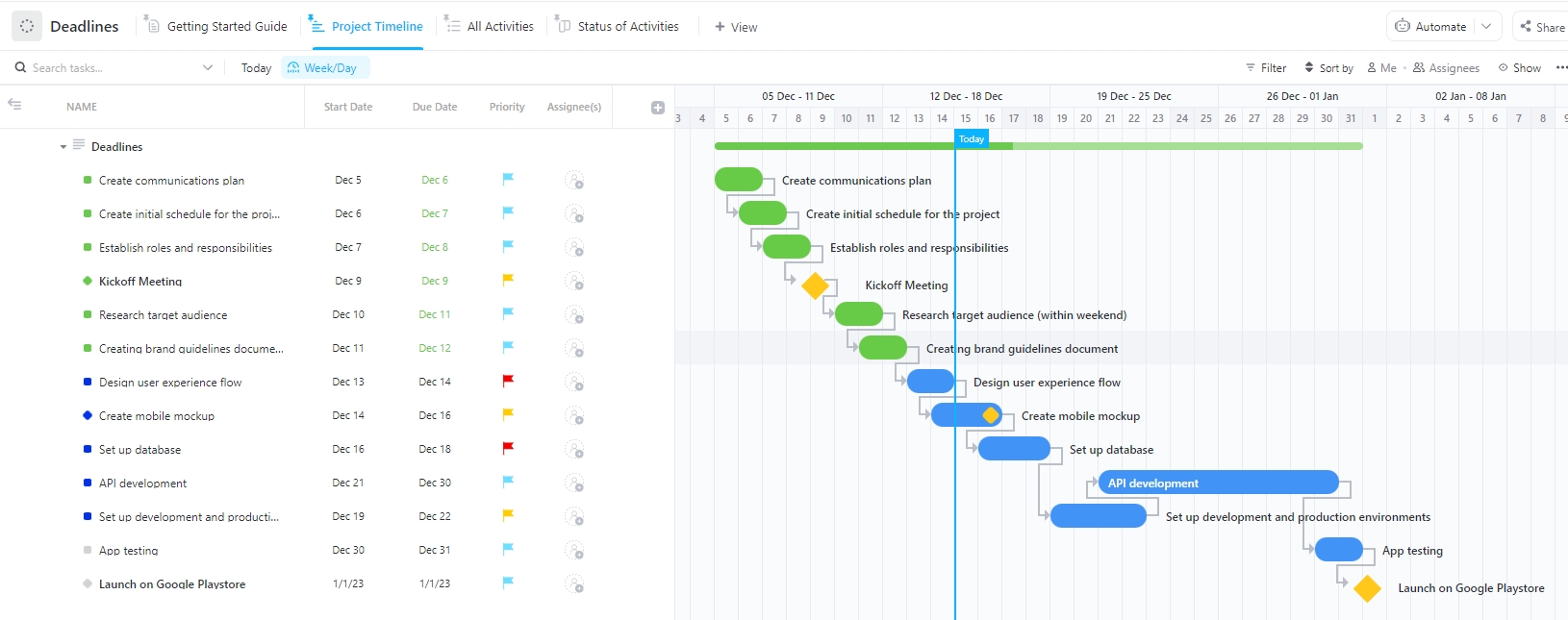
Use the Deadlines Template by ClickUp when your tasks are all over the place. It lays out every task and due date in one List, sorts them by Phase, and moves each through To Do, In Progress, and Done so you always know what’s next.
Use case: You’re a writer juggling four drafts, two edits, and a review, all due the same week. Drop each one in, tag it by Phase, and pull up the Project Timeline view to see what’s on fire. When a deadline shifts, you drag it in Calendar View and the whole schedule reshuffles, no rebuilding required.
The obvious move is to work whatever’s due first. It’s usually the wrong one. The riskiest project isn’t the nearest deadline; it’s the one that needs something else before it can move: an SME quote, client approval, editor feedback, legal review, or source access.
Start the dependency-heavy piece before the urgent solo piece. Say this is your week:
| Project | Due date | Real risk | First move |
|---|---|---|---|
| Newsletter | Wednesday | You already have the material | Draft Tuesday |
| Blog post | Friday | Needs SME input | Send questions Monday |
| Case study | Monday | Needs client approval | Finish draft Thursday |
The blog post is due last but moves first, because a Monday email is what unblocks Thursday’s work. This is how working writers survive overlapping deadlines: they separate writing time from waiting time.
Journalist Sophie Haigney gives the real-world version. At the San Francisco Chronicle, she wrote an average of four stories a day, sometimes as many as 11, and learned to build her life around “intense deadlines.” She also gets only about two hours of good work on one project before switching modes.
The lesson: Not every project needs the same attention. Some need a clean two-hour block. Some just need an email sent today so another person can unblock tomorrow.
Here’s a video walkthrough of a calendar system built for this. It maps long-term deadlines against daily priorities so the two never surprise each other.
Also Read: How to Manage Multiple Projects
Of course, software will not fix a broken deadline process. But the right tool can make a working process easier to run and harder to derail.
For deadline management, look for four things:
Here are the primary types of tools you’ll find useful:
At the simplest level, a calendar app covers two of the four. It handles time blocking and reminders, and it is the fastest thing to start with when you juggle only a few pieces at a time.
There is also a piece most writers skip. You can’t estimate a phase until you know how long it really takes, so a time tracker is what builds that baseline. Tools like Toggl Track or RescueTime log how long research, drafting, and revision actually run, so you can quote from data instead of guessing
The gap shows up when the work gets more layered. A calendar can show when something is due, but not whether the draft is stuck in review, blocked by a source, or waiting on edits. That is the dependencies-and-status half of the list, and it is where a calendar runs out of steam.
Dedicated work management software is what covers all four at once. Tools like ClickUp, Asana, or Trello connect tasks, statuses, deadlines, dependencies, and reminders on one surface, so a slipped task moves everything downstream.
The tradeoff is setup time, and it is worth it once you are running several projects, review rounds, or stakeholders at the same time.
Not every writer needs the same deadline system. The best setup protects the part of the work most likely to slip.
| Writer type | Biggest deadline risk | How to manage it | Tool to try |
|---|---|---|---|
| Book writers | A faraway deadline makes the project drift | Set chapter deadlines and weekly word-count targets. Split research, drafting, revision, and feedback into separate phases | Scrivener: Tracks session, document, and project targets for long manuscripts |
| Freelance writers | Client deadlines compete in the same week | Keep one master deadline view. Set internal due dates one or two days before client deadlines | Toggl Track: Tracks time by client and project, so estimates come from real data |
| Content writers | Approvals and edits take longer than the draft | Map the full workflow: brief, outline, draft, SME review, edit, QA, and upload | ClickUp: Keeps briefs, Docs, owners, due dates, statuses, and content calendars connected |
| Journalists | Fast turnarounds leave sources scattered | Send interview requests early. Keep a live source file and write around confirmed facts | Raindrop.io: Saves articles, PDFs, pages, and source links in searchable collections |
| Academic writers | Research keeps expanding and delays the draft | Set a research cutoff date. Split “use now” sources from “read later” sources | Zotero: Organizes, annotates, cites, and shares research sources |
| Copywriters | Feedback changes the direction late | Lock the brief before drafting: offer, audience, claim, CTA, owner, and approval date | Milanote: Builds visual briefs, swipe files, campaign notes, and reference boards |
| Technical writers | SME reviews become bottlenecks | Give SME review its own deadline. Ask specific questions, not “thoughts?” | MadCap Flare: Supports reusable content, structured authoring, and single-source publishing |
| Grant writers | Attachments and approvals pile up near submission | Work backward from the due date. Add checkpoints for budget, letters, review, and upload | Instrumentl: Helps grant teams find, write, manage, and collaborate on grants |
| Scriptwriters | Rewrites keep expanding | Set draft gates: outline, first draft, table read, revision, final polish | Beat: Free screenwriting app with clean formatting and revision markers |
| Editors | Late drafts shrink review time | Set earlier draft handoff dates. If a draft arrives late, reduce the edit scope | Draftable: Compares versions across Word docs, PDFs, PowerPoints, and text files |
Fun Fact: Ernest Hemingway followed strict routines, writing early in the morning and stopping only when he felt he’d reached a creative high. He claimed this habit helped him meet deadlines without burnout.
Everything above works in a spreadsheet or a calendar. We run it in ClickUp because it keeps the four things a deadline system needs (scheduled work, dependencies, visible status, and reminders) in one place instead of four. Here’s where each step from this guide actually lives.
Before we plan dates, we make sure the writing context has one home. That means the brief, outline, source links, SME notes, and final handoff details don’t sit across five tools. They live in a ClickUp Doc, with nested pages.
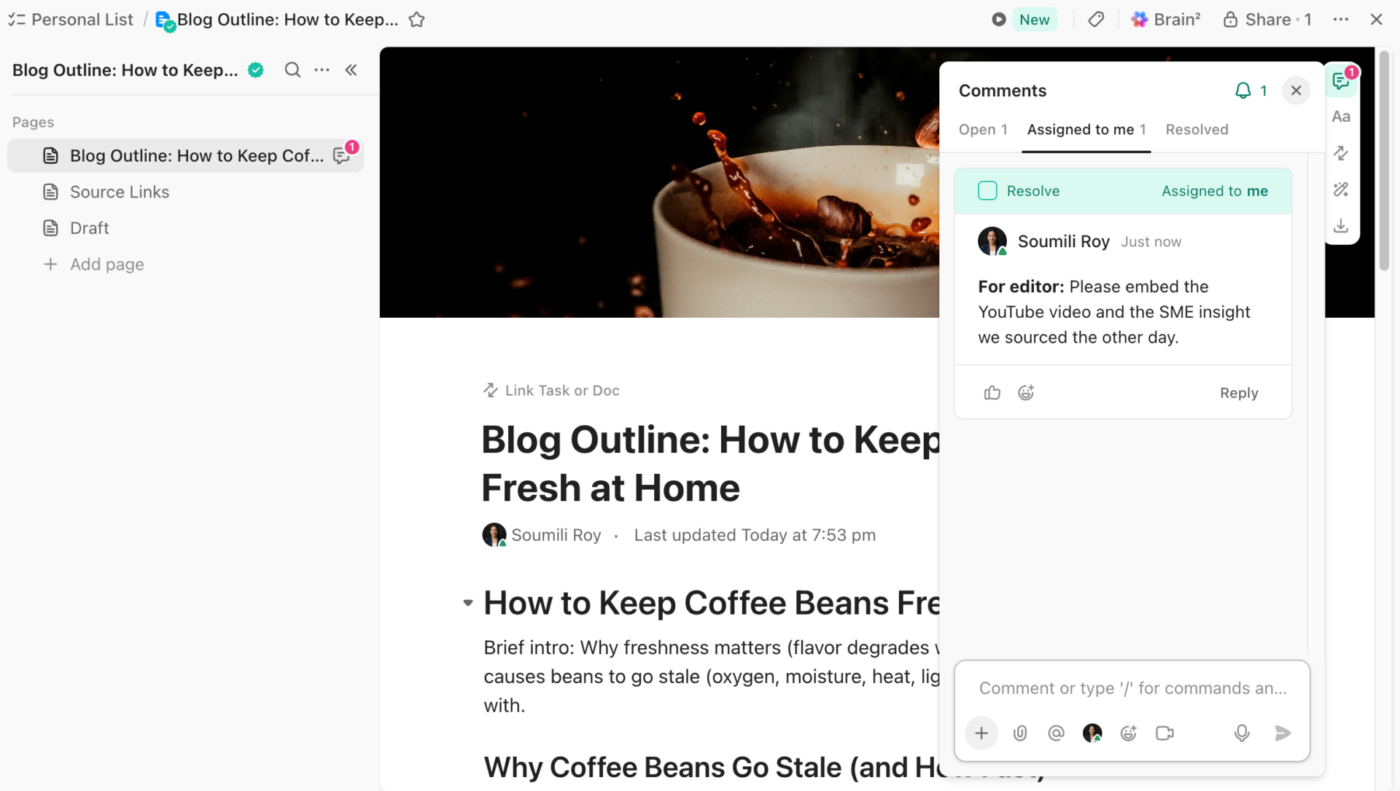
This helps in three ways:
For example, a blog post Doc can hold the approved angle, embedding materials, and assigned comments. What we also use daily is “Relationships.” It lets you connect Docs and tasks, so the writing plan and the actual work stay linked.
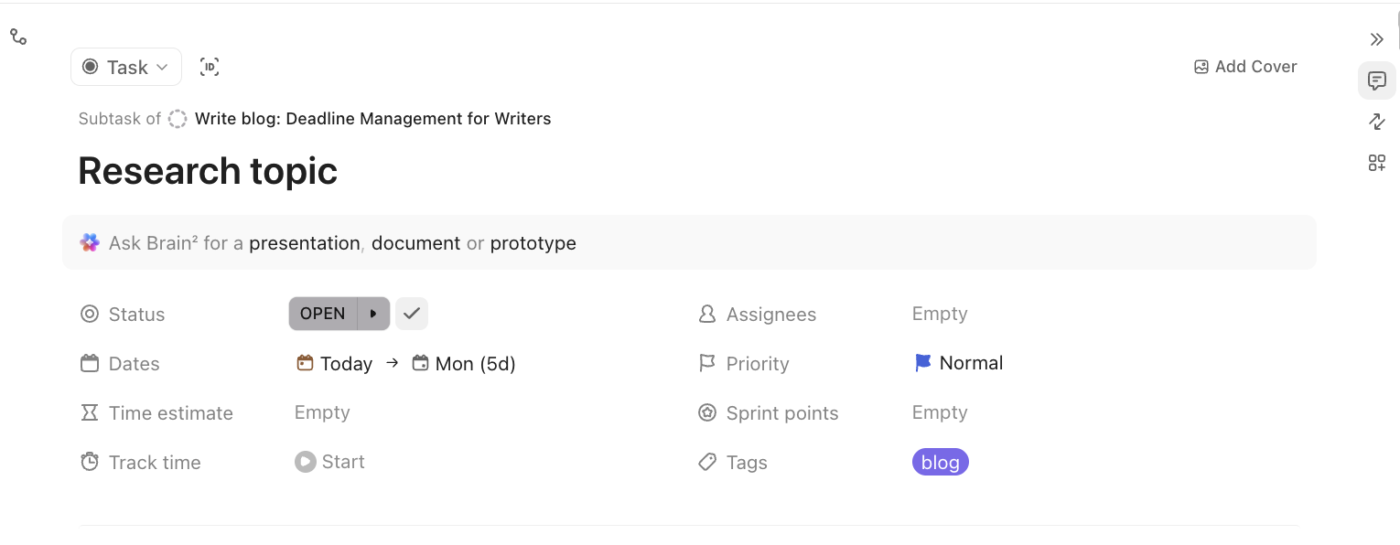
Once the context is in Docs, we break things further. “Write a blog post” in ClickUp Tasks gets broken down into subtasks (research, outline, draft, editor handoff, SME feedback, revise, upload).
Each subtask can have its own owner, due date, priority, and status in ClickUp. That keeps the work honest and entirely transparent. Moving on, we connect those stages with dependencies because some writing work cannot start until another person has moved.
ClickUp Calendar places writing work around meetings, calls, reviews, and team check-ins. And with AI time blocking, our team receives recommended work sessions based on task time estimates.
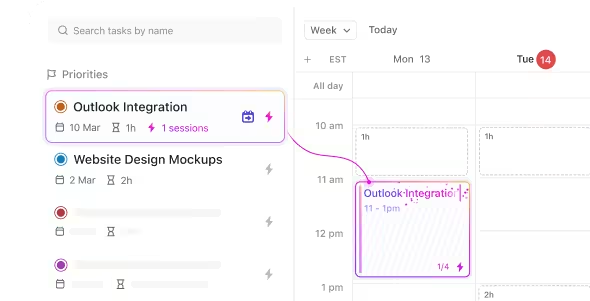
We also use Workload View to track the team’s actual capacity over time. If one writer has three heavy pieces landing at once, we can catch that early and move the work before the deadline gets messy.
When deadlines pile up, the writing itself is rarely the bottleneck. Knowing what to work on first is. ClickUp Brain works across tasks, Docs, Chats, and connected work, so you can ask things like:

It also handles the part every writer dreads: the zeroth draft. That messy first pass that gets words on the page and gives you something to shape.
We also have a range of dedicated content and marketing Super Agents in ClickUp that autonomously work on drafts, content calendars, rewrites, etc. Each one is built for a specific content job, so you can pick the agent that fits the task at hand.
Here’s a sneak peek into how we use content agents in-house:
A G2 reviewer recently mentioned:
The biggest selling point for me is the consolidation. I love that I can take a dozen different apps and shrink them down into this one platform. I primarily use it for managing complex projects and staying in constant contact with the people I’m working with.
The built-in AI has also become an essential part of my workflow; I use it constantly to organize my thoughts when they’re a bit scattered and to polish my writing by correcting any slight mistakes. It’s like having a project manager and an editor rolled into one.
If your work consists of a handful of predictable deadlines a month, a calendar and a buffer will get you most of the way there with less setup. ClickUp earns its keep once you are running several concurrent projects, coordinating with editors or clients, or simply tired of your plan going stale whenever something changes.
Most of the unglamorous parts (estimating, staging, focus, word-count discipline) have free tools built for exactly that, no signup or spreadsheet formula required.
Worth knowing: Each of these solves one slice in isolation. They’re the fastest way to try a piece of the system today. Once you find yourself juggling five of them at once, that’s the signal the work has outgrown standalone tools and wants them connected in one place.
Missed deadlines aren’t a character flaw; they’re a planning gap. Estimate the phases, set a date earlier than the one everyone’s watching, put the actual work on a calendar, and check the plan against reality before the week decides for you.
Do that, and the deadline stops being a cliff you race toward and becomes a series of small checkpoints you’ve already passed. That’s the whole trick: not working harder the night before, but building a plan that flinches early, while you still have room to move.
Sign up for ClickUp to take the first step toward stress-free writing.
Tell the client or editor the moment you’re sure, not on the due date. Propose a specific new date and, if needed, offer to cut scope so part of the work still lands on time. Early communication protects the relationship; a silent slip is what damages trust. Send the update as soon as your review cadence flags the risk, while there’s still runway to renegotiate.
Plan for roughly three to four hours of focused work, though research-heavy pieces run longer. Orbit Media’s annual blogging survey puts the average post at just under 3.5 hours and about 1,300 words. That covers drafting only, so add separate time for research, outlining, fact-checking, and formatting when you estimate a deadline.
Yes, but spaced deadlines beat a single final one. In Ariely and Wertenbroch’s 2002 study, people working toward evenly spaced interim deadlines performed better and procrastinated less than those aiming at one end date. For writers, that means staging due dates (research, draft, revision) rather than pinning everything to the submission date.
Most professionals sustain roughly 1,000 to 2,000 finished words a day, not counting research and editing. Stephen King targets 2,000 words daily, while Graham Greene held himself to a strict 500. Raw output isn’t the same as publishable copy, so a realistic daily deadline should budget for revision, not just first draft speed.
Estimate each phase of the work separately, then set a priority deadline earlier than the client’s date, so delays have somewhere to go. Schedule the actual writing sessions rather than just marking the due date, and review the plan on a fixed cadence to catch drift early. Missed deadlines are usually structural, not a discipline problem, so the fix is a better-built plan, not more willpower.
Work backward from the finish date into interim milestones, then convert those into a daily or weekly word-count target. A book writing calculator can turn a total word count and end date into a per-session goal automatically. Interim deadlines matter more than the final one here: staged checkpoints keep a months-long project from drifting, which a single distant due date never catches until it’s too late.

Manasi Nair
Max 20min read
Manasi Nair
Max 31min read

Sudarshan Somanathan
Max 19min read

© 2026 ClickUp