

Let’s be honest—AI content creation tools are on the uptick everywhere.
Recent surveys indicate that approximately 76% of marketers now leverage these tools in their work, with 85% specifically employing them for article writing.
However, despite this widespread adoption, it’s normal to be skeptical about artificial intelligence’s abilities. No one wants to risk AI-generated fluff ruining their brand voice.
However, the right AI tool can make your team faster, more productive, and more scalable—without adding headcount.
Quality AI tools can crank out not just high-quality written content but also AI-powered images and videos for your content marketing activities.
So, how do you choose the right AI content creation tool? After testing 11 options extensively, I’m sharing my insights in this blog post. You’ll get an overview of each tool’s features, limitations, and reviews—essentially, a complete picture to help you decide.
Let’s begin.

 Summarize this article for me please
What Should You Look for in AI Content Creation Tools?
While your choice of tool will depend largely on your team’s goals and priorities, there are certain characteristics to look out for, especially when evaluating a range of text, image, and video production platforms. Here’s what to consider in AI tools:
- Use cases: If investing in an AI tool, you should select one as versatile as possible. For instance, AI text software and outline generators should help you with everything, including blog posts, eBooks, LinkedIn updates, etc. The more adaptable the tool, the more value it will bring to your workflow.
- Pricing: You want to make sure the AI content creation tool fits your budget while offering measurable value over time. Evaluating how the tool helps you save costs through its automation features is essential. Learning how to automate content creation processes effectively can further maximize your ROI.
- Learning curve: Your team should be able to quickly learn how to use the chosen AI tool so that they can start creating engaging content—whether written, visual, or video—as soon as possible. Therefore, opt for something intuitive and user-friendly.
- Content quality: This, of course, is non-negotiable. While any AI content creation tool will need some training and tweaking, it should be able to deliver high-quality and error-free results across formats and platforms. You don’t want to be spending time rehashing AI-powered blog outlines, PPC copy, or video scripts
- Customizability: Look for a platform that allows deep personalization of tone of voice, design style, format, and audience preferences. For example, you should be able to adjust the tool’s settings to create professional slide decks for a corporate audience and casual, engaging social media captions
Summarize this article for me please11 AI Content Creation Tools at a Glance
| Tool | Use Case | Best For |
| ClickUp | AI content generation and project management | Marketers, teams managing campaigns, content creators |
| ChatGPT | AI text production and conversational assistance | Writers, researchers, and customer support professionals |
| Copy.ai | Marketing copy and content idea generation | Marketing teams, agencies, and outbound sales teams |
| Jasper | Search-optimized, targeted content creation | Marketers, SEO specialists, and content creators |
| Descript | Audio and video editing with text-based interface | Podcasters, video creators, and audio and video content editors |
| DALL•E | AI-driven image generation | Designers, marketers, and visual content creators |
| Midjourney | Stylized AI image generation | Artists, creative professionals, and graphic designers |
| Synthesia | Professional AI-generated content and localized video production | Training teams, educators, and multilingual marketers |
| Invideo | User-friendly video creation with templates | Social media managers, small businesses, and content teams |
| Murf | Text-to-speech production | Voiceover artists, video editors, and multimedia creators |
| Canva | Design solutions with AI graphic and video tools | Businesses, educators, and non-designers |
Summarize this article for me pleaseThe 11 Best AI Content Creation Tools
1. ClickUp (Best for AI content generation and integrated project management)
ClickUp is an all-in-one project management software. Since It’s entirely customizable and scalable, any user, team, or organization can configure it to suit their unique needs.
Whether you’re looking to create content calendars, marketing dashboards, or brand guideline templates, trust me when I say ClickUp has it all and more.
I love using this tool because its built-in artificial intelligence ClickUp Brain learns to write the way you do. Plus, it’s integrated throughout the platform, so I can perform a number of tasks, including:
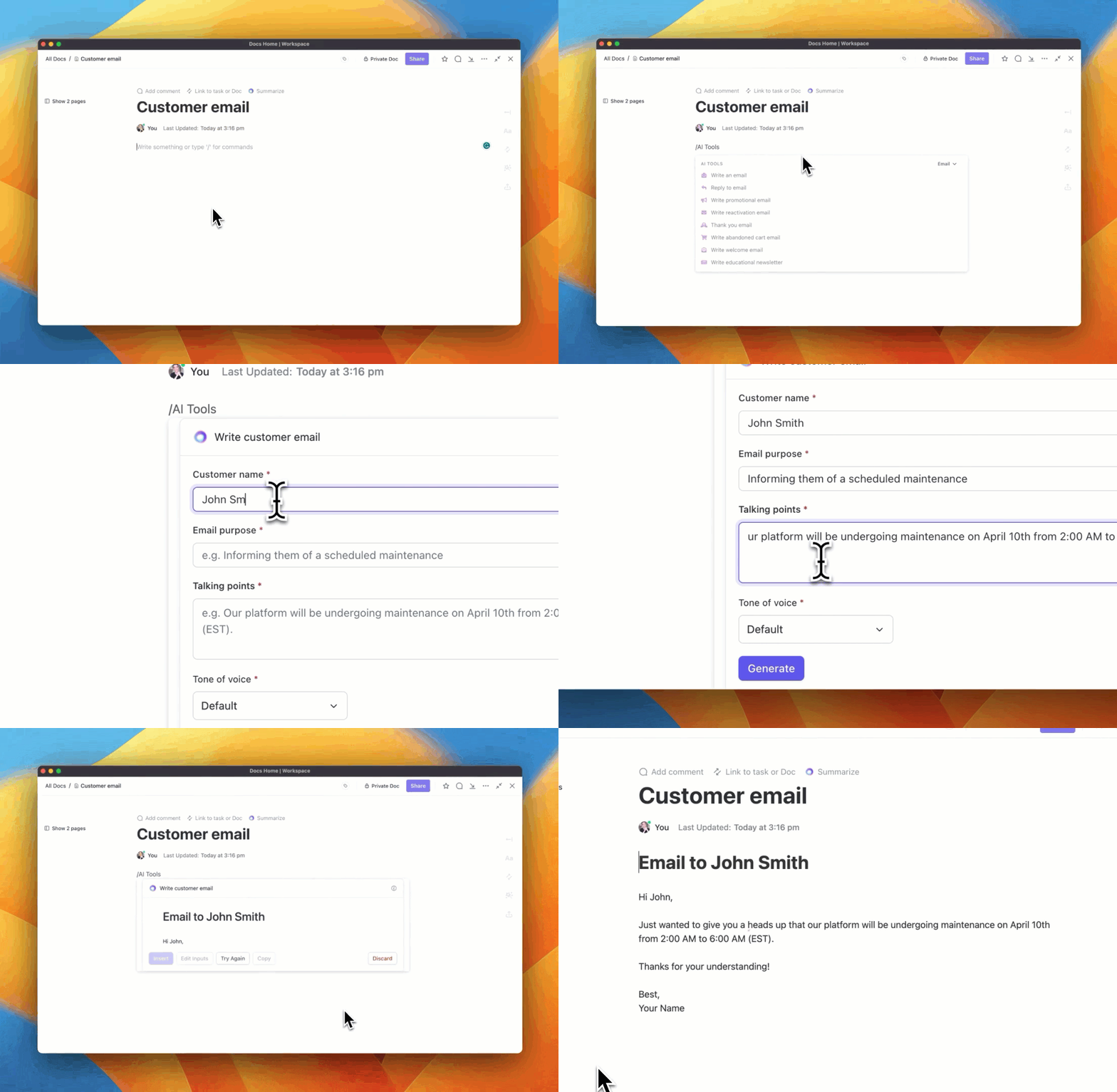
- Producing high-quality content in ClickUp Docs for blogs, emails, ad copy, websites, and more
- Summarizing critical points from Docs, Tasks, and comments
- Getting suggestions to simplify and improve writing
- Creating tables with rich data and insights for anything, from restaurants to real estate
- Transcribing voice notes and Clips into text and repurposing the copy
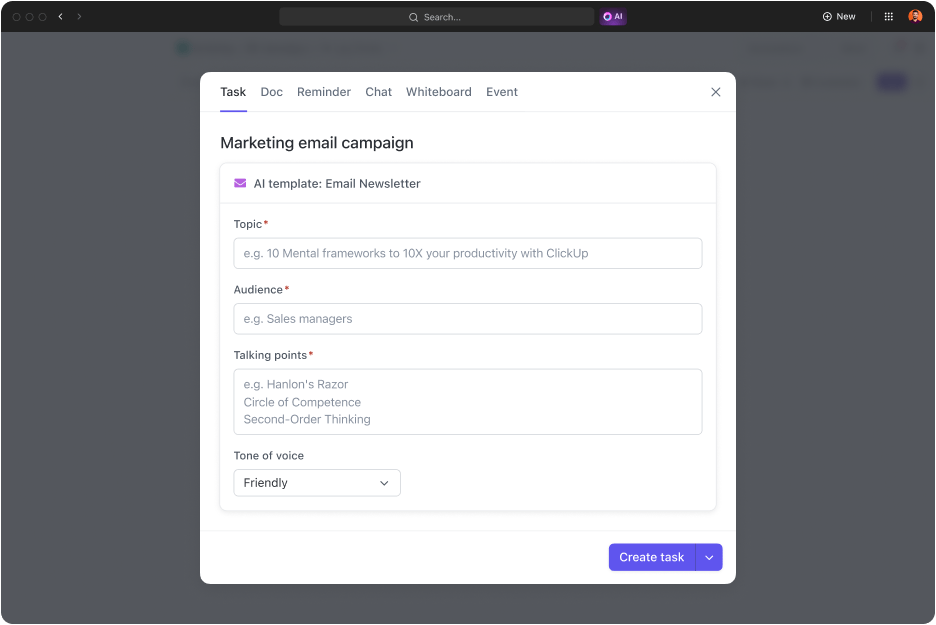
ClickUp Docs, is an excellent collaborative documentation tool for jotting down ideas, drafting copy (with AI), and organizing work. I can enhance my documents with bookmarks, tables, links, and various formatting options.

With ClickUp’s Connected Search, finding any file across connected apps like Google Drive, Slack, and Figma is easier than ever—all from one centralized hub.

Plus, ClickUp offers many templates for marketing strategies, campaign management, and event planning.
Whether you’re exploring how to use AI in content marketing or need a starting point for your creative production, these templates let you hit the ground running without starting from scratch.
ClickUp focuses on creating, strategizing, and organizing content. It’s one of the best productivity tools out there, and I can’t recommend it enough.
ClickUp best features
- Choose from 15+ customizable ClickUp Views to visualize your content calendar, production workflows, or editorial pipelines in whichever way you like—List, Kanban, Gantt Chart, and so on
- Transition from ideation to execution by creating tasks directly from your Docs and ClickUp Whiteboards; embed relevant files, Docs, and other resources for the bigger picture
- Align content production tasks with broader team objectives using ClickUp Goals, ensuring every piece of content contributes to your overall strategy
- Create and transcribe screen recordings to train team members or showcase product features using ClickUp Clips
- Simplify your content approval process by automating task handoffs—when content is approved, it automatically progresses to the next stage
- Access over 100 research-backed tools to streamline content creation with prompts tailored to specific roles and tasks
- Monitor how long it takes to draft, edit, and finalize content to identify bottlenecks and optimize your team’s efficiency
ClickUp limitations
- It takes time to master all of its powerful features—thankfully, there are help docs, demos, and courses for quicker adoption
- The dashboard displays a lot of information, but users can streamline the look and information included in their settings
ClickUp pricing
free forever
Best for personal use
Free Free
Key Features:
60MB Storage
Unlimited Tasks
Unlimited Free Plan Members
unlimited
Best for small teams
$7 $10
Everything in Free Forever plus:
Unlimited Storage
Unlimited Folders and Spaces
Unlimited Integrations
business
Best for mid-sized teams
$12 $19
Everything in Unlimited, plus:
Google SSO
Unlimited Teams
Unlimited Message History
enterprise
Best for many large teams
Get a custom demo and see how ClickUp aligns with your goals.
Everything in Business, plus:
White Labeling
Conditional Logic in Forms
Team Sharing for Spaces
* Prices when billed annually
The world's most complete work AI, starting at $9 per month
ClickUp Brain is a no Brainer. One AI to manage your work, at a fraction of the cost.
ClickUp ratings and reviews
- G2: 4.7/5 (9,900+ reviews)
- Capterra: 4.6/5 (4,300+ reviews)
What are real-life users saying about ClickUp: From a G2 review
2. ChatGPT (Best for AI text production and conversational assistance)

We all know what ChatGPT is and what it does. You use it, I use it, we all use it. Developed by Open AI, this AI-powered conversational agent generates human-like text based on the prompt it receives via Natural Language Processing (NLP).
What I found most impressive about ChatGPT was that it could assist me with various content-related tasks, from preparing blog outlines and drafting landing page copy to writing corporate newsletters and polishing client emails.
It really helped me cut down a lot of time and energy that would have otherwise been spent on research and copywriting.
ChatGPT best features
- Upload a file and ask it to help analyze data, summarize information, or create a chart
- Emulate the style of your existing blogs and social media templates to write on-brand copy
- Enjoy supplementary AI tools like DALL•E and Sora AI for creating images and producing videos, respectively
ChatGPT limitations
- Some privacy concerns have been noted when using it with sensitive or proprietary data, as OpenAI processes the input
- It tends to lose context in longer conversations, causing repetition or confusion
ChatGPT pricing
- Free
- Plus: $20/month
- Pro: $200/month
- Team: $30/month per user
- Enterprise: Custom pricing
ChatGPT ratings and reviews
- G2: 4.7/5 (630+ reviews)
- Capterra: 4.5/5 (70+ reviews)
What are real-life users saying about ChatGPT: From a G2 review
3. Copy.ai (Best for rapid generation of marketing copy and content ideas)

Copy.ai is a GTM AI platform that helps you research data, brainstorm ideas, and produce copy for various types of content, including thought leadership pieces, long-form blogs, social media posts, and more.
I loved how Copy.ai works on an unlimited-word pricing model, which makes it a practical option for teams with high usage requirements.
In addition to the usual content creation, Copy.ai also helps with pipeline generation, outbound prospecting, systems integration, and L&D programs.
Copy.ai best features
- Optimize all of your paid campaigns through targeted A/B testing
- Convert the spoken word (from interviews, events, and sales call recordings) into the text in seconds
- Automate the tedious parts of content repurposing; transcribe or extract insights in seconds
Copy.ai limitations
- It needs careful use as some content might be sourced from published web pages, raising plagiarism concerns
- They are growing fast and sometimes product delivery does not match the promise
Copy.ai pricing
- Free Forever
- Starter: $49/month per user
- Advanced: $249/month (up to 5 users)
- Enterprise: Custom pricing
Copy.ai ratings and reviews
- G2: 4.7/5 (180+ reviews)
- Capterra: 4.4/5 (60+ reviews)
What are real-life users saying about Copy.ai: From a G2 review
4. Jasper (Best for search-optimized, targeted content creation)

When you think of Copy.ai alternatives, you’ll invariably think of Jasper. It’s a purpose-built generative AI platform for marketing that offers advanced brand control and a dynamic AI toolkit.
What I found particularly valuable about Jasper was that it could suggest keywords, headings, and other elements necessary to improve the SEO performance of the generated content.
It offers 50+ marketing plan templates and customization options suited to different content requirements. In addition, Jasper has a few other features, like Jasper Chat and AI Art, and it supports over 29 languages.
Jasper best features
- Draft a comprehensive plan with goals and deliverables for a marketing campaign
- Generate on-brand content anywhere you write with its Chrome extension
- Build a solid AI-powered content strategy by repurposing, optimizing, and converting existing content into different formats
Jasper limitations
- It has an aggressive trial sign-up that defaults to an annual plan, with no refunds if you forget to cancel
- No free plan
- Lacks advanced language processing, leading to inferior output and a less intuitive experience
Jasper pricing
- Creator: $49/month per seat
- Pro: $69/month per seat
- Business: Custom pricing
Jasper ratings and reviews
- G2: 4.7/5 (1,200+ reviews)
- Capterra: 4.8/5 (1,800+ reviews)
What are real-life users saying about Jasper: From a G2 review
Also Read: Alternatives to Jasper AI
5. Descript (Best for audio and video editing with text-based interface)

Descript is an AI-driven, fully featured A/V editor. Its USP is that it’s straightforward to use, and it’s true. I don’t have a technical skill set, but I could edit audio and video content by simply editing the transcript.
I could arrange visuals in my video like a slide deck and use templates and layouts to quickly make things look and sound good.
What I absolutely loved was that I could read my script placed beside the camera, and Descript made it seem like I was looking directly at the lens the whole time.
The tool can also transcribe audio in 20+ languages and provides a cloud-based version history for tracking changes.
Descript best features
- Create your own voice clone or choose from stock AI voices to produce a podcast intro and do video voiceovers
- Remove all the stuff you obviously don’t want in the audio, such as “ums and uhs,” long pauses, and other verbal clutter
- Make videos with ease using drag-and-drop captions, shapes, and images; adjust layouts, fonts, and styles to match your look and feel
Descript limitations
- It sometimes inaccurately transcribes dates, ordinals, and contractions, which requires manual correction
- No free plan
- Increasingly sluggish performance has been reported over the past year; slower navigation, downloads, and functionality despite using a high-speed internet connection
Descript pricing
- Hobbyist: $19/month per user
- Creator: $35/month per user
- Business: $50/month per user
Descript ratings and reviews
- G2: 4.6/5 (550+ reviews)
- Capterra: 4.8/5 (150+ reviews)
What are real-life users saying about Descript: From a G2 review
Summarize this article for me please📮 Why AI Investment Rarely Pays Off
Over 80% of AI initiatives fail—many because tools don’t share context. Check how ClickUp’s Contextual AI rebuilds the intelligence layer across tasks, docs, and chats—so AI actually supports your team.
6. DALL•E (Best for AI-driven image generation with fine details)

Another tool from OpenAI, DALL•E, creates images from text captions using concepts expressible in natural language. It’s like using ChatGPT—throw in a prompt, and you’ll receive an image.
The only catch is that you must be clear about what you want to produce. A method I often used was studying a few images I wanted to emulate and then crafting prompts based on them to generate similar visuals.
DALL•E 3, the latest version, can sometimes ‘fill in the blanks’ when the prompt implies the image must contain a specific detail not explicitly stated—and that’s a boon for non-creatives doing this for the first time.
DALL•E best features
- Apply different types of optical distortions to visual content, such as ‘fisheye lens view’ and ’a spherical panorama’
- Generate images in multiple dimensions, including 1024×1024, 1024×1792, and 1792 x 1024 pixels
- Control the location and angle from which an image is rendered
DALL•E limitations
- Errors can consume session limits, potentially locking users out through no fault of their own
- No free plan
- It may overlook parts of a prompt if it’s too long or overly complex
DALL•E pricing
- Standard: Starts at $0.040 per image
- HD: Starts at $0.080 per image
DALL•E ratings and reviews
- G2: 3.9/5 (30+ reviews)
- Capterra: Not enough reviews
What are real-life users saying about DALL•E: From a G2 review
7. Midjourney (Best for crafting visually stunning, stylized AI images)

Midjourney is an AI-powered text-to-image generator that creates hyper-realistic images from natural language descriptions. Sure, DALL•E and Midjourney do similar things, and I enjoyed using both, but the latter offers more.
I could adjust how prominently Midjourney’s default style influenced my images, control the level of creativity and uniqueness, and determine the amount of variation among the outputs.
I also had the option to use images and brand guidelines examples as the basis for a prompt, style reference, or character reference.
Midjourney best features
- Find or create shared spaces to work together with other users
- Interact with the Midjourney Bot on Discord and receive technical and billing support
- Write advanced prompts, including one or more image URLs, multiple text phrases, and parameters like aspect ratios, models, and upscale
Midjourney limitations
- Initial face generation often has significant issues (missing eyes, distorted noses, etc.)
- No free plan
- Limited prompt control makes achieving specific details challenging and requires trial and error
Midjourney pricing
- Basic Plan: $10/month
- Standard Plan: $30/month
- Pro Plan: $60/month
- Mega Plan: $120/month
Midjourney ratings and reviews
- G2: 4.4/5 (80+ reviews)
- Capterra: Not enough reviews
What are real-life users saying about Midjourney: From a G2 review
8. Synthesia (Best for professional, localized video production with AI avatars)

Don’t have any knowledge about video production but want to create videos in different languages, such as French, German, and Spanish? No problem—Synthesia is the go-to tool. Seriously—it supports 140+ global languages, which I think is brilliant.
I could make professional, localized visual content using diverse AI avatars and voiceovers. I even cloned my voice and used it to provide video audio.
Plus, team collaboration was a breeze on Synthesia. I could share the video directly from within the platform and invite people to comment and give feedback.
Synthesia best features
- Customize your videos with your brand colors, logos, and favorite avatars
- Automatically add subtitles in the target language to your file using the video translator
- Easily browse, duplicate, and personalize templates for marketing, education, and training videos
Synthesia limitations
- The custom avatar feature struggles with accurately representing regional accents; for example, it may have a southern British accent instead of a northern one
- Rendering videos with many slides, animations, or transitions can be time-consuming
Synthesia pricing
- Free
- Starter: $24/month
- Creator: $74/month
- Enterprise: Custom pricing
Synthesia ratings and reviews
- G2: 4.7/5 (1,700+ reviews)
- Capterra: 4.7/5 (200+ reviews)
What are real-life users saying about Synthesia: From a G2 review
9. Invideo (Best for user-friendly video creation with a vast template library)

Invideo is a DIY video creation platform that enables users to turn their ideas into videos in real time. It comes with 4000+ custom-built social media, real estate, advertisement, and content calendar templates, so there’s no need to reinvent the wheel.
What I found particularly useful about Invideo was its automated text-to-speech feature. It allowed me to simultaneously work on multiple scripts and convert them into audio.
Also, seamlessly adding narration and background music is a convenient benefit included in most of Invideo’s plans.
Invideo best features
- Scan a vast library of 16 million stock media items to incorporate the perfect visuals into each scene
- Choose from bold subtitles with popping effects in classic Hormozi style and karaoke style word-by-word animation
- Use Invideo AI’s magic box to make edits with prompts like ‘delete scene,’ ‘narrate in a Midwest male accent,’ and so on
Invideo limitations
- Cloud storage system lacks the functionality to amend saved videos, requiring users to start from scratch after a crash
- Color selectors are limited to RGB
Invideo pricing
- Free:
- Plus: $35/month
- Max: $60/month
- Generative: $120/month
Invideo ratings and reviews
- G2: 4.5/5 (150+ reviews)
- Capterra: 4.6/5 (350+ reviews)
What are real-life users saying about Invideo: From a G2 review
Also Read: Best AI Tools for Podcasters
10. Murf (Best versatile text-to-speech software)

Say you’re working on a product video or prepping for a new podcast, and need to add some narration. There’s no need to hire a voice actor—just use Murf to generate AI voiceovers.
I found it an excellent tool for adding incredibly natural-sounding AI voices to my presentations, explainer videos, and social media posts. It could even integrate my voiceover with existing videos, creating a cohesive multimedia experience.
Murf best features
- Install Murf once to access its voices on all Windows applications compatible with Microsoft’s API for voices and narrations
- Get your dubbed content reviewed by native speakers from Murf’s expert network, ensuring every pronunciation is spot-on
- Modify your script anytime during the creative process and generate the voiceover with new changes
Murf limitations
- Failed conversion attempts are counted as downloads, unfairly reducing the available project count
- Limited suitability for educational or accessible content creation, particularly for learners with special needs
Murf pricing
- Free
- Creator Lite: $29/month
- Creator Plus+: $49/month
- Business Lite: $99/month
- Business Plus+: $199/month
- Enterprise: Custom pricing
Murf ratings and reviews
- G2: 4.7/5 (1,200+ reviews)
- Capterra: NA
What are real-life users saying about Murf: From a G2 review
11. Canva (Best for design solutions with AI-powered graphic and video tools)

Today, everyone can design, thanks to Canva. It’s that simple. So, I was more than happy to give it a shot for one of my visual content creation assignments. Canva has an extensive library of templates for website banners, landing pages, blog post headers, social media posts, and so on.
With a wealth of design inspiration at my fingertips, I could create images, slideshows, and videos of my choice and experiment with fonts, music, and elements.
You wouldn’t think of Canva as one of the AI writing tools, but you’ll be pleasantly surprised.
It also offers AI writing prompts through its Magic Write feature. This AI text generator helps create blog outlines, bio captions, and website copy—perfect for kickstarting the creative process without worrying about writer’s block.
Canva best features
- Trim, split, splice, or cut your videos online with its video cutter and trimmer
- Review and approve designs instantly with in-built design approval
- Maintain your brand’s consistency by incorporating your brand guidelines into your Canva account
- Leverage its multiple AI tools to do everything from translating text and generating images to animating and resizing designs
Canva limitations
- Its mobile app can be slow and hard to use
- Over-reliance on templates can result in generic designs if not personalized
Canva pricing
- Canva Free
- Canva Pro: $5.98/month per person
- Canva Teams: $4.55/month per person for a minimum of three people
- Canva Enterprise: Custom pricing
Canva ratings and reviews
- G2: 4.7/5 (4,300+ reviews)
- Capterra: 4.7/5 (12,100+ reviews)
What are real-life users saying about Canva: From a G2 review
Summarize this article for me pleaseScale Up Your Content Creation Process With AI Content Creation Tools
There’s an AI content creation tool for almost every industry, preference, and budget. As far as possible, go with something tailored to help you achieve what you want with the best possible output.
And remember—while AI content creation won’t replace human creativity, AI-powered tools can boost your team’s productivity, allowing your content to reach the target audience with less effort.
With its extensive features and capabilities, ClickUp undoubtedly takes content creation, supplemented with project management, to the next level. Everything you need—projects, tasks, templates, AI, and automation—is in one place.
But don’t just take my word for it. Experience it yourself—sign up for ClickUp for free today.

Everything you need to stay organized and get work done.
