
Sorry, there were no results found for “”
Sorry, there were no results found for “”
Sorry, there were no results found for “”
Most sprint rollover doesn’t start with a bad estimate. In Easy Agile’s survey of 419 development professionals, dependency delays accounted for 36% of rollover, ahead of scope change, underestimation, and unplanned work.
A two-week sprint can be sized perfectly and still stall, because the upstream team you depend on commits its work two days after you commit yours. Nothing you do inside your own sprint fixes that. Not a tighter estimate, not a better standup.
That’s the part most sprint scheduling advice skips. It argues one week versus two, places the ceremonies, and treats the boundary, the actual date your sprint closes, as a byproduct of the length. It isn’t. The boundary is the deadline that every dependency you have must hit. Choose it deliberately, and a large share of your rollover turns out to be a calendar problem you can actually solve.
A sprint schedule is a fixed calendar that sets when each sprint starts, when it ends, and when its ceremonies happen. Building one takes three decisions: a length matched to how much uncertainty you’re carrying, an anchor weekday your team can reliably protect, and boundaries checked against the teams that hand you work. From there, it’s mechanical. Map two quarters of working days, cut planned capacity where holidays land, mark the last safe handoff date for every dependency, then hold the whole thing steady for three sprints before you judge it.
A sprint schedule is the dated calendar a team works from: the start and end date of every sprint in a run, plus the fixed slots for sprint planning, daily scrum, sprint review, and retrospective. Most teams draw two quarters at a time.
Sprint cadence is the fixed rhythm that those sprints follow, the same length and the same start weekday, sprint after sprint. The schedule is the calendar built from that cadence. The cadence is the rule the calendar follows.
There are three more related terms that get swapped around, and each answers a different question:
| Term | What it is | Question it answers |
|---|---|---|
| Sprint schedule | The dated cadence and ceremony slots for a run of sprints | When does work start and stop? |
| Sprint calendar | The visual rendering of that schedule, usually a calendar view | What’s happening this week? |
| Sprint backlog | The work selected for one sprint | What are we building next? |
The 2020 Scrum Guide gives you two rules: cap the sprint at a month and keep the length fixed. Beyond that, nothing. Which weekday do you start on? Not mentioned. How to line your boundaries up with a team you depend on? Also not mentioned. The 2020 revision was deliberately less prescriptive, and those two gaps are exactly where several sprint schedules fail.
Read More: Agile Ceremonies
A two-week sprint schedule typically places sprint planning on the first morning (Day 1), the daily scrum every working day, and sprint review plus sprint retrospective back-to-back on the final afternoon (Day 10).
Here’s an example of a two-week sprint that runs from Wednesday to Tuesday:
| Working day | Weekday | Event | Typical timebox |
|---|---|---|---|
| Day 1 | Wednesday | Sprint planning | 90 minutes |
| Every day | Monday to Friday | Daily Scrum (9:45 a.m.) | 15 minutes |
| Day 7 | Thursday | Backlog refinement (optional) | 60 minutes |
| Day 10 | Tuesday | Sprint review | 60 minutes |
| Day 10 | Tuesday | Sprint retrospective | 60 minutes |
Midway through the sprint, many teams hold a backlog refinement session to review and clarify work for the next sprint.
A sprint schedule pays for itself in four specific ways: it makes your delivery data comparable, it gives dependencies a real deadline, it stops holidays and time off from ambushing your commitments, and it keeps the cadence visible next to the work instead of buried in a calendar invite.
Your velocity numbers start meaning something. A fixed length is what makes one cycle comparable to the next. Stretch a sprint by three days to fit a big feature, and every number moves with it. You can no longer tell whether the team was slower this time or just working longer. Three sprints at a steady length give you a usable signal. Three sprints at three different lengths give you three unrelated data points.
Dependencies get a date instead of a hope. Upstream teams can only work backward from your boundary if they know when it falls. A published schedule turns “we need this soon” into a specific date, and gives both sides something to check before planning rather than after. Skip it, and late handoffs only surface in the retrospective, once the story has already rolled.
Capacity stops being a guess. Holidays and planned leave are only visible in advance if someone has drawn them onto the sprint dates. A schedule that does that tells you Sprint 42 is a short sprint before the team commits to anything, so the conversation is about how much to take on rather than why the sprint missed.
The cadence stops being tacit knowledge. When the schedule lives next to the work, anyone can answer “which sprint does this land in?” without asking. New joiners see the rhythm on day one, partner teams can check your boundary before they plan, and nobody reconstructs the dates from a chain of invites. That matters most when the person who set the cadence is on leave.
One caveat: not every team needs sprints. They work best when the work breaks into reasonably independent increments and priorities genuinely benefit from regular reprioritization. For continuous, interrupt-driven work like support or incident response, a Kanban-style flow with WIP limits will serve you better than a boundary you keep breaking.
A sprint schedule rests on three choices: length, anchor day, and alignment. Length sets how often you get feedback. The anchor day decides where planning, reviews, and handoffs land. Alignment is your cadence against everyone else: whether another team’s work can reach you before your sprint closes.
Most teams argue about length for years and inherit the other two by accident, which is where the real cost hides. A tidy two-week sprint still generates delays when its boundary lands in the wrong place for the teams upstream.
Most teams prefer two weeks, because there’s room to finish something useful and the feedback loop stays short enough to change course. The right length depends on how much uncertainty you’re carrying:
Start with two questions: how fast do your priorities change, and how soon do you need feedback? Then look at the size of your typical work item. If most items take three or four days, a one-week sprint leaves you no room for testing or recovery. Newer teams usually do better on shorter cycles, since every cycle is another rep at planning and estimating.
Once you pick a length, hold it. Don’t stretch a sprint to fit a big feature. Split the feature into smaller, usable pieces instead.
Also Read: Velocity Chart
The anchor day decides where sprint planning, sprint review, and sprint retrospective sit. Scrum doesn’t name a weekday, so pick yours based on team attendance, holidays, release windows, and the schedules of the teams you depend on.
Monday to Friday looks like the obvious answer, but for U.S. teams, it’s the shakiest. Five federal holidays are observed on Mondays (Martin Luther King Jr. Day, Presidents’ Day, Memorial Day, Labor Day, and Columbus Day). That means a Monday planning session gets disrupted several times a year before anyone books a vacation or calls in sick.
A Friday close creates its own problem. Scrum training firm 3Back notes that when teams finish Friday with just a bit of testing or cleanup remaining, that work often spills over into the weekend.
A midweek boundary doesn’t let that happen. Wednesday to Tuesday is worth testing for many U.S. teams: planning lands after the Monday disruptions, and review and retros finish before Friday.
Teams outside the U.S. should run the same check against local holidays and working patterns. The best anchor day puts your two biggest ceremonies on the days your team and its partners reliably show up.
Changing the anchor day is easier than changing the length. But again, it isn’t free. Expect one transition sprint, a round of new recurring events, and updates to any reports or automations that read those dates. The transition will also bend one cycle of velocity data, so make the switch at a sprint boundary and write down the reason.
Now compare your boundary with the teams that hand you work, data, approvals, or technical support, because their timing decides whether a dependency lands inside your sprint or waits for the next one.
Say a platform team runs two-week sprints, Monday to Friday, while the checkout team that consumes its APIs runs Wednesday to Tuesday. Checkout plans on Wednesday, two days after Platform has already committed its sprint.
When Checkout turns up a new API need at planning, Platform can’t look at it until the following cycle. Checkout blocks or carries the story forward, and the retrospective writes it up as a bad estimate when the real cause was the calendar.
There are two ways out. Move both teams onto the same boundary and review dependencies ahead of both planning sessions, or build in a deliberate offset where Platform finishes a week before Checkout plans, giving Checkout time to test the upstream work first.
Neither pattern guarantees delivery. Both give you an earlier point to spot what’s needed, agree on the handoff, and sequence the work.
Before you lock your cadence, check:
If blocked time and dependency rollover stay flat once the boundaries line up, your problem lies elsewhere: unclear ownership, late discovery, or work that’s broken down poorly.
Aligning sprint boundaries can reduce waiting between teams. But if the same dependency has to be carefully scheduled every sprint, the calendar may be compensating for a deeper problem.
DORA research consistently finds that loosely coupled teams, those that can test, deploy, and release independently, deliver faster and more reliably.
So align the dependencies you genuinely need. But if the same handoff keeps shaping your sprint schedule, ask whether that dependency can be removed, automated, or turned into a self-service capability instead.
Teams keep sprint schedules in one of three places: a spreadsheet, a shared calendar, or a tool that treats the sprint as an object with its own dates. The choice determines how much the schedule can tell you beyond “when.”
A shared spreadsheet lists sprint numbers, start and end dates, ceremony times, and capacity notes in one tab. It’s free, instantly editable, and requires zero tool migration.
The trade-off is that nothing connects the schedule to the work. When a sprint date shifts or a holiday cuts capacity, you update the spreadsheet manually, and the tasks sitting elsewhere don’t know about it. Past a few sprints, version drift is almost guaranteed.
Best for: Small teams (2-4 people) with one backlog and few dependencies, or teams evaluating a cadence before committing to tooling.
Skip it if: You need rollover tracking, automated sprint creation, or historical velocity data tied to specific sprints.
A recurring calendar event marks sprint boundaries and ceremonies. Everyone sees the schedule in the tool they already check daily, and reminders fire without extra setup.
But a calendar shows when, never what. It can’t tell you that last sprint rolled 30% of its work, that a dependency is late, or that this sprint has nine working days instead of ten. It also fragments the moment two teams run different cadences, because calendar overlays get noisy fast.
Best for: Teams that need visibility into ceremony timing and don’t track sprint-level metrics yet.
Skip it if: You want the schedule to interact with tasks, capacity, or reporting in any way.
Purpose-built sprint tools treat the sprint as an object: it owns a start date, an end date, and the tasks inside it. That means rollover, velocity, and burndown read directly from the sprint without a manual export step.
The cost is setup and administration. Someone configures the cadence, manages permissions, and maintains automations. For a two-person team with one list of tasks, that overhead may not pay back.
Best for: Cross-functional teams running multiple sprints, tracking velocity over time, or coordinating handoffs across squads.
Skip it if: Your team is under five people with minimal dependencies, and a spreadsheet plus a calendar already keeps everyone aligned.
With the three decisions made, setting the schedule is mechanical. Map two quarters of working days, record the cadence in the tool that holds your tasks, mark the last safe handoff date for every dependency, place the four Scrum events at consistent times, publish one source of truth, and review it against blocked-day and rollover data after three sprints.
Draw the sprint dates for the next six months first, then mark public holidays, company closures, and known leave on top of them. Here’s what that looks like for a team running two-week sprints on a Wednesday anchor, starting Wed Aug 12, 2026.
| Sprint | Dates (2026) | Working days | What’s inside |
|---|---|---|---|
| 41 | Wed Aug 12 – Tue Aug 25 | 10 | Clean baseline |
| 42 | Wed Aug 26 – Tue Sep 8 | 9 | Labor Day, Mon Sep 7 |
| 43 | Wed Sep 9 – Tue Sep 22 | 10 | No holidays, full capacity |
| 44 | Wed Sep 23 – Tue Oct 6 | 10 | Straddles the Q3/Q4 boundary |
| 45 | Wed Oct 7 – Tue Oct 20 | 9 | Columbus Day, Mon Oct 12 |
| 46 | Wed Oct 21 – Tue Nov 3 | 10 | Clocks change Sun, Nov 1 in the US |
A two-week sprint gives you 10 working days only when nothing eats into it. Keep the dates fixed when a holiday lands inside a sprint and reduce the planned capacity instead. Nine working days out of 10 means you start the conversation at roughly 90% of your usual commitment.
Adjust that number for who is away and what skills leave with them. A mid-sprint public holiday costs less than a key engineer taking the same day off. Base the reduction on recent delivery data. A fixed points-per-day deduction won’t be accurate, because points track complexity while days track time.
Look at Sprint 44 in the table above. It runs Sep 23 to Oct 6, so it straddles the quarter boundary, and a Q3 review would land in the middle of it. Left alone, this drift compounds. Each quarter the boundary slips a little further, until quarterly planning happens mid-sprint every time.
Fix it while you’re drawing the map. Set the first sprint of each quarter from the anchor day closest to the quarter start, then absorb the leftover days into a shorter buffer sprint before it.
Q4 2026 begins Thursday, Oct 1, and the nearest Wednesday anchor is Sep 30. Shorten Sprint 44 to a one-week buffer running Sep 23 to Sep 29, then open the quarter cleanly:
| Sprint | Dates | Working days | Note |
|---|---|---|---|
| 44 | Wed Sep 23 – Tue Sep 29 | 5 | Buffer sprint, closes Q3 |
| 45 | Wed Sep 30 – Tue Oct 13 | 9 | First sprint of Q4; Columbus Day, Mon Oct 12 |
| 46 | Wed Oct 14 – Tue Oct 27 | 10 | No holidays, full capacity |
| 47 | Wed Oct 28 – Tue Nov 10 | 10 | No holidays; clocks change Sun Nov 1 in the U.S. |
A buffer sprint is a good home for the work that never fits a normal cycle: tech debt, documentation, upgrades, and the quarterly planning itself. Number it in sequence and exclude it from velocity calculations.
Buffer sprints are especially useful for tech debt that keeps getting pushed aside during feature work. The video below shows how teams can identify, prioritize, and reduce that debt as part of the sprint process:
Enter the length and anchor day in the tool that holds your tasks, then generate the future sprints and check the results against your working day map.
Three details worth paying attention to:
Then hold the length steady for at least three sprints before you judge it. Three cycles give you an early velocity and capacity signal. However, teams finishing only a handful of items per sprint will need more data than that.
Turn the alignment decision into dates. For each upstream team, write down the last date a handoff can arrive and still be useful, counted back from when you plan or start the work. One line per dependency: the team, the thing you need, the date, the owner on each side, and what “ready” means.
Then put those dates on the schedule itself, next to the sprint they protect. A handoff date that lives in a doc nobody opens during planning isn’t a date, it’s a note.
Open a blank doc or a whiteboard and list every team you believe you depend on. Then ask one person from each of those teams a single question: Who are you waiting on before you can hand off to us? Compare the two lists.
The gap between the dependencies you think you have and the ones that actually exist is your schedule risk. If the two lists don’t match, your handoff dates are fiction.
Reminder: Sprint planning goes on the first day, the daily scrum on every working day, and the sprint review before the sprint retrospective on the last day.
Book every ceremony at a consistent time and location. The Scrum Guide recommends consistency because it reduces complexity, and a predictable slot is much easier for partner teams to plan around.
Every timebox is a ceiling, too. The Scrum Guide allows up to eight hours of sprint planning for a one-month sprint and says the event is usually shorter for shorter sprints. A two-week sprint doesn’t need four hours by default.
For distributed teams, protect overlap time for planning and review. If the team follows Scrum, the daily scrum remains a 15-minute event each working day. Teams using a looser agile cadence can replace that event with an async check-in when time zones make a live meeting impractical.
Keep the sprint dates in the system that holds the sprint work, then let calendar invitations read from that schedule rather than carrying dates of their own.
The failure mode is a second version. Someone drags a recurring invite, the tool still shows the original date, and half the team plans against each. One rule prevents it: the schedule gets edited in one place, and everything else subscribes.
Put this on the retrospective agenda and give it to the Scrum Master to run.
Bring four numbers: blocked days, dependency-related rollover, completed work against commitment, and hours spent in sprint events. Then change one thing at a time.
Leave the schedule alone when the numbers look healthy.
Time the switch to fall on a sprint boundary. Label the transition sprint in its name so nobody compares its velocity to anything. Announce it before the boundary, so recurring events get rebooked once. Then check what else reads those dates: dashboards, burndown charts, automations that move unfinished work, and any integration syncing sprints elsewhere.
Sprint schedules should reflect the work each team handles. Product squads need a steady delivery rhythm, platform teams need room for shared services and support, and PMOs need a cadence that keeps several squads moving together. The examples below show what each schedule can look like in practice.
A six-person squad owning one product surface runs two-week sprints, Wednesday to Tuesday. Planning is 90 minutes on Wednesday morning. Daily Scrum is 15 minutes at 9:45 a.m. Refinement takes 60 minutes on the Thursday of week two.
Review and retrospective run back-to-back on the closing Tuesday afternoon. Releases ship when they pass review. The sprint boundary stays a planning rhythm and never turns into a release gate.
Example: The UK Office for National Statistics used a simple, repeating cadence during its eQ Alpha project. Each sprint began with about two hours of planning. On the final day, the team held a 15–30 minute sprint review, followed by a 60–90 minute retrospective, before moving into the next Sprint.
That fixed rhythm helped the team spot a problem early. Developers were rushing work through near the end of each sprint, which was creating technical debt. The team caught the pattern in retrospectives and adjusted how it worked.
A platform team works on a different clock from the product teams it supports. Infrastructure changes tend to span several teams, while product squads need APIs, data, or shared services in time for their own sprint planning.
That makes the handoff more important than forcing every team onto the same schedule. The platform team can keep its own cadence, but dependencies should surface early enough for product squads to plan around them. It also helps to leave some capacity open for support work that’s hard to predict in advance.
Example: Spotify built Backstage, an internal developer portal, and ran it as a product for its own engineers rather than as an infrastructure project. The platform team treated internal developers as customers, shaped the roadmap around what those teams actually needed, and eventually open-sourced the result. The lesson for cadence: a platform team’s schedule works when it’s built around when its consumers plan, not when its own sprint happens to close.
A PMO owns the calendar that holds the sprints. Its job is to publish a cadence. That means a shared anchor day across squads, matching sprint numbers, and a quarterly checkpoint in the buffer before quarter-end.
Reporting then reads from the squads’ scrum boards, so nobody has to collect a status update by hand.
Example: Fedora’s program manager proposes the release schedule, and a steering committee ratifies it. Neither ships code. The calendar is the whole job, and team schedules get built around those dates.
Releases always land on a Tuesday. Fedora picked that day for news coverage and mirror syncing, and a slip adds a full week to protect it. April and October targets keep the work clear of long holiday breaks.
Fedora also notes that the schedule intentionally includes buffer weeks, with an early target and a later one, and contributors aim for the early date. Fedora likens that slack to setting your clocks five minutes ahead. It works until you start counting on the extra time.
A sprint schedule usually breaks for reasons that have nothing to do with length or anchor day. Common ones include inheriting a tool’s default settings, letting code freeze land exactly at sprint close, writing the sprint goal after the backlog is already locked, accepting new scope mid-sprint without adjusting the commitment, and running leadership status checks on a separate cadence. Each one has a specific fix.
| Mistake | What happens | Fix |
|---|---|---|
| Inheriting the tool’s default schedule | The team never actually chose Monday-Friday or two weeks. The project management tool set it up on day one, and nobody’s revisited it since | Treat the default as a placeholder. Review it once, on purpose, even if you keep it in the end |
| Letting code freeze land exactly at sprint close | Engineers rush to merge everything before the sprint ends, so the last day fills with last-minute pull requests and skips real testing | Set the freeze a day or two before the sprint closes. That leaves real time to catch problems before review |
| Writing the sprint goal after the backlog is locked | The goal ends up describing whatever tasks got picked. It never shaped which tasks got picked in the first place | Set the goal first, in the same planning session, before the team finalizes backlog items |
| Accepting new scope mid-sprint without adjusting the commitment | Someone adds a task partway through, and the sprint quietly carries more work than it was built to hold | Send new scope to the next sprint by default. If it truly can’t wait, drop something else to make room |
| Running leadership status checks on a separate cadence | A stakeholder check-in lands on day 6 of a 10-day sprint, and the team stops mid-flow to prepare an update | Pull status straight from the sprint board when someone asks. If possible, skip the separate meeting built to produce one |
ClickUp holds the sprint as an object, so the dates, the tasks, and the reporting stay in one place. You set the length and start day once, plan work inside each sprint, automate the rollover, and read capacity and velocity off the same sprints you planned. Here’s how each piece works.
In ClickUp Sprints, it starts with a Sprint Folder. It holds your backlog plus each sprint as its own List.
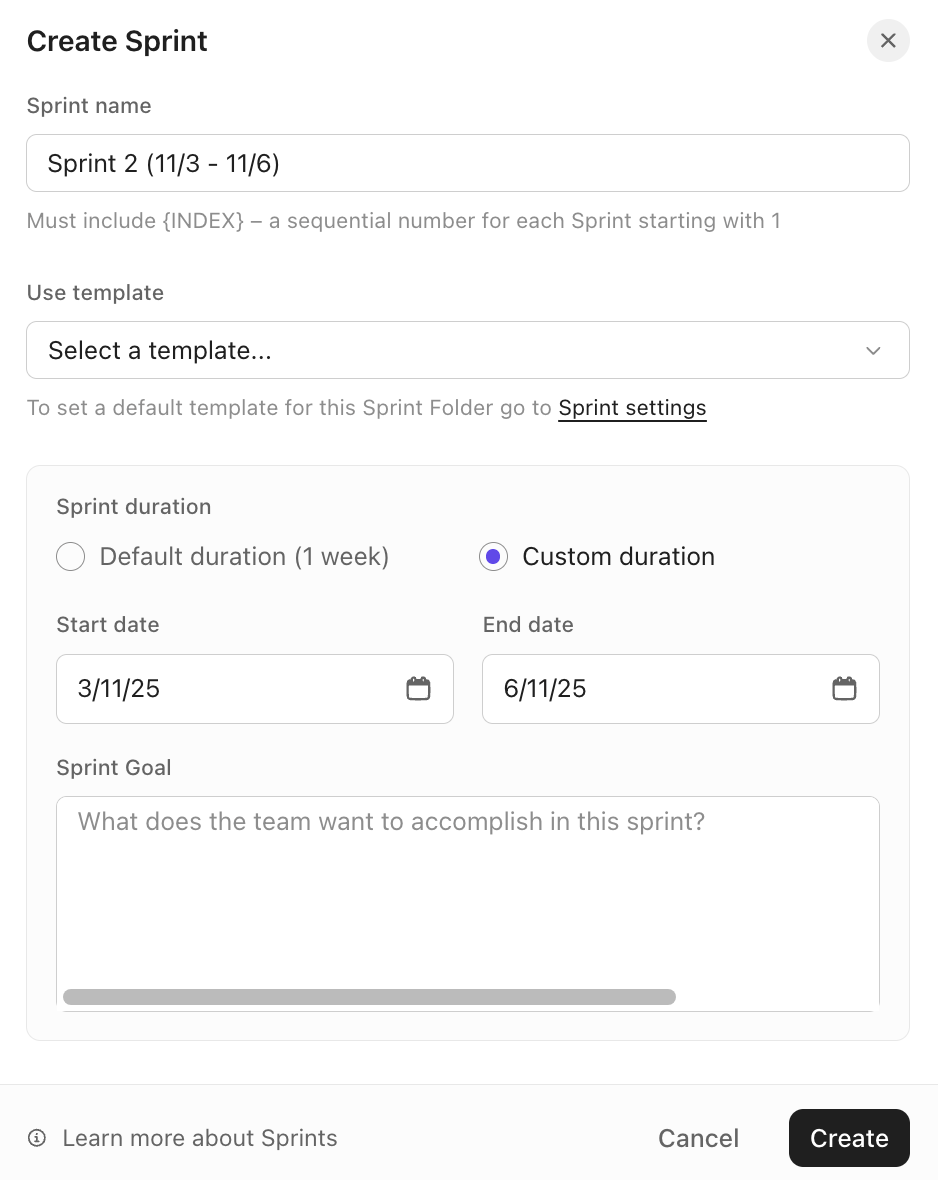
Set the sprint duration and start day at the Folder level, then create the next few sprints and compare those dates with your working-day map. Where a holiday shortens a sprint, the dates stay put, and the commitment comes down.
ClickUp’s Workload View can help you check assigned work against available capacity before the sprint starts.
Once the cadence is stable, Sprint Automations can create future sprints, move unfinished tasks into the next sprint, and archive older ones.
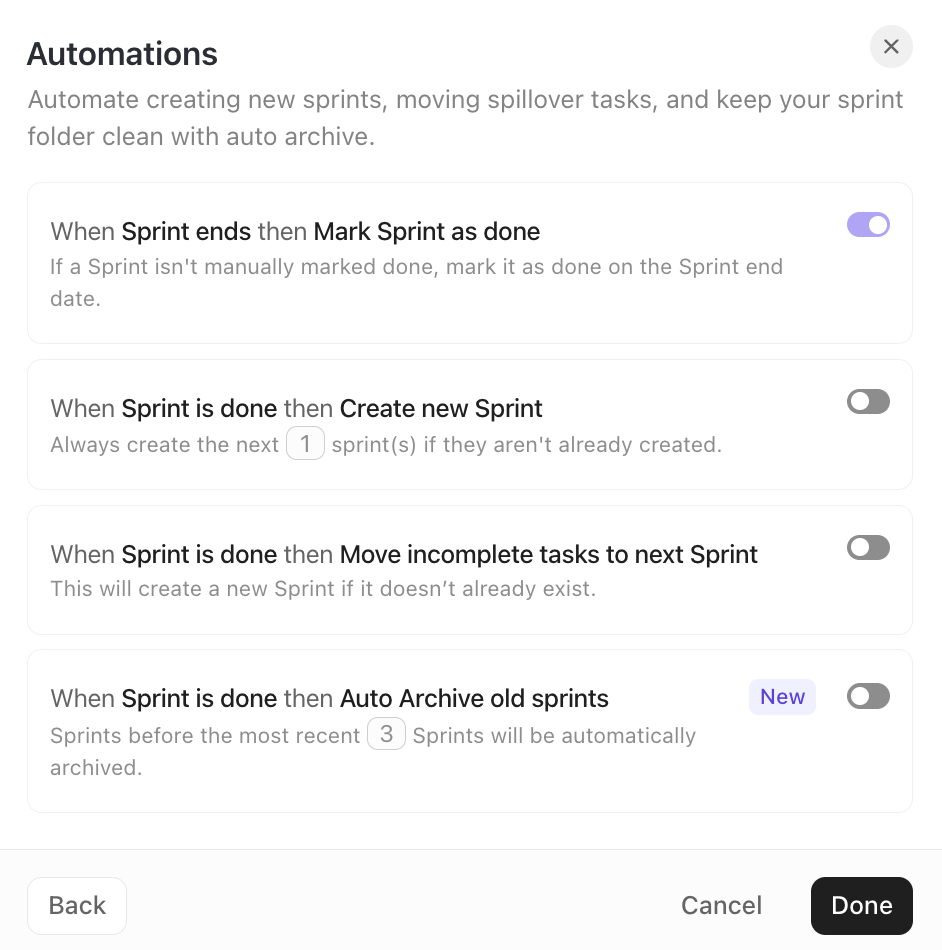
Just don’t let rollover disappear into the automation. If the same work keeps moving forward, bring that pattern into the retrospective.
After a few cycles, use ClickUp Dashboards to compare the plan against reality.

Burndown shows remaining work, Velocity compares committed and completed work across sprints, and Burnup helps expose scope growth.
Pair those charts with the four review signals from step six. The dashboards tell you what got delivered; those numbers tell you whether the cadence had anything to do with it.
Start from a template: The ClickUp Agile Sprints Events Template gives you a starting point for recurring sprint events. And for planning, pair it with the ClickUp Agile Sprint Planning Template.
Some sprint reporting and automation features require higher-tier ClickUp plans, and Workspace-level sprint defaults are admin-controlled.
For a two-person team with one backlog and few dependencies, a task list plus a shared calendar may be enough. The added structure becomes more useful once you need sprint dates, capacity, rollover, and historical data to stay connected.
In short, a sprint schedule deserves about 30 minutes of deliberate thought and then almost no maintenance. Pick a length that matches your uncertainty and freeze it. Pick an anchor day that keeps planning and the retrospective on days your team is present. For U.S. teams, that usually means midweek. Then compare boundaries with the teams you depend on, and either match or offset them on purpose.
After that, connect the schedule to the work.
You can build your first sprint cadence, anchor day, and everything downstream in a few minutes. Get started with ClickUp for free.
A Scrum sprint normally keeps its fixed duration even when the selected work finishes early. The team can use the remaining time to pursue the sprint goal and adapt the sprint backlog as more is learned. The Scrum Guide allows a sprint to be canceled when its goal becomes obsolete, and only the product owner has that authority. Finishing work early isn’t given as a reason to shorten it.
A sprint schedule sets the repeating calendar: sprint start and end dates plus the timing of recurring events. Sprint planning is one event within that schedule where the scrum team defines the sprint goal, selects work, and creates an initial plan for delivering it.
The schedule answers “when?” Sprint planning answers “why this sprint, what work, and how will we approach it?”
A sprint is a fixed calendar timebox, while the daily scrum occurs on each working day. Teams commonly schedule a two-week sprint as a repeating 14-day cadence rather than stopping and restarting the clock around weekends.
Weekends affect the number of working days available, not the continuity of the sprint itself.
The 3-5-3 rule is a memory aid for Scrum’s structure, covering three accountabilities, five events, and three artifacts. The accountabilities are the product owner, the Scrum master, and the developers. The five events are the sprint itself, sprint planning, daily scrum, sprint review, and sprint retrospective. The artifacts are the product backlog, the sprint backlog, and the increment.
The Scrum team sets its own sprint length and cadence; no single role owns the decision in Scrum. The 2020 Scrum Guide describes the Scrum team as self-managing and doesn’t assign schedule ownership to the Scrum master or product owner. In practice, the Scrum master facilitates the choice and protects the ceremony slots, while a workspace or project admin holds the permissions to change cadence settings in the tool. Where several squads share a cadence, a PMO or delivery lead usually publishes the shared calendar.
A quarter holds about six two-week sprints, or three four-week sprints, before holidays and buffer time are accounted for. A calendar quarter runs roughly 13 weeks, so two-week cycles divide unevenly and leave a spare week. Most teams absorb that remainder into a shorter buffer sprint at quarter-end rather than stretching one cycle, which keeps quarterly planning from drifting into the middle of a sprint.
Unfinished work returns to the product backlog for reprioritization rather than automatically rolling into the next sprint. The Scrum Guide sets no rule for carryover, and Scrum.org guidance is that incomplete items go back to the product backlog so the product owner can decide whether they still matter. Automatic rollover is common in tooling but it hides a pattern: if the same item moves forward three sprints running, the problem is sizing or a dependency, not capacity.

Praburam Srinivasan
Max 19min read

Manasi Nair
Max 28min read

Sudarshan Somanathan
Max 29min read

© 2026 ClickUp




