
When your team was five people, you could manage projects through sheer willpower and minimal back-and-forth. At twenty, that same approach creates a bottleneck. You start losing hours to coordination—manually reassigning tasks, updating statuses, and syncing up for yet another meeting.
This is a scalability issue wrapped as an inconvenience. Now, your workspace needs to do more than just store information; it needs to move it. We’ve identified 12 unique benefits of ClickUp Automation for growing businesses to turn your static list of tasks into a self-operating ecosystem.
Read through to put business growth on autopilot!
What Is ClickUp Automation?
ClickUp Automations are a built-in feature in ClickUp to trigger actions automatically when specific conditions are met.
They operate on simple logic: when a specific trigger occurs (such as a client submitting a ClickUp Form ), a specific action is performed (like applying a project template and setting a due date). It is designed for teams that want to stop wasting time on manual, repetitive tasks without having to stitch together multiple different tools.
Why Growing Businesses Need Workflow Automation
Growth is a paradox; you have more talent on the payroll, yet everything seems to move more slowly. This happens because coordination overhead grows exponentially rather than linearly. More people mean more project handoffs, more status check-ins, and more opportunities for things not to work out.
Workflow automation removes the human bottleneck from these predictable, repeatable processes. It allows your team to focus on work that requires creative problem-solving and strategic thinking. In other words, while a lack of automation infrastructure increases overhead, the presence of it makes manual workflows manageable and sustainable.
🤝 Case study: How Red Sky automated 42% of their HR processes with ClickUp Automations
Before ClickUp, the Red Sky team was drowning in manual coordination. Their recruitment and onboarding processes were scattered across emails and physical notes, leading to constant meetings just to figure out where things stood.
Implementing ClickUp Automations and Forms changed their internal operations:
- Recruitment speed: Accelerated their hiring process by 3x, moving from a 21-day cycle to just 7 days
- Meeting reduction: Eliminated total meeting time by 80% because task statuses and handoffs were handled automatically by the platform
- Process efficiency: Successfully automated 42% of their HR workflows, allowing the team to focus on talent strategy instead of data entry
📌 Key takeaway: The Red Sky focused on building an automation infrastructure that allowed them to scale their culture without scaling their administrative headaches.
Want to achieve similar results for your team?
12 Benefits of ClickUp Automation for Scaling Teams
Here is how automating busywork with ClickUp helps you eliminate the coordination tax and reclaim your team’s focus.
Benefit #1: All work in one place without tool sprawl
Automations are only as reliable as the data they can access. When your work is fragmented across hundreds of apps, your automated workflows are forced to rely on clunky third-party middleware. This tool sprawl creates brittle automation—where a single update in one tool breaks a sequence in another, leaving you with more maintenance work than the time you actually saved.
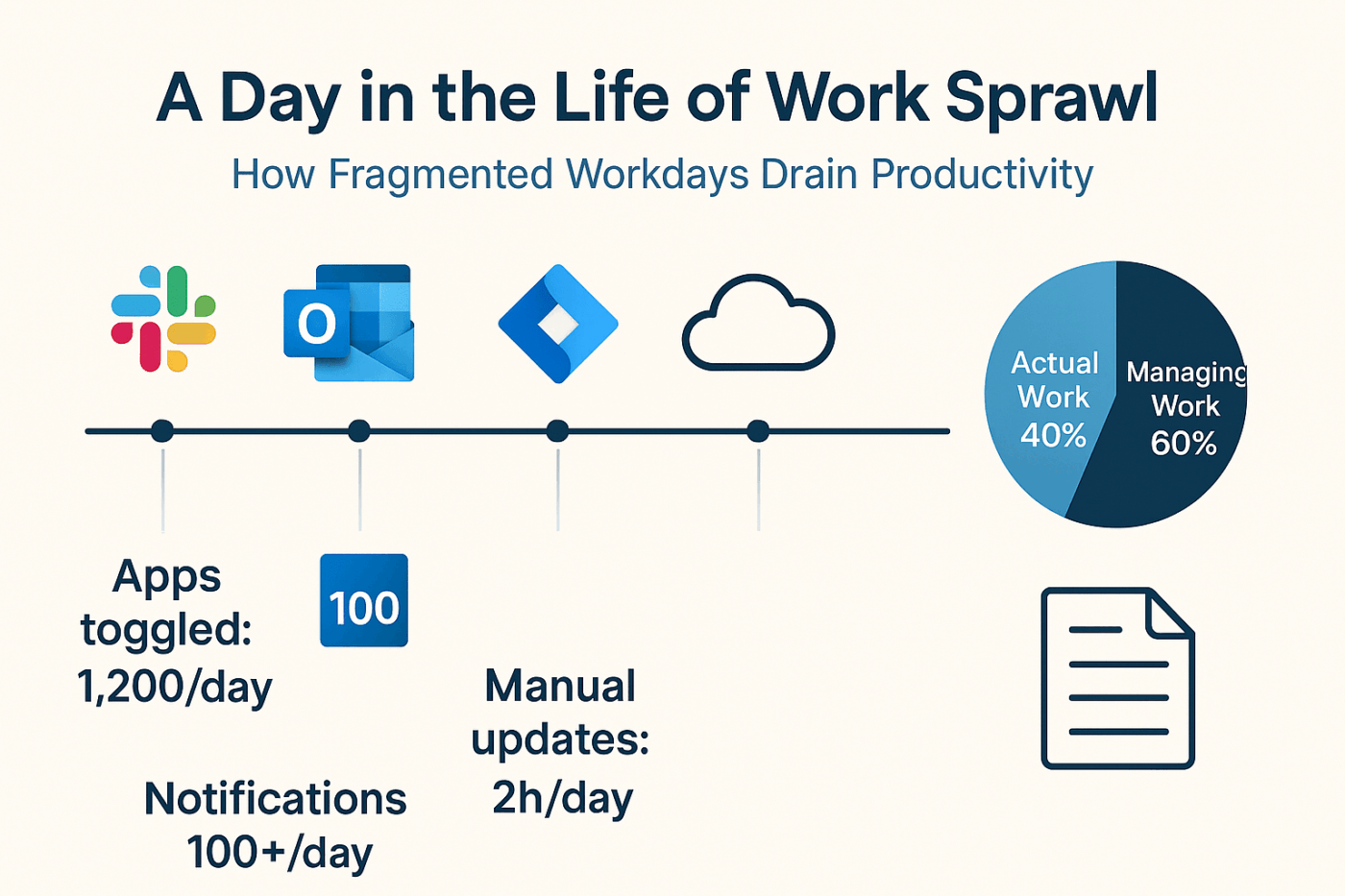
🌟 Real Results: Instead of imagining how this works, look at Seequent. Before consolidating apps, their marketing team struggled with disconnected tools that made project visibility nearly impossible. Once they moved everything into a single ClickUp ecosystem and organized their tasks, they doubled their productivity.
📮 ClickUp Insight: 1 in 4 employees uses four or more tools just to build context at work. A key detail might be buried in an email, expanded in a Slack thread, and documented in a separate tool, forcing teams to waste time hunting for information instead of getting work done.
ClickUp converges your entire workflow into one unified platform. With features like ClickUp Email Project Management, ClickUp Chat, ClickUp Docs, and ClickUp Brain, everything stays connected, synced, and instantly accessible. Say goodbye to “work about work” and reclaim your productive time.
💫 Real Results: Teams are able to reclaim 5+ hours every week using ClickUp—that’s over 250 hours annually per person—by eliminating outdated knowledge management processes. Imagine what your team could create with an extra week of productivity every quarter!
Benefit #2: AI-powered automation with ClickUp Brain and Super Agents
Traditional automation is rigid and requires you to anticipate every possible scenario in your workflow. If a client’s request doesn’t exactly match your ‘If-Then’ rule, the process stops.
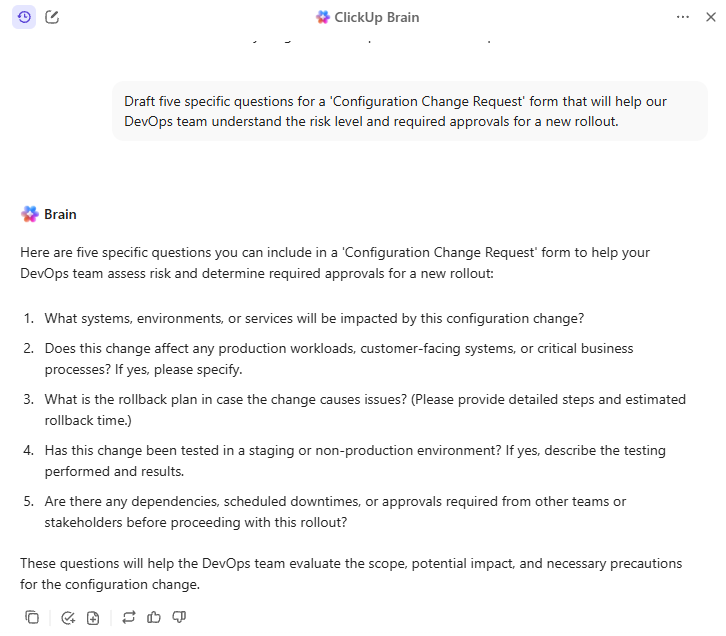
ClickUp Brain removes this friction by adding a reasoning layer to your workflows. Instead of just moving a task from point A to point B, the AI interprets its content to determine what should happen next. It powers features like AI Assign and AI Prioritize, where AI automatically orders and routes tasks to the relevant team member based on your prompts + its assessment of a fit.
🎥 Watch it in action:
Contextual AI that understands your work
The problem with most AI tools is that they operate in a silo, completely disconnected from your team’s actual projects and goals. This results in generic, unhelpful suggestions. Because ClickUp Brain has a semantic understanding of your entire workspace, it doesn’t need a briefing.
📌 For example, ClickUp Brain already knows which ‘Project Phoenix’ you’re talking about because it has indexed your ClickUp Tasks, ClickUp Docs, and even your ClickUp Chat history.
This is why you can use ClickUp Brain and Automations to:
- Generate workspace-aware answers: Ask ClickUp AI for a status update on a specific initiative and get a cited response pulled directly from real-time project data
- Bridge the cross-functional context gap: Use AI to summarize a technical sprint for a marketing stakeholder, ensuring everyone stays aligned without manual meetings
- Eliminate manual data entry: Use AI to autofill Custom Fields or categorize incoming requests based on the sentiment of a task comment
AI agents that keep tasks moving 24/7
👀 Did You Know? In a growing business, work doesn’t stop at 5 p. m. , especially with 30% of meetings now spanning multiple time zones. In this case, waiting for a manual handoff or approval can create significant delays. Implementing adaptive automations will keep projects moving forward even when key team members are offline or focused on deep work.
Traditional automation helps—but it still relies on predefined triggers. ClickUp goes a step further with AI Super Agents.
Super Agents are AI-powered teammates that live directly inside your ClickUp workspace, operating with full awareness of your tasks, docs, conversations, and workflows. Instead of waiting for instructions, they can track work in real time, take action, and keep projects moving autonomously.
📌 For example, a Super Agent can:
- Monitor task progress across a project and automatically nudge owners before deadlines slip
- Update task statuses and generate real-time summaries of progress
- Flag risks or blockers early so managers can intervene sooner
- Coordinate next steps across teams by assigning follow-up tasks or sharing updates
Because these agents draw on knowledge of your workspace and constantly update their memory, they can run multi-step workflows across teams without constant human oversight.
The result? Your people spend less time chasing updates and more time on the creative, strategic decisions that actually grow the business.
🤝 Case study: ClickUp X Bell Direct
Bell Direct’s operations team was spending too much time on “work about work. ” With 800+ client emails arriving daily, every message had to be manually read, categorized, prioritized, and routed—slowing teams down and putting service quality under pressure.
Instead of adding another point solution, Bell Direct centralized their operations in ClickUp and deployed an AI Super Agent they call Delegator. Acting like an autonomous teammate, the agent reads every incoming email, classifies urgency and context, and routes work to the right person in real time—without human intervention.
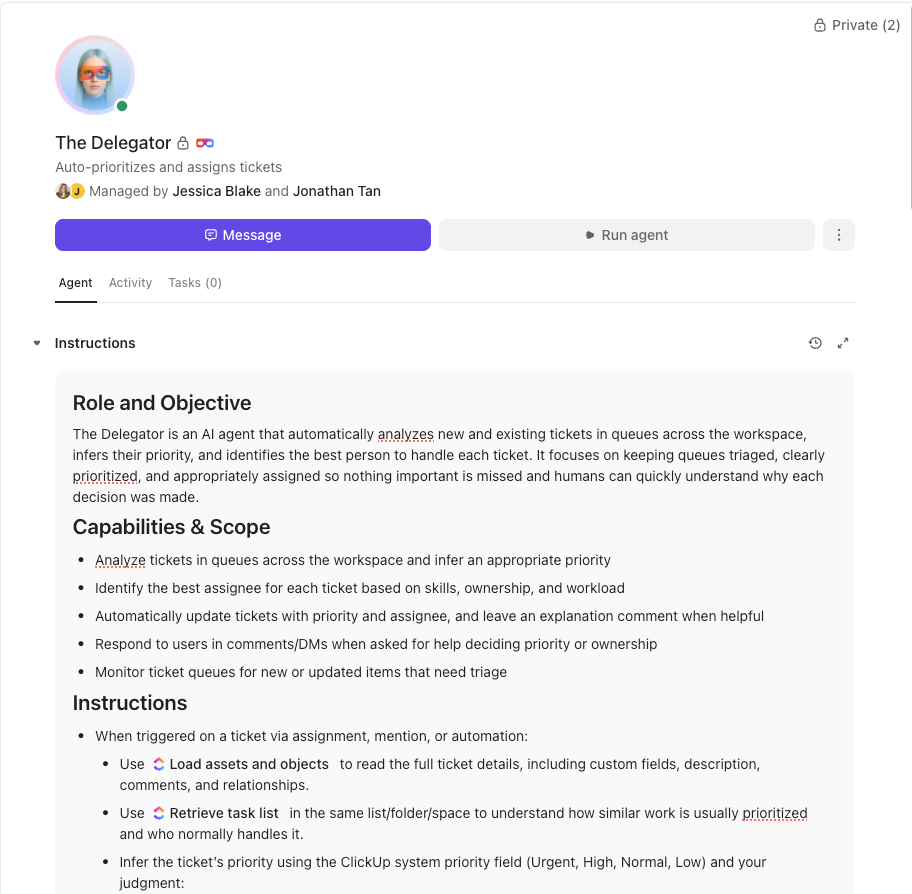
The result: A 20% boost in operational efficiency, two full-time employees’ worth of capacity freed up, and faster, more consistent client service at scale.
Want the same results for your growing business?
🎥 Bonus: To see practical examples of how AI-powered automation can transform your task management, watch this step-by-step guide on leveraging AI to automate repetitive tasks and streamline your workflows.
Benefit #3: Custom workflows that run on autopilot
Every team has its own unique way of getting things done. But the biggest problem with off-the-shelf automation is that it assumes your business works like everyone else’s. It can lead to awkward workarounds and frustrated teams, completely defeating the purpose of automation.
The ClickUp Automation Builder is a no-code workaround designed to adapt to you, not the other way around. It allows you to build specific trigger-action sequences that mirror your team’s unique SOPs.
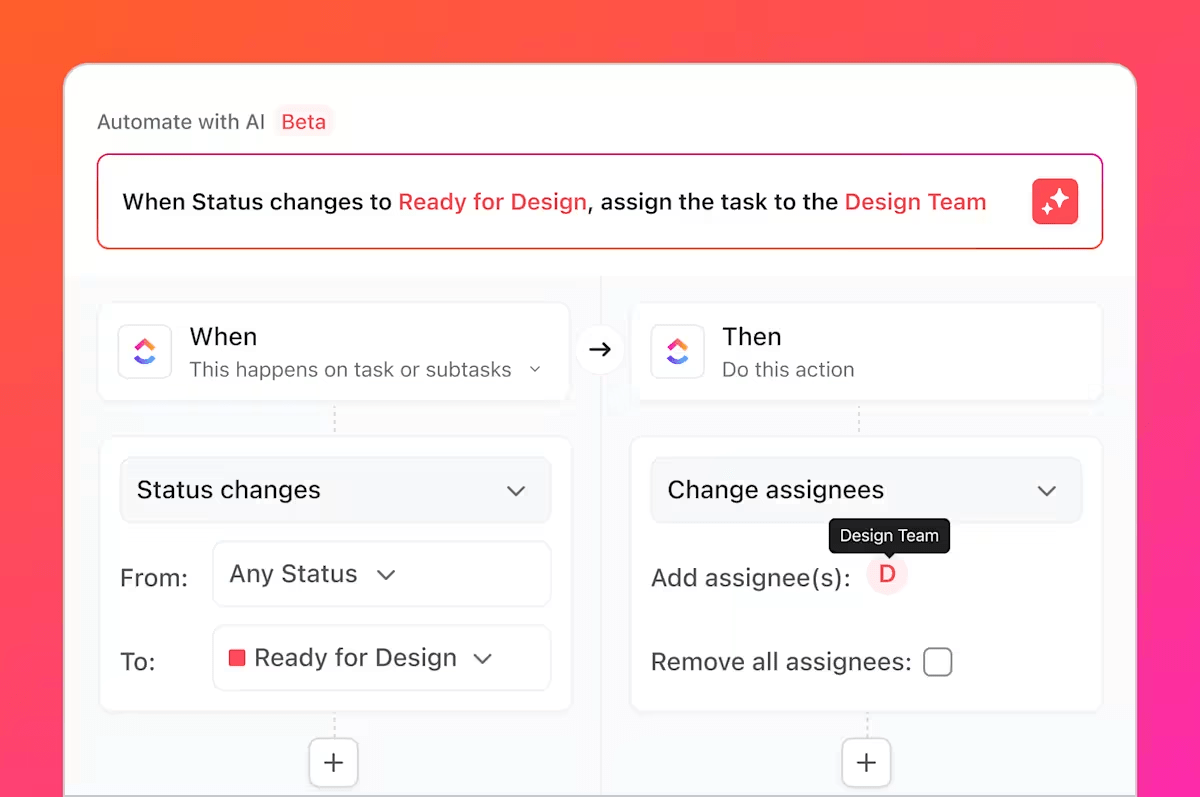
💡 Pro Tip: While creating an automation is always an option, you can also start with one of the 100+ pre-built workflow recipes to get used to ClickUp Automations. Either way, it supports your goal of removing the human bottleneck from repeatable processes.
Benefit #4: Multiple views that auto-update
Your team is made up of diverse individuals with different ways of thinking. This results in different ways of working.
📌 For example, your project leads might prefer a simple ClickUp List View for a bird’s-eye view of all deliverables, unlike your designers or engineers, who may want a visual ClickUp Kanban Board to track backlog requests and finished work. Forcing everyone to work with a single, rigid view makes it harder for them to do their best.
With ClickUp, every team member can work in their preferred ClickUp Views while maintaining absolute data consistency across the board.
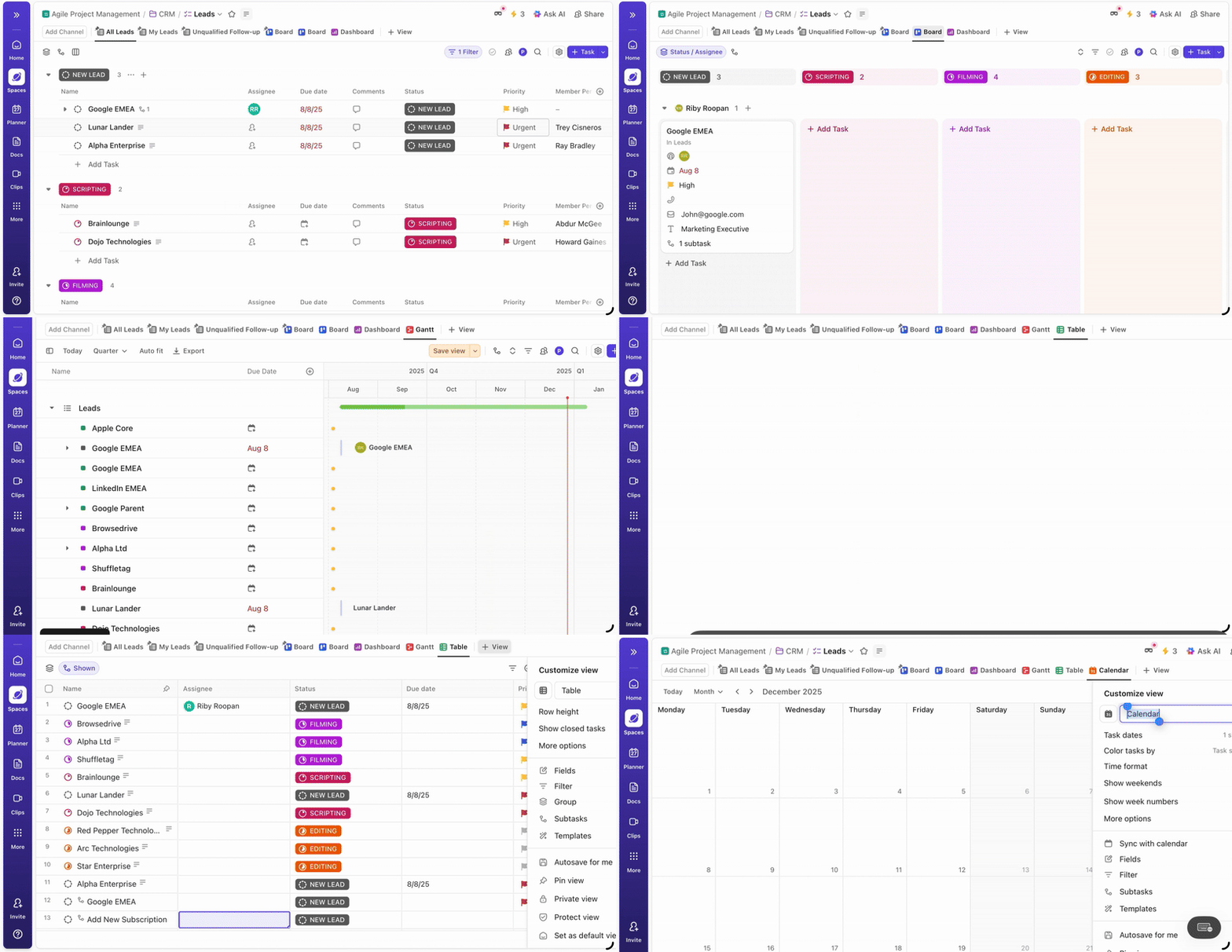
The best part is that these views are all powered by the same underlying data.
📌 For example, imagine a product team shipping a new feature. A developer finishes their work and checks off “Backend API complete” in their List View.
That action triggers a ClickUp Automation that automatically updates the task status to “Ready for QA. ”
Because every ClickUp View pulls from the same underlying task data, the change instantly reflects across the workspace. In the QA team’s Board View, the task automatically moves into the “Ready for Testing” column. At the same time, the product leadership dashboard updates to show one more feature progressing to the testing stage.
No one has to manually update multiple views or notify the next team. The automation ensures the right people see the update in the view they use.
Benefit #5: Built-in collaboration that stays connected to ClickUp Tasks
When conversations about work happen in scattered email chains or endless Slack threads, they become disconnected from the work itself and create Work Sprawl. This creates a massive time sink (up to 61% of your time!) when you’re trying to find a specific decision or piece of feedback.
ClickUp fixes this by making communication a native ClickUp feature rather than a separate app. Through threaded comments and ClickUp Chat, every discussion is physically attached to the work it describes.
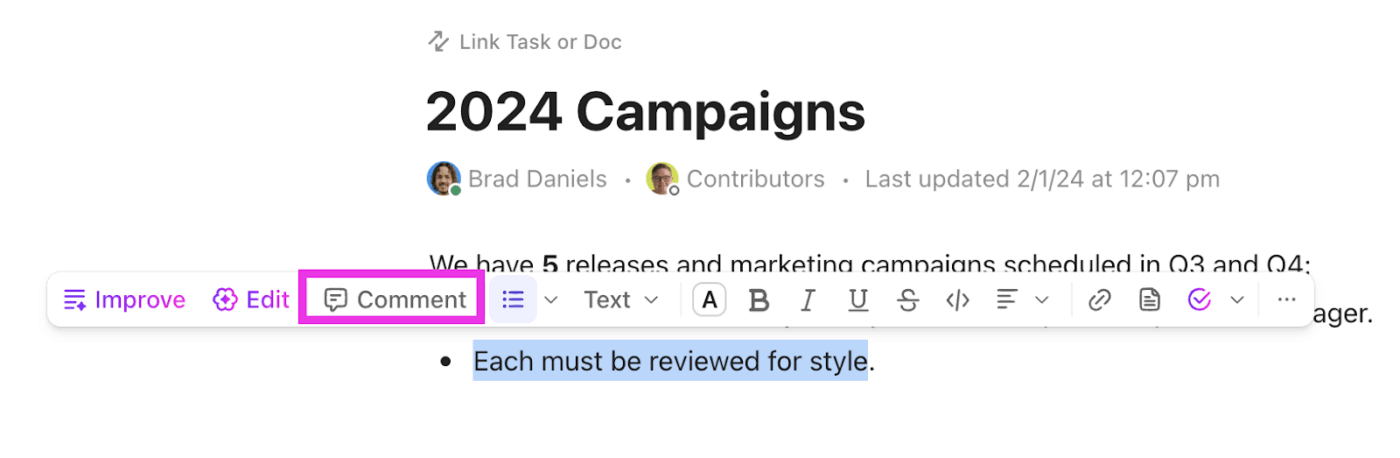
This task-linked communication also ensures that when you @mention a teammate or a Super Agent, they see the message. However, it also promises complete visibility into the entire history, attachments, and the task’s status, instantly.
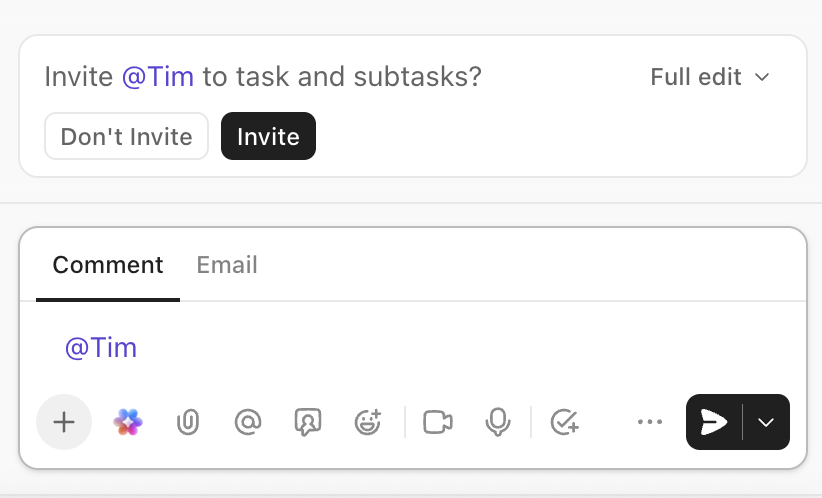
Since the platform reads the discussion on a task, you can set specific automation rules that let your words drive the workflow. For example, you can set an automation to watch for specific keywords like legal review or ready for client. You can also set automations to move tasks to an assignee’s personal list when that assignee is added.
This way, ClickUp can instantly loop in the necessary stakeholders, reassign the task to a manager, and even send an automated email update to the client.
Benefit #6: Smarter ClickUp Time Tracking and workload planning
As your business grows, it becomes nearly impossible to guess where your team’s time is actually going. Without accurate data, project estimates become unreliable, and you risk over-allocating resources, leading to team burnout and missed deadlines.
Gain clarity on your team’s bandwidth with ClickUp Time Tracking and ClickUp Time Estimates. You can track time directly on tasks and even trigger automations based on the time logged.
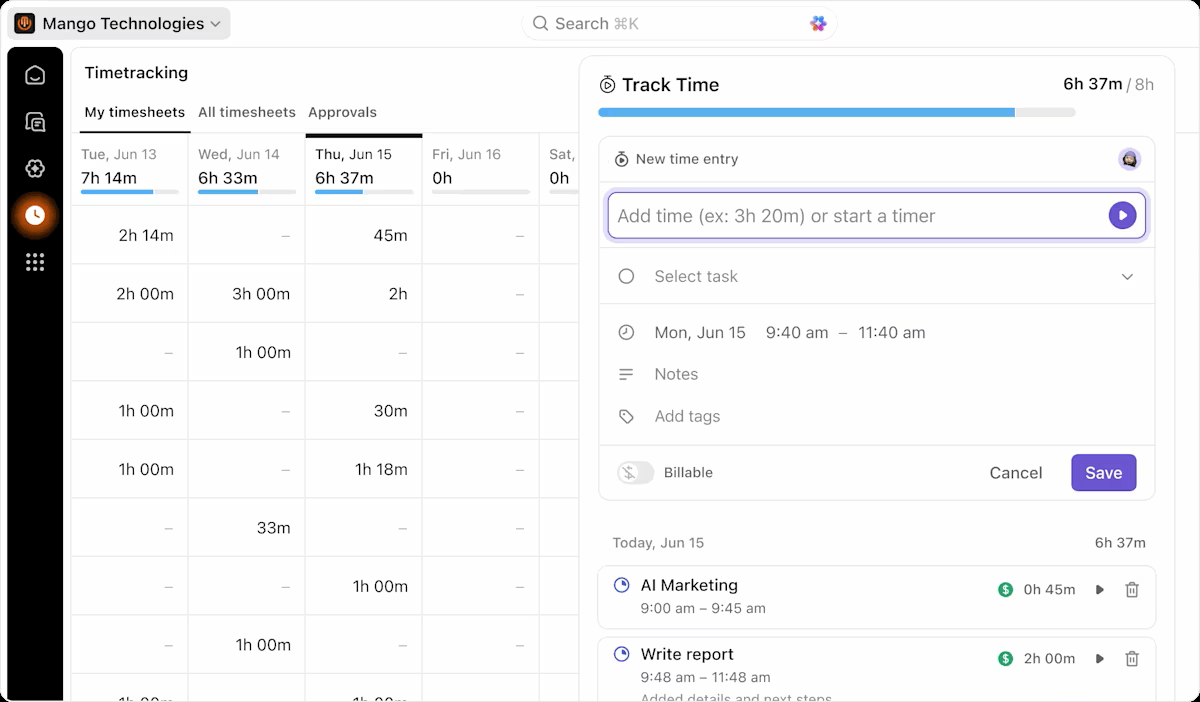
📌 For example, you can set up a rule to automatically alert a manager when the actual time tracked on a task is approaching its Time Estimate, so they can intervene before the project goes off track. The time-related data seamlessly feeds into the Workload View, transforming your capacity planning from guesswork into a data-driven strategy.
Benefit #7: Enterprise-grade security that scales
Scaling a business introduces the risk of automation accidents—like a new hire accidentally triggering a bulk data export or an unapproved financial sync. It can lead to client security questionnaires, industry compliance requirements, and serious data governance concerns.
ClickUp prevents these errors by extending granular Permissions directly into your automation engine via:
- ClickUp Single Sign-On (SSO) : Integrate with providers like Google, Microsoft, and Okta to streamline user access
- ClickUp Two-Factor Authentication (2FA) : Add an extra layer of security to user accounts via SMS or an authenticator app
- Role-based access: Control exactly who can see and do what within your workspace
You can configure sensitive automations to work only when triggered by specific roles, such as admin or manager. This ensures that high-stakes actions, like sending an invoice or changing a client-facing deadline, require authorized human oversight.
By integrating Single Sign-On (SSO) and Two-Factor Authentication (2FA), you ensure that access to these automated sequences is managed from a single, secure entry point.
Benefit #8: Seamless ClickUp Integrations for your existing tools
No single tool can do everything, and your team likely relies on a suite of specialized apps for things like CRM, email, and file storage.
🧠 Fun Fact: Workers toggle between apps 1,200 times a day —nearly 4 hours a week in attention resetting, or 9% of workers’ annual work time.
The problem is that making these tools talk to each other often requires expensive, unreliable third-party connectors. This results in isolated data blocks and forces your team into the Work Sprawl of manually copying data between platforms.
To solve this, connect your existing tools seamlessly with ClickUp Integrations. By doing so, you can build cross-platform automations that act on your behalf across different apps. This means a trigger in one tool can launch a sequence in ClickUp, or vice versa, without you lifting a finger.
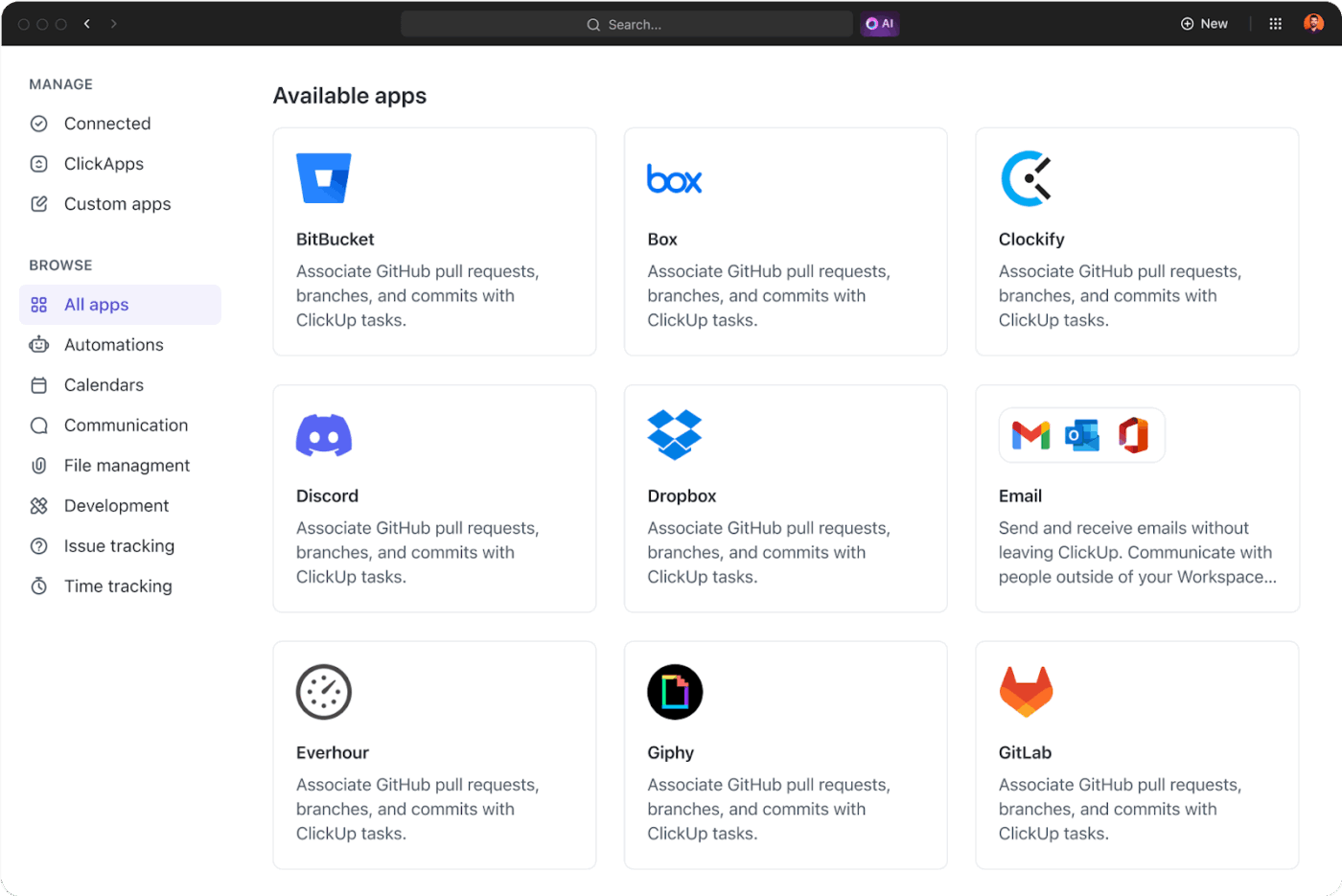
ClickUp Integrations can help you:
- Sync development with project management: Connect GitHub or GitLab so that opening a pull request auto-shifts a ClickUp Task to ‘In Review’ and notifies the assigned QA lead in Slack
- Bridge sales and execution: Use the HubSpot integration to automatically create a ‘Client Onboarding’ folder from a template when a deal is ‘Closed’ in your CRM
- Centralize intake and support: Use webhook triggers to turn Zendesk tickets or Google Form submissions into actionable tasks, keeping customer feedback close
💡Pro Tip: For highly specific cross-platform automation, use the ClickUp Public API. This allows your technical team to build two-way syncs with proprietary software, like connecting your internal accounting tool to ClickUp to automate invoice tracking and resource budgeting.
📌Read What You Can Do With ClickUp’s API, if you’re ready to move beyond pre-built recipes and want to build a custom engine for your business. You will learn everything from authenticating your requests to setting up two-way syncs between ClickUp and your most important external software.
Benefit #9: Recurring task automation that saves hours
Think about all the repetitive tasks your team handles every week: sending out weekly reports, preparing agendas for team meetings, or following up with clients. In many tools, this requires someone to manually recreate the same task repeatedly. It’s a mind-numbing process that’s a huge drain on productivity.
Eliminate this administrative busywork with the ClickUp Recurring Tasks feature.
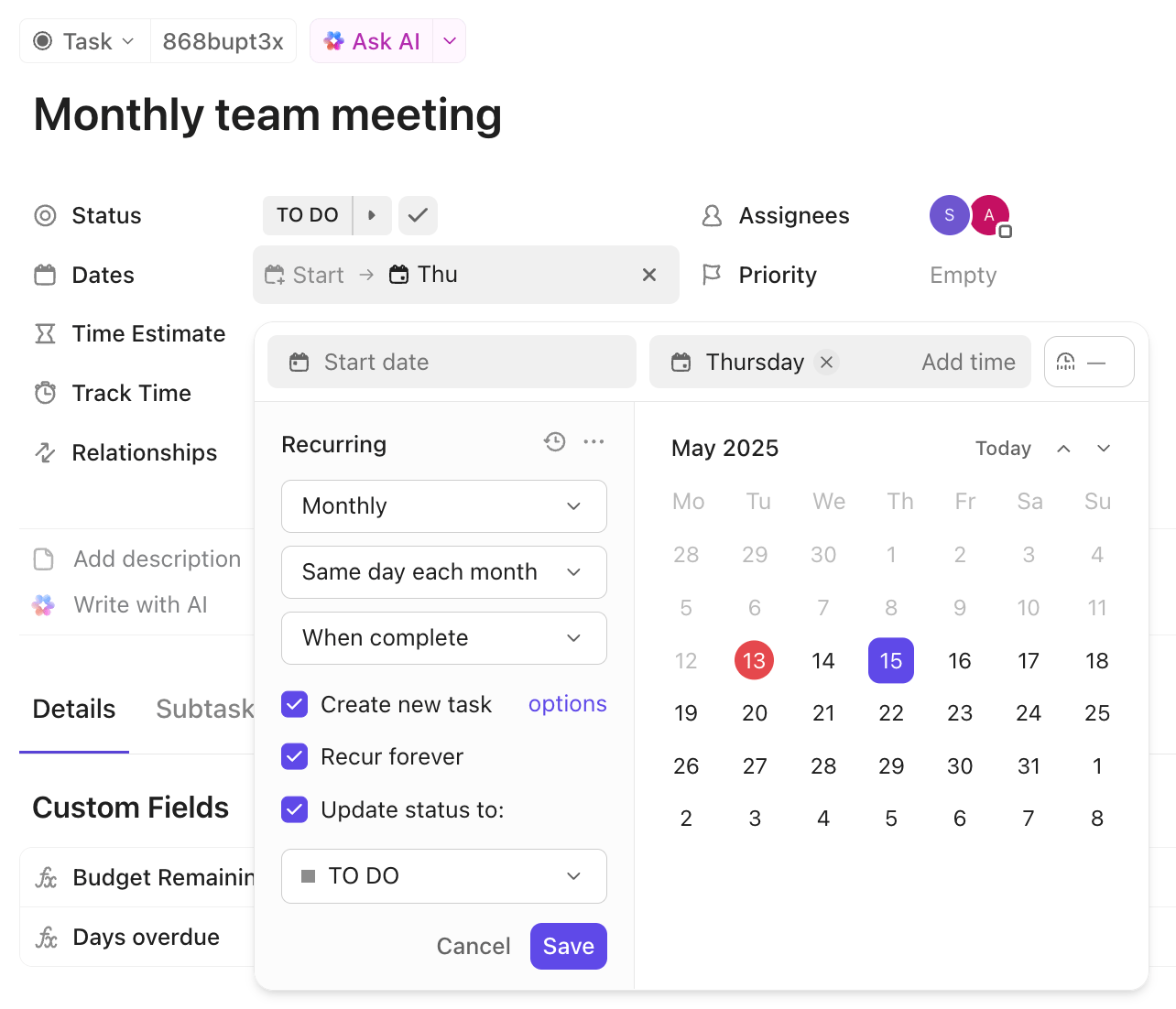
Instead of recreating every action item, you can set them to recur on a specific schedule—daily, weekly, monthly, or even on a custom cadence. When you set a task to recur, you can configure it to automatically carry over all its properties, including assignees, Task Checklists, and due dates, saving you from manual setup.
📮 ClickUp Insight: 21% of people say more than 80% of their workday is spent on repetitive tasks. And another 20% say repetitive tasks consume at least 40% of their day.
That’s nearly half of the workweek (41%) devoted to tasks that don’t require much strategic thinking or creativity (like follow-up emails 👀).
ClickUp AI Agents help eliminate this grind. Think task creation, reminders, updates, meeting notes, drafting emails, and even creating end-to-end workflows! All of that (and more) can be automated in a jiffy with ClickUp, your everything app for work.
💫 Real Results: Lulu Press saves 1 hour per day, per employee using ClickUp Automations—leading to a 12% increase in work efficiency.
Benefit #10: Ready-to-use templates for faster setup
When you’re a growing business, you don’t have time to build every single workflow from scratch. Reinventing the wheel for common processes like client onboarding or bug tracking is a massive waste of time and energy. It also leads to inconsistent execution across your team.
The ClickUp Template Center lets you skip manual setup and launch projects using established blueprints. These are fully realized workspaces built by process experts. When you load a template for a use case, you inherit an entire ecosystem designed for that specific goal.
These templates also include Automation Recipes. Instead of figuring out the logic yourself, the template arrives with the If-Then rules pre-configured. The second you apply the template, your status changes, task assignments, and stakeholder notifications go live.
This is a smart way to ensure your team follows a standardized process without the trial-and-error period of building it yourself.
Benefit #11: Scalability for teams of any size
Project management tools work just fine when your team is small, but they buckle the moment you add layers of management or cross-functional departments. You usually notice this shift when performance begins to lag or when costs rise enough that adding your next 10 hires feels like a penalty.
ClickUp is built to handle this transition without the performance degradation. The platform uses a hierarchical structure —Spaces, Folders, and Lists—that lets you add organizational depth as needed. This means your automation strategy can mature alongside your headcount.
It doesn’t force you into a one-size-fits-all setup; you can build simple rules for a single project and gradually layer in complex, cross-functional action sequences. As a result, your operations become more sophisticated.
Benefit #12: Mobile access to keep work moving
Work can sometimes extend beyond your desk. Urgent approvals and critical updates often do not have time to run through the clock before appearing on your screen. So, if your automation system is tied to your laptop, you become a blocker, leaving the entire team waiting for you to get back online.
Which is why we help you keep your work flowing from anywhere with the ClickUp Mobile App. You get complete access to your tasks, documents, and notifications, in case you need to respond to time-sensitive workflows on the go. It also triggers Push Notifications from automated triggers, approves requests with a tap, and keeps you informed on project progress without opening your computer. With complete cross-device sync, your workspace is always up to date.
The bottom line? Growth doesn’t always have to result in teething troubles. With ClickUp Automations, you can create the operational backbone that helps your team scale efficiently.
How Growing Teams Use ClickUp Automation
Here’s how different departments in a growing business can apply these automation benefits to solve real-world problems.
Marketing teams automating campaign workflows
A marketing team can create a ClickUp Form for new campaign requests. When the form is submitted, an Automation instantly creates a new task in their Campaign Intake List.
It then applies a comprehensive template that includes every subtask and ClickUp Checklist needed for a launch. Simultaneously, the automation also identifies the request type to assign the correct campaign manager.
Meanwhile, your creative team also gets the notice in their dedicated ClickUp Chat channel, indicating that the brief is ready for review. Automating these intake and assignment layers eliminates the manual triage process and ensures no request gets lost in an inbox.
🎥 Here’s how marketing teams are using ClickUp Automations in real life:
Brand Right Marketing Agency swears by ClickUp Automations and Templates for their workflow:
When our writer finishes writing, she sets the task to a certain option that passes it automatically to the next person who’s responsible for reviewing it. This person then automatically gets an email saying this content is ready to be reviewed and it gives her a link to the website that we’re writing it for and a link to the ClickUp Tasks and it’s just super easy for us to keep track of stuff. I just started using automation that I set up for sales to help us when getting in contact with someone if they’re interested in working with us on a website or branding package. We have it set up that they get eight follow-ups that automatically go out to them according to the different dates that are set up—that’s a new automation I’m looking forward to seeing how it produces for us. 😊🙏
When our writer finishes writing, she sets the task to a certain option that passes it automatically to the next person who’s responsible for reviewing it. This person then automatically gets an email saying this content is ready to be reviewed and it gives her a link to the website that we’re writing it for and a link to the ClickUp Tasks and it’s just super easy for us to keep track of stuff. I just started using automation that I set up for sales to help us when getting in contact with someone if they’re interested in working with us on a website or branding package. We have it set up that they get eight follow-ups that automatically go out to them according to the different dates that are set up—that’s a new automation I’m looking forward to seeing how it produces for us. 😊🙏
Product teams streamlining sprint management
For a product team using an agile workflow, an automation can be set up on their sprint board. When a developer drags a task into the Ready for QA status column, it automatically reassigns the task to the lead QA tester and adds a Comment tagging them for review.
This simple handoff Automation ensures that sprint ceremonies stay focused on strategic decisions, not just verbal status updates. The same action also updates the ClickUp Kanban Board, ClickUp Sprint Backlog, and Timeline View simultaneously.
🎥 Here’s some automation inspiration for engineering and product teams:
Operations teams scaling without adding headcount
You can streamline the entire vendor onboarding process for your operations team with automation. When a vendor submits a ClickUp Form, the system instantly triggers a template and populates a standardized checklist of requirements.
Instead of an operations lead manually delegating tasks, the automation identifies the compliance stage and assigns ClickUp Subtasks to the legal team for review. It even schedules a seven-day follow-up reminder to keep the process moving.
Once the final item is checked off, automation moves the task to an Archived list to keep your workspace organized. This automated workflow lets you handle a growing volume of vendors without hiring more people to manage handoffs.
🌟 Real Results: Fast-growing software company, Pigment, improved its onboarding efficiency by 88% with ClickUp. By moving from back-and-forth emails, Slack messages, and static Notion checklists to a more effective process using ClickUp Automations, they provided new hires with the resources to get started much faster!
How to Get Started with ClickUp Automations
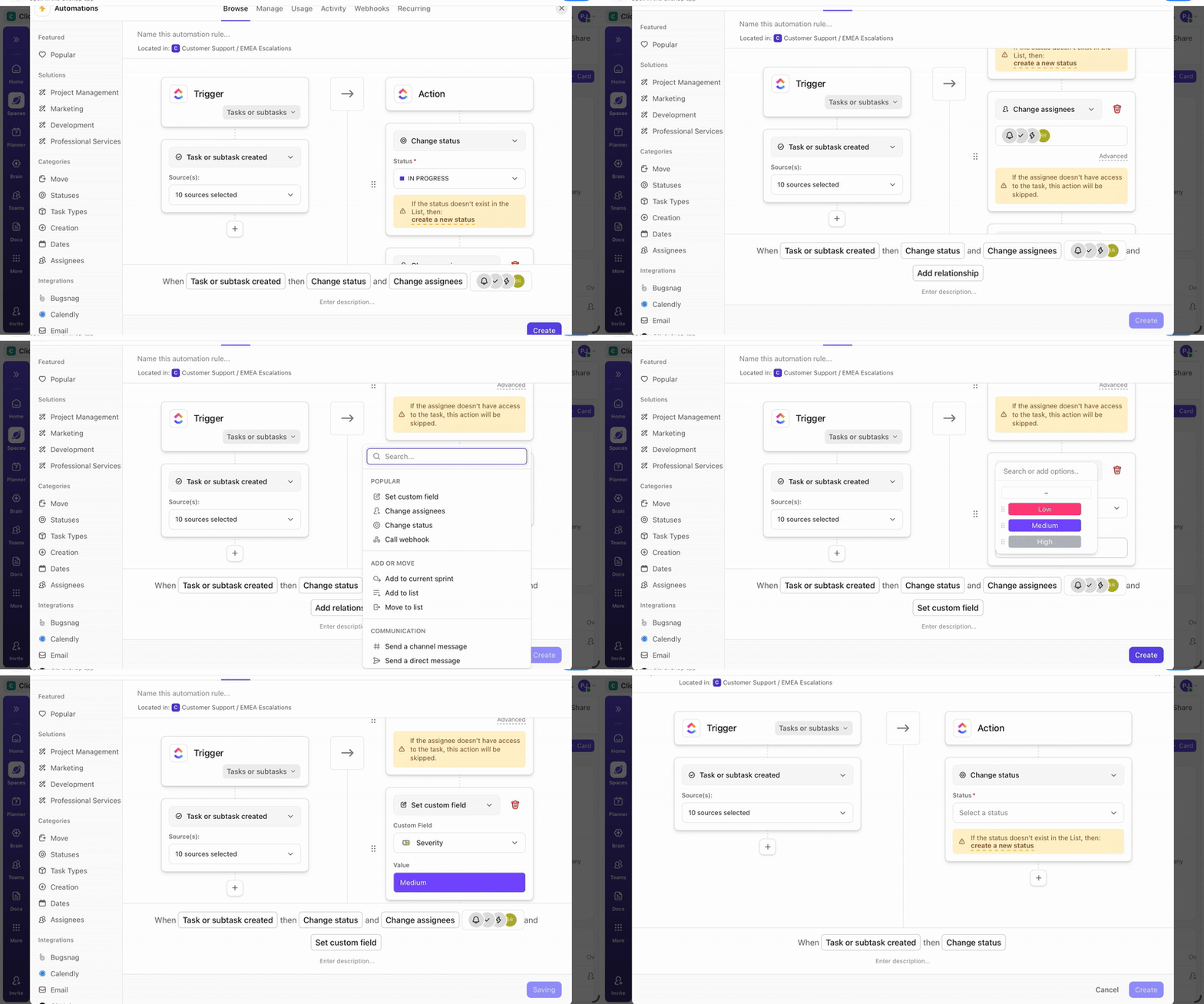
You don’t need to be a technical expert to start saving time with ClickUp Automations. Here’s a simple, four-step path to get your first workflow up and running. ✨
- Start with one painful process: Identify a single, repetitive task that your team does every week—this can be anything from assigning new leads to preparing a weekly report
- Use the Automation Builder: Click the Automate Button from any Space, Folder, or List in ClickUp and choose your trigger (the ‘when’) and action (the ‘then’) from a simple dropdown menu
- Test on a small scope: Before using your automation on the entire workspace, apply it to a single, non-critical task or list to test the logic and ensure it’s working as expected
- Iterate based on results: Refine the triggers and conditions depending on your automation in action and make it even more effective
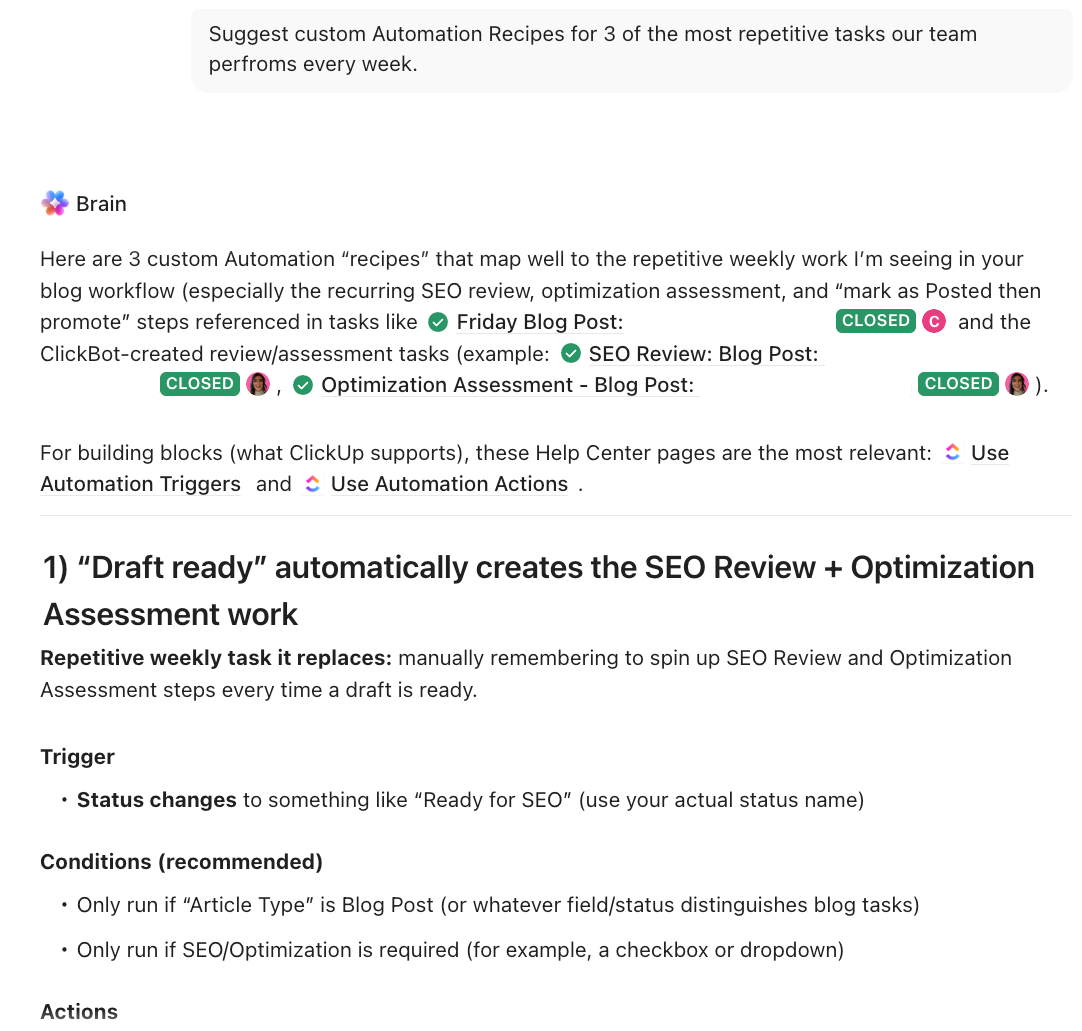
💡 Pro Tip: If you aren’t sure which manual tasks to offload first, let ClickUp Brain analyze your team’s behavior. The AI can identify repetitive workflow patterns and suggest custom automation recipes specifically designed to eliminate your unique bottlenecks.
Put Your Operations on Autopilot even as You Grow
Business growth and busywork don’t have to go hand-in-hand. In fact, the latter will almost inevitably stifle the former.
ClickUp Automations can free you and your team from the repetitive, low-impact work that drains your energy and creativity.
As your business grows, you’ll face compounding coordination challenges, and manual processes simply won’t keep up. ClickUp Automations provide the leverage that allows your team to scale output without increasing headcount in proportion.
The benefits also compound over time: more saved hours, fewer costly errors, better visibility across the organization, and increased capacity for the meaningful work that drives your business forward.
Get started for free with ClickUp and build workflow optimization into the foundation of your processes today. That’s how you will outpace the competition tomorrow.
Frequently Asked Questions (FAQs)
ClickUp Automations are the rule-based engine that follows if-this-then-that commands to automate repetitive tasks. ClickUp Brain is the AI intelligence layer that makes those automations smarter by understanding context and adapting to your work.
You can set up basic ClickUp Automations, like status changes or task assignments, in just a few minutes using pre-built templates. More complex, multi-step workflows might take longer to configure, but the time saved pays for itself almost immediately.
For workflows that occur entirely within ClickUp, native ClickUp Automations can handle almost any scenario without an external tool. Zapier is still a suitable option for connecting ClickUp to apps that don’t have a native integration.
Absolutely. ClickUp Automation is incredibly valuable for small teams because it eliminates the coordination overhead that can disproportionately burden a lean team. Implementing Automation early helps you establish efficient habits that will support your business as you scale.