

Efficient data management relies on effective tools for data storage and organization, both of which play a vital role in business operations. Whether you’re tracking sales figures, organizing workflows, or managing customer information, the database vs. spreadsheet decision can significantly influence how efficiently your data works for you.
Spreadsheets and databases serve different purposes, and each has unique strengths and limitations. Understanding these differences isn’t just a technical necessity; it’s a strategic move that can improve decision-making.
In this guide, we’ll break down where each tool excels to help you make an informed choice for your data needs.
Database vs. Spreadsheet: Choose the Right Tool for You

 Summarize this article for me please
What is a Database?
A database is an organized collection of data stored electronically for easy access, management, and retrieval. It uses structured systems to handle large volumes of information effectively, making it ideal for managing complex data. Databases are designed to ensure data integrity, consistency, and security.
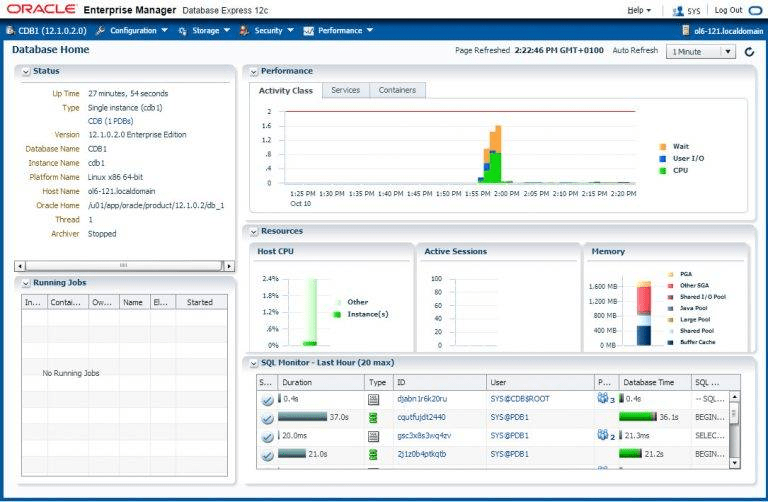
Common uses of databases:
- Business operations: Managing customer records, sales data, and inventory
- Web applications: Storing user profiles, transaction histories, and content
- Finance: Tracking transactions, accounts, and budgets
- Healthcare: Organizing patient records, medical histories, and billing
- Education: Storing student records, grades, and course materials
Databases are fundamental for workflows that require handling multiple users, relational data, or sensitive data securely. They are essential for businesses aiming to streamline data management and ensure accuracy.
Databases are a cornerstone of efficient data management systems.
Summarize this article for me pleaseWhat is a Spreadsheet?
A spreadsheet is a digital tool that organizes data into rows and columns, often used for calculations, data analysis, and visualizing information efficiently. Spreadsheets allow users to manipulate data through formulas, functions, and charts for easy interpretation.

Common uses of spreadsheets:
- Financial planning: Budgeting, forecasting, and expense tracking
- Project management: Task tracking and progress monitoring
- Data analysis: Sorting, filtering, and visualizing numeric data
- Inventory management: Organizing stock levels and tracking items
- Reporting: Creating reports with tables and charts
Spreadsheets are widely used because they are accessible, easy to use, and suitable for simple data analysis. Tools like Google Sheets and Microsoft Excel support collaborative work and enable multiple users to update data in real time.
Spreadsheets are versatile tools for organizing and analyzing data in various industries.
Also Read: 14 Best Spreadsheet Software Solutions
Summarize this article for me pleaseThe Critical Differences Between Databases and Spreadsheets
When choosing between databases and spreadsheets, understanding their differences is crucial. Both tools manage data, but their applications and capabilities vary significantly. Here’s a breakdown based on key aspects like data structure, scalability, and complexity.
1. Data structure:
- Databases: Use structured query language (SQL) for organizing relational data into tables. These tables can be connected to create relationships, making databases ideal for complex data sets
- Spreadsheets: Store data in a tabular form with rows and columns. They are best suited for static data or when performing simple data analysis tasks
2. Scalability:
- Databases: Handle large volumes of data efficiently and support multiple users accessing and editing the same data simultaneously
- Spreadsheets: Perform well with small to medium-sized datasets but can become slow and error-prone with larger or more complex datasets
3. Complexity:
- Databases: Designed for managing complex queries and ensuring data consistency. They are ideal for scenarios where data integrity and robust security features are critical
- Spreadsheets: Focus on ease of use and quick calculations. They work well for tasks requiring minimal data manipulation and analysis
4. User access and collaboration:
- Databases: Allow role-based access control, ensuring sensitive data remains secure while supporting multiple users
- Spreadsheets: May have collaborative features (for example, Google Sheets) to allow multiple users to work on the same file, but they lack the security depth of databases
5. Automation and integration:
- Databases: Integrate with software systems, enabling automated workflows and real-time data updates
- Spreadsheets: Offer limited automation options, often requiring manual updates and maintenance
Use cases comparison:
- Use databases for managing relational data, storing sensitive information, or handling large datasets
- Use spreadsheets for quick calculations, data visualization, or simple analysis
Understanding these differences can help businesses choose the right tool for their needs.
Also Read: Excel Project Management
Summarize this article for me pleaseAdvantages and Disadvantages of Using Databases
Databases are powerful tools for managing data, but they come with their own set of pros and cons. Here’s a detailed look at their advantages and disadvantages.
Advantages of using databases
- Data integrity: Databases maintain consistency and accuracy in relational data, minimizing errors and ensuring reliability
- Security features: Advanced security settings protect sensitive data by controlling access through user roles and permissions
- Querying capabilities: Using structured query language (SQL), databases allow complex data retrieval, making them ideal for handling relational datasets
Disadvantages of using databases
- Complexity: Setting up and managing databases requires expertise and specialized knowledge
- Cost: Databases often involve high initial setup costs, especially when enterprise-grade solutions are required
- Learning curve: Understanding database management systems can take time, particularly for non-technical users
Why database is faster than a spreadsheet
Databases outperform spreadsheets in speed and efficiency when handling large or complex datasets. Tasks involving relational data or advanced queries with high volumes of data are far quicker in databases. In industries requiring constant data updates, databases provide real-time synchronization.
Here’s why.
- Optimized for large datasets: Databases process and retrieve data using indexes and queries, which are faster than manually searching through spreadsheets
- Efficient multi-user access: Databases handle concurrent updates and queries without slowing down, unlike spreadsheets, which may experience lags with multiple users
- Real-time updates: Automated processes in databases ensure faster updates compared to spreadsheets requiring manual edits
While databases excel in speed and reliability, their complexity and cost require businesses to assess their specific needs before implementation.
Summarize this article for me pleaseAdvantages and Disadvantages of Using Spreadsheets
Spreadsheets are popular for their simplicity, but they come with limitations. Let’s explore their strengths and weaknesses.
Advantages of using spreadsheets
- Simplicity: Spreadsheets offer an intuitive interface that allows users to organize and manipulate data without advanced technical skills
- Accessibility: Most spreadsheets, like Google Sheets, are cloud-based, enabling quick sharing and collaboration from any device with internet access
- Cost-effectiveness: Tools like Excel and Sheets provide robust features at minimal or no cost, making them a practical choice for businesses with tight budgets
Disadvantages of using spreadsheets
- Limited scalability: Spreadsheets are designed for small-scale data handling and may become inefficient with complex or multi-layered datasets
- Data accuracy risks: Lack of built-in error-checking mechanisms can lead to unnoticed mistakes, especially in calculations
- Version control issues: With multiple users making changes, keeping track of the most up-to-date version can be challenging, increasing the risk of data loss or duplication
While spreadsheets are great for basic data tasks, their limitations can hinder efficiency for more complex requirements.
Summarize this article for me pleaseUsing ClickUp to Manage Database and Spreadsheets
ClickUp combines task management with powerful database-like features, making it an efficient solution for professionals who need to organize their data for various uses.
ClickUp’s database-like features

ClickUp’s Table View and ClickUp Custom Fields allow users to organize and view data in a structured way, resembling traditional databases. This helps teams manage data efficiently while maintaining clarity and organization.
Additionally, ClickUp Automations simplifies repetitive tasks such as updating data or sending notifications, which saves time and reduces errors, making workflows smoother and more efficient.
How ClickUp integrates task management with data management
ClickUp connects tasks directly to data, ensuring seamless collaboration across teams. This integration ensures that team members have real-time access to both data and tasks, improving coordination and reducing miscommunication.
With its real-time updates and integrations with other tools, ClickUp supports a unified approach to managing workflows and organizing data simultaneously.
ClickUp’s Spreadsheet Template bridges the gap between databases and spreadsheets, offering flexibility and organization in one tool. This template is perfect for:
- Tracking data while linking it directly to tasks
- Simplifying project management with ready-made structures
- Allowing easy customization with fields to suit specific workflows

ClickUp’s Project Management Spreadsheet Template is designed for managing large-scale projects with clear task tracking. The Editable Spreadsheet Template by ClickUp provides a fully customizable format for organizing and updating data easily.
ClickUp is an all-in-one solution for professionals managing both tasks and data efficiently.
ClickUp vs. traditional databases
ClickUp is notably easier to use compared to traditional database systems, thanks to its intuitive interface that eliminates the steep learning curve often associated with database management. It is also cost-effective, providing powerful features at a fraction of the cost of complex database solutions.
Plus, its all-in-one functionality combines task and data management into a single platform, reducing the need for businesses to rely on multiple tools to achieve the same results.
While ClickUp is robust for most use cases, it is not tailored for handling highly advanced SQL-based database requirements, which may limit its application for certain niche needs.
Read More: 10 Best Free Database Software
Summarize this article for me pleaseWhen to Use a Spreadsheet vs. a Database
Choosing between a spreadsheet and a database depends on your specific needs, such as the scale, complexity, and purpose of storing data. Both tools excel in different scenarios, and understanding when to use each ensures all your data is managed efficiently and your workflow is optimized.
Ideal scenarios for spreadsheets
Spreadsheets are perfect for straightforward tasks that don’t require extensive data relationships or complex processing. They are widely used for tasks where simplicity, flexibility, and immediate accessibility are priorities.
Simple financial tracking
Spreadsheets are excellent for managing personal or small-scale financial data. Tasks like creating budgets, tracking expenses, and forecasting revenues are easily handled using tools like Microsoft Excel or Google Sheets. Built-in formulas and charts allow for quick calculations and visual insights.
Task lists
For short-term or personal projects, spreadsheets are a go-to solution for creating and managing task lists. Users can categorize tasks, set deadlines, and monitor progress without requiring advanced tools or technical skills.
Small data management
Spreadsheets work well for managing small data sets that don’t involve complex relationships. Examples include contact lists, basic sales tracking, and event planning. Their tabular format makes it easy to sort and filter information while keeping everything visually accessible.
Ad-hoc analysis
For quick, one-off analyses, spreadsheets are an efficient choice. Users can input data, apply formulas, and generate insights without setting up a more structured system.
Collaboration on simpler data sets
Cloud-based tools like Google Sheets allow multiple users to work on the same spreadsheet in real-time. This makes spreadsheets a convenient option for lightweight collaborative efforts.
While spreadsheets offer simplicity, their limitations—such as difficulty handling large data sets and lack of relational capabilities—make them less suitable for more complex tasks.
Best use cases for databases
Databases shine in scenarios that demand organization, scalability, and the ability to handle complex data relationships. They are designed for robust, multi-user environments where data integrity and accuracy are critical.
Customer management systems
Databases provide structured storage and retrieval capabilities for businesses managing large volumes of client information. Features like relational data linking allow businesses to connect customer profiles to transactions, orders, and communication histories. This level of organization is critical for maintaining long-term customer relationships.
Inventory systems
Businesses with inventory spread across multiple locations or dealing with thousands of SKUs rely on databases to track stock levels, suppliers, and order histories. Databases can automate reordering processes and generate detailed reports, ensuring smooth operations and minimizing errors.
Relational data management
Complex data environments with multiple relationships benefit significantly from databases. For example, e-commerce businesses can link customers, orders, and products to streamline operations. This relational structure allows for advanced queries and real-time updates, which spreadsheets cannot efficiently handle.
Multi-user collaboration
Databases are built to handle simultaneous access by multiple users without risking data overwrites or inconsistencies. Role-based permissions ensure that sensitive data remains secure while collaboration is seamless.
Dynamic data management
For workflows where data changes frequently, such as sales pipelines or marketing campaigns, databases provide real-time updates and automation. This ensures that all stakeholders have access to the most current information without manual updates.
Regulatory compliance and security
Businesses with strict regulatory requirements, such as in healthcare or finance, benefit from advanced security features of a database management system, including encryption and audit trails. This ensures that sensitive data is protected and accessible only to authorized personnel.
Spreadsheets excel in simplicity, while databases are indispensable for managing complex, interconnected data, making the right choice key to achieving efficiency and better results.
Also Read: 10 Best Data Entry Software Programs
Summarize this article for me pleaseMaking the Right Choice: Spreadsheets or Databases?
Data is at the heart of every decision, and the tools you choose to manage it play a pivotal role in your success. A spreadsheet is excellent for simplicity and quick tasks, while a relational database excels at handling complexity and scale.
Each has its place, and understanding the database vs. spreadsheet difference ensures your workflows remain efficient and aligned with your goals.
Combine database management with wider task management and productivity tools with an all-in-one tool like ClickUp. Sign up for free now.


Everything you need to stay organized and get work done.

Recent Articles
How to Set Product OKRs That Survive the Quarter (With Examples) 
How to Set Product OKRs That Survive the Quarter (With Examples)
Stretch Goals: What They Are, When They Work, and How to Set Them
Stretch Goals: What They Are, When They Work, and How to Set Them
Agency Capacity Planning: How to Find the Hours You Already Pay For 
Agency Capacity Planning: How to Find the Hours You Already Pay For
