







Still downloading templates?
There’s an easier way. Try a free AI Agent in ClickUp that actually does the work for you—set up in minutes, save hours every week.
Sorry, there were no results found for “”
Sorry, there were no results found for “”
Sorry, there were no results found for “”

Imagine delivering a software project after putting in tons of effort, only to receive feedback that the software is buggy. Heartbreaking!
But that’s the story of every software development team. Because bugs coexist with software. 🤷🏽♀️
Not tracking and fixing them on time can lead to project delays, low-quality software, increased costs, and security issues.
But worry not! Bug tracking tools help you spot, record, and manage bugs at every stage of the software development cycle. In this listicle, we’ve compiled some of the best bug-tracking tools that you can use to crush bugs effectively!
The demands on software teams continue to grow. Projects are more complex, user expectations are higher, and the pace of releases is accelerating.
In these high-stakes scenarios, bug tracking software becomes critical for delivering reliable, high-quality products and maintaining team efficiency.
Here’s why investing in robust bug tracking software is essential:
🌟 Intuitive user experience: Enables every team member, regardless of technical expertise, to report and manage bugs with ease—minimizing onboarding time and reducing errors
📊 Comprehensive analytics and reporting: Delivers real-time insights into bug trends, resolution times, and team performance, empowering leaders to make informed decisions and continuously improve processes
⚒️ Streamlined bug triage and prioritization: Facilitates effective sorting and prioritization of bugs based on severity and business impact, ensuring critical issues are addressed promptly
🔗 Seamless integrations: Connects effortlessly with your existing development and communication tools—such as GitHub, Slack, and project management platforms—creating a unified workflow and reducing manual work
🚦 Customizable workflows: Adapts to your team’s unique processes, allowing you to define custom statuses, tags, and automation rules for efficient bug management
🔔 Automated notifications and updates: Keeps everyone in the loop with instant alerts on bug status changes, assignments, and resolutions, reducing miscommunication and delays
🔒 Centralized documentation: Stores all bug-related information, discussions, and attachments in one accessible location, making it easy to track progress and reference past issues
| Tool name | Key features | Best for | Pricing |
| ClickUp | All-in-one project & bug management, AI assistant, custom workflows, automations, integrations, bug templates, dashboards | Unified bug tracking and project management for teams | Free plan available; Paid plans start from $7/user/month |
| Jira | Agile boards, custom workflows, deep integrations, automation, advanced reporting | Software development, QA, DevOps teams | Free plan available; Paid plans start from $7.53/user/month |
| Bugzilla | Advanced bug search, customizable workflows, email notifications, time tracking, open-source | Free, self-hosted bug tracking for QA teams | Free |
| YouTrack | Agile boards, query-based search, time tracking, knowledge base, JetBrains integration | Small teams, IT support, JetBrains users | Free for up to 10 users; Paid plans start from $5.40/user/month |
| MantisBT | Open-source, customizable fields, email notifications, role-based permissions, plugin support | Basic, free bug tracking for dev teams | Free |
| Redmine | Gantt charts, wikis, forums, version control integration, multi-database support | Adaptable, self-hosted project & bug tracking for QA teams | Free (plugins may be paid) |
| Kualitee | Test case management, defect tracking, AI-powered test case generator, dashboards, traceability | Test-case based bug tracking for QA teams | Free plan available; Paid plans start from $15/user/month |
| BugHerd | Visual feedback, website bug tracking, Kanban board, video feedback , guest access | Web dev teams, agencies | Paid plans start from $49/month |
| Zoho BugTracker | Custom workflows, real-time dashboards, audit trails, team chat, Zoho suite integration | Visual feedback, website bug tracking, Kanban board, video feedback, guest access | Free plan available; Paid plans start from $4/user/month |
| Linear | Keyboard-first navigation, real-time sync, automation, GitHub/GitLab integration, sprints | Agile teams, startups, fast issue/project management | Free plan available; Paid plans start from $10/user/month |

Bug detection can often feel harder than fixing them. Why? Software development teams struggle with duplicate bug reports, unclear bug priorities, massive backlogs, and incorrect bug classifications—all of which complicate the software development lifecycle unnecessarily.
The solution? A robust project and bug management platform that tackles these obstacles head-on. That’s where ClickUp steps in.
It is a powerful project management tool designed to improve collaboration, centralize communication, and automate workflows.
ClickUp for Software Teams simplifies the entire bug-tracking process. You can collect bug requests using ClickUp Forms. Create a custom form with details like bug title, description, environment (browser, device, etc.), and severity.
Each form submission becomes a trackable task, making it easier to assign them to relevant team members and monitor them using ClickUp Tasks. The best part is that you can add custom tags and statuses to prioritize bug management.

For example, adding tags like ‘security,’ ‘functional,’ and ‘performance’ to classify bugs enables you to understand which bugs to resolve first. Plus, it helps you analyze bug trends and identify recurring problems. You can link related bugs, add custom statuses, and track bug resolution status in real time.
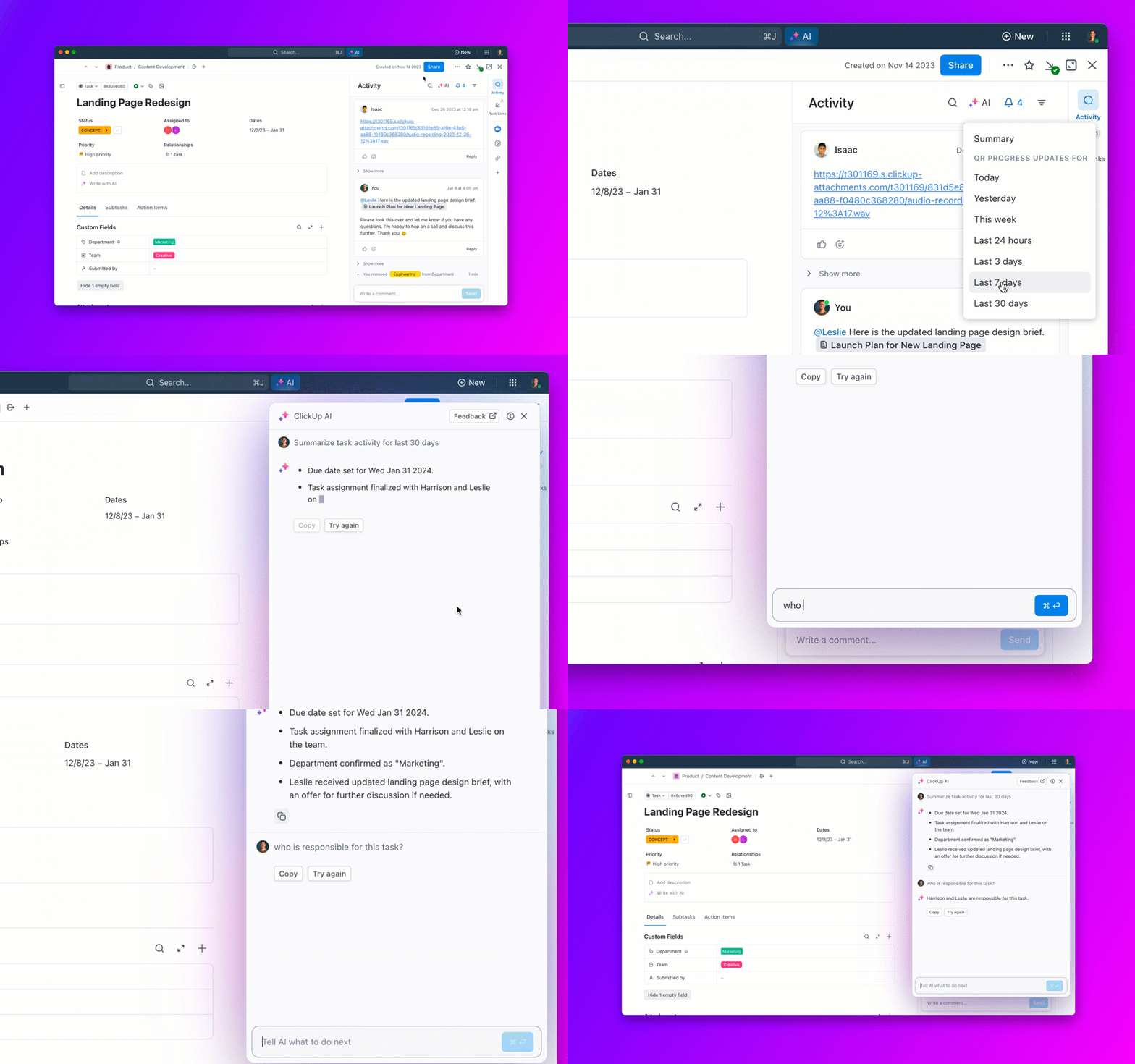
ClickUp Brain, ClickUp’s built-in AI assistant, further streamlines this process by leveraging AI to automatically summarize bug reports, suggest relevant tags or statuses, and recommend next steps based on historical data. With this AI, your team can quickly identify duplicate bugs, get instant answers to common questions, and automate repetitive tasks—saving valuable time and reducing manual effort.
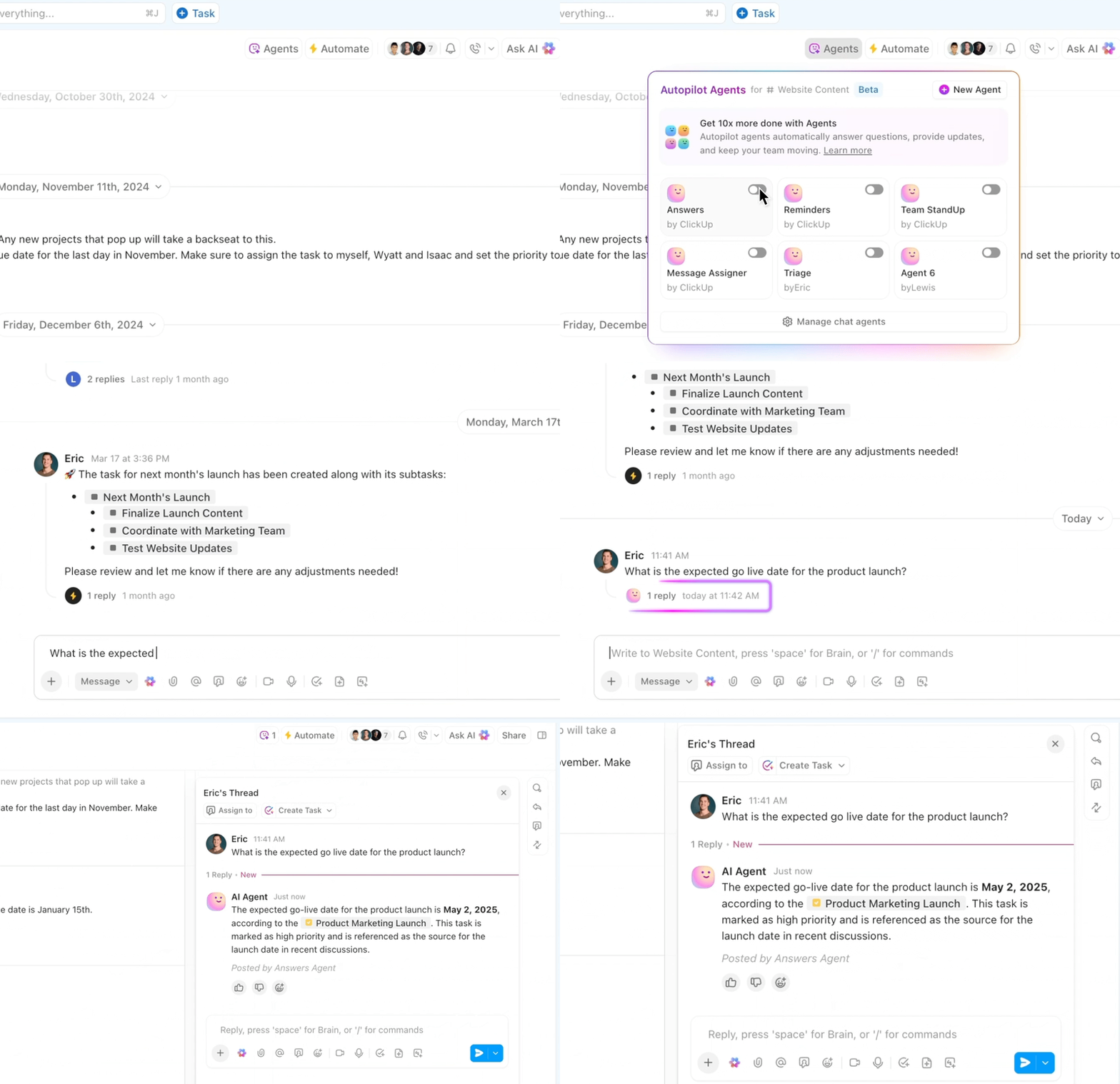
ClickUp also automates software development and bug management tasks through custom workflows using ClickUp Automations and Autopilot Agents.
For example, you can set up an automation so that once a developer marks a bug as ‘Fixed,’ it automatically changes to ‘Awaiting Verification’ and notifies quality assurance (QA) testers. With Autopilot Agents, you can take automation even further by letting AI-powered agents handle routine bug triage, assign tasks based on priority, and ensure nothing falls through the cracks.
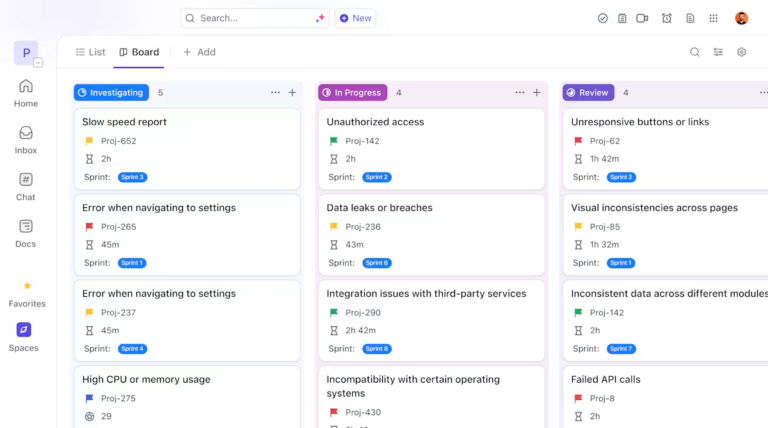
That’s not it! ClickUp also provides bug management templates to make the process smoother. The ClickUp Bug & Issue Tracking Template helps visualize the bug management process and offers a consolidated view of all bugs. You can also monitor the real-time status of each bug report.
A G2 review says:
What I like best about ClickUp is how seamlessly it adapts to our team’s unique workflows. With over 20 team members using it daily — including QA, developers, designers, and leads — it keeps everyone aligned without feeling overwhelming. The flexibility of views (List, Board, Timeline, etc.) lets each person work in the way that suits them best, while still contributing to a unified process. We especially love how tasks, docs, sprints, and goals are all interconnected — it saves us from juggling multiple tools and keeps collaboration transparent and fast.
A Capterra review says:
The complexity and depth of customization can be daunting for new users. I found myself overwhelmed at times and struggling to understand certain layers of views and status effects. However, ClickUp does have its own University with well-made educational content.
💟 Bonus: If you want to truly integrate AI into your internal customer service workflows, there’s Brain MAX! This powerful desktop app unifies AI, search, and automation across all your work apps. Say goodbye to the chaos of disconnected AI tools—this is the new era of Contextual AI.
Jira serves as a centralized solution for agile development, including Scrum and Kanban frameworks. The tool is intuitive and flexible enough to tailor workflows to your needs.
The highlight of Jira is its comprehensive bug and issue-tracking features. It allows you to create tickets, add attachments, and assign issues to specific team members. You can also add people to track the bug’s progress or submit new insights.
A Capterra review says:
Jira’s flexibility and customizable workflows are fantastic for tailoring project management to any team’s needs. Its integration with tools like Confluence and Bitbucket enhances collaboration, and the reporting features provide valuable insights. However, the initial learning curve can be steep, making it overwhelming for new users. Configuring advanced workflows might also be complex.
So far the things that have upset me have been very few, perhaps of the most important is that I would like the on-premises version to be installed on linux servers, that the reports of hours logged by user were more friendly, and that there was a Native mobile app to track tickets when you’re not on the computer.
Bugzilla is open-source, fuss-free bug-tracking software that helps categorize and track bugs based on products and components. Its easy-to-navigate interface allows searching multiple bugs at a time and sends email updates for bug changes.
However, the tool doesn’t help with ticket and task management, customization, or other project management features.
I do like the API for creating custom dashboards to bypass the Bugzilla interface. You can also do a lot of saved searches and reporting based on the data, and it is definitely the right cost! It is also very much a bug tracking system, which it does well.
Since it is an open-source bug-tracking tool, it is not bad at all. While it has a wide range of features for incident tracking, it fails to bend a little bit and be adaptable to user needs.
📖 Read More: Looking for a bug tracker with more features? Here are the Best Bugzilla Alternatives for Bug Tracking
🧠 Bug terminology that’ll make you smile
Check out more at The Computer Dictionary of Information Technology!
YouTrack is mostly project management software that integrates bug-tracking features. It helps you organize projects, manage workflows, track tasks, collaborate with teams, and create basic reports.
When it comes to bug tracking, YouTrack provides an easy ticketing system and dashboard, keeps bugs in one place, and allows you to create bug reports. However, it’s not the best issue-tracking software out there as it offers limited bug-tracking features.
There is a lot to do in YouTrack you literally do all your work task efficient with it. There is a feature in which you can assign a task of a particular project to your employee and as an employee you can track your work done so far.
I really like the ability to freely adapt the layout of the agile boards. Unfortunately, most of the features I used to use are being withdrawn, forcing me to return to Notion.
➡️ Read More: Top YouTrack Alternatives and Competitors to Look for
MantisBT is a configurable and developer-friendly, open-source bug tracking system. You can track issues, customize issue fields, notifications, and workflows. It helps keep your team posted on the latest issue updates.
The best part about MantisBT is its simple and clean UI and intuitive navigation. The tool is quite handy and works well for teams that don’t need many customizations and integrations.
A G2 review says:
MantisBT is very intuitive and straightforward if your team does not have much need for customization or integrations with other software. MantisBT is a solid, reliable database for tracking bugs and issues. However, the interface is dated. Usually, this isn’t an issue, but when you’re working intensively with a specific software, aesthetics are an unexpected yet appreciated aspect. Additionally, my team has found that when needing more flexibility (integrations, workflows, etc.) MantisBT requires much more technical acumen to implement the desired changes.
A Capterra review says:
The web interface was a bit clunky and it could be easy to miss information for new users.
📮ClickUp Insight: The average professional spends 30+ minutes a day searching for work-related information—that’s over 120 hours a year lost to digging through emails, Slack threads, and scattered files.
An intelligent AI assistant embedded in your workspace can change that. Enter ClickUp Brain. It delivers instant insights and answers by surfacing the right documents, conversations, and task details in seconds—so you can stop searching and start working.
💫 Real Results: Teams like QubicaAMF reclaimed 5+ hours weekly using ClickUp—that’s over 250 hours annually per person—by eliminating outdated knowledge management processes. Imagine what your team could create with an extra week of productivity every quarter!
Redmine is a lightweight ticketing system with good adaptability. It is cross-platform and cross-database and offers easy customizations. You can modify its processes and look according to your needs, and write your own integrations via its plugin. Redmine is often compared to tools like Jira.
Though Redmine isn’t the perfect solution for your software development challenges, you can use it to track and manage tasks, bugs, and deliverables. Plus, it helps organize projects, assign tasks, and plan and schedule workload between team members.
A G2 review says:
An open source and customizable, a free and good choice for project management if you are in a start-up company and don’t want to invest a good chunk of money in another software. However, it requires a lot of maintenance, doesn’t have support and it isn’t really useful if your company isn’t on the developer side of things.
A Capterra user says:
It is quite old as technological stack. It requires high knowledge to upgrade and specially to ensure data migration, we had a hard time upgrading and had to move to another tool, keeping it as an archive.
➡️ Read More: Free Issue Tracking & Log Templates in Excel & ClickUp
Kualitee is an agile testing software that allows collaboration and traceability for easy software testing. It gives you real-time QA insights, detailed test execution, summaries, and defect reports. The tool also works great for writing and managing test cases.
Kualitee’s highlight is its comprehensive test management features. You can track and manage defects, run multiple test cycles on the same test case, and create bug reports. It also allows you to create personalized dashboards for admins, testers, and developers.
A G2 review says:
Kualitee has a user-friendly interface for managing test cases, defects, and QA workflows, making it ideal for QA teams. However, it has limited integration options with some development tools; can feel basic for advanced test management needs.
A TrustRadius review says:
One downside is that we cannot change the visualisations of some graphs. I believe that by giving the user more customisation options, such as filtering out on the basis of days and months, the experience could be greatly improved.
📖 Read more: Best Automation QA Testing Software Tools
There are two primary tasks in website development: asking for client feedback and bug tracking. BugHerd combines them. It creates actionable bug reports by including details such as browser, operating system, and exact URL with each feedback pin.
The visual feedback tool streamlines ticketing and lets you share designs and communications with clients, log bugs directly on the website, and speed up your internal QA processes. However, non-tech folks would require training to use the tool properly.
A G2 review says:
BugHerd makes it easy to input a large volume of website edits, and as a project manager, it bridges the gap between client requests and development speak. However, there are several issues with screenshots not being taken when quickly adding mass edits, and often the pin dropped goes to the wrong place when the task is submitted. Additionally, the extension sometimes breaks down, so you have to uninstall and reinstall the program, which is a pain. The tool is fantastic, but some maintenance and bug fixes must occur as we roll out BugHerd to our whole company.
A Capterra review says:
The development team is very slow to update and make changes to BugHerd. BugHerd is lacking bulk select features, and their connections to third party tools with better backend management aren’t up to scratch.
📖 Read More: How to Create the Perfect Bug Report in ClickUp
Zoho BugTracker is a popular bug-tracking tool that records bugs quickly based on severity and due date. It also offers a consolidated view of all bugs in real time for easy management. You can create custom workflows for bug tracking and resolution and link-related bugs.
The tool allows easy collaboration with team members for faster issue resolution, ensuring on-time software deliveries. However, Zoho BugTracker has limited integrations and works best for Zoho Suite users.
A G2 review says:
1. Good interface
2. Customizable I can change severity result status etc.
3. Easy to use, these tools easy to use because of my experience before
No plan for unlimited storage, maybe Zoho can add more storage.
A Capterra review says:
During the initial setup, the data migration process could be smoother. We encountered some challenges that could have been avoided with better migration tools. Additionally, while we managed to onboard ourselves, having access to volunteer support during the onboarding process would have made it much easier and more efficient. Despite these minor setbacks, Zoho Bug Tracker remains an excellent choice for our team.
🧠 Fun Fact: IBM estimates that developers make 100–150 errors per 1,000 lines of code, with about 10% being serious—meaning a 20,000‑line program could contain ~200 significant defects.
Linear’s issue-tracking tool is popular among users for its ease of use, UX, and intuitive UI, making creating, organizing, and tracking tasks in real time easier. With Linear, you can plan sprints, create product roadmaps, streamline issues with templates, and manage projects with minimal effort.
Its auto-closing and auto-archiving features automatically clear the backlogs and reduce clutter.
A G2 review says:
I like that Linear is a powerful project management platform that allows its users to easily organize, track, and collaborate on tasks and projects. The intuitive user interface makes it easy to create tasks, assign them to team members, and see progress updates in real time. However, I don’t like that Linear is limited in terms of customization options. You can’t customize the look and feel of the interface beyond basic settings, and there aren’t any advanced features that allow you to tailor the system to your specific needs.
A Capterra review says:
I sometimes wish I could order by different criteria, like latest added, due date, etc. But overall, it doesn’t impact productivity.
➡️ Read More: Top Performance Testing Tools to Optimize Your Systems
Still not sure? We’ve answered some of the commonly asked questions for you here!
| Common questions | Our recommendations |
| ❗️What are the best bug tracking tools for software development teams? | Top choices include ClickUp, Jira, YouTrack, Bugzilla, and Linear. These tools offer robust workflows, integrations, and reporting features tailored for software development teams. |
| ❗️How does Jira compare to GitHub Issues and Bugzilla? | Jira is highly customizable and ideal for agile teams; GitHub Issues is best for teams already using GitHub and wanting simple, code-centric tracking; Bugzilla is open-source, powerful, and great for teams needing advanced search and self-hosting. |
| ❗️Are there free and open-source bug tracking software options? | Yes, Bugzilla, MantisBT, and Redmine are leading free and open-source bug trackers, offering core features without licensing fees. |
| ❗️Which bug tracking software is best for small teams? | YouTrack (free for up to 10 users), Linear, and Zoho BugTracker offer affordable plans and user-friendly interfaces ideal for small teams. |
| ❗️What is the best bug tracking software for agile development? | Jira, ClickUp, and YouTrack are excellent for agile teams, providing agile boards, sprint planning, backlog management, and customizable workflows. |
| ❗️What are the top-rated bug tracking software tools on Capterra? | ClickUp, Jira, and Linear all offer native Slack integrations for real-time notifications and seamless team communication. |
| ❗️What are the top-rated bug tracking software tools on Capterra? | ClickUp (4.6/5), Jira (4.5/5), BugHerd (4.7/5), Zoho BugTracker (4.7/5), and Kualitee (4.3/5) are among the highest rated on Capterra. |
| ❗️How do bug tracking tools compare based on reporting features? | Jira and ClickUp provide advanced, customizable reporting and dashboards; Bugzilla and Redmine offer basic reporting; Linear and YouTrack feature visual reports and analytics. |
| ❗️What is the best bug tracking software for remote teams? | ClickUp, Jira, and BugHerd are well-suited for remote teams, offering cloud access, real-time updates, and integrations that support distributed collaboration. |
Bug tracking tools save you from increasing development costs, software quality issues, and negative client feedback. Without them, you risk losing your brand reputation.
While we’ve listed some great bug-tracking tools, ClickUp stands out as the most advanced yet user-friendly bug tracker.
From key project management and bug tracking tool features, ClickUp has everything to help teams work together and ensure agile software development.
Sign up to ClickUp for free and bat away the bugs to offer customers the best-quality software!

© 2026 ClickUp

There’s an easier way. Try a free AI Agent in ClickUp that actually does the work for you—set up in minutes, save hours every week.