Still downloading templates?
There’s an easier way. Try a free AI Agent in ClickUp that actually does the work for you—set up in minutes, save hours every week.
Sorry, there were no results found for “”
👀 Did You Know? Student AI usage has skyrocketed to 92%, up from 66% only a year prior.
But as AI becomes the norm, the bar for quality has risen. It’s no longer enough to generate a quick draft. You now need to produce work that is accurately cited and connects ideas well.
Olovka AI is a popular entry point for quick essays. However, it often hits a ceiling when the work demands academic depth. For researchers and students, a generic “essay bot” can be a risk. You don’t want to miss nuances or quote from unverified sources.
This guide looks at the best Olovka AI alternatives for the 2026 school year.
Here’s a quick side-by-side look at the top Olovka AI alternatives, who they’re best for, standout features, and pricing.
| Tool | Best for | Best features | Pricing* |
|---|---|---|---|
| ClickUp | AI-powered writing that stays connected to tasks, docs, and deadlines | ClickUp Brain, Brain MAX, Docs, AI Notetaker, Super Agents, Automations, Clips, Notepad, Reminders | Free Forever; Customization available for enterprises |
| Notion AI | AI writing inside a flexible knowledge base for notes and research | Workspace-wide Q&A, inline rewrite/summarize, database autofill | Free plan available; Paid plans from $12/month |
| The Good AI | Structured academic essay generation with fast outlines and citations | Essay outline-to-draft flow, academic tone, citation formatting | Free plan available; Paid plans from $5/month |
| EduWriter AI | Citation-heavy academic papers with plagiarism support | Multi-style auto-citations, plagiarism detection, formatted paper exports | Free plan available; Paid plans from $19/month |
| Samwell.ai | Research-backed academic writing with source support | Academic source search, guided essay workflow, citation style switcher | Free plan available; Paid plans from $15.32/month |
| Writeless | Quick long-form essay drafts from minimal input | Long-form drafts, topic suggestions, adjustable writing complexity | Free plan available; Paid plans from $24.99/month |
| MyEssayWriter AI | Creating essay outlines and longer drafts with basic revision help | Outline builder, extended essay generation, revision suggestions | Paid plans from $7.99/month |
| QuillBot AI | Paraphrasing, grammar fixes, and quick rewrites | Paraphrasing modes, grammar checker, summarizer + citation generator | Free plan available; Paid plans from $4.17/month |
| EssayFlow AI | Human-like academic writing with detection + citation tooling | AI detection check, citation support, plagiarism tools, multilingual writing | Paid plans from $27.98/month |
| Grammarly | Real-time grammar and tone correction across apps | Browser + app integrations, tone detection, clarity suggestions | Free plan available; Paid plans from $30/month |
Our editorial team follows a transparent, research-backed, and vendor-neutral process, so you can trust that our recommendations are based on real product value.
Here’s a detailed rundown of how we review software at ClickUp.

Olovka AI is an AI writing assistant built for academic and essay writing. It’s great at generating structured essays and handling citations. But what happens when your writing tasks go beyond the classroom?
Many teams juggle a wide range of writing tasks every day—from client emails and project reports to internal documentation and marketing copy. Using a single-purpose essay tool for these jobs creates friction.
The constant need to switch between your AI writer and your actual workspace creates context sprawl. It also drives teams to look for better options. In fact, only 23% of employees are completely satisfied with their work applications, due to this fragmentation.
Here are the key reasons teams look for Olovka AI alternatives:
👀 This video will give you some helpful tips on how to shortlist and find the best AI writing tool for your needs!
👀 Did You Know? The word “essay” comes from the French verb “essayer,” which literally means “to try” or “to attempt.” Michel de Montaigne coined the term in the 1500s because he saw his writings as “attempts” to put his thoughts into order.
Each of the tools below brings something different to the table—more customization, stronger research integration, or support for a wider range of writing tasks.
Starting with the best one:
Olovka AI is built to help students write essays faster. But once your work grows beyond a single draft, you start needing more than an AI writer. You need your notes, research, writing, and deadlines to stay connected.
That’s where ClickUp, the world’s first converged AI workspace, pulls ahead.
To begin with, you have ClickUp Brain, the most contextual AI, solving the age-old problems of hallucination and broken work.

You can use it to:
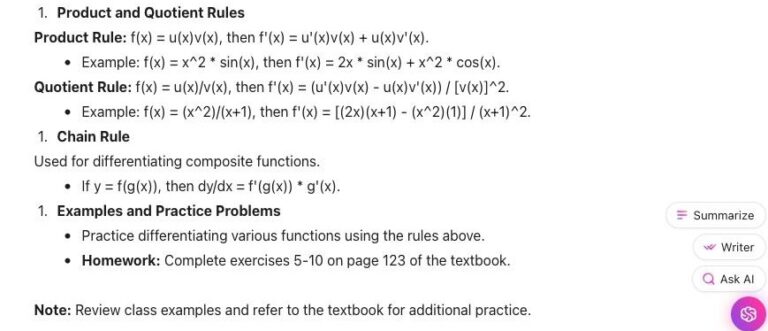
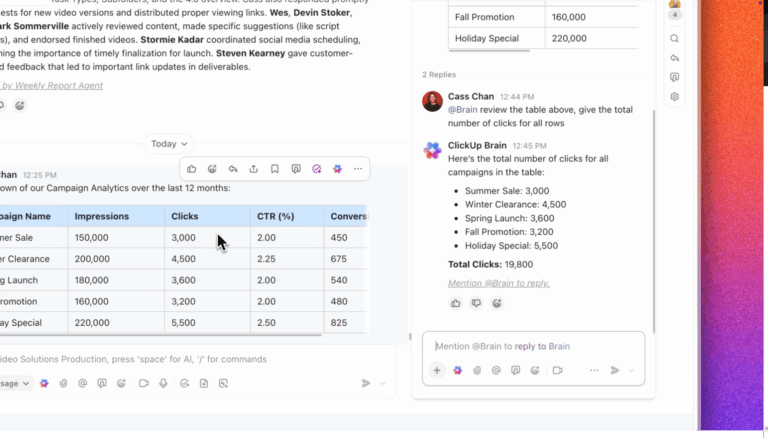
Brain can also generate copy from a prompt directly in ClickUp Docs or other text fields. It also works on selected text in Docs. That means, when a paragraph feels off, you can rework it without copying everything into another tool.

Moreover, with ClickUp Docs, you can draft and store papers, class notes, and study material in a collaborative editor. Once done, just format them with headings, highlights, pull quotes, code blocks, buttons, dividers, and more.
Docs also support embeds and live collaboration, so you can easily juggle solo writing, shared notes, and project-based coursework.

In Docs and other text areas, /AI slash commands bring up AI writing help right where you’re working. It helps brainstorm, draft, or rewrite without interrupting your flow.
For lectures and live classes, ClickUp AI Notetaker picks up where most AI writers stop. It can automatically join and record meetings on Zoom, Microsoft Teams, and Google Meet.
Afterward, ClickUp gives you an overview, key takeaways, next steps, key topics, attendee list, and a full transcript. All of it in a Doc you get tagged in.
All these are stored in the Docs Hub, and you can even ask AI questions about them afterward. No more rewatching long lectures or digging through timestamps.

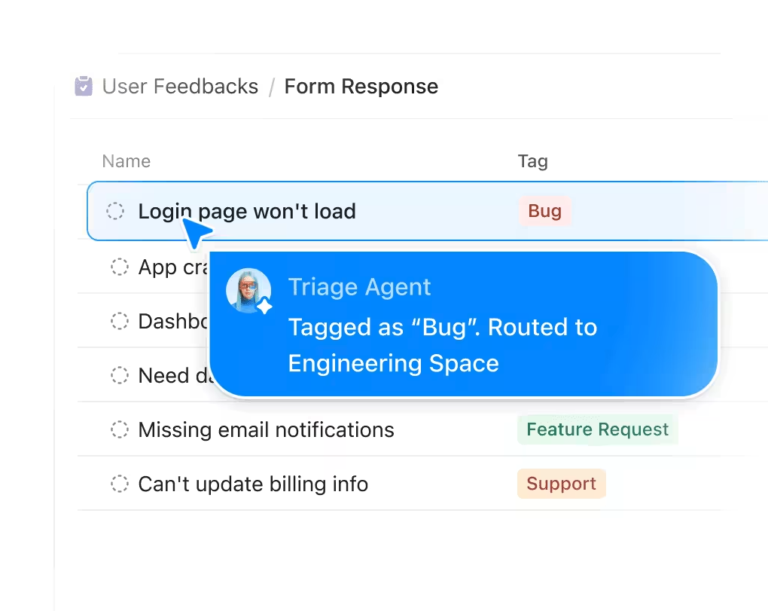
ClickUp Super Agents take things up another notch. They are autonomous agents that you can configure to handle core jobs using workspace context. They can handle tasks, update priorities, craft content, and manage workflows automatically, while you have the final say.
For instance, you can use:
Pros:
Cons:
A G2 user says:
ClickUp has made me a much organised person when it comes to my workspace as a student, along with day-to-day reminders for my other hobbies. It also allows in-depth customisation using templates to make the space more personal.
📮 ClickUp Insight: Procrastinating feels heavy. In fact, nearly half of those who took our survey feel guilty when they aren’t working.
But often, the problem isn’t you—it’s your setup. If your notes are a mess or you don’t know what to do next, it is hard to start.
ClickUp Brain MAX helps you take that first easy step. Just ask it, “What should I work on today?” or “What is stopping me?” It looks at your tasks and gives you a clear answer right away.
Plus, Talk-to-Text helps you think out loud. You don’t have to type the perfect prompt or text three different friends. Just speak your mind and get to work without the stress.

Notion AI is an assistant built directly into the Notion workspace. It is useful for students and researchers who store large volumes of notes, PDFs, and lecture transcripts in a single location. Unlike standalone chat tools, it uses specific data inside your private pages to answer questions or organize your files.
The tool uses a “workspace-wide” search logic. Say you ask the AI to find a specific theory buried in a semester’s worth of notes. The assistant scans your whole database to pull the exact answer with links to the source.
It can also transform a messy list of bullet points into a structured table. You’ll also find data like “Date” or “Key Concept” filled automatically based on the page content.
Pros:
Cons:
What are real-life users saying about Notion AI?
A G2 user says:
I love the block system, the ability to turn a simple note into a complex relational database. I love the AI-powered thread summaries, Slack Huddles, the Workflow Builder, the new Lists and Canvas features.
📚 Read More: Best AI Tools for Students

The Good AI is a writing assistant tailored for student essays. It helps those who struggle with the “blank page” problem.
You can use this tool to produce fully referenced drafts in minutes. Unlike generic chatbots, it maintains an academic tone and proper citations from the initial prompt onward.
Type in your essay prompt and choose how long you want the paper to be. The AI creates a full outline for you—think introduction, body, and a conclusion.
Once you have the draft, highlight any sentence to have the AI write the next part for you. You can also use the built-in tools to fix grammar and check for AI. This helps you polish your work before you turn it in.
Pros:
Cons:
💟 Regardless of what you’re creating—essays, research papers, or any content—ClickUp Super Agents make life easier. Here’s how we use them at ClickUp to run our entire content process. If it works for us, it works for you, too:

EduWriter AI is an AI assistant for students and researchers on deadlines. It produces fully formatted academic papers in under 20 seconds.
Unlike general AI, this tool is built for school rules. It includes an essay grader and a tool that builds citations in the correct APA 7th style.
To start, just type your topic. Then, pick your level, from high school to PhD. The tool will build a clear draft with an intro, a thesis statement, and a closing summary.
You can download the content as a Word file. It’ll already have a title page, a reference list, and the right spacing. Plus, all sources used are linked to your text.
Pros:
Cons:
A Capterra user says:
My overall experience with EduWriter.ai has been positive. It is easy to use, saves a lot of time, and produces well-structured academic content. While occasional edits are still needed, it is a reliable tool that supports productivity and meets most writing needs effectively.

Finding credible sources for a research paper can take hours of manual search. This is too inefficient, and makes it hard to build a strong argument based on evidence.
Samwell.ai is an AI research assistant that helps with this. It looks for academic sources to add to your writing. It can find sources, summarize what they say, and put citations right into your draft.
The tool uses a large group of over 20 academic libraries. This ensures your references are real and peer-reviewed. And once the draft is ready, use the “Power Editor” to insert custom tables, charts, and video references.
Pros:
Cons:
A Reddit user says:
Personally, I’ve found it to be super useful when it comes to writing scientific research papers.
🧠 Fun Fact: History’s first AI Teaching Assistant, Jill Watson, was good at her job. So good, that her students at Georgia Tech had no idea she wasn’t human. For months in 2016, she managed forum posts and handled student inquiries perfectly. The big “reveal” only happened at the end of the semester. It’s a classic example of how powerful AI can be when it’s fed the right “context.”

Sometimes, the hardest part of writing is just getting started. Writer’s block can leave you staring at a blank page with no ideas. This is stressful when you’re on a tight deadline.
Writeless focuses on speed, drafting essays quickly with minimal user input. It is built for students who need a quick start and plan to finish the work themselves. Just enter a topic and get a draft in seconds, no complex settings to manage.
Pros:
Cons:
🎥 You’re already using AI for your essays and other content. But it goes beyond that. Today, you can use AI to actually learn. Watch this video to discover the smartest ways students can use AI for real learning:

MyEssayWriter AI helps high school and college students who don’t know how to start. It is not a complex research tool. Instead, it is simple to use and builds a clear draft fast.
To start, just type your topic. Then, pick a style, like an “argumentative” or “descriptive” essay. The AI creates a thesis statement and a full outline. You can then use the “Humanizer” tool to match the output to your writing style.
Pros:
Cons:
A G2 user says:
Its search and citation feature saves a lot of time, and the AI delivers well-structured, natural-sounding text that feels like my own work.

You’ve finished your first draft, but it feels messy. You’re worried it has errors, or the tone isn’t quite right. Truly, polishing a draft can be just as hard as writing it.
QuillBot helps you rewrite your draft to fix grammar and improve clarity. The paraphraser offers multiple modes, such as “fluency” or “formal”. This lets you adjust the tone and style as needed.
Pros:
Cons:
What are real-life users saying about QuillBot AI?
A G2 user says:
This is a great piece of easy-to-use software that is full of features like paraphrasing and an AI checker. The app extensions and integration are also useful, and there are premium options. Virtually no training is needed.
💡 Pro Tip: ClickUp’s dedicated AI agent team handles your entire content pipeline—from drafting outlines to polishing final work. Whether you need a simple tone fix or end-to-end writing support, there’s an agent to help.


Students often worry that AI writing will sound robotic or get flagged by AI detection tools. This fear can make it hard to use AI, even when you really need help to get started.
EssayFlow AI focuses on content that reads naturally and passes AI detection. This helps students worried about their work being flagged as AI-generated content. The tool aims to blend human-like writing with the speed of AI.
Pros:
Cons:

Writing across different platforms—email, social media, documents—can be a challenge. It’s easy for small grammar mistakes or an inconsistent tone to slip through, undermining your professionalism.
Grammarly is a widely used writing assistant that provides real-time grammar, spelling, and punctuation correction wherever you type. Its strength is its ubiquity. In short, the browser extension and integrations ensure consistent support across all your apps. Its tone detection feature also helps you adjust your writing for different contexts, from casual to formal.
Pros:
Cons:
A G2 user says:
Grammarly is very easy to use and integrates seamlessly with the browsers and tools I use daily. It provides real-time suggestions for grammar, clarity, and tone, which helps me write more professionally and confidently. The interface is clean, and implementation requires minimal setup. I especially like the tone detection and rephrasing suggestions, which improve communication quality significantly.
Finding a great alternative to Olovka AI isn’t just about finding a better text generator. It’s more about finding a better way to work.
AI is powerful when it has the full picture of your work. With a converged workspace like ClickUp, you have that. Because your AI lives where your research and tasks are, it can write better. It keeps your work more relevant to your goals.
Stop writing in a vacuum. Start using a system that gets your whole story.
Start for free with ClickUp ✨ and turn your ideas into results.
Yes, some AI writing tools work directly inside project management platforms. For example, you can get AI writing help right where you work with your team. ClickUp Brain works everywhere inside your ClickUp Workspace. It is linked to ClickUp Tasks, Docs, and ClickUp Chat, so writing and execution stay connected.
Choose tools that have clear privacy rules. Look for top security badges like SOC 2 or ISO. It is also important to see how the AI is trained. Tools built into big platforms like ClickUp are safer than small, solo apps. ClickUp uses high-level security to keep your work safe and private.
Teams can use AI to draft status updates, summarize meeting notes, adjust tone, and keep documents consistent. The best way to use AI is to put it right into the work you already do. You should not have to add a new tool just to manage your writing.
© 2026 ClickUp
There’s an easier way. Try a free AI Agent in ClickUp that actually does the work for you—set up in minutes, save hours every week.