10 Best Fyntrix AI Alternatives in 2026

Fyntrix AI alternatives

Start using ClickUp today

  • Manage all your work in one place
  • Collaborate with your team
  • Use ClickUp for FREE—forever

Most teams move on from Fyntrix AI for the same reason: it makes email faster without fixing the disconnected systems that create email overload in the first place.

This guide breaks down 10 Fyntrix AI alternatives, from faster inbox clients to converged workspaces that reduce the need to treat email as your central hub.

Let’s dive in! 🚀

Summarize this article with AI ClickUp Brain not only saves you precious time by instantly summarizing articles, it also leverages AI to connect your tasks, docs, people, and more, streamlining your workflow like never before.
ClickUp Brain
Avatar of person using AI Summarize this article for me please

Fyntrix AI Alternatives at a Glance

Here’s a quick look at what the strongest Fyntrix AI alternatives do best. 👀

ToolBest forBest featuresPricing*
ClickUpAI-powered work management for teams that need email, tasks, docs, and communication unified in one contextual workspaceClickUp Brain for context-aware AI across tasks, docs, and chats, Super Agents for no-code workflow execution with AI teammates, unified Inbox for prioritizing notifications and converting them into tasksFree forever; customizations available for enterprises
NotionKnowledge workers and teams needing AI-assisted documentation, wikis, and lightweight project trackingNotion AI for writing, summarizing, and extracting action items, Notion Calendar integration for scheduling, and Notion Mail for email in the workspaceFree; Starts at $12/month per user
MotionProfessionals and small teams wanting AI-driven scheduling and automatic calendar planningIntelligent auto-scheduling based on priorities and deadlines, dynamic rescheduling when plans change, and focus-oriented time blocking to reduce distractionsFree trial; Starts at $29/month per user
SuperhumanPower users focused on high-speed email workflows and keyboard-driven productivityAI-assisted email drafting and summarization, keyboard-first navigation for rapid inbox management, Split Inbox for prioritizationStarts at $30/month
ShortwaveGmail users seeking AI-native inbox organization and semantic searchAI-powered natural language email search, automatic bundling of low-priority emails, instant reply suggestionsFree; Starts at $18/month per user
MissiveTeams requiring shared inbox collaboration and real-time communication around emailsShared drafts for collaborative email writing, internal team chat alongside email threads, assignment and routing rules for conversationsFree trial; Starts at $18/month per user
SpikeIndividuals and small teams preferring a chat-style email interface with built-in productivity toolsConversational email interface that removes clutter, Magic Message AI for drafting replies, Priority Inbox for filtering important messagesFree; Starts at $8/month per user
Fyxer AIIndividuals looking for automated email drafting, inbox prioritization, and AI-assisted meeting preparationAI-generated replies tailored to user writing style, automatic inbox categorization by priority, meeting brief generation summarizing relevant conversationsFree trial; Starts at $30/month
SaneBoxProfessionals overwhelmed by email volume who need intelligent filtering and prioritizationSaneLater folder for separating non-urgent emails, Do Not Disturb mode for focused work periods, follow-up reminders for unanswered emailsFree trial; Starts at $3.49/month
Clean EmailUsers focused on bulk inbox cleanup and long-term email organizationSmart Views for grouping similar emails, Unsubscriber tool for managing subscriptions, Auto Clean rules for ongoing inbox maintenanceFree trial; Starts at $9.99/month
*Please check the tool’s website for the latest pricing.

How we review software at ClickUp

Our editorial team follows a transparent, research-backed, and vendor-neutral process, so you can trust that our recommendations are based on real product value.

Here’s a detailed rundown of how we review software at ClickUp.

Summarize this article with AI ClickUp Brain not only saves you precious time by instantly summarizing articles, it also leverages AI to connect your tasks, docs, people, and more, streamlining your workflow like never before.
ClickUp Brain
Avatar of person using AI Summarize this article for me please

Why Look for Fyntrix AI Alternatives

You may be looking for an alternative if you’re running into problems like these:

  • Limited AI scope: Fyntrix AI only sees your inbox, so it cannot answer questions about project status or summarize work happening outside email
  • No team visibility: Fyntrix AI is built for individuals, leaving teams in the dark about who is handling which client request or sales lead
  • Broken workflows: Email requests still have to be turned into tasks manually, which creates gaps where work can get lost

The alternatives below solve these issues in different ways. Some are hyper-focused on making email better, while others, like ClickUp, aim to eliminate the tool sprawl that makes email a problem in the first place.

Summarize this article with AI ClickUp Brain not only saves you precious time by instantly summarizing articles, it also leverages AI to connect your tasks, docs, people, and more, streamlining your workflow like never before.
ClickUp Brain
Avatar of person using AI Summarize this article for me please

The Best Fyntrix AI Alternatives to Use

These are our top picks for the best Fyntrix AI alternatives. 👇

1. ClickUp (Best for teams wanting AI-powered work management beyond email)

ClickUp Brain: Best Fyntrix AI alternatives
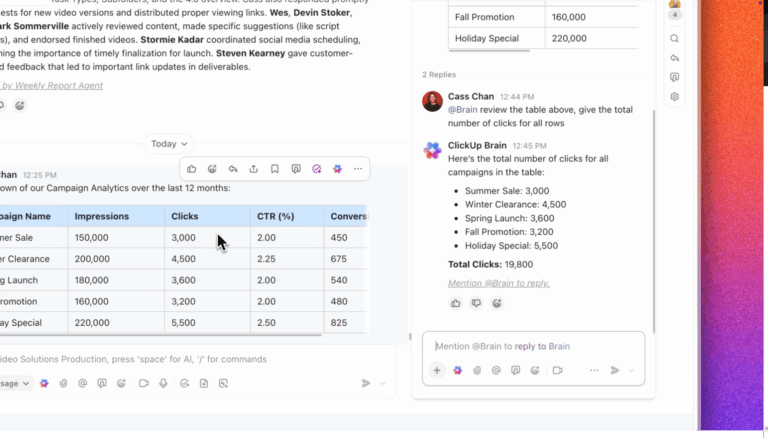
Generate context-aware answers using ClickUp Brain

Fyntrix AI helps you move faster inside email. ClickUp takes a different approach: it helps reduce how much work has to run through email in the first place.

That distinction matters. For many teams, email overload is not really an email problem. It is a symptom of disconnected work. Requests live in inboxes, updates live in chat, decisions live in docs, and action items get copied manually into a separate project tool. By the time you respond to the email, you are already piecing context together from three or four places.

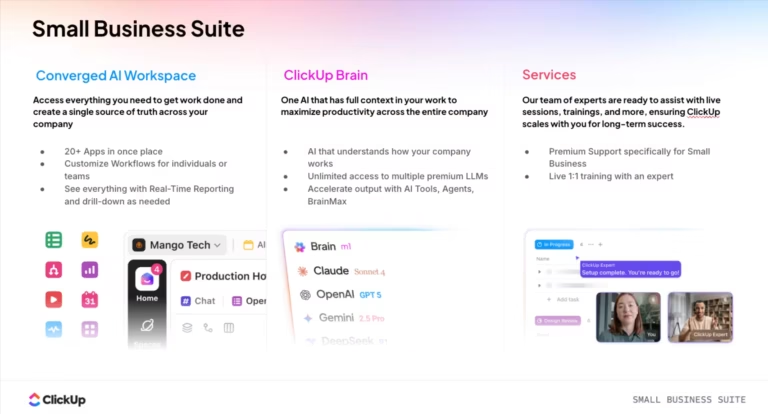
ClickUp is a Converged AI Workspace built to solve that. It combines tasks, docs, chat, automations, and AI in one system, so teams can manage work where it actually happens instead of treating email as the center of everything. That makes it a much stronger Fyntrix AI alternative for teams that need visibility, coordination, and follow-through, not just faster replies.

ClickUp brings different elements of your workspace in one view

Instead of only helping you draft emails, ClickUp helps you turn incoming work into tracked execution. A request can become a task, a discussion can stay attached to the project it belongs to, and AI can pull context from across your workspace instead of only from your inbox. For teams trying to reduce tool-switching and stop losing work between systems, that is a much bigger improvement than a smarter email assistant.

📌 Try this prompt: Create a concise client update based on this task. Include progress made, current status, and any dependencies or delays in simple language.

ClickUp Brain MAX Talk to Text for voice-first productivity
Convert speech into structured work using Talk to Text in ClickUp Brain MAX

ClickUp best features

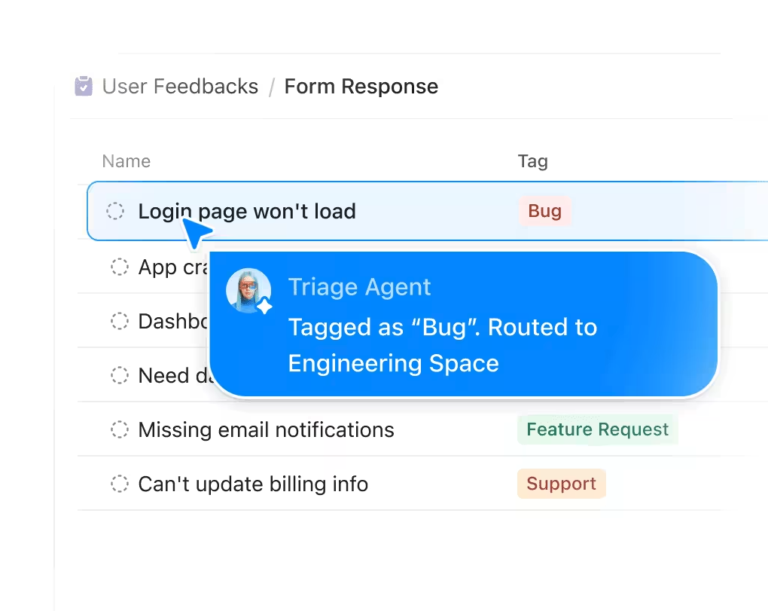
  • Workflow automation and AI agents: Use ClickUp Automations and Super Agents to route work, trigger next steps, and reduce repetitive coordination
  • Context-aware AI with ClickUp Brain: Ask questions, draft updates, summarize work, and generate content using context from your tasks, docs, and conversations
  • Connected work management: Bring tasks, docs, chat, and notifications into one workspace so requests do not get lost between tools

ClickUp pros and cons

Pros

  • Solves the bigger workflow problem: ClickUp reduces email overload by connecting tasks, docs, communication, and AI in one workspace instead of treating email as a separate layer
  • Improves team visibility: Teams can see who owns what, what is blocked, and what needs to happen next without digging through inboxes or switching tools
  • Reduces tool sprawl: By combining work management, communication, and automation in one place, ClickUp cuts down on the back-and-forth between disconnected apps

Cons

  • Not a dedicated email client: ClickUp supports email inside workflows, but it is not designed to replace a standalone inbox tool for people who want a pure email-first experience
  • Can feel broader than needed: Solo users or teams looking only for lightweight inbox help may find ClickUp more expansive than what they need for day-one use

ClickUp pricing

free forever
Free Free
Key Features:
60MB Storage
Unlimited Tasks
Unlimited Free Plan Members
unlimited
$7 $10
per user per month
Everything in Free Forever, plus:
Unlimited Storage
ClickUp Chat
Native Time Tracking
business
$12 $19
per user per month
Everything in Unlimited, plus:
Google SSO
Custom Exporting
5K Monthly Automations
enterprise
Get a Custom Demo
Everything in Business, plus:
White Labeling
Live Onboarding Training
250K Monthly Automations
* Prices when billed annually
The world's most complete work AI, starting at $9 per month
ClickUp Brain is a no Brainer. One AI to manage your work, at a fraction of the cost.
Try for free

ClickUp ratings and reviews

  • G2: 4.7/5 (11,480+ reviews)
  • Capterra: 4.6/5 (4,565+ reviews)

What are real-life users saying about ClickUp?

A satisfied ClickUp user shares:

I really like how ClickUp saves me countless hours with its automations and how it makes my reservation process seamless. The automations are invaluable to me, and I love the SuperAgent capabilities I recently discovered. The SuperAgents and Automations handle the minutia for me, letting me focus on more important tasks. […] Another wonderful feature is the Google Mail connection that lets me send emails via Automations or through ClickUp, eliminating the need to keep hundreds of emails open.

G2 review

2. Notion (Best for knowledge workers who need docs, wikis, and light task management with AI)

Notion: Fyntrix AI alternatives for knowledge workers
via Notion

Notion is a connected workspace built around documentation, knowledge management, and lightweight project organization. It works especially well as a central hub for wikis, notes, and relational databases.

Its AI is built into every page, allowing you to summarize long documents, pull action items from meeting notes, or generate first drafts of project briefs. The platform has also expanded to include Notion Calendar and Notion Mail to bring scheduling and email into the same environment.

Notion best features

  • Notion AI: The integrated AI assistant helps you write, edit, and summarize content directly within your documents and databases
  • Relational databases: You can create powerful databases to track projects, tasks, or contacts and link them together to build custom systems
  • Connected calendar and mail: Notion Calendar syncs with Google Calendar, and Notion Mail brings email into your workspace, though it’s a newer feature

Notion pros and cons

Pros:

  • Highly flexible: You can build almost any kind of workflow or documentation system you need
  • Excellent for knowledge management: It excels at creating and organizing long-form content like team wikis and project plans

Cons:

  • Can be slow: Workspaces with thousands of pages or complex databases can experience performance issues
  • Steep learning curve: Building advanced setups requires a significant time investment

Notion pricing

  • Free
  • Plus: $12/month per user
  • Business: $24/month per user
  • Enterprise: Custom pricing

Notion ratings and reviews

  • G2: 4.6/5 (10,215+ reviews)
  • Capterra: 4.7/5 (2,685+ reviews)

What are real-life users saying about Notion?

A Redditor says:

I only did the trial really. It was fine for rewording something, and I really liked it for building databases especially with relations and formulas. So much faster than me trying to get the syntax right. I didn’t find it overly impressive for long form stuff, I’ll stick [sic] the main ones for that

Reddit user

3. Motion (Best for professionals who want AI to auto-schedule tasks and meetings)

Motion scheduling tool with AI
via Motion

Motion is an AI-powered scheduling tool that tackles a different part of the problem: time, not email. Instead of just helping you write emails, it automatically schedules your tasks and meetings onto your calendar. You provide the tasks and deadlines; Motion builds a realistic plan for your day.

When your schedule changes, the AI automatically reorganizes your tasks to fit. This dynamic scheduling prevents the overcommitment that leads to burnout and missed deadlines.

Motion best features

  • Intelligent auto-scheduling: Motion finds the best time to work on your tasks based on priority, deadlines, and your existing meetings
  • Automatic rescheduling: If a meeting gets booked or a task takes longer than expected, Motion adjusts your calendar on the fly
  • Meeting scheduler: It includes booking links to share your availability, reducing the back-and-forth emails typically required to find a time to meet

Motion pros and cons

Pros:

  • Reduces decision fatigue: You don’t have to spend mental energy deciding what to work on next
  • Creates a realistic schedule: It prevents you from overbooking yourself by only scheduling what you have time for
  • Enforces focus: It helps protect you from distractions by time blocking tasks

Cons:

  • Doesn’t manage email: It’s a time management tool, not an email assistant. You’ll need another tool for inbox-related AI features
  • Requires trust in the AI: Some users feel uncomfortable letting an algorithm control their schedule
  • Limited team features: It’s primarily for individual use and lacks robust collaboration capabilities

Motion pricing

  • Free trial

For individuals

  • Pro AI: $49/month
  • Business AI: $69/month

For teams

  • Pro AI: $29/month per user
  • Business AI: $49/month per user

Motion ratings and reviews

  • G2: 4.1/5 (155+ reviews)
  • Capterra: 4.3/5 (85+ reviews)

What are real-life users saying about Motion?

As shared on G2:

I like using Motion’s AI feature to ask questions about how I’m spending my time and if there’s a better way I could operationalize things. It’s really helpful in identifying if I’ve missed something. I also like the feature that allows me to send tasks directly from my email. The AI agenda is something I use daily as it organizes my tasks into what I need to prioritize, helping me to manage everything effectively.

G2 review

4. Superhuman (Best for power users focused on email speed and keyboard-driven workflows)

Superhuman is built for speed and is still one of the most email-focused options on this list. It achieves this through a keyboard-first design, where nearly every action has a shortcut. Power users can fly through their inbox without ever touching the mouse.

Its AI is seamlessly integrated to help you draft replies, summarize threads, and adjust tone on the fly. What’s more, the Split Inbox also automatically sorts emails, so you only see what’s important.

Superhuman best features

  • Superhuman AI: An integrated AI assistant for drafting, rewriting, and summarizing emails
  • Keyboard-first design: Allows you to manage your inbox at high speed using shortcuts for every action
  • Read statuses: Shows you when your emails have been opened, which is useful for sales and follow-ups

Superhuman pros and cons

Pros:

  • Extremely fast: Users consistently report that it’s the fastest email client they’ve ever used
  • Seamless AI integration: The AI features are built directly into the compose window, making them easy to use
  • Opinionated workflow: The design guides you toward inbox zero, which helps build good email habits

Cons:

  • Email only: It doesn’t manage tasks, projects, or other types of work
  • Limited provider support: Only works with Gmail and Outlook accounts
  • No team features: It’s an individual tool without shared inboxes or team collaboration

Superhuman pricing

  • Starter: $30/month
  • Business: $40/month
  • Enterprise: Custom pricing

Superhuman ratings and reviews

  • G2: 4.7/5 (1,195+ reviews)
  • Capterra: 4.8/5 (20+ reviews)

What are real-life users saying about Superhuman?

Per a G2 review:

I like the split inbox feature and the automated and scheduled follow up features. Using the various keyboard shortcuts is very helpful and time saving. I also find the search feature more powerful than other email platforms I use, which is a blessing!

G2 review

5. Shortwave (Best for Gmail users seeking AI-native inbox management)

Shortwave is an AI-powered email client designed to make Gmail feel cleaner, faster, and easier to search. Its standout feature is a natural language search that lets you ask questions about your inbox. For example, you can ask, “What did my boss say about the Q3 budget last year?” and the AI will find the relevant emails.

In addition to search, Shortwave automatically bundles related emails (like newsletters and notifications) to keep your inbox clean. It also offers AI reply suggestions and summarization, making it a modern Fyntrix alternative for anyone deep in the Google ecosystem.

Shortwave best features

  • Automatic bundling: It groups non-urgent emails together to keep your primary inbox focused
  • Instant reply suggestions: You can choose from quick reply options based on the content of the email
  • Modern interface: It offers a cleaner and faster experience than the standard Gmail web app

Shortwave pros and cons

Pros:

  • Powerful semantic search: The ability to find old emails by describing them is a huge time-saver
  • Enhances Gmail: It works on top of your existing Gmail account, so there’s no need to migrate
  • Good balance of features: It adds useful AI without making the interface feel cluttered

Cons:

  • Gmail only: It doesn’t support Outlook or other email providers
  • No project management features: It’s strictly an email tool
  • Bundling can be imperfect: Some users report that the AI occasionally miscategorizes emails

Shortwave pricing

Individual

  • Free
  • Pro: $18/month per user

Business

  • 14-day free trial
  • Business: $30/month per user
  • Premier: $45/month per user
  • Max: $120/month per user
  • Enterprise: Custom pricing

Shortwave ratings and reviews

  • G2: 4.4/5 (65+ reviews)
  • Capterra: Not enough reviews

What are real-life users saying about Shortwave?

Someone on G2 shares:

Shortwave helps in managing emails with feaures [sic] like customization, prioritization and data security. It’s user-friendly interface led to use it daily and even switch from Gmail. The Pinning feature is exceptionally great making important mails easily accessible.

G2 review

📮 ClickUp Insight: 1 in 5 professionals spends 3+ hours daily just looking for files, messages, or additional context on their tasks. That’s nearly 40% of a full workweek wasted on something that should only take seconds!

ClickUp’s Connected Search unifies all your work—across tasks, docs, emails, and chats—so you can find exactly what you need when you need it without jumping between tools.

6. Missive (Best for teams needing shared inboxes with real-time collaboration)

Missive team email client with AI
via Missive

Missive is a team email client that provides visibility and collaboration features for shared inboxes. You can assign conversations to specific team members, so everyone knows who is responsible for what.

The platform also allows you to chat with teammates right next to an email thread, which keeps conversations about a customer or issue in one place. You can even collaborate on writing an email in real-time with shared drafts.

Missive best features

  • Shared drafts: Write and edit emails together in real time before sending them
  • Team chat: Discuss emails with your team in a side chat without having to forward threads
  • Automation rules: Automatically route, assign, or label emails based on your own rules

Missive pros and cons

Pros:

  • Designed for team workflows: The features are built from the ground up for team collaboration around email
  • Reduces internal chatter: You can see the status of any conversation directly in Missive
  • Supports multiple email providers: Works with Gmail, Outlook, and other IMAP accounts

Cons:

  • Limited AI features: The focus is on collaboration, not AI-powered writing or summarization
  • Can be overkill for small teams: The features might be too complex for solo users or very small teams
  • Doesn’t integrate with project management: You’ll need to manually move information between Missive and your task management tool

Missive pricing

  • 30-day free trial
  • Starter: $18/month per user
  • Productive: $30/month per user
  • Business: $45/month per user

Missive ratings and reviews

  • G2: 4.8/5 (795+ reviews)
  • Capterra: 4.9/5 (145+ reviews)

What are real-life users saying about Missive?

A review on Capterra reads:

The ability to have multiple inboxes (support, billing, general inquiries) all in one place is exactly what we needed. The @mentions in internal comments make it super easy to loop in the right person without forwarding emails back and forth.

Capterra review

7. Spike (Best for users who prefer chat-style email with integrated productivity tools)

Spike: Fyntrix AI alternatives
via Spike

Spike turns your email into a chat-like conversation. It strips away the headers and clutter, displaying your emails as simple message bubbles. This makes conversations easier to follow and much faster to read.

In addition to its unique interface, Spike includes built-in notes, tasks, and video meetings. While these features are more basic than dedicated tools, they allow you to handle simple workflows without leaving your inbox. Spike’s AI, called Magic Message, also helps you draft replies and adjust your tone.

Spike best features

  • Built-in productivity tools: It includes basic notes, tasks, and video meetings within the app
  • Magic Message AI: An integrated AI assistant for writing and editing emails
  • Priority Inbox: The Fyntrix alternative filters out less important messages so you can focus on what matters

Spike pros and cons

Pros:

  • Reduces context switching: Having basic productivity tools in one app is convenient for simple use cases
  • Supports all major email providers: Works with Gmail, Outlook, Yahoo, and other IMAP accounts

Cons:

  • Chat interface isn’t for everyone: It can be confusing for longer, more formal email threads
  • Features are not very deep: The built-in notes and tasks are not as powerful as dedicated tools
  • May feel too informal: The design might not be suitable for all professional or client-facing communication

Spike pricing

Email App

  • Pro: $8/month per user
  • Ultimate: $16/month per user

Teamspace

  • Free
  • Team: $5/month per user
  • Business: $10/month per user

Spike ratings and reviews

  • G2: 4.6/5 (260+ reviews)
  • Capterra: 4.7/5 (45+ reviews)

What are real-life users saying about Spike?

Feedback on G2 mentions:

I like using Spike because it makes email feel like chat, which is fast and easy to manage. The clean interface and built-in features like notes and tasks help improve productivity and keep everything organized in one place. It has made my daily communication much more efficient.

G2 review

8. Fyxer AI (Best for individuals wanting automated email drafting and inbox organization)

Fyxer AI is a direct Fyntrix AI alternative that acts as your personal AI email assistant. It learns your writing style and drafts replies for you, which you can then edit and send. For routine messages, you can even configure it to send replies automatically.

It also serves as an AI meeting preparation tool by generating briefs before your calendar events. These briefs summarize relevant email conversations, so you walk into every meeting with the right context. Fyxer is designed for individuals who want to automate as much of their email workflow as possible.

Fyxer AI best features

  • AI-generated replies: It drafts email responses based on the conversation history and your personal style
  • Inbox organization: The AI automatically categorizes emails by priority to help you focus
  • Meeting brief generation: It compiles summaries of relevant emails before your meetings

Fyxer AI pros and cons

Pros:

  • Saves significant writing time: The AI-drafted replies can handle a large portion of your email workload
  • Adapts to your style: The AI learns from you, so its suggestions become more natural over time
  • Automated meeting prep: The briefs are a useful way to get up to speed quickly

Cons:

  • For individuals only: It has no team collaboration or shared inbox features
  • Limited integrations: It doesn’t connect to your other work tools like project managers or CRMs
  • Requires trust: Allowing an AI to auto-send emails requires a high degree of confidence in its accuracy

Fyxer AI pricing

  • 7-day free trial
  • Starter: $30/month per user
  • Professional: $50/month per user
  • Enterprise: Custom pricing

Fyxer AI ratings and reviews

  • G2: Not enough reviews
  • Capterra: Not enough reviews

9. SaneBox (Best for anyone overwhelmed by email volume needing smart filtering)

SaneBox smart email filter with AI
via SaneBox

SaneBox works more like a smart filter than a full email assistant. It uses AI to analyze your email habits and automatically sorts non-urgent messages into a separate SaneLater folder. Your main inbox is left with only the emails the AI has learned are important to you.

Because it works on the server, you don’t have to change your email client. The Fyntrix alternative also includes features like a SaneBlackHole to instantly block senders and reminders to follow up on emails that haven’t received a reply.

SaneBox best features

  • SaneLater folder: It automatically moves non-urgent emails out of your inbox so you can process them later
  • Do Not Disturb: This feature pauses the delivery of non-urgent emails during times you set for focused work
  • Follow-up reminders: It notifies you if an email you sent doesn’t get a reply within a certain timeframe

SaneBox pros and cons

Pros:

  • Works with any email client: You can keep using the email app you already know and love
  • Easy to set up: After a brief training period, it runs automatically in the background
  • Reduces inbox anxiety: It makes your email volume feel manageable by separating the signal from the noise

Cons:

  • No AI writing features: It only filters and organizes; it doesn’t help you write emails
  • Requires checking a second folder: You have to build the habit of checking your SaneLater folder
  • Algorithm isn’t perfect: Occasionally, an important email might get filtered by mistake

SaneBox pricing

  • 14-day free trial
  • Snack: From $3.49/month
  • Lunch: From $5.99/month
  • Dinner: From $16.99/month

SaneBox ratings and reviews

  • G2: 4.9/5 (185+ reviews)
  • Capterra: 4.8/5 (70+ reviews)

What are real-life users saying about SaneBox?

A user on G2 highlights:

I like the ease of use and the ability of SaneBox to clean up my email. It helps keep my inbox from being overrun with vendor emails and newsletters, which was causing me to miss important information. SaneBox brings organization to that situation. The ease of use makes me feel less pressured to achieve a zero inbox and keeps me from feeling guilty about not staying on top of my emails. The initial setup was very easy.

G2 review

10. Clean Email (Best for users focused on bulk inbox cleanup and ongoing hygiene)

Clean Email is focused on bulk inbox cleanup, helping you archive, delete, and organize large volumes of email much faster. It groups your emails into Smart Views, such as Emails from social networks or Notifications from online shopping, so you can manage them in batches.

You can also set up Auto Clean rules to keep your inbox tidy going forward. For example, you can create a rule to automatically archive newsletters after 30 days. It’s a maintenance tool that helps you get your inbox under control and keep it that way.

Clean Email best features

  • Smart Views: Groups similar types of emails together for easy bulk processing
  • Unsubscriber: Identifies all your subscriptions and lets you unsubscribe from them in one place
  • Privacy-focused: The tool analyzes email headers and metadata, not the content of your messages

Clean Email pros and cons

Pros:

  • Excellent for bulk cleanup: It can help you clean up a messy inbox in a fraction of the time it would take manually
  • Automates inbox hygiene: The Auto Clean rules help prevent clutter from building up again
  • Supports all major email providers: Works with Gmail, Outlook, Yahoo, and other IMAP accounts

Cons:

  • Not a daily email client: It’s a utility for cleaning, not for reading and replying to emails
  • Requires periodic use: To get the most value, you need to use it regularly to maintain your inbox
  • No AI writing features: It’s focused entirely on organization and cleanup

Clean Email pricing

  • Free trial
  • One account: $9.99/month
  • Five accounts: $19.99/month
  • 10 accounts: $29.99/month

Clean Email ratings and reviews

  • G2: Not enough reviews
  • Capterra: Not enough reviews

What are real-life users saying about Clean Email?

Based on a Capterra review:

Definitely this software has helped be a [sic] lot by managing my mailbox. Trying to organize my personal and professional life in the mail, can be a struggle due to the amount I personally receive daily. This software is amazing for organizing a large quantity of emails in a very efficient way.

Capterra review
Summarize this article with AI ClickUp Brain not only saves you precious time by instantly summarizing articles, it also leverages AI to connect your tasks, docs, people, and more, streamlining your workflow like never before.
ClickUp Brain
Avatar of person using AI Summarize this article for me please

The Right Fyntrix AI Alternative for Your Workflow

Choosing the right tool comes down to identifying the real source of the problem. Are you trying to improve email itself, or fix the disconnected workflows that make email so overwhelming?

If email overload is really a symptom of disconnected tools and scattered information, a better inbox client will only solve part of the problem. You will still be switching between apps and rebuilding context manually. That is where ClickUp becomes the stronger answer.

By bringing your tasks, docs, and communication into one place, you eliminate the work sprawl that creates email overload. Your AI understands your work, your team has full visibility, and your workflows are connected from end to end.

Sign up for ClickUp today! ✅

Summarize this article with AI ClickUp Brain not only saves you precious time by instantly summarizing articles, it also leverages AI to connect your tasks, docs, people, and more, streamlining your workflow like never before.
ClickUp Brain
Avatar of person using AI Summarize this article for me please

Frequently Asked Questions

What should I look for in a Fyntrix AI alternative?

Look for a tool that does more than speed up email replies. The strongest Fyntrix AI alternatives also improve visibility, reduce manual handoffs, and connect email to the rest of your work, such as tasks, docs, and team communication.

Which Fyntrix AI alternative is best for teams, not just individuals?

ClickUp is one of the best options for teams because it goes beyond inbox assistance. It connects email, tasks, docs, chat, and AI-powered workflows in one workspace, so teams can manage requests and execution together instead of working across disconnected tools.

Are there Fyntrix AI alternatives that work well with Gmail or Outlook?

Yes. Tools like Shortwave are built specifically for Gmail users, while Superhuman, Missive, Spike, SaneBox, and Clean Email support Gmail and Outlook. The right choice depends on whether you want a faster inbox experience or a broader system for managing work around email.

Can a Fyntrix AI alternative help reduce email overload, not just organize it?

Yes, but only some tools do that. Inbox-focused tools like SaneBox and Clean Email help organize and filter incoming messages. Platforms like ClickUp help reduce email overload more fundamentally by moving tasks, updates, and team communication into a shared workspace, so fewer things need to happen in email at all.

What is the difference between an AI email assistant and a converged workspace like ClickUp?

An AI email assistant helps you write, summarize, and organize messages inside your inbox. A converged workspace like ClickUp handles the bigger workflow by connecting tasks, docs, chat, automations, and AI in one place. That means your team can turn requests into action without manually rebuilding context across tools.

Everything you need to stay organized and get work done.
clickup product image
Super Agents

Still downloading templates?

There’s an easier way. Try a free AI Agent in ClickUp that actually does the work for you—set up in minutes, save hours every week.