









Still downloading templates?
There’s an easier way. Try a free AI Agent in ClickUp that actually does the work for you—set up in minutes, save hours every week.
Sorry, there were no results found for “”
Sorry, there were no results found for “”
Sorry, there were no results found for “”
A study by the National Retail Federation estimates that inventory shrinkage costs U.S. retailers over $112 billion annually. Nearly 27% of those losses are caused by internal process and control failures—essentially, poor record-keeping that a better inventory management system could prevent.
This article walks you through choosing the right daily stock Excel template, and also explains why most teams eventually outgrow spreadsheets. It also introduces alternative inventory templates in ClickUp that give you the structure of Excel with built-in automation and real-time collaboration.
| Template Name | Download Link | Best For | Key Features | Visual Format |
| Excel Stock Inventory Control Template by Smartsheet | Download template | Small to mid-sized businesses managing a high volume of stock | SKU and bin tracking, unit cost and total stock value, reorder level column, supplier details | Structured spreadsheet with multiple inventory columns |
| Daily Report of Stock In and Out by WPS | Download template | Retailers and warehouse teams tracking fast daily stock movement | Stock in/out logging, running balance, daily reconciliation, mobile-friendly layout | Daily transaction log spreadsheet |
| Blue Inventory List by Microsoft | Download template | Users who want a simple and polished inventory list | Pre-formatted table, status column, sortable and filterable rows, clean design | Blue-and-white list-style spreadsheet |
| Equipment Inventory List by Microsoft | Download template | IT managers and office admins tracking physical assets | Serial number tracking, purchase details, model info, location fields, maintenance notes | Asset register spreadsheet |
| Inventory List with Highlighting by Microsoft | Download template | Users who want visual low-stock alerts | Conditional formatting, reorder quantity fields, automatic value calculations, color-coded highlighting | Highlight-based inventory list |
| Blank Inventory Template by Template.net | Download template | Minimalists who want a simple manual stock sheet | Clean layout, editable fields, printable format, multi-format download support | Bare-bones blank inventory sheet |
| Inventory List Template by Template.net | Download template | Small businesses needing a professional inventory document | Ready-made business layout, customizable fields, printable and shareable design | Document-style inventory list |
| Inventory Control Template with Count Sheet by Vertex42 | Download template | Power users who want advanced spreadsheet-based inventory tracking | Stock update sheet, count sheet, multiple tabs, transaction-based stock updates, customizable categories | Multi-sheet inventory workbook |
| Inventory Management Template by ClickUp | Get free template | Teams managing moderate-to-large inventories across multiple locations | Custom Fields, List and Table Views, reorder automations, supplier tracking, ClickUp Brain support | Collaborative inventory workspace with List and Table Views |
| Inventory Template by ClickUp | Get free template | Small teams or single-location businesses moving beyond spreadsheets | Simple inventory setup, status tracking, spreadsheet-style layout, quick filtering | Clean table-style inventory tracker |
| Simple Business Inventory Register Template by ClickUp | Get free template | Teams that prefer a traditional daily stock register format | Opening balance, received and issued stock, closing balance, formula-based calculations | Register-style stock log |
| Office Inventory Template by ClickUp | Get free template | Office managers and facilities teams tracking company assets | Asset assignment, condition tracking, value tracking, maintenance reminders | Office asset tracking workspace |
| Office Supplies Inventory Template by ClickUp | Get free template | Admin teams managing recurring office supply orders | Low-stock alerts, supplier and cost tracking, usage monitoring, reorder planning | Supplies inventory tracker |
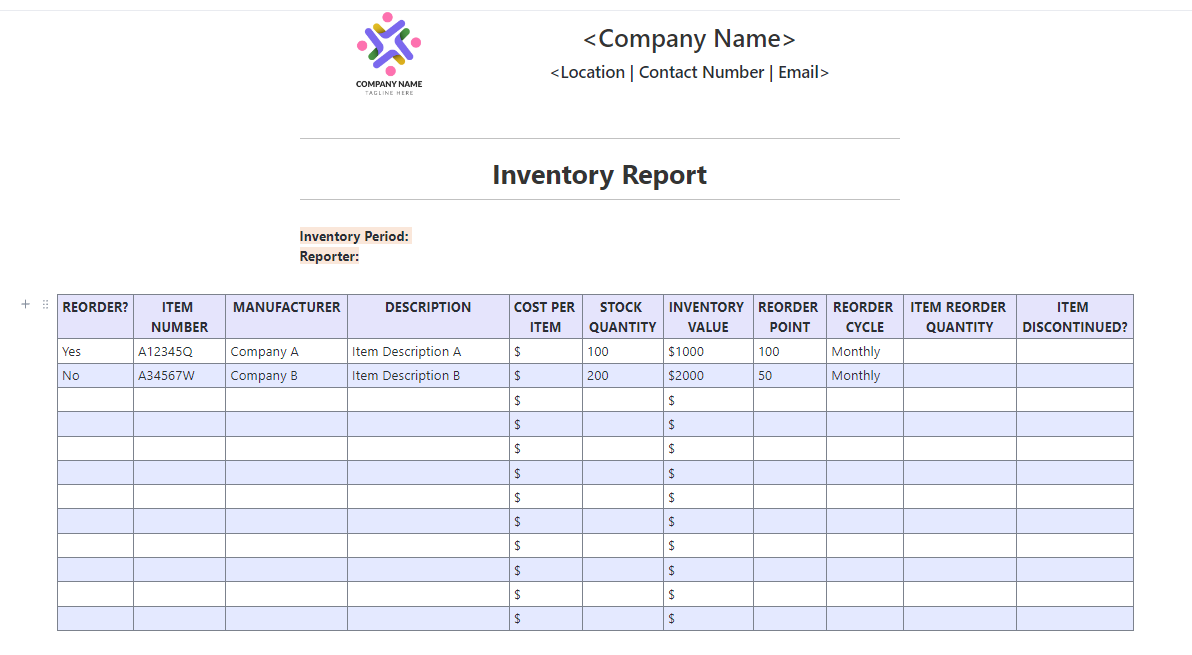
| Inventory Report Template by ClickUp | Get free template | Operations and finance teams creating inventory summaries | Dashboards, high-level reporting, stock value summaries, AI-generated report support | Reporting-focused inventory dashboard |
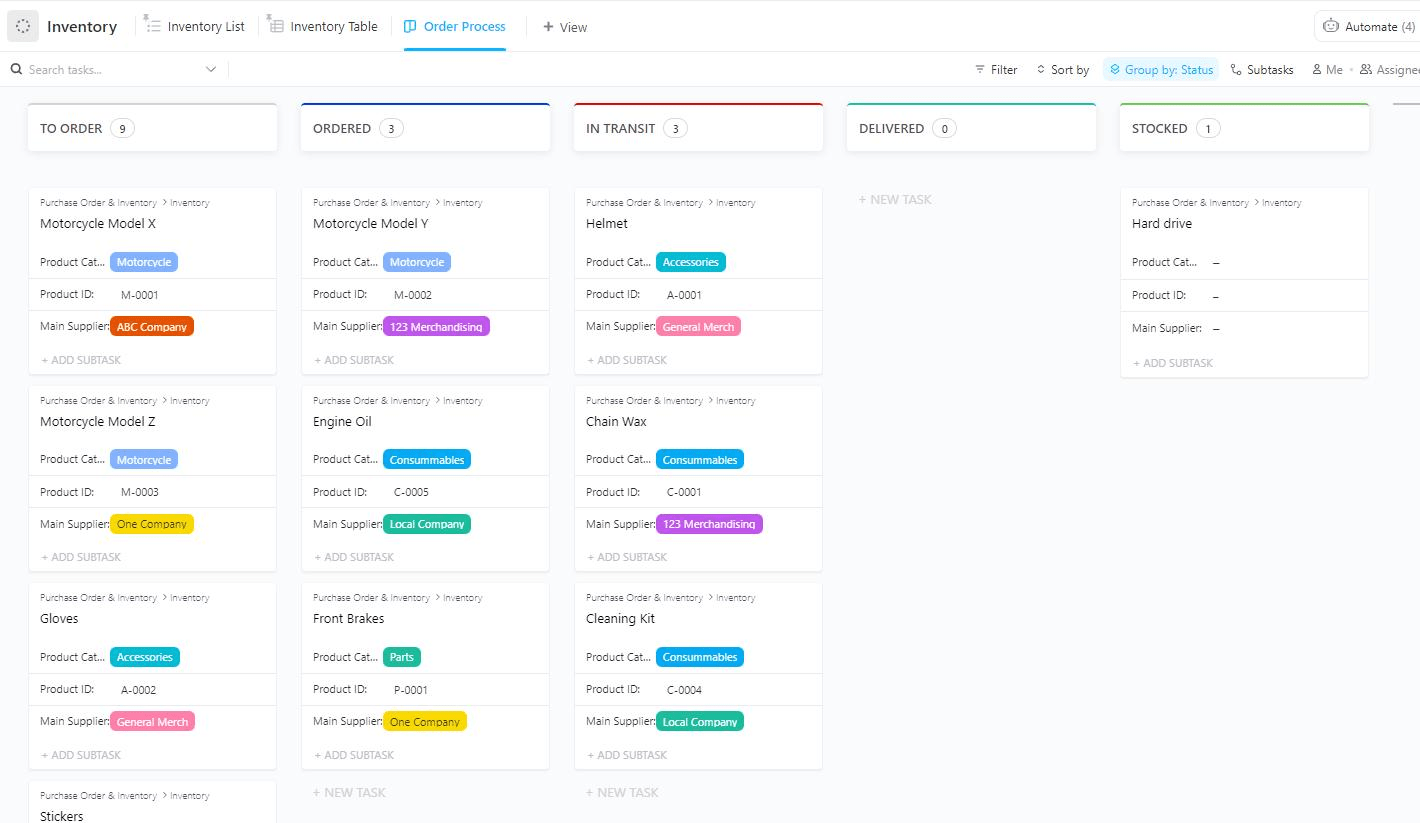
| Purchase Order and Inventory Template by ClickUp | Get free template | Teams connecting purchasing and inventory workflows | PO tracking, linked inventory records, supplier details, automated stock updates | Procurement and inventory workflow tracker |
| Spreadsheet Template by ClickUp | Get free template | Teams that want spreadsheet flexibility with live collaboration | Grid layout, formulas, real-time editing, customizable columns for inventory use | General-purpose spreadsheet-style workspace |
| IT Inventory Template by ClickUp | Get free template | IT teams managing hardware, licenses, and warranties | Serial number tracking, warranty dates, renewal reminders, auditable records | IT asset management tracker |
A daily stock Excel template is a pre-built spreadsheet designed to record inventory movements—what comes in, what goes out, and what’s left—on a day-by-day basis. It’s a common starting point for warehouse managers, retail store owners, and operations teams who need visibility into stock levels without investing in dedicated software.
The core problem you’ll face is that most generic spreadsheets lack the structure to prevent data entry errors, track multiple product categories, or scale as your SKU count grows.
Without the right columns and formulas, you’ll end up with inconsistent data, manual calculation errors, and no clear audit trail for stock discrepancies. This leads to inaccurate stock counts, which can cause you to either run out of popular items or waste money on overstocked products.
A well-structured inventory tracking spreadsheet prevents this chaos.
Here’s what a solid template should include:
Managing work shouldn’t mean chasing updates, switching between tools, or manually coordinating every task. AI can help teams automate tasks and keep work moving without constant follow-ups. Watch this video to see how you can use AI for your daily work to-dos.
If you need a quick way to track stock in Excel, there’s no shortage of downloadable inventory templates online. Some are built for simple item-by-item stock logs, while others add reorder alerts, supplier details, and stock valuation formulas. The catch is that even the more polished spreadsheets still depend on manual updates, which makes them harder to maintain as inventory grows across products, teams, or locations.
Here’s a closer look at some commonly used Excel inventory templates and what they’re best suited for:
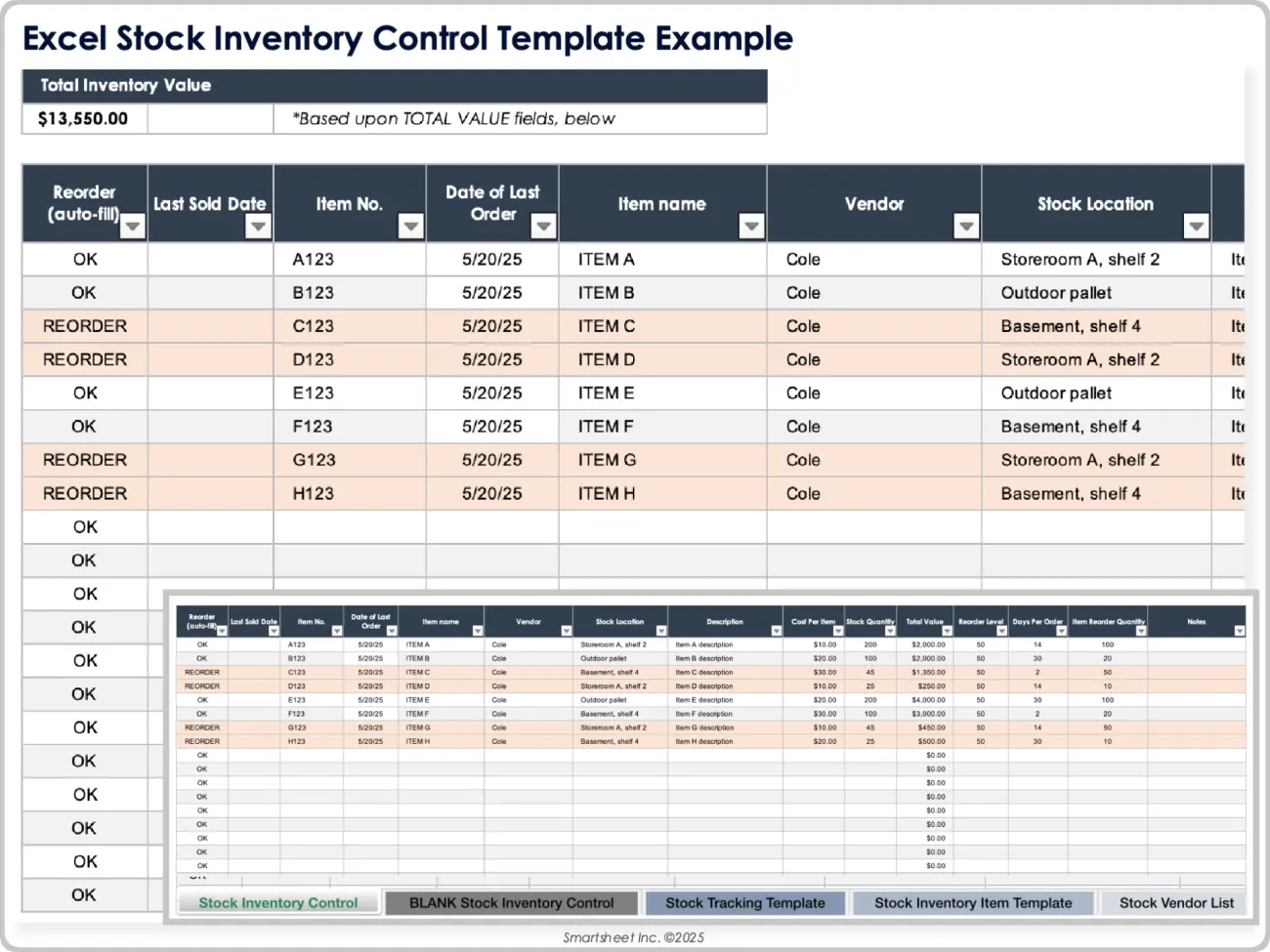
Smartsheet’s Excel Stock Inventory Control Template is a robust option for those who need a detailed way to manage a high volume of parts or products. It offers a structured environment for tracking stock levels, reorder points, and supplier information, all in one place.
Why you’ll like this template
The template is comprehensive, but it can become cluttered and difficult to navigate if you have thousands of line items. Because it is a static file, you’ll need to manually update quantities every time a sale or shipment occurs.
🚀 Ideal for: Small to mid-sized businesses needing a detailed view of their stock value.
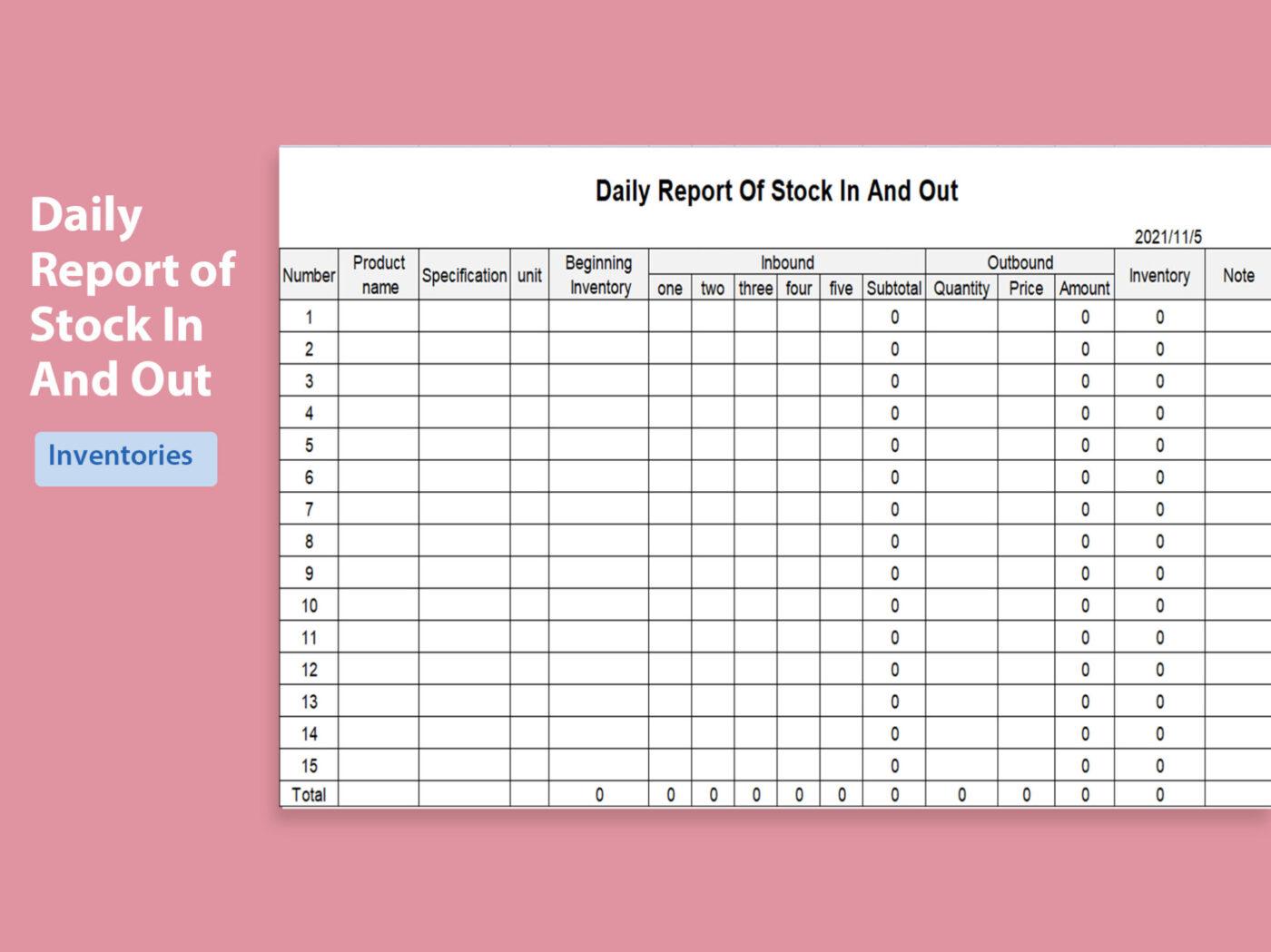
If your business moves through inventory quickly, the Daily Report of Stock In and Out by WPS is a great fit. This template focuses specifically on the daily movement of goods, allowing you to record exactly what arrives and what leaves your facility within a 24-hour window.
Why you’ll like this template
The main limitation is its narrow scope; it is designed for daily tracking rather than long-term inventory forecasting or historical analysis. It also lacks advanced features like barcode scanning or automated low-stock notifications.
🚀 Ideal for: Retailers or warehouse managers who need to track high-frequency daily stock movements.
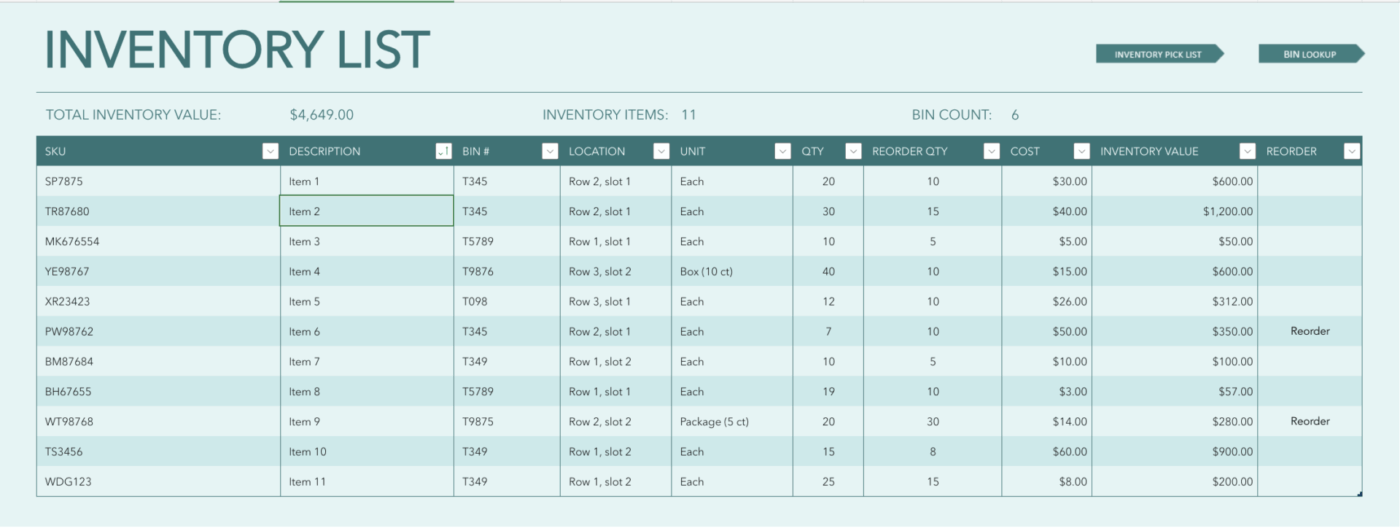
The Blue Inventory List is a professional, visually appealing Excel template designed for general-purpose tracking. It uses a clean blue-and-white color scheme and pre-formatted tables to help you quickly organize your inventory without building a sheet from scratch.
Why you’ll like this template
While it looks great, it is a basic list. It doesn’t include complex formulas for calculating depreciation or lead times, and like most Excel-based tools, it lacks the ability to sync data across different platforms in real-time.
🚀 Ideal for: Users looking for a simple, aesthetically pleasing way to organize a basic product list.
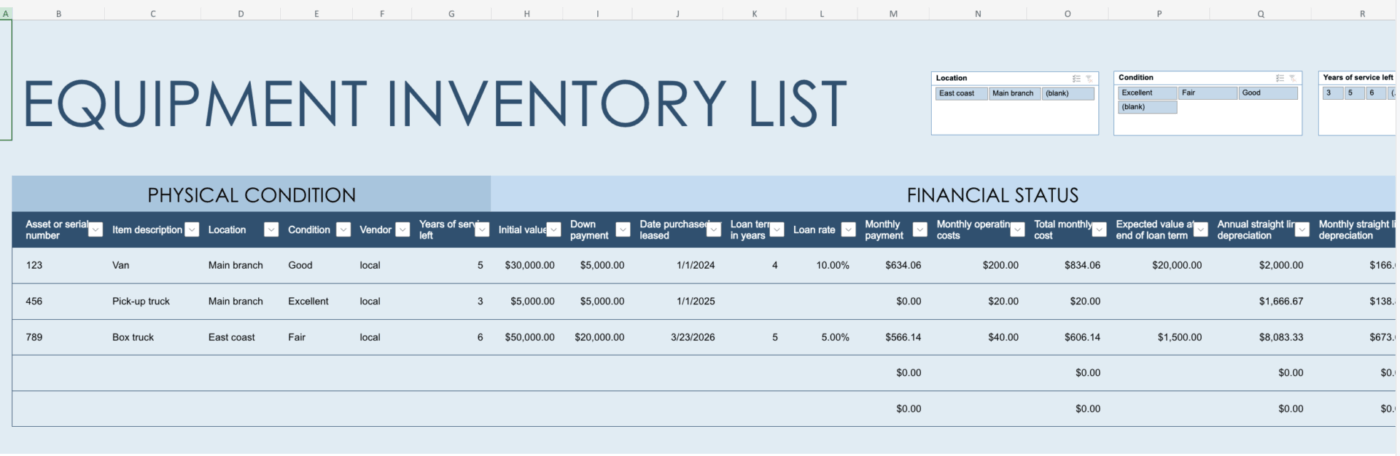
Specifically designed for physical assets rather than retail stock, the Equipment Inventory List by Microsoft is perfect for tracking company property. From laptops to heavy machinery, this template helps you keep a record of serial numbers, purchase dates, and current conditions.
Why you’ll like this template
This template is not optimized for “consumables” or retail products where stock levels change by the hour. It is a record-keeping tool rather than an active sales-tracking system.
🚀 Ideal for: IT managers or office administrators tracking company hardware and assets.
👀 Did You Know: A recent study found that 90% of organizations still rely on legacy technology—including spreadsheets.
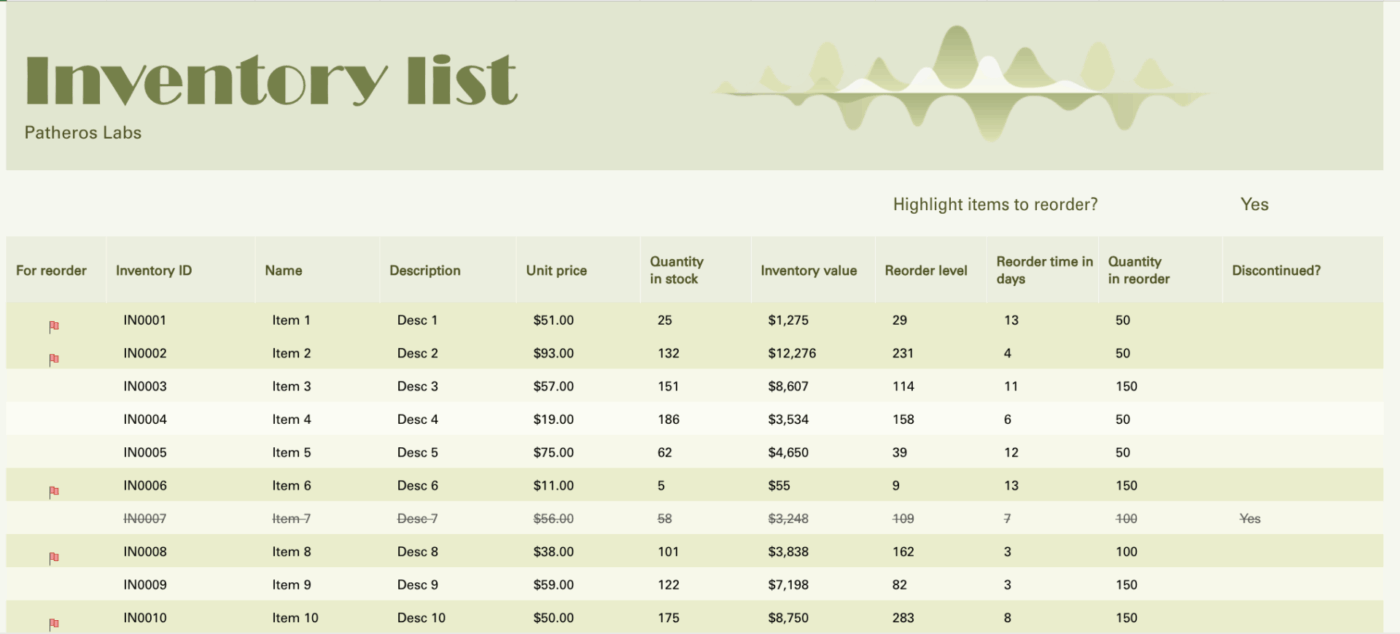
If you struggle to spot low stock at a glance, the Inventory List with Highlighting is a game-changer. It uses conditional formatting to automatically highlight rows when stock falls below a certain level, providing a visual “warning” that it’s time to reorder.
Why you’ll like this template
Because it relies on Excel’s conditional formatting, the sheet can become slow or buggy if you try to add too many custom rules or thousands of rows. It also requires a solid understanding of Excel to troubleshoot if the highlighting stops working.
🚀 Ideal for: Visual learners who want their spreadsheet to “flag” problems for them.
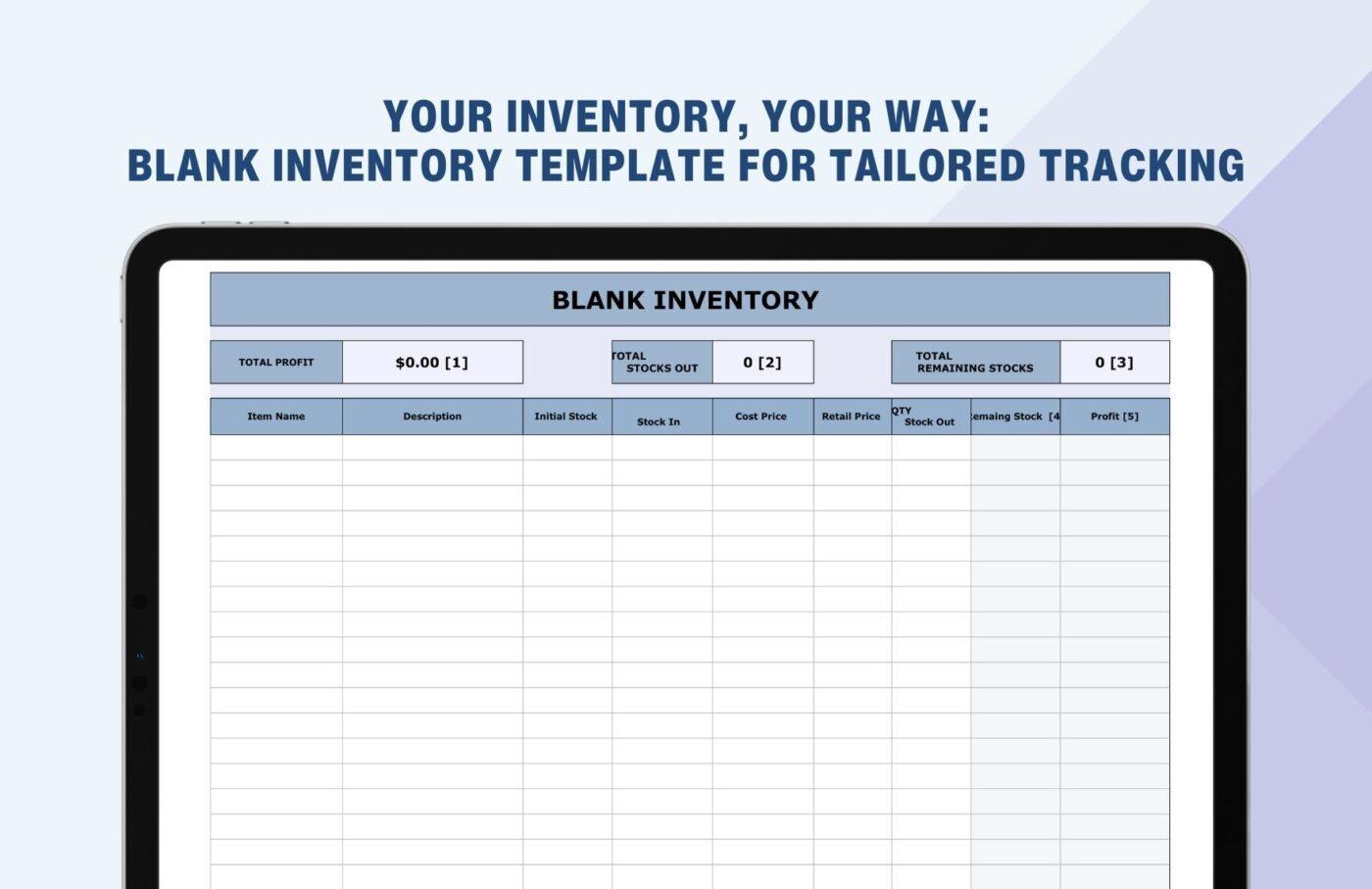
The Blank Inventory Template by Template.net is a “bare bones” starting point for those who want to build their own system without the hassle of formatting cells. It provides the essential columns—Item, Description, Quantity—and leaves the rest up to you.
Why you’ll like this template
This template provides very little automation. There are no formulas to calculate totals or reorder points, meaning you will have to do the heavy lifting when it comes to data analysis.
🚀 Ideal for: Minimalists who need a simple physical or digital form for manual counting.
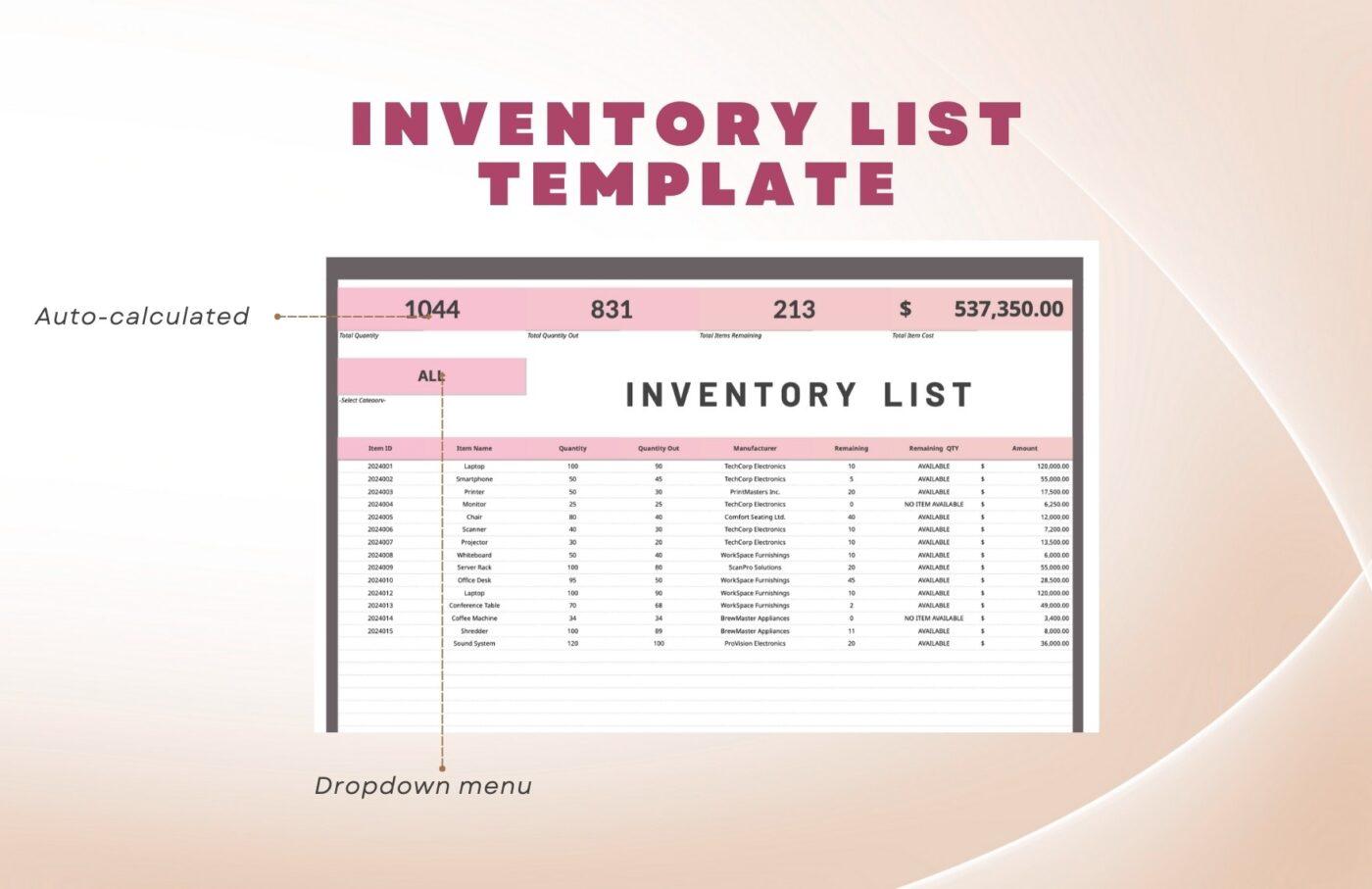
For a more structured approach, the Inventory List Template from Template.net offers a professional layout with expanded fields. It’s designed to be a versatile document that works just as well as a digital tracker as it does a printed report for a small business.
Why you’ll like this template
Being a document-style template, it doesn’t offer the data-crunching power of a dedicated database or inventory software.
🚀 Ideal for: Small business owners who need a professional-looking inventory document.
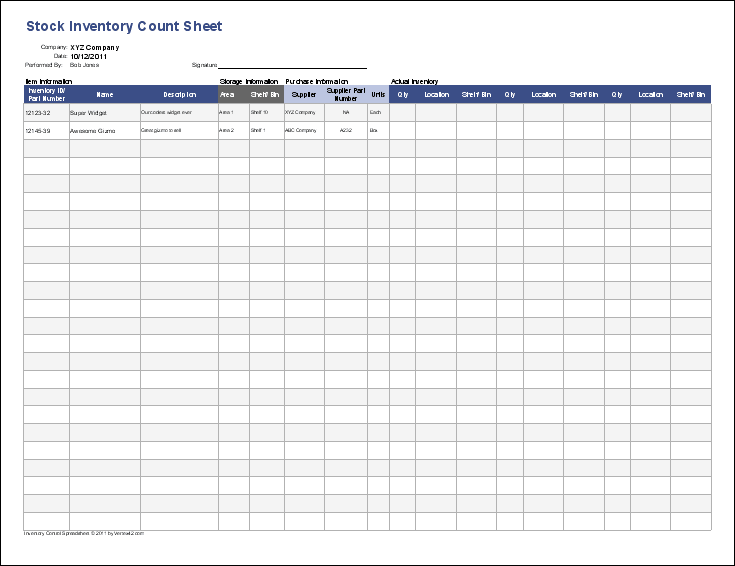
Vertex42’s Inventory Control Template is a highly functional tool that bridges the gap between a simple list and complex software. It features a “Stock Update” sheet where you can record additions and subtractions, which then automatically updates your main inventory levels.
Why you’ll like this template
While powerful for a spreadsheet, it can be intimidating for beginners due to its multiple tabs and interconnected formulas. If a formula is accidentally deleted, the entire tracking system may break.
🚀 Ideal for: Power users who want a “software-lite” experience within Excel.
While these free templates are a good first step, they all share a common weakness: they depend entirely on manual upkeep. As your inventory grows, you’ll quickly find that maintaining the spreadsheet becomes a job in itself, which is the first sign you’re outgrowing Excel.
📮ClickUp Insight: The average professional spends 30+ minutes a day searching for work-related information—IDC finds 80 percent of analytics teams’ time is wasted on data discovery and preparation—that’s over 120 hours a year lost to digging through emails, Slack threads, and scattered files.
An intelligent AI assistant embedded in your workspace can change that. Enter ClickUp Brain. It delivers instant insights and answers by surfacing the right documents, conversations, and task details in seconds—so you can stop searching and start working.
💫 Real Results: Teams like QubicaAMF reclaimed 5+ hours weekly using ClickUp—that’s over 250 hours annually per person—by eliminating outdated knowledge management processes. Imagine what your team could create with an extra week of productivity every quarter!
Excel is familiar, but that comfort disappears once your inventory becomes more complex. You start spending hours hunting down a single data entry error or trying to figure out which version of the spreadsheet is the most current. This wasted time and rising frustration are signs that the tool is no longer working for you.
👀 Did You Know: A 2024 study found 94 percent of business spreadsheets contain critical errors 😨
These are the walls most teams hit:
These limitations are precisely why teams start looking for a better inventory management system—one that feels as intuitive as a spreadsheet but adds the collaboration, automation, and reliability that Excel lacks.
📮ClickUp Insight: 92% of knowledge workers risk losing important decisions scattered across chat, email, and spreadsheets. Without a unified system for capturing and tracking decisions, critical business insights get lost in the digital noise.
With ClickUp’s Task Management capabilities, you never have to worry about this. Create tasks from chat, task comments, docs, and emails with a single click!
When you’re tired of fighting with broken formulas and outdated files, it’s time for a system that does the heavy lifting for you. Instead of wrestling with the limitations of a static inventory spreadsheet, you can use a collaborative platform that offers a familiar grid-based layout with powerful built-in features.
ClickUp’s inventory management templates are designed to solve the exact problems that make Excel frustrating. They provide a structured, scalable, and automated way to maintain daily stock without the manual overhead. With features like ClickUp Brain, your AI assistant, you can even generate reports or draft purchase orders just by asking a question.
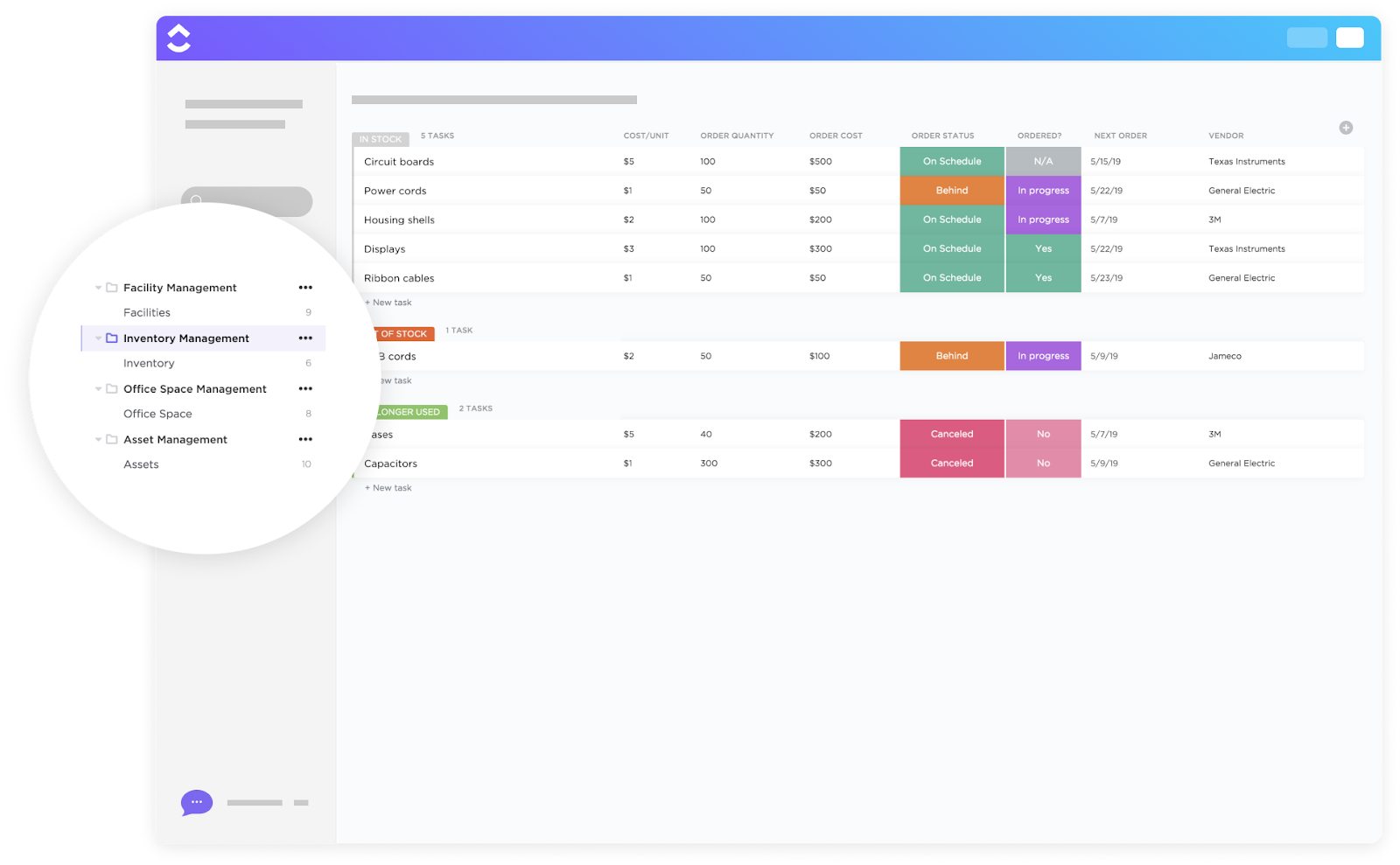
The Inventory Management Template by ClickUp is your all-in-one command center for inventory. It’s designed for teams managing moderate-to-large inventories across multiple locations who are tired of data silos and manual tracking.
It goes beyond simple stock counts to include supplier information, reorder points, and total inventory value, giving you a complete financial picture.
Why you’ll like it:
@brain in any task or comment with ClickUp Brain🚀 Ideal for: Teams managing moderate-to-large inventories across multiple locations
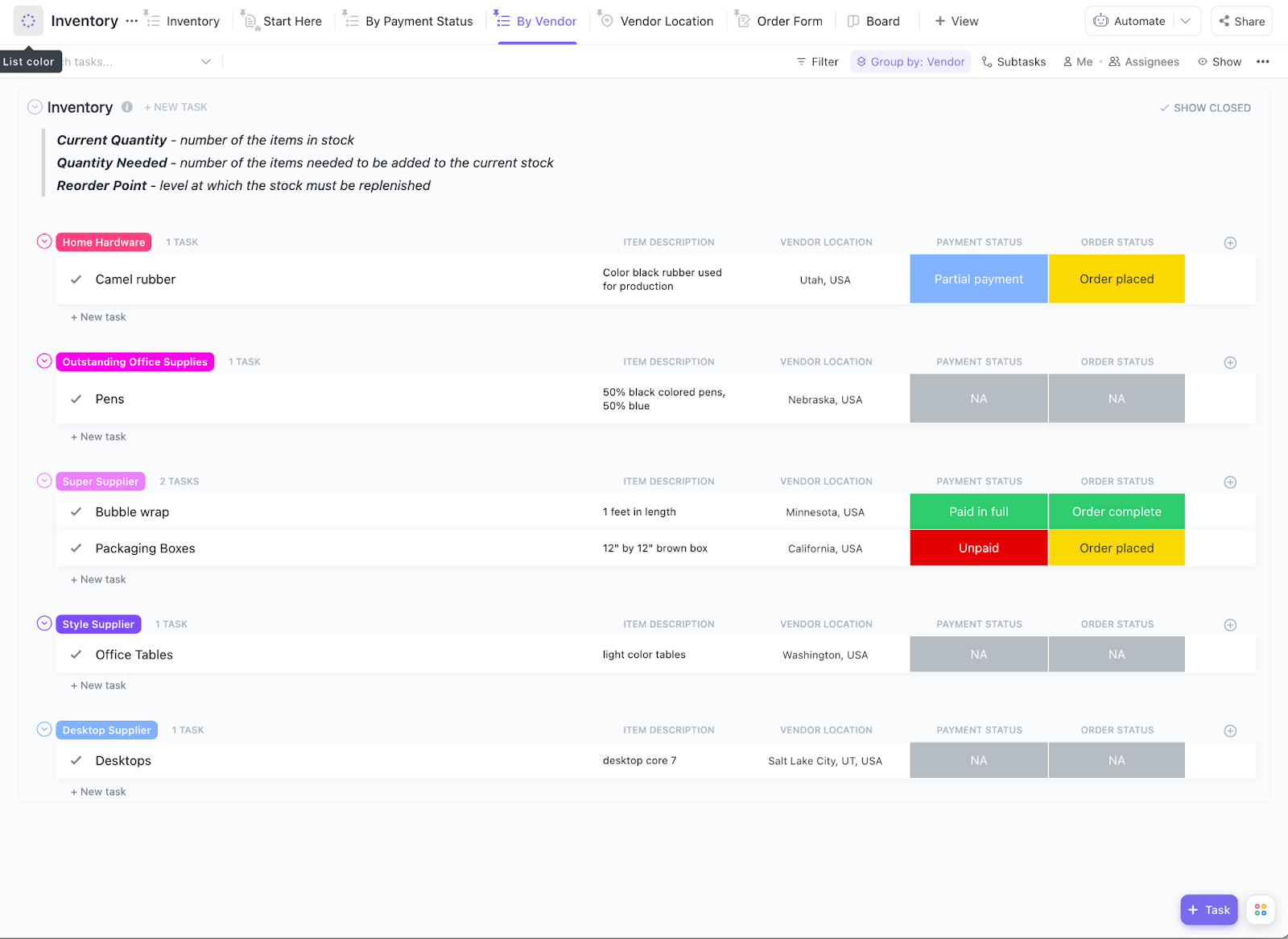
If you’re a small team or single-location business ready to move beyond a basic Excel sheet, this is your perfect starting point. The Inventory Template by ClickUp focuses on the core essentials of inventory tracking: item name, quantity on hand, location, and status. It’s designed for simplicity and quick adoption.
Why you’ll like it:
🚀 Ideal for: Small teams or single-location businesses moving beyond spreadsheets
This template is for you if you love the traditional daily stock register format but hate the manual calculations and lack of collaboration.
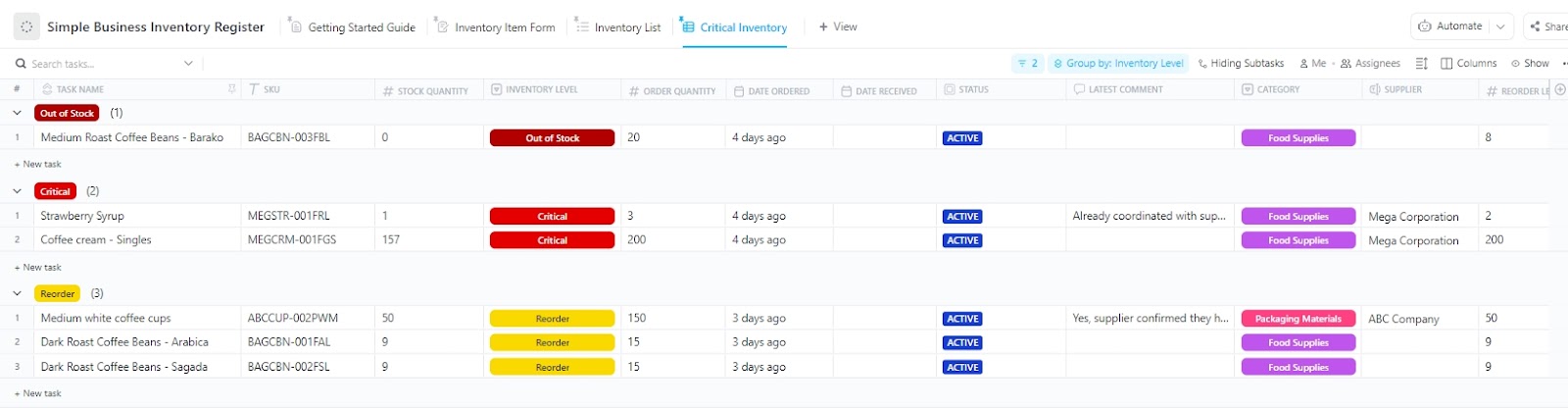
Simple Business Inventory Register Template by ClickUp mirrors the classic layout for logging daily stock movements—opening balance, received, issued, and closing balance. It gives you the familiarity of an Excel inventory template with the power of a cloud-based platform.
Why you’ll like it:
🚀 Ideal for: Teams that prefer a traditional daily stock register format
This template is designed for tracking fixed assets like furniture, computers, and office equipment, not consumable stock.
The Office Inventory Template by ClickUp is perfect for office managers and facilities teams who need to know where every company asset is, who has it, and what condition it’s in. This prevents assets from getting lost during office moves or team changes.
Why you’ll like it:
🚀 Ideal for: Office managers and facilities teams tracking company assets
💡 Pro Tip: Skip the tab-hopping with ClickUp Brain MAX. This desktop AI assistant has the context of all your work, plus connected apps. Pull inventory context from multiple tools, and draft updates or stock documentation hands-free with Talk to Text.
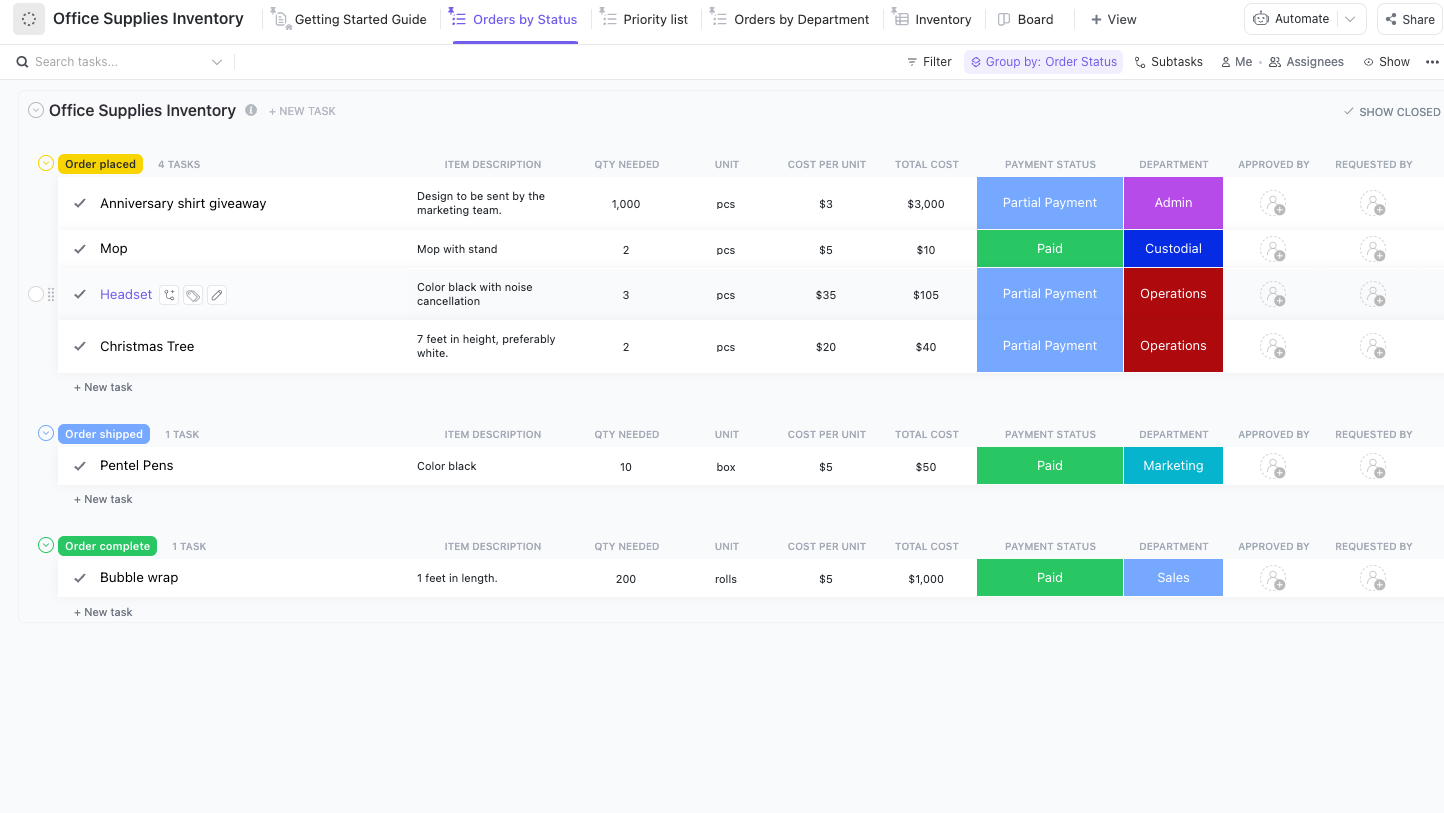
Stop running out of pens and printer paper. The Office Supplies Inventory Template by ClickUp is built for admin teams managing recurring orders of consumable office supplies. It helps you track what you have, what you need, and how much you’re spending, so you can stay on budget and keep the office running smoothly.
Why you’ll like it:
🚀 Ideal for: Admin teams managing recurring office supply orders
Manually compiling inventory reports is a time-consuming task prone to errors. The Inventory Report Template by ClickUp automates the process by aggregating your inventory data into high-level summary views. It’s ideal for operations leads and finance teams who need to present key metrics to stakeholders without spending hours in spreadsheets.
Why you’ll like it:
🚀 Ideal for: Operations and finance teams creating inventory summaries
Purchase Order and Inventory Template by ClickUp creates a single source of truth by connecting your purchase orders directly to your inventory. When a PO is marked as complete, your stock levels update automatically, preventing discrepancies.
Why you’ll like it:
🚀 Ideal for: Teams connecting purchasing and inventory workflows
If your team loves the flexibility of spreadsheets but is tired of the “which version is the latest?” chaos, Spreadsheet Template by ClickUp is for you. It provides a general-purpose spreadsheet experience inside ClickUp Table View, but with the critical addition of real-time collaboration. Everyone on the team sees the same data at the same time.
Why you’ll like it:
🚀 Ideal for: Teams that want spreadsheet flexibility with live collaboration
This template is specifically tailored for IT asset management. The IT Inventory Template by ClickUp helps IT departments track all hardware, software licenses, and warranties across the organization. This ensures compliance, helps with budget planning, and makes it easy to manage device assignments for new and departing employees.
Why you’ll like it:
🚀 Ideal for: IT teams managing hardware, licenses, and warranties
📚 Also Read: How to Use ClickUp for Inventory Tracking
Whether you stick with an Excel inventory template or move to a more powerful system, your data is only as good as your processes. Adopting these habits will help you maintain accurate records and avoid the headache of reconciling discrepancies down the line. ✨
Implementing these practices is much easier with a tool like ClickUp, which offers built-in automation and audit trails, reinforcing the value of moving beyond a simple spreadsheet.
💡 Pro Tip: Build a Stock Reorder and Inventory Summary Super Agent in ClickUp!
Set up a ClickUp Super Agent to scan your inventory data, flag low-stock items, draft reorder recommendations, and share a ready-to-review stock summary with your team, so you can turn inventory tracking into an automated workflow instead of a manual spreadsheet chore.
Learn how to set up your first Super Agent today!
While Excel is a familiar place to start your inventory management process, its limitations around collaboration, automation, and data integrity often create more work than they save. The best approach is to standardize your processes, track everything in real time, and audit your data regularly.
Manual inventory tracking creates constant bottlenecks and costly errors. Every hour spent reconciling broken spreadsheets is an hour stolen from growing your actual business. Centralize your operations with ClickUp’s Converged AI Workspace—a single, secure platform where projects, documents, conversations, and analytics live together with AI embedded as the intelligence layer that understands your work and helps move it forward.
You eliminate tool sprawl, gain full visibility over your stock, and save hours of manual administrative work each week. 🤩
Get started for free with ClickUp and experience the difference a purpose-built inventory management system can make.
A basic daily stock register should always include columns for Date, Item Name/SKU, Opening Stock, Quantity Received, Quantity Issued, Closing Stock, and Remarks.
A static Excel template is a single, offline file that creates version-control issues, whereas a collaborative tool is a cloud-based platform that enables real-time multi-user editing and automation.
The most effective methods are using data validation features like dropdown lists to standardize input and automating calculations with formulas to eliminate manual math.
You should consider moving when you frequently find data errors, waste time figuring out which spreadsheet version is current, or need automated features like low-stock alerts.

© 2026 ClickUp

There’s an easier way. Try a free AI Agent in ClickUp that actually does the work for you—set up in minutes, save hours every week.