



Sorry, there were no results found for “”
Sorry, there were no results found for “”
Sorry, there were no results found for “”
Whether it’s a home or a business project, simple or complex by nature, the secret sauce to delivering successful projects is starting strong with the right strategy and execution plan.
You can do this (and do it well) with a go-getter mindset, proper project management approaches, and the right tools.
In this article, you’ll learn about the building blocks of project management, including the key success factors and phases, as well as how project management tools can keep them together. Then, we’ll show you how it all works in practice with five real project management examples! 👌
Managing projects from start to finish can come with long and complex processes. So, to help make everyone’s job easier, the concept of the project life cycle was introduced.
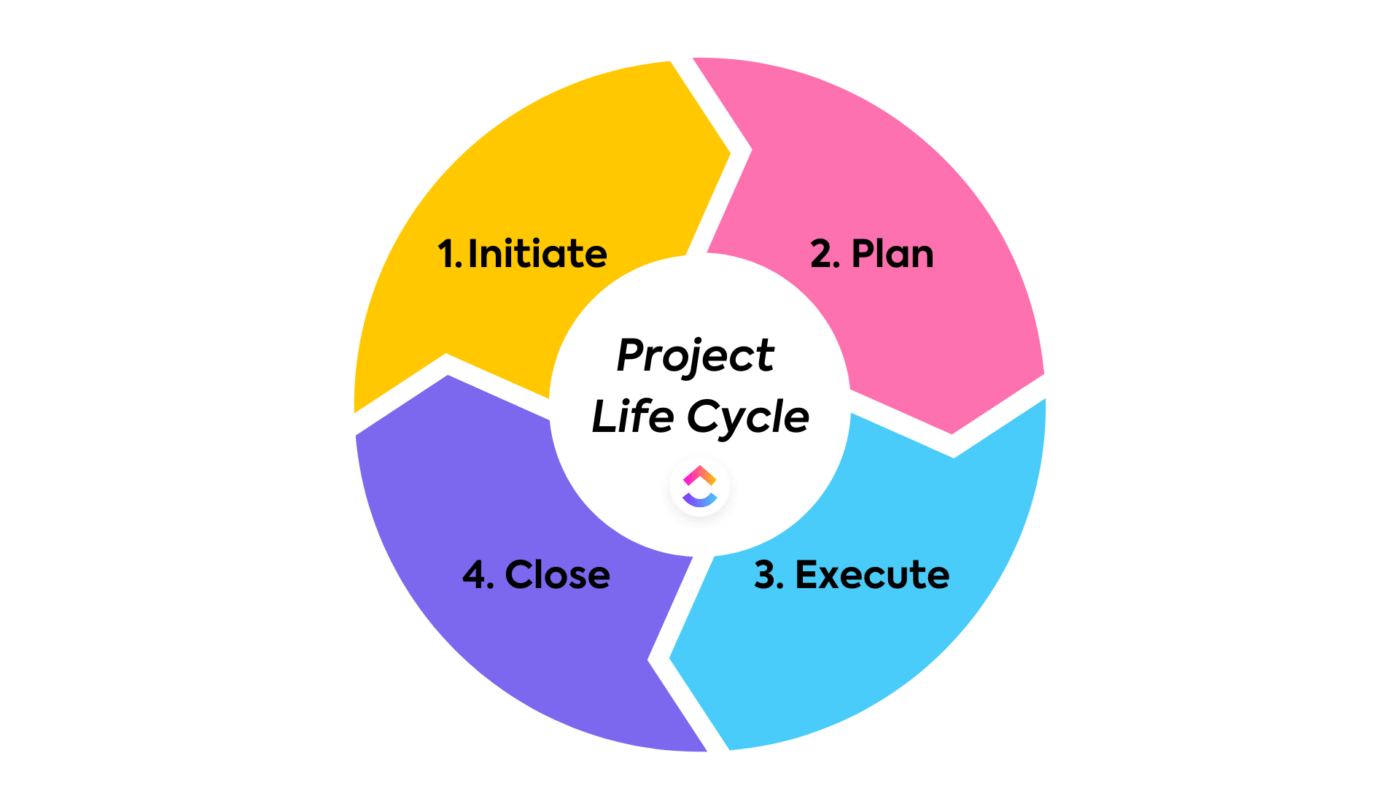
The project life cycle, or project management process, consists of four phases: initiating, planning, executing, and closing. It’s a structured path your projects go through to help move them from conception to completion and ensure project objectives are delivered in each phase.
Let’s take a look at what the project manager is responsible for in each phase:
Get everyone onboard. The project manager defines the organization, client, or customer’s goal, identifies key stakeholders, the project team, and the scope of work of the project, and determines measurable objectives for the team.
Strategically prepare and map out the project. The project manager is responsible for creating a detailed project plan and outlining the project schedule that includes the major project milestones and describes what tasks or deliverables make up each milestone. This is important because the project plan provides a strategy and project checklist to help properly manage resources, budget, and timeline along the project life cycle.
It’s go time. In this phase, the project manager’s main job is to oversee the team’s efforts and ensure everyone understands what’s expected of them, what tasks need to be done, and how and when to complete those tasks to ensure everything is done within the project schedule.
Time to wrap up the project. The project manager must identify that their team has completed all of the requested outcomes, then present the final product to the stakeholders to sign off and officially close the project.
By following the project life cycle, you’re ensuring that you are:
Project management methodologies to choose from 💪🏻
Want to gain a strategic advantage? Learn how to use AI for project management. 👇🏼
Critical factors for successful project management can vary from one project to another, but here are a few factors that should remain constant no matter the type of project or what industry you’re in:
With so many factors that can impact project success, using project management software can help to keep everyone and everything on track and ahead of curveballs.
A good project management app can take so much of the burden of managing projects off your shoulders by providing teams with the tools they need to get a high-level overview of their work, streamline business processes, create efficient workflows, communicate more effectively, and make collaboration seamless and more enjoyable.
ClickUp, for one, helps project managers and teams plan, manage, track projects, and collaborate with each other—all in one place. Its fully customizable platform gives teams the flexibility and the advanced tools they need to create the most efficient workflow that best suits their project needs and preferences.
With project tasks, documentation, and communication all in one connected platform powered by AI, ClickUp is the everything app for project managers.
And because the platform is fully customizable, teams in ClickUp are fully equipped to handle any type of project and support any type of project management methodology, including the most common approaches such as Waterfall, Agile (Scrum and Kanban), Lean, Six Sigma, and more.
Key ClickUp features for effective project management include:
Now, let’s take a look at a few real-life project management examples and learn how other industry experts have successfully delivered projects using the right methodology and tools!
📮ClickUp Insight: 92% of workers use inconsistent methods to track action items, which results in missed decisions and delayed execution.
Whether you’re sending follow-up notes or using spreadsheets, the process is often scattered and inefficient. ClickUp’s Task Management Solution ensures seamless conversion of conversations into tasks—so your team can act fast and stay aligned.
Jakub Grajcar, a Marketing Manager at STX Next, leads a team of content and social media specialists, spearheads the Marketing department’s lead generation and brand recognition strategy and works with multiple departments to deliver projects. A typical day for the team includes executing upwards of five content deliverables, with Jakub often reviewing 10+ different projects at a time.
The problem?
Working with our Product Design department was a chaotic process. Our teams struggled with communication because we lacked project visbility—we often didn’t have clear information about whether tasks were still under review or needed more work.
We absolutely needed a system that would allow me and the Head of Product Design to get an overview of the entire process and come to grips with all the work in progress and upcoming tasks.

The goal?
To help improve global collaboration across departments, and content marketing processes, speed up project completion and delivery, and keep the teams aligned on goals, project timelines, and so on by creating a cross-functional workflow and standardizing processes in ClickUp.
Here’s how Jakub and his team carried out this initiative:
Task checklist:
At the end of the project, Jakub and the teams within STX Next tested the new Marketing Sprints template and Dashboard to ensure the process was smooth for everyone involved in the project and all of the custom automation in ClickUp was set up properly.
📌 Use this Marketing Sprint Folder template to help with project planning, keep project activities visible and organized, and streamline your processes. Hit the ground running with pre-set Board and List views, task estimation capabilities, and customizable automation!
Adele Payant, ClickUp’s SEO Specialist, is responsible for researching opportunities and creating content briefs for the writers to use as a guide when drafting articles for the blog page. And to write compelling content briefs, she has to perform keyword research, competitive analysis, and other important related tasks, and ensure the content brief is detailed and easy to follow for the writers.
The problem?
The biggest challenge in our SEO blog workflow was focusing on scaling our content production without impacting the quality of each blog.

The goal?
To create a clear and repeatable system to help our SEO team ramp up the volume of briefs without compromising the quality of the brief and reduce unnecessary back-and-forth communication.
Here’s how Adele executed this project:
Task checklist:
📌 Use this SEO Content Brief template to clearly state your goals and objectives, and share it with your writers to improve content delivery.
For more SEO project management tips, check out ClickUp’s Sr. SEO Manager’s article: Tips to Optimize Your Workflow.
Robin Wisner, ClickUp’s LMS Administrator, is responsible for delivering a new initiative to give ClickUp customers a fun and interactive way to learn how to use ClickUp and maximize the features within the platform.
The Customer Enablement team, of which Robin is a member, launched ClickUp University (CUU) in November 2021. The new program received an overwhelmingly positive response from ClickUp users and ultimately gave the team the green light to launch another option to help further enhance user experience.
To accomplish this, she led the initiative to launch CUU Certificates—a program intended to recognize the ClickUp users’ product knowledge and reward them for completing the course exams.
The problem?
The biggest challenge for a project of this scale was managing across so many teams with competing priorities.

The goal?
To delegate work effectively and launch the new certification program on time to provide a measurable process for customers to successfully onboard and enhance their experience as a ClickUp user.
Here’s how Robin and the project team members made it happen:
Task checklist:
📌 Use this Feedback Form template to customize your feedback collection, view all your feedback in one place, and improve your products and services.
Bonus: Project Management Software for Freelancers
Morey Graham, the Director of Alumni and Donor Services (ADS) at Wake Forest University, leads and manages fundraising campaigns, alumni relationships, brand identity, and publications within the Wake Forest community.
The problem?
Because teams worked on separate platforms, it created work silos that led to duplicated efforts and poor team communication. We also lacked visibility into our data which impacted our ability to make strong business decisions for the organization.

The goal?
To find a new project management tool that is user-friendly for all the departments and to create a business dashboard that displays and updates data in real-time to help improve project visibility across the organization.
Here’s how Morey and the ADS department delivered this project:
Task checklist
📌 Create custom Dashboards in ClickUp to get a high-level overview of all your initiatives, highlight KPIs, project status, and progress, to keep everyone on track and aligned at all times.
To further expand ClickUp’s list of features for project management, the company set out a huge initiative to build and successfully launch a new product feature, ClickUp Whiteboards. Spearheading the project is ClickUp’s Group Product Manager, Zach Blodgett.
The company’s vision was to create a powerful yet easy-to-use digital collaboration tool that project managers, executives, and team members could use to level up their brainstorming, planning, and execution processes.
The problem?
The biggest challenge was team size and a rapidly approaching deadline. The deadline was immovable and we had a ton of stakeholders from GTM, sales, pricing & packaging, growth, support, CSMs, EPD. We had to ensure they knew what was going out, what was next, and how to talk about Whiteboards.

The goal?
To use a project management tool to help manage tasks, communicate with stakeholders across the globe, and minimize risks and bottlenecks to deliver the new and highly-anticipated product feature within the agreed-upon timeline.
Here’s how Zach and the company launched a successful project launch:
Task checklist:
Here’s the final look—check it out!
📌 Create a step-by-step approach to how your organization will bring a product to the market, and use this Go to Market Strategy template to help you ship faster!
Other helpful project management templates for you
Successful project management starts with understanding what the ultimate goal of the project is, understanding the key elements that go into an intelligent project plan, and creating a smooth and actionable strategy to get there—refer to the project management examples above to help spark ideas.
You’ll also need to ensure to implement the appropriate methodology to guide you through the entire process and utilize the project lifecycle to keep you on track.
And to make your life as a project manager as easy as humanly possible, you need to use a project management tool like ClickUp to help keep everything in order and bring all your work to one centralized place. Use it to track project progress, manage project risks and resources effectively, collaborate with your entire organization, and so much more.
ClickUp, the everything app for work, combines project, knowledge, and chat in one place—all powered by AI that helps you work faster and smarter.
With its extensive list of customizable and functional features, you’ll be fully equipped to handle any type of project management approach, manage multiple complex projects at once, set up the most streamlined workflow, support your remote and hybrid teams, and confidently deliver quality projects on time, every time.
(cue “That was easy” sound effect 😉)

Praburam Srinivasan
Max 19min read
Praburam Srinivasan
Max 17min read

Manasi Nair
Max 22min read

© 2026 ClickUp





