


As a project manager, you constantly walk the tightrope of resource management. Managing people’s capacity and workload along with other project resources is a careful balancing act, one that resource utilization looks to solve.
In this guide, we’ll walk through practical steps for a project manager to make the most of their team’s resources. We’ll show you how to measure and improve resource utilization in project management and overcome the common challenges along the way. Plus, we’ve got some fantastic templates to help you get there faster and with greater accuracy.
Let’s dive in and unlock the secrets to effective resource management!
Resource Utilization Strategies
- What is Resource Utilization?
- How to Calculate Resource Utilization: Key Metrics
- Factors That Can Impact Resource Utilization
- How to Improve Resource Utilization on Your Team
- 5 Useful Resource Utilization Templates
- Challenges in Resource Utilization & How to Solve Them
- Benefits of Effective Resource Utilization
- Best Practices for Tracking Resource Utilization
- Improve Your Resource Utilization With ClickUp

 Summarize this article for me please
What is Resource Utilization?
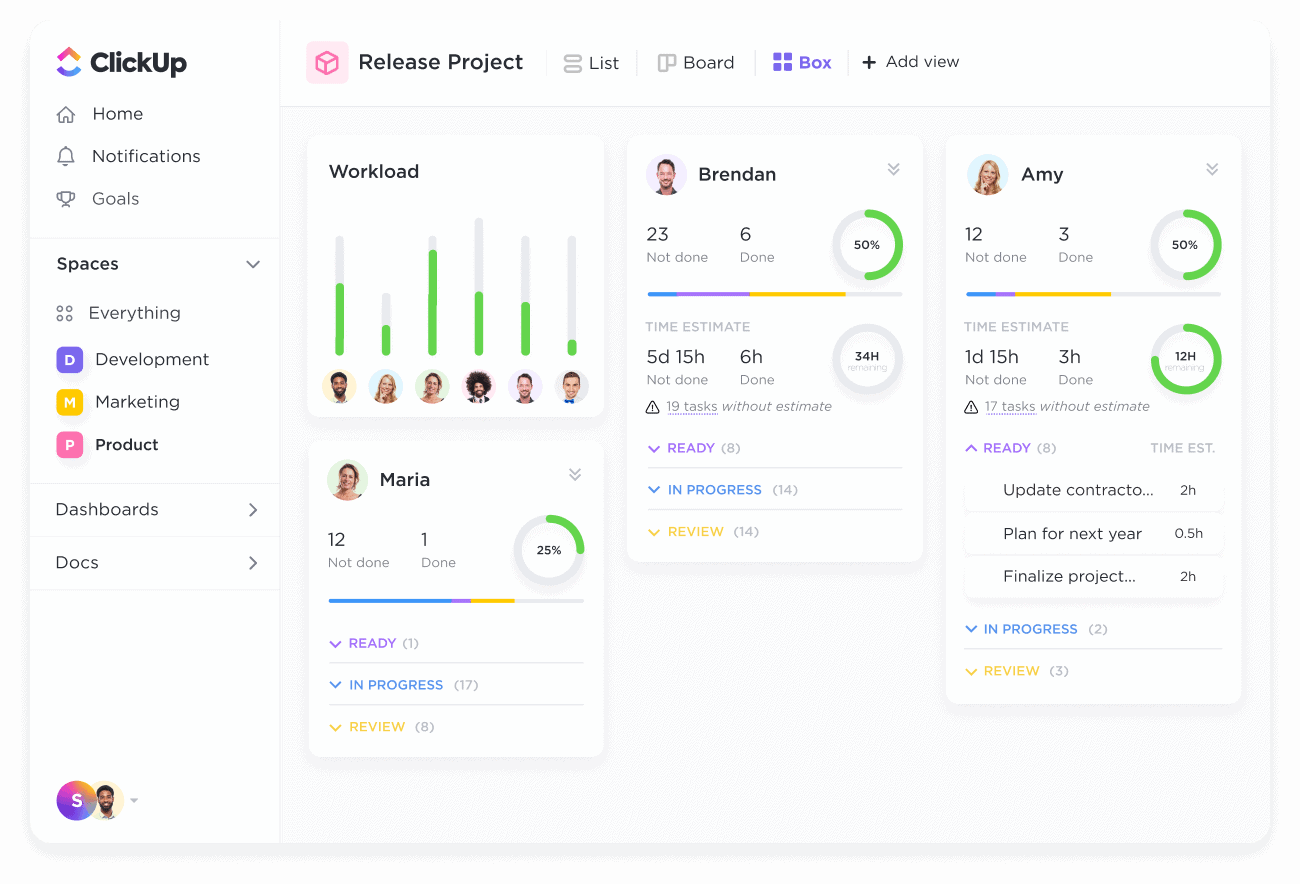
Resource utilization is a metric that project managers and leaders use to evaluate how their resources are being used within a project. It measures the utilization rate of your resources (people, materials, funds, etc.) over time to determine whether they’re being underused, overused, or used just enough.
This gives you insight into whether you’re using project resources effectively, how productive your team members are, and how you can better optimize your work for higher productivity and profitability.
Resource utilization often gets confused with resource allocation. They’re in a similar space, but both have unique roles. Utilization focuses on how you manage and optimize all of your resources. Allocation is the science of assigning specific resources to individual projects once you’ve decided on the best way to organize them.
 Summarize this article for me please
How to Calculate Resource Utilization: Key Metrics
Understanding whether your resources are underutilized or overutilized is incredibly valuable, but how do you measure resource utilization? It might sound like it’s complicated, but there are actually a few useful resource utilization formulas you can use. We’ve put them on one list for you. ⚒️
1. Resource utilization rate
This essential metric measures how efficiently resources (employees, equipment, etc.) are being used compared to their total available capacity.
Formula: Utilization Rate=(Billable or Productive Hours/Total Available Hours)×100
Example: If a developer works 32 hours in a 40-hour workweek, their utilization rate is 80%.
How to track: Use time-tracking software or project management tools with integrated time tracking, such as ClickUp.
2. Billable vs. non-billable utilization
This tracks how much time is spent on revenue-generating (billable) tasks vs. internal (non-billable) tasks.
Formula: Billable Utilization= (Billable Hours/Total Available Hours)×100
Example: If a consultant logs 30 billable hours out of 50 total hours, billable utilization is 60%.
How to track: Use invoicing software or categorize work using project management tools.
3. Capacity utilization
This measures how much of the total available resource capacity is being used.
Formula: Capacity Utilization=(Actual Output/Total Possible Output)×100
Example: If a manufacturing plant produces 8,000 units when it has a capacity of 10,000, its capacity utilization amounts to 80%
How to track: ERP systems (e.g., SAP, Oracle) or production monitoring and scheduling software
4. Employee productivity rate
This is a measure of output per employee over a given period.
Formula: Productivity Rate=Total Output (Revenue, Tasks, Units, etc.)/Total Employee Hours
Example: If a marketing team generates 500 leads in 200 working hours, their productivity rate is 2.5 leads per hour
How to track: CRM tools (e.g., HubSpot, Salesforce) and time-tracking apps
5. Resource availability
The resource availability metric identifies how many resources (people, machines, etc.) are available vs. assigned.
Formula: Availability Rate=[(Available Hours – Assigned Hours)/Total Available Hours]×100
Example: If an engineer has 10 hours free out of a 40-hour week, the availability rate is 25%
How to track: Use workforce management software like Float and similar tools
6. Projected vs. actual utilization
Project managers use this typical resource utilization formula to compare planned vs. actual resource usage per project plan and identify inefficiencies.
Formula: Utilization Variance=[(Actual Utilization−Planned Utilization)/Planned Utilization]×100
Example: If a developer was planned for 35 hours but worked 45 actual hours, they were over-utilized by 28.57%
How to track: Project management tools like ClickUp can help do this effectively
7. Cost per resource unit
This shows us how much each resource (employee, equipment, etc.) costs per unit of work.
Formula: Cost per Resource Unit=Total Cost/Total Work Output
Example: If a company spends $10,000 on a design team that delivers 50 projects, the cost per resource unit is $200 per project
How to track: Financial software (e.g., QuickBooks, Xero) and budgeting tools
8. Resource conflict rate
This is an indicator of how often resources are double-booked or over-allocated.
Formula: Conflict Rate=(Number of Resource Conflicts/Total Resource Assignments)×100
How to track: Resource scheduling tools and regular resource performance audits
9. Project completion efficiency
This metric tells project managers whether resources are being used effectively to meet deadlines.
Formula: Completion Efficiency=(Projects Completed On Time/Total Projects)×100
Example: If a team completes 8 out of 10 projects on time, their project completion efficiency is 80%
How to track: Gantt charts and performance dashboards in project management tools
Also Read: Best Free Gantt Chart Maker Software
Summarize this article for me pleaseFactors That Can Impact Resource Utilization
Here’s a list of key factors that influence resource utilization rates in a project or company:
- Project scope and complexity: The size and difficulty of a project determine how many resources are required and for how long. Larger, more complex projects demand more strategic resource allocation
- Resource availability: The number of employees, equipment, and materials available directly impacts how efficiently resources can be utilized. Limited availability can cause bottlenecks and slow down progress
- Skill alignment: Assigning the right people with the right skills to the right tasks ensures efficient resource utilization. Mismatched skills can lead to inefficiencies and lower productivity
- Workload distribution: Uneven workload allocation can result in resource underutilization or overutilization. Balancing workloads ensures steady productivity
- Project scheduling and deadlines: Tight schedules may require intensive resource usage, while flexible timelines allow for better allocation. Poor scheduling can lead to resource conflicts and delays in a project
- Employee productivity levels: Team members’ efficiency affects resource utilization. Motivated and skilled employees complete tasks faster, reducing overall resource consumption
- Task dependencies and bottlenecks: Tasks that rely on prior work being completed can cause delays if resources are not available at the right time. Proper sequencing and planning help optimize utilization
- Technology and automation: Using the right tools, software, and automation can improve resource efficiency by reducing manual effort, streamlining workflows, and enhancing productivity
- Budget constraints: Financial limitations impact the number of resources that can be allocated to a project. Companies must optimize utilization within budget limits to avoid overspending
- External factors: Changing customer needs can affect resource allocation. Economic downturns, new regulations, or supply chain disruptions can impact resource availability and efficiency, forcing companies to adjust utilization strategies
- Team collaboration and communication: Strong communication ensures that resources are used effectively without duplication of effort or misalignment of priorities. Poor collaboration can lead to wasted resources
- Unexpected disruptions: Unforeseen circumstances such as illness, equipment failure, and scope changes can affect resource allocation and utilization. Having contingency plans in place helps mitigate these disruptions
- Performance monitoring and adjustments: Regularly tracking resource utilization metrics helps businesses adjust allocation strategies in real time. This can help prevent inefficiencies and maximize productivity
Also Read: Free Project Progress Tracker Templates
Summarize this article for me pleaseHow to Improve Resource Utilization on Your Team
Effective resource allocation brings benefits, but how do you make it happen? Here’s a step-by-step process to improve resource utilization and enjoy the upside within your project team.
1. Get an overview of resource availability
Using your resources more effectively starts by getting to know them better.
For example, knowing your team members’ working hours and patterns can help you assign the correct people to your projects. Similarly, knowing the exact availability of input materials and budget for each project phase helps you plan more effectively for their use.
Use a tool like ClickUp to store all your data and see your resource availability in real time.
💡Pro Tip: Use the Workload View to get a view of your team members’ available workload so you can make smarter decisions when it comes to assigning tasks, roles, and responsibilities. 📄

2. Use the formula to determine your resource utilization
You can’t make efficiency savings if you don’t know where you’re starting from. Before you can begin optimizing, try calculating resource utilization in your current state.
Take the resource utilization formulas we’ve shared above and calculate the utilization rate for personnel and other resources on your project team. This will give you a useful metric to use as you make improvements so you can understand the impact of your changes on your utilization rate. 🙌
3. Assign the right resources to projects
Once you know what your utilization rate is, you can use this to inform which resources you allocate to which projects. This metric makes project planning and resource scheduling easier, as you can make strategic decisions based on workload and capacity.
Assigning the right people isn’t only about who has time available. It’s also about skill sets, compatibility, and expertise. The best resource managers know how to balance every need to build a strong project team and maximize productive utilization. ✨
4. Assign hours as billable or non-billable
Understanding the difference between billable tasks and non-billable activities means you can make smarter decisions about how to use your resources. If there are too many non-billable hours, your project team doesn’t have time to work on billable projects that earn a fee.
Consider all the tasks your team members work on and assign them as either billable utilization or non-billable activities. Determine whether the balance is right or whether you need to assign non-billable tasks away to another team member to free up valuable time.
💡Pro Tip: ClickUp Custom Fields make it easy to categorize tasks so you can quickly see how your team members are spending their time. 📚

5. Use time tracking
You can’t understand what your team members are working on without accurate timesheets that are updated on a regular basis. Introduce a system where your team members complete weekly timesheets so you can get a realistic view of how time is spent on any given project.
ClickUp has plenty of time management templates and features that make tracking your team members’ time easy.

💡Pro Tip: Use ClickUp’s built-in time tracker from desktop, web, or mobile devices to add time to projects wherever your team members are. 👀
6. Compare expected and actual billed hours
Even the best-managed projects can run into roadblocks and resource constraints, causing the actual total billable hours to be different from what you expected. Use a resource utilization tool to track resource utilization rates throughout the project and evaluate them at the end to see how close to your estimate you were.
Measuring your expected vs. actual billed hours gives you a greater insight into how you’re managing resources. If it’s close, you’re on the right track. If you’ve gone over, maybe it’s time to monitor utilization more closely throughout the project to avoid scope creep. In case it’s below expected, there may be more you could have done to deliver work for the client. All of this is useful information to take with you into future projects. 🌻
💡Pro Tip: Customizable ClickUp Dashboards make this comparison super smooth!

Also Read: Manage resources with a resource calendar!
7. Use tools and templates for optimal resource utilization

Measuring resource utilization rate and assigning resources strategically makes sense, but you need the right resource management tools to make it happen. Invest in resource utilization software that streamlines the process, uses automation for repetitive tasks, and gives you more control over your resources.
ClickUp’s resource management features go beyond basic spreadsheets and databases—giving you a digital hub for all your resource needs.
See and track company assets at a glance across multiple view types like lists, boards, and timelines. Use the built-in time tracker to add entries and set estimates, and use these to make smarter time allocations.
ClickUp combines time tracking, asset management, team communication, and smart dashboards to bring you a better project management experience. No more fragmented tools, data, and processes✨
Summarize this article for me please5 Useful Resource Utilization Templates
Starting from scratch can feel overwhelming—especially if this is your first venture into the world of strategic resource utilization. Luckily, ClickUp has a collection of resource planning templates designed to make your role easier.
1. ClickUp Resource Planning Template
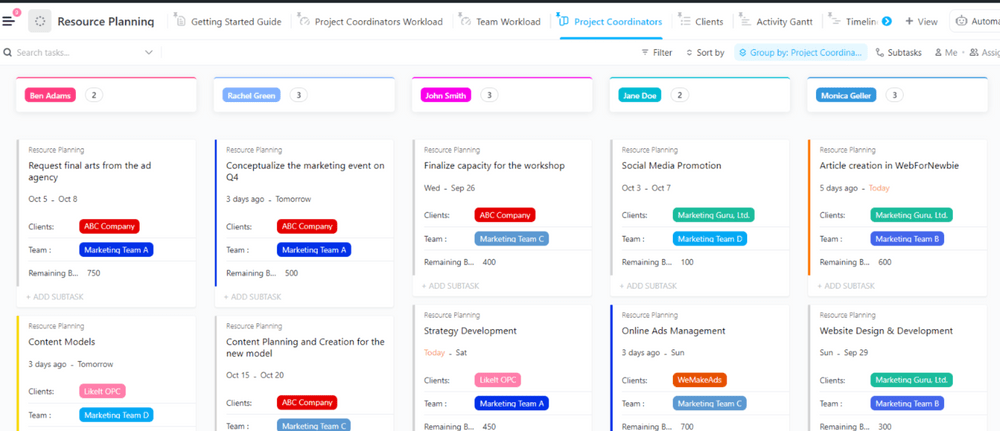
The Resource Planning Template by ClickUp gives you an easy way to see and allocate resources across your project team or department. Use the Workload view to understand every team member’s capacity, then allocate resources by making changes directly in the resource plan.
2. ClickUp’s Resource Allocation Template

ClickUp’s Resource Allocation Template makes it easier than ever to plan and manage your team’s resources. With this template, you can:
- Efficiently allocate resources to projects and tasks
- Visualize resource availability in real-time
- Optimize utilization of people and materials
3. ClickUp Project Resource Matrix Template
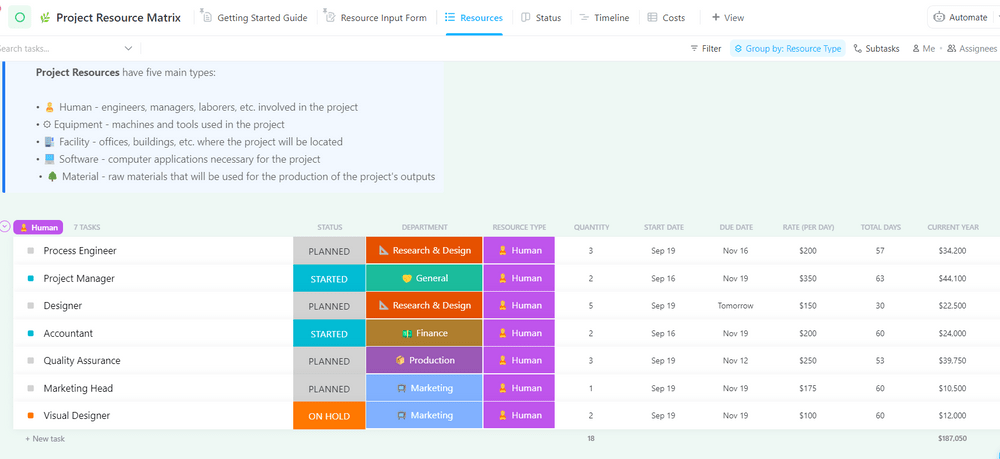
Enjoy an easier way to understand the total costs of your project with the Project Resource Matrix Template by ClickUp. This template uses custom fields like department, resource type, days, and rate so you can determine the cost, prepare accurate budgets, and allocate resources more effectively.
4. ClickUp Resource Management People Template
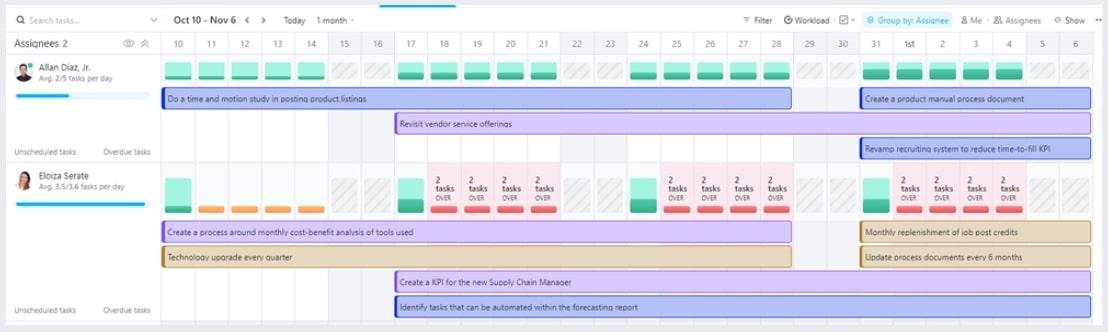
Presented here in a timeline format, this Resource Management People Template by ClickUp is a great way to oversee your team members’ time, availability, and utilization of resources. See their capacity, project type, and what tasks they’re working on from one central place.
5. Services Timesheet Template by ClickUp
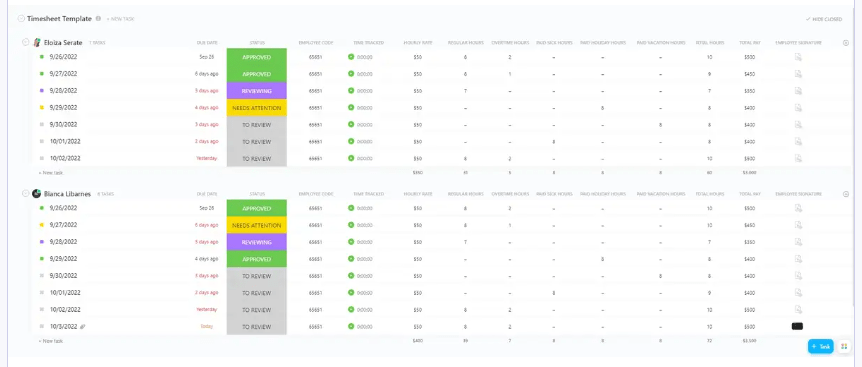
ClickUp’s Services Timesheet Template is designed to help you track and manage the hours of your services team. This template includes 12 different custom attributes such as total pay, paid sick hours, paid vacation hours, hourly rate, employee signature, and more to track service team hours.
You can break down the data by daily, weekly, and monthly views.
Summarize this article for me pleaseChallenges in Resource Utilization & How to Solve Them
Resource utilization comes with several challenges, especially in project management, operations, and business strategy. Here are some key issues and recommended strategies to overcome them:
⛔️ Challenge: Overallocation and burnout
- Assigning too many tasks to a resource can lead to stress, errors, and decreased productivity
- Employees working beyond capacity can experience burnout, leading to higher turnover
✅ Solution
- Use workload balancing tools to ensure no one is overburdened
- Encourage breaks and time off to maintain productivity
- Track work hours and set realistic deadlines
⛔️ Challenge: Underutilization of team members
- Idle employees or equipment can lead to wasted costs and inefficiencies
- Poor task distribution can result in some team members being overburdened while others have little to do
✅ Solution
- Identify idle resources using time-tracking or project management software
- Cross-train employees to handle multiple tasks
- Allocate surplus resources to new projects or initiatives
⛔️ Challenge: Lack of real-time visibility
- Without proper tracking tools, it’s difficult to know which resources are available or overloaded
- Projects may suffer from delays or inefficiencies due to misallocation
✅ Solution
- Use resource management software for live tracking
- Implement dashboards to visualize workloads and availability
- Conduct regular resource planning meetings
⛔️ Challenge: Skill-resource mismatch
- Assigning tasks to people who lack the right skills can lead to poor performance
- Hiring or training may be needed, which adds costs and delays
✅ Solution
- Maintain a skills inventory to match the right people to the right tasks
- Provide upskilling and training opportunities
- Use competency-based project assignments
⛔️ Challenge: Unpredictable demand and resource availability
- Projects often face fluctuating needs, making it difficult to allocate resources optimally
- Unexpected employee absences or equipment failures can disrupt plans
✅ Solution
- Use historical data to predict resource needs
- Build contingency plans for unexpected absences or equipment failures
- Maintain a flexible workforce
⛔️ Challenge: Siloed teams and poor communication
- Departments working in isolation can lead to duplicated efforts or underutilized shared resources
- Lack of collaboration makes it difficult to reallocate resources when needed
✅ Solution
- Encourage cross-functional collaboration
- Use centralized resource planning tools for better coordination
- Hold regular team sync-ups to discuss resource allocation
⛔️ Challenge: Inflexible resource planning
- Static plans don’t account for changes in project scope or unexpected requirements
- Over-reliance on rigid schedules can lead to inefficiencies when priorities shift
✅ Solution
- Use Agile methodologies for adaptive resource allocation
- Regularly reassess project priorities and adjust resources accordingly
- Maintain a buffer for unexpected changes
⛔️ Challenge: Budget constraints
- Limited budgets may prevent organizations from hiring additional staff or upgrading resources
- Balancing cost efficiency with effective resource use can be challenging
✅ Solution
- Prioritize critical resources within the budget
- Automate repetitive tasks to reduce costs
- Leverage cost-effective outsourcing when necessary
⛔️ Challenge: Multiple project dependencies
- Resources working across multiple projects may face conflicts in priorities
- Bottlenecks can occur when key resources are needed by multiple teams simultaneously
✅ Solution
- Identify key shared resources early in the planning process
- Set clear priorities and deadlines for each project
- Use dependency mapping to avoid bottlenecks
⛔️ Challenge: Technology limitations
- Outdated or inadequate resource management tools make it hard to track and optimize utilization
- Lack of automation can lead to manual errors and inefficiencies
✅ Solution
- Implement AI-driven resource and capacity planning tools for smarter allocation
- Automate time tracking and reporting to reduce manual work
- Use cloud-based collaboration tools for remote teams
Also Read: How to Manage Multiple Projects Successfully
Summarize this article for me pleaseBenefits of Effective Resource Utilization
It’s almost impossible to get the balance exactly right, but the best project managers strive to manage and level resources as effectively as possible. Smart resource utilization brings plenty of benefits to the whole team. Here are some of the many reasons why it’s worth investing your time and energy into managing resource utilization.
Increased team happiness
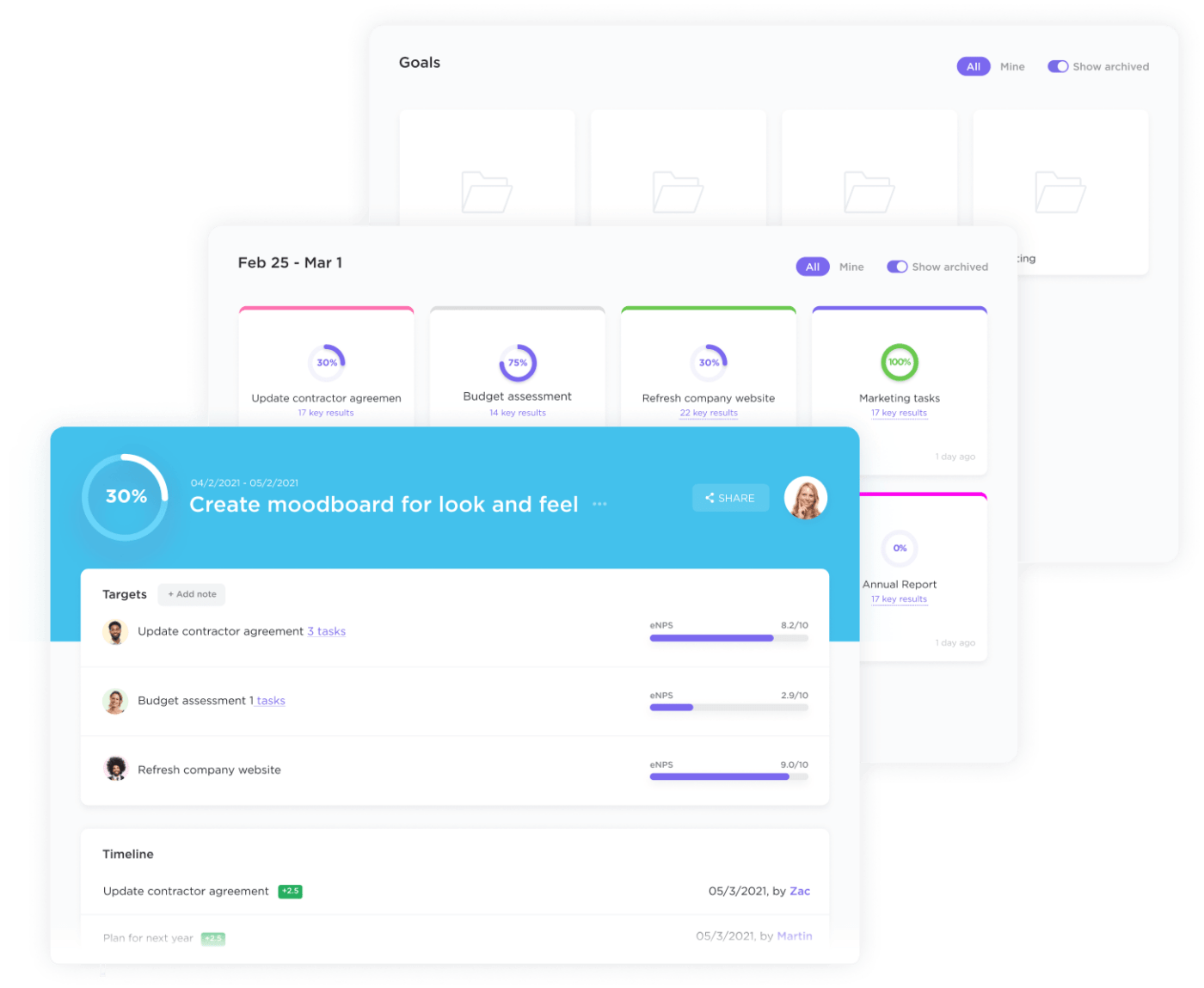
Most of us thrive when there’s a good, steady stream of work that feels manageable but also helps us grow and challenge ourselves. Having too much work is a route toward burnout and unhappiness, and having too little can make us bored and unhappy.
Effective project managers aim to optimize resource management so their team members stay happy. They know that overutilization and over-scheduled working times should be avoided, and they make an effort to proactively manage utilization to improve employee happiness, morale, and satisfaction. 🤩
Higher productivity levels
In almost every organization, resources aren’t being used to their fullest. Understanding your overall resource utilization rate allows you to identify underutilization and make changes to raise productivity levels.
With the right tools, formulas, and plans, you can check resource utilization regularly and quickly adapt to make the best use of your project team. Distribute more work to team members whose schedules aren’t full, and look to allocate tasks away from those who are at risk of becoming unproductive from overutilization. 📈
Greater control over projects
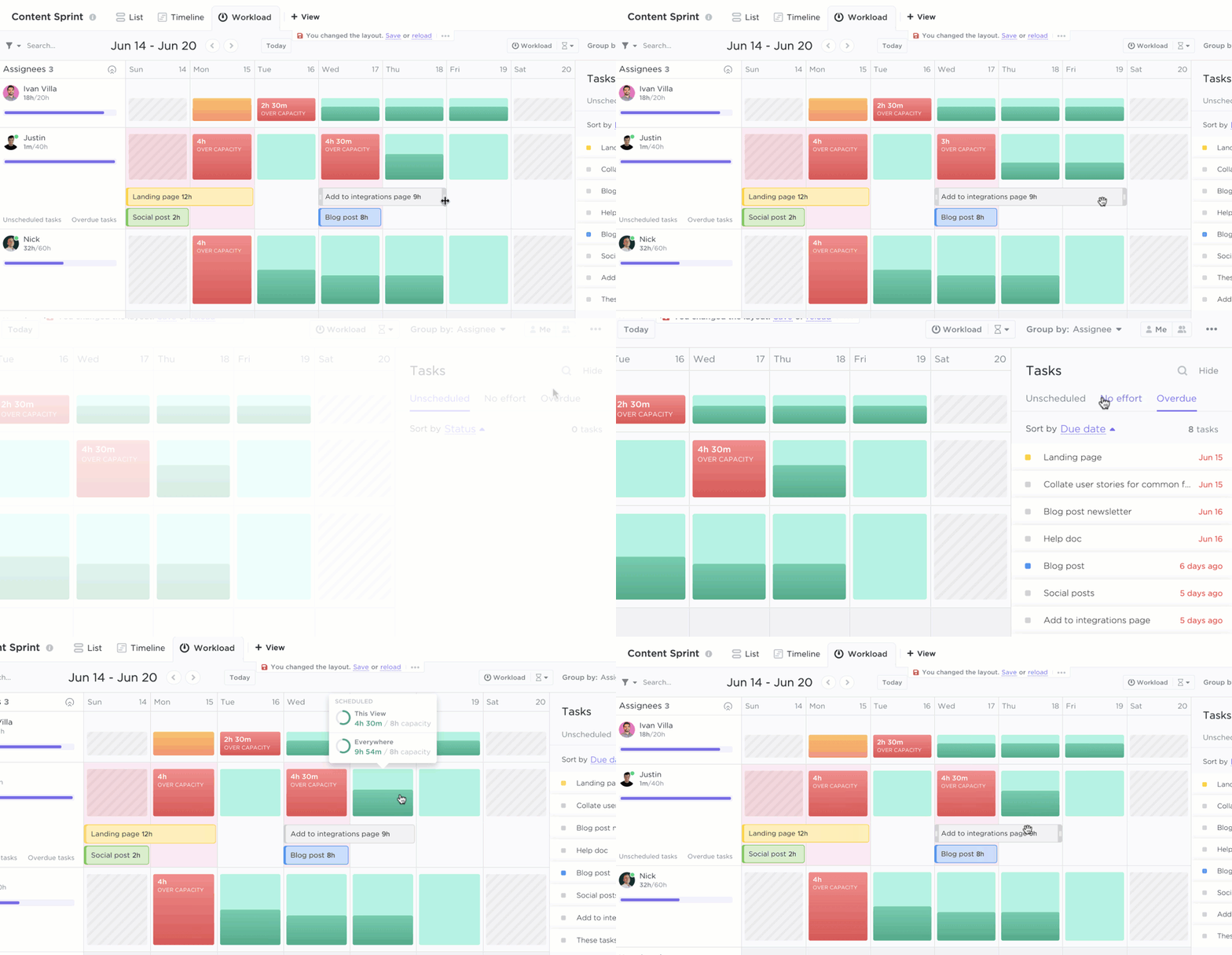
Project management involves lots of moving parts, and understanding how your resources are being used is just one of them. An effective resource utilization plan makes capacity planning easier and gives you greater insight and control over your projects.
If you don’t know how much of your planned material is being used or how productive your project team members are, it’s hard to stay in control. Avoid going over your billed hours for clients, assigning team members at the last minute, and paying extra to procure additional resources by carefully managing your resource use. 👀
Better management of individual resources
Whether you’re working with a big project team or a small one, having a tool that simplifies resource utilization gives you a better way to understand available resources and their effectiveness.
This helps you make more strategic decisions for your project. ✨
Higher profitability
Adopting the practice of effective resource utilization doesn’t just make people happier; it can make you more money, too. By working on productivity levels and streamlining the use of material and money, you can also enjoy higher profitability.
Managing your resources more effectively has a direct impact on your bottom line. A good utilization rate ensures you aren’t spending more time or effort on client projects than expected, which can impact profitability.
Plus, happier, more engaged team members also do better work—which means you can command higher rates for the best product or service. 💰
Summarize this article for me pleaseBest Practices for Tracking Resource Utilization
Here are a few more resource utilization tips to keep in mind:
- Balance workloads to prevent overutilization and burnout
- Use automated tools to collect and analyze data
- Use AI and analytics to predict and adjust resource allocation
- Set benchmarks to compare actual vs. expected utilization
- Conduct regular reviews to adjust allocations
- Track real-time utilization with digital dashboards and automation
- Encourage team feedback to improve utilization balance
Modern resource planning and management tools such as ClickUp make effective resource utilization an easier goal to achieve!
Summarize this article for me pleaseImprove Your Resource Utilization With ClickUp
Proper resource utilization leads to higher productivity and impacts employee happiness and your bottom line. Use the steps above to improve resource utilization within your team or across the entire organization.
Make the whole process easier and build a dedicated hub for all your project management needs with ClickUp. ClickUp is the everything app for work that combines project management, knowledge management, and chat—all powered by AI that helps you work faster and smarter.
Sign up for a free ClickUp account today and enjoy a better way to manage your new projects. 🤩


Everything you need to stay organized and get work done.

Recent Articles
Jira Project Management: What It Does Well and Where It Taps Out 
Jira Project Management: What It Does Well and Where It Taps Out
8 Communication Strategies That Actually Fix Team Chaos
8 Communication Strategies That Actually Fix Team Chaos
