A skills matrix is the obvious fix, but most teams pick a template, fill it once, and never touch it again. Within a quarter, it’s a museum piece. The honest question isn’t which template has the prettiest heat map. It’s whether the template will survive its second update, who owns the gap-to-action loop, and what happens when two managers try to edit at the same time.
We reviewed 10 free templates for Excel, Google Sheets, and ClickUp, and ranked them by what they actually survive.
Summarize this article with AI ClickUp Brain not only saves you precious time by instantly summarizing articles, it also leverages AI to connect your tasks, docs, people, and more, streamlining your workflow like never before.
Summarize this article for me please
What Is a Skills Matrix Template?
A skills matrix template is a grid mapping team abilities against required skills, scored on a rating scale. The right template depends on three things: how many people edit it, how often it updates, and whether you need a one-time audit or a live gap-to-action workflow.
For example, a tech lead on a small team might use a basic sheet to confirm that three developers know Java. However, a large HR team needs a live, multi-editor workspace to track hundreds of employees, identify hiring trends, and trigger training tasks.
Summarize this article with AI ClickUp Brain not only saves you precious time by instantly summarizing articles, it also leverages AI to connect your tasks, docs, people, and more, streamlining your workflow like never before.
HR and L&D teams turning gap findings into trackable training programs
Training Needs Evaluation Form, approval workflow with Custom Statuses, department grouping
ClickUp List
Summarize this article with AI ClickUp Brain not only saves you precious time by instantly summarizing articles, it also leverages AI to connect your tasks, docs, people, and more, streamlining your workflow like never before.
Summarize this article for me please
10 Free Skills Matrix Templates Explained
Seven of these templates work in Excel or Google Sheets. These are best for small teams that just need a quick, one-time look at their skills.
The final three are ClickUp templates. These are built for teams that need to keep their data live. They allow many people to edit at once and help you turn skill gaps into real hiring or training tasks.
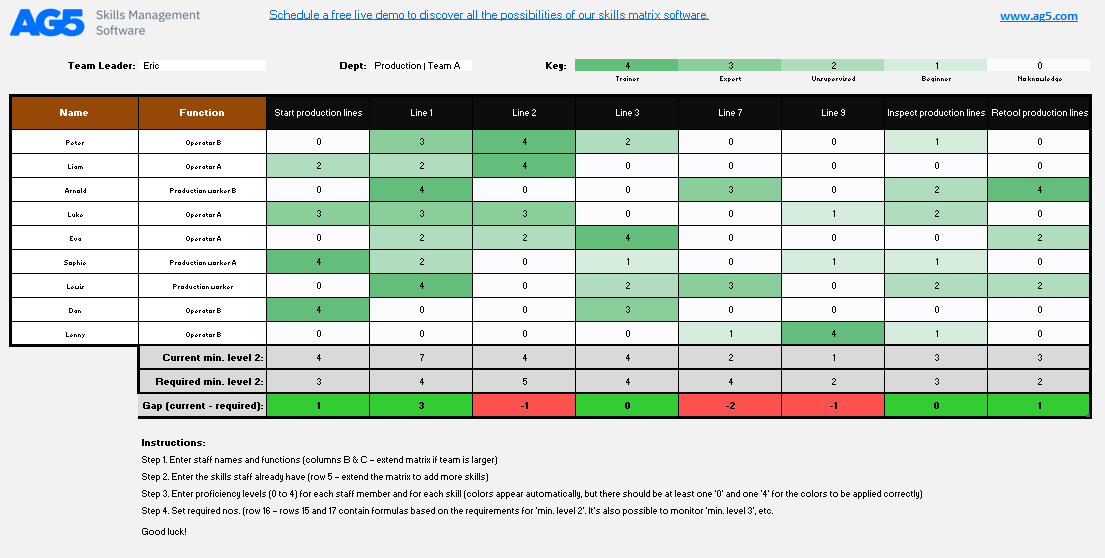
Use the Skills Matrix Template by AG5 when you need a fast skills snapshot in a file your team can open without learning a new tool
The AG5 Skills Matrix Template is built for teams that want to map skills quickly and move on. You list employees, add the skills that matter for the role, and rate each person on a five-level scale from ‘no knowledge’ to ‘trainer.’
AG5 also offers industry-specific versions for manufacturing, warehousing, and chemical operations. These presets save you from building a matrix structure from scratch.
Use case: You manage a 25-person production team and need to see who can safely run specific lines before assigning shifts. Fill in the grid to compare current coverage against required levels. Then, spot weak points before they become staffing problems.
A useful rule of thumb: This works best when one manager owns the file. The spreadsheet breaks if multiple people need to update data simultaneously. It leads to version conflicts, overwritten formulas, and no edit history.
Why use this template?
Skill coverage: Track employee abilities in one central location
Proficiency levels: Use a five-level scale to separate beginners from experts
Industry presets: Start with layouts designed for manufacturing or warehousing
Quick reference: Create simple sheets for training plans and audits
Best for: Small teams that need a simple spreadsheet-based matrix for an initial skills review
Skip it if: You need live collaboration, detailed reporting, or a reliable way to maintain the matrix over time
Have your skills matrix lead directly to a development plan with the Skills Matrix Template
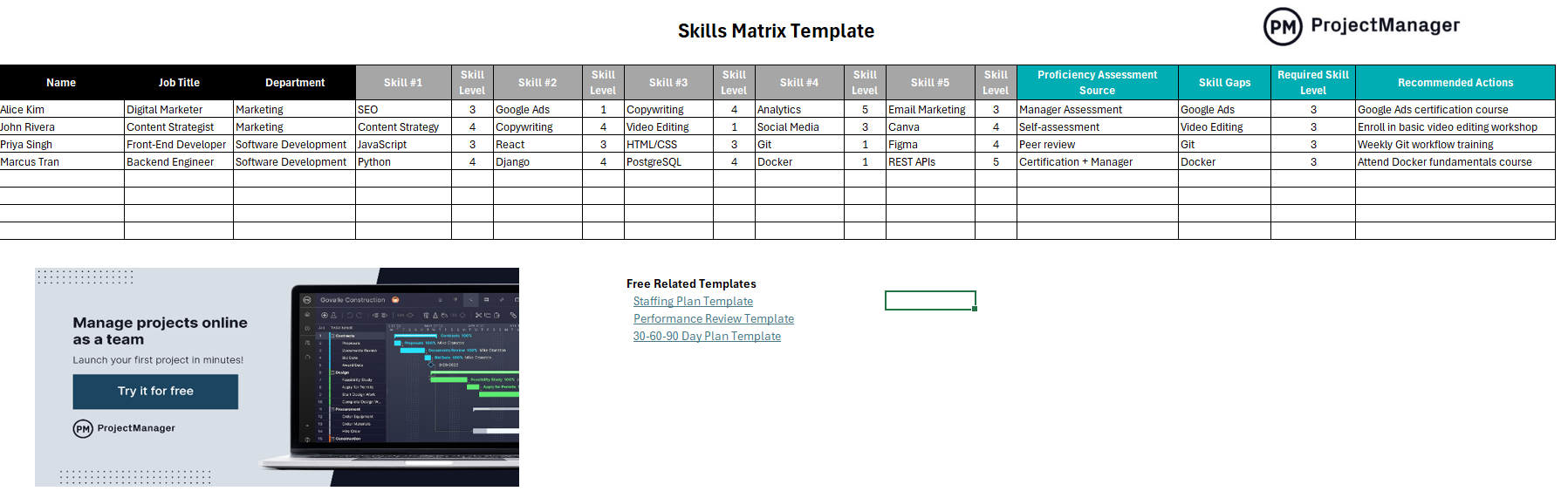
The ProjectManager Skills Matrix Template is better than a basic grid because it pushes for action. It includes a skill gap column and a recommended actions field. You can see where someone falls short and decide the next step in the same row.
It also includes a source field for each rating. This helps you distinguish between manager judgment, peer input, and official certifications.
Use case: You are preparing for quarterly reviews for a 60-person department. Use this sheet to identify gaps and determine whether the solution is mentoring, training, or reassignment.
A useful rule of thumb: If your process ends with specific action items, this template fits. If your team keeps breaking formulas or needs to edit together in real-time, Excel will get in the way. It will force workarounds like emailing copies and manually merging changes.
Why use this template?
Gap analysis: Compare current proficiency against required levels for each skill
Action planning: Record recommended next steps right next to the identified gap
Data credibility: Note how each skill was assessed to add weight to the score
Team growth: Highlight the largest skill gaps across an entire department
Best for: HR leads and department heads who use Excel to plan performance reviews
Skip it if: You need browser-based collaboration or a setup that multiple managers can update without breaking the file
Use the Valamis Skill Matrix Template like a blank starter grid in Excel or Google Sheets
The Valamis Skills Matrix Template is a blank grid you can shape to fit any role. It is available for Excel and Google Sheets. It ships without preset skills or fixed scales, so you can provide your own skill list, rating language, and department structure.
Use case: You lead a 15-person startup and want to run a first skills check without committing to a specific tool or methodology. Make a copy, define your own 1-to-5 scale, and list the skills your roles actually need.
A useful rule of thumb: A blank template works when you already know what you want to measure. If you are still figuring that out, start with a structured template and edit it down.
Why use this template?
Format flexibility: Work in the tool your team already uses (Excel or Google Sheets)
Custom scales: Define your own rating language so your team reads it the same way
Clean organization: Group skills by category or seniority without fighting preset columns
Zero friction: Download the file without creating an account, just provide an email
Best for: Teams with non-traditional roles that need a fully custom structure
Skip it if: You want pre-built skill lists, auto-calculated gaps, or visual heat maps
Track both what your team can do and what they want to do with the Skills Matrix Template by AIHR
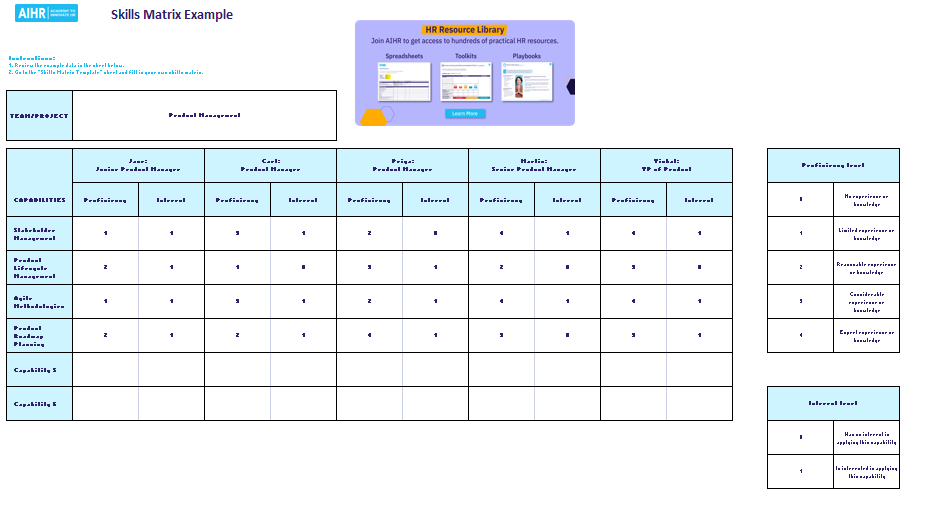
The AIHR Skills Matrix Template tracks interest alongside proficiency. It pairs a 0-to-4 skill score with a simple interest rating. This is ideal for HR, because training a motivated employee is a better investment than forcing a class on someone who isn’t interested.
The layout displays required, available, and missing skills side by side. This gives you a clear view of your skill debt and shows who is willing to help you pay it off.
Use case: You are an HR lead planning next year’s training budget for a 40-person team. You can fund six programs, but have eleven gaps. Use the interest scores to fund programs for employees who are low on skills but high on motivation.
A useful rule of thumb: Use interest scores when you control the training budget. If you don’t, the proficiency column is enough.
Why use this template?
Dual scoring: Measure proficiency and interest on a 0-to-4 scale
Budget priority: Target training plans toward motivated employees first
Gap visibility: View required and missing skills side-by-side
Assessment logic: Pair the grid with AIHR’s guide for better assessment methods
Best for: HR teams planning employee development to fit the limited training budget
Skip it if: You only need proficiency scores, or if your team won’t reliably self-report their interests
Plan development, calibrate scores, or audit your whole team with this template by Deel
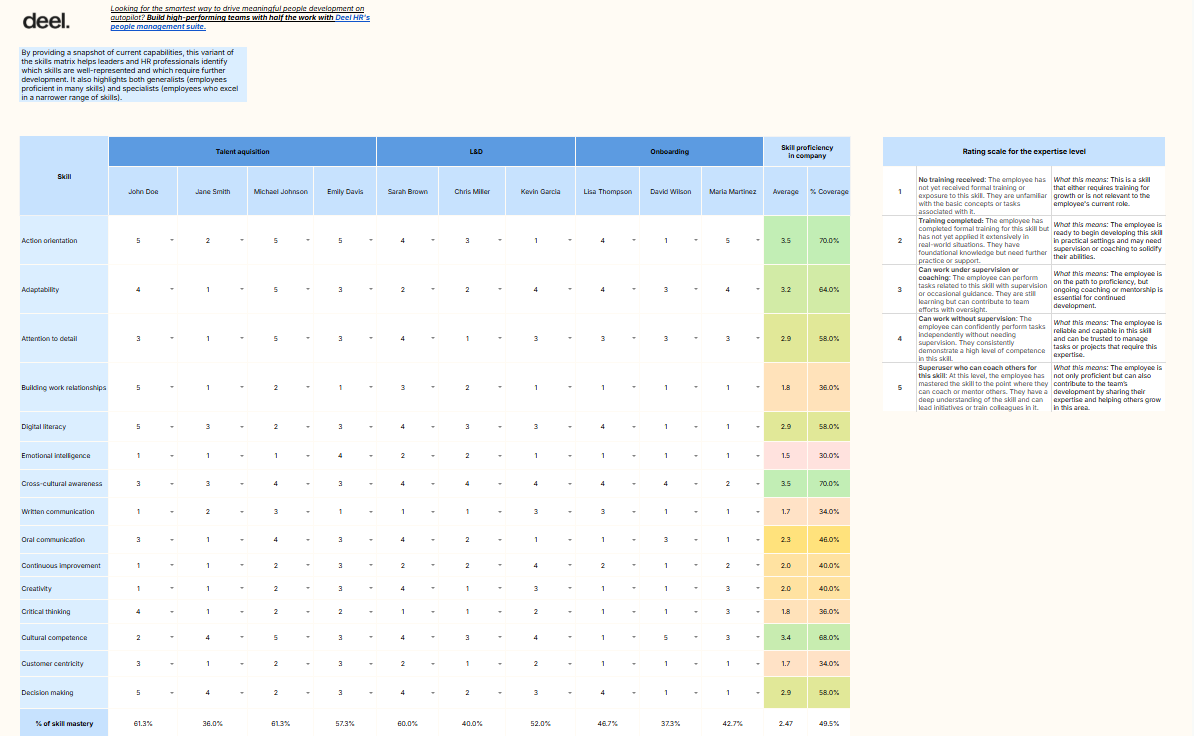
The Deel Skills Matrix Template provides three different ways to view your team’s talent. You get specific variants for interest-based planning, manager vs. self-evaluations, and team coverage.
Each version uses a 1-to-5 scale defined by behavior, ranging from ‘no training’ to ‘can coach others.’ It includes a pre-filled example so you can see how the data looks before entering names.
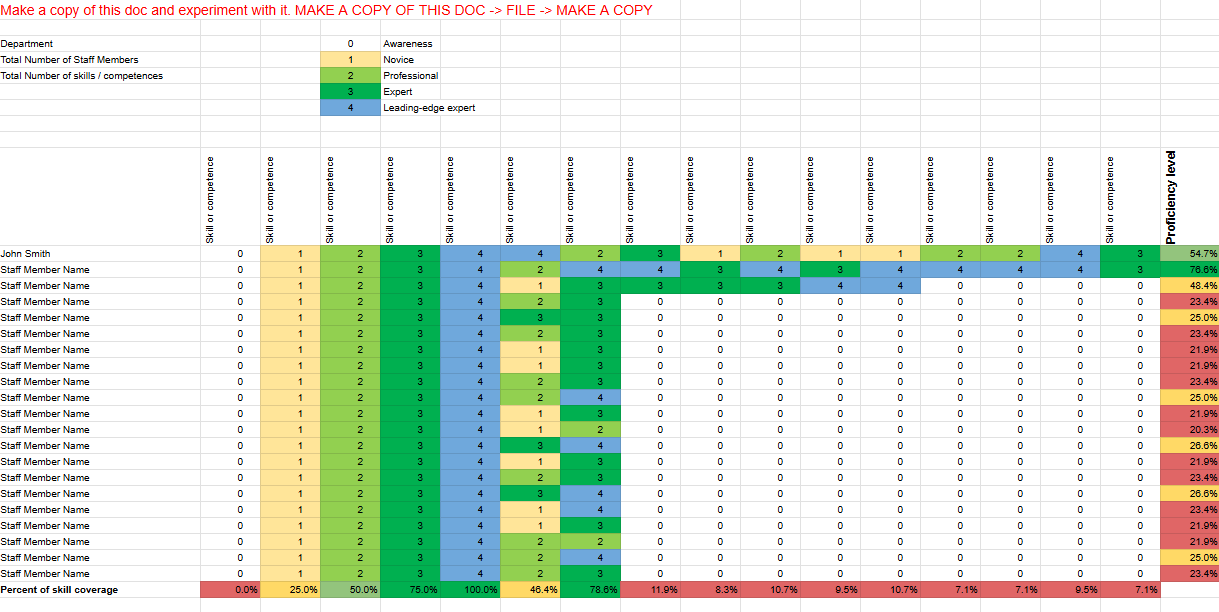
Use case: You manage a 50-person marketing team and need to find skills that are dangerously thin. Use the coverage variant to map every skill, flag low-coverage areas in red, and decide whether to train, hire, or restructure.
A useful rule of thumb: Pick the variant based on your goal. Use ‘calibration’ for fair reviews and ‘coverage’ for organizational audits.
Why use this template?
View variety: Choose from three structures based on your specific goal
Behavioral scales: Use 1-to-5 ratings defined in plain, actionable terms
Visual alerts: Identify team-wide gaps automatically through conditional formatting
Reference data: Use the pre-filled example to set up your matrix correctly
Best for: People leads at growing companies who need different views from the same skills data
Skip it if: You only need one simple grid or don’t want to provide contact info for the download
Use the FreeSkillsMatrix.com Excel Template when you need a one-page heat map for an executive update, not an individual development plan
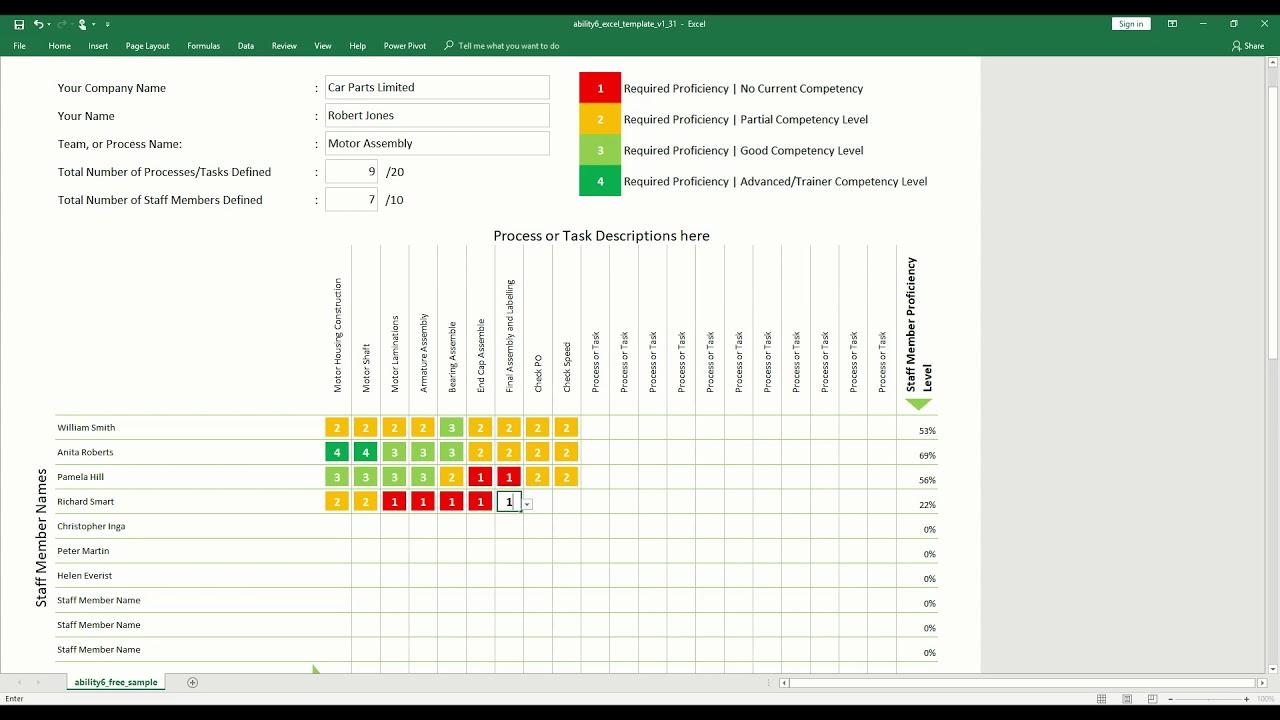
The FreeSkillsMatrix.com Excel Template is for managers who want to avoid staring at walls of numbers. It features an automated heat map: as you enter ratings, the cells change color and formulas calculate scores for every person and skill.
The template automatically flags low scores, bringing urgent gaps up without manual sorting. Instructions are built directly into the file, so you can start entering data in minutes.
Use case: You manage a 30-person support team and need to find out why resolution rates are dropping. Enter proficiency across core skills like troubleshooting and product knowledge. The heat map instantly highlights gaps in red for your next director update.
A useful rule of thumb: Heat maps are great for executive reviews and quick checks. They are less useful for individual development plans because the colors hide the nuance of the data.
Why use this template?
Visual reporting: See team-wide strengths through automatic cell coloring
Automated math: Use built-in formulas to score employees and skills automatically
Urgency flagging: Surface the most critical training needs without manual filtering
Built-in setup: Follow instructions baked into the file for a faster start
Best for: Managers who need a one-page visual report for review meetings or executive updates
Skip it if: Your team works in Google Sheets or you need to heavily customize the grid structure
Access radar charts for large-scale skills audits with the Skills Matrix Template by Someka
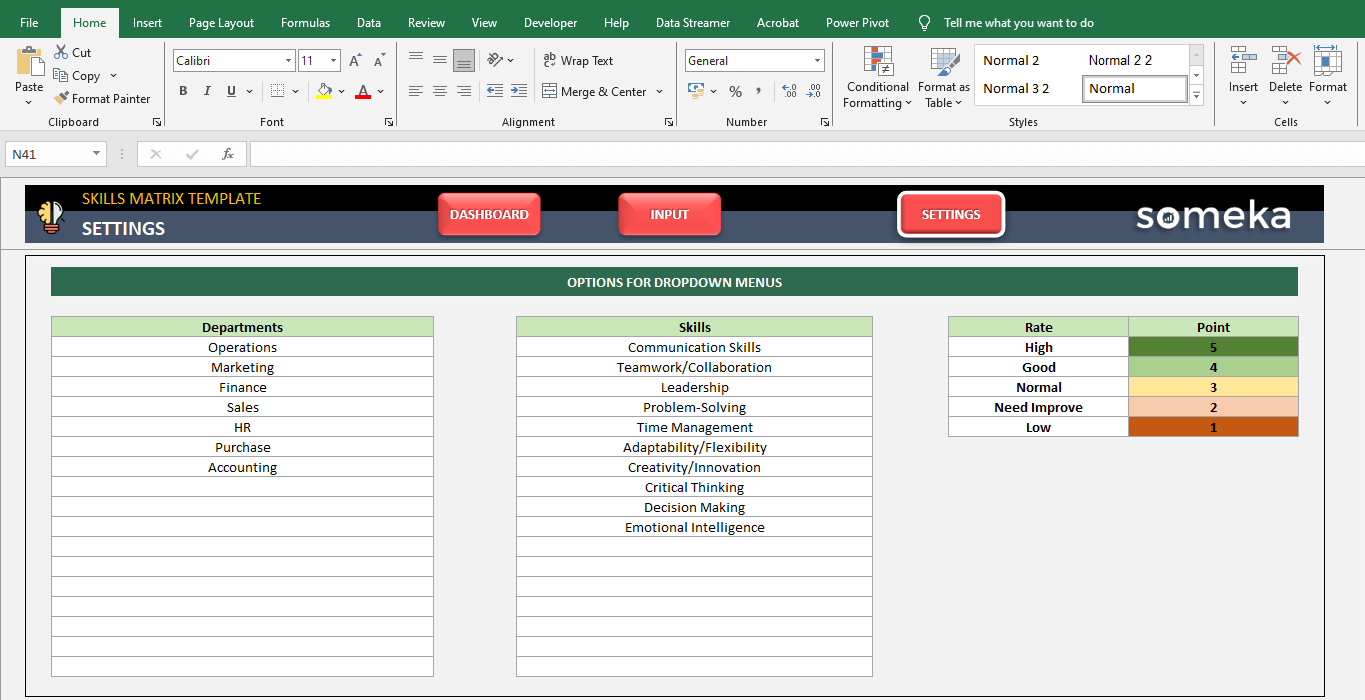
The Someka Skills Matrix Excel Template is built for department-wide use, supporting up to 500 employees. It features a Settings tab to define departments and skills, a Skills Input table for ratings, and a Dashboard with radar and bar charts.
You can filter by person or department from the dashboard. And the visual summaries update automatically to show your best and worst performers.
Use case: You are the head of HR at a 200-person company and need to present a skills audit to leadership. Rate employees across 15 skills and use the radar charts to show department-level coverage.
A useful rule of thumb: The free version is a demo for testing the layout. If you need to track 500 employees and use the full dashboard, you will need to pay for the full version.
Why use this template?
High capacity: Run assessments for hundreds of employees in one file
Deep customization: Define departments, categories, and labels in a central tab
Visual analytics: See person-level and department-level analysis through charts
Performance tracking: Identify the strongest and weakest performers per skill instantly
Best for: HR leads at mid-size to large organizations who need presentation-ready audits
Skip it if: You want a fully featured tool for free or your team works exclusively in Google Sheets
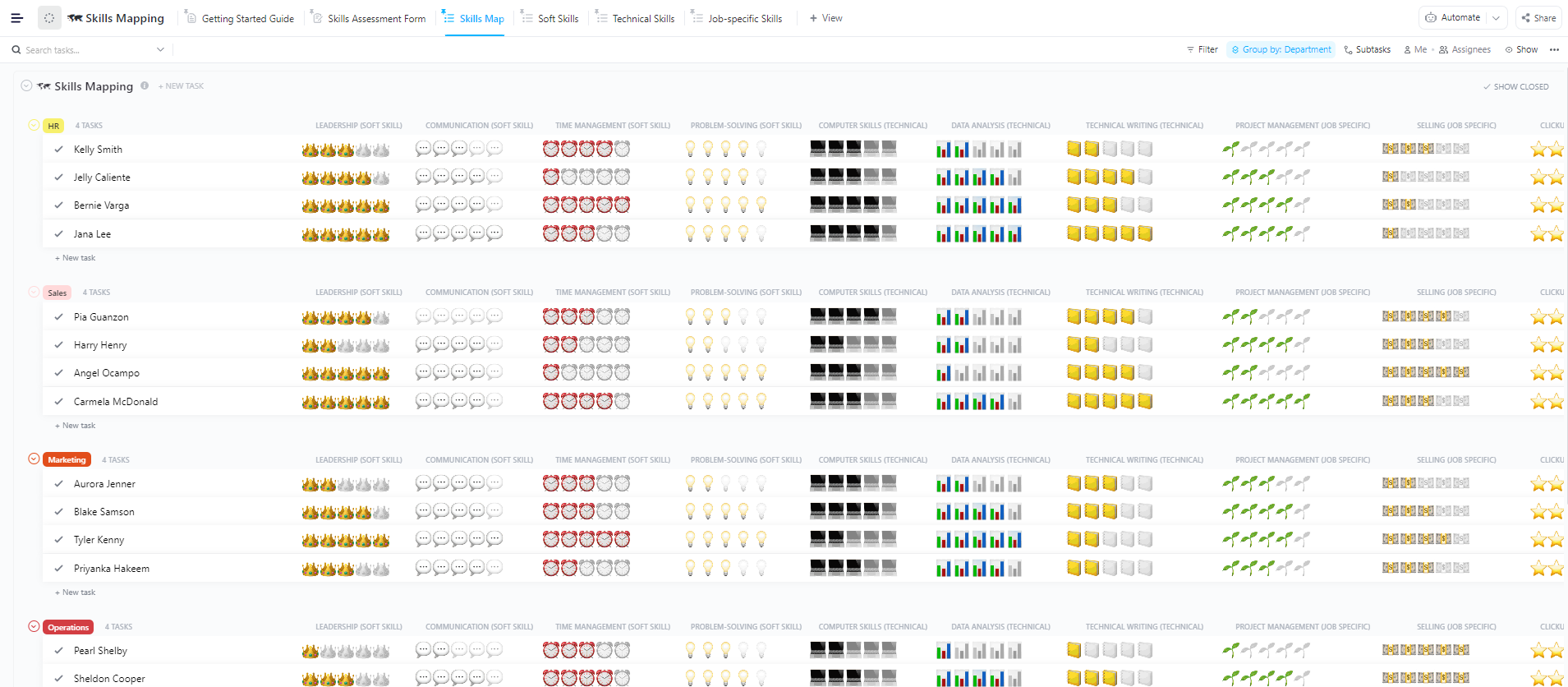
Identify, score, and visualize your team’s technical, soft, and job-specific skills in one workspace with the ClickUp Skills Mapping Template
Use the ClickUp Skills Mapping Template when you need a single source of truth for your team’s capabilities. Six built-in views split skills into Technical, Soft, and Job-Specific categories. You can stop going through lists to compare a developer’s Python proficiency with their presentation skills.
The Skills Assessment Form view collects self-evaluations directly from team members. Plus, ClickUp Brain analyzes proficiency scores across roles. It then suggest learning priorities based on the gaps it finds.
Use case: You are scaling a product team from 8 to 20 people. You need to know which senior engineers can mentor on system design and where to invest in upskilling versus hiring. Use the Technical Skills view to spot stack gaps, then use the Assessment Form to collect ratings from new hires during onboarding.
A useful rule of thumb: This works best for teams that need to search past assessments by name, skill, or date when making hiring or promotion decisions.
Why use this template?
Custom attributes: Score 12 distinct attributes across technical, soft, and job-specific skills on a 1–5 scale
Focused views: Switch between different skill categories so data stays organized
Status tracking: Use ‘Open’ and ‘Complete’ statuses to see which assessments are pending
Integrated forms: Collect self-reports directly inside ClickUp with no external tools required
Best for: Cross-functional teams that want a living skills inventory instead of a static spreadsheet
Skip it if: You only need to track one category or require a full performance review workflow with formal sign-offs
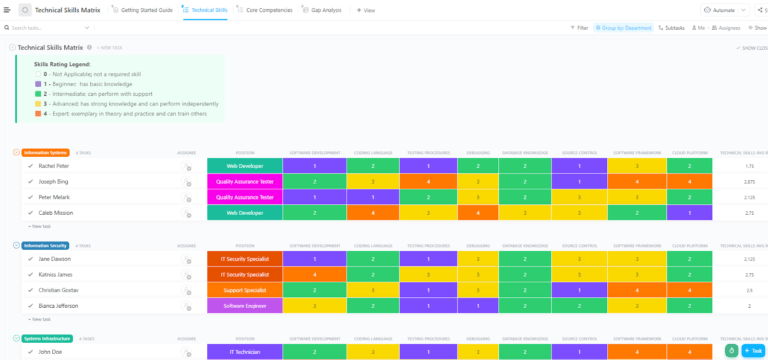
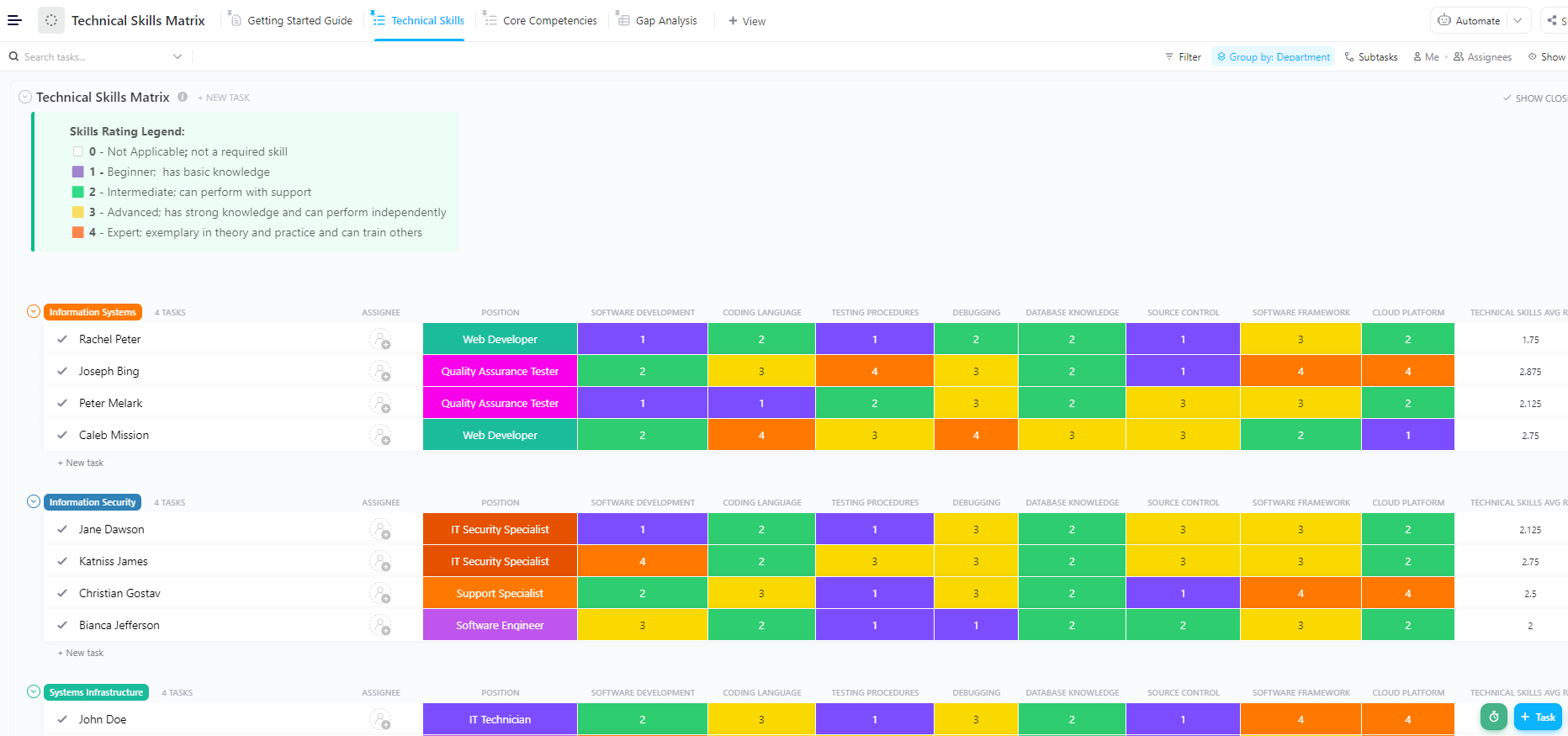
Track, score, and analyze engineering capabilities across 18 technical domains in one place with ClickUp’s Technical Skills Matrix Template
The ClickUp Technical Skills Matrix Template gives you granular visibility into what your team can actually do. Pre-built Custom Fields house concrete areas like software development and risk management. This ensures you are scoring real competencies rather than vague labels.
The gap analysis view filters and sorts data to surface the widest gaps between required and current proficiency. Managers can see which team members need support for their assigned work. The best part? This happens without building custom reports or exporting data to a spreadsheet.
Use case: Your team just inherited a new microservices architecture. Use the Technical Skills view to score each engineer on Cloud Platforms and Debugging. Flip to Gap Analysis to see who is furthest from the required proficiency for their role. Then assign training tasks with deadlines directly from the matrix.
A useful rule of thumb: This works best for technical leads who want to turn skill gaps into trackable work items in the same workspace.
Why use this template?
Technical depth: Use proficiency columns to capture capability levels beyond ‘yes/no’ familiarity
Gap Analysis view: Automatically surface and rank the most critical skill gaps by severity
Multiple perspectives: Switch between technical skills, core competencies, and gap analysis for different data angles
Assessment workflow: Track the status of each evaluation from ‘Open’ to ‘Complete’ to ensure no one is missed
Best for: Engineering and IT teams that need a structured, domain-specific matrix
Skip it if: Your team is non-technical. The pre-built fields are software-heavy; use the general Skills Mapping Template instead
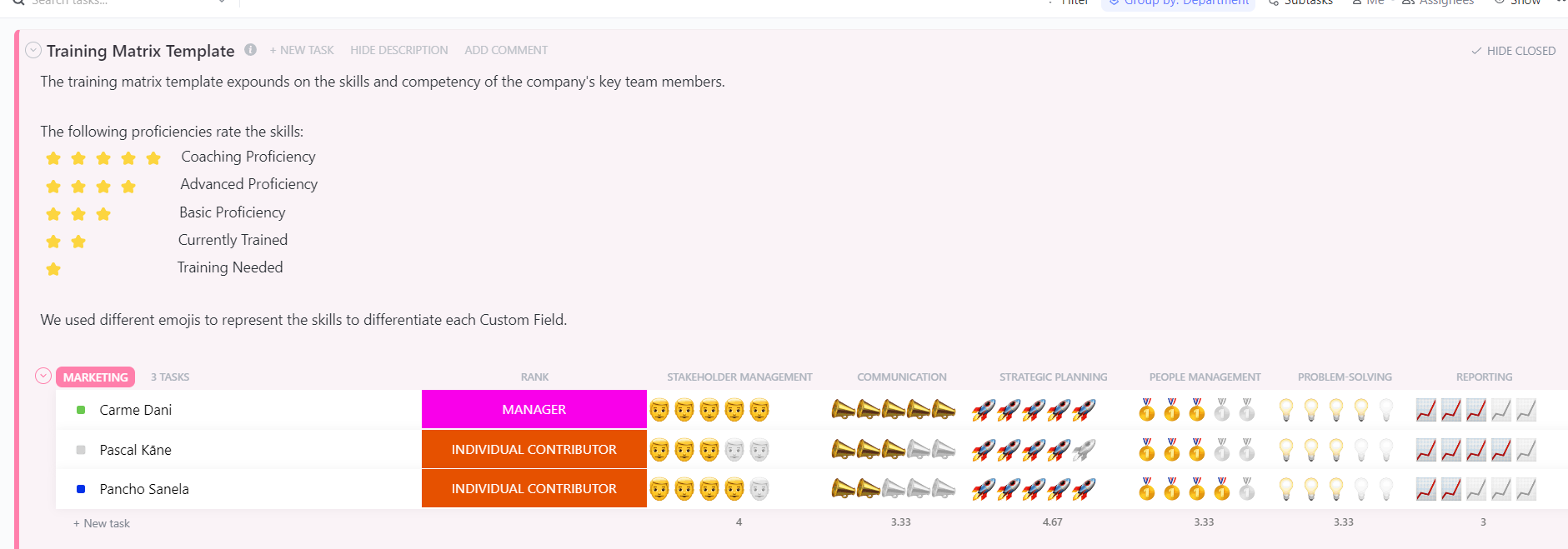
Turn identified skill gaps into structured training programs with the ClickUp Training Matrix Template
The ClickUp Training Matrix Template is helpful when you’ve found the gaps and need to actually close them. It turns skill deficiencies into a talent development pipeline. All of it comes marked with owners, statuses, and deadlines. Purpose-built views cover the full workflow from collecting training requests to reviewing completions across departments.
The Training Needs Evaluation Form submits training requests directly in ClickUp. It does not require a separate intake form or email thread. The review process view then moves each request through Custom Statuses.
Use case: Your Q1 assessment shows the customer success team lacks a specific product certification. Use the evaluation form to collect requests from managers. Then use the review process to approve and schedule the training. Finally, flip to the skills-per-department view to confirm that those gaps close.
A useful rule of thumb: Internal training programs succeed when they have a clear owner and a deadline. Use this template to assign both to every skill gap you find.
Why use this template?
Intake management: Collect training requests directly through a built-in evaluation form
Approval workflow: Track progress through custom statuses to keep HR and managers aligned
Department visibility: Manage development across the entire organization
Progress tracking: Monitor attributes to see how employees are advancing
Best for: HR and L&D teams that need to turn gap findings into trackable training programs
Skip it if: You are still in the assessment phase. This template manages the response; pair it with the Skills Mapping Template for a full solution
Summarize this article with AI ClickUp Brain not only saves you precious time by instantly summarizing articles, it also leverages AI to connect your tasks, docs, people, and more, streamlining your workflow like never before.
Summarize this article for me please
How to Choose the Right Skills Matrix Template
Your choice depends on the friction between your team size and your update frequency. Use the breakdown below to find your balance:
Team size: A 10-person team can live in a spreadsheet, but a 200-person org will outgrow Excel the first time two managers try to edit at once
Update frequency: If the matrix needs to stay current quarterly or more, you need a live workspace
Scope of skills: Generic competencies need a different template than specialized technical stacks
What happens after: A static skills matrix tells you the gap. But one connected to task management and training workflows closes it
If you’re a small team that needs a snapshot for an upcoming review, grab a spreadsheet. If the matrix must remain live and inform training or hiring decisions, go for the ones in ClickUp or a similar tool.
Summarize this article with AI ClickUp Brain not only saves you precious time by instantly summarizing articles, it also leverages AI to connect your tasks, docs, people, and more, streamlining your workflow like never before.
Summarize this article for me please
Which Template Should You Use First?
If you skimmed the list and still aren’t sure, use this. Match your immediate need to the right starting point:
If you need to…
Start with this template
Get a quick snapshot for an upcoming review
AG5 Skills Matrix or Valamis Skills Matrix
Plan development around employee motivation
AIHR Skills Matrix
Compare manager ratings against self-assessments
Deel Skills Matrix (calibration variant)
Present a visual skills audit to leadership
Someka or FreeSkillsMatrix.com
Run a department-wide audit for 100+ employees
Someka Skills Matrix
Keep a live, multi-editor skills inventory
ClickUp Skills Mapping Template
Audit a technical team’s stack-specific gaps
ClickUp Technical Skills Matrix Template
Turn identified gaps into assigned training programs
ClickUp Training Matrix Template
Still unsure? Start with the question: Does this matrix need to stay alive after the first fill-in? If yes, use a ClickUp template. The workspace keeps the data live, assigns owners to gaps, and triggers follow-up work. If you just need a one-time export for a meeting or review cycle, a spreadsheet template will do the job faster.
Summarize this article with AI ClickUp Brain not only saves you precious time by instantly summarizing articles, it also leverages AI to connect your tasks, docs, people, and more, streamlining your workflow like never before.
Summarize this article for me please
ClickUp Templates vs. External Templates: When Each One Wins
External templates work when the skills matrix is a one-time exercise. You need a snapshot for a quarterly review, an audit deck for leadership, or a quick gap check before hiring. AG5, Valamis, and Someka handle these jobs well because they live in tools your team already has open. One person fills in the grid, exports it, and moves on.
ClickUp templates are better when the matrix has to stay alive after the first fill-in. They connect each skill gap to an owner, a training task, a deadline, and a status update. Multiple managers can edit at once without breaking formulas. The data feeds directly into hiring decisions, onboarding workflows, and L&D programs. This happens without leaving the workspace.
Users describe the same shift. Philip Storry, a Senior System Administrator at SYZYGY, wrote:
Our teams have used forms and templates to standardize some workflows. We’ve also used the built-in automation to ease some workflows, especially where custom fields are capturing information that can help determine who should be assigned to a task.
Philip Storry, Senior System Administrator at SYZYGY
The honest answer: if you’ll fill in the matrix once and file it away, a spreadsheet is faster. If the matrix needs to update quarterly or support multiple editors, a spreadsheet will break down within one review cycle.
Summarize this article with AI ClickUp Brain not only saves you precious time by instantly summarizing articles, it also leverages AI to connect your tasks, docs, people, and more, streamlining your workflow like never before.
Summarize this article for me please
Why Most Skills Matrices Fail After the First Quarter
A skills matrix is easy to build. The hard part is keeping it accurate past the first review cycle. Three failure modes show up constantly:
No one owns the update. The matrix is filled during a planning sprint, then ignored for six months. By the time someone asks if it is still accurate, the team has already changed roles or learned new skills
Gaps get identified but are never actioned. Without a link between finding a gap and assigning a task to close it, the matrix becomes a record of problems rather than a trigger for solutions
Ratings become political. Without clear scoring criteria, managers may inflate ratings to avoid friction. And employees underscore themselves to set a safer baseline. Within one cycle, the data stops reflecting reality
A useful template assigns an owner to the update, links gaps to training tasks, or enforces scoring criteria, fixing at least one failure mode. A stronger workflow connects the matrix to owners, deadlines, training tasks, and a recurring review cadence.
Summarize this article with AI ClickUp Brain not only saves you precious time by instantly summarizing articles, it also leverages AI to connect your tasks, docs, people, and more, streamlining your workflow like never before.
Summarize this article for me please
How to Keep Your Skills Matrix Useful
Once you know how matrices break, you can build against it. Run through this checklist every quarter to catch staleness before it spreads:
Check
What to ask
What to fix
Ownership
Does every skill category have one person responsible for keeping it current?
Assign a single owner per department or skill group
Review cadence
Is the matrix reviewed at least quarterly?
Set a recurring task to trigger reassessment every 90 days
Gap-to-action link
When a gap is found, does it automatically become a training task with a deadline?
Connect your matrix to a training workflow (like the ClickUp Training Matrix Template)
Rating criteria
Can two managers independently score the same person and get a similar result?
Define behavioral anchors for each proficiency level (e.g., ‘can do independently’ vs. ‘can teach others’)
Measurement
Do you know if the matrix actually improved hiring or training outcomes?
Track two metrics: time-to-fill for gap-related roles, and skill score movement quarter over quarter
If you only do one thing from this table, make it the gap-to-action link. A matrix that finds problems but doesn’t assign someone to fix them is just a spreadsheet with anxiety.
Most of the items on this checklist (ownership nudges, review reminders, gap-to-task handoffs) are exactly the kind of repetitive HR work AI now handles in the background.
Watch this video to learn four practical ways HR teams can use AI to reduce repetitive work, improve hiring decisions, and build stronger teams.
Summarize this article with AI ClickUp Brain not only saves you precious time by instantly summarizing articles, it also leverages AI to connect your tasks, docs, people, and more, streamlining your workflow like never before.
Summarize this article for me please
How to Build a Skills Matrix from Scratch
Use these steps if you want to build a skills matrix without a template or customize one of the options above to fit your team.
Step 1: Define skill categories and scope
Start by deciding what you’re measuring and why. A skills matrix that tries to track everything is useful for nothing.
Group skills into categories that match how your team works:
Job-specific skills: Domain knowledge tied to a role (underwriting, sales methodology, compliance)
Limit yourself to 10–15 skills per role. If the matrix takes longer than 20 minutes to fill in, people won’t do it honestly.
Use a shared doc to brainstorm skill lists with your team leads before locking them into the matrix structure. Collaborative editing means you won’t end up with one manager’s blind spots sprinkled into the whole system.
Step 2: Choose a rating scale
Your scale needs to be specific enough that two managers rating the same person conclude the same number.
Level
What it means
1
No exposure. Needs full training before starting.
2
Basic awareness. Can assist but not lead.
3
Working proficiency. Can do the job independently.
4
Advanced. Can handle edge cases and mentor others.
5
Expert. Can design systems, set standards, or teach at scale.
Avoid scales beyond 5 levels. The more options you offer, the more inconsistent people’s scores will be. Behavioral anchors (like ‘can do independently’ vs. ‘can teach others’) matter more than the number of levels.
Step 3: Decide who rates whom
If only managers rate, you get a top-down view that misses daily realities. If only employees self-rate, scores drift toward the middle. Three common approaches:
Manager-only: Fast, consistent, but limited to what the manager observes
Self-assessment: Captures breadth, but employees tend to underscore or overscore depending on confidence
Calibrated: Manager and employee rate independently, then discuss gaps, since it produces the most accurate data
Pick one approach and commit. Mixing methods without a calibration step creates data you can’t compare across the team.
Step 4: Set required vs. current proficiency
A skills matrix without a target is just a roster. For each role, define the minimum proficiency level required for each skill. Then compare it against actual scores.
The gap is the difference between the required and the current. This is what drives every decision downstream: hiring, training, reassignment, or restructuring.
For example:
Skill
Required level
Current level
Gap
Cloud Platform (AWS)
4
2
-2 (critical)
Technical Writing
3
3
0 (met)
Stakeholder Mgmt
3
4
+1 (strength)
Step 5: Build the matrix structure
Now assemble the actual grid. Each row is a person; each column is a skill. Add columns for role, department, and overall gap score.
Build the matrix in a spreadsheet or any tool that supports a live grid view with filters. The structure works either way:
Rows = Team members
Columns = Skills (grouped by category)
Cells = Proficiency ratings
Summary row or column = Average scores and gap flags
For teams over 20 people, add a department filter so managers only see their direct reports by default, but can zoom out for cross-team visibility.
Step 6: Set a review cadence and owner
The World Economic Forum projects that nearly 40% of required skills will change by 2030. So a skills matrix must stay updated regularly. Decide upfront:
How often: Quarterly works for most teams. Faster-moving teams (like engineering during a tech migration) may need monthly check-ins
Who triggers it: Assign one owner per department. This is the person responsible for nudging team leads to update scores
What happens after: Every review should produce a short list of actions: training to assign, hires to prioritize, or mentorship pairs to create
Summarize this article with AI ClickUp Brain not only saves you precious time by instantly summarizing articles, it also leverages AI to connect your tasks, docs, people, and more, streamlining your workflow like never before.
Summarize this article for me please
Build a Skills Matrix That Outlasts the First Review
A well-designed skills matrix answers questions like: who can do what, where are the gaps, and what are we doing about them?
A good template makes that assessment repeatable. An effective workspace keeps it accurate after the first fill-in, connecting every gap to a real action.
ClickUp fits when the matrix needs multiple editors, recurring reviews, and a direct path from ‘gap found’ to ‘training assigned.’ External templates work when you need a one-time snapshot for a review meeting or an audit deck.
Pick the template that matches your biggest skills risk: unclear team coverage, undocumented expertise, stalled training follow-through, outdated proficiency data, or technical gaps hiding in plain sight.
Summarize this article with AI ClickUp Brain not only saves you precious time by instantly summarizing articles, it also leverages AI to connect your tasks, docs, people, and more, streamlining your workflow like never before.
Summarize this article for me please
Frequently Asked Questions About Skills Matrix Templates
What’s the difference between a skills matrix and a competency matrix?
A skills matrix tracks specific, measurable abilities (Python, SQL, forklift operation). A competency matrix tracks broader behaviors (leadership, strategic thinking, collaboration). It’s easy to use the terms interchangeably. Pick the label your org already uses so people know what they’re being assessed on.
Can you use a skills matrix for hiring decisions?
Yes, the matrix shows which skills are thin on your current team. It makes writing job descriptions based on actual gaps easier. If three engineers are strong in frontend but no one scores above a 2 in DevOps, hire for DevOps. The matrix also tells you when upskilling an existing person makes more sense than recruiting.
How many skills should a single template track?
Cap it at 10 to 15 skills per role. Beyond that, self-reports get gamed, and managers stop filling them in. Group them by Technical, Soft, and Job-Specific so the grid stays scannable. If a skill doesn’t tie to a real hiring, training, or staffing decision, it doesn’t belong on the matrix.
How do you get employees to rate themselves honestly on a skills matrix?
Use behavioral anchors rather than abstract numbers. ‘Can work independently’ is harder to game than ‘rate yourself 4 out of 5.’ Separate the matrix from performance reviews so low scores don’t feel punitive. Have managers and employees rate independently, then discuss any gaps larger than one level.
Can a small team use a skills matrix, or is it only for large organizations?
Works for teams of 3 to 5 people. Small teams benefit more because there’s less redundancy. One departure means losing 20% of your capability. Keep it simple: 8–12 skills, a 1-to-4 scale, quarterly review. A spreadsheet is enough until you hit 20 people or multiple managers editing the same file.
Who should fill out a skills matrix: managers, employees, or both?
Calibrated ratings (manager and employee independently, then reconcile) produce the most accurate data. Manager-only is fast but misses what people actually do day-to-day. Self-assessment alone drifts toward the middle as employees protect themselves. Pick one method and commit; mixing without a calibration step gives you data you can’t compare across the team.
Everything you need to stay organized and get work done.