Sorry, there were no results found for “”
Sorry, there were no results found for “”
Sorry, there were no results found for “”
Only 46% of employees feel satisfied with their workplace career support, according to Gartner. The other half are actively updating their resumes.
Organizations can close the gap by actively providing their employees with clear career paths. Career path templates make this easier to do.
When you build career paths in a spreadsheet, formatting is the easy part. The real challenge is finding a template that fits your specific team.
This guide lists 9 free career path templates in Excel and ClickUp. Each breakdown explains who should use the template and who should skip it. This ensures you find the single tool you need instead of opening nine useless tabs.
A career path template maps out roles, skills, milestones, and growth steps. Employees and managers use it to plan a clear future together.
The term gets used loosely. To avoid confusion, separate these three distinct tools:
You can find most templates in Excel or Google Sheets. They range from a single worksheet for one person to a massive framework for a whole team. Your current goals determine which tool you need. The next section covers how to choose.
Did You Know? The World Economic Forum projects that nearly 40% of required skills will change by 2030. So a career path has to stay up to date, not framed and forgotten.
Here’s the full lineup at a glance, then a closer look at each one.
| Template | Download | Best for | Best features | Format |
|---|---|---|---|---|
| 1. Template.net Career Roadmap Template | Get free template | Solo planners who want a simple, printable spreadsheet | Career stages (trainee to leader), goals + milestones, self-assessment, customizable layout | Excel |
| 2. Stack-Sheet Career Path Template Excel | Get free template | Teams wanting multiple layouts with dual Excel + Sheets access | Predefined layouts, skills self-assessment, dated action plan, gap analysis | Excel + Google Sheets |
| 3. Someka Career Roadmap Template | Get free template | Professionals who want a clear visual map of their career direction | Visual career timeline, dated goals + priority ranking, fully editable fields, printable one-page view | Excel + PDF |
| 4. WPS Employee On-the-Job Training Form | Get free template | Team leads recording hands-on training as it happens | Per-session training log, trainer + date + skill capture, sign-off tracking, browser editing | Excel |
| 5. Employee Training Plan Template by Template Lab | Get free template | HR teams planning structured, team-wide training | Goals + topics outline, target-audience mapping, blank or sample start, multi-format files | Excel + Word + PDF |
| 6. AIHR Career Progression Framework | Get free template | HR teams building company-wide career architecture | Job levels framework, role expectations per level, IC + manager tracks, multi-function standardization | Excel |
| 7. ClickUp Career Path Template | Get free template | Teams wanting visual, collaborative career mapping | Whiteboard visualization, custom statuses + fields, automated reminders, guided Start Here view | ClickUp (Whiteboard) |
| 8. ClickUp Employee Development Plan | Get free template | Managers and HR teams managing many employee plans at once | Custom attributes per employee, purpose-built views, department-wide management, cross-stakeholder visibility | ClickUp |
| 9. ClickUp Capability Matrix | Get free template | Teams mapping skill gaps + promotion readiness | Interactive matrix view, qualification ratings, color-coded skill grid, automated review workflows | ClickUp |
Before you scan the list, filter by four things: how many people the plan covers, how often it changes, whether it’s a simple role-to-role map or company-wide leveling, and what happens after you fill it out. One person reviewing once a year is fine in a spreadsheet. A department updating every quarter needs a live workspace. Keep that lens as you read.
Every template below includes a brief summary of what it does, who should use it, and when to skip it. Six options are standard Excel spreadsheets you can open. Three use ClickUp for teamwork, and one also works in Google Sheets
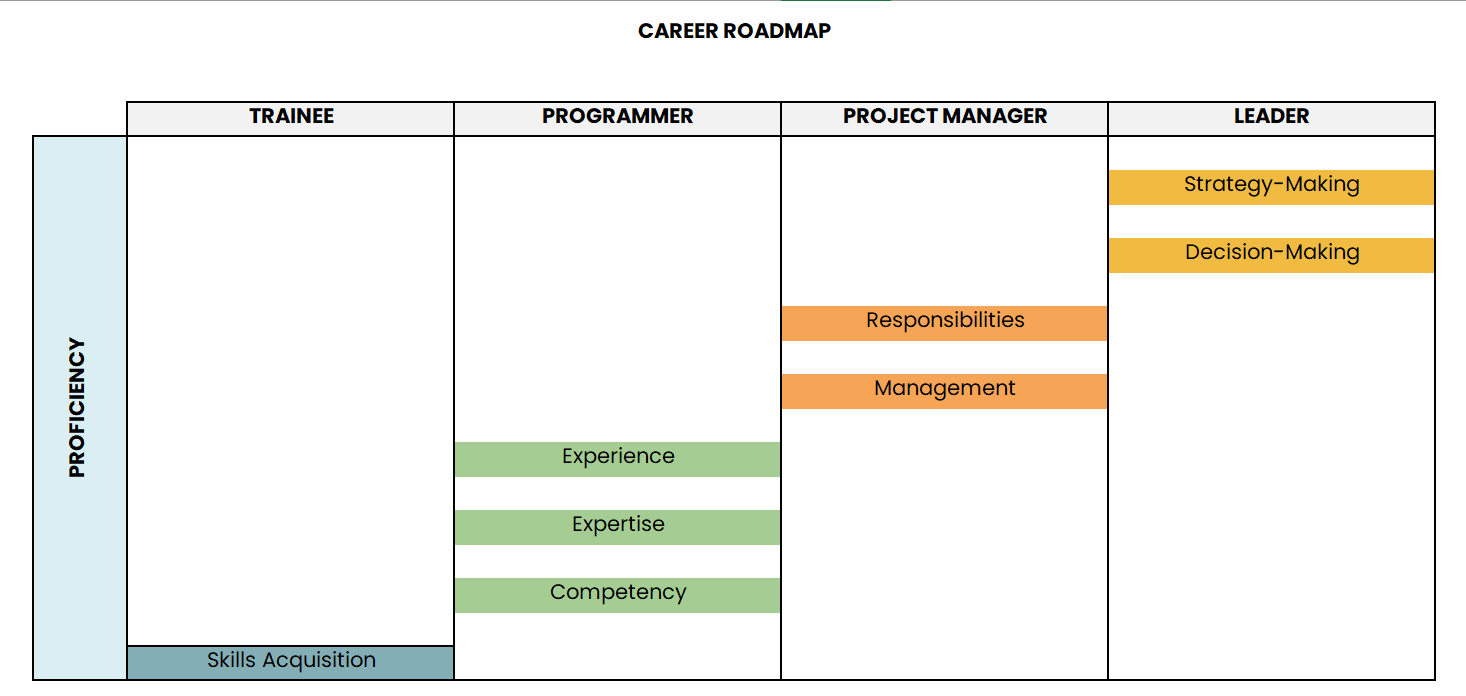
Choose the Career Roadmap Template if you want a basic spreadsheet you can download, fill out, and print instantly. It runs natively in Excel (.xlsx) and requires no training. It gives managers and employees a clean, blank canvas to map out goals, key milestones, and self-assessments.
This template maps four stages: trainee, programmer, project manager, and leader. Each stage adds new skills, from skills acquisition to strategy and decision-making.
Use case: Individual workers or managers who want to draw a clear growth path on a single page. Then look at it again during yearly performance reviews.
How this template helps you:
Best for: Solo planners who want a simple, printable spreadsheet to download.
Skip it if: You need live teamwork or automated updates. This is a static document you must change by hand. For shared, real-time editing, pick one of the collaborative ClickUp templates below.
Your employee’s career path will be forward-looking only if they feel willing to contribute more at work. Watch this to ensure they feel well supported:
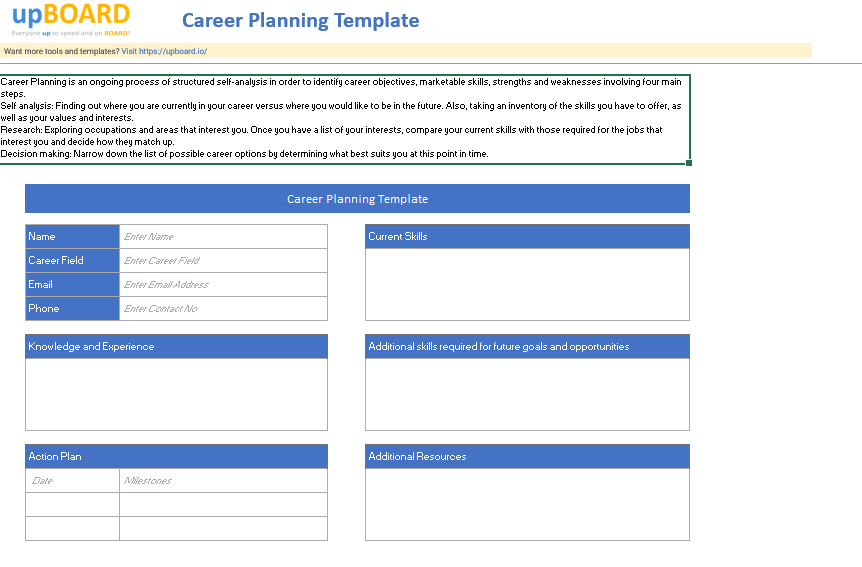
Use the Career Path Template if you want multiple design options in a single file. Stack-Sheet bundles six distinct career layouts into one package. You can conduct a self-assessment of your current skills, knowledge, and experience. It will show you the gaps you’ll need to close for future roles.
Next, turn it all into a dated action plan with clear milestones. Map where you are now against where you want to go.
Use case: Distributed teams that need flexible spreadsheet options. It works well whether your employees use Microsoft tools or Google apps daily.
How this template helps you:
Best for: Teams that want a spreadsheet-first approach with multiple layouts and dual-software access.
Skip it if: Some layouts sit behind a premium tier, so confirm pricing before a company-wide rollout.
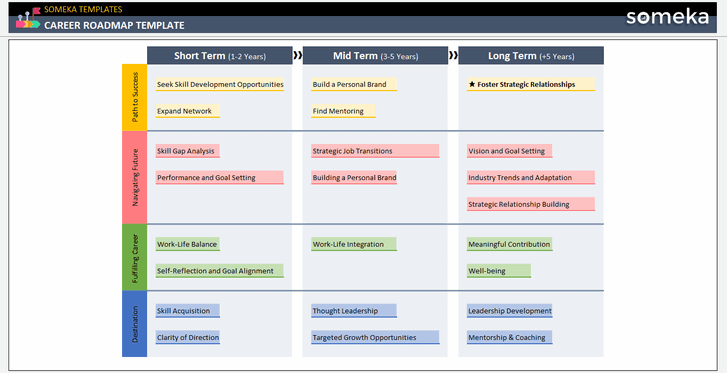
You can use the Career Roadmap Template to map your entire career onto a single visual timeline. Someka designed this template to plot your goals against specific dates and priority levels. It keeps your direction clear.
You define each milestone, rank its importance, and place it along the road ahead. The clean layout lets you understand your whole plan at a single glance. The template runs in Excel and also downloads as a PDF. You can edit every field to match your own goals before a review.
Use case: Professionals who want a clear visual map of where their career is headed over the next few years.
How this template helps you:
Best for: Individuals who want a visual roadmap they can plan and present in minutes.
Skip it if: You need live task tracking or team updates. Because it maps the big picture rather than daily work, pair it with a tracker when you want specific steps.
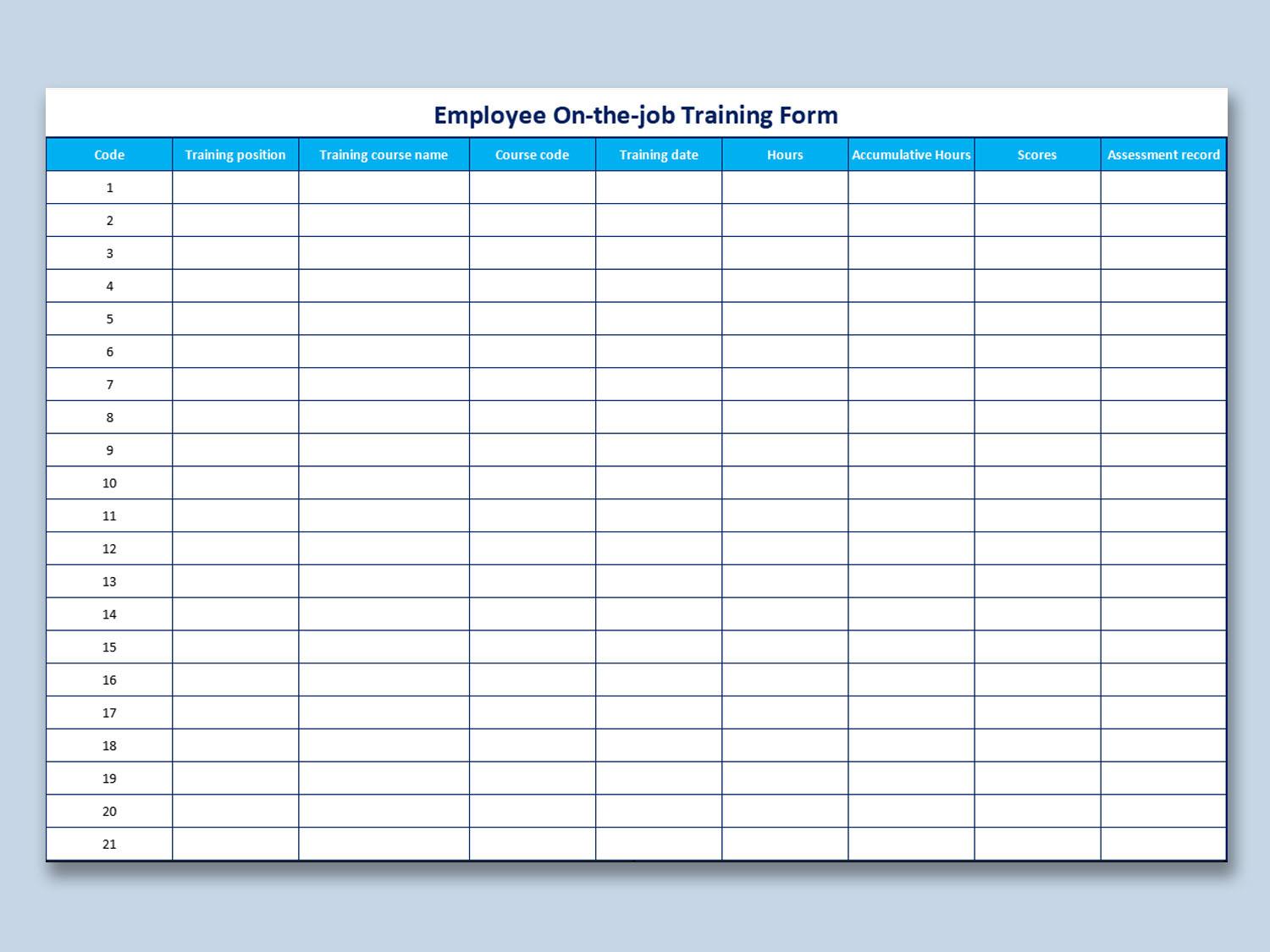
The Employee On-the-Job Training Form makes your training days easier. You can use it to capture what each person learns on the floor. Record the skill, the trainer, the date, and the result. The form keeps a clear record that you can revisit later.
Because this tool documents training while it happens, you log every session the same week. This also helps confirm when someone is ready to work independently. Managers can then verify who learned each skill and when they approved the sign-off.
Use case: Team leads who coach staff on real tasks and need a simple record of who learned what.
How this template helps you:
Best for: Managers who train people on the job and want a quick, clear training record.
Skip it if: You want to map long-term roles or future promotions. The form tracks hands-on training, so it works best alongside a career path template.
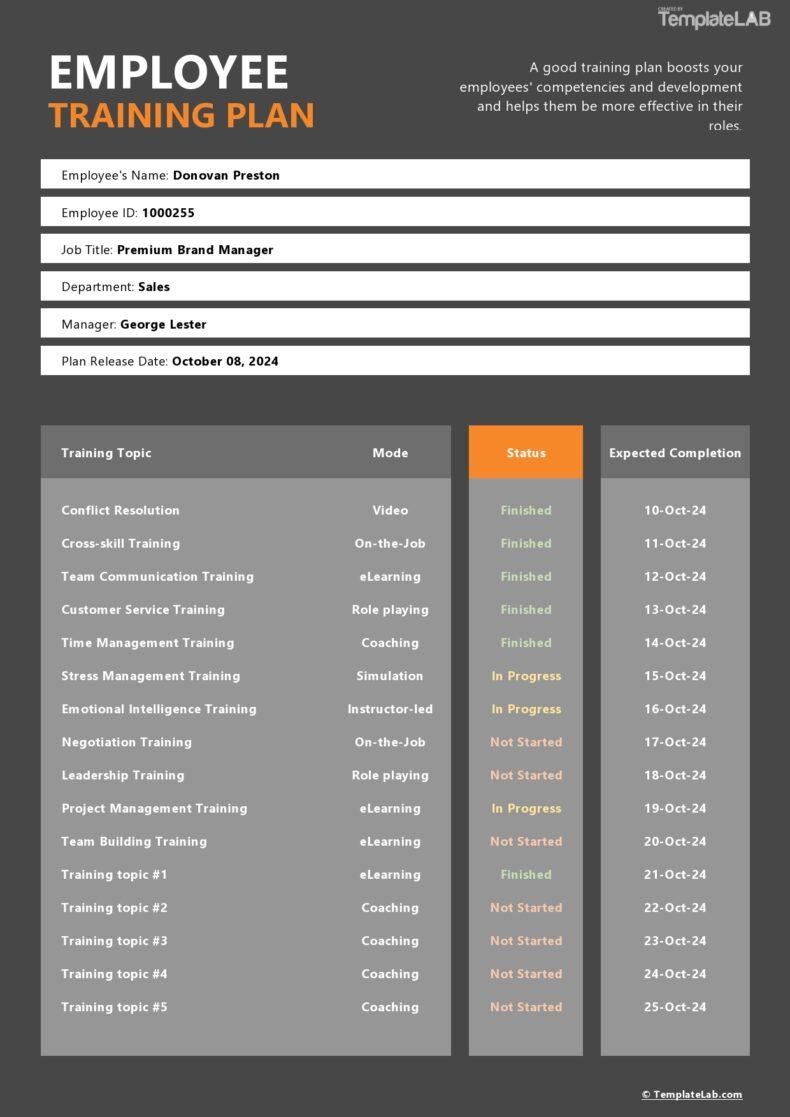
Pick the Employee Training Plan Template when you need to design a training program from scratch. You can outline your goals, topics, and target groups in a single document. Identify what every team must learn and explain why each subject matters. Then you set the order and scope of the sessions.
Feel free to begin with a blank plan or adapt the sample to suit your team. It supports anything from a single course to a full-year program.
Use case: HR leads and managers who plan structured training for a team or a whole department.
How this template helps you:
Best for: HR teams and managers who want a flexible plan for team-wide training.
Skip it if: You only need to track one person’s next promotion. Because it plans training for groups rather than individuals, a focused worksheet handles a single path better.
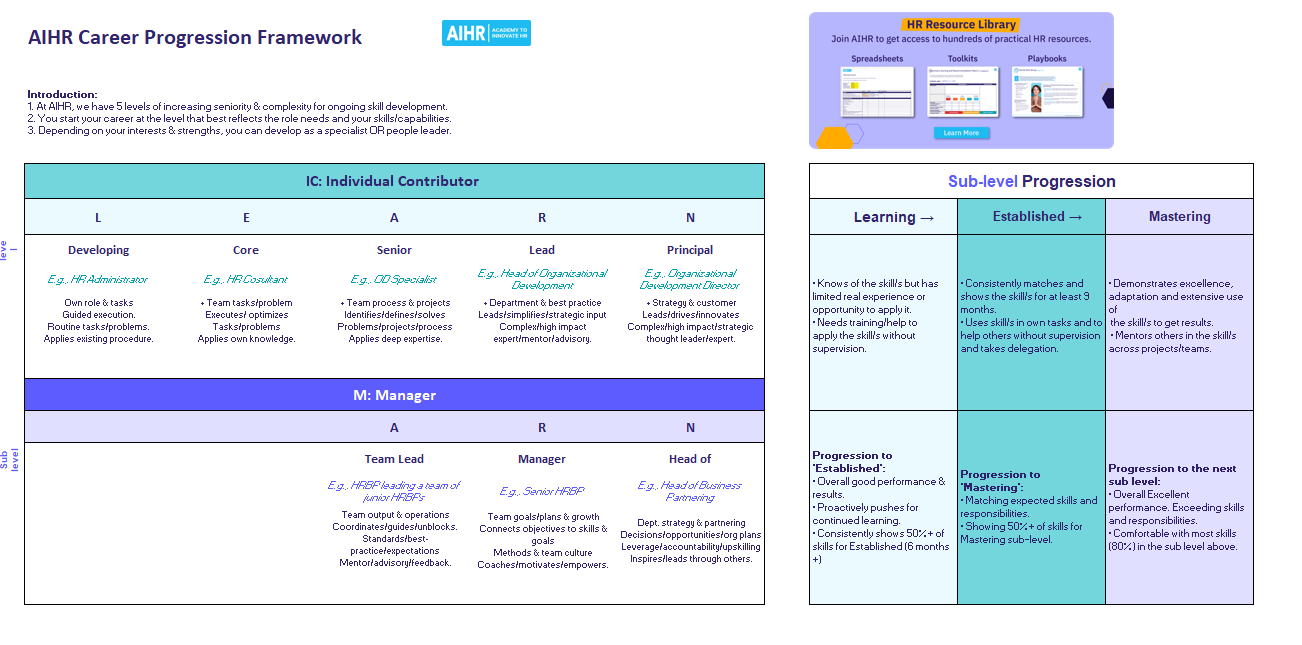
The Career Progression Framework Template helps you build a job architecture for your entire company. AIHR designed this Excel spreadsheet to organize role levels, job titles, and career paths across different teams. It features separate tracks for individual workers and managers, complete with clear skill lists for every position.
For each level, it spells out scope, skills, and responsibilities. It gives HR teams a shared standard for what every role looks like and what it takes to move up.
Use case: HR leaders who need to standardize titles across departments like engineering and product. It helps everyone understand the promotion rules.
How this template helps you:
Best for: HR teams and executives who need to create company-wide career structures.
Skip it if: You want a quick form for a single employee. This tool builds organizational systems; it does not track one person’s next move.
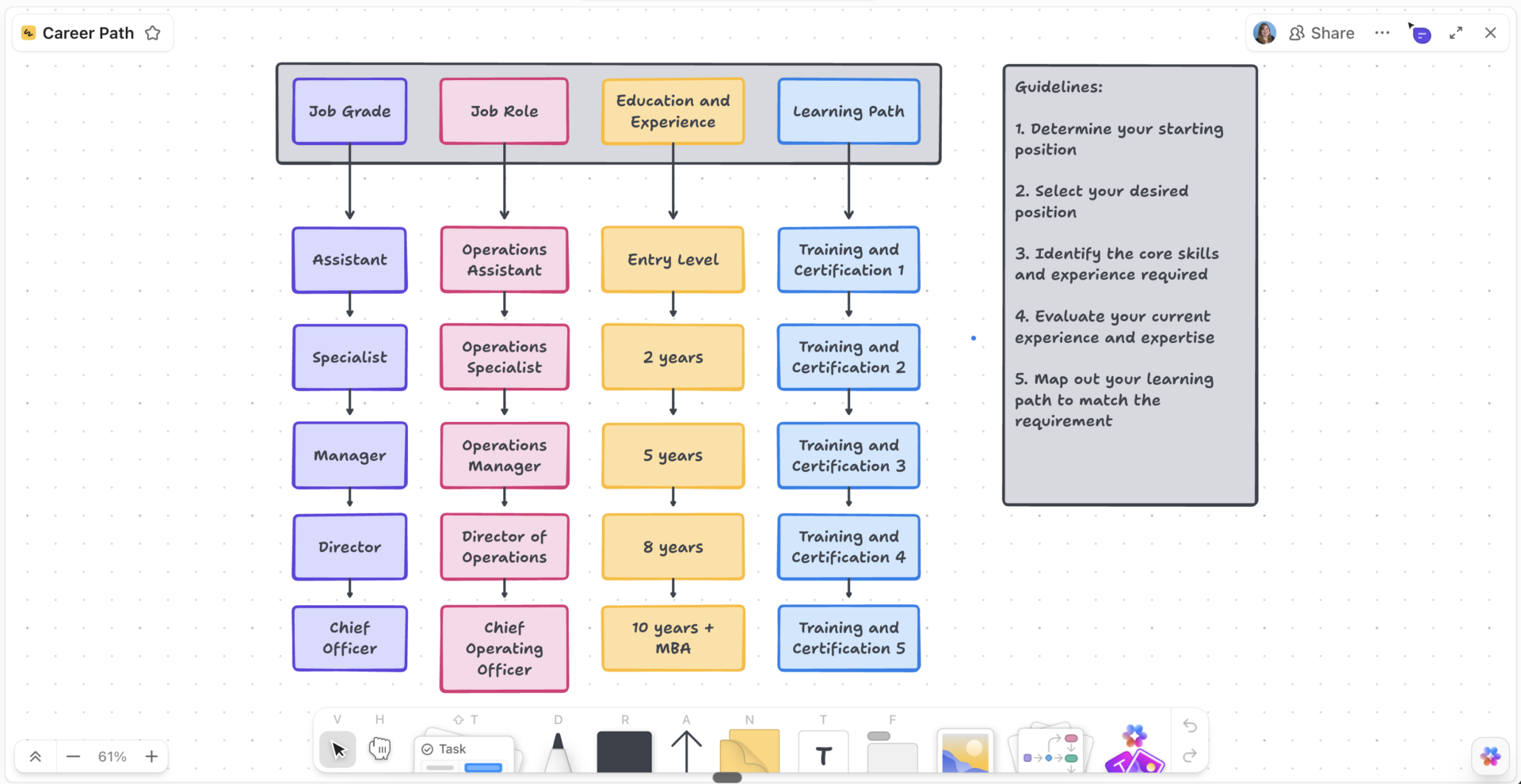
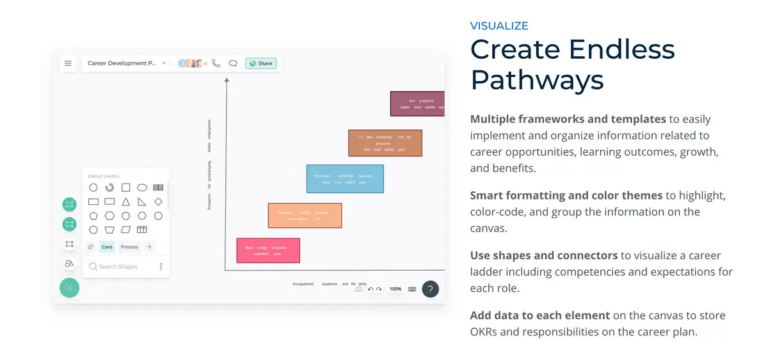
Here’s where spreadsheets give way to a live canvas. The ClickUp Career Path Template replaces flat, boring spreadsheets with a highly visual workspace. ClickUp built this platform-based tool around a collaborative Whiteboard view.
It includes custom status tags, personal text fields, milestone tracking, and automated reminders. This makes your regular review sessions easy to track. Built-in guidelines walk you through mapping your starting point to your goal. Since it’s collaborative, the whole team can build and update it together in real time.
Use case: Modern teams that want to draw career paths visually. They can also edit the same live document together in real time without emailing files back and forth.
How this template helps you:
Best for: Teams that want to abandon static spreadsheets in favor of live, collaborative career planning.
Skip it if: Your company requires a native Excel file. This tool requires a ClickUp account and will not work inside traditional spreadsheet software.
Here is the flow of whiteboard-to-task conversion that you can implement in the Career Path Template by ClickUp:
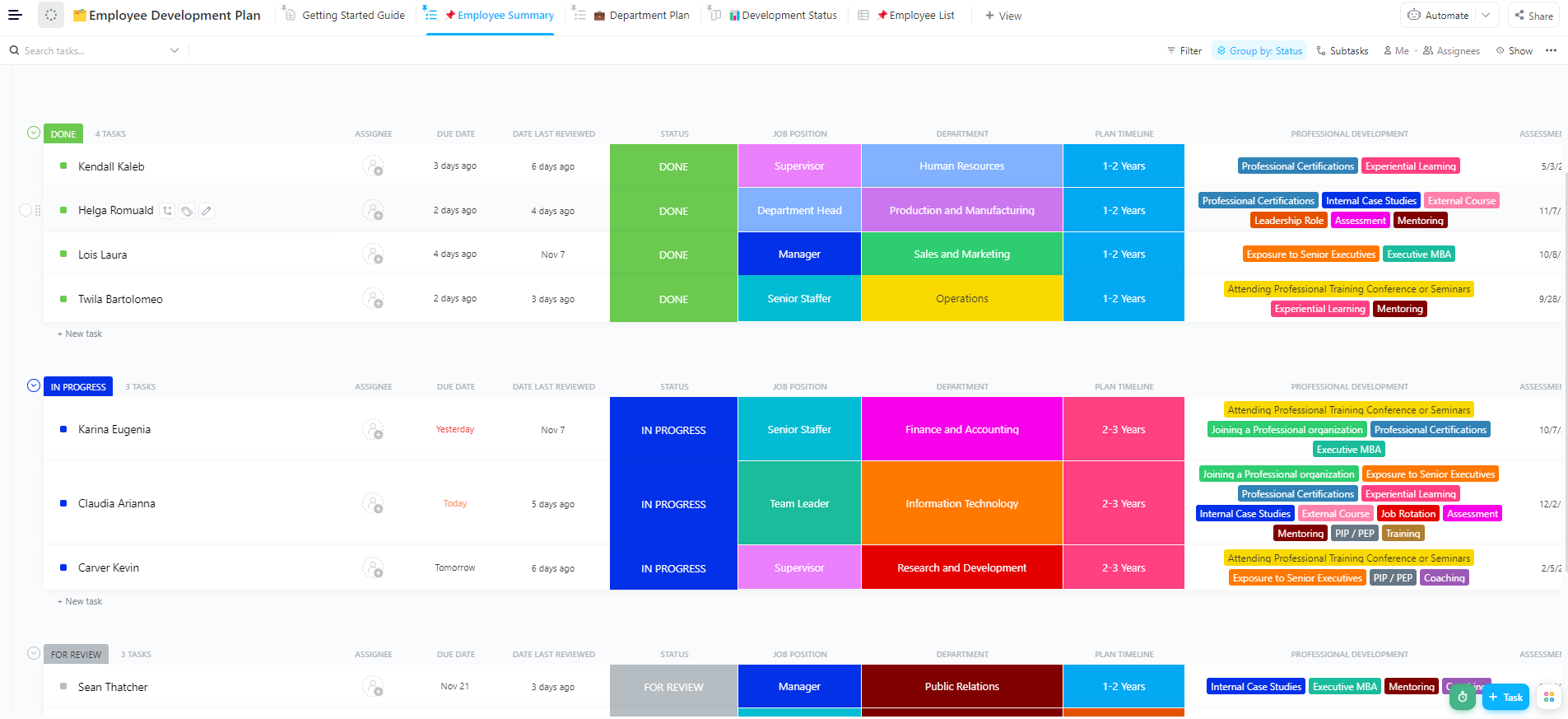
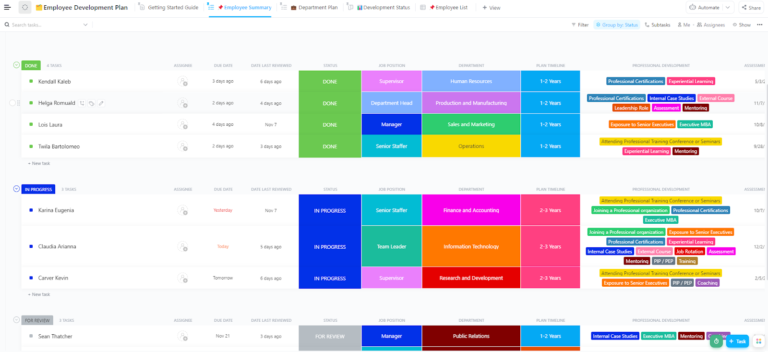
When you’re running development plans for a whole team, this is the control center. The Employee Development Plan Template organizes multiple career growth files into a single central dashboard.
The system tracks 11 distinct details for every employee, including personal timelines and skill assessments. It also provides five unique display views to sort your data. You can view information by department, employee list, or overall progress status.
Use case: HR leaders and busy managers who oversee career growth across an entire department. It helps with visibility for upper management.
How this template helps you:
Best for: Managers and HR teams managing multiple employee plans at once.
Skip it if: You want a pure, single-person career path worksheet. This covers broader employee development, which is more than you need for one focused path.
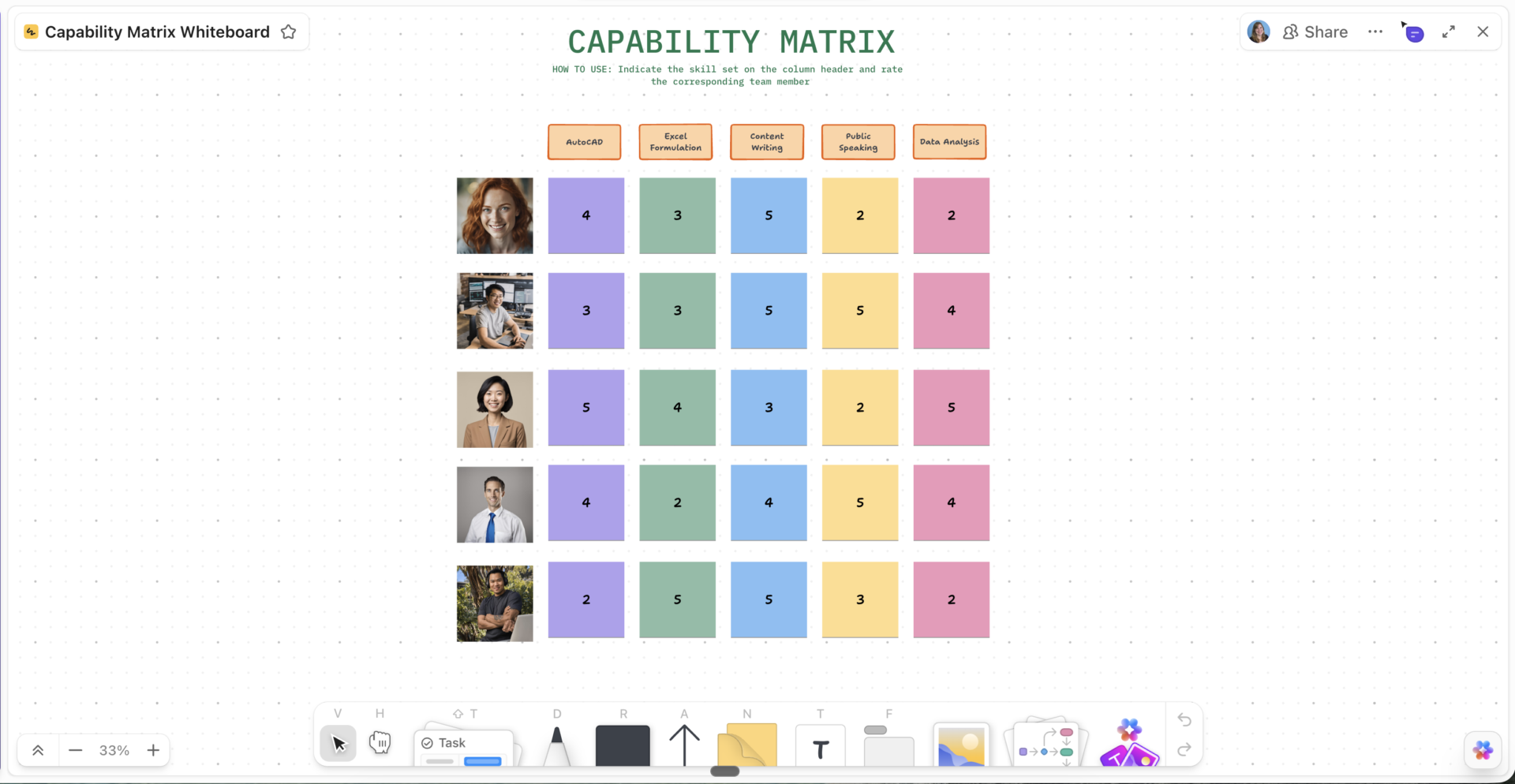
The ClickUp Capability Matrix Template connects career progression directly to skill tracking. It answers a different question: not where someone’s going, but what they can do right now.
This template is built around an interactive matrix view. It uses custom status labels, qualification ratings, and automated review workflows. This helps pinpoint your team’s skill levels and talent gaps. You can also use the color-coded grid to make strengths and gaps jump out instantly.
Use case: Technical or cross-functional leaders who want to evaluate current team skills against future business. This way, you can see who deserves a promotion.
How this template helps you:
Best for: Technical and cross-functional teams mapping skills against growth needs.
Skip it if: You need a standalone career path map. This works best as a complement to a career path template, not a replacement for one.
With 9 options, here’s the fastest way to pick a starting point.
| If you need to… | Start with this template |
| Map your own path on a simple, printable sheet | Career Roadmap Template by Template.net |
| Choose from several ready-made layouts | Career Path Template Excel by Stack-Sheet |
| See your whole career on a visual timeline | Career Roadmap Template by Someka |
| Record hands-on training as it happens | Employee On-the-Job Training Form by WPS |
| Plan structured training for a team | Employee Training Plan Template by TemplateLab |
| Build org-wide leveling and progression | Career Progression Framework by AIHR |
| Map paths visually and collaborate live | Career Path Template by ClickUp |
| Manage many employee plans at once | Employee Development Plan by ClickUp |
| Spot skill gaps and promotion readiness | Capability Matrix by ClickUp |
Still unsure? Start with this simple question: must this plan stay alive after you fill it out?
If yes, use a ClickUp template. The live workspace tracks progress, assigns tasks, and schedules reminders so your plan never goes stale. If no, use a spreadsheet template from Someka, WPS, TemplateLab, AIHR, or Template.net. These files work best if you just need to fill out a static document for a one-off review.
Pick a spreadsheet template if you want to build a career path once and move on. This works best when you need to map out one promotion or hand a manager a blank file. Tools from Someka, WPS, TemplateLab, AIHR, or Template.net are fast because they open in software your team already uses daily. You don’t need to create new logins or configure a new system.
ClickUp wins when a career path requires constant updates. The platform assigns an owner, a due date, and a live status to every single milestone. This turns career growth into clear, trackable tasks rather than frozen lines in a spreadsheet. Multiple managers can edit the same files simultaneously. Progress flows directly into your regular goals, reviews, and training programs.
Users love this all-in-one approach. One G2 reviewer, Shannon R., a Business Development Manager, shared this praise:
It’s got the perfect balance of frameworks and customization to help me be productive immediately on starting. I need some direction for how to organize myself, and the templates for almost every imaginable workflow were perfect for setting myself up on day one. But the fact that I can still customize every field and create stunning dashboards and views that are bespoke to my business, make it astoundingly functional. The integration with my other business tools is also incredibly helpful so that I have a single engine behind my business.
“
The bottom line: If you want to fill out a document once and archive it, a spreadsheet wins on speed. If you need multiple people to update a plan every quarter, that spreadsheet will fall apart during your very first review cycle.
Drawing a career path is easy. Keeping it accurate past your first review cycle is tricky. Three main errors happen repeatedly:
A great template fixes these flaws. It names a clear owner, turns milestones into actions, and syncs job levels with the company.
Run through this checklist every review cycle to catch a stale path before it costs someone a promotion:
| Check | What to ask | What to fix |
| Ownership | Does the path have one clear owner? | Make the direct manager responsible for updates |
| Review cadence | Do you review the path every quarter? | Schedule a recurring reminder before each review cycle |
| Goal-to-action link | Does the next role turn into daily tasks? | Connect each milestone to assigned tasks with strict deadlines |
| Currency | Does the path match current company titles? | Update your tracks when the organization restructures |
| Measurement | Can you prove employees are growing? | Track actual promotions and skill changes cycle over cycle |
If you only choose one fix from this table, connect goals to actions. A path that names a destination without assigning the daily work is just a spreadsheet with ambitions.
Follow these six direct steps to build a custom career path for your team without using a template.
Chart one department at a time to prevent confusion. List every position from entry-level to executive before you draw any connections.
Pro Tip: Draft this list in a shared document with team leads to eliminate individual blind spots before you finalize the structure.
Write specific requirements so that different managers grade the same employee identically.
| Level | What it means |
| 1. Entry | Executes basic tasks under close guidance |
| 2. Developing | Owns routine work independently |
| 3. Proficient | Handles ambiguity and drives projects alone |
| 4. Senior | Sets direction for a team and mentors peers |
| 5. Lead | Defines strategy and company-wide systems |
Important: Cap your track at five levels. Focus on behavioral benchmarks rather than adding endless rungs to the ladder.
Choose a strategy to build the document. Mixing methods without a clear process creates conflicting goals.
Compare the skills needed for the target role against the employee’s current performance. This gap dictates all future training and promotions.
| Skill | Required level | Current level | Gap |
| People Management | 4 | 2 | -2 (Critical Gap) |
| Stakeholder Comms | 3 | 3 | 0 (Met) |
| Technical Depth | 3 | 4 | +1 (Strength) |
Assemble the final map using standard spreadsheet blocks or a digital workspace.
Pro Tip: Add a department filter for teams larger than 20 people so managers can sort data quickly.
Skills change rapidly over time. Prevent your document from going outdated by setting rules upfront.
An effective career path answers three questions.
Spreadsheets work well for one-time planning sessions. ClickUp fits best when your paths require multiple editors, automated reminders, and a direct link between future roles and daily tasks.
Select the tool that eliminates your biggest risk. To build your career paths in ClickUp, get started for free.
A career path template maps your route from role to role. It shows where you are now and where you can go next. A career development plan tracks the specific actions, skills, and deadlines you need to get there. Think of the path as your destination and the development plan as your map.
Yes, but you will face heavy version-control issues. Excel handles a single team well. Scaling across an entire company forces you to sync multiple files and adjust different job levels by hand. For multi-team use, an organizational framework standardizes your structure. While a collaborative tool stops spreadsheet errors completely.
Look for these three warning signs. Move when you have too many employee plans for one sheet. Or, multiple managers need to edit the same file at once. Consider it also when your data goes stale between review cycles. If updates get lost, leave spreadsheets behind and adopt a live tool.
Make the path a living document, not a once-a-year artifact. Turn each milestone into a measurable task with a clear owner and a firm deadline. Review these goals during every performance cycle. Using a platform with automated tasks and status tracking links daily work straight to career promotions.

Praburam Srinivasan
Max 10min read
Praburam Srinivasan
Max 19min read
Praburam Srinivasan
Max 20min read

© 2026 ClickUp