
Tylko 28% organizacji umożliwiło swoim pracownikom osiągnięcie transformacyjnego wpływu biznesowego dzięki sztucznej inteligencji. Istnieje więc duże prawdopodobieństwo, że Twój obecny asystent AI nie jest dla Ciebie najlepszym rozwiązaniem.
Jeśli więc agenci Sintra AI wydają Ci się trudni do kierowania, trudni do kontrolowania lub po prostu zbyt sztywni w codziennym użytkowaniu, nie jesteś sam. W tym poście przedstawimy Ci lepsze opcje.
Zobaczysz narzędzia, które oferują dobrze zdefiniowane wyzwalacze i wyniki dla wykonywania AI. Zapewniają one konfigurowalne, niestandardowe agenty oparte na dużych modelach językowych, a także wizualny kreator cyklu pracy, który naprawdę spodoba się Twoim koordynatorom.
Poinformujemy Cię również, gdzie potrzebujesz pełnej kontroli, aby chronić poufne dane. A także kiedy jedno hub jest lepsze niż łączenie pięciu narzędzi.
🧠 Ciekawostka: Pomysł zespołów agentów AI nie jest nowy — Pattie Maes z MIT już w 1994 roku pisała o „agentach programowych ”, które zmniejszają obciążenie pracą i nadmiar informacji. Dzisiejsze platformy wieloagentowe w końcu doganiają tę wizję.
Alternatywy dla Sintra AI w skrócie
Szukasz szybkiego porównania najlepszych narzędzi? Oto przegląd najlepszych alternatyw dla Sintra AI i ich funkcji.
| Narzędzie | Najlepsze funkcje | Najlepsze dla | Ceny* |
| ClickUp | Super agenci AI dla wieloetapowych cykli pracy, automatyzacje typu „jeśli/to”, listy/dokumenty dla standardowych procedur operacyjnych oraz pulpity nawigacyjne dla podsumowań KPI. | Osoby fizyczne, małe firmy, średnie przedsiębiorstwa, duże przedsiębiorstwa | Dostępny jest bezpłatny Free Plan; możliwość dostosowania niestandardowego do potrzeb przedsiębiorstw. |
| Lindy AI | Kreator agentów bez kodowania, zaawansowane cykle pracy w Gmailu/Kalendarzu, sortowanie wiadomości w Skrzynce odbiorczej + połączenia głosowe/telefoniczne z przejrzystymi cenami za użytkowanie. | Małe firmy, średnie przedsiębiorstwa | Dostępny jest Free Plan; płatne plany zaczynają się od 49,99 USD miesięcznie. |
| Zapier | Ponad 8000 połączeń z aplikacjami, agenci/kreator AI, wieloetapowe zapy z ścieżkami/filtrami, tabele i interfejsy | Małe firmy, średnie przedsiębiorstwa, niewielkie zespoły przedsiębiorstw | Brak Free Planu; płatne plany zaczynają się od 19,99 USD/miesiąc (rocznie). |
| n8n | Wizualne i kodowe cykle pracy, ponad 500 integracji, węzły narzędzi AI, samodzielne hostowanie z RBAC (kontrola dostępu oparta na rolach) | Zespoły techniczne, start-upy zatrudniające inżynierów, średnie przedsiębiorstwa | Brak Free Planu; płatne plany zaczynają się od 20 USD miesięcznie, rozliczane rocznie. |
| Stwórz | Wizualne scenariusze z routerami/iteratorami, ponad 3000 aplikacji, integracje AI, przewidywalne poziomy kredytowe | Małe firmy, agencje, średnie przedsiębiorstwa | Dostępny jest Free Plan; płatne plany zaczynają się od 10,59 USD miesięcznie. |
| Taskade AI | Niestandardowe agenci AI, automatyzacje, projekty jako pamięć, dokumenty/czat z połączonymi kredytami AI. | Twórcy indywidualni, małe firmy, zespoły marketingowe/ds. zawartości | Dostępny jest Free Plan; płatne plany zaczynają się od 8 USD miesięcznie. |
| LangChain | Przepływy agentów oparte na grafach (stan/węzły/krawędzie), agenci pojedynczy/wielokrotni/hierarchiczni, śledzenie/oceny LangSmith | Zespoły programistów, inżynierowie ML, grupy produktowe/platformowe | Plan dla programistów dostępny bezpłatnie; płatne plany zaczynają się od 39 USD/miesiąc za licencję. |
| Ruch | Asystent AI do planowania i spotkań, automatyczna zmiana priorytetów zadań, prognozowanie opóźnień w projektach | Zapracowani menedżerowie, zespoły sprzedaży/obsługi klienta, małe i średnie przedsiębiorstwa | Brak Free Planu; płatne plany zaczynają się od 29 USD miesięcznie. |
| CrewAI | Wielopodmiotowe „zespoły”, wizualny kreator Studio lub framework Python, AMP do wdrażania/monitorowania/testowania | Teams kierowane przez programistów, operacje z złożonymi procesami, średnie przedsiębiorstwa | Niestandardowe ceny |
| AutoGen | Otwarte oprogramowanie typu multi-agent, Studio do prototypowania bez kodowania, AgentChat/Core do skalowalnych aplikacji. | Organizacje inżynieryjne, zespoły badawcze, przedsiębiorstwa z własnymi programistami | Niestandardowe ceny |
Na co należy zwrócić uwagę w alternatywach dla Sintra AI?
Zmiana platformy nie powinna polegać wyłącznie na wyborze bardziej atrakcyjnych funkcji AI. Należy rozważyć, czy Twój zespół będzie w stanie szybciej realizować zadania, zachowując kontrolę i przejrzystość.
Przed wyborem platformy asystenta AI zacznij od prostej analizy rzeczywistości:
- Jakie powtarzalne zadania możemy dziś bezpiecznie zautomatyzować?
- Gdzie nadal potrzebujemy ludzkiej weryfikacji lub zabezpieczeń polityki?
- Z czym to narzędzie będzie miało trudności za sześć miesięcy?
Potraktuj to jako listę kontrolną przed zakupem — dla kogo jest przeznaczona, co obejmuje automatyzacja i jak jest zarządzana. Oto kryteria, które mają znaczenie.
- Prawdziwe wyniki, a nie prezentacje: Czy platforma AI może ograniczyć przekazywanie zadań i wysyłać kampanie, posty lub raporty bez dodatkowych spotkań? Poszukaj mierzalnej automatyzacji zadań w całym procesie od przyjęcia → produkcji → przeglądu.
- Koordynacja, którą Twój zespół może przejąć: przejrzysty wizualny kreator cyklu pracy, z którego mogą korzystać użytkownicy bez wiedzy technicznej. Dodatkową zaletą jest możliwość tworzenia agentów AI dla typowych przepływów i przełączania się na weryfikację przez człowieka w przypadku ryzykownych kroków.
- Wybór modeli i danych: wsparcie dla wielu modeli AI i zabezpieczenia danych wrażliwych (kontrola danych osobowych, logi i usuwanie). Preferuj dostawców, którzy wyjaśniają, w jaki sposób wykorzystywane są duże modele językowe.
- Współpraca w ramach przepływu pracy: płynne przekazywanie zadań między zespołami marketingowymi i sprzedażowymi, a także komentarze, zatwierdzenia i spójny przekaz marki podczas tworzenia zawartości.
- Skalowalność i kontrola: możliwość uruchamiania wielu agentów, połączenia wielu narzędzi i, w razie potrzeby, przejścia na własny hosting w celu uzyskania pełnej kontroli.
- Przejrzyste ceny: jasna cena początkowa, uczciwe limity użytkowania i opcjonalne ceny niestandardowe w przypadku skalowania.
- Odpowiednie zastosowania: wybierz narzędzia dostosowane do swoich głównych cykli pracy, niezależnie od tego, czy chodzi o reklamy, analizę danych, wsparcie dla projektów czy inne procesy.
💡 Wskazówka dla profesjonalistów: Zanim wybierzesz narzędzia, przeprowadź 10–14-dniowy pilotaż z dwoma rzeczywistymi cyklami pracy (jednym o niskim ryzyku, drugim związanym z przychodami). Dodaj ludzką weryfikację każdego działania agenta, przypisz etykietę do każdego wyniku (zwycięstwo/blokada) i ustal dzienny budżet użytkowania. Twoje kryteria wyboru będą oparte na wynikach, a nie na prezentacjach.
Najlepsze alternatywy dla Sintra AI
A teraz zapoznaj się z najlepszymi alternatywami i konkurentami Sintra AI:
Jak oceniamy oprogramowanie w ClickUp
Nasz zespół redakcyjny stosuje przejrzysty, oparty na badaniach i neutralny wobec dostawców proces, dzięki czemu możesz mieć pewność, że nasze rekomendacje opierają się na rzeczywistej wartości produktów.
Oto szczegółowy opis tego, jak oceniamy oprogramowanie w ClickUp.
1. ClickUp (najlepszy do zadań opartych na sztucznej inteligencji, projektów i współpracy zespołowej na jednej platformie)
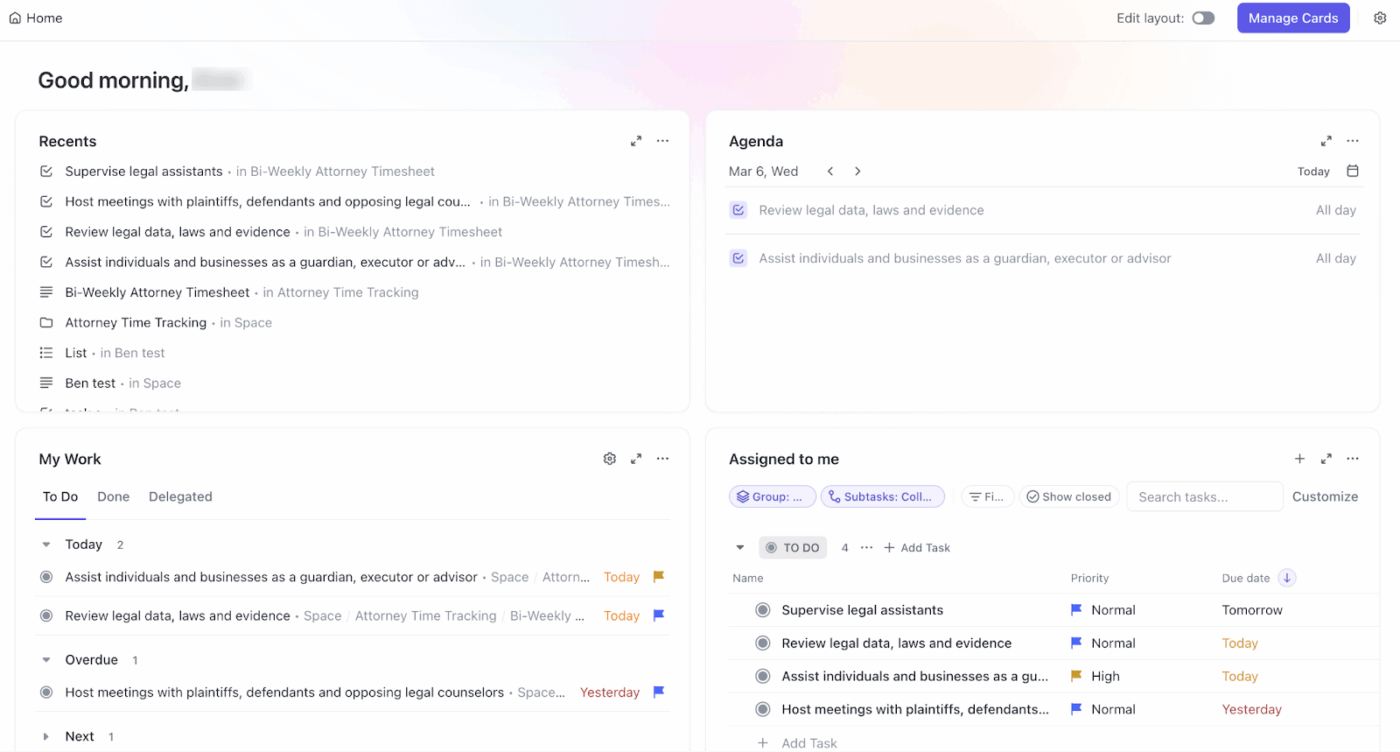
Kiedy zespoły zaczynają testować asystentów AI, rzadko poprzestają na jednym. Jedno narzędzie służy do tworzenia zawartości. Inne do podsumowywania pracy. Trzecie do monitorowania wskaźników. Każde z nich działa osobno — i wkrótce nikt nie wie, gdzie podejmowane są decyzje ani który agent ma właściwy kontekst. Ta fragmentacja to rozrost AI — i po cichu wpływa na czas reakcji, widoczność i zaufanie.
ClickUp wybiera inną drogę, oferując pierwsze na świecie zintegrowane obszary robocze AI. Zamiast nakładać warstwy samodzielnych narzędzi AI na stos, ClickUp przenosi AI bezpośrednio do miejsca, w którym odbywa się praca.
Jej AI Super Agents to wspierani przez sztuczną inteligencję współpracownicy, którzy działają bezpośrednio w Twoim obszarze roboczym. Oni
- Obserwuj aktywność w zadaniach ClickUp, dokumentach i osiach czasu.
- Podejmuj działania w oparciu o zdefiniowane zasady i
- Udostępniaj odpowiednie informacje we właściwym czasie — bez zakłócania pracy zespołów.
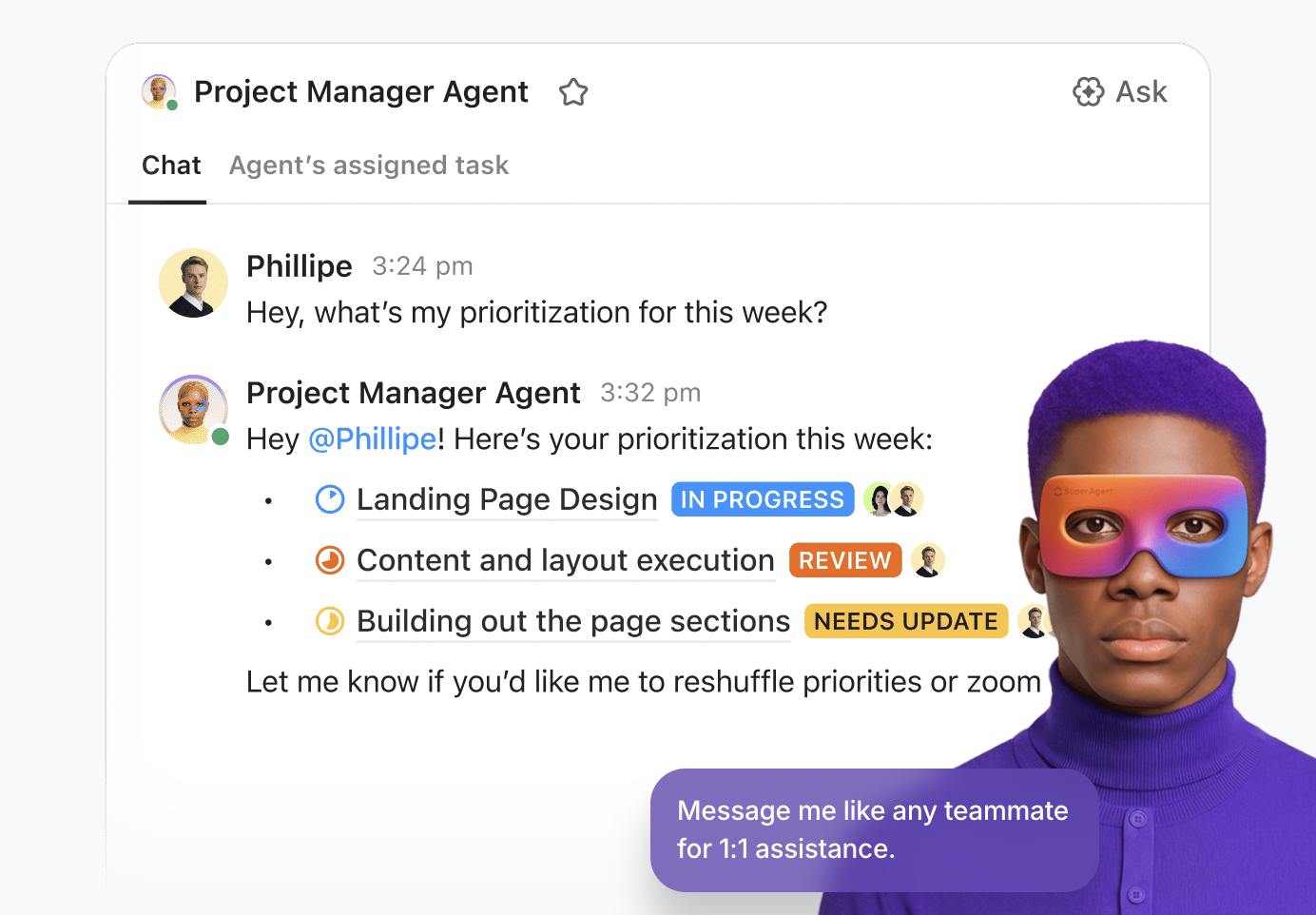
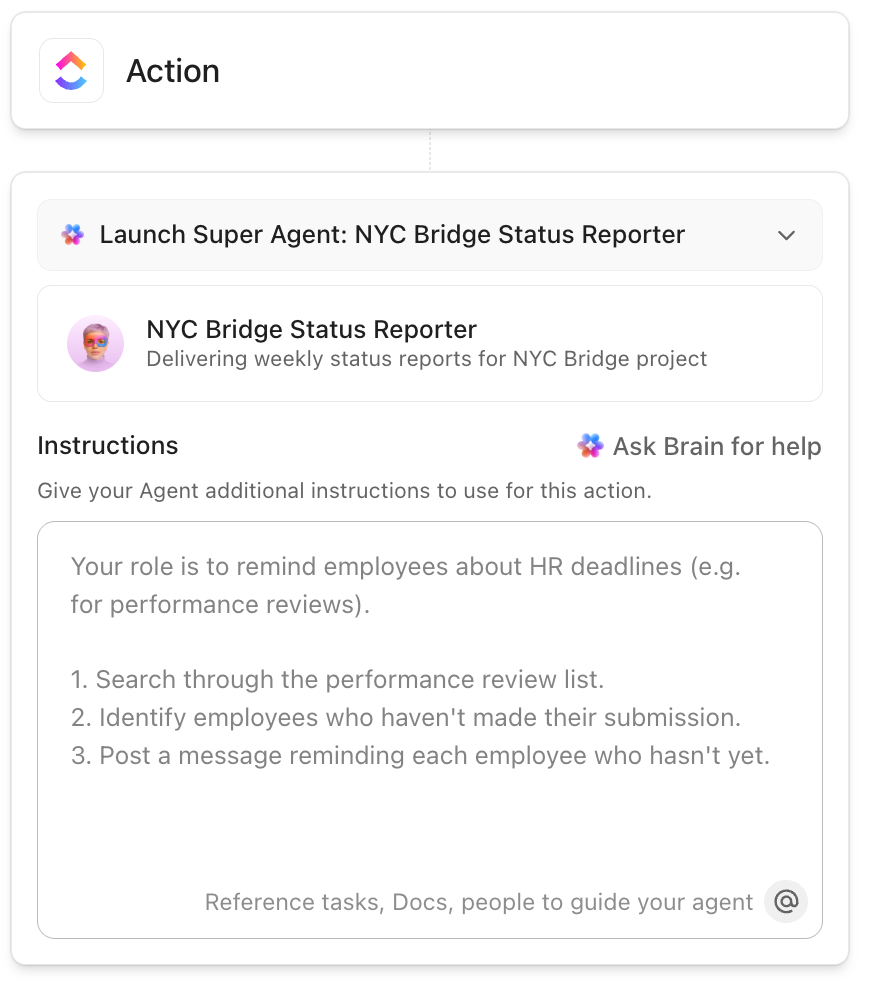
W ClickUp tworzysz Super Agentów za pomocą prostych ustawień bez kodowania. Wybierz, co agent powinien monitorować (np. aktualizacje zadań lub terminy), zdecyduj, co powinien robić (aktualizować statusy, publikować podsumowania, przydzielać zadania) i włącz go. Agent będzie wtedy działał automatycznie w Twoim obszarze roboczym.
Ciekawi Cię Super Agents? Oto wideo, które pokazuje wszystkie możliwości, jakie ma:
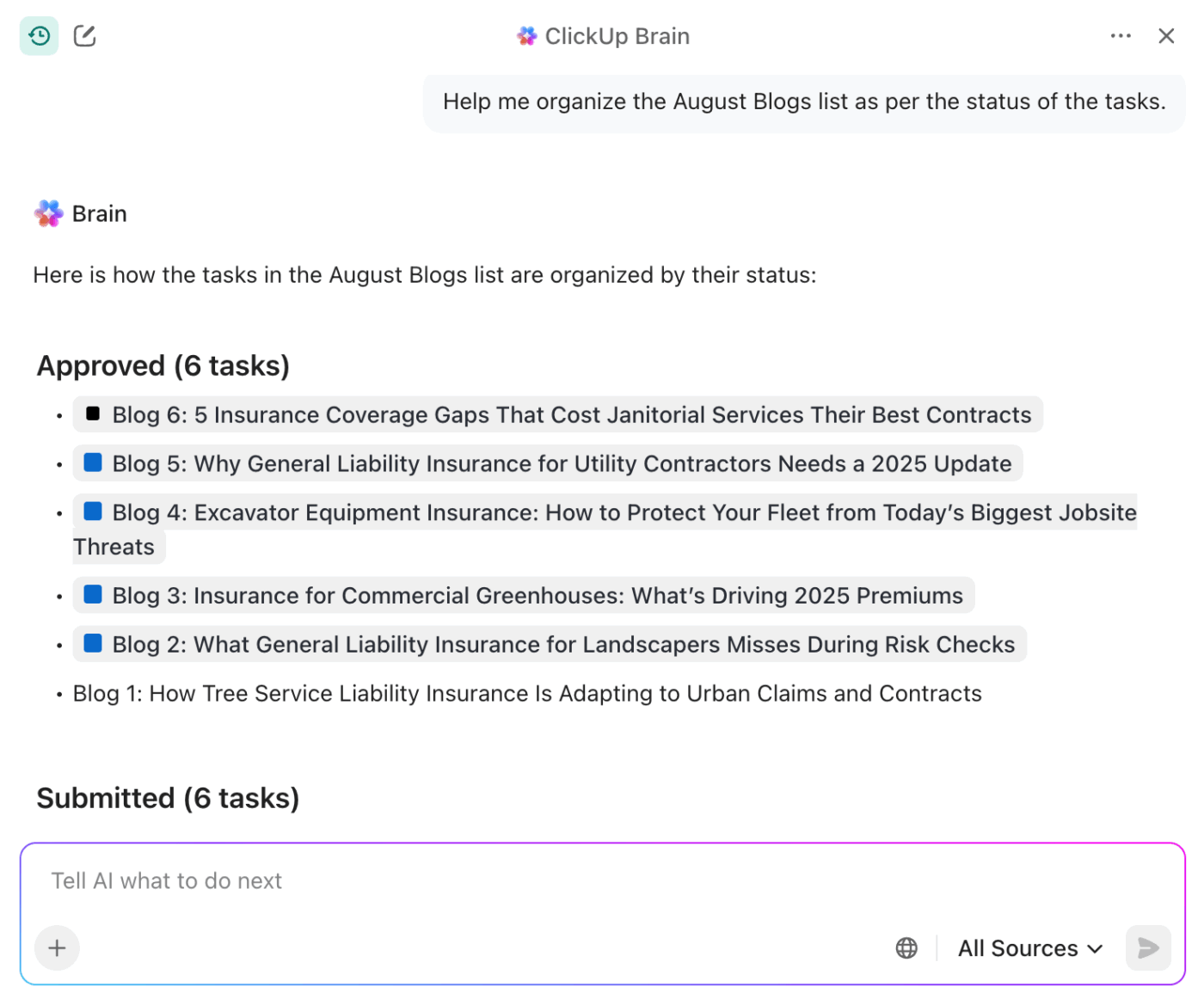
A jeśli potrzebujesz gotowego asystenta kontekstowego AI, który zna i rozumie Twoją pracę, wypróbuj ClickUp Brain. Jest on połączony z Twoimi zadaniami ClickUp, dokumentami i czatem ClickUp. Dzięki temu może nie tylko wyświetlać informacje z tych źródeł, ale także podejmować na ich podstawie działania.
Dzięki ClickUp Brain możesz:
- Podsumowuj długie wątki, dokumenty lub aktualizacje, przedstawiając jasne kolejne kroki.
- Automatycznie zamieniaj rozmowy na zadania, komentarze lub elementy do wykonania.
- Otrzymuj sugestie dostosowane do projektu w oparciu o rzeczywiste terminy, właścicieli i priorytety.
- Zadawaj pytania dotyczące swojej pracy w języku naturalnym i uzyskaj precyzyjne, kontekstowe odpowiedzi.
- Automatycznie aktualizuj statusy zadań, pisz dokumenty i twórz komentarze — dokładnie tam, gdzie pracujesz.
- Ogranicz przełączanie się między kontekstami, działając na podstawie spostrzeżeń, zamiast tylko je czytać.
A to nie wszystko.
ClickUp jeszcze bardziej ułatwia odpowiedzialną ocenę, testowanie i skalowanie AI dzięki:
- Lista, która zapewnia zespołom jeden system rejestracji do śledzenia eksperymentów AI, właścicieli, danych wejściowych i wyników — dzięki czemu pilotażowe projekty nie znikają w narzędziach pobocznych.
- ClickUp Docs, które centralizują zasady, podpowiedzi, kryteria oceny i decyzje, oferując współpracę na żywo i przejrzystą historię wersji.
- Panele ClickUp, które przekształcają aktywność AI w widoczny efekt, pokazując czas cyklu, obciążenie pracą i wydajność, zanim cokolwiek trafi do produkcji.
- Automatyzacje ClickUp, które tworzą połączenie między działaniami ludzkimi a działaniami AI, eliminując ręczne przekazywanie zadań przy zachowaniu zgodności z przepisami.
Ponieważ agenci ClickUp AI działają w tym samym obszarze roboczym, co Twoja praca, kontekst nigdy nie zostaje utracony. Zespoły tracą mniej czasu na zarządzanie rozrostem zadań i mają więcej czasu na usprawnianie cyklu pracy.
📮ClickUp Insight: Tylko 10% respondentów naszej ankiety korzysta z asystentów głosowych (4%) lub automatycznych agentów (6%) w aplikacjach AI, podczas gdy 62% preferuje narzędzia konwersacyjne AI, takie jak ChatGPT i Claude. Niższe wykorzystanie asystentów i agentów może wynikać z faktu, że narzędzia te są często zoptymalizowane pod kątem konkretnych zadań, takich jak obsługa bez użycia rąk lub określone cykle pracy. ClickUp oferuje najlepsze cechy obu rozwiązań. ClickUp Brain służy jako konwersacyjny asystent AI, który może pomóc w szerokim zakresie zastosowań. Z drugiej strony agenci oparci na sztucznej inteligencji w kanałach ClickUp Chat mogą odpowiadać na pytania, segregować problemy, a nawet wykonywać określone zadania!
📖 Przeczytaj również: Rodzaje agentów AI zwiększających wydajność biznesową
Najlepsze funkcje ClickUp
- Odpowiadaj na pytania dotyczące obszaru roboczego natychmiast, przeszukując zadania, dokumenty i komentarze za pomocą funkcji Ask AI w ClickUp.
- Uzyskaj dostęp do wielu modeli LLM i najnowszych modeli AI w jednym miejscu dzięki ClickUp Brain.
- Rejestruj pomysły i instrukcje bez użycia rąk dzięki komendom głosowym AI za pomocą funkcji ClickUp Talk to Text.
- Podsumowuj długie wątki i strumienie aktywności, tworząc jasne wnioski przy użyciu AI.
- Wypełniaj pola niestandardowe AI podsumowaniami, spostrzeżeniami lub klasyfikacjami automatycznie w miarę aktualizacji zadań.
- Nagrywaj, transkrybuj i podsumowuj spotkania dzięki ClickUp AI Notetaker.
Ograniczenia ClickUp
- Zaawansowane funkcje AI są dodatkiem do obszaru roboczego, a koszty mogą się zmieniać w zależności od stopnia wykorzystania.
Ceny ClickUp
Oceny i recenzje ClickUp
- G2: 4,7/5 (ponad 10 000 recenzji)
- Capterra: 4,6/5 (ponad 4000 recenzji)
Co mówią o ClickUp prawdziwi użytkownicy?
Ta recenzja na Reddicie naprawdę mówi wszystko:
Na początku nie byłem przekonany do ClickUp Brain, wydawało mi się, że to kolejna sztuczka AI. Jednak uratowało mnie to przed żmudnymi zadaniami związanymi z pisaniem, zwłaszcza gdy muszę streszczać długie e-maile od klientów lub rozpocząć tworzenie szkicu.
Na początku nie byłem przekonany do ClickUp Brain, wydawało mi się, że to kolejna sztuczka AI. Jednak uratowało mnie to przed żmudnymi zadaniami związanymi z pisaniem, zwłaszcza gdy muszę streszczać długie e-maile od klientów lub rozpocząć tworzenie szkicu.
📖 Przeczytaj również: Jak korzystać z agentów opartych na wiedzy w AI
🧠 Czy wiesz, że: 45% respondentów naszej ankiety twierdzi, że przez tygodnie pozostawia otwarte zakładki związane z pracą. Dla kolejnych 23% te cenne zakładki zawierają wątki czatu AI wypełnione kontekstem. Zasadniczo ogromna większość outsourcuje pamięć i kontekst do niestabilnych zakładek przeglądarki.
Powtórz za nami: zakładki nie są bazami wiedzy. 👀
ClickUp BrainGPT zmienia zasady gry. Ta superaplikacja AI umożliwia przeszukiwanie obszaru roboczego ClickUp, interakcję z wieloma modelami AI, a nawet korzystanie z poleceń głosowych w celu pobrania kontekstu z jednego interfejsu.
2. Lindy AI (najlepsze rozwiązanie dla agentów AI bez kodowania i wielokanałowych)
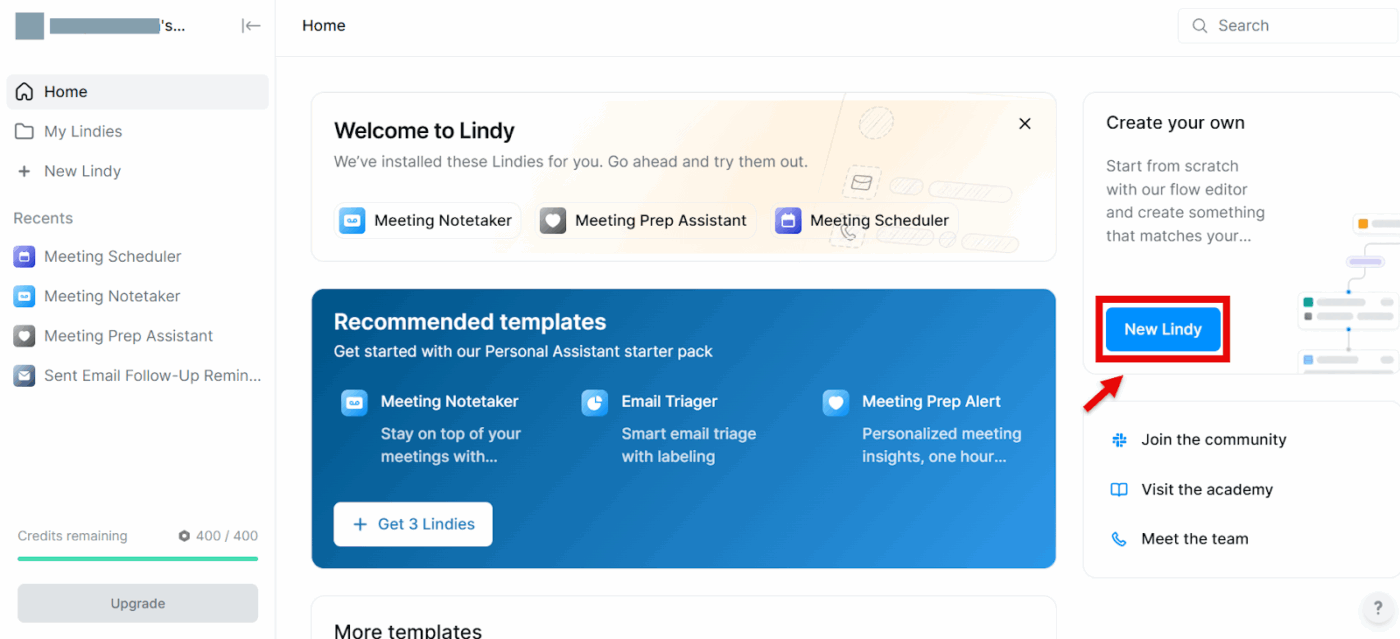
Jeśli szukasz „pracowników AI”, którzy zajmą się za Ciebie rutynowymi zadaniami — zarządzaniem e-mailem, porządkowaniem kalendarza, zestawianiem aktualizacji CRM, a nawet wykonywaniem połączeń telefonicznych — Lindy może Ci pomóc. Lindy to praktyczna platforma AI do tworzenia agentów AI bez konieczności pisania kodu.
Zacznij od szablonów lub hubu agentów, wykonaj połączenie z Gmailem, kalendarzem i innymi aplikacjami, a następnie wykonaj kolejne kroki w wizualnym przepływie. Są to instrukcje dla agenta dotyczące czytania, rozumowania i działania. Ceny są uzależnione od wykorzystania (płatność za zadanie/minutę), co ułatwia przetestowanie rozwiązania przed jego wdrożeniem na większą skalę.
Najlepsze funkcje Lindy AI
- Zautomatyzuj cykl pracy od początku do końca dzięki narzędziu do tworzenia agentów bez kodowania, które oferuje rosnący katalog agentów startowych i samouczków.
- Szybko uporaj się z zaległościami w Skrzynce odbiorczej dzięki automatyzacji e-maila, która sortuje wiadomości, tworzy odpowiedzi w Twoim stylu i wyszukuje nadawców.
- Skorzystaj z wysokiego poziomu bezpieczeństwa dzięki odznakom zgodności z przepisami RODO, SOC 2, HIPAA i PIPEDA.
Ograniczenia Lindy AI
- Prognoza kosztów może być trudna w przypadku dużych projektów, ponieważ ceny są naliczane za każde zadanie i za każdą minutę połączenia. Warto wprowadzić alerty dotyczące wykorzystania i budżety.
- Zakres funkcji różni się w zależności od integracji; najlepsze doświadczenia z integracją są związane z Google (Gmail/Kalendarz Google), więc rozwiązania inne niż Google mogą wymagać dodatkowej konfiguracji.
- Szablony są pomocne, ale złożone przepływy nadal wymagają dokładnego testowania i zabezpieczeń.
Ceny Lindy AI
- Free
- Zalety: Cena od 49,99 USD miesięcznie.
- Business: od 199,99 USD miesięcznie
- Enterprise: Ceny niestandardowe
Oceny i recenzje Lindy AI
- G2: 4,9/5 (ponad 160 recenzji)
- Capterra: zbyt mało recenzji
Co mówią o Lindy AI prawdziwi użytkownicy?
Użytkownik G2 mówi:
Korzystam z Lindy AI już od jakiegoś czasu i najbardziej podoba mi się to, jak wiele czasu mi oszczędza. Zaskakująco dokładnie wykonuje powtarzalne zadania i planuje harmonogram, co naprawdę pomogło mi zmniejszyć obciążenie umysłowe. Wyróżnia się naturalnością i łatwością interakcji — nie sprawia wrażenia robotycznej ani nieporęcznej. To tak, jakby mieć niezawodnego asystenta, który po cichu wykonuje zadania w tle. Zdecydowanie rewolucyjne rozwiązanie zwiększające wydajność.
Korzystam z Lindy AI już od jakiegoś czasu i najbardziej podoba mi się to, jak wiele czasu mi oszczędza. Zaskakująco dokładnie wykonuje powtarzalne zadania i planuje harmonogramy, co naprawdę pomogło mi zmniejszyć obciążenie umysłowe. Wyróżnia się naturalnością i łatwością interakcji — nie sprawia wrażenia robotycznej ani nieporęcznej. To tak, jakby mieć niezawodnego asystenta, który po cichu wykonuje zadania w tle. Zdecydowanie rewolucyjne rozwiązanie zwiększające wydajność.
📖 Przeczytaj również: Przykłady potężnych agentów AI zmieniających branże
3. Zapier (najlepszy do połączenia wielu narzędzi z automatyzacją wspomaganą AI)
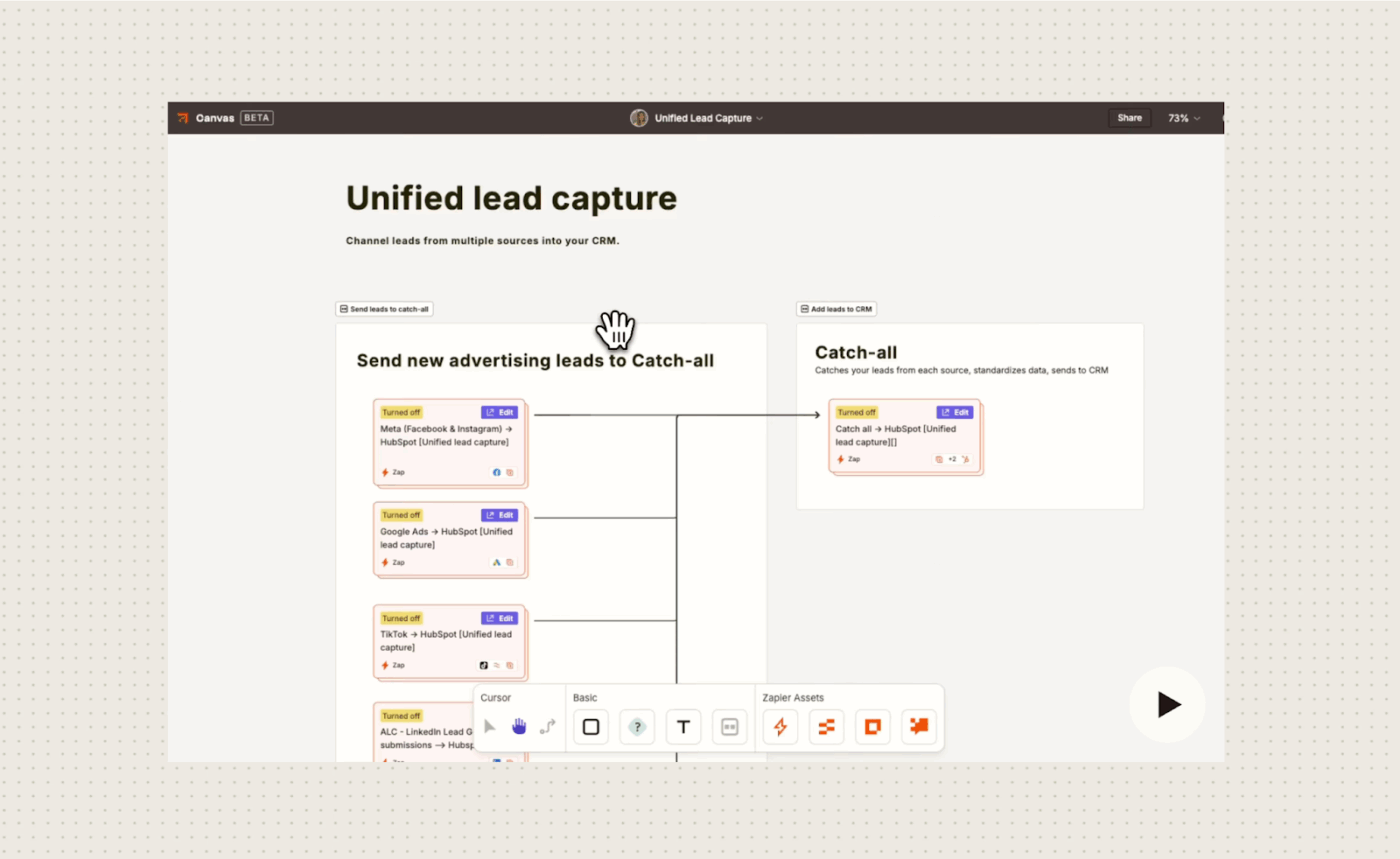
Zapier AI umożliwia użytkownikom integrację sztucznej inteligencji z cyklami pracy automatyzowanymi. Łączy aplikacje w celu wykonywania złożonych zadań.
Twórz „agentów” opartych na AI, którzy rozumieją kontekst, podejmują decyzje i działają autonomicznie w oparciu o dane z tysięcy aplikacji. Buduj zaawansowane systemy, takie jak automatyczne chatboty obsługi klienta, centra pomocy IT lub systemy kierowania potencjalnymi klientami, bez konieczności kodowania.
Najlepsze funkcje Zapier
- Uzyskaj dostęp do ponad 8000 połączeń aplikacji z szybkimi ustawieniami wyzwalaczy/akcji oraz ponad 30 000 akcji za pośrednictwem MCP.
- Twórz „współpracowników”, którzy będą pracować w całym Twoim środowisku dzięki intuicyjnemu cykliowi pracy AI i ustawieniom tworzenia agentów.
- Korzystaj ze ścieżek, filtrów i wieloetapowych zapów, aby uzyskać rozgałęzioną logikę i bogatsze automatyzacje.
- Korzystaj z tabel Zapier do przechowywania danych operacyjnych i uruchamiania automatyzacji jako wyzwalaczy bezpośrednio z warstwy danych.
- Twórz proste formularze, portale lub pulpity nawigacyjne, które będą działać na bazie Twoich automatyzacji za pośrednictwem interfejsów Zapier.
Ograniczenia Zapier
- Zaawansowana współpraca i zarządzanie są dostępne w planach wyższych poziomów, więc koszty rosną wraz ze wzrostem wykorzystania, ilości zadań i kontroli.
- Niektóre podstawowe funkcje (takie jak wieloetapowe zapy, filtry, rozgałęzienia) są dostępne tylko w płatnych planach.
- Poszczególne zapy mają limity dotyczące liczby kroków; złożone przepływy mogą wymagać refaktoryzacji do wielu zapów w celu zapewnienia niezawodności i łatwości konserwacji.
Ceny Zapier
- Profesjonalny: od 19,99 USD/miesiąc (rocznie)
- Zespół: od 69 USD/miesiąc (rocznie)
- Enterprise: Ceny niestandardowe
Oceny i recenzje Zapier
- G2: 4,5/5 (ponad 1700 recenzji)
- Capterra: 4,7/5 (ponad 3000 recenzji)
Co o Zapier mówią prawdziwi użytkownicy?
Użytkownik G2 dokonuje wzmianki:
Podoba mi się, że łatwo przeprowadza połączenie między dwoma programami MS! Power Automate z MS nie jest tak przyjazny dla użytkownika, a Zapier pomógł mi przeprowadzić połączenie między wieloma plikami MS Excel, aby wysyłać wiadomości do MS Teams za pomocą zaledwie kilku kliknięć!
Podoba mi się, że łatwo przeprowadza połączenie między dwoma programami MS! Power Automate z MS nie jest tak przyjazny dla użytkownika, a Zapier pomógł mi przeprowadzić połączenie między wieloma plikami MS Excel, aby wysyłać wiadomości do MS Teams za pomocą zaledwie kilku kliknięć!
📖 Przeczytaj również: Super agenci i rozwój AI opartej na agentach
4. n8n (najlepsze rozwiązanie do automatyzacji cyklu pracy AI z precyzyjną kontrolą)
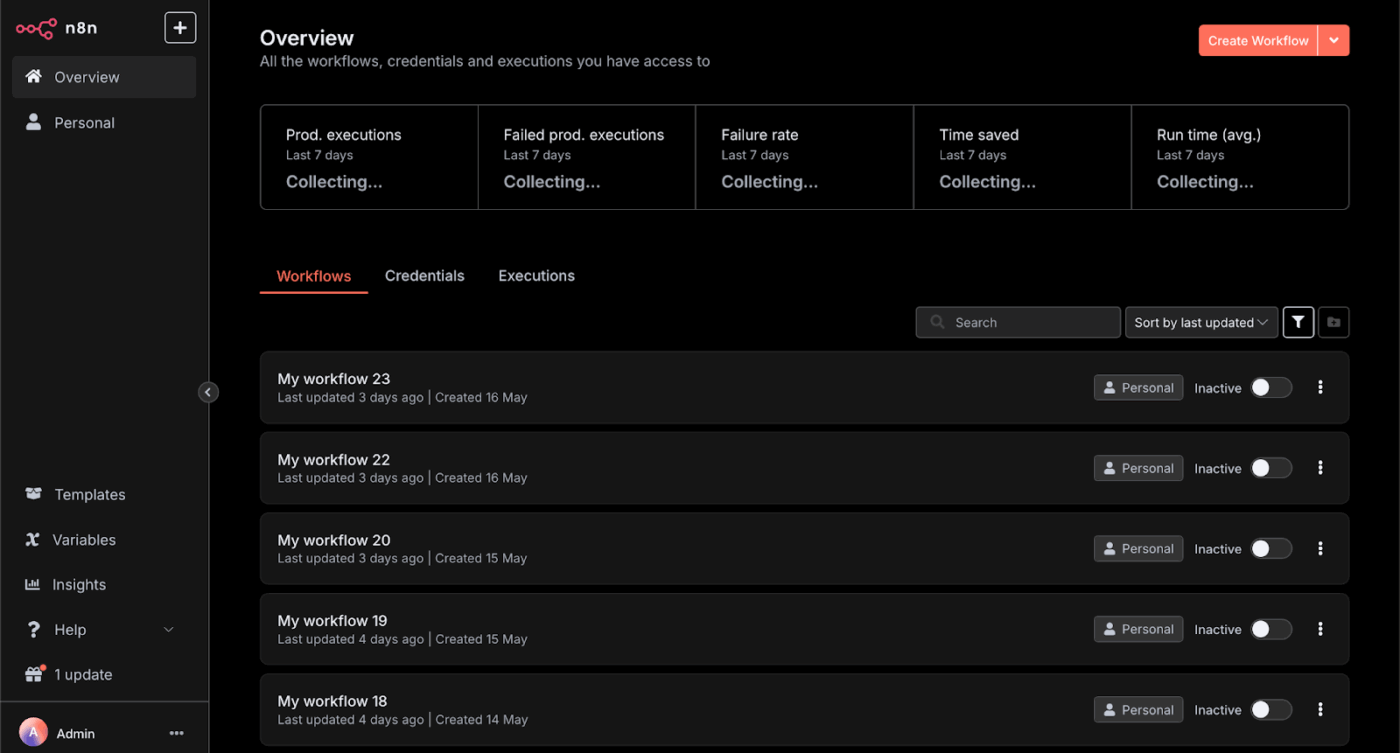
n8n to otwarta platforma do automatyzacji cyklu pracy oparta na sprawiedliwym kodzie. Wykorzystuje wizualny interfejs oparty na węzłach do łączenia aplikacji i usług, umożliwiając użytkownikom automatyzację powtarzalnych zadań między nimi bez konieczności stosowania rozbudowanego kodowania.
Oferuje wsparcie dla niestandardowych skryptów w języku JavaScript i może być hostowany samodzielnie lub używany za pośrednictwem usługi w chmurze.
Możesz łączyć interfejsy API, bazy danych i agenty AI w tym samym przepływie, dodawać zabezpieczenia i wdrażać automatyzacje na poziomie produkcyjnym.
Najlepsze funkcje n8n
- Skorzystaj z wizualnego kreatora cyklu pracy z natywnymi węzłami i niestandardowym kodem do tworzenia złożonych struktur logicznych i wzorców agentów AI.
- Połącz modele AI z predefiniowaną logiką, zabezpieczeniami i monitorowaniem, aby uzyskać niezawodne wyniki.
- Skorzystaj z ponad 500 integracji i węzłów „narzędzi AI”, w tym żądań HTTP, kodu i możliwości wywoływania innych cykli pracy jako narzędzi.
- Skorzystaj z opcji samodzielnego hostingu z dokumentem, zestawami startowymi i funkcjami bezpieczeństwa, takimi jak szyfrowane transfery, bezpieczne poświadczenia i RBAC (SOC 2 na hostingu).
Ograniczenia n8n
- Samodzielne hostowanie wymaga prawdziwych umiejętności DevOps w zakresie ustawień, skalowania i wzmacniania zabezpieczeń, więc planuj czas na prace inżynieryjne.
- Stopień integracji różni się w zależności od aplikacji; skomplikowane przypadki użycia mogą nadal wymagać niestandardowych węzłów lub wywołań HTTP.
Ceny n8n
- Pakiet startowy: 20 USD/miesiąc, rozliczany rocznie
- Pro: 50 USD/miesiąc, rozliczane rocznie
- Business: 667 USD/miesiąc, rozliczane rocznie
- Enterprise: Ceny niestandardowe
Oceny i recenzje n8n
- G2: 4,8/5 (ponad 190 recenzji)
- Capterra: 4,6/5 (ponad 30 recenzji)
Co mówią o n8n prawdziwi użytkownicy?
Użytkownik Reddit pisze:
n8n znajduje się w idealnym miejscu... jest wystarczająco wydajny dla inżynierów i wystarczająco przystępny dla użytkowników bez wiedzy programistycznej, którzy nie boją się eksperymentować. Programiści używają go do złożonej orkiestracji API, ETL i agentowych cykli pracy, podczas gdy użytkownicy bez wiedzy technicznej polegają na jego interfejsie użytkownika do automatyzacji.
n8n znajduje się w idealnym miejscu... jest wystarczająco wydajny dla inżynierów i wystarczająco przystępny dla użytkowników bez wiedzy programistycznej, którzy nie boją się eksperymentować. Programiści używają go do złożonej orkiestracji API, ETL i agentowych cykli pracy, podczas gdy użytkownicy bez wiedzy technicznej polegają na jego interfejsie użytkownika do automatyzacji.
📖 Przeczytaj również: Najlepsze narzędzia do tworzenia agentów AI do automatyzacji cyklu pracy
5. Make (najlepsze rozwiązanie do automatyzacji, które można hostować lub uruchamiać w chmurze)
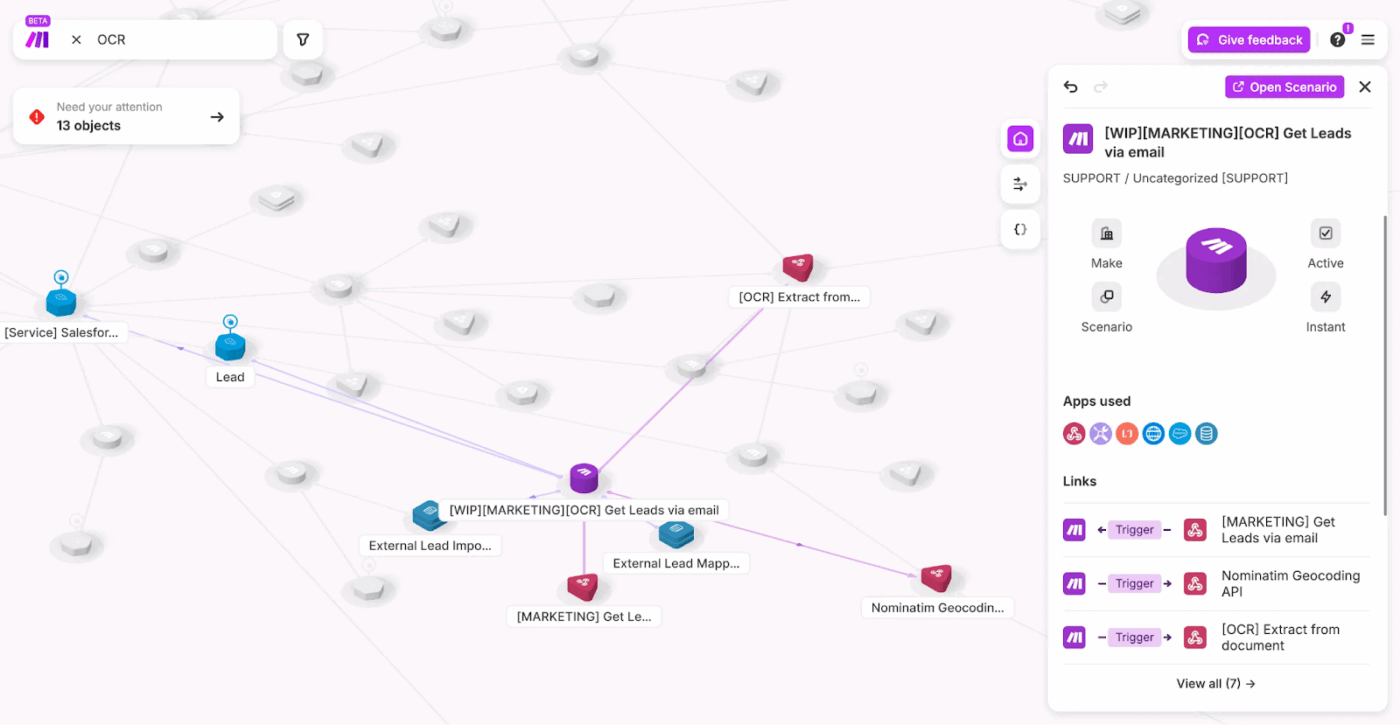
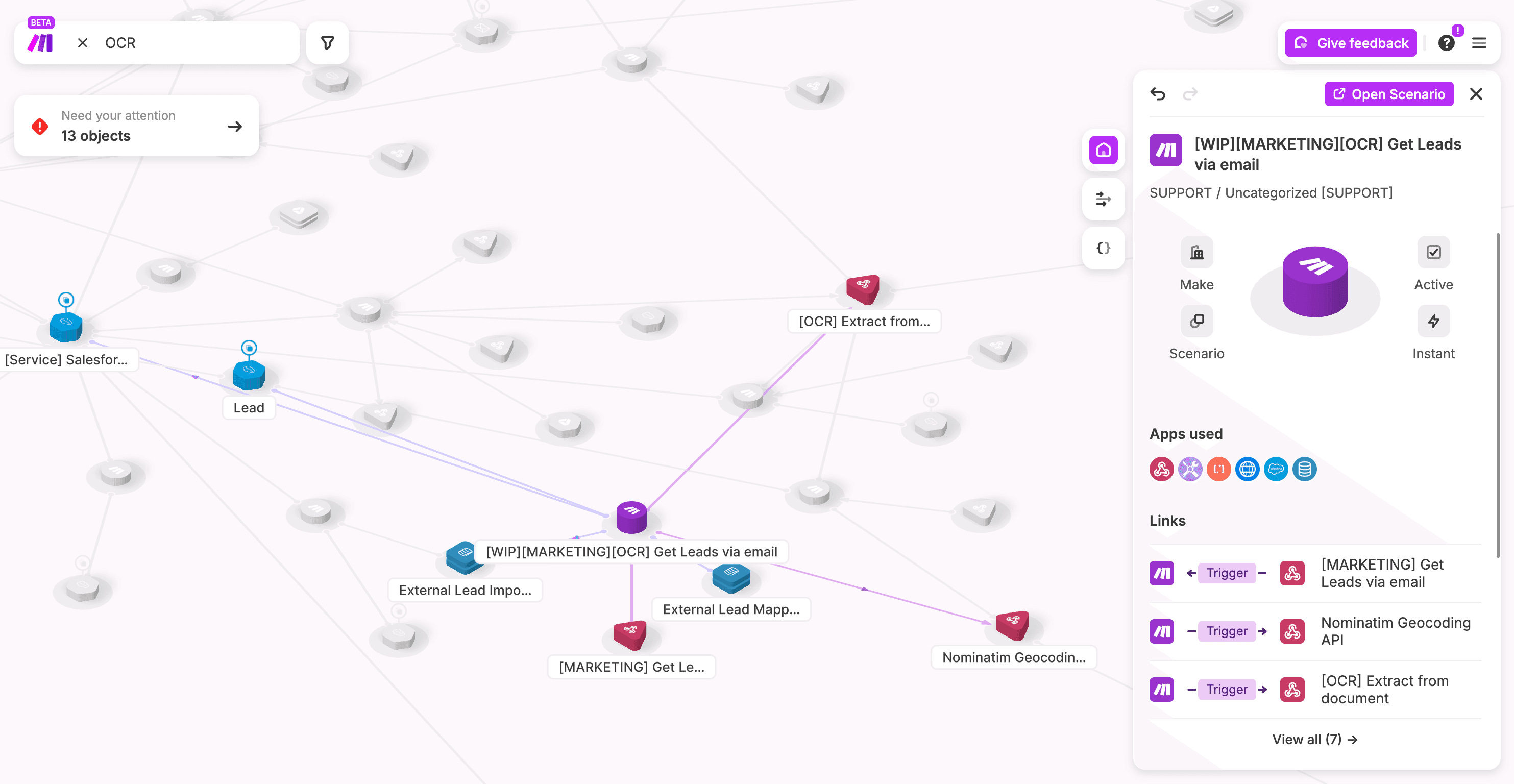
Make (dawniej Integromat) to platforma automatyzacji bez kodowania, która zapewnia połączenie aplikacji i usług w celu wizualnej automatyzacji cykli pracy i procesów.
Umożliwia użytkownikom tworzenie złożonych automatyzacji bez konieczności pisania kodu. Możesz tworzyć „scenariusze”, które połączają różne aplikacje za pomocą wyzwalaczy i akcji.
Szybko twórz dzięki funkcji „przeciągnij i upuść”, trybowi podpowiedzi i dodatkom do cyklu pracy agenta AI, a następnie skaluj w planach chmurowych lub uruchom samodzielnie, aby uzyskać większą kontrolę.
Wykorzystaj najlepsze funkcje
- Przeciągaj, upuszczaj i szybko testuj wieloetapowe automatyzacje za pomocą wizualnego kreatora z trybem podpowiedzi.
- Koordynuj przepływy od początku do końca dzięki ponad 3000 zweryfikowanych aplikacji oraz integracjom i agentom AI.
- Uzyskaj dostęp do solidnych funkcji routingu, filtrowania, iteratorów i agregatorów do branchów, pętli i transformacji danych.
- Skorzystaj z Free Plan, aby stworzyć prototyp, a następnie przejdź do przewidywalnych płatnych poziomów z opublikowanymi limitami kredytowymi/operacyjnymi.
Ogranicz limity
- Ceny oparte na kredytach/operacjach mogą gwałtownie wzrosnąć w przypadku scenariuszy o dużej objętości lub intensywnych pętlach.
- Głębia różni się w zależności od integracji, a złożone aplikacje mogą wymagać modułów HTTP lub niestandardowych rozwiązań.
- Samodzielne hostowanie zapewnia kontrolę, ale wiąże się z dodatkowymi kosztami DevOps związanymi z bezpieczeństwem, skalowaniem i monitorowaniem.
Ustal ceny
- Free
- Podstawowy: od 10,59 USD miesięcznie
- Zalety: Cena zaczyna się od 18,82 USD miesięcznie.
- Zespół: Od 34 USD miesięcznie
- Enterprise: Ceny niestandardowe
Dodawaj oceny i recenzje
- G2: 4,6/5 (ponad 250 recenzji)
- Capterra: 4,8/5 (ponad 400 recenzji)
Co mówią o Make prawdziwi użytkownicy?
Użytkownik G2 dokonuje wzmianki:
W Make najbardziej podoba mi się to, jak proste i intuicyjne jest tworzenie automatyzacji. Szczególnie doceniam to, jak łatwo łączy się z narzędziami takimi jak Webflow i wieloma innymi, umożliwiając automatyzację procesów bez konieczności stosowania skomplikowanego kodu.
W Make najbardziej podoba mi się to, jak proste i intuicyjne jest tworzenie automatyzacji. Szczególnie doceniam to, jak łatwo łączy się z narzędziami takimi jak Webflow i wieloma innymi, umożliwiając automatyzację procesów bez konieczności stosowania skomplikowanego kodu.
📖 Przeczytaj również: Zarządzanie cyklem pracy: narzędzia, korzyści i najlepsze praktyki
🔎 Czy wiesz, że... Ramy zarządzania ryzykiem sztucznej inteligencji NIST (AI RMF 1.0) zapewniają zespołom praktyczny podręcznik dotyczący zarządzania systemami sztucznej inteligencji — przydatny podczas wdrażania agentów, którzy mają dostęp do wrażliwych danych lub cykli pracy klientów.
6. Taskade AI (najlepsze rozwiązanie do tworzenia agentów AI i automatyzacji w jednym obszarze roboczym)
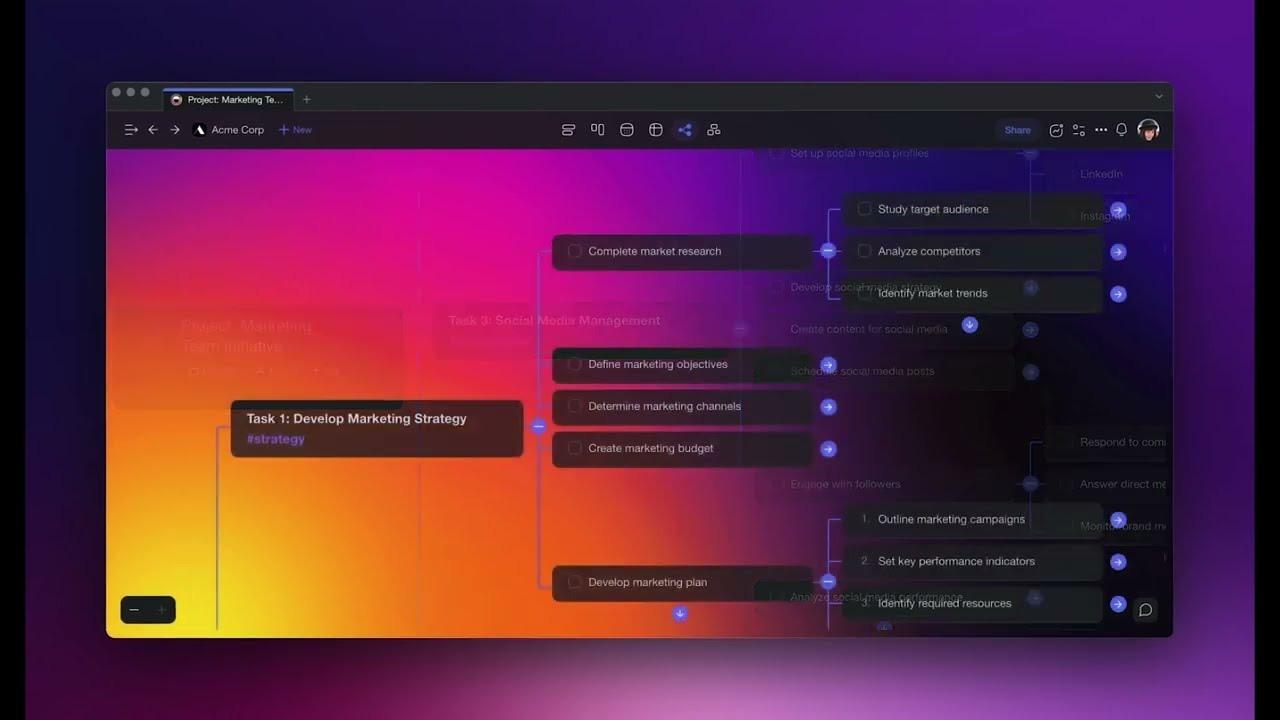
Taskade jest przeznaczony dla zespołów, które nie chcą tylko „bota do obsługi e-maila” lub „bota do raportowania”, ale miejsca, w którym można zaprojektować cały obszar roboczy oparty na agentach.
Zamiast korzystać z oddzielnych narzędzi do tworzenia list zadań, map myśli, spotkań i czatu AI, Taskade łączy je w jednym wspólnym obszarze roboczym. W ten sposób projekty, notatki i rozmowy znajdują się tuż obok Twoich agentów. W tym obszarze roboczym możesz uruchamiać niestandardowych agentów AI, którzy tworzą zawartość, analizują dane lub zarządzają cyklem pracy, korzystając z Twoich własnych dokumentów i kontekstu projektu.
AI Project Studio pomaga generować kompletne plany projektów na podstawie krótkiego briefu lub dokumentów źródłowych, a automatyzacje łączą się z narzędziami takimi jak Slack, Gmail i Arkusze Google. Dzięki temu agenci mogą faktycznie wykonywać dalsze prace, a nie tylko przedstawiać sugestie.
Najlepsze funkcje Taskade AI
- Zautomatyzuj tworzenie zawartości, analizę danych i obsługę zadań w ramach różnych projektów dzięki konfigurowalnym agentom AI.
- Wprowadzaj projekty jako „pamięć”, aby asystenci AI mogli pracować w kontekście Twojego obszaru roboczego, a nie tylko na podstawie podpowiedzi.
- Zaproś członków zespołu i szybko wprowadzaj zmiany w rzeczywistych cyklach pracy.
Limits of Taskade AI
- Niektórzy użytkownicy dokonywali raportowania, że interfejs użytkownika zawiera błędy.
- Samodzielne hostowanie i zaawansowane zabezpieczenia nie są głównym celem w porównaniu z chmurą; sprawdź wymagania, jeśli potrzebujesz ścisłej kontroli przed wdrożeniem na dużą skalę.
Ceny Taskade AI
- Free
- Pakiet startowy: 8 USD/miesiąc
- Pro: 20 USD/miesiąc
- Ultra: 50 USD/miesiąc
Oceny i recenzje Taskade AI
- G2: 4,6/5 (ponad 50 recenzji)
- Capterra: 4,7/5 (ponad 60 recenzji)
Co mówią o Taskade AI prawdziwi użytkownicy?
Użytkownik G2 podkreśla:
Niesamowita lista funkcji. Jako przedsiębiorca SaaS wiem, że może to zniechęcić do korzystania z aplikacji, ale twórcy wykonali świetną robotę w zakresie CX/UX, sprawiając, że jest ona przystępna. Świetne narzędzie do śledzenia zadań, ale możliwości wydają się niemal nieograniczone. Doskonała wartość dla ceny. Osobiście podoba mi się, że jest to aplikacja do pobrania na Windows, a nie tylko aplikacja internetowa.
Niesamowita lista funkcji. Jako przedsiębiorca SaaS wiem, że może to zniechęcić do korzystania z produktu, ale udało im się stworzyć niesamowity CX/UX, dzięki czemu jest on łatwy w obsłudze. Świetne narzędzie do zarządzania zadaniami, a możliwości wydają się niemal nieograniczone. Doskonała wartość dla ceny. Osobiście podoba mi się, że jest to aplikacja do pobrania na Windows, a nie tylko aplikacja internetowa.
📖 Przeczytaj również: Najlepsze darmowe szablony cykli pracy w Excelu i ClickUp
7. LangChain (najlepszy do kontrolowanych, produkcyjnych cykli pracy agentów)
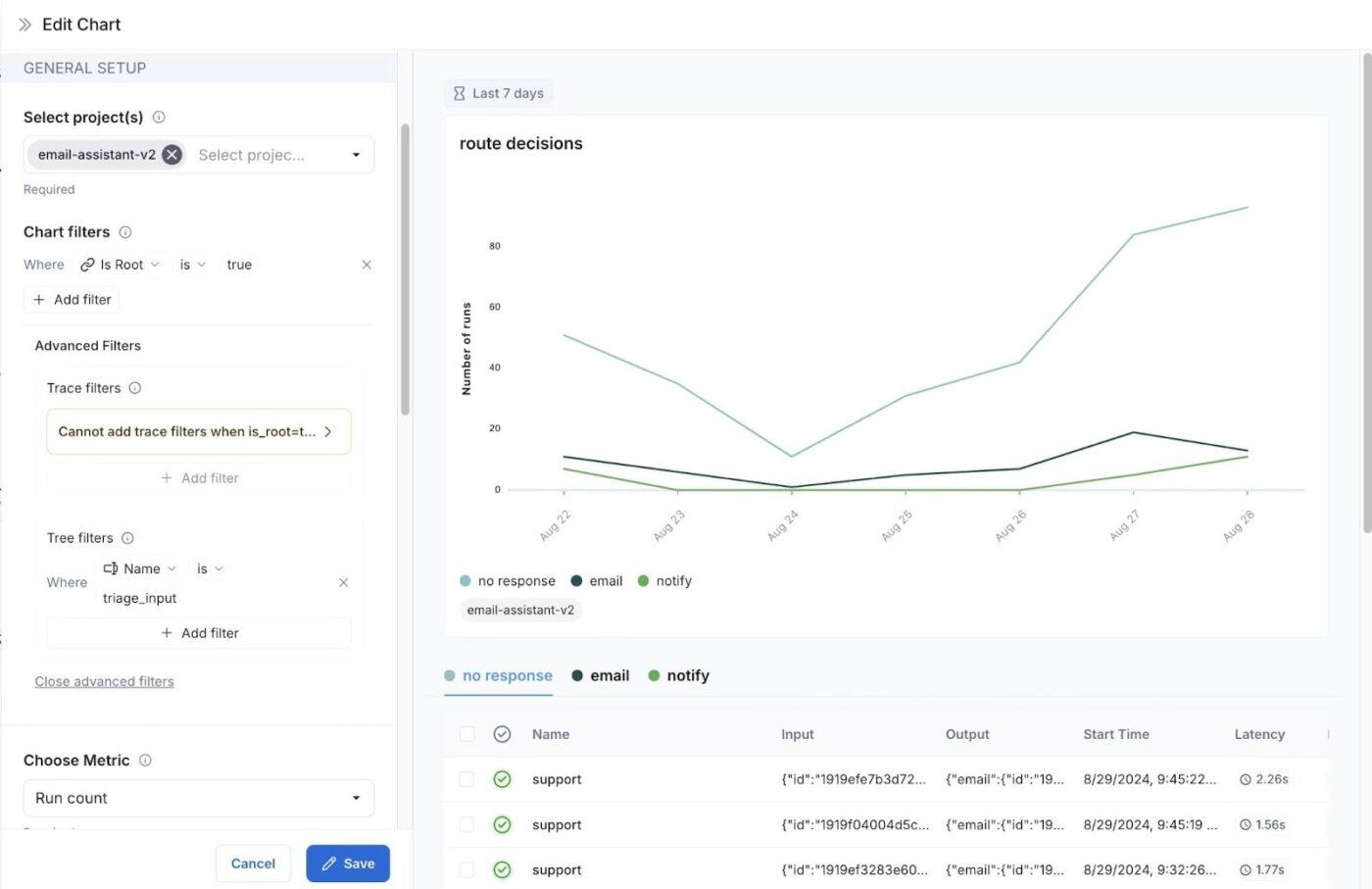
LangChain (wraz ze stosem LangGraph i LangSmith) został stworzony dla zespołów, które chcą mieć pełną kontrolę nad sposobem myślenia, kierowania i wywoływania narzędzi przez swoich agentów AI.
Zamiast „współpracownika AI” typu black box, projektujesz cykle pracy agentów jako wyraźne wykresy i określasz sposób przechowywania stanu. Możesz również dokładnie zdecydować, kiedy modele powinny wywoływać narzędzia, wyszukiwać lub przekazywać zadania innemu agentowi.
Dzięki temu LangChain doskonale nadaje się dla zespołów produktowych i platformowych, które są gotowe zainwestować czas inżynierów w bardziej zdecydowaną i niezawodną strukturę agentów, zamiast w czysto bezkodowy kreator asystentów.
Najlepsze funkcje LangChain
- Spraw, aby logika agenta i routing były jasne i możliwe do sprawdzenia dzięki projektowi opartemu na grafie z sekcją Stan → Węzły → Krawędzie.
- Uzyskaj elastyczne przepływy sterowania — pojedynczy agent, wielu agentów, hierarchiczne, sekwencyjne — oraz wbudowane funkcje moderacji i oceny zapewniające niezawodność.
- Podłącz agenty do istniejącej infrastruktury zamiast budować ją od podstaw dzięki bogatej warstwie integracyjnej dla modeli LLM, magazynów wektorowych, narzędzi i źródeł danych.
- Debuguj agentów i wprowadzaj bezpieczniejsze zmiany do produkcji dzięki integracji Deep LangSmith, która umożliwia śledzenie, odtwarzanie i ocenę przebiegu procesów.
- Skorzystaj z narzędzi pomocniczych do wdrażania, takich jak LangServe/LangGraph, aby ułatwić udostępnianie agentów jako interfejsów API lub pracowników działających w tle — bez konieczności ręcznego podłączania wszystkich elementów.
Ograniczenia LangChain
- Wyższa wydajność inżynieryjna niż w przypadku narzędzi bezkodowych; będziesz projektować maszyny stanowe i pisać kod w celu definiowania węzłów i przejść.
- Najlepsze wyniki zapewnia LangSmith w zakresie obserwowalności i wdrażania, który dodaje kolejną platformę do nauki i zarządzania.
- Mniej gotowych „szablonów biznesowych” niż w przypadku automatyzatorów SaaS, więc zespoły bez wiedzy technicznej mogą działać wolniej bez wsparcia programistów.
Ceny LangChain
- Free
- Plus: 39 USD/miesięcznie za licencję
- Enterprise: ceny niestandardowe
Oceny i recenzje LangChain
- G2: 4,7/5 (ponad 30 recenzji)
Co mówią o LangChain prawdziwi użytkownicy?
Użytkownik G2 dokonuje wzmianki:
LangChain sprawia, że połączenie dużych modeli językowych ze źródłami danych i API jest bardzo łatwe i proste. Jego modułowe narzędzia i gotowe integracje (takie jak Pinecone, OpenAI i sklepy wektorowe) oszczędzają czas potrzebny na rozwój i znacznie ułatwiają eksperymentowanie.
LangChain sprawia, że połączenie dużych modeli językowych ze źródłami danych i API jest bardzo łatwe i proste. Jego modułowe narzędzia i gotowe integracje (takie jak Pinecone, OpenAI i sklepy wektorowe) oszczędzają czas potrzebny na rozwój i znacznie ułatwiają eksperymentowanie.
📖 Przeczytaj również: Jak zoptymalizować zarządzanie projektami dzięki automatyzacji
8. Motion (najlepsze rozwiązanie do planowania zadań AI, które pozwala zachować koncentrację i dotrzymywać terminów)
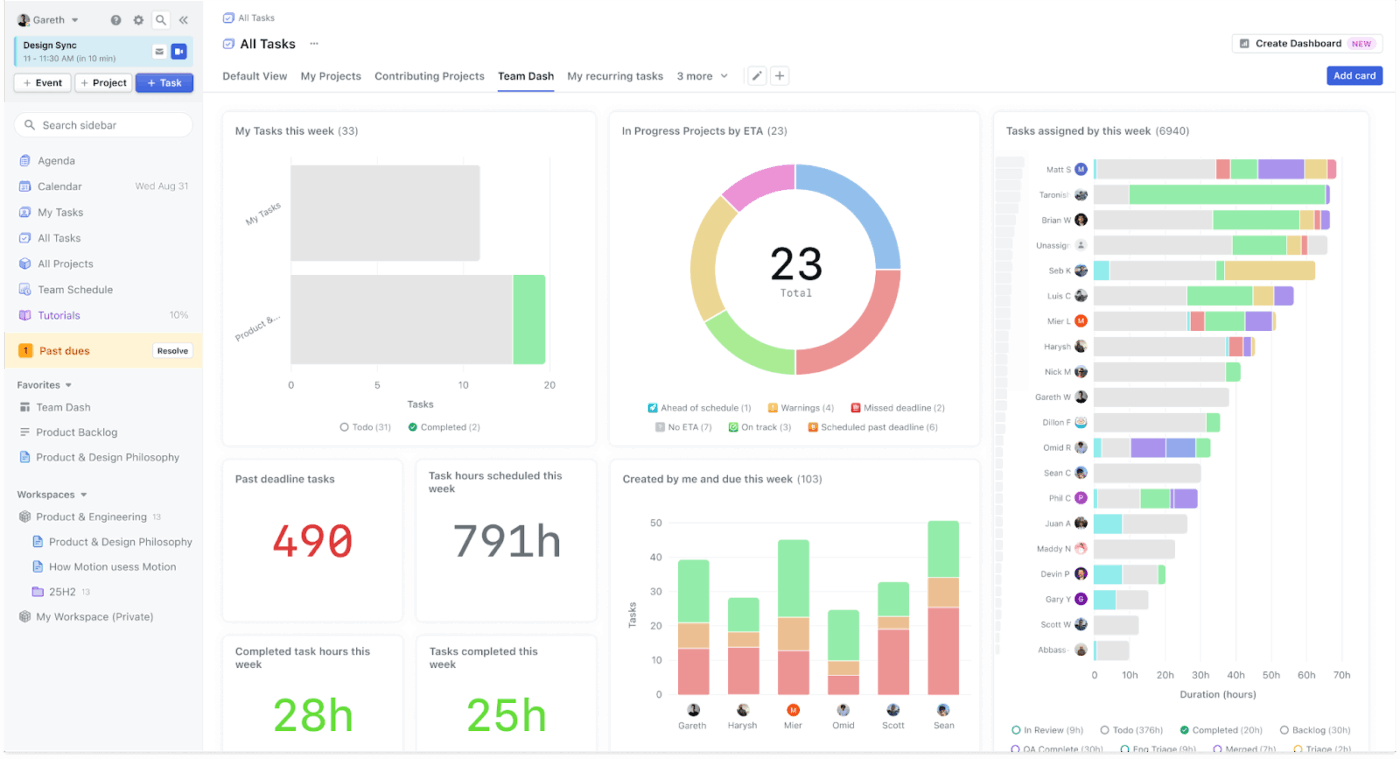
Motion to oparta na AI platforma zwiększająca wydajność, która łączy zarządzanie zadaniami, zarządzanie projektami i harmonogramowanie kalendarza w jednym miejscu. Zamiast ręcznie zmieniać priorytety, automatycznie planuje Twój dzień, analizując terminy i dostępny czas w kalendarzach.
Dla zespołów CS lub operacyjnych z napiętym kalendarzem Motion działa jak drugi pilot ds. planowania. Blokuje czas na skupienie się i nieustannie optymalizuje plan, dzięki czemu zadania o dużym znaczeniu nie giną wśród pilnych spraw.
Gdy zmieniają się priorytety lub pojawiają się nowe zadania, Motion aktualizuje harmonogram w tle, dzięki czemu wszyscy nadal wiedzą, nad czym mają pracować.
Zespoły mogą również wykorzystać Motion jako lekki menedżer zarządzania projektami: przydzielając zadania, śledząc status i sprawdzając, kto ma nadmiar zleceń. Ponieważ jest on oparty na zarządzaniu czasem, jest przydatny dla liderów, którzy chcą uzyskać realistyczne terminy realizacji.
Najlepsze funkcje Motion
- Ustal priorytety zadań według terminów, zależności i obciążenia, a następnie ponownie zoptymalizuj swój plan w miarę zmian, korzystając z automatycznego planowania.
- Skorzystaj z wbudowanego kalendarza AI i asystenta spotkań, który proponuje terminy, unika konfliktów i chroni czas przeznaczony na pracę.
- Zaufaj menedżerowi zarządzania projektami AI, który przewiduje opóźnienia, automatycznie planuje obciążenie pracą zespołu i ostrzega Cię, zanim projekty zboczą z kursu.
- Zintegruj zadania, wydarzenia i spotkania w jednym, dynamicznym widoku dzięki integracji kalendarza Motion.
- Uzyskaj aktualny obraz tego, kto co robi i kiedy, dzięki funkcjom współpracy zespołowej, takim jak wspólne tablice, przydzielanie zadań i śledzenie statusu.
Ograniczenia ruchowe
- Ceny przesunęły się w kierunku pakietów kredytów „AI Employees” i poziomów licencji, więc prognoza kosztów wymaga monitorowania zużycia kredytów i limitów integracji.
- Wcześniejsze listy zawartości zawierają różne ceny dla osób indywidualnych/zespołów, co może powodować niejasności podczas oceny; przed wdrożeniem należy potwierdzić aktualne plany i zawartość na stronie z cennikiem.
- Najlepsze wyniki zakładają, że Motion jest Twoim głównym narzędziem do planowania; Teams, które zainwestowały znaczne środki w inne narzędzia do zarządzania projektami, mogą napotkać nakładanie się lub powielanie cykli pracy podczas wdrażania.
Ceny Motion
- Pro AI (Teams): 29 USD/miesiąc/użytkownik
- AI dla biznesu: 49 USD/miesiąc/użytkownik
Oceny i recenzje ruchu
- Recenzja G2: 4,2/5 (ponad 130 recenzji)
- Recenzja Capterra: 4,3/5 (ponad 80 recenzji)
Co użytkownicy mówią o Motion w praktyce?
Użytkownik G2 dokonuje wzmianki:
Doceniam elegancki wygląd aplikacji Motion, która pomaga mi uporządkować liczne kalendarze i przechowywać je w jednym miejscu. Jedną z funkcji, która najbardziej mi się podoba, jest możliwość tworzenia zadań bezpośrednio z wiadomości e-mail, co uważam za bardzo pomocne i pozwalające zaoszczędzić czas.
Doceniam elegancki wygląd aplikacji Motion, która pomaga mi uporządkować liczne kalendarze i przechowywać je w jednym miejscu. Jedną z funkcji, która najbardziej mi się podoba, jest możliwość tworzenia zadań bezpośrednio z wiadomości e-mail, co uważam za bardzo pomocne i oszczędzające czas.
📖 Przeczytaj również: Jak wykorzystać AI do automatyzacji zadań
9. CrewAI (najlepsze rozwiązanie do automatyzacji wieloagentowej, które można zaprojektować i wdrożyć)
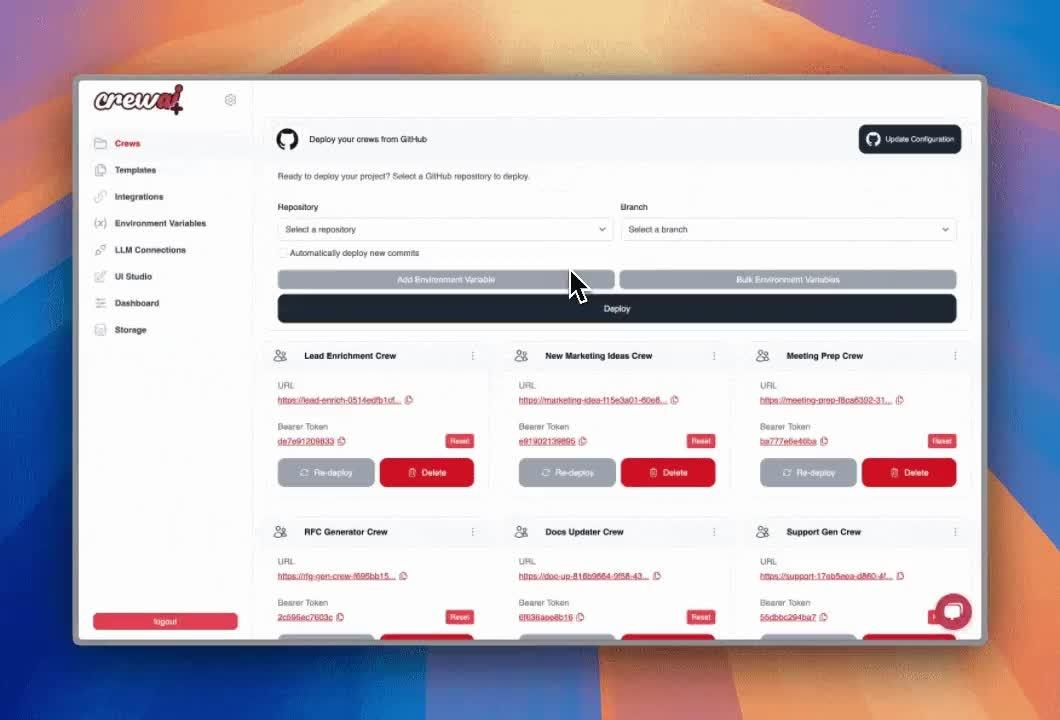
CrewAI to platforma automatyzacji wieloagentowej, która pozwala projektować „zespoły” agentów AI do wspólnej pracy. Nie polegasz na jednym asystencie. Każdy agent może otrzymać rolę, narzędzia i wytyczne, a następnie zostać skoordynowany w celu badania, rozumowania i wykonywania zadań sekwencyjnie lub równolegle.
Automatyzacje te można tworzyć za pomocą otwartej platformy Python lub interfejsu użytkownika Studio bez konieczności pisania kodu. Dzięki temu zarówno inżynierowie, jak i zespoły operacyjne mogą współpracować w ramach tego samego systemu.
Gdy ekipa jest gotowa, CrewAI pomaga przejść od etapu eksperymentów do produkcji dzięki opcjom wdrażania w chmurze, na własnym serwerze lub we własnej infrastrukturze.
Po wdrożeniu otrzymujesz narzędzia do monitorowania i oceny, które pozwalają na śledzenie wydajności poszczególnych zespołów, debugowanie awarii i dążenie do uzyskania bardziej niezawodnych wyników.
Najlepsze funkcje CrewAI
- Twórz agentów i „zespoły” za pomocą bezkodowego studia lub frameworka Python, a następnie koordynuj wieloetapowe zadania z zachowaniem stanu.
- Dodaj wdrażanie, monitorowanie działania, testowanie i pętle iteracyjne, aby z czasem poprawić jakość.
- Projektuj ustawienia pojedyncze, wieloagentowe lub hierarchiczne za pomocą narzędzi, pamięci i haków moderacyjnych; zapewnij wsparcie dla agentów multimodalnych i wielu modeli AI.
- Zarządzaj zespołami w chmurze, na własnym serwerze lub lokalnie, aby spełnić wymagania dotyczące bezpieczeństwa i zgodności z przepisami.
Ograniczenia CrewAI
- Przed wdrożeniem należy spodziewać się wysiłku inżynieryjnego związanego z modelowaniem stanu, ról i przepływów zadań.
- Non-technical teams may prefer simpler SaaS agents to achieve quick wins.
Ceny CrewAI
- Niestandardowe ceny
Oceny i recenzje CrewAI
- G2: zbyt mało recenzji
- Capterra: zbyt mało recenzji
Co mówią o CrewAI prawdziwi użytkownicy?
Użytkownik G2 dokonuje wzmianki:
Największą zaletą crewAI jest to, że podczas tworzenia agenta możemy określić jego rolę, cel i historię, co znacznie zwiększa jego wydajność.
Największą zaletą crewAI jest to, że podczas tworzenia agenta możemy określić jego rolę, cel i historię, co znacznie zwiększa jego wydajność.
10. AutoGen (najlepszy dla aplikacji wieloagentowych tworzonych przez programistów, które można skryptować)
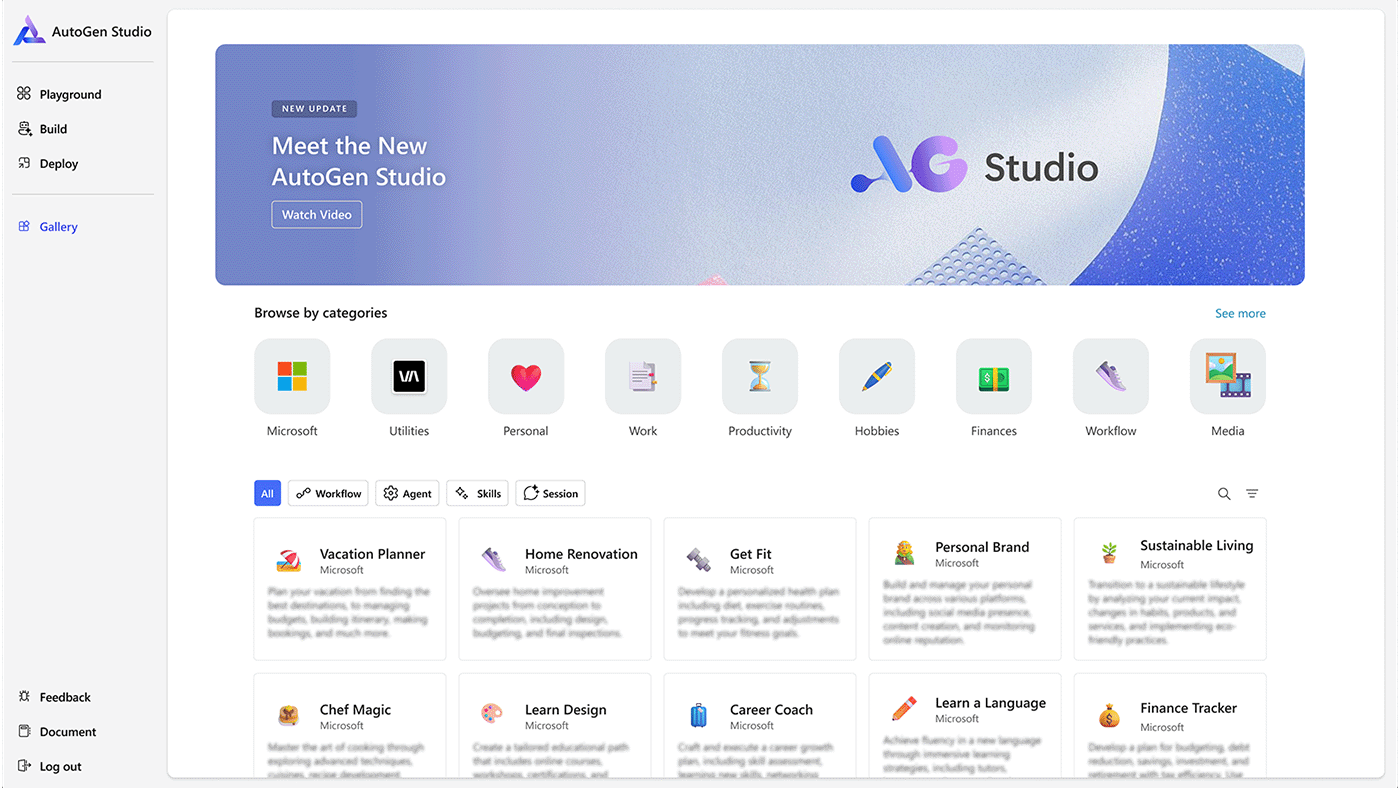
Platforma AutoGen to framework typu open source opracowany przez firmę Microsoft do tworzenia wieloagentowych aplikacji AI.
Ułatwia data powstania agentów konwersacyjnych, którzy mogą współpracować w celu rozwiązywania złożonych zadań, przy czym agenci są definiowani przez podpowiedzi, narzędzia i role.
Platforma oferuje wsparcie dla różnych wzorców konwersacji, wykorzystuje architekturę opartą na zdarzeniach i aktorach oraz zawiera narzędzia takie jak Agent Chat i AutoGen Studio do tworzenia i prototypowania z wykorzystaniem niewielkiej ilości kodu.
Najlepsze funkcje AutoGen
- Skorzystaj ze Studio, aby szybko i bez kodowania tworzyć prototypy agentów i Teams, a następnie powtarzaj proces za pomocą interfejsu użytkownika przeglądarki i interfejsu API Python.
- Użyj AgentChat do tworzenia rozmów z jednym lub wieloma agentami, korzystając z rozsądnych ustawień domyślnych i wzorców zespołowych.
- Wspieraj skalowalne, odporne cykle pracy agentów dzięki środowisku uruchomieniowemu opartemu na zdarzeniach, które działa niezawodnie w środowisku produkcyjnym.
Limits of AutoGen
- Wymaga Python 3. 10+ i prawdziwego wysiłku inżynieryjnego. Nie jest to platforma do automatyzacji cyklu pracy bez kodowania dla użytkowników nietechnicznych.
- Mniej gotowych „szablonów biznesowych”; przygotuj się na samodzielne łączenie narzędzi, modeli i zabezpieczeń w celu wykonywania złożonych zadań.
Ceny AutoGen
- Platforma open source
Oceny i recenzje AutoGen
- G2: zbyt mało recenzji
- Capterra: zbyt mało recenzji
Inne alternatywy warte rozważenia
Chociaż były to nasze najlepsze propozycje do tworzenia agentowych cykli pracy, zalecamy również wypróbowanie:
Blaze AI
Pomyśl o Blaze AI jako o „agenturze marketingowej AI”, która planuje strategię marketingową, generuje zawartość, automatycznie publikuje posty w różnych kanałach i uczy się na podstawie wyników, aby zapewnić ciągły rozwój. Jest to najlepsze rozwiązanie dla zespołów, które potrzebują asystenta marketingowego dostępnego 24 godziny na dobę, 7 dni w tygodniu, skupionego na zarządzaniu kampaniami, a nie na ogólnych działaniach operacyjnych.
Vellum AI
Vellum AI to warstwa koordynacyjna służąca do tworzenia agentów AI na poziomie produkcyjnym. Umożliwia projektowanie agentów i cykli pracy w formie graficznych wykresów, kontrolowanie wykorzystywanych przez nie modeli LLM oraz monitorowanie wąskich gardeł i trybów awarii. Funkcje te sprawiają, że jest to narzędzie przydatne, gdy potrzebna jest dokładniejsza kontrola nad złożonymi systemami agentów.
Jasper AI / AI
Jasper AI to platforma marketingowa, która automatyzuje planowanie, tworzenie i skalowanie zawartości. Dzięki swoim agentom, wspólnej warstwie kontekstowej (Jasper IQ) i narzędziom do automatyzacji, jest idealna dla zespołów, które potrzebują szybkiego tworzenia bezpiecznych dla marki tekstów, kampanii i zasobów w wielu kanałach.
Copy. ai
Copy.ai przekształciło się w platformę GTM AI, która łączy cykle pracy, agentów i warstwę inteligencji w celu automatyzacji procesów sprzedaży i marketingu. Jest przeznaczona dla zespołów ds. przychodów, które chcą, aby sztuczna inteligencja obsługiwała całość procesów, od nawiązywania kontaktów i działań następczych po raportowanie, a nie tylko generowała teksty.
Claude AI (Anthropic)
Claude to rodzina modeli pionierskich firmy Anthropic, „partner myślący” do złożonego rozumowania, kodowania, agentów i cykli pracy w przedsiębiorstwie. Opus i Sonnet to dwa poziomy rodziny modeli Claude AI. Różnią się one inteligencją, szybkością, kosztem i przeznaczeniem. Opus to flagowy, najpotężniejszy model przeznaczony do złożonych zadań o wysokiej stawce. Sonnet jest natomiast szybszym, bardziej opłacalnym modelem „roboczym”, idealnym do zastosowań ogólnych i skalowalnych.
Modele te są szczególnie przydatne, jeśli potrzebujesz bezpiecznych asystentów, którzy potrafią obsługiwać obszerne dokumenty, wieloetapowe analizy i długotrwałe zadania agencyjne.
Wybierz pakiet AI, który się opłaca
Jeśli Sintra AI nie spełnia Twoich oczekiwań, masz teraz jasny sposób na porównanie alternatywnych rozwiązań AI. Od orchestratorów bez kodowania po frameworki dla programistów — możesz zdecydować, gdzie agenci, zarządzanie i praca zespołowa faktycznie poprawiają wyniki.
Wybierz platformę do automatyzacji cyklu pracy, którą Twoi pracownicy mogą obsługiwać, mierzyć i dostosowywać. Właśnie w tym zakresie ClickUp wyróżnia się jako „jedno miejsce” do pilotowania, standaryzacji i skalowania cykli pracy opartych na AI bez konieczności korzystania z pięciu różnych narzędzi.
Zacznij od małych kroków, udowodnij wartość, a następnie rozszerzaj zakres automatyzacji tam, gdzie zapewnia ona rzeczywistą wydajność operacyjną i zwiększa produktywność, zamiast powodować dodatkowe zakłócenia.
Jeśli potrzebujesz pomocy w dopasowaniu tego do swoich przypadków użycia lub chcesz uzyskać dodatkową opinię na temat swojej listy, wypróbuj ClickUp za darmo, a my pomożemy Ci to zrobić.